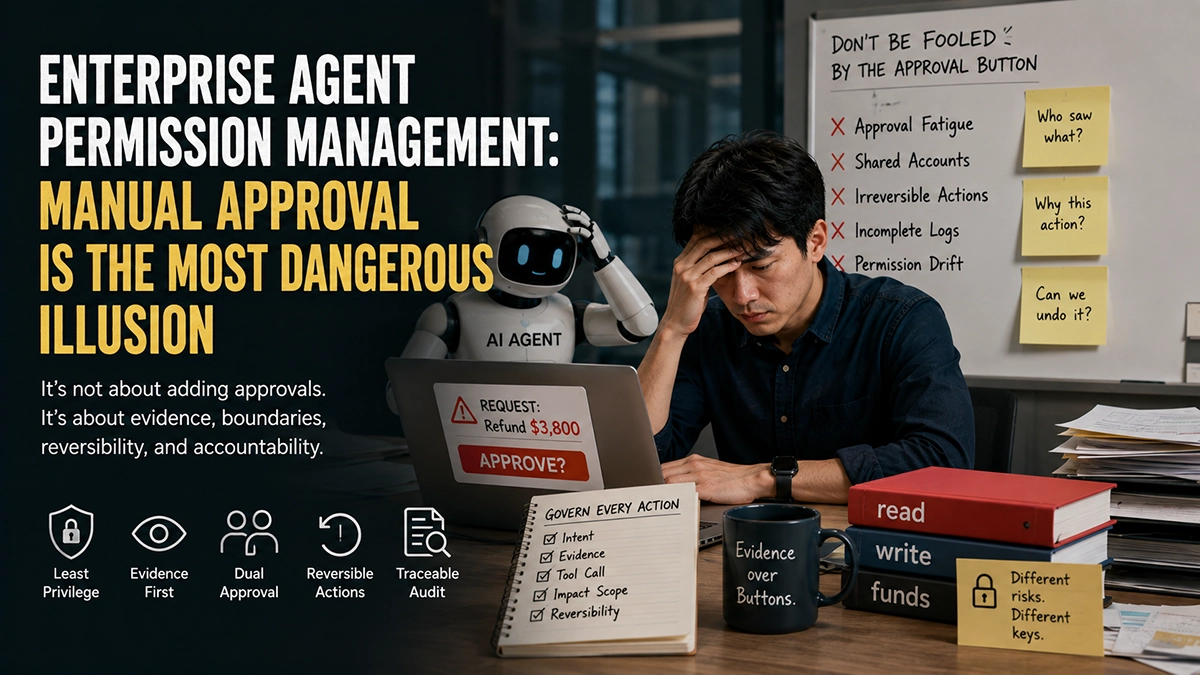
The real failure in enterprise agent permission management isn’t “no approval step”—it’s treating “make a human click Approve” as governance itself. The button doesn’t think. It just shifts accountability from the system onto a person who is rushing, fatigued, and never shown the evidence. Real Enterprise Agent Permission Management makes the reviewer see intent, tool calls, blast radius, and reversibility, while fencing off exactly what data the agent can read and what actions it can take. Otherwise “approved” is just the politest alibi in the post-incident report.
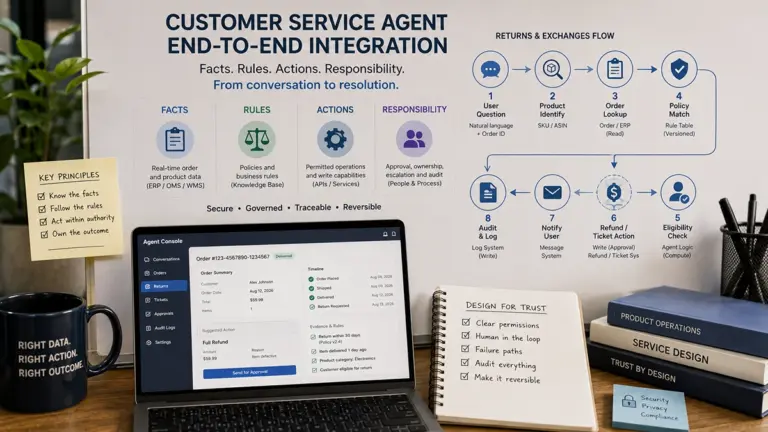
This is for the leader who is opening up permissions for an agent, or who just got cold-sweated by “how did it dare touch that money.” The enterprise AI transformation series has covered six pieces: why a support agent must first learn to say “I don’t know” (see Support Agent Refusal), how to actually get work done once trust is set (see End-to-End Integration), how not to be fooled by “how much per agent” pricing (see Agent Is Not a Delivery Unit), the hardest system-integration wall in manufacturing (see Project Management Agent System Integration), whether AI transformation should first observe the flow or rewrite the SOP (see AI Transformation SOP or Decision Flow), and why knowledge bases rot (see Enterprise AI Knowledge Base Governance). Here we tackle the topic nobody wants to detail before launch and nobody escapes after: permissions, audit, and rollback.

Why must read, write, and fund permissions be separated?
Let me start with a scar. A cross-border support client gave its refund agent a single token that could both “read orders” and “issue refunds,” because “it needs both anyway.” In week two, a ¥3,800 order that should never have been refunded went out. On review, the approver had clicked “Approve” 23 times in 11 minutes and later said “I thought the system had already screened the risk.” It hadn’t—it had bound “look” and “refund” into one identity, so any link in the chain could seamlessly do “see + refund.”
This is the most basic, most ignored rule in Enterprise Agent Permission Management: read, write, and fund are three permissions with completely different risk levels, and they must be three separate identities. A wrong read costs at most a wrong answer. A wrong status change costs a manual fix. A wrong fund action costs real money out the door. Binding them to one token sets “glance at it” and “spend it” at the same bar. The right design uses least privilege: a read-only token to see, a constrained write token to change status, and a fund token invoked only with approval and an idempotency key.
How should agent tools be designed for least privilege?
Least privilege isn’t the romantic “deny if unsure.” It’s an engineering constraint you apply at definition time. Every agent tool must answer four questions when it’s built: is this tool read-only or writable by default? Can the fields it needs be cut further? Can it be confined to a single market, store, or time window? Does it carry an idempotency key that uniquely identifies this call?
The most stable pattern we’ve seen is “the tool is the boundary”: put the permission in the tool’s signature, not in the agent’s prompt. A “refund policy lookup” tool is signed read-only, market=US—no matter how the agent is jailbroken, it cannot reach a write interface. A “issue refund” tool forces approver_id and idempotency_key as required parameters; omit either and the API rejects it. So even if the prompt is broken, the tool-layer boundary holds. Real Enterprise Agent Permission Management relies on hard constraints in the tool signature, not soft requests in the system prompt.
Concrete rollout advice: issue read-only tokens in phase one. Let the agent “watch” for two weeks, logging every action it wants to take as “proposed” without committing to the database. Once you see exactly what it reaches for, open write permissions one action at a time. Most teams skip this and go all-access, then lean on approval as a safety net—which is where every later incident begins.
Which actions can run automatically, and which need dual approval?
Not every action deserves a human click. Shoving low-risk actions into an approval queue only creates approval fatigue, which makes the genuinely dangerous ones get waved through. We split actions into three tiers by “is it reversible + what’s the cap on money or consequence”:
- Auto tier: read-only queries, draft suggestions, creating draft tickets. Worst case you redo it; no human needed.
- Single-approval tier: changing order status, sending non-financial notices, adjusting low-risk settings. Reversible; one confirmation suffices.
- Dual-approval tier (four-eyes): issuing refunds, changing ad budget, deleting data, cross-market writes. Financial or irreversible; two independent identities must each confirm.
One sentence decides it: if this action is wrong, can it be undone without loss in five minutes? If not, don’t let it auto-run. Changing an ad budget—where money doesn’t fly out directly but burns—is sneakier than a one-off refund. A refund alarms instantly; a quietly changed budget may not show in reports for three days. So the boundary around fund permissions can’t look only at “does it transfer cash directly.”
What evidence must the approval page show the reviewer?
This is where the “human approval equals governance” illusion shatters most easily. Most approval pop-ups show one line: “Agent requests a ¥3,800 refund. Approve?”—what is the reviewer supposed to decide on? They can only guess. Effective Enterprise Agent Permission Management requires the approval page to present five things at once:
- Intent: why is the agent doing this? Which user message or policy triggered it?
- Evidence: what did it “see”? Order status, policy version, time window—all clickably traceable.
- Tool call: which tool is it about to invoke, with what parameters?
- Blast radius: how much money, how many orders, which market does this touch?
- Reversibility: if you click Approve now, can it later be undone, and how?
Drop any one, and “approve” is a blind sign. When we rebuild approval pages for clients, the most common reaction is “so that’s what it was about to touch”—because the old page never spelled out the blast radius. The reviewer isn’t irresponsible; they were never authorized to see what matters. The quality of approval depends on how much evidence you feed the reviewer, not how many approval buttons you add.
How do deny, retry, rollback, and audit form a closed loop?
Permission management doesn’t end at “approved.” It ends at “we can catch it when it breaks.” From trigger to close, an action needs at least four defenses:
- Deny: when evidence is thin or scope is exceeded, the system blocks it—no approval queue.
- Retry: transient failures replay via the idempotency key, never causing a duplicate refund or double budget change.
- Rollback: reversible actions keep a compensating operation—refunds have “reverse,” budget changes have “snapshot restore,” deletes have “soft-delete + recycle bin.”
- Audit: every call carries a trace id linking model decision, tool parameters, approver, and timestamp, so “who approved what, when, on what basis” is fully reproducible.
Retry without an idempotency key is a disaster. Rollback without a snapshot is empty talk. Audit without a trace id is blame-shifting. All three must be designed with permissions, not bolted on after the incident. The most expensive tuition in enterprise AI transformation is “we thought it could be undone—it couldn’t.”
Enterprise Agent Permission Management action matrix: write permissions in a table, not in someone’s head
Here is the “action matrix” skeleton we use when landing this for clients. Its value isn’t completeness; it’s turning permissions from “someone has it in mind” into “a team-auditable fact.” Every action is tagged with: role, amount cap, evidence requirement, approver, idempotency key, and rollback plan.
| Action | Tier | Role | Cap | Evidence | Approver | Idempotency | Rollback |
|---|---|---|---|---|---|---|---|
| Query order | Read | Agent | None | None | System | query_id | None (read) |
| Draft suggestion | Read (out) | Agent | None | Policy version | System | draft_id | None (draft) |
| Create ticket | Write | Agent | Low | Order + reason | System | ticket_id | Close ticket |
| Change status | Write | Agent+1 | Medium | Old/new + basis | Single | op_id | Restore status |
| Issue refund | Fund | Agent+2 | Tiered (≤¥500 single, >¥500 dual) | Order+policy+window+user confirm | Dual (four-eyes) | refund_id | Reverse |
| Change ad budget | Fund | Agent+2 | Daily cap | Old/new + reason | Dual (four-eyes) | budget_id | Snapshot restore |
Review this table weekly: which approvers have left? Which caps haven’t been tuned in six months and no longer fit reality? Which actions quietly upgraded from “single” to “auto”? Permissions don’t drift on their own—they drift because people got lazy maintaining them.
Five failure modes everyone ignores
Every major platform ships guardrails and approval. But implementation teams treat “we have approval” as “we have governance,” then fall into five traps:
- Approval fatigue: high-frequency low-risk actions flood the queue; the human becomes a rubber stamp.
- Shared accounts: a swarm of agents shares one admin token; post-incident, nobody knows who moved what.
- Non-rollbackable actions: drop DB, send external email, change global config—clicked and irreversible.
- Incomplete logs: they record “what was called” but not “on what evidence, approved by whom.”
- Permission drift: business changed, permissions didn’t; a temporary write grant was never revoked.
Four of these five have nothing to do with “approval” and everything to do with “evidence, boundaries, reversibility, auditability.” That alone proves the real opponent of Enterprise Agent Permission Management was never “no approval”—it was “assuming approval was enough.”
Exclusive view: the smallest unit of agent governance is the “action,” not the “model”
The longer we do this, the more convinced we are of one thing: industry talk about agent governance obsesses over “is the model safe” and “did the prompt get jailbroken.” But for an enterprise, the smallest unit that actually needs auditing is not the model—it’s the action. However obedient the model, what it ultimately lands on is four questions: what did it see, what did it call, what did it change, can it be undone? A model that chats perfectly in a sandbox and an agent that can rewrite your ad budget are not in the same risk class—and what sets the class is the action, not the model.
So push governance attention down from the “model layer” to the “action layer”: give every action its role, cap, evidence, approver, idempotency key, and rollback. When every action can be audited, withdrawn, and blamed on its own, a model having a fit stays boxed inside that one small cell. That is what Enterprise Agent Permission Management should grow into.
What this teaches Amazon e-commerce agents
For Amazon teams, this framework is almost a mirror. An Amazon ops agent can touch too much: check BSR, change bids, shift budget, read reviews, even email buyers on your behalf. We strongly advise splitting “real-time data” from “write actions” completely: let a live data layer like Amazon Data API provide the “see” facts (price, rank, ad placement, reviews), while any action that changes the Amazon backend must go through least-privilege token + dual approval + idempotency key + rollback. Most wrong refunds and mis-budget changes don’t root in a dumb agent—they root in mixing the “see” fact layer with the “act” permission layer, then pretending approval caught it.
Also, Amazon policy swings hard by market, season, and category—exactly the high-risk zone for “permission drift” above. We recommend pulling external real-time facts uniformly from a trusted data layer (not letting the agent scrape and guess the web), so at least “which policy version did it decide on” is traceable. Data layer and permission layer each do their job, and that’s stable.
Conclusion: Enterprise Agent Permission Management governs “accountability,” not “switches”
Back to the start—why does Enterprise Agent Permission Management let people believe “approval added, safe now”? Because approval shifts accountability from the system to a human, and humans fatigue, blind-sign, and pass the buck. Real safety comes from making the reviewer see evidence, intent, calls, and reversibility; from splitting read, write, and fund into three different locks; from giving every action an idempotency key and a rollback; from tagging every call with a trace id that enables blame. When “approve” is no longer a blind sign, when “wrong” is always undoable, and when “incident” always traces to who—the agent finally graduates from toy to colleague you can trust with the business. Until then, “approved” is just the most dignified line in the incident report.
Frequently Asked Questions
Isn’t human approval enough—why separate permission management?
Approval only shifts blame to a human who fatigues and blind-signs. Real safety needs least privilege, evidence display, idempotency keys, and rollback. Approval is one link, not the whole chain.
Why split read, write, and fund into three identities?
Different risk levels: a wrong read costs a wrong answer, a wrong write is fixable, a wrong fund is money gone. One token binds “look” and “spend” at the same bar and multiplies the blast radius.
Which agent actions require dual approval?
Anything irreversible or financial: refunds, ad-budget changes, data deletion, cross-market writes. One test: if wrong, can it be undone losslessly in five minutes? If not, don’t auto-run it.
What’s the minimum evidence an approval page must show?
Five things: intent, evidence, tool call, blast radius, reversibility. Miss any one and the reviewer blind-signs—”Approve” carries zero governance value.
How do you roll back and assign blame after an error?
Rollback uses compensating ops (reverse / snapshot / soft-delete); blame uses a trace id linking decision, params, approver, and time. Retry without an idempotency key causes a second incident—design all three with permissions.
External references: UiPath: Agents Governance and Salesforce: Knowledge Article Lifecycle & Governance. This is a sub-piece of the Pangolinfo enterprise AI transformation series; the pillar is Amazon Enterprise AI Transformation; prior pieces: Support Agent Refusal, End-to-End Integration, Agent Is Not a Delivery Unit, Project Management Agent System Integration, AI Transformation SOP or Decision Flow, and Enterprise AI Knowledge Base Governance.