What Is Pangolinfo API and What Problems Does It Solve?
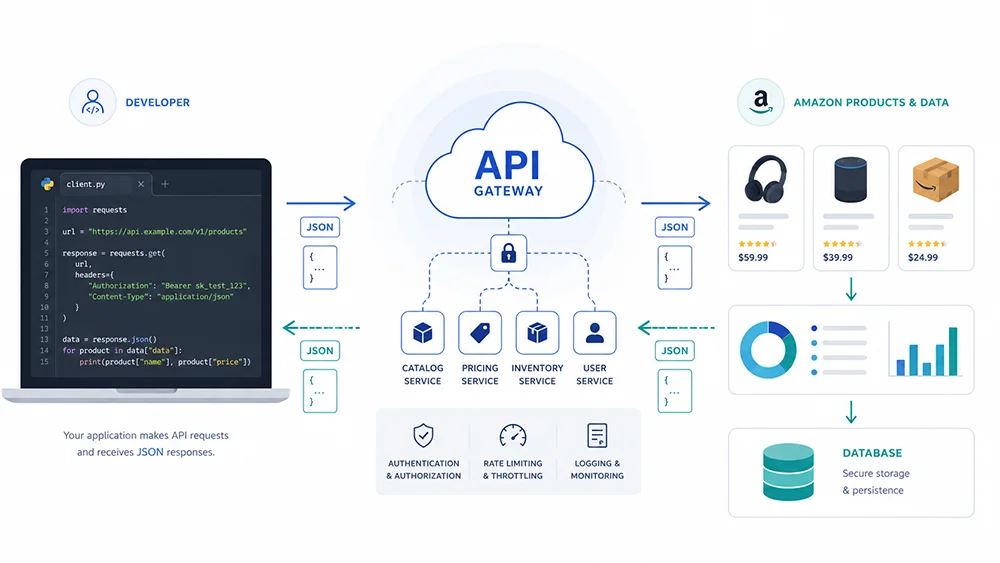
Pangolinfo API is an enterprise-grade data Scraper interface designed for businesses and developers who need to acquire Amazon platform data at scale with high timeliness. Through standardized RESTful endpoints, users can on-demand retrieve product details, keyword search results, sales rankings, user reviews, sponsored ad placements, category nodes, and more — covering 15 major Amazon marketplaces worldwide.
Compared to traditional self-built scraping solutions, Pangolinfo API encapsulates distributed crawling, intelligent parsing, anti-bot countermeasures, and proxy scheduling on the server side. Developers only need to focus on business logic and data applications. According to platform statistics, enterprises using Pangolinfo API have reduced engineering investment related to data Scraper by an average of 78%, while improving data acquisition stability from 82% to over 99.5%.
This article is a comprehensive developer guide covering authentication, synchronous/asynchronous calling methods, various data Scraper scenarios, response structure analysis, enterprise system integration, and AI Agent applications — with runnable code examples and production-tested best practices.
Pangolinfo API Ecosystem Overview
Before diving into technical details, let’s establish a holistic understanding of Pangolinfo’s data product ecosystem. The core products for Amazon data Scraper include four APIs and one Agent skill:
Core API Product Matrix
| API Product | Core Capability | Typical Use Case | Data Freshness |
|---|---|---|---|
| Scrape API | General ecommerce page scraping: product details, search, rankings | Product research, competitor monitoring, price tracking | Minute-level |
| Reviews Scraper API | Professional review Scraper: all reviews, image/video reviews | User insights, negative review analysis, product improvement | Hour-level |
| AI Overview SERP API | Google AI Overview search result Scraper | SEO strategy, competitor search performance | Real-time |
| AMZ Data Tracker | Visual data monitoring and tracking dashboard | Operations monitoring, trend analysis, alerts | Scheduled sync |
Data Coverage
Pangolinfo API currently supports 15 Amazon marketplaces: US, Canada, Mexico, UK, Germany, France, Italy, Spain, Netherlands, Sweden, Poland, Japan, Australia, UAE, and Singapore. Data types include:
Product Data: Title, brand, price (current/historical), stock status, shipping, seller info, variants, images, A+ content, bullet points, technical specs.
Ranking Data: Best Sellers, New Releases, Movers & Shakers, Most Wished For, Gift Ideas with real-time rankings and BSR category paths.
Review Data: Title, content, star rating, reviewer info, Vine badge, image/video reviews, helpful votes, review date.
Advertising Data: SP (Sponsored Products) ad placements, ad copy, position (top/middle/bottom/detail page).
Search Data: Keyword search results, ad distribution, organic vs paid ranking, search suggestions.
Pangolinfo API Amazon Data Scraper Guide
Output Format Options
All APIs support three output formats via the output_format parameter: json (default, structured and parsed), html (raw page HTML), markdown (for content processing and LLM input).
Getting Started: Authentication, Quotas, and Configuration
Step 1: Obtain Your API Key
Visit the Pangolinfo Console to register and create a project. In the “API Keys” section, click “Generate New Key” to get your exclusive API Key. We recommend creating separate Keys for different environments (dev/staging/production) for permission management and usage tracking.
API Keys follow the format pgo_xxxxxxxxxxxxxxxx and must be passed in each request header as Authorization: Bearer YOUR_API_KEY.
Step 2: Understand Credits and Billing
Pangolinfo API uses usage-based billing with “Page Credits” as the unit. Each successfully scraped page consumes 1 Credit. Rates vary by data type:
| Data Type | Credits per Request | Notes |
|---|---|---|
| Product detail page | 1 | Single ASIN product details |
| Search listing page | 1 | Typically 20-24 products per page |
| Ranking page | 1 | 50 products per page |
| Review page | 1 | 10 reviews per page |
| Sponsored ads | 2 | Higher due to ad placement parsing |
New registrations receive free Credits for testing. For production, choose a plan based on your volume and enable usage alerts.
Step 3: Install the SDK (Optional)
pip install pangolinfo-apiThe SDK encapsulates authentication, retries, error handling, and pagination. Recommended for production use.
Synchronous Integration: REST API Real-Time Calls
Synchronous integration is the most direct way to use Pangolinfo API. The client sends an HTTP request, the server executes Scraper in real-time, and returns results immediately. Suitable for latency-sensitive scenarios with relatively small data volumes.
Basic Request Structure
POST /v1/amazon/scrape HTTP/1.1
Host: api.pangolinfo.com
Authorization: Bearer pgo_your_api_key_here
Content-Type: application/json
Scenario 1: Product Detail Scraper (Sync)
import requests
import json

API_KEY = "pgo_your_api_key_here"
BASE_URL = "https://api.pangolinfo.com/v1"

def get_product_details(site: str, asins: list):
    url = f"{BASE_URL}/amazon/product"
    headers = {
        "Authorization": f"Bearer {API_KEY}",
        "Content-Type": "application/json"
    }
    payload = {
        "site": site,
        "asins": asins,
        "output_format": "json",
        "include_variants": True,
        "include_bsr": True,
        "include_seller_info": True
    }
    response = requests.post(url, headers=headers, json=payload, timeout=30)
    response.raise_for_status()
    return response.json()

result = get_product_details("amazon.com", ["B08N5WRWNW", "B08N5M7S6K", "B09V3KXJPB"])
for product in result.get("products", []):
    print(f"ASIN: {product['asin']} | Price: {product['price']['current']} | Rating: {product['rating']['average']}")
Response Structure (Product Details)
{
  "status": "success",
  "request_id": "req_abc123def456",
  "products": [{
    "asin": "B08N5WRWNW",
    "title": "Apple AirPods (3rd Generation)",
    "brand": "Apple",
    "price": {"current": 149.99, "currency": "USD", "list_price": 179.00},
    "rating": {"average": 4.5, "count": 84532},
    "bsr": {"rank": 42, "category": "Electronics"},
    "images": {"main": "https://m.media-amazon.com/images/..."},
    "features": ["Spatial audio", "Adaptive EQ"],
    "variants": [{"asin": "B08N5WRWNW", "attribute": "Color", "value": "White"}],
    "seller": {"name": "Amazon.com", "is_amazon": true, "fulfillment": "FBA"},
    "availability": {"status": "In Stock"},
    "collected_at": "2026-05-25T08:30:00Z"
  }],
  "credits_used": 3,
  "credits_remaining": 997
}
Scenario 2: Keyword Search Data Scraper
def search_keywords(site: str, keyword: str, pages: int = 1):
    url = f"{BASE_URL}/amazon/search"
    headers = {"Authorization": f"Bearer {API_KEY}", "Content-Type": "application/json"}
    all_results = []
    for page in range(1, pages + 1):
        payload = {
            "site": site, "keyword": keyword, "page": page,
            "sort_by": "relevance", "output_format": "json",
            "include_sponsored": True, "include_bsr": True
        }
        response = requests.post(url, headers=headers, json=payload, timeout=45)
        data = response.json()
        all_results.extend(data.get("products", []))
    return all_results

products = search_keywords("amazon.com", "wireless earbuds", pages=2)
print(f"Total products: {len(products)}")
Scenario 3: Best Sellers Ranking Scraper
def get_best_sellers(site: str, node_id: str, pages: int = 1):
    url = f"{BASE_URL}/amazon/bestsellers"
    headers = {"Authorization": f"Bearer {API_KEY}", "Content-Type": "application/json"}
    payload = {"site": site, "node_id": node_id, "pages": pages, "output_format": "json"}
    response = requests.post(url, headers=headers, json=payload, timeout=30)
    return response.json()

result = get_best_sellers("amazon.com", "172282", pages=2)
for item in result.get("products", []):
    print(f"#{item['rank']} {item['title'][:50]}... | ${item['price']['current']}")
Scenario 4: Review Scraper
def get_reviews(site: str, asin: str, pages: int = 3):
    url = f"{BASE_URL}/amazon/reviews"
    headers = {"Authorization": f"Bearer {API_KEY}", "Content-Type": "application/json"}
    payload = {"site": site, "asin": asin, "pages": pages, "sort_by": "recent", "include_images": True}
    response = requests.post(url, headers=headers, json=payload, timeout=30)
    return response.json()

reviews = get_reviews("amazon.com", "B08N5WRWNW", pages=2)
for review in reviews.get("reviews", [])[:5]:
    print(f"⭐ {review['rating']}/5 | {review['title']} | by {review['author']}")
Sync API Performance Characteristics
Average response latency: 3-15 seconds depending on target site speed and page complexity. Recommended timeout: 30-45 seconds. Maximum per request: 50 ASINs or 5 search pages. For larger batches, use async interface.
Asynchronous Integration: Best Practices for Large-Scale Scraper
When your business needs to collect thousands of products, hundreds of keywords, or continuously monitor multiple rankings, synchronous serial waiting becomes a bottleneck. Pangolinfo API’s async task mechanism allows submitting large batches at once, processed by distributed clusters, with results delivered via Webhook or polling.
Async Workflow
Phase 1: Task Submission. Client submits to task endpoint, server immediately returns task ID without waiting.
Phase 2: Distributed Processing. Tasks distributed across global Scraper nodes with automatic retries, proxy rotation, anti-bot handling.
Phase 3: Result Delivery. Upon completion, server pushes results via configured Webhook URL, or client pulls via status query.
Submit Async Tasks
def submit_async_task(task_type: str, tasks: list):
    url = f"{BASE_URL}/amazon/tasks"
    headers = {"Authorization": f"Bearer {API_KEY}", "Content-Type": "application/json"}
    payload = {
        "task_type": task_type,
        "tasks": tasks,
        "webhook_url": "https://your-domain.com/webhook/pangolinfo",
        "webhook_secret": "your_webhook_secret",
        "priority": "normal",
        "output_format": "json"
    }
    response = requests.post(url, headers=headers, json=payload, timeout=30)
    return response.json()

asins = ["B08N5WRWNW", "B08N5M7S6K", ...]  # 100 ASINs
tasks = [{"site": "amazon.com", "asin": asin} for asin in asins]
result = submit_async_task("product_details", tasks)
print(f"Batch ID: {result['batch_id']} | Tasks: {result['task_count']}")
Webhook Receiver (Flask Example)
from flask import Flask, request, jsonify
import hmac, hashlib

app = Flask(__name__)
WEBHOOK_SECRET = "your_webhook_secret"

@app.route('/webhook/pangolinfo', methods=['POST'])
def handle_webhook():
    signature = request.headers.get('X-Pangolinfo-Signature')
    expected = hmac.new(WEBHOOK_SECRET.encode(), request.data, hashlib.sha256).hexdigest()
    if not hmac.compare_digest(signature, expected):
        return jsonify({"error": "Invalid signature"}), 401

    data = request.json
    if data['event'] == 'task.completed':
        save_to_database(data['task_id'], data['result'])
    elif data['event'] == 'task.failed':
        log_failure(data['task_id'], data['error'])
    return jsonify({"status": "ok"}), 200
Active Polling
def check_task_status(batch_id: str):
    url = f"{BASE_URL}/amazon/tasks/{batch_id}"
    headers = {"Authorization": f"Bearer {API_KEY}"}
    response = requests.get(url, headers=headers, timeout=30)
    return response.json()

batch_id = "batch_abc123"
while True:
    status = check_task_status(batch_id)
    print(f"Progress: {status['completed']}/{status['total']}")
    if status['status'] in ['completed', 'failed']:
        break
    time.sleep(10)
Sync vs Async Comparison
| Dimension | Sync | Async |
|---|---|---|
| Latency | 3-15s | Immediate task ID |
| Max batch size | 50 ASINs / 5 pages | 10,000 tasks/batch |
| Result delivery | HTTP response | Webhook / Polling |
| Use case | Real-time, small batch | Large-scale, scheduled |
| Retry | Client handles | Server auto-retries x3 |
| Concurrency | 100 req/min | No hard limit |
Enterprise Integration: Connecting Pangolinfo API to Your Data Systems and ERP
For mid-to-large enterprises, API Scraper is just the first step. Seamlessly integrating collected data into existing data warehouses, ERPs, BI systems, or custom platforms determines whether data value can be fully realized.
Integration Pattern 1: Direct Database Write
import psycopg2
from datetime import datetime

def save_products_to_db(products: list, db_config: dict):
    conn = psycopg2.connect(**db_config)
    cursor = conn.cursor()
    insert_sql = """
        INSERT INTO amazon_products (asin, site, title, brand, current_price, currency,
            rating_avg, rating_count, bsr_rank, collected_at)
        VALUES (%s, %s, %s, %s, %s, %s, %s, %s, %s, %s)
        ON CONFLICT (asin, site) DO UPDATE SET
            title = EXCLUDED.title, current_price = EXCLUDED.current_price,
            rating_avg = EXCLUDED.rating_avg, collected_at = EXCLUDED.collected_at
    """
    for product in products:
        cursor.execute(insert_sql, (
            product['asin'], product['site'], product['title'],
            product.get('brand', ''), product.get('price', {}).get('current'),
            product.get('price', {}).get('currency', 'USD'),
            product.get('rating', {}).get('average'),
            product.get('rating', {}).get('count'),
            product.get('bsr', {}).get('rank'), datetime.now()
        ))
    conn.commit()
    cursor.close()
    conn.close()
Integration Pattern 2: Message Queue Middleware
import redis
redis_client = redis.Redis(host='localhost', port=6379, db=0)

def publish_to_queue(channel: str, data: dict):
    redis_client.xadd(channel, {"data": json.dumps(data)})

@app.route('/webhook/pangolinfo', methods=['POST'])
def handle_webhook():
    data = request.json
    if data['event'] == 'task.completed':
        publish_to_queue("amazon:data:products", data['result'])
    return jsonify({"status": "ok"}), 200
Integration Pattern 3: Data Warehouse ETL Pipeline
from airflow import DAG
from airflow.operators.python import PythonOperator
from datetime import datetime

def extract_amazon_data(**context):
    batch_id = submit_async_task("product_details", task_list)
    return wait_for_completion(batch_id)

def transform_data(**context):
    raw_data = context['ti'].xcom_pull(task_ids='extract')
    return clean_data(raw_data)

def load_to_warehouse(**context):
    data = context['ti'].xcom_pull(task_ids='transform')
    bulk_insert(data)

with DAG('amazon_data_pipeline', start_date=datetime(2026, 1, 1),
     schedule_interval='0 6 * * *', catchup=False) as dag:
    extract = PythonOperator(task_id='extract', python_callable=extract_amazon_data)
    transform = PythonOperator(task_id='transform', python_callable=transform_data)
    load = PythonOperator(task_id='load', python_callable=load_to_warehouse)
    extract >> transform >> load
ERP Integration Example
class AmazonERPConnector:
    def __init__(self, api_key: str, erp_db):
        self.api_key = api_key
        self.erp = erp_db
        self.base_url = "https://api.pangolinfo.com/v1"

    def sync_product_catalog(self, site: str, category_node: str):
        products = self._fetch_category_products(site, category_node)
        erp_products = [{
            "sku": f"AMZ-{p['asin']}", "name": p['title'],
            "category": p['bsr']['category'], "sale_price": p['price']['current'],
            "supplier": p['brand'], "source_platform": "amazon"
        } for p in products]
        self.erp.bulk_upsert_products(erp_products)
        return len(erp_products)

    def update_competitive_pricing(self, site: str, sku_list: list):
        asins = [sku.replace("AMZ-", "") for sku in sku_list]
        products = self._fetch_products(site, asins)
        for product in products:
            self.erp.update_price_monitor(
                sku=f"AMZ-{product['asin']}",
                competitor_price=product['price']['current']
            )
AI Agent Integration: Letting LLMs Directly Invoke Amazon Data Capabilities
Connecting large language models with external data tools is reshaping analytical workflows. Pangolinfo Amazon Scraper Skill, based on MCP (Model Context Protocol), enables AI Agents to directly invoke Amazon data Scraper capabilities without writing code.
MCP Protocol Overview
MCP is an open standard defining communication between AI Agents and external tools. Through MCP, Agents understand tool inputs, invocation methods, and return formats for autonomous decision-making. Pangolinfo is among the first ecommerce data providers supporting MCP.
Configuring Pangolinfo Amazon Scraper Skill
{
  "mcpServers": {
    "pangolinfo-amazon": {
      "command": "npx",
      "args": ["-y", "@pangolinfo/amazon-scraper-mcp@latest"],
      "env": {"PANGOLINFO_API_KEY": "pgo_your_api_key_here"}
    }
  }
}
Agent Use Cases
Case 1: Market Research
User: “Analyze wireless earbuds competition on Amazon US. I need: 1) Brand count in top 3 pages; 2) Price distribution; 3) Products with 1000+ reviews.”
Agent invokes amazon_search, processes 60 products, generates structured report.
Case 2: Competitor Monitoring
User: “Monitor ASIN B08N5WRWNW. Alert me if price drops >10% or BSR falls below 100.”
Agent fetches data, compares with history, triggers alerts with recommended actions.
Case 3: Review Sentiment Analysis
User: “Get last 100 reviews for these 5 competitor ASINs. What do users like and dislike most?”
Agent collects 500 reviews, extracts themes: “Most liked: sound quality (87%), battery (72%); Most disliked: charging speed (23%).”
Technical Implementation for Custom Agents
from langchain.tools import BaseTool
from pydantic import BaseModel, Field

class AmazonSearchInput(BaseModel):
    keyword: str = Field(description="Amazon search keyword")
    site: str = Field(default="amazon.com")
    pages: int = Field(default=1, ge=1, le=5)

class AmazonSearchTool(BaseTool):
    name = "amazon_search"
    description = "Search Amazon products and return structured data"
    args_schema = AmazonSearchInput
    def _run(self, keyword: str, site: str = "amazon.com", pages: int = 1):
        response = requests.post("https://api.pangolinfo.com/v1/amazon/search",
            headers={"Authorization": f"Bearer {API_KEY}"},
            json={"site": site, "keyword": keyword, "pages": pages})
        return response.json()

from langchain.agents import initialize_agent, Tool
tools = [Tool(name="amazon_search", func=AmazonSearchTool()._run)]
agent = initialize_agent(tools, llm, agent="zero-shot-react-description")
result = agent.run("Find top 10 wireless earbuds under $100 with 4.5+ rating")
Production Best Practices and Performance Optimization
1. Request Deduplication and Caching
import functools, redis
from datetime import timedelta
cache = redis.Redis()

def cached_api_call(ttl_seconds: int = 300):
    def decorator(func):
        @functools.wraps(func)
        def wrapper(*args, **kwargs):
            cache_key = f"pangolinfo:{func.__name__}:{hash(str(args)+str(kwargs))}"
            cached = cache.get(cache_key)
            if cached: return json.loads(cached)
            result = func(*args, **kwargs)
            cache.setex(cache_key, timedelta(seconds=ttl_seconds), json.dumps(result))
            return result
        return wrapper
    return decorator
2. Rate Limiting and Backoff
import time
from functools import wraps

def rate_limit(max_per_minute: int = 100):
    min_interval = 60.0 / max_per_minute
    last_call_time = {}
    def decorator(func):
        @wraps(func)
        def wrapper(*args, **kwargs):
            key = func.__name__
            now = time.time()
            if key in last_call_time:
                elapsed = now - last_call_time[key]
                if elapsed < min_interval: time.sleep(min_interval - elapsed)
            last_call_time[key] = time.time()
            return func(*args, **kwargs)
        return wrapper
    return decorator
3. Data Quality Validation
def validate_product_data(product: dict) -> tuple[bool, list]:
    errors = []
    if not product.get('asin'): errors.append("Missing ASIN")
    if not product.get('title') or len(product['title']) < 5: errors.append("Invalid title")
    price = product.get('price', {}).get('current')
    if price is None or price <= 0: errors.append("Invalid price")
    return len(errors) == 0, errors
4. Cost Control Strategies
| Strategy | Approach | Savings |
|---|---|---|
| Incremental updates | Only changed fields, not full refresh | 30-50% |
| Smart scheduling | Off-peak execution by timezone | 10-20% |
| Local caching | Hot data cached 5-30 min | 20-40% |
| Async priority | Large batches via async | 15-25% |
| Data reuse | One Scraper, multiple consumers | 25-35% |
Conclusion: From Data Access to Business Value
This article has systematically covered Pangolinfo API’s complete usage for Amazon data Scraper — from synchronous REST API calls to asynchronous batch processing; from product details, keyword search, ranking monitoring, review Scraper to ad placement analysis; from direct database integration to message queue middleware and AI Agent intelligence applications. Each section provides production-tested code examples and best practices.
The essence of ecommerce data Scraper isn’t technical complexity, but providing timely, accurate, complete data for business decisions. Choosing the right technical approach, building reliable data pipelines, and letting teams focus on insight extraction and strategy formulation — that’s what data-driven operations truly mean.
Start building your Amazon data capabilities today: Visit Pangolinfo Scrape API for your API Key and full documentation, or explore Amazon Scraper Skill to give your AI Agent direct ecommerce data Scraper capabilities.Read the Amazon Scrape API documentation
Frequently Asked Questions
What Amazon data Scraper scenarios does Pangolinfo API support?
Pangolinfo API supports keyword search, Best Sellers, New Releases, product details, reviews, sponsored ads, browse nodes, and AI Overview SERP data Scraper across 15 major Amazon marketplaces globally.
What is the difference between sync and async integration?
Sync integration returns results directly via REST API, suitable for real-time single requests with 3-15s latency. Async integration submits tasks and receives results via Webhook callbacks, ideal for large-scale batch collection.
How do I integrate Pangolinfo API with my ERP system?
Three approaches: 1) Direct REST API calls writing to ERP database; 2) Middleware service for periodic synchronization; 3) Webhook push mechanism for real-time data delivery.
What data formats does Pangolinfo API return?
Default is structured JSON. Also supports raw HTML and Markdown output formats via the output_format parameter.
How can AI Agents use Pangolinfo Amazon Scraper Skill?
Pangolinfo Amazon Scraper Skill uses MCP protocol, enabling AI Agents to invoke data collection via natural language commands.