Pangolinfo Alexa API Integration Tutorial – 30-Minute Setup Guide
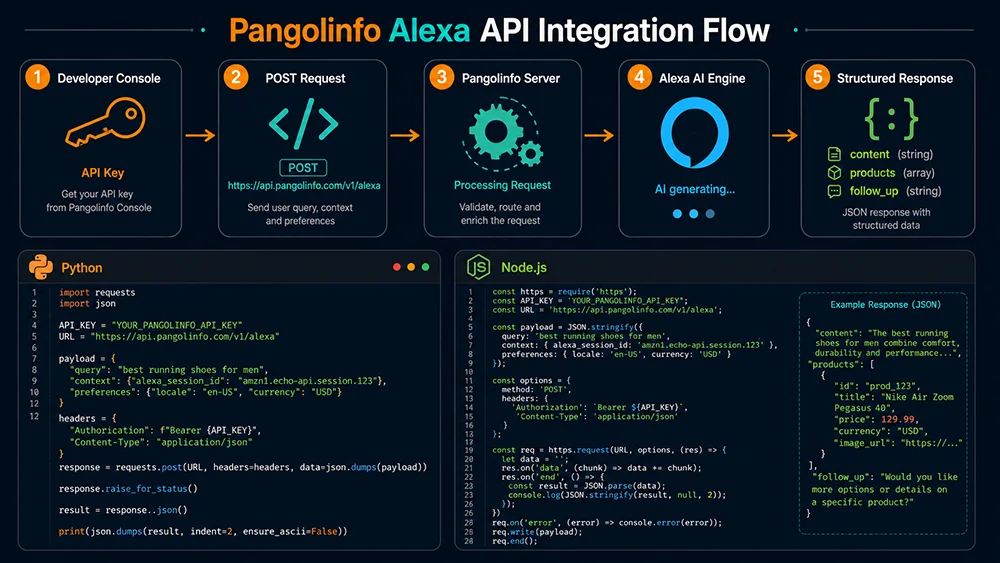
This article is written for engineering teams. If you’re responsible for e-commerce data infrastructure, or need to help an operations team bring Alexa for Shopping data into their analytics pipeline, this guide gets you from zero to a successful API request — without repeated trial-and-error.
We’ll cover: account and API key setup, the complete request structure, a field-by-field response breakdown, copy-ready Python and Node.js code examples, and the production environment best practices that are most commonly missed on first integration.
Prerequisites
Account Setup and API Key
- Register at the Pangolinfo Console. New accounts receive free test credits on signup (each Alexa API request consumes 6 credits per param).
- After logging in: navigate to API Keys → copy your Bearer Token.
- Store the token securely — never commit it to a repository. Use environment variables or a secrets manager in production.
Endpoint Reference
| Property | Value |
|---|---|
| Method | POST |
| Endpoint | https://scrapeapi.pangolinfo.com/api/v2/scrape |
| Content type | application/json |
| Authentication | Bearer Token (HTTP Authorization header) |
| Recommended timeout | 120 seconds minimum (AI generation takes 30–90s) |
| Concurrency limit | Max 3 concurrent requests per account |
Request Structure
Request Headers
{
  "Content-Type": "application/json",
  "Authorization": "Bearer YOUR_API_TOKEN"
}
Note: There is exactly one space between “Bearer” and the token. Incorrect formatting here is the most common cause of 401 Unauthorized errors.
Request Body Parameters
| Parameter | Required | Type | Description |
|---|---|---|---|
parserName | ✅ Yes | string | Fixed value: "amazonAlexa" — specifies the Alexa for Shopping parser (case-sensitive) |
param | ✅ Yes | array<string> | Conversation prompt array — each element initiates one Alexa conversation turn. Max 5 elements recommended. |
Minimal curl Example
curl -X POST https://scrapeapi.pangolinfo.com/api/v2/scrape \
  -H "Content-Type: application/json" \
  -H "Authorization: Bearer YOUR_API_TOKEN" \
  --max-time 120 \
  -d '{
    "parserName": "amazonAlexa",
    "param": ["queen bed frame no box spring easy assembly"]
  }'
param Design Guidance
The param array accepts two input forms:
- Keyword form:
"queen bed frame under 200"— Alexa processes this as a search query - Natural language question:
"I need a bed frame for a studio apartment that works without a box spring and is easy to disassemble for moving"— Alexa performs full semantic intent parsing
Both forms return the full content / products / follow_up_questions response. For AEO analysis, querying the same category with both a keyword form and a natural language form gives a broader view of how Alexa interprets user intent in your category.
Response Structure Breakdown
A typical successful Alexa API response:
{
  "code": 200,
  "data": {
    "content": "Looking for a queen bed frame that's easy to assemble and doesn't require a box spring? Here are some great options. The Zinus Olney Metal Platform Bed Frame is a popular choice for apartment dwellers — it assembles in about 30 minutes without tools and supports any mattress type directly on its slat system...",

    "products": [
      {
        "title": "Best for Apartments & Small Spaces",
        "items": [
          {
            "asin": "B07XJZXZXZ",
            "describe": "A metal queen platform bed frame with no-tools assembly, designed for renters who move frequently. Supports up to 1,800 lbs and works with any mattress type."
          },
          {
            "asin": "B09ABCDEFG",
            "describe": "Low-profile queen frame with under-bed storage clearance. Easy 20-minute assembly for solo setup."
          }
        ]
      },
      {
        "title": "Heavy-Duty Options",
        "items": [
          {
            "asin": "B08XXXXXXX",
            "describe": "Steel-reinforced queen frame rated to 2,000 lbs. Suitable for couples or users who prioritize maximum structural durability."
          }
        ]
      }
    ],

    "follow_up_questions": [
      "Does it need to work without a box spring?",
      "What's the maximum weight capacity you need?",
      "How long does assembly take?",
      "Do you need under-bed storage space?"
    ]
  }
}
content Field
The natural language AI summary Alexa generates for the query. This is the content displayed at the top of Amazon search results above all product listings. It contains: category selection guidance + specific brand/product recommendations + scene context.
AEO analysis use: Check whether your brand name appears in content and how Alexa describes it when it does.
products Field
Alexa’s grouped product recommendation list. Each group contains:
title: Group name — reflects Alexa’s semantic categorization of user needs (e.g., “Best for Apartments,” “Heavy-Duty Options”)items[].asin: Recommended product ASINitems[].describe: Alexa’s AI-generated description of the product — a direct semantic extraction from listing content
AEO analysis use: Check whether your ASIN appears, which group it’s placed in, and whether the describe content accurately reflects your differentiated value.
follow_up_questions Field
The follow-up question array Alexa presents to users after each response — typically 2–4 questions.
AEO analysis use: This is your highest-priority optimization signal. Cross-reference each question against your Q&A section and ensure every follow-up has a clear, specific answer in your listing.
Error Response Structure
{ "code": 401, "message": "Unauthorized: invalid or missing API token" }
{ "code": 429, "message": "Rate limit exceeded: please reduce request frequency" }
{ "code": 504, "message": "Gateway timeout: Alexa AI response took too long" }
Code Examples
Python — Basic Single Request
import requests

API_TOKEN = "your_api_token_here"
API_URL = "https://scrapeapi.pangolinfo.com/api/v2/scrape"

def query_alexa(keyword: str) -> dict:
    """
    Query Alexa for Shopping recommendation data for a given keyword.

    Args:
        keyword: Target keyword or natural language question

    Returns:
        dict with keys: content, products, follow_up_questions
        Returns empty dict on failure.
    """
    headers = {
        "Content-Type": "application/json",
        "Authorization": f"Bearer {API_TOKEN}"
    }
    payload = {
        "parserName": "amazonAlexa",
        "param": [keyword]
    }

    try:
        response = requests.post(
            API_URL,
            headers=headers,
            json=payload,
            timeout=120  # Critical: AI generation requires long timeout
        )
        response.raise_for_status()
        data = response.json()

        if data.get("code") == 200:
            return data["data"]
        else:
            print(f"API error: {data.get('message')}")
            return {}

    except requests.exceptions.Timeout:
        print(f"Request timed out for keyword: '{keyword}'. Consider increasing timeout.")
        return {}
    except requests.exceptions.RequestException as e:
        print(f"Request failed: {e}")
        return {}


def analyze_brand_visibility(data: dict, brand_name: str) -> bool:
    """Check whether a brand appears in Alexa's AI summary."""
    content = data.get("content", "")
    return brand_name.lower() in content.lower()


def find_asin_in_recommendations(data: dict, target_asin: str) -> dict:
    """Look up a specific ASIN in Alexa's recommendation groups."""
    for group in data.get("products", []):
        for item in group.get("items", []):
            if item.get("asin") == target_asin:
                return {
                    "found": True,
                    "group": group.get("title"),
                    "describe": item.get("describe")
                }
    return {"found": False}


# Example usage
if __name__ == "__main__":
    keyword = "queen bed frame no box spring easy assembly"
    result = query_alexa(keyword)

    if result:
        # Brand visibility check
        my_brand = "Zinus"
        visible = analyze_brand_visibility(result, my_brand)
        print(f"Brand '{my_brand}' in Alexa summary: {'✅ Present' if visible else '❌ Absent'}")

        # ASIN recommendation status
        my_asin = "B07XJZXZXZ"
        asin_result = find_asin_in_recommendations(result, my_asin)
        if asin_result["found"]:
            print(f"ASIN {my_asin} placed in group: {asin_result['group']}")
            print(f"Alexa describes it as: {asin_result['describe']}")
        else:
            print(f"ASIN {my_asin}: not present in recommendation groups")

        # Follow-up questions (AEO signals)
        print("\n=== AEO Optimization Signals (follow_up_questions) ===")
        for q in result.get("follow_up_questions", []):
            print(f"  • {q}")
Python — Async Batch Query (Production)
import asyncio
import aiohttp
from typing import List, Dict

API_TOKEN = "your_api_token_here"
API_URL = "https://scrapeapi.pangolinfo.com/api/v2/scrape"
MAX_CONCURRENT = 3  # Stay within rate limit

async def query_alexa_async(
    session: aiohttp.ClientSession,
    keyword: str,
    semaphore: asyncio.Semaphore
) -> Dict:
    async with semaphore:
        headers = {
            "Content-Type": "application/json",
            "Authorization": f"Bearer {API_TOKEN}"
        }
        payload = {"parserName": "amazonAlexa", "param": [keyword]}

        try:
            timeout = aiohttp.ClientTimeout(total=120)
            async with session.post(
                API_URL, headers=headers, json=payload, timeout=timeout
            ) as response:
                data = await response.json()
                if data.get("code") == 200:
                    return {"keyword": keyword, "data": data["data"]}
                return {"keyword": keyword, "data": {}, "error": data.get("message")}

        except asyncio.TimeoutError:
            return {"keyword": keyword, "data": {}, "error": "Timeout"}
        except Exception as e:
            return {"keyword": keyword, "data": {}, "error": str(e)}


async def batch_query(keywords: List[str]) -> List[Dict]:
    semaphore = asyncio.Semaphore(MAX_CONCURRENT)
    async with aiohttp.ClientSession() as session:
        tasks = [query_alexa_async(session, kw, semaphore) for kw in keywords]
        return await asyncio.gather(*tasks)


# Example usage
keywords = [
    "queen bed frame no box spring",
    "queen bed frame apartment small space",
    "platform bed frame heavy duty 2000 lbs",
    "queen bed frame easy assembly under 150",
    "metal bed frame with storage"
]

results = asyncio.run(batch_query(keywords))

for r in results:
    kw = r["keyword"]
    data = r["data"]
    if data:
        brand_visible = "Zinus" in data.get("content", "")
        groups = len(data.get("products", []))
        fups = len(data.get("follow_up_questions", []))
        print(f"[{kw}] Brand: {'✅' if brand_visible else '❌'} | Groups: {groups} | Follow-ups: {fups}")
    else:
        print(f"[{kw}] Failed: {r.get('error')}")
Node.js — Async with Concurrency Control
const axios = require('axios');

const API_TOKEN = 'your_api_token_here';
const API_URL = 'https://scrapeapi.pangolinfo.com/api/v2/scrape';

/**
 * Query Alexa for Shopping data for a single keyword.
 * @param {string} keyword
 * @returns {Promise<Object|null>}
 */
async function queryAlexa(keyword) {
  try {
    const { data } = await axios.post(
      API_URL,
      { parserName: 'amazonAlexa', param: [keyword] },
      {
        headers: {
          'Content-Type': 'application/json',
          Authorization: `Bearer ${API_TOKEN}`
        },
        timeout: 120_000  // 120 seconds in milliseconds
      }
    );

    return data.code === 200 ? data.data : null;
  } catch (err) {
    const label = err.code === 'ECONNABORTED' ? 'Timeout' : err.message;
    console.error(`[${keyword}] Request failed: ${label}`);
    return null;
  }
}

/**
 * Batch query with concurrency control.
 * @param {string[]} keywords
 * @param {number} concurrency - max simultaneous requests (default: 3)
 */
async function batchQuery(keywords, concurrency = 3) {
  const results = [];

  for (let i = 0; i < keywords.length; i += concurrency) {
    const batch = keywords.slice(i, i + concurrency);
    const batchResults = await Promise.all(
      batch.map(kw => queryAlexa(kw).then(data => ({ keyword: kw, data })))
    );
    results.push(...batchResults);

    // Throttle between batches to avoid rate limiting
    if (i + concurrency < keywords.length) {
      await new Promise(r => setTimeout(r, 2000));
    }
  }

  return results;
}

/**
 * Extract key AEO metrics from a response object.
 */
function analyzeResponse(data, brandName, targetAsin) {
  if (!data) return null;

  const content = data.content || '';
  const brandVisible = content.toLowerCase().includes(brandName.toLowerCase());

  let asinGroup = null;
  let asinDescribe = null;
  for (const group of data.products || []) {
    const item = (group.items || []).find(i => i.asin === targetAsin);
    if (item) {
      asinGroup = group.title;
      asinDescribe = item.describe;
      break;
    }
  }

  return {
    brandVisible,
    asinFound: !!asinGroup,
    asinGroup,
    asinDescribe,
    followUps: data.follow_up_questions || []
  };
}

// Example usage
(async () => {
  const keywords = [
    'queen bed frame no box spring easy assembly',
    'queen bed frame apartment small space',
    'platform bed frame heavy duty'
  ];

  console.log('Starting batch Alexa API query...\n');
  const results = await batchQuery(keywords, 3);

  for (const { keyword, data } of results) {
    console.log(`\n=== "${keyword}" ===`);
    const analysis = analyzeResponse(data, 'Zinus', 'B07XJZXZXZ');
    if (!analysis) { console.log('No data returned.'); continue; }

    console.log(`Brand visible: ${analysis.brandVisible ? '✅' : '❌'}`);
    if (analysis.asinFound) {
      console.log(`ASIN group: ${analysis.asinGroup}`);
      console.log(`Alexa describe: ${analysis.asinDescribe}`);
    } else {
      console.log('ASIN: ❌ not in recommendations');
    }
    if (analysis.followUps.length) {
      console.log('AEO signals:');
      analysis.followUps.forEach(q => console.log(`  • ${q}`));
    }
  }
})();
Production Best Practices
1. Timeout Configuration
Alexa for Shopping responses involve real-time large language model inference. Response times consistently range from 30–90 seconds; set HTTP client timeout to at least 120 seconds (150 seconds recommended). Timeouts set below 90 seconds will cause a significant percentage of valid requests to fail — this is the most common production reliability issue we see on first integration.
2. Concurrency Control
Maximum 3 concurrent requests per account. Exceeding this triggers 429 rate-limit responses. Use a semaphore (Python asyncio.Semaphore) or batch processing with a 2-second inter-batch delay (Node.js) to stay within limits. Do not use fire-and-forget request flooding.
3. Retry Strategy
# Python: simple retry wrapper
import time
from functools import wraps

def with_retries(max_attempts=3, delay_seconds=5):
    def decorator(func):
        @wraps(func)
        def wrapper(*args, **kwargs):
            for attempt in range(max_attempts):
                result = func(*args, **kwargs)
                if result:
                    return result
                if attempt < max_attempts - 1:
                    print(f"Attempt {attempt + 1} failed, retrying in {delay_seconds}s...")
                    time.sleep(delay_seconds)
            return {}
        return wrapper
    return decorator

@with_retries(max_attempts=3, delay_seconds=5)
def query_alexa_with_retry(keyword):
    return query_alexa(keyword)
4. Data Storage Structure
Alexa recommendations change over time — always store a timestamp alongside the data. A keyword + date index enables time-series comparison analysis, which is the foundation of any useful competitive monitoring system.
# Recommended storage schema
{
  "queried_at": "2026-06-02T10:30:00Z",
  "keyword": "queen bed frame no box spring",
  "brand_visible": true,
  "target_asin_group": "Best for Apartments",
  "follow_up_questions": ["Does it work without a box spring?", "..."],
  "products_group_count": 3,
  "content_snippet": "Looking for a queen bed frame..."
}
5. Credit Consumption Planning
Each param consumes 6 credits. Planning guidance:
- 10 keywords/week = 60 credits/week
- 50 keywords/week = 300 credits/week
- 200 keyword-queries/month = ~1,200 credits/month
Recommendation: start with 10–20 core keywords to validate your data pipeline and analysis workflow before scaling to full monitoring volume.
Error Reference
| Code | Message | Root Cause | Fix |
|---|---|---|---|
401 | Unauthorized | Invalid API token or malformed Authorization header | Verify format: Authorization: Bearer {space}{token}. Check token expiry. |
429 | Rate limit exceeded | Concurrent requests above limit or request burst too high | Cap concurrent requests at 3. Add 2s inter-batch delay. |
400 | Invalid parameters | Misspelled parserName or empty param array | Confirm parserName: "amazonAlexa" (exact case). Ensure param has at least one non-empty string. |
504 | Gateway timeout | Alexa AI generation exceeded server-side processing limit | Normal during peak periods. Apply retry with 5s delay, max 2 retries. |
200 but empty content | — | Keyword didn’t trigger Alexa recommendations (category/region limits) | Try a broader keyword. Confirm the category is available on amazon.com US. Very niche keywords may not produce Alexa responses. |
The Bottom Line
The Pangolinfo Alexa API integration involves one endpoint, two parameters, and three response fields. The technical details that most commonly cause production issues are timeout configuration (120+ seconds) and concurrency control (max 3 concurrent). Get those right and the rest is standard HTTP API work.
Once your pipeline is running, the data becomes the foundation for:
→ Pillar Page: Amazon Alexa API Complete Guide
→ Using the data for AEO: Amazon AEO Optimization Guide
→ Automated analysis without coding: Listing Optimization Skill
→ Building a monitoring system: Ad Monitoring Skill Guide
Get your API token at the Pangolinfo Console and run your first Alexa data query. Full field reference: Amazon Alexa API Product Page.
For a complete list of all available parameters, refer to the official Amazon Alexa API Documentation