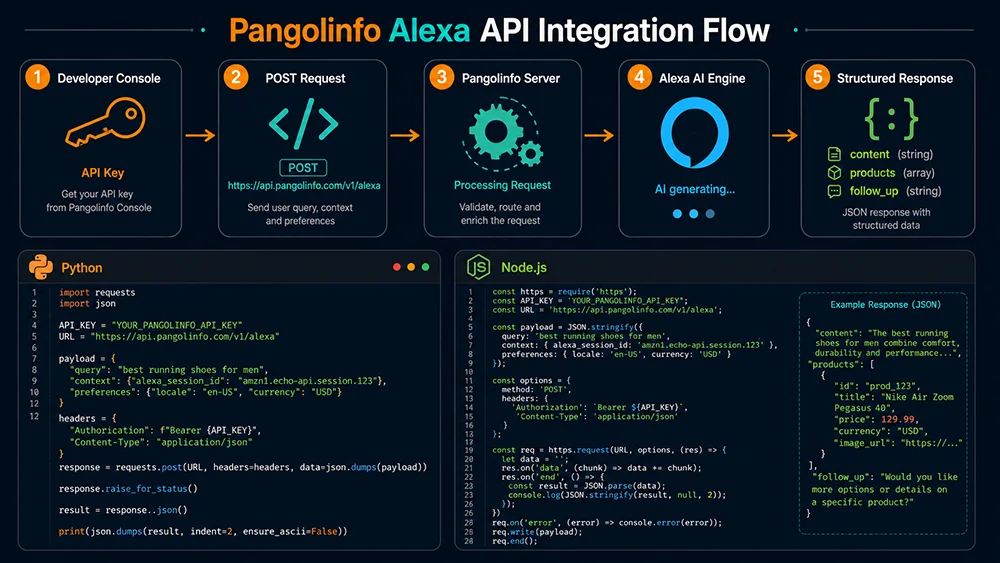
Pangolinfo Alexa API 开发者接入教程完全指南
这篇文章是写给技术团队的。如果你负责的是跨境电商的数据基础设施,或者需要帮运营团队把 Alexa for Shopping 数据纳入分析流程,这篇教程让你从零到一次成功请求,不需要反复试错。
我们会覆盖:账号和密钥准备、完整的请求结构、响应字段逐一解析、可直接运行的 Python 和 Node.js 代码示例,以及生产环境的关键最佳实践。
一、接入前准备
1.1 注册账号并获取 API Key
- 访问 Pangolinfo 控制台,完成账号注册
- 新用户注册后自动获得免费测试积点(每个 Alexa API 请求消耗 6 积点/param)
- 进入控制台 → 「API 密钥」→ 复制你的 Bearer Token
- 妥善保存该 Token,它是所有请求的认证凭证,不要提交到代码仓库
1.2 接口基本信息
| 项目 | 内容 |
|---|---|
| 请求方法 | POST |
| 接口地址 | https://scrapeapi.pangolinfo.com/api/v2/scrape |
| 数据格式 | application/json |
| 认证方式 | Bearer Token(HTTP Authorization 头) |
| 建议超时 | 120 秒(AI 生成响应需要较长处理时间) |
| 并发建议 | 每账号最多 3 个并发请求 |
二、请求结构详解
2.1 请求头(Headers)
{
  "Content-Type": "application/json",
  "Authorization": "Bearer YOUR_API_TOKEN"
}注意:Bearer 和 Token 之间有一个空格,这是 HTTP Bearer 认证的标准格式。Token 格式不正确是最常见的 401 错误原因。
2.2 请求体(Request Body)参数
| 参数名 | 必填 | 类型 | 说明 |
|---|---|---|---|
parserName | ✅ 是 | string | 固定填写 "amazonAlexa",指定使用 Alexa for Shopping 解析器 |
param | ✅ 是 | array<string> | 对话提示词数组,每个元素发起一轮对话;建议数组长度不超过 5 条 |
2.3 请求示例(curl)
curl -X POST https://scrapeapi.pangolinfo.com/api/v2/scrape \
  -H "Content-Type: application/json" \
  -H "Authorization: Bearer YOUR_API_TOKEN" \
  --max-time 120 \
  -d '{
    "parserName": "amazonAlexa",
    "param": ["queen bed frame no box spring easy assembly"]
  }'
2.4 param 数组设计建议
param 是 Alexa 对话的输入,支持两种形式:
- 关键词形式:
"queen bed frame under 200"——Alexa 将其作为搜索词处理 - 自然语言问题:
"I need a bed frame for a small apartment that works without a box spring and is easy to move"——Alexa 进行语义理解
两种形式都会返回完整的 content/products/follow_up_questions 响应。对 AEO 分析而言,同一品类同时使用关键词形式和自然语言形式分别查询,可以得到更全面的 Alexa 语义视角。
三、响应数据结构解析
以下是一个典型的 Alexa API 成功响应结构:
{
  "code": 200,
  "data": {
    "content": "Looking for a queen bed frame that's easy to assemble and doesn't require a box spring? Here are some great options. The Zinus Olney Metal Platform Bed Frame is a popular choice for apartment dwellers — it assembles in about 30 minutes without tools and supports mattresses directly...",

    "products": [
      {
        "title": "Best for Apartments & Small Spaces",
        "items": [
          {
            "asin": "B07XJZXZXZ",
            "describe": "A metal queen platform bed frame with no-tools assembly, designed for renters who move frequently. Supports up to 1,800 lbs and works with any mattress type."
          },
          {
            "asin": "B09ABCDEFG",
            "describe": "Low-profile queen frame with under-bed storage clearance. Easy 20-minute assembly for solo setup."
          }
        ]
      },
      {
        "title": "Heavy-Duty Options",
        "items": [
          {
            "asin": "B08XXXXXXX",
            "describe": "Steel reinforced queen frame rated to 2,000 lbs. Suitable for couples or users needing maximum durability."
          }
        ]
      }
    ],

    "follow_up_questions": [
      "Does it need to work without a box spring?",
      "What's the maximum weight capacity you need?",
      "How long does assembly take?",
      "Do you need under-bed storage space?"
    ]
  }
}
3.1 content 字段
Alexa 针对该查询生成的自然语言 AI 摘要。这是展示在搜索结果顶部的核心内容,包含:品类选购建议 + 具体品牌/商品推荐 + 场景说明。
AEO 分析用途:检查你的品牌名是否出现在 content 中,以及出现时的描述方式。
3.2 products 字段
Alexa 的分组推荐商品列表,每个分组包含:
title:分组名称,反映 Alexa 对该场景的语义理解(如 “Best for Apartments”、”Heavy-Duty Options”)items[].asin:推荐的商品 ASINitems[].describe:Alexa 对该商品的 AI 描述,反映 AI 对 Listing 内容的语义提炼
AEO 分析用途:检查你的 ASIN 是否出现,以及出现在哪个分组(title)中,分析 describe 内容是否准确反映了你的差异化卖点。
3.3 follow_up_questions 字段
Alexa 向用户提出的追问问题数组,通常包含 2-4 个问题。
AEO 分析用途:这是最关键的 AEO 优化信号。将这些问题逐一对照你的 Q&A 区,确保每个追问都有清晰、具体的回答。
3.4 错误响应结构
{
  "code": 401,
  "message": "Unauthorized: invalid or missing API token"
}

{
  "code": 429,
  "message": "Rate limit exceeded: please reduce request frequency"
}

{
  "code": 504,
  "message": "Gateway timeout: Alexa AI response took too long"
}
四、代码示例
4.1 Python 示例(推荐:requests + 异步并发版)
基础单请求版本
import requests
import json

API_TOKEN = "your_api_token_here"
API_URL = "https://scrapeapi.pangolinfo.com/api/v2/scrape"

def query_alexa(keyword: str) -> dict:
    """
    查询指定关键词的 Alexa for Shopping 推荐数据

    Args:
        keyword: 目标关键词或自然语言问题

    Returns:
        包含 content, products, follow_up_questions 的字典
    """
    headers = {
        "Content-Type": "application/json",
        "Authorization": f"Bearer {API_TOKEN}"
    }

    payload = {
        "parserName": "amazonAlexa",
        "param": [keyword]
    }

    try:
        response = requests.post(
            API_URL,
            headers=headers,
            json=payload,
            timeout=120  # 关键:AI 生成响应需要足够的超时时间
        )
        response.raise_for_status()
        data = response.json()

        if data.get("code") == 200:
            return data["data"]
        else:
            print(f"API 错误: {data.get('message')}")
            return {}

    except requests.exceptions.Timeout:
        print(f"请求超时(关键词: {keyword}),请检查网络或增大超时值")
        return {}
    except requests.exceptions.RequestException as e:
        print(f"请求失败: {e}")
        return {}


def analyze_brand_visibility(data: dict, brand_name: str) -> bool:
    """检查品牌是否出现在 Alexa AI 摘要中"""
    content = data.get("content", "")
    return brand_name.lower() in content.lower()


def find_asin_in_recommendations(data: dict, target_asin: str) -> dict:
    """在推荐列表中查找指定 ASIN 并返回其所在分组和描述"""
    for group in data.get("products", []):
        for item in group.get("items", []):
            if item.get("asin") == target_asin:
                return {
                    "found": True,
                    "group": group.get("title"),
                    "describe": item.get("describe")
                }
    return {"found": False}


# 使用示例
if __name__ == "__main__":
    keyword = "queen bed frame no box spring easy assembly"
    result = query_alexa(keyword)

    if result:
        # 品牌可见性检查
        my_brand = "Zinus"
        visible = analyze_brand_visibility(result, my_brand)
        print(f"品牌 '{my_brand}' 在 Alexa 摘要中: {'✅ 出现' if visible else '❌ 未出现'}")

        # ASIN 推荐检查
        my_asin = "B07XJZXZXZ"
        asin_result = find_asin_in_recommendations(result, my_asin)
        if asin_result["found"]:
            print(f"ASIN {my_asin} 出现在分组: {asin_result['group']}")
            print(f"Alexa 描述: {asin_result['describe']}")

        # 追问问题(AEO 信号)
        print("\n=== Alexa 追问问题(AEO 优化信号)===")
        for q in result.get("follow_up_questions", []):
            print(f"  • {q}")
批量关键词异步采集版本
import asyncio
import aiohttp
import json
from typing import List, Dict

API_TOKEN = "your_api_token_here"
API_URL = "https://scrapeapi.pangolinfo.com/api/v2/scrape"
MAX_CONCURRENT = 3  # 建议最大并发数,避免触发限流

async def query_alexa_async(
    session: aiohttp.ClientSession,
    keyword: str,
    semaphore: asyncio.Semaphore
) -> Dict:
    """异步查询单个关键词"""
    async with semaphore:
        headers = {
            "Content-Type": "application/json",
            "Authorization": f"Bearer {API_TOKEN}"
        }
        payload = {
            "parserName": "amazonAlexa",
            "param": [keyword]
        }

        try:
            timeout = aiohttp.ClientTimeout(total=120)
            async with session.post(
                API_URL,
                headers=headers,
                json=payload,
                timeout=timeout
            ) as response:
                data = await response.json()
                if data.get("code") == 200:
                    return {"keyword": keyword, "data": data["data"]}
                return {"keyword": keyword, "data": {}, "error": data.get("message")}

        except asyncio.TimeoutError:
            return {"keyword": keyword, "data": {}, "error": "超时"}
        except Exception as e:
            return {"keyword": keyword, "data": {}, "error": str(e)}


async def batch_query(keywords: List[str]) -> List[Dict]:
    """批量查询多个关键词"""
    semaphore = asyncio.Semaphore(MAX_CONCURRENT)

    async with aiohttp.ClientSession() as session:
        tasks = [
            query_alexa_async(session, kw, semaphore)
            for kw in keywords
        ]
        results = await asyncio.gather(*tasks)

    return results


# 使用示例
keywords = [
    "queen bed frame no box spring",
    "queen bed frame easy assembly apartment",
    "metal platform bed frame under 200",
    "bed frame for heavy person 2000 lbs",
    "queen bed frame storage under bed"
]

results = asyncio.run(batch_query(keywords))

for r in results:
    kw = r["keyword"]
    data = r["data"]
    if data:
        brand_visible = "Zinus" in data.get("content", "")
        print(f"[{kw}] 品牌可见: {'✅' if brand_visible else '❌'} | "
              f"推荐商品组: {len(data.get('products', []))} 个 | "
              f"追问问题: {len(data.get('follow_up_questions', []))} 条")
    else:
        print(f"[{kw}] 请求失败: {r.get('error')}")
4.2 Node.js 示例(axios + 并发控制)
const axios = require('axios');

const API_TOKEN = 'your_api_token_here';
const API_URL = 'https://scrapeapi.pangolinfo.com/api/v2/scrape';

/**
 * 查询单个关键词的 Alexa for Shopping 数据
 * @param {string} keyword - 目标关键词或自然语言问题
 * @returns {Promise<Object>} Alexa 响应数据
 */
async function queryAlexa(keyword) {
  try {
    const response = await axios.post(
      API_URL,
      {
        parserName: 'amazonAlexa',
        param: [keyword]
      },
      {
        headers: {
          'Content-Type': 'application/json',
          'Authorization': `Bearer ${API_TOKEN}`
        },
        timeout: 120000  // 120 秒,单位毫秒
      }
    );

    if (response.data.code === 200) {
      return response.data.data;
    } else {
      console.error(`API 错误 [${keyword}]:`, response.data.message);
      return null;
    }
  } catch (error) {
    if (error.code === 'ECONNABORTED') {
      console.error(`请求超时 [${keyword}]`);
    } else {
      console.error(`请求失败 [${keyword}]:`, error.message);
    }
    return null;
  }
}

/**
 * 控制并发数的批量查询
 * @param {string[]} keywords - 关键词数组
 * @param {number} concurrency - 最大并发数(建议不超过 3)
 */
async function batchQuery(keywords, concurrency = 3) {
  const results = [];

  // 按并发数分批处理
  for (let i = 0; i < keywords.length; i += concurrency) {
    const batch = keywords.slice(i, i + concurrency);
    const batchResults = await Promise.all(
      batch.map(kw => queryAlexa(kw).then(data => ({ keyword: kw, data })))
    );
    results.push(...batchResults);

    // 批次间增加间隔,避免触发限流
    if (i + concurrency < keywords.length) {
      await new Promise(resolve => setTimeout(resolve, 2000));
    }
  }

  return results;
}

/**
 * 分析 Alexa 数据:提取 AEO 关键指标
 * @param {Object} data - Alexa API 返回的 data 对象
 * @param {string} brandName - 需要检查可见性的品牌名
 * @param {string} targetAsin - 需要检查推荐状态的 ASIN
 */
function analyzeAlexaData(data, brandName, targetAsin) {
  if (!data) return { visible: false, asinFound: false, followUps: [] };

  // 品牌可见性
  const content = data.content || '';
  const visible = content.toLowerCase().includes(brandName.toLowerCase());

  // ASIN 推荐状态
  let asinGroup = null;
  let asinDescribe = null;
  for (const group of data.products || []) {
    const found = (group.items || []).find(item => item.asin === targetAsin);
    if (found) {
      asinGroup = group.title;
      asinDescribe = found.describe;
      break;
    }
  }

  return {
    visible,
    asinFound: !!asinGroup,
    asinGroup,
    asinDescribe,
    followUps: data.follow_up_questions || []
  };
}

// 使用示例
(async () => {
  const keywords = [
    'queen bed frame no box spring easy assembly',
    'queen bed frame apartment small space',
    'platform bed frame heavy duty 2000 lbs'
  ];

  console.log('开始批量查询 Alexa 数据...\n');
  const results = await batchQuery(keywords, 3);

  for (const { keyword, data } of results) {
    console.log(`\n=== 关键词: "${keyword}" ===`);

    const analysis = analyzeAlexaData(data, 'Zinus', 'B07XJZXZXZ');

    console.log(`品牌可见性: ${analysis.visible ? '✅ 出现' : '❌ 未出现'}`);

    if (analysis.asinFound) {
      console.log(`ASIN 推荐分组: ${analysis.asinGroup}`);
      console.log(`Alexa 描述: ${analysis.asinDescribe}`);
    } else {
      console.log('ASIN: ❌ 未出现在推荐列表');
    }

    if (analysis.followUps.length) {
      console.log('追问问题(AEO 信号):');
      analysis.followUps.forEach(q => console.log(`  • ${q}`));
    }
  }
})();
五、生产环境最佳实践
5.1 超时设置
Alexa for Shopping 的每次响应涉及 AI 实时生成,处理时间通常在 30-90 秒之间,高峰期可能超过 90 秒。务必将 HTTP 客户端超时设置为至少 120 秒,建议设置为 150 秒。设置过短的超时是导致生产环境请求失败率偏高的最常见原因。
5.2 并发控制
每账号建议最大并发请求数为 3。超过此限制可能触发 429 限流响应。推荐使用信号量(Python asyncio.Semaphore / Node.js 的并发批处理)控制并发,同时在批次之间设置 1-2 秒的间隔。
5.3 错误重试策略
# Python 重试装饰器示例
import time
from functools import wraps

def retry_on_timeout(max_retries=3, delay=5):
    def decorator(func):
        @wraps(func)
        def wrapper(*args, **kwargs):
            for attempt in range(max_retries):
                result = func(*args, **kwargs)
                if result:  # 成功则返回
                    return result
                if attempt < max_retries - 1:
                    print(f"第 {attempt + 1} 次重试,等待 {delay} 秒...")
                    time.sleep(delay)
            return {}  # 全部失败则返回空字典
        return wrapper
    return decorator

@retry_on_timeout(max_retries=3, delay=5)
def query_alexa_with_retry(keyword):
    return query_alexa(keyword)  # 调用前面定义的基础查询函数
5.4 数据存储建议
Alexa 推荐数据具有时间特征——同一关键词的响应会随时间变化。建议在存储时始终记录查询时间戳,并按关键词 + 日期建立索引,以便后续做时序对比分析。
# 推荐的数据存储结构(JSON 格式示例)
{
  "queried_at": "2026-06-02T10:30:00Z",
  "keyword": "queen bed frame no box spring",
  "content": "...",
  "brand_visible": true,
  "target_asin_group": "Best for Apartments",
  "follow_up_questions": ["...", "..."],
  "raw_products_count": 6
}
5.5 积点消耗计划
每个 param 消耗 6 积点。规划采集量时:
- 10 个关键词 / 周 = 60 积点 / 周
- 50 个关键词 / 周 = 300 积点 / 周
- 每月监控 200 个关键词 = 约 1,200 积点 / 月
建议先用 10-20 个核心关键词建立数据基准,验证数据质量和分析流程后再扩展规模。
六、常见错误与解决方案
| 错误代码 | 错误信息 | 原因 | 解决方案 |
|---|---|---|---|
401 | Unauthorized | API Token 无效或格式错误 | 检查 Authorization 头格式:Bearer {空格} {Token},Token 是否过期 |
429 | Rate limit exceeded | 并发请求超限或请求频率过高 | 减少并发数至 3 以内,批次间增加 2 秒间隔 |
400 | Invalid parameters | parserName 拼写错误或 param 为空数组 | 确认 parserName 为 "amazonAlexa"(区分大小写),param 至少包含 1 个字符串 |
504 | Gateway timeout | Alexa AI 响应时间超出服务端阈值 | 高峰期正常现象,使用重试机制,延迟 5 秒后重试 1-2 次 |
| 响应 200 但 content 为空 | — | 该关键词当前未触发 Alexa 推荐(品类/地域限制) | 尝试更通用的关键词;确认目标为美国站商品;检查关键词是否过于小众 |
小结
Pangolinfo Alexa API 的接入本身并不复杂——一个 POST 请求,两个核心参数(parserName + param),三个核心响应字段(content + products + follow_up_questions)。需要特别注意的技术细节是超时设置(120 秒以上)和并发控制(最多 3 个并发)。
完成接入之后,建议结合以下文章把数据价值最大化:
→ 支柱页面:亚马逊 Alexa API 完全指南
→ 数据分析方法:AEO 优化实战指南
→ 自动化分析工具:Listing 优化 Skill
→ 监控体系搭建:广告监控 Skill 实战
在 Pangolinfo 控制台 获取 API Token,开始你的第一次 Alexa 数据请求。完整字段文档请查看 Alexa API 产品详情页。
更多信息查看Alexa API 文档