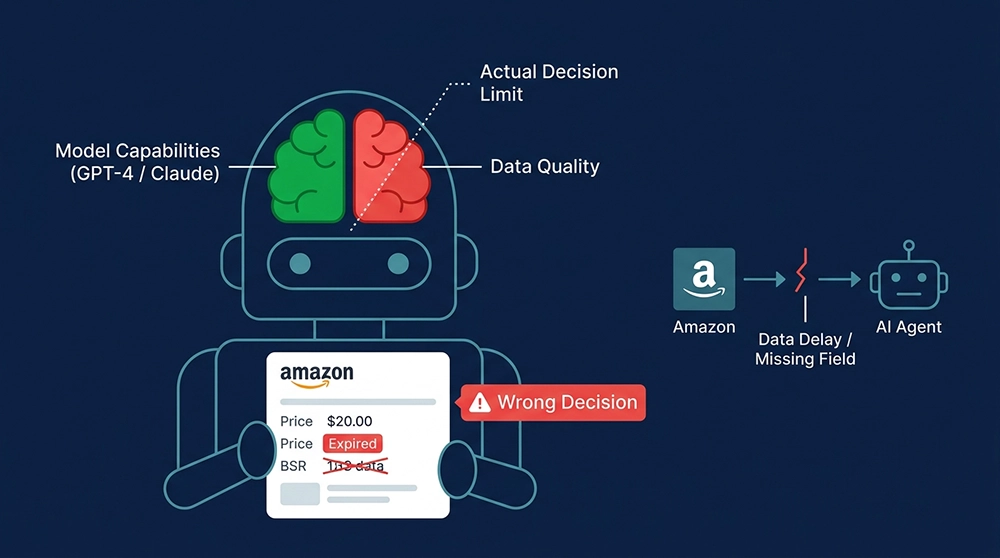
Why Your Amazon AI Agent Keeps Making Wrong Decisions (It’s Not the Model)
Article Summary
You’ve wired your Amazon AI agent to GPT-4 or Claude, spent weeks on prompt engineering, and it’s still making decisions that cost you money — wrong reorder timing, mispriced competitive responses, outdated product recommendations. The model isn’t the problem. The data is. This guide breaks down the three data failure modes that silently corrupt Amazon AI agent decision quality, and shows how to fix them with a real-time data pipeline built around Pangolinfo’s Amazon Scraper Skill and structured data API — so your agent’s reasoning quality is finally limited by the model, not by what you feed it.
Your Amazon AI agent’s decision quality is capped by your data quality — not your model. Swapping GPT-4o for Claude won’t help an agent that’s reasoning over stale price snapshots produce better pricing recommendations. It’ll just produce wrong answers more fluently. Based on engineering work across dozens of Amazon seller tool teams, over 90% of Amazon AI agent decision quality problems trace back to the data pipeline, not the model or the prompt design.
What Is an Amazon AI Agent Actually Using to Make Decisions?
Before diagnosing the problem, it helps to be precise about how the agent works. A typical Amazon AI agent decision loop looks like this: receive a task instruction (e.g., “analyze competitor B0XXXXX’s pricing strategy”) → call a tool to fetch data → inject that data into the LLM context window → LLM reasons over the data and outputs a recommendation. In this chain, the LLM handles reasoning. Data quality determines what it has to reason over. Garbage in, garbage out — this principle is older than machine learning and hasn’t stopped applying just because the model got smarter. In fact, the smarter the model, the more convincing and internally coherent its wrong answers sound when built on bad data, making the failure harder to detect.
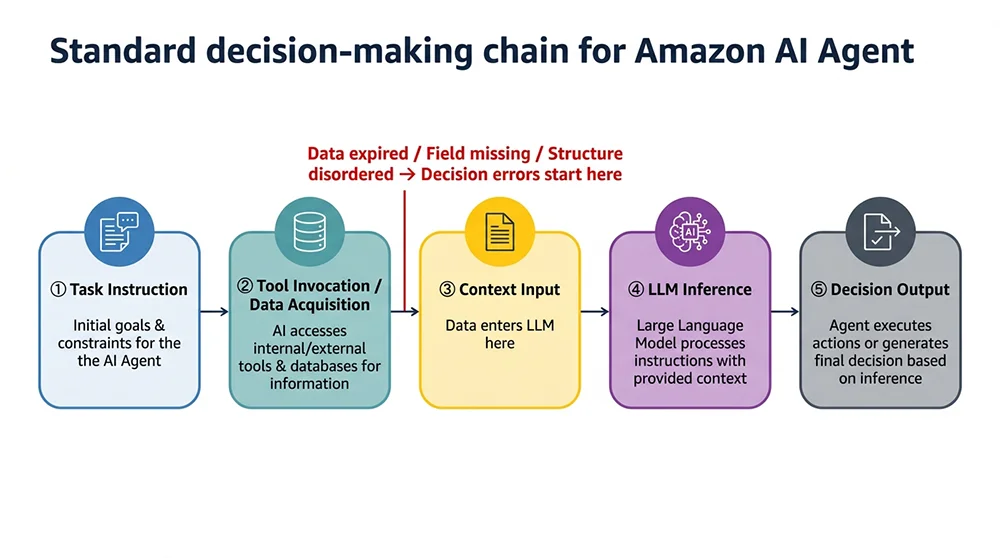
Caption: In the AI agent decision chain, data quality failures happen upstream of the LLM — no amount of prompt engineering reverses them.
The especially tricky part: the LLM won’t tell you the data it received was bad. Ask your agent “how much did the competitor lower their price yesterday?” and if it has a 36-hour-old price snapshot, it won’t say “this data might be stale.” It will deliver a complete, confident-sounding analysis built on the wrong number. This is Amazon AI agent failure mode number one — it looks like it’s working, but it’s earnestly making wrong decisions based on incorrect inputs.
The Three Amazon AI Agent Data Failure Modes (and Why Each One Matters)
Not all data problems are equally damaging, and not all data fields matter equally to decision quality. Three failure modes account for the vast majority of Amazon AI agent decision quality issues seen in production.
Failure Mode 1: Stale Data — Your Agent Is Navigating With an Old Map
Amazon product data is inherently high-velocity. In competitive categories, prices can update every 15–30 minutes as sellers respond to each other. BSR recalculates hourly. Inventory status changes the moment an FBA shipment arrives at a fulfillment center. Lightning deals go live and expire within hours. Most teams run a scheduled scraper once a day and store the results in a database — technically functional, but equivalent to giving your agent a map of a battlefield that changed 24 hours ago.
A concrete example: a seller’s AI reorder agent had logic that said “trigger a reorder signal when competitor inventory drops below 50 units.” The database showed 45 units. The agent fired the reorder recommendation. In reality, the competitor had completed a 2,000-unit FBA inbound shipment 6 hours earlier — plenty of stock. The result was unnecessary inventory buildup and storage costs. The agent’s logic was correct. The data was wrong. This is a data pipeline problem, not a model problem.
Failure Mode 2: Missing Fields — Your Agent Is Reasoning From an Incomplete Picture
Amazon product page data is distributed across multiple DOM nodes that shift with every A/B test Amazon runs. A scraper that isn’t actively maintained will often capture title, main price, and review count while silently dropping fields that are critical for intelligent decision-making:
- Variant price matrix — price differences across colors, sizes, and configurations are essential for accurate competitive pricing analysis
- Promotional indicators — Coupon amounts, Lightning Deal badges, Subscribe & Save discounts, all of which affect the actual price a buyer sees
- A+ content text — the primary source material for brand differentiation analysis
- Review breakdown by variant — aggregate star rating hides quality issues specific to certain configurations
- BSR trend direction — a single-point rank value tells you where the competitor ranks now, not whether they’re rising or falling
The agent receives an incomplete information set but doesn’t know what it doesn’t know. It produces an analysis that is “reasonable” given the available fields, but that analysis is built on an incomplete foundation — and no amount of reasoning sophistication compensates for missing inputs.
Failure Mode 3: Unstructured Input — Your Agent Is Parsing Noise
Even with fresh and complete data, there’s a third failure mode: format. Feeding raw HTML or unprocessed Markdown of an Amazon page directly into the LLM context is a common pattern in early agent implementations. It creates two specific problems: first, the non-structured text contains substantial noise (navigation menus, footer content, ad copy) that dilutes useful information and consumes context window tokens unnecessarily; second, LLMs extracting precise numeric values like prices and rankings from unstructured text have a meaningful error rate, especially when page layout changes introduce format ambiguity.
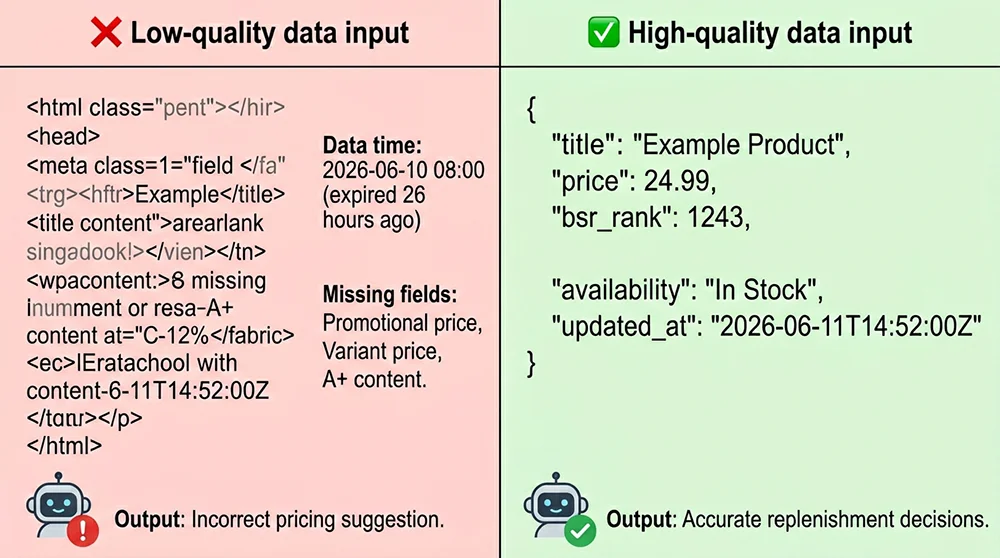
Engineering teams that migrated their Amazon data inputs from raw HTML to structured JSON reported a 35–45% improvement in critical field extraction accuracy and approximately 60% reduction in context token consumption — without changing a single line of LLM-related code. The gains came entirely from fixing the data format layer.
How Do You Build an Amazon AI Agent Data Pipeline That Actually Works?
Data quality problems are engineering problems, and they have engineering solutions. The three failure modes map to three solution layers: freshness, completeness, and structure.
Layer 1: Real-Time Data Over Snapshots — Use an API, Not a Cron Job
The fundamental fix for stale data is letting the agent fetch data on demand — at the moment it needs it — rather than depending on a periodically refreshed snapshot database. This puts specific requirements on the tool interface: P95 response time under 3 seconds (so the agent’s reasoning loop doesn’t stall), data freshness measured in minutes rather than hours (direct collection with no cache layer), and parse failure rate below 1% despite Amazon’s page structure changes.
Pangolinfo’s Amazon Scraper API delivers typical response times of 1.2–2.8 seconds for agent real-time query scenarios, with data freshness in the sub-minute range from collection to return. For pricing surveillance agents (need to detect competitor price moves in near-real-time) and inventory alert agents (need to catch competitor stockout signals as they happen), this freshness level meets the engineering requirements of the majority of seller tool teams.
Layer 2: Full Field Coverage — Don’t Let the Agent Decide on Incomplete Data
A reliable Amazon data API should return all decision-critical fields in a single call: variant price matrix, all promotional indicators, complete BSR (parent + sub-category), A+ content text, review breakdown, and dimensions/weight for FBA cost modeling. Pangolinfo’s Amazon Scraper API covers all of these in a single response with a consistent JSON schema, eliminating the field-gap-induced reasoning errors described above.
For review analysis agents, the Reviews Scraper API returns structured review data including per-review star rating, date, ASIN variant identifier, and verified purchase flag — the necessary inputs for review sentiment analysis and negative review alerting that an aggregate rating summary simply can’t provide.
Layer 3: Structured Output — Feed the Agent JSON, Not HTML
Data structuring isn’t a nice-to-have; it’s an engineering prerequisite for agent reliability. Specific implementation standards:
- All price fields returned as float type without currency symbols, eliminating string-parsing format ambiguity in LLM extraction
- Timestamps in ISO 8601 format so the agent can independently judge data freshness
- Boolean fields (is_prime, is_in_stock) as true/false, not strings “Yes”/”No”
- Array fields (bullet_points, images) maintained as arrays, not concatenated strings
- Failed collection fields returned as null with an error_code, never as zero values or empty strings
That last point is especially critical. When the agent receives price: null, error_code: "CAPTCHA_HIT", it knows the collection failed and should retry or flag uncertainty. But if it receives price: 0, it may interpret that as “competitor is running a clearance sale” and trigger an incorrect competitive pricing response — a decision failure that traces all the way back to a missing distinction between “collection failed” and “price is genuinely zero.”
Amazon Scraper Skill: Give Your AI Agent Native Amazon Data Access
The three solution layers above all point toward the same engineering goal: let the agent fetch fresh, complete, structured Amazon data whenever it needs it. Pangolinfo’s Amazon Scraper Skill is designed specifically for this use case — wrapped as an MCP protocol tool so the agent can call it like a built-in capability, with no separate authentication management, rate limiting, or parsing logic on the agent side.
From the perspective of an agent developer, integrating the Scraper Skill has two core advantages: first, you don’t need to write infrastructure code in the agent for API key rotation, rate limit handling, or CAPTCHA retry logic — all of that is handled inside the Skill; second, the data returned is already in the structured format the LLM needs for direct reasoning, with no additional parsing or cleaning required on the agent side. A developer can typically complete the Amazon data integration in half a day and spend the rest of the time on actual business logic — not data pipeline operations.
For teams that need full Amazon data pipeline coverage — real-time product data, search results, Best Sellers rankings, and review data — Amazon Data MCP provides a more complete toolset with direct support for Claude, GPT-4, Gemini, and other mainstream LLM frameworks. Full tool listings, call parameters, and integration examples are in the Pangolinfo documentation center.
Amazon AI Agent Data Pipeline Engineering Best Practices
Translating the analysis above into actionable engineering decisions — here are the three design choices that matter most in production Amazon AI agent data pipelines.
Data Freshness Strategy: Tier by Field, Not by ASIN
Not all fields need the same refresh frequency. Price and inventory status have the highest freshness requirements — ideally fetched within 30 minutes of the agent’s actual use. BSR updates hourly, so hourly refresh is sufficient. Stable fields like title, images, and A+ content can be refreshed daily or every 3 days. A tiered refresh strategy by field type maintains freshness where it matters most while dramatically reducing total API call volume and cost — often by 60–70% compared to blanket full-field refreshes on all ASINs.
Explicit Data Staleness Marking: Uncertainty Over False Confidence
Attach a freshness metadata object to each field in the agent’s data context — collection timestamp plus a success flag. A well-designed Amazon AI agent should be able to say “this price was collected 4 hours ago; I’ll flag it as a reference value rather than a confirmed current price in this competitive analysis” rather than treating stale data as real-time. This requires the data pipeline to pass timestamp information through to the agent context — not just the data values themselves.
Error Handling Chain: Collection Failure ≠ Data Value of Zero
Define a clear error code taxonomy and pass it through to agent context. Distinguish explicitly between “collection failed (CAPTCHA / network timeout)” and “the product genuinely doesn’t have this field (e.g., no A+ content).” The former should trigger retry logic; the latter should pass null with a field description. Never use zero values or empty strings as catch-all fallbacks — zero inventory or zero price will be interpreted by the agent as business facts and can trigger cascading decision errors that are extremely difficult to trace back to a data pipeline issue.
Frequently Asked Questions
What is the root cause of Amazon AI agent wrong decisions?
Over 90% of Amazon AI agent decision quality issues trace back to three data problems: stale data (price, BSR, or inventory snapshot has expired), incomplete fields (scraper missed promotional pricing, variant price matrices, or A+ content), and unstructured input (raw HTML in context causes LLM field extraction errors). None of these is fixed by upgrading to a more powerful model — the data pipeline is where the fix has to happen.
Why can’t an Amazon AI agent use a static database?
Amazon product data is inherently high-velocity: prices update every 15–30 minutes in competitive categories, BSR recalculates hourly, inventory changes the moment an FBA shipment arrives. A static database means your agent is navigating a real-time battlefield with a day-old map. In competitive categories, a 6-hour data lag is enough to turn a logically correct reorder decision into an operational error.
What is the Amazon Scraper Skill and how does it differ from the API?
The Amazon Scraper Skill is Pangolinfo’s agent-native tool interface, wrapped using the MCP protocol so an agent can request Amazon product data as a built-in tool call — no separate auth, no response parsing required. Compared to calling the API directly, the Skill removes the integration overhead on the agent side: data is returned as typed structured JSON ready for direct reasoning, with zero parsing cost.
Which Amazon data fields does an AI agent actually need?
Minimum viable set: product title, current price (including promotional), BSR (parent + sub-category), rating and review count, inventory status, Prime badge. For high-quality decisions: variant price matrix, A+ content text, review sentiment summary, ad placement occupancy data. Pangolinfo’s Amazon Scraper API covers all of these, with field selection support to avoid unnecessary token consumption.
What are the three most important engineering principles for an Amazon AI agent data pipeline?
First, freshness over volume: 100 ASINs of real-time data beats 10,000 ASINs of 24-hour-old data. Second, structured input over text input: typed JSON saves 60–80% of context tokens versus raw HTML and significantly reduces hallucination rates. Third, explicit error marking: return null + error_code rather than zero values — price: 0 will be interpreted as a business fact (clearance sale) rather than a collection failure.
The Amazon AI Agent Data Pipeline Is Infrastructure, Not Optional
Fixing Amazon AI agent decision quality is fundamentally an infrastructure investment decision: should your engineering resources go toward LLM tuning and business logic, or toward maintaining a reliable data collection pipeline? For most teams, the data pipeline investment has a higher return — because data quality improvements compound across every agent and feature that uses the pipeline, while model tuning returns diminish over time.
If your team is building or optimizing an Amazon AI agent, Pangolinfo’s Amazon Scraper Skill is the lowest-integration-cost entry point — one MCP tool call, structured JSON output, covering product detail, search results, Best Sellers rankings, and review data. The Amazon Scraper API is the right choice for teams that need batch collection and custom integration. First 100 calls are free with no credit card required.
Ready to upgrade your Amazon AI agent’s data pipeline? Explore the Amazon Scraper Skill →
Or check the Pangolinfo documentation center for complete Python and Node.js integration examples for agent workflows.