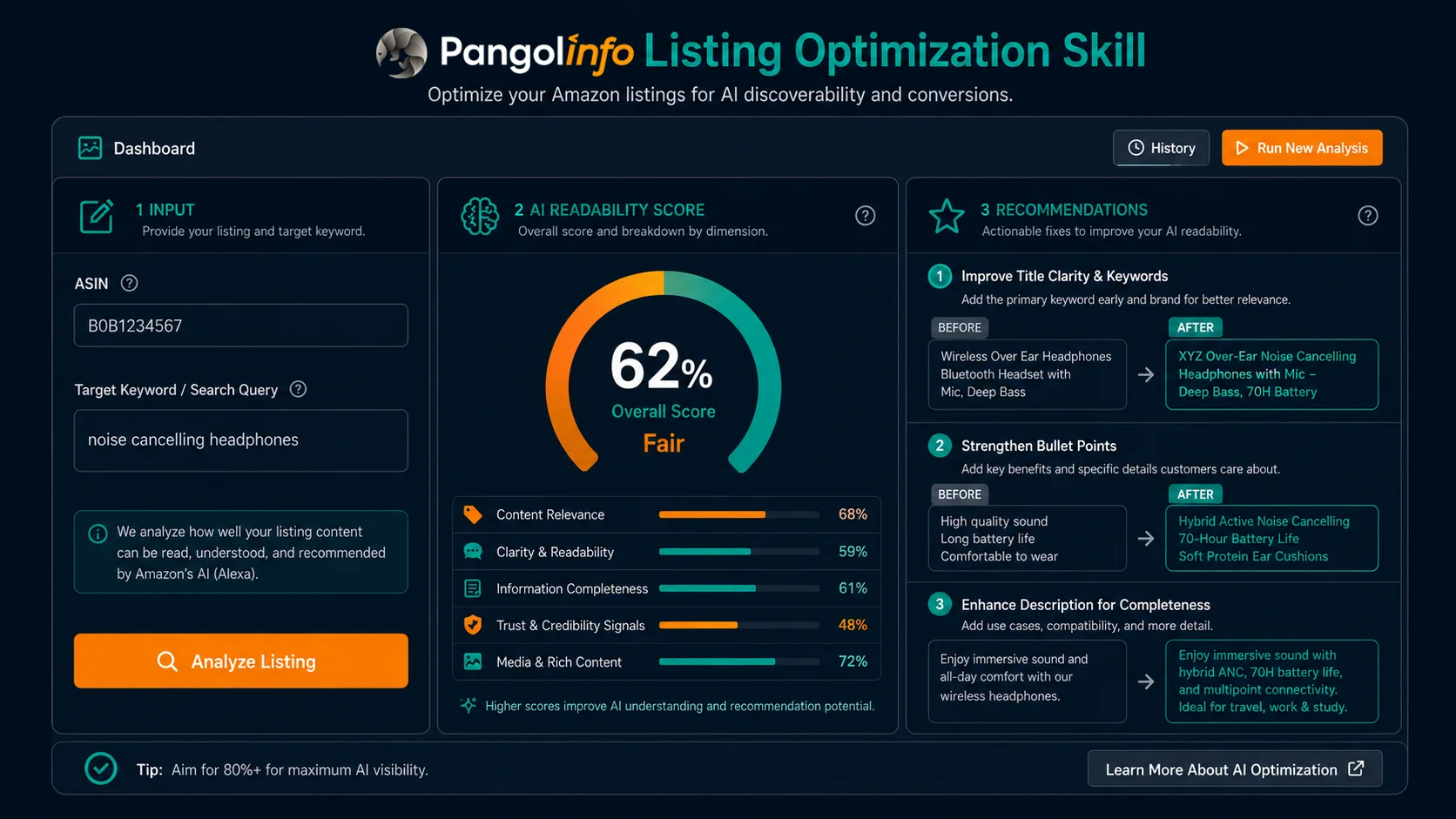
Pangolinfo Listing Optimization Skill
In practice, AEO optimization always hits the same wall: “Which part of my listing do I fix first?”
A listing has seven optimization dimensions — title, bullets, description, Q&A, A+ Content, images, video. Without data, you’re choosing by instinct: which one is weakest? Which one Alexa is actually penalizing you for? Which change will move the needle?
The Pangolinfo Listing Optimization Skill was built to answer exactly that question — with data, not guesswork.
What Is the Pangolinfo Listing Optimization Skill?
The Pangolinfo Listing Optimization Skill is an AI readability diagnostic tool powered by live Alexa for Shopping data, designed specifically for AEO optimization in the post-Rufus Amazon era.
The problem it solves: Can Alexa for Shopping clearly “read” your listing well enough to recommend it?
Traditional listing optimization tools measure keyword density, title length, review count, BSR tier. These metrics matter for traditional SEO but are largely irrelevant to AEO — because Alexa doesn’t evaluate keyword density. It evaluates semantic clarity: how well your listing communicates who the product is for, what scene it serves, and what makes it different.
The Listing Optimization Skill does this: it takes your listing content, cross-references it against live Alexa API data from your target keywords, identifies where your listing is semantically weak in AI terms, and delivers specific rewrite recommendations.
The 3 Core Problems It Solves
| Problem Type | Symptom | How the Skill Helps |
|---|---|---|
| Missing audience signal | Alexa can’t determine who this product is for — skips it or places it in the wrong recommendation group | Identifies which listing sections lack audience-specific language; provides targeted rewrite examples |
| Thin scene description | Alexa’s follow-up questions surface scene dimensions your listing doesn’t clearly address | Maps follow_up_questions to listing gaps; generates missing scene-based content suggestions |
| Generic differentiation | Your listing copy is similar to competitors’ — Alexa can’t extract a clear AI reason to prefer your product | Compares your listing against competitor Alexa describe fields; identifies differentiation language gaps |
How It Works: Alexa API Data + Listing Semantic Analysis
The Skill runs on a two-data-source cross-analysis architecture:
Data Source 1: Live Pangolinfo Alexa API Data
The Skill calls the Pangolinfo Alexa API to collect real-time data for your target keywords:
- content field: Alexa’s full AI summary text for each keyword — including which brands and products it mentions by name
- products field: Alexa’s grouped recommendation list, with AI-generated descriptions (describe) for each recommended ASIN
- follow_up_questions field: The decision dimensions Alexa considers most critical for users in your category
Data Source 2: Your Current Listing Content
The Skill reads the live listing content for your specified ASIN — title, bullet points, product description, Q&A — and runs a semantic analysis to assess:
- Audience-targeting language coverage and specificity
- Scene-use description depth and concreteness
- Differentiation claim parsability by an AI language model
Cross-Analysis Output
The intersection of these two data sources produces three outputs:
- AI Readability Score (0–100): A quantified assessment of your listing’s current semantic performance across all seven dimensions
- Gap Diagnosis Report: The three highest-priority optimization points, ranked by impact, with specific problem descriptions for each
- Rewrite Recommendations: Actionable rewrite directions and example text for each identified gap
Step-by-Step: How to Use the Listing Optimization Skill
Step 1: Register and Log In to the Pangolinfo Console
Go to the Pangolinfo Console. New accounts receive free test credits on registration. After logging in, locate “Listing Optimization Skill” in the tools panel.
Step 2: Enter Your ASIN and Target Keywords
Fill in the Skill’s input form:
- Target ASIN: The product you want to analyze (supports batch input — separate multiple ASINs with commas)
- Target keywords: Enter 3–5 keywords — typically your core keyword, 1–2 scene-based keywords, and 1 long-tail keyword
- Competitor ASINs (optional): Enter 2–3 competitor ASINs for comparative analysis — the Skill will include their Alexa describe fields in its diagnosis
Step 3: Wait for Analysis (approx. 2–3 minutes)
The Skill runs in the background:
- Calls the Alexa API for each target keyword (6 credits per keyword query)
- Reads your ASIN’s live listing content
- Runs the semantic cross-analysis model
- Generates the diagnosis report and rewrite recommendations
Because Alexa API responses involve AI-generated content, each keyword query requires a 90-second+ timeout. Analyzing 5 keywords typically takes 2–3 minutes total.
Step 4: Read the Diagnosis Report
① AI Readability Score Dashboard
Total score: 0–100, with 7 dimension sub-scores displayed. Score interpretation:
- Below 60: Significant AI readability gaps exist — prioritize optimization before running ads or launching new keywords
- 60–80: Moderate performance with clear improvement headroom — targeted dimension optimization will have measurable impact
- 80+: Strong AI readability baseline — shift focus to competitive monitoring and incremental refinement
② Priority Gap Diagnosis
Top 3 optimization points, ranked by priority, each including:
- Specific problem description (e.g., “Title lacks audience signal — Alexa cannot categorize this product as ‘suitable for studio apartments'”)
- Mapping to follow-up questions (e.g., “Alexa frequently asks ‘Does it work without a box spring?’ — no Q&A answer found”)
- Expected impact: HIGH / MEDIUM / LOW
③ Rewrite Recommendation Text
Copy-ready rewrite examples for each gap. For instance:
Current (title): Metal Queen Platform Bed Frame Heavy Duty Black
Recommended rewrite: Metal Queen Platform Bed Frame — No Box Spring Needed, 2,000 lbs Capacity, 30-Min Tool-Free Assembly for Apartments & Solo Renters
Step 5: Implement Changes and Set a Validation Date
Apply the recommended changes in Seller Central. Record the date changes go live. Set a calendar reminder for 2 weeks out to re-run the Skill and compare your Alexa data snapshots — this is where you measure whether the optimization actually moved the needle.
Before and After: How to Validate AEO Optimization Results
One of the hardest parts of AEO optimization is proving it worked. Traditional tools track keyword rank — but Alexa recommendation changes show up in AI data, not in rank positions.
The Listing Optimization Skill provides structured before/after comparison across three dimensions:
Comparison 1: Brand Frequency in Alexa Summaries
Before: Brand name appears in 0 of 5 queried keyword Alexa content fields.
After (2 weeks): Brand appears in 3 of 5 queried keywords — 60% coverage rate.
Comparison 2: ASIN Placement in Recommendation Groups
Before: ASIN does not appear in any Alexa recommendation group across any target keyword.
After: ASIN appears in the “Best for Apartments” recommendation group, ranked 2nd within that group.
Comparison 3: Alexa’s AI Description of Your Product
Before — Alexa’s describe field: “A metal queen bed frame with heavy-duty construction.” (Generic, no differentiation, no scene)
After — Alexa’s describe field: “A tool-free queen bed frame designed for apartment renters, supporting up to 2,000 lbs without a box spring.” (Specific, scene-based, differentiated)
The Listing Optimization Skill’s report interface auto-generates side-by-side before/after views of all three comparison types — no manual data assembly required.
Who Should Prioritize the Listing Optimization Skill?
✅ Highest priority use cases
- Mid-to-large sellers with 50+ SKUs: Manual AEO auditing at scale is prohibitively time-intensive — the Skill’s batch processing pays off immediately
- Pre-launch new product optimization: Running a diagnostic before a listing goes live ensures AI readability is built in from day one rather than retrofitted later
- Competitive response situations: When a competitor starts appearing in Alexa recommendations in your category and you aren’t, that’s the most urgent signal to run the Skill
- Teams building repeatable SOPs: Adding the Skill to a quarterly listing review cycle converts AEO from an ad-hoc project into a systematic operational capability
⚠️ Lower-urgency situations
- Sellers with 1–3 SKUs who aren’t scaling — a single manual AEO audit following the AEO Optimization Guide may be sufficient to start
- Listings that already have strong Alexa visibility and are in a monitoring phase — the Skill is more valuable for diagnosis than maintenance
FAQ
How many API credits does a single ASIN analysis consume?
The Alexa API charges 6 credits per param (prompt). A standard single-ASIN analysis queries 3–5 keywords, consuming 18–30 credits. New account registrations include free credits for initial testing. Check your account dashboard in the Pangolinfo Console for your current credit balance and usage rates.
How often should I re-run the diagnostic?
Recommended cadence: run a validation check 2 weeks after each listing update; run a routine monitoring check once per month with no listing changes; run immediately when competitive dynamics shift significantly (e.g., a major competitor gains strong Alexa presence in your category). The goal is to make AEO monitoring a recurring operational rhythm, not a one-time event.
What if the Skill’s rewrite suggestions conflict with my existing keyword strategy?
AEO-optimized rewrites are generally compatible with SEO keyword strategies — richer semantic content improves both. However, if there’s a specific conflict, prioritize keeping your primary keyword in the title and early bullet points, then apply the AEO suggestions to the description, Q&A, and A+ Content where keyword density constraints are less critical. The Skill’s suggestions are directional guidance, not mandatory prescriptions.
Does the Skill support A+ Content and image analysis?
Yes — A+ Content text fields and image alt texts are included in the listing content analysis. Visual image content is evaluated at the scene and context level based on available metadata. Full visual AI analysis of image composition is on the product roadmap.
The Bottom Line
The Pangolinfo Listing Optimization Skill doesn’t replace operational judgment — it eliminates the information gap that makes good judgment impossible. It tells you how Alexa is currently reading your product, where it can’t parse your listing clearly, and exactly what to change.
The fundamental shift of the AI era is that your listing’s evaluator changed from a keyword algorithm to a language model. Language models need to be written for differently than keyword algorithms. The Listing Optimization Skill translates that abstract requirement into specific, executable actions.
→ Pillar Page: Amazon Alexa API Complete Guide
→ AEO Method: Amazon AEO Optimization Guide
→ Foundation: What Is Amazon Alexa for Shopping?
Register at the Pangolinfo Console to run your first Listing Optimization Skill analysis with free credits. Read the API documentation and see the full Alexa API data field reference: Amazon Alexa API Product Page.