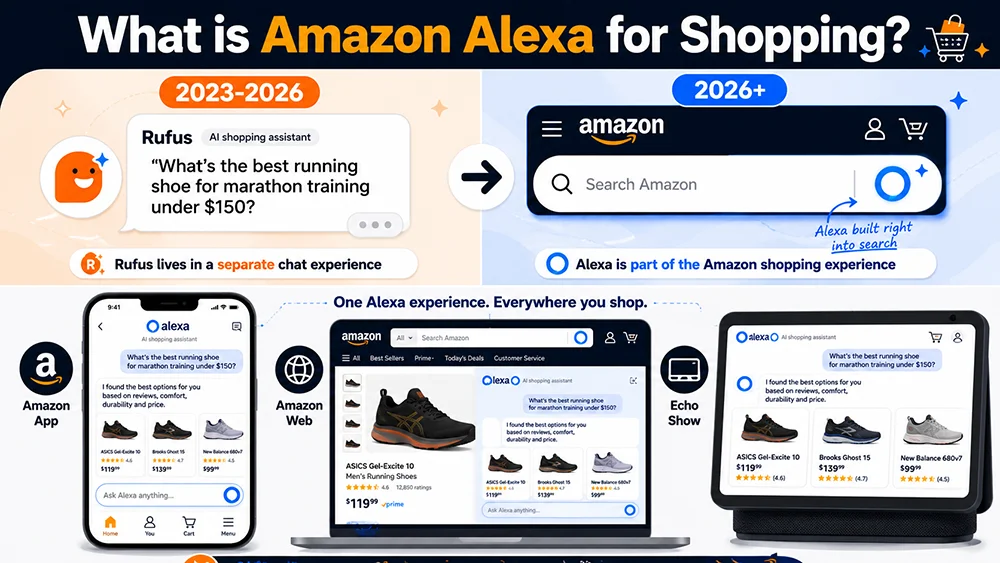
On May 13, 2026, Amazon made it official: Rufus is retired. Alexa for Shopping now lives inside the main search bar.
Seller communities erupted. “Is Rufus dead?” “Do my six months of AI optimization work still count?” “What exactly is Alexa for Shopping, anyway?”
This article answers those questions clearly. By the end, you’ll know exactly what Alexa for Shopping is, how it works, how it compares to Rufus, where it shows up, and — most importantly — what it means for your business as a seller.
The One-Sentence Definition
Amazon Alexa for Shopping is a purpose-built AI shopping assistant, now embedded directly in Amazon’s main search bar, that generates AI-powered product recommendations and summaries before users ever see the traditional product listing grid.
That last part is what makes this different from everything Amazon has done before. It’s not a sidebar tool. It’s not an optional feature users activate. It sits between the search bar and the results — the first thing every user sees after every search query.
Amazon’s own description: Alexa for Shopping combines Rufus’s product knowledge base with Alexa+’s long-term user memory and personalization layer, creating a “dedicated shopping AI” that operates across the Amazon App, website, and Echo Show devices.
In plain terms: the AI that used to be a side character became the main character.
Where Does Alexa for Shopping Actually Appear?
One of the most common misconceptions is that Alexa for Shopping is just the voice assistant on Echo devices. It’s much broader than that. It currently operates across three primary surfaces:
1. Amazon Mobile App
When a user opens the Amazon App and types a search query — or speaks one — Alexa for Shopping’s AI summary appears above the product grid. Users can interact with it conversationally (typing questions like “I need a bed frame for a small apartment that doesn’t need a box spring”) or use traditional keyword search. Either way, Alexa processes the input semantically and returns an AI-generated recommendation summary before displaying ranked results.
2. Amazon Website (Desktop)
The main search bar on amazon.com now integrates an Alexa for Shopping entry point. Users see an “Ask Alexa” prompt when they search, which initiates a conversational shopping flow. The AI summary appears at the top of the search results page — above all sponsored products and organic rankings.
3. Echo Show Screen Devices
Echo Show users can interact with Alexa for Shopping via voice or touchscreen, receiving visual product recommendation cards. This was the earliest surface for Alexa-powered shopping recommendations; it’s now unified with the App and web experience under a single AI model.
All three surfaces share the same underlying model and data pipeline. That’s the core architectural shift: one unified shopping AI across all Amazon touchpoints, rather than separate features with separate logic.
How Alexa for Shopping Actually Works
Understanding the mechanism matters more than knowing it exists. Here’s what happens, step by step, when a user searches on Amazon today:
Step 1: Input Processing
Alexa for Shopping accepts two forms of input: traditional keyword search (“queen bed frame no box spring”) and natural language queries (“I’m moving into a studio apartment and need a bed frame that doesn’t require a box spring and is easy to move”). Even for traditional keyword searches, Alexa processes the input semantically — it infers intent, context, and likely constraints — rather than just matching literal keywords.
Step 2: AI Response Generation (the “content” field)
Alexa generates a natural-language shopping advisory summary. This response typically:
- Explains the key selection criteria for the category
- Names specific brands or products it recommends
- Proposes follow-up questions to help the user narrow their choice
This summary appears at the top of the search results page — above every sponsored listing and every organic result. It is, in practical terms, the first piece of content every user reads after searching.
Step 3: Grouped Product Recommendations (the “products” field)
Below or alongside the summary, Alexa displays product recommendations organized into semantic category groups. Instead of a ranked list by relevance score, users see groups like “Best for Apartments,” “Heavy-Duty Options,” “Under $100,” or “Tool-Free Assembly.” Each group contains ASINs with Alexa-generated AI descriptions (the “describe” field) that explain why each product fits that category.
This is fundamentally different from keyword-ranked results. Alexa is curating, not just sorting.
Step 4: Follow-Up Questions (the “follow_up_questions” field)
Alexa concludes each response with 2–4 suggested follow-up questions — for example: “Does it need to work without a box spring?” or “What’s the maximum weight you need it to support?” These questions route users deeper into a conversational shopping flow.
For sellers and data teams: these follow-up questions are the single most valuable signal in the entire API response. They reveal exactly what Alexa considers the critical decision dimensions in your category — and therefore exactly what your listing needs to address clearly to have any chance of being recommended.
Alexa for Shopping vs. Rufus: The Actual Differences
The most frequent seller question after the announcement: do I need to start from scratch? The short answer is no — but understanding what actually changed is important.
| Dimension | Rufus (2023–2026) | Alexa for Shopping (2026+) |
|---|---|---|
| Location | Sidebar panel / bottom overlay on search results page | Embedded in main search bar; summary above all results |
| Activation | User had to actively click to open Rufus | Triggers automatically on every search |
| Data sources | Product catalog + review data | Product catalog + Alexa+ user preference history + Echo device data |
| User reach | Subset of users (those who chose to interact) | All users by default |
| Traffic impact | Limited (Rufus was a separate module) | Significant (AI summary occupies top-of-page prime real estate) |
| Ad support | Early testing only | Prompts AI ad placements now live |
| Cross-device | App and web only | App + web + Echo Show unified |
The Most Important Clarification: Does Your Rufus Work Still Count?
Yes. Completely. Amazon was explicit in their announcement: Rufus’s underlying technology was absorbed into Alexa for Shopping. It was not discarded. The optimization work you did for Rufus — structured listings, clear audience signals, complete Q&A sections, scene-based copy — remains valid and relevant.
What changed is scale. Rufus reached the users who chose to engage with it. Alexa for Shopping reaches every user, every search, by default. Your listing now needs to satisfy both the traditional keyword algorithm and Alexa’s semantic recommendation logic. The overlap is large, but the AI layer adds specific requirements around clarity and differentiation that keyword-only optimization doesn’t address.
A useful analogy: if Rufus was an optional product consultant you could choose to consult in a store, Alexa for Shopping is the server who greets every customer at the door and gives them a curated recommendation before they even pick up the menu. You still need a great menu — but now the server’s description of your dish matters as much as the dish itself.
What Does This Mean for Seller Traffic, Practically?
The data tells a nuanced story. YouGov research from January 2026 shows roughly 14% of US consumers have actively used an AI shopping assistant, and only 14% would let AI automatically place orders on their behalf. The transition is real but gradual.
At the same time: Alexa for Shopping’s monthly active users grew over 115% year-over-year in 2025. Amazon helped 300M+ customers through AI interactions in that year alone. The trend is clear even if current penetration is modest.
The seller implication breaks down by time horizon:
- Near-term (2026): Alexa’s AI summary is intercepting a growing percentage of search sessions before users reach your listing. The impact is real but not yet dominant for most categories.
- Medium-term (2027–2028): As Alexa adoption compounds and Amazon continues improving the experience, AI-mediated traffic will become a primary rather than supplementary channel.
- Long-term: AI recommendation coverage rate will likely become a core operating metric alongside ACOS and conversion rate.
Sellers who build their data infrastructure and optimization methodology now will enter the high-competition phase with established advantages. Sellers who wait until AI-mediated traffic hits 30% of their category before responding will be playing catch-up against brands that have a year’s head start.
Three Things Sellers Can Do Right Now
1. Find Out What Alexa Is Actually Saying About Your Category
You can’t optimize what you can’t see. The Pangolinfo Alexa API is currently the only third-party interface that returns structured data from Alexa for Shopping’s AI-generated content layers. Query your target keywords and you’ll receive:
- The full text of Alexa’s AI summary (the
contentfield) - Grouped product recommendations with AI-generated descriptions (the
productsfield) - The follow-up questions Alexa asks users (the
follow_up_questionsfield — your most actionable optimization signal) - Competitor ASIN visibility data
This data is what separates sellers who are guessing about AI from sellers who are making decisions based on what Alexa is actually saying in their category.
2. Run an AI Readability Audit on Your Listings
Pangolinfo’s Listing Optimization Skill combines Alexa API data with your current listing text to identify exactly where your AI readability is weakest — whether that’s unclear audience targeting, thin use-case specificity, or differentiation claims that are too generic for AI to parse. It produces specific rewrite recommendations, not vague suggestions.
3. Set Up Ongoing Monitoring
Alexa’s recommendation results are not static. They update as user behavior data evolves, as competitors change their listings, and as Alexa’s model continues developing. A one-time audit is useful; a weekly monitoring routine is what actually builds a compounding data advantage. The sellers who will win in the AI era are those who make Alexa data a standard part of their operational rhythm, not a one-off exercise.
FAQ
Is Alexa for Shopping free for users?
Yes, completely free. It’s a standard part of the Amazon search experience. Sellers cannot pay to force their products into Alexa’s organic recommendation summary — but they can purchase placements in the new Prompts AI ad format, which appears within Alexa’s conversational flow.
Which Amazon marketplaces support Alexa for Shopping?
The US marketplace (amazon.com) has full live rollout. UK, Germany, Japan, and additional marketplaces are in active expansion phases. Check Amazon’s official announcements for current market-specific availability.
Do small sellers need to worry about this?
Yes, but proportionally. Small sellers don’t need to immediately build API infrastructure. The practical starting point is using Pangolinfo’s Listing Optimization Skill for an AI readability audit — low cost, high impact, no engineering overhead. As AI-mediated traffic grows in your category, scaling into full API monitoring becomes the logical next step.
Can I see what Alexa says about my specific ASIN?
Yes. Using the Pangolinfo Alexa API, you can query the keywords most relevant to your product and check whether your ASIN appears in the grouped product recommendations, what category group Alexa places you in, and what language Alexa uses to describe your product in the describe field. That description is often the most revealing signal — it tells you exactly how the AI characterizes your product to potential buyers.
The Bottom Line
Alexa for Shopping isn’t a mystery technology. It’s Amazon taking two products it already had — Rufus’s product intelligence and Alexa+’s personalization capability — merging them, and placing the result at the very top of every search. For users, shopping gets smarter. For sellers, there’s now an AI layer between the search bar and your listing that forms opinions about your product before the user scrolls anywhere near it.
The sellers who will come out ahead are the ones who decide to make that AI layer visible — to actually see what Alexa is saying, measure it, and optimize for it — rather than treating it as an unknowable black box.
Pangolinfo’s Alexa API makes that AI layer visible. The data is there. The question is whether you’re reading it.
→ Next step: Amazon Alexa API Complete Guide — World’s First Practical Playbook
→ Ready to optimize? Amazon AEO Optimization Guide: How to Get Your Listing Recommended by Alexa
Register at the Pangolinfo Console for free API credits and see what Alexa is saying about your category right now. Full field reference: Alexa API Official Documentation.