Amazon Alexa vs Rufus differences
Every time Amazon makes a major product change, sellers go through the same cycle: shock on day one, anxiety on day two, searching for answers on day three.
Rufus retiring and Alexa for Shopping taking over the search bar was no different. But amid all the discussion about “how do we respond,” a more fundamental question hasn’t been answered clearly: what actually is different between Alexa and Rufus?
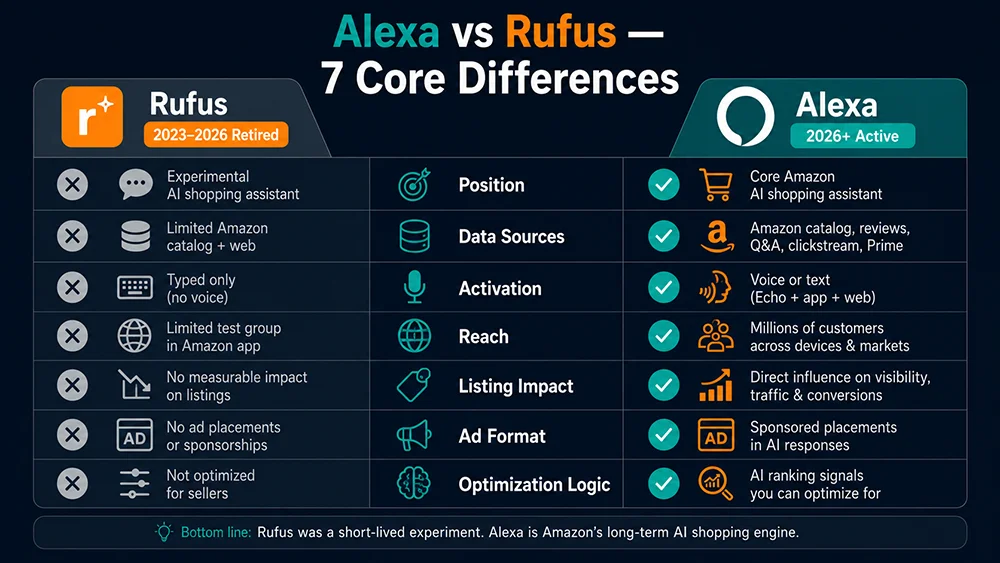
This article breaks down 7 core differences — clearly, with specific seller implications for each. By the end, you’ll know exactly what optimization work carries over, what needs to be built from scratch, and where the real competitive advantage in the Alexa era comes from.
The One-Sentence Summary First
If you had to summarize the Alexa vs Rufus difference in one sentence:
Rufus was an optional research tool users could choose to engage; Alexa for Shopping is a mandatory default filter layer built into the search process itself.
Rufus waited in a sidebar for users to click on it. Users who wanted it used it; users who didn’t went straight to the product grid. Alexa for Shopping doesn’t give users that choice — every search, the AI summary appears above the product grid automatically, and every user sees it.
That placement difference is the root of every other difference that follows.
Difference 1: Core Positioning — Research Tool vs Default Search Filter
Rufus was designed as a “shopping research companion” — helping users do more thorough comparison and evaluation before committing to a purchase. Amazon placed it alongside search results as supplementary information to reduce decision friction.
Alexa for Shopping is positioned as a “purchase decision engine” — it doesn’t help users research, it directly delivers recommendations and routes users toward specific purchasing paths. Amazon embedded it in the main search bar, making it part of the search experience itself rather than an add-on feature.
This positioning difference has a direct implication for listings: to succeed with Rufus, your listing needed to “hold up under research.” To succeed with Alexa, your listing needs to “get recommended in the first place.” Both require semantic clarity, but Alexa places considerably higher demands on clear, immediate differentiation.
Difference 2: Data Sources — Product Catalog vs User Preference History
Rufus’s recommendations drew primarily from: the Amazon product catalog (title, description, bullets) + review data + basic search history.
Alexa for Shopping layers in additional signals:
- Alexa+ user preference records: what categories and products a user has shown interest in historically, what questions they’ve asked
- Purchase history data: a user’s past purchases and repeat-buy behavior
- Echo device data: household context signals from smart home devices (household size, home category preferences, routine patterns)
The seller implication: Alexa’s recommendations carry stronger personalization. The same keyword query from two different users may produce meaningfully different Alexa recommendations. This is why monitoring Alexa data across multiple keywords and user contexts matters — a single query gives you one data point, not the full picture of how Alexa represents your category.
Difference 3: Display Placement — Sidebar Overlay vs Top-of-Results Default
This is the most immediate, most impactful difference — and the clearest to explain.
| Rufus | Alexa for Shopping | |
|---|---|---|
| Where it appears | Search results page sidebar or bottom overlay; requires user to click to expand | Embedded in main search bar; AI summary auto-displays above all search results |
| Can users skip it? | Yes — most users never clicked Rufus | Not directly — the AI summary is the first content element on the results page |
| User coverage | Minority (active interaction users only) | All users (triggered by default on every search) |
One important clarification: Alexa’s summary doesn’t replace the product grid — it precedes it. Users who see Alexa’s recommendations can still scroll down to the traditional ranked listing. But Alexa has already formed a first impression in the user’s mind. If your product isn’t in Alexa’s recommendation, you’ve lost the competition for that critical first-impression moment — before the user ever reaches your listing.
Difference 4: Impact on Listing Keywords
In the Rufus era, the core listing optimization logic was: maximize keyword coverage so Rufus could match your product when users asked relevant questions. Keyword breadth and density were the primary metrics.
In the Alexa era, that logic isn’t replaced — but it gains new requirements:
- Semantic clarity over keyword density: Alexa is driven by a large language model that understands meaning, not keyword matching. A listing written with clear semantic intent performs better than one that optimizes for keyword density.
- Scene-based copy becomes a primary competitive signal: Alexa’s grouped product recommendations (e.g., “Best for Apartments,” “Heavy-Duty Options”) are derived from the scene-based language in your listing. Without clear scene descriptions, Alexa can’t place your product in the right recommendation group for the right user.
- Follow-up questions are the new keyword intelligence: The
follow_up_questionsfield returned by the Alexa API reveals exactly which decision dimensions Alexa considers critical in your category. These are the dimensions your listing must address clearly and specifically.
Difference 5: Impact on Advertising Traffic
Rufus had limited impact on advertising — it operated as a separate conversational module that ran largely parallel to the traditional Sponsored Products ecosystem, with minimal direct interference.
Alexa for Shopping has structural implications for advertising:
Impact One: Traditional SP Ad Placements Shift Down the Page
Alexa’s AI summary and grouped product recommendations now occupy the prime top-of-page real estate that traditional Sponsored Products ads previously competed for. SP ads remain active, but their first-screen visibility is reduced as Alexa’s content occupies the initial scroll position. Advertisers need to reassess their SP ad effective impression quality metrics.
Impact Two: Prompts AI Ad Format Now Live
Amazon launched the new Prompts ad format, allowing advertisers to appear within Alexa’s conversational shopping flow. This is a fundamentally different channel from keyword-based PPC — it’s closer to a combination of content marketing and conversational advertising, where placement is tied to Alexa’s recommendation dialogue rather than search keyword bids.
Pangolinfo’s Ad Monitoring Skill can track competitor Prompts ad activity — including keywords targeted, ad copy patterns, placement frequency, and competitive intensity — to support both defensive and offensive ad strategy in this new format.
Difference 6: AI Recommendation Logic — Keyword Matching vs Semantic Intent Matching
This is the most fundamental technical difference between Rufus and Alexa — and the one with the deepest implications for how sellers should think about optimization.
Rufus’s recommendation logic was closer to “enhanced keyword search” — when a user asked something, Rufus found keyword-relevant products from the catalog and generated a response using product data and review signals. Keywords remained the primary matching signal.
Alexa for Shopping’s recommendation logic is “intent-driven semantic matching” — Alexa first constructs a full understanding of the user’s actual need (not just the keywords, but the implied scene, constraints, budget signals, and usage context), then searches the product catalog for products that best match that full-context need profile. Keywords are just the input trigger; user intent is the real matching standard.
A concrete illustration:
| User Input | Rufus Approach | Alexa Approach |
|---|---|---|
| “bed frame queen easy assembly” | Matches products containing these keywords, ranks by relevance score and sales velocity | Interprets the “easy assembly” signal as likely indicating a single/renter user context; prioritizes products by assembly time, tool requirements, and suitability for frequent moves — not just keyword presence |
The practical consequence: your listing doesn’t just need to “contain the keywords.” It needs to “describe the use case.” Alexa reads for meaning, not for words.
Difference 7: Seller Visibility — Black Box vs Measurable Data
This difference is rarely discussed but critically important for operations teams.
In the Rufus era, sellers had almost no tools to systematically monitor “what Rufus is recommending.” Rufus was conversational and non-deterministic — each interaction produced different outputs — and no third-party data interfaces existed. Most sellers could only do manual spot-checking, which was too inefficient to be actionable.
In the Alexa era, Pangolinfo provides the industry’s first structured API for collecting Alexa for Shopping search data — the Pangolinfo Alexa API. Through this interface, sellers can:
- Systematically query any keyword’s Alexa recommendation results
- Monitor their brand’s visibility within Alexa’s AI summaries
- Track competitor ASIN presence in Alexa recommendation groups
- Extract
follow_up_questionsas AEO optimization signals - Build periodic monitoring reports to quantify AI-era brand competitiveness
The shift from “invisible” to “measurable” is the most important infrastructure upgrade the Alexa era offers sellers compared to the Rufus era — but only for those who build that infrastructure.
All 7 Differences: Summary Table
| Dimension | Rufus (2023–2026) | Alexa for Shopping (2026+) | Seller Action Direction |
|---|---|---|---|
| 1. Positioning | Optional research companion | Default search filter layer | Shift goal from “hold up under research” to “get recommended first” |
| 2. Data Sources | Product catalog + reviews | Catalog + user preference history + Echo device data | Monitor multiple keywords; account for personalization variance |
| 3. Placement | Sidebar, user-initiated | Top of search results, automatic | AI recommendation coverage becomes a parallel KPI to keyword rank |
| 4. Listing Impact | Keyword coverage primary | Semantic clarity + scene-based copy primary | Audit listing structure with AEO lens; enrich scene descriptions |
| 5. Ad Impact | Parallel to SP; minimal interference | SP positions shift down; Prompts AI ad format active | Reassess SP efficiency; begin Prompts ad competitive monitoring |
| 6. AI Logic | Keyword matching | Intent-driven semantic matching | Replace/supplement keyword density with scene-based differentiation copy |
| 7. Seller Visibility | No systematic monitoring possible | Structured data via Alexa API | Build periodic Alexa data monitoring into operational rhythm |
What to Keep, What to Build
✅ Carry Forward Directly
- Semantic listing structure (audience + use case + differentiation)
- Complete Q&A sections addressing real purchase decision questions
- A+ Content comparison and scene-based modules
- User-intent-driven keyword research methodology
🆕 Build from Here
- Alexa data monitoring system: use the Pangolinfo Alexa API to collect periodic Alexa recommendation data for your core keywords
- AEO optimization workflow: use
follow_up_questionssignals to close semantic gaps in your listings - Prompts ad landscape awareness: use the Ad Monitoring Skill to understand competitor deployment in the new ad format before it becomes a crowded channel
- Brand AI visibility metric: add “frequency of appearance in Alexa summary” to your operational KPI dashboard
The Bottom Line
Rufus to Alexa for Shopping isn’t just a name change — it’s a change in the competitive arena. Rufus was a tool; some users engaged with it, others didn’t. Alexa is a gatekeeper that every customer passes through on every search.
The good news: your Rufus optimization investment is not obsolete. The difference is that Alexa demands greater rigor on semantic clarity, and now requires a data monitoring system that simply didn’t exist in the Rufus era — one that lets you see what the AI is actually saying about your products, rather than guessing.
That monitoring system starts with the Pangolinfo Alexa API.
→ Full strategy: Amazon Alexa API Complete Guide — World’s First Practical Playbook
→ Optimization mechanics: Amazon AEO Optimization Guide: Getting Your Listing Recommended by Alexa (Article 03 — update link when published)
→ Foundation reading: What Is Amazon Alexa for Shopping?
See what Alexa is saying in your category right now. Register at the Pangolinfo Console for free API credits. Full field documentation: Alexa API Documentation.