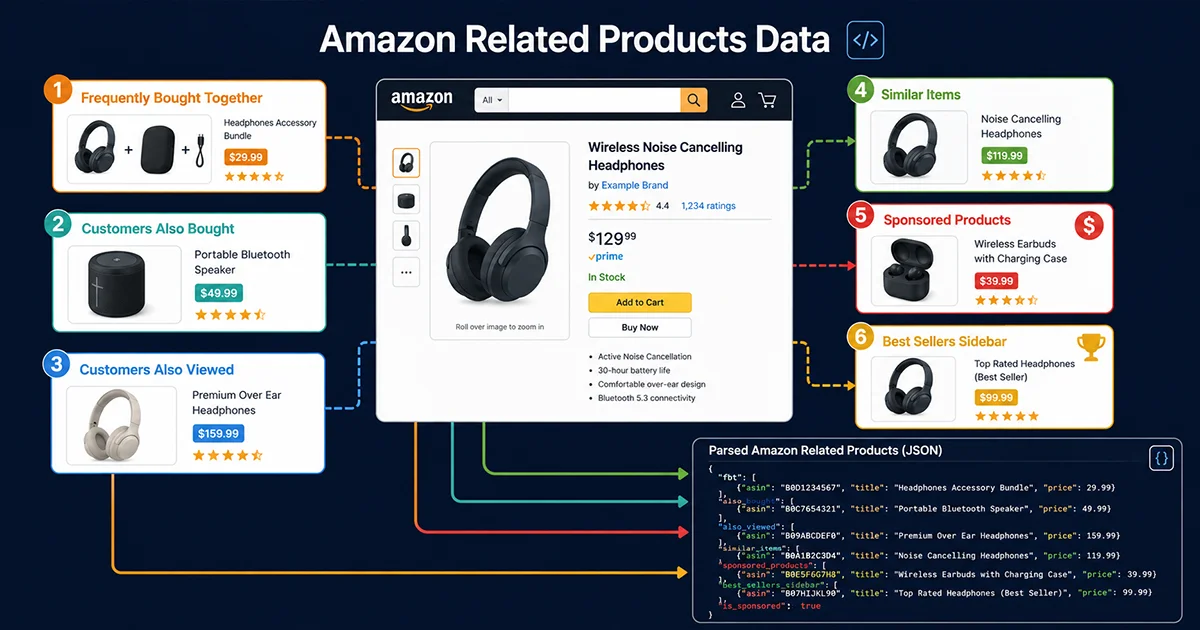
Amazon related products data extraction gives you something competitor ASINs, keyword tools, and BSR charts don’t: revealed behavioral connections between products. When Amazon’s algorithms surface a product in the “Frequently Bought Together” section, it’s because thousands of real customers bought those two items together. When something appears in “Customers Also Viewed,” it means Amazon’s recommendation engine treats it as a direct substitute in the decision process. That’s signal that no keyword tool manufactures.
This guide breaks down all six related product modules on Amazon product pages — their HTML structure, render behavior, scraping complexity, and the Python code to extract them. Skip to the section that applies to your use case.
The Six Amazon Related Products Modules: What They Are and Why They Differ
Amazon product pages don’t have one “related products” section — they have six distinct modules, each driven by different algorithmic signals and carrying different competitive intelligence value. Understanding this distinction before writing any scraping code saves significant debugging time later.
Module 1: Frequently Bought Together (FBT)
FBT is the highest-signal module for product relationship analysis. It surfaces only when a statistically significant number of customers have purchased both items in the same order — Amazon doesn’t show FBT associations for weak or spurious co-purchases. This makes FBT data valuable for two use cases: identifying genuine “bundle” opportunities (products that customers naturally pair together), and mapping direct competitive relationships (if your ASIN appears in a competitor’s FBT, you’re in the same purchase consideration set).
FBT shows 2-4 associated ASINs. HTML container: #sims-fbt or #frequently-bought-together_feature_div. Server-rendered — available in static HTML. Easiest of the six modules to extract.
Module 2: Customers Who Bought This Also Bought
Purchase-based collaborative filtering. Shows 15-20 ASINs in a carousel format. The behavioral signal is strong — these are actual purchase completions. Container IDs: #p_dp_sims_btf_1, #similarities_feature_div. Server-rendered but carousel-paginated: static HTML yields only the first 4-6 items. Full extraction requires carousel pagination or XHR interception.
Module 3: Customers Who Viewed This Also Viewed
Browse-based collaborative filtering. More inclusive than Also Bought — users browse more products than they buy, so this module captures a wider substitution set. Useful for mapping the full competitive landscape a customer considers before purchase. Container: #p_dp_sims_btf_2, #session-sims-feature-div. Same carousel structure and extraction complexity as Also Bought.
Module 4: Similar Items to Consider
Category-level similarity recommendations. Amazon’s algorithm for this leans more on product attribute matching (category, price range, feature overlap) than behavioral signals. Useful for finding direct feature competitors. Mixed render: partially server-rendered, partially JavaScript-injected depending on the category template.
Module 5: Sponsored Products (Paid Placements)
Sponsored Products appear interspersed within recommendation carousels and are identified by the “Sponsored” label. Identifying which ASINs are paid placements vs. organic recommendations is critical for competitive ad intelligence — it tells you which sellers are actively bidding on competitor product pages, and how much of the “related” real estate is monetized vs. algorithmic. JavaScript-rendered, highest extraction complexity.
Module 6: Best Sellers in Category Sidebar
The category BSR sidebar appears on some product pages, showing the top 3-5 sellers in the relevant category. Server-rendered. Container: #zg-right-col. Lower extraction complexity, useful for quick category leader identification without navigating to the full BSR page.
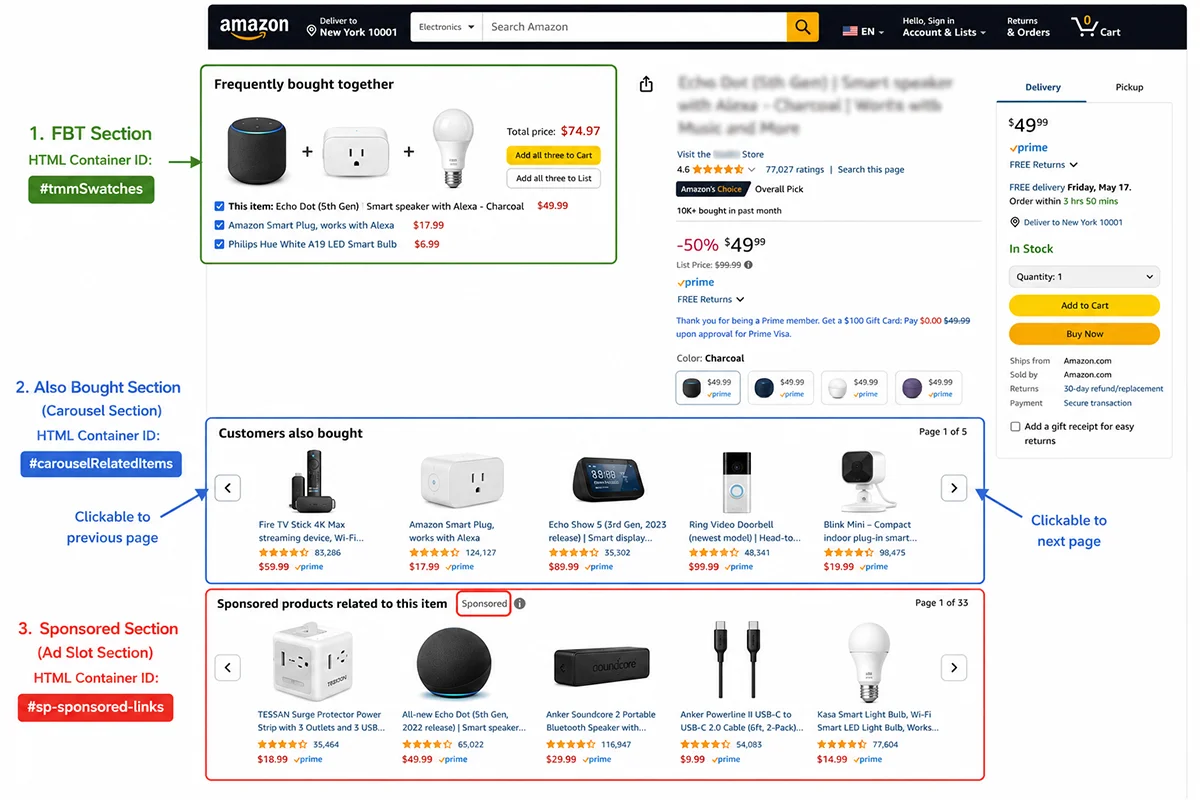
Amazon Related Products Data: Extraction Complexity by Module
| Module | Render Method | Default Visible ASINs | Scraping Complexity | Intelligence Value |
|---|---|---|---|---|
| FBT | Server-rendered | 2–4 | Low ★☆☆ | Very High (co-purchase signal) |
| Also Bought | Server + carousel | 4–6 (first screen) | Medium ★★☆ | High (purchase affinity) |
| Also Viewed | Server + carousel | 4–6 (first screen) | Medium ★★☆ | High (browse competitors) |
| Similar Items | Mixed (server/JS) | 4–8 | Medium ★★☆ | Medium (feature peers) |
| Sponsored Products | JavaScript-injected | 4–8 | High ★★★ | High (competitive ad map) |
| BSR Sidebar | Server-rendered | 3–5 | Low ★☆☆ | Medium (category leaders) |
Python Code: Extracting Amazon Related Products Data
FBT Extraction (Server-Rendered, Static HTML)
from bs4 import BeautifulSoup
from dataclasses import dataclass, field
from typing import Optional
import re

@dataclass
class RelatedProduct:
    asin: str
    title: Optional[str] = None
    price: Optional[str] = None
    rating: Optional[float] = None
    review_count: Optional[int] = None
    image_url: Optional[str] = None
    is_sponsored: bool = False
    module: str = ""


def extract_asin_from_element(el) -> Optional[str]:
    """
    Extract ASIN from an HTML element.
    Tries data-asin attribute first, then /dp/ASIN pattern in href.
    """
    asin = el.get("data-asin", "").strip()
    if asin and len(asin) == 10:
        return asin
    link = el.find("a", href=True)
    if link:
        match = re.search(r"/dp/([A-Z0-9]{10})", link["href"])
        if match:
            return match.group(1)
    return None


def extract_product_card(card_el, module_name: str) -> Optional[RelatedProduct]:
    """Extract structured data from a single product card element."""
    asin = extract_asin_from_element(card_el)
    if not asin:
        return None

    product = RelatedProduct(asin=asin, module=module_name)

    # Title — multiple selector fallbacks
    title_el = (
        card_el.select_one(".a-size-base-plus") or
        card_el.select_one(".a-size-medium") or
        card_el.select_one(".a-truncate-cut")
    )
    if title_el:
        product.title = title_el.get_text(strip=True)[:200]

    # Price
    price_whole = card_el.select_one(".a-price-whole")
    price_frac = card_el.select_one(".a-price-fraction")
    if price_whole:
        whole = price_whole.get_text(strip=True).replace(",", "")
        frac = price_frac.get_text(strip=True) if price_frac else "00"
        product.price = f"${whole}.{frac}"
    else:
        offscreen = card_el.select_one(".a-price .a-offscreen")
        if offscreen:
            product.price = offscreen.get_text(strip=True)

    # Rating
    rating_el = card_el.select_one("[aria-label*='out of 5 stars']")
    if rating_el:
        match = re.search(r"([\d.]+)\s+out of 5", rating_el.get("aria-label", ""))
        if match:
            try:
                product.rating = float(match.group(1))
            except ValueError:
                pass

    # Review count
    review_el = (
        card_el.select_one("[aria-label$='ratings']") or
        card_el.select_one("[aria-label$='reviews']")
    )
    if review_el:
        match = re.search(r"([\d,]+)", review_el.get("aria-label", ""))
        if match:
            try:
                product.review_count = int(match.group(1).replace(",", ""))
            except ValueError:
                pass

    # Image
    img = card_el.select_one("img")
    if img:
        product.image_url = img.get("src") or img.get("data-src")

    return product


def extract_fbt(html: str) -> list[RelatedProduct]:
    """
    Extract Frequently Bought Together data.
    FBT is server-rendered — works on static HTML with no browser required.
    Typical yield: 2-4 ASINs.
    """
    soup = BeautifulSoup(html, "lxml")
    results = []
    seen_asins = set()

    container = (
        soup.find(id="sims-fbt") or
        soup.find(id="frequently-bought-together_feature_div")
    )
    if not container:
        return results

    for card in container.find_all(attrs={"data-asin": True}):
        asin = card.get("data-asin", "").strip()
        if not asin or asin in seen_asins or len(asin) != 10:
            continue
        seen_asins.add(asin)
        product = extract_product_card(card, module_name="fbt")
        if product:
            results.append(product)

    return results
Carousel Modules: Handling Also Bought and Also Viewed Pagination
def extract_carousel_module(
    html: str,
    container_ids: list[str],
    module_name: str
) -> list[RelatedProduct]:
    """
    Extract from carousel-style related product modules.

    Static HTML limitation: only 4-6 ASINs visible on first render.
    This function extracts all pre-loaded carousel items (typically 12-16),
    which is the maximum from static HTML without simulating carousel navigation.

    For the complete 15-20 ASIN list, use get_full_carousel_asins() with Playwright.
    """
    soup = BeautifulSoup(html, "lxml")
    results = []
    seen_asins = set()

    container = None
    for cid in container_ids:
        container = soup.find(id=cid)
        if container:
            break

    if not container:
        return results

    # Select all carousel cards, including off-screen pre-loaded ones
    for card in container.select(".a-carousel-card, [data-asin]"):
        asin = card.get("data-asin", "") or extract_asin_from_element(card)
        if not asin or str(asin) in seen_asins or len(str(asin)) != 10:
            continue
        seen_asins.add(str(asin))
        product = extract_product_card(card, module_name=module_name)
        if product:
            results.append(product)

    return results


def extract_also_bought(html: str) -> list[RelatedProduct]:
    return extract_carousel_module(html, [
        "p_dp_sims_btf_1", "similarities_feature_div", "sp-recommendations-feature-div"
    ], "also_bought")


def extract_also_viewed(html: str) -> list[RelatedProduct]:
    return extract_carousel_module(html, [
        "p_dp_sims_btf_2", "session-sims-feature-div", "customers-also-viewed_feature_div"
    ], "also_viewed")


def is_sponsored_product(card_el) -> bool:
    """
    Detect whether a related product card is a Sponsored placement.
    Uses four independent HTML signals for high-confidence classification.
    """
    if card_el.select_one(".s-sponsored-label-info-icon, .puis-sponsored-label-info-icon"):
        return True
    if "sponsored" in card_el.get("data-component-type", "").lower():
        return True
    if "sponsored" in card_el.get_text()[:200].lower():
        return True
    for link in card_el.select("a[href]"):
        if "amazon-adsystem" in link.get("href", "") or "aax-us-pdp" in link.get("href", ""):
            return True
    return False
When to Use a Managed API Instead of a Custom Scraper
The custom scraper code above handles static HTML extraction well. The gaps appear in three situations that all production Amazon data pipelines eventually hit:
Scale. Monitoring 1,000+ ASINs for related product changes requires rotating residential proxies, browser automation, and active maintenance when Amazon updates its Cloudflare rules (every 2-4 weeks). The infrastructure cost of building and maintaining this typically exceeds the cost of a managed API past roughly 500 ASINs/day.
Completeness. Carousel pagination, JavaScript-rendered Sponsored placements, and dynamic module loading mean a static HTML scraper can’t reliably capture all six related product modules in a single pass. A managed API handles browser rendering and carousel pagination internally.
Stability. Amazon updates its related product module HTML structure approximately quarterly. Each update can silently break field extraction for 15-30% of ASINs. Pangolinfo Amazon Scraper API maintains parsing templates server-side, so breaking changes don’t propagate to your integration. Full documentation at docs.pangolinfo.com.
Business Applications: What to Do with Amazon Related Products Data
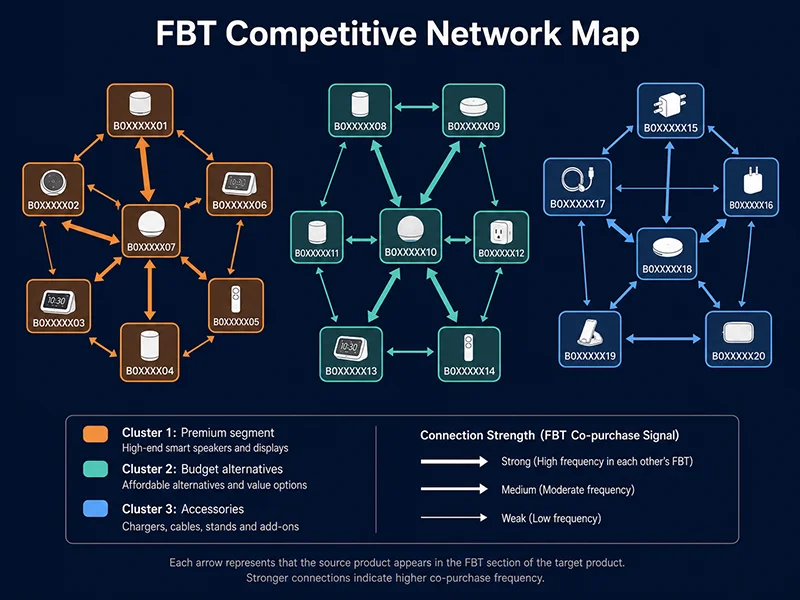
Application 1: Competitive Network Mapping
Systematically collecting FBT and Also Bought data for a category’s top 50 ASINs reveals which products are algorithmically clustered together — both in customer purchase behavior and in Amazon’s recommendation logic. Visualized as a network graph, this shows you the structural “neighborhoods” of your category: which products are deeply entangled in customer decision-making, and which are genuinely differentiated.
Application 2: Ad Targeting Research
Amazon’s Sponsored Display and Sponsored Products campaigns support ASIN targeting — placing ads directly on competitor product pages. The Also Viewed data from a set of competitors gives you a populated candidate list for product targeting. And tracking which ASINs appear as Sponsored in competitor related sections tells you who else is actively bidding on those same pages.
Application 3: AI Agent Competitive Research Workflows
For AI agent pipelines that need real-time competitive intelligence, the Pangolinfo Amazon Scraper Skill exposes related products data via MCP protocol. An agent can request all six modules for a target ASIN in a single tool call, enabling automated workflows like: “fetch all related ASINs → rank by review velocity → flag new entrants → generate competitive summary.” No HTML parsing required in the agent layer.
Frequently Asked Questions
What are the six Amazon related products modules?
Frequently Bought Together (co-purchase signal, 2-4 ASINs), Customers Also Bought (purchase collaborative filtering, 15-20 ASINs), Customers Also Viewed (browse collaborative filtering), Similar Items (category alternatives), Sponsored Products (paid placements interspersed in recommendations), and Best Sellers sidebar (category rank leaders). Each has distinct HTML structure and extraction complexity.
What HTML selector targets Amazon FBT data?
#sims-fbt or #frequently-bought-together_feature_div. FBT is server-rendered; available in static HTML. Extract data-asin attributes from child elements to get the associated ASINs. No browser required.
Why does static HTML only return 4-6 ASINs from Also Bought carousels?
Carousels render only the first “page” of items in the initial HTML — typically 4-6 ASINs. The remaining 10-14 items load as users page through the carousel. To get the full list, simulate carousel navigation with Playwright or intercept the XHR requests triggered by carousel navigation.
How do I identify Sponsored Products in Amazon related sections?
Check for .s-sponsored-label-info-icon, data-component-type containing “sponsored”, text “Sponsored” appearing within the card’s first 200 characters, or impression URLs containing “amazon-adsystem”. Record is_sponsored: bool for each extracted ASIN.
When should I use Pangolinfo API instead of a custom scraper?
When monitoring 500+ ASINs (proxy infrastructure cost exceeds API cost), when you need all six modules reliably (including JS-rendered Sponsored placements), when your pipeline can’t tolerate quarterly DOM update breakage, or when feeding data into an AI agent workflow that requires high reliability.
Summary
Amazon related products data extraction covers six distinct modules with different HTML structures, render methods, and extraction complexity levels. FBT and Best Sellers sidebar are server-rendered and straightforward. Also Bought and Also Viewed require carousel pagination for complete ASIN lists. Sponsored Products require JavaScript rendering. All six carry different intelligence value: FBT for bundle opportunities, Also Viewed for competitive mapping, Sponsored for ad strategy analysis.
The Python code in this guide handles static-HTML extraction for most modules. For production-scale pipelines covering multiple modules reliably: Pangolinfo Amazon Scraper API → documentation.