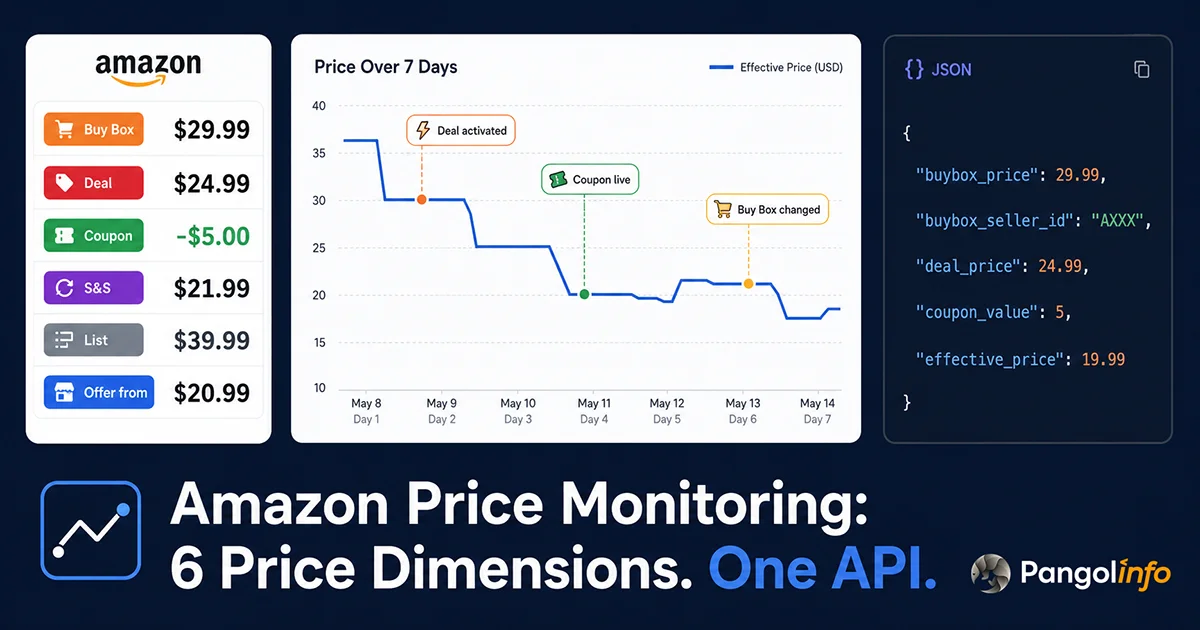
The right Amazon price monitoring tool doesn’t just tell you when a competitor lowered their Buy Box price — it captures coupon discounts, Lightning Deal activations, and Buy Box ownership changes in real time, because these are the price signals that actually move purchase decisions.
The Problem with “Amazon Price Monitoring”: Most Tools Solve the Wrong Version of It
Amazon price monitoring means completely different things to different people. A consumer wants to know “alert me when this item drops below $25.” A seller wants to know “which of my top 20 competitors changed their pricing strategy this week, and by how much?” A data team wants “continuous price snapshots for 3,000 ASINs, structured for time-series analysis.”
These are three different engineering problems. The consumer use case is solved. The seller and data team use cases — at any meaningful scale and completeness — largely aren’t, at least not by the tools that most people default to.
This guide is written for sellers and technical teams who need to systematically track competitor pricing dynamics and feed that data into decision systems (manual or automated). If you just need a personal price drop alert, install Keepa and stop reading.
Four Real Seller Scenarios Where Price Monitoring Matters
Buy Box defense. The Buy Box algorithm weights pricing competitiveness heavily. When a competitor undercuts you and takes the Buy Box, your conversion rate drops immediately. Without real-time monitoring, you might not discover the loss for hours — on a high-volume ASIN, that’s real revenue gone.
Competitor pricing strategy research. In a category with 20 competing sellers, who drops prices on weekends? Who inflates their list price two weeks before Prime Day to manufacture a 40% discount? Whose pricing fingerprint looks like they’re running an automated repricer (frequent small-magnitude changes)? These patterns only emerge from historical price data collected at sufficient frequency.
Promotional activity detection. Lightning Deals, Best Deals, coupons, Prime Exclusive Discounts — Amazon’s promotional stack is complex, and each layer changes the effective price consumers see. Tracking these activations across competitors is part of operational competitive intelligence.
AI agent data supply. An increasing number of seller teams are running AI agents for pricing decisions. Those agents need real-time, structured competitor price data as input — which means the data source needs an API, low latency, and high reliability.
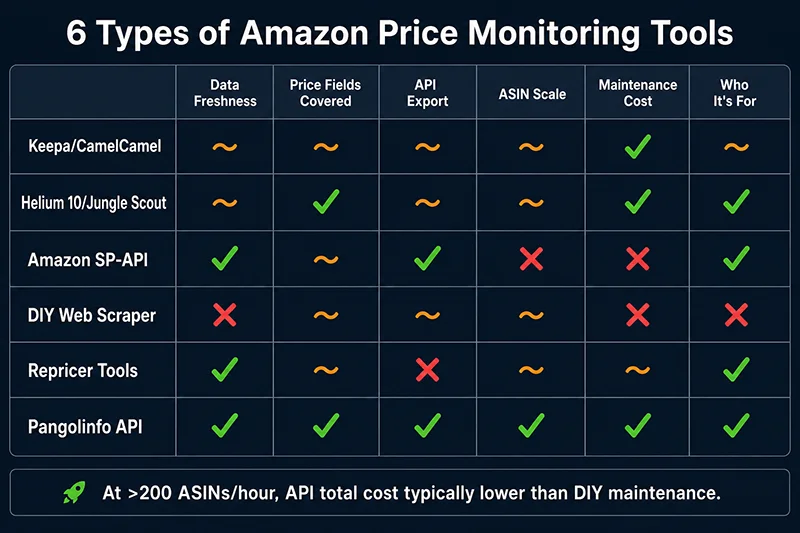
Six Types of Amazon Price Monitoring Tools: How They Work and Where They Break
Type 1: Consumer Browser Extensions (CamelCamelCamel, Honey, Keepa)
These tools serve shoppers, not sellers. They work by crowdsourcing price data from user browsing sessions, supplemented by periodic direct scraping of popular ASINs. Keepa has over a decade of price history for millions of products — genuinely impressive for historical research.
What they do well: Long historical records, good visualization, free or low-cost, cover Amazon-fulfilled and third-party prices on a basic level.
Where they fail for sellers: Update frequency is unpredictable (depends on user traffic to that ASIN — cold products might update once in days). No API for bulk monitoring (Keepa’s paid API exists but is expensive and rate-limited). Data fields are sparse: typically only the main buy price, not coupons, deals, or Subscribe & Save. No way to configure “monitor these 500 ASINs every hour.”
Type 2: Seller SaaS Platforms (Helium 10, Jungle Scout, Sellerboard)
These tools are built around seller operations management. Price tracking is a feature within their product research or competitor analysis modules.
How they work: Combine Amazon SP-API (for your own ASINs) and internal scrapers (for competitor data), typically refreshing on a daily cycle.
Where they fail for sellers with real monitoring needs: Daily update frequency can’t catch intraday Buy Box price wars. Raw data isn’t exportable via API — you get charts, not data. ASIN monitoring caps require tier upgrades. Data definitions vary across platforms, making cross-platform analysis unreliable.
Type 3: Amazon SP-API (Pricing Endpoints)
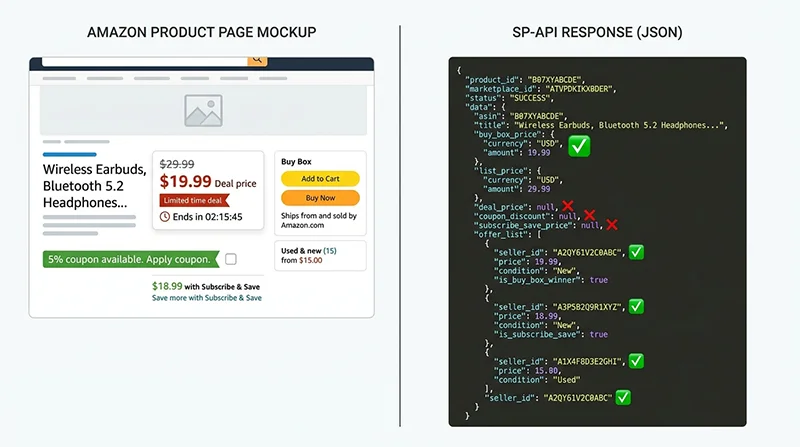
Amazon’s Selling Partner API includes GetPricing, GetCompetitivePricing, and GetItemOffers — official, compliant access to pricing data sourced directly from Amazon’s backend.
How it works: OAuth 2.0 seller authorization, then API calls returning Buy Box price and competing offer lists for specified ASINs. Data is real-time and authoritative.
Where it fails for competitive intelligence:
- Authorization scope: SP-API authorization is tied to a seller account. You can only query ASINs within your account’s accessible scope — competitor ASINs at scale require your own account and careful policy compliance.
- Rate limits: GetPricing defaults to 10 requests/second with burst capacity. Monitoring 1,000 ASINs hourly means ~17 requests/second sustained — already over the default limit.
- Missing price fields: SP-API returns the Buy Box price and offer listing prices. It does not return coupon discounts, Lightning Deal activation prices, or Subscribe & Save rates — the price layers that often determine which seller actually wins the conversion.
Type 4: DIY Web Scraper
Teams with engineering resources build their own scrapers using Playwright or Puppeteer, with residential proxy rotation, to directly parse Amazon product pages and extract price data.
How it works: Browser automation simulates real user sessions. The scraper navigates to target product pages, waits for dynamic content to load, extracts price fields from the DOM, and stores structured data.
Where it breaks — and this is worth going deep on:
Problem 1: Amazon’s price HTML is genuinely complex. A single Amazon product page can simultaneously have:
#corePrice_feature_div .a-price— main price display#dealsAccordionRow— deal price (only present during active promotions)#couponBadgeAsinDetailPageCoupon— coupon badge (unstable CSS)#subscribeAndSave_feature_div— Subscribe & Save price zone- Offer Listing prices — on a completely separate page (
/gp/offer-listing/[ASIN])
Each zone uses different selectors across product categories, marketplaces (amazon.com vs. amazon.co.uk vs. amazon.de), and A/B test cohorts. A scraper that works for a US electronics ASIN may completely fail on a UK grocery ASIN. Amazon updates these structures approximately quarterly — each update silently breaks 15-30% of field extractions.
Problem 2: Buy Box ownership is dynamic. The Buy Box rotates between eligible sellers every 15-20 minutes. A price snapshot without the accompanying Buy Box seller ID is misleading — you don’t know if you’re seeing Amazon’s price, your main competitor’s price, or a third-party seller who happened to hold the box at your scraping moment. Valid price monitoring records both price and Buy Box attribution simultaneously.
Problem 3: Anti-scraping enforcement escalates at scale.
- Cloudflare + HUMAN Security block datacenter IPs at TCP level — residential proxies are mandatory, not optional
- TLS fingerprinting (JA4+) and behavioral analysis detect headless browsers
- Amazon embeds honeypot prices — artificially low price values designed to be visible to automated scrapers but invisible to human users — to identify abnormal collection patterns
- Residential proxy costs: $50-200/month, plus active quality management
Problem 4: The scale vs. frequency engineering conflict. High-frequency monitoring (hourly) × large ASIN count (1,000+) = sustained high-volume requests = escalating anti-scraping response. This isn’t a problem you solve by writing better scraper code — it’s a structural constraint of the self-hosted approach.
Type 5: Automated Repricer Tools (BQool, Repricer Express, Amazon Automate Pricing)
Repricers combine price monitoring with automated price execution. They watch competitor prices and adjust your listings automatically based on configured rules.
How they work: Use SP-API to poll competitor prices (from the Offers listing endpoint), evaluate against your configured rules (e.g., “stay $0.10 below the lowest FBA price”), and submit price updates via SP-API.
Where they’re limited: Same SP-API data gaps — coupon and deal prices are invisible. Rule engines are rigid: they execute pre-configured logic, not adaptive strategies. You can’t build “if competitor’s 30-day average price drops below X AND they have an active coupon, hold my price rather than racing to the bottom” without custom development.
Type 6: Commercial Data APIs (Pangolinfo and Others)
This category is data infrastructure, not user-facing tools. No GUI. The value proposition: stable, complete, structured Amazon price data via API, letting you decide what to do with it. Covered in detail in the next section.
The Three Structural Limitations That Most Tools Share
Looking across all five tool types above, their failures trace back to three root causes:
Root Cause 1: Incomplete price field coverage. “Buy Box price” is one price dimension. A complete competitive price picture requires six: Buy Box + List Price + Deal Price + Coupon + Subscribe & Save + Offer Listing. Monitoring only Buy Box underestimates competitor pricing competitiveness and misses promotional moments entirely.
Root Cause 2: Buy Box attribution isn’t captured. Price data without the seller ID of the Buy Box holder is incomplete. When you see a price change, you need to know: did my main competitor lower their price and take the box? Did Amazon Retail reenter the listing? Did an unknown third party undercut everyone? The price value alone doesn’t answer any of these questions.
Root Cause 3: Infrastructure cost versus monitoring depth trade-off. The more complete and real-time your price monitoring, the more engineering infrastructure you need to maintain. Most teams underestimate this ongoing cost: proxy management, anti-detection updates, selector maintenance, HTML structure change handling. The engineering work doesn’t end at v1.
Building Amazon Price Monitoring with Pangolinfo’s Product Stack
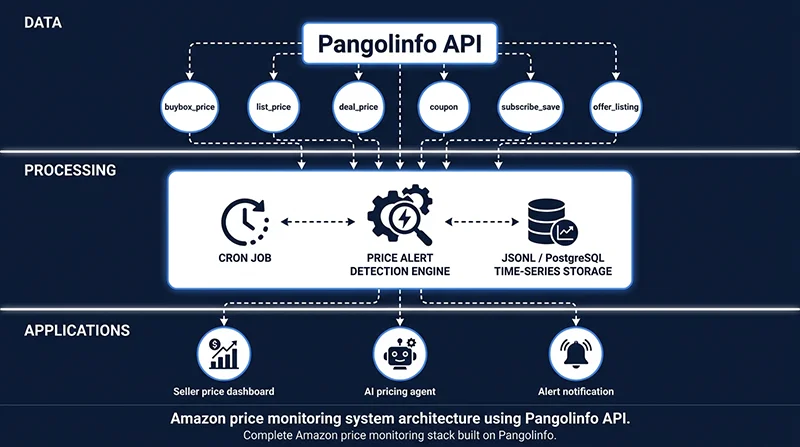
Pangolinfo Amazon Scraper API provides structured price data covering all six price dimensions in a single API call, with server-side maintenance of parsing templates that handles Amazon’s HTML structure changes transparently.
Complete Price Fields Returned
| Field | Description | Source Page |
|---|---|---|
| buybox_price | Current Buy Box price | Product detail page |
| buybox_seller_id | Seller ID holding the Buy Box | Product detail page |
| buybox_is_amazon | Whether Amazon Retail holds Buy Box | Product detail page |
| list_price | Crossed-out reference price (MSRP) | Product detail page |
| deal_price | Lightning Deal / Best Deal activation price | Product detail page |
| deal_ends_at | Deal expiration time (ISO 8601) | Product detail page |
| coupon_type | Coupon type: “percentage” or “fixed” | Product detail page |
| coupon_value | Coupon discount value | Product detail page |
| subscribe_save_price | Lowest Subscribe & Save price | Product detail page |
| lowest_offer_price | Lowest third-party seller price | Offer Listing page |
| offer_count | Number of active seller offers | Offer Listing page |
Python Implementation: Scheduled Price Monitoring
import requests
import json
import time
import logging
from datetime import datetime, timezone
from pathlib import Path
from typing import Optional

logging.basicConfig(
    level=logging.INFO,
    format="[%(asctime)s] %(levelname)s: %(message)s"
)

PANGOLINFO_API_KEY = "your_api_key_here"
API_ENDPOINT = "https://api.pangolinfo.com/v1/amazon/product"

PRICE_FIELDS = [
    "buybox_price", "buybox_seller_id", "buybox_is_amazon",
    "list_price", "deal_price", "deal_ends_at",
    "coupon_type", "coupon_value",
    "subscribe_save_price",
    "lowest_offer_price", "offer_count"
]


def fetch_price_snapshot(asin: str, marketplace: str = "US") -> Optional[dict]:
    """Fetch a complete price snapshot for one ASIN via Pangolinfo API."""
    try:
        resp = requests.post(
            API_ENDPOINT,
            headers={
                "Authorization": f"Bearer {PANGOLINFO_API_KEY}",
                "Content-Type": "application/json"
            },
            json={"asin": asin, "marketplace": marketplace, "fields": PRICE_FIELDS},
            timeout=30
        )
        resp.raise_for_status()
        data = resp.json().get("data", {})
        data.update({
            "_asin": asin,
            "_marketplace": marketplace,
            "_fetched_at": datetime.now(timezone.utc).isoformat()
        })
        return data
    except requests.HTTPError as e:
        logging.error(f"HTTP error for ASIN {asin}: {e}")
    except Exception as e:
        logging.error(f"Error for ASIN {asin}: {e}")
    return None


def compute_effective_price(snapshot: dict) -> Optional[float]:
    """
    Calculate the lowest effective price a consumer would actually pay.
    Priority: deal_price > buybox_price, then apply coupon on top.
    """
    base = snapshot.get("deal_price") or snapshot.get("buybox_price")
    if base is None:
        return None

    # Apply coupon discount
    coupon_type = snapshot.get("coupon_type")
    coupon_value = snapshot.get("coupon_value", 0) or 0

    if coupon_type == "percentage":
        base = base * (1 - coupon_value / 100)
    elif coupon_type == "fixed":
        base = base - coupon_value

    # Compare with Subscribe & Save price
    ss = snapshot.get("subscribe_save_price")
    if ss and ss < base:
        base = ss

    return round(max(base, 0), 2)


def check_price_alert(snapshot: dict) -> list[str]:
    """
    Check for notable price events that warrant alerting.
    Returns a list of alert messages (empty if no alerts).
    """
    alerts = []
    asin = snapshot.get("_asin", "unknown")

    # Alert: Deal is live
    if snapshot.get("deal_price"):
        alerts.append(
            f"🔥 DEAL ACTIVE: {asin} @ ${snapshot['deal_price']:.2f}"
            f" (ends: {snapshot.get('deal_ends_at', 'unknown')})"
        )

    # Alert: Deep discount
    bb = snapshot.get("buybox_price")
    lp = snapshot.get("list_price")
    if bb and lp and lp > 0:
        discount_pct = (1 - bb / lp) * 100
        if discount_pct >= 30:
            alerts.append(f"📉 DEEP DISCOUNT: {asin} — {discount_pct:.0f}% off list price")

    # Alert: Amazon Retail lost Buy Box
    if snapshot.get("buybox_is_amazon") is False:
        alerts.append(f"⚠️ BUY BOX SHIFT: {asin} — No longer held by Amazon Retail")

    return alerts


def run_price_monitor(
    asins: list[str],
    marketplace: str = "US",
    interval_minutes: int = 60,
    output_file: str = "price_snapshots.jsonl",
    max_cycles: Optional[int] = None
):
    """
    Main price monitoring loop — polls all target ASINs at regular intervals.

    Args:
        asins: List of ASINs to monitor
        marketplace: Amazon marketplace code (US, UK, DE, JP, etc.)
        interval_minutes: How often to poll (in minutes)
        output_file: JSONL file for append-mode storage (supports resumption)
        max_cycles: None = run indefinitely; int = stop after N cycles
    """
    output = Path(output_file)
    cycle = 0
    total_alerts = []

    logging.info(
        f"Starting price monitor: {len(asins)} ASINs | "
        f"{marketplace} | Every {interval_minutes}min"
    )

    while max_cycles is None or cycle < max_cycles:
        cycle += 1
        cycle_start = datetime.now()
        logging.info(f"\n=== Cycle {cycle} | {cycle_start.strftime('%Y-%m-%d %H:%M')} ===")

        cycle_data = []
        for i, asin in enumerate(asins, 1):
            snapshot = fetch_price_snapshot(asin, marketplace)
            if not snapshot:
                continue

            snapshot["_effective_price"] = compute_effective_price(snapshot)
            cycle_data.append(snapshot)

            alerts = check_price_alert(snapshot)
            total_alerts.extend(alerts)
            for alert in alerts:
                logging.warning(alert)

            logging.info(
                f"  [{i}/{len(asins)}] {asin}: "
                f"BB=${snapshot.get('buybox_price', 'N/A')} | "
                f"Deal=${snapshot.get('deal_price') or '—'} | "
                f"Coupon={snapshot.get('coupon_value') or '—'} | "
                f"Effective=${snapshot.get('_effective_price', 'N/A')}"
            )
            time.sleep(0.5)  # Gentle pacing between ASINs

        # Append to JSONL for time-series storage
        with open(output, "a", encoding="utf-8") as f:
            for row in cycle_data:
                f.write(json.dumps(row, ensure_ascii=False) + "\n")

        logging.info(
            f"Cycle {cycle} done: {len(cycle_data)}/{len(asins)} succeeded | "
            f"{len(total_alerts)} alerts total"
        )

        if max_cycles is None or cycle < max_cycles:
            logging.info(f"Waiting {interval_minutes}m until next cycle...")
            time.sleep(interval_minutes * 60)

    logging.info("Price monitoring session complete.")


# ── Example Usage ──────────────────────────────────────
if __name__ == "__main__":
    TARGET_ASINS = [
        "B0CHP7BPYQ",
        "B09G9FPHY6",
        "B08N5WRWNW",
        # Add competitor ASINs here
    ]

    run_price_monitor(
        asins=TARGET_ASINS,
        marketplace="US",
        interval_minutes=60,       # Hourly monitoring
        output_file="competitor_prices.jsonl",
        max_cycles=None            # Run indefinitely
    )
AI Agent Integration via MCP Protocol
For teams routing price data into AI agent decision workflows, Pangolinfo Amazon Scraper Skill exposes price data as a standard MCP tool. An agent can call it directly within a reasoning chain:
// MCP Tool Call from AI Agent
{
  "tool": "pangolinfo_get_price",
  "arguments": {
    "asin": "B0CHP7BPYQ",
    "marketplace": "US",
    "fields": ["buybox_price", "deal_price", "coupon_value", "effective_price"]
  }
}

// Agent receives structured response and continues reasoning:
// {
//   "buybox_price": 29.99,
//   "deal_price": null,
//   "coupon_value": 5.0,
//   "coupon_type": "fixed",
//   "effective_price": 24.99,
//   "buybox_seller": "Amazon",
//   "timestamp": "2026-06-18T10:00:00Z"
// }
//
// Agent next step: "Competitor effective price is $24.99.
// Our current price is $26.99. Recommend reducing to $24.49
// to win Buy Box while maintaining 18% margin."
This closes the loop on AI-driven pricing: real-time price data → agent reasoning → pricing recommendation → SP-API price update execution.
Tool Selection Framework: Which Approach Fits Your Situation?
| Use Case | ASIN Count | Recommended Approach | Monthly Cost Estimate |
|---|---|---|---|
| Personal price drop alerts | <10 | Keepa / CamelCamelCamel | Free |
| Small team competitor reference | 10–100 | Helium 10 / Jungle Scout | $39–99/mo |
| Own listing automated repricing | Own ASINs only | BQool / Amazon Automate Pricing | $25–100/mo |
| Mid-to-large scale competitor monitoring | 100–5,000+ | Pangolinfo Amazon Scraper API | Usage-based |
| AI agent pricing workflow | Dynamic / on-demand | Pangolinfo MCP Scraper Skill | Per-call |
Decision threshold for a commercial data API: When you need any of the following, self-hosted scrapers and SaaS platforms start falling short:
- Monitoring >200 ASINs at hourly frequency
- Complete price fields beyond just Buy Box price (coupon, deal, Subscribe & Save)
- Structured data output for integration with your own database or AI system
- Reliable pipeline without maintaining proxy pools and HTML selector sets
Frequently Asked Questions
What types of Amazon price monitoring tools are available?
Six categories: consumer browser extensions (Keepa, CamelCamelCamel), seller SaaS platforms (Helium 10, Jungle Scout), Amazon SP-API pricing endpoints, DIY web scrapers, automated repricer tools (BQool, Repricer Express), and commercial data APIs (Pangolinfo). Each trades off differently across data freshness, field completeness, and scalability.
Can SP-API handle competitor price monitoring?
Not at scale. SP-API is designed for managing your own listings, requires seller account OAuth, has strict rate limits (10 rps for GetPricing), and doesn’t return coupon discounts, deal prices, or Subscribe & Save rates — the price layers most relevant to consumer purchase decisions.
What price fields should a complete price monitor track?
Six dimensions: Buy Box price + seller ID, List Price / MSRP, Deal price + expiration time, coupon type and value, Subscribe & Save price, and third-party offer listing prices. Monitoring only Buy Box price misses most of what actually drives consumer decisions.
Why do DIY Amazon scrapers break so often?
Three structural reasons: Amazon’s price HTML is complex (six distinct zones, different selectors per category/marketplace/A/B variant, quarterly updates); Buy Box ownership rotates every 15-20 minutes making attribution critical; anti-scraping enforcement requires residential proxies and behavioral simulation that increases in cost as monitoring scale increases.
How does Pangolinfo API work for price monitoring?
One API call per ASIN returns all six price dimensions in structured JSON. Server-side parsing handles Amazon HTML changes. Supports scheduled polling via standard REST API or real-time on-demand queries via MCP Skill for AI agent integration. Full documentation: docs.pangolinfo.com.
Summary
Amazon price monitoring at seller scale is a harder problem than it appears. Most available tools — consumer extensions, seller SaaS, SP-API — were designed for a narrower use case than they’re often asked to serve. DIY scrapers are flexible but carry structural maintenance costs that escalate with monitoring depth and ASIN count.
The core insight: effective price monitoring isn’t about tracking one number (Buy Box price) — it’s about capturing a complete, time-stamped price snapshot across six dimensions, including Buy Box attribution, coupon discounts, and deal activations. That’s the data that reflects what consumers actually see and respond to.
For teams building serious price monitoring infrastructure: Pangolinfo Amazon Scraper API provides the complete field coverage and API reliability that self-hosted approaches struggle to match at scale.
🚀 Get started: Free trial of Pangolinfo Amazon Scraper API → Start here | API documentation