Node.js Headless Browser to Bypass Cloudflare for Amazon Scraping
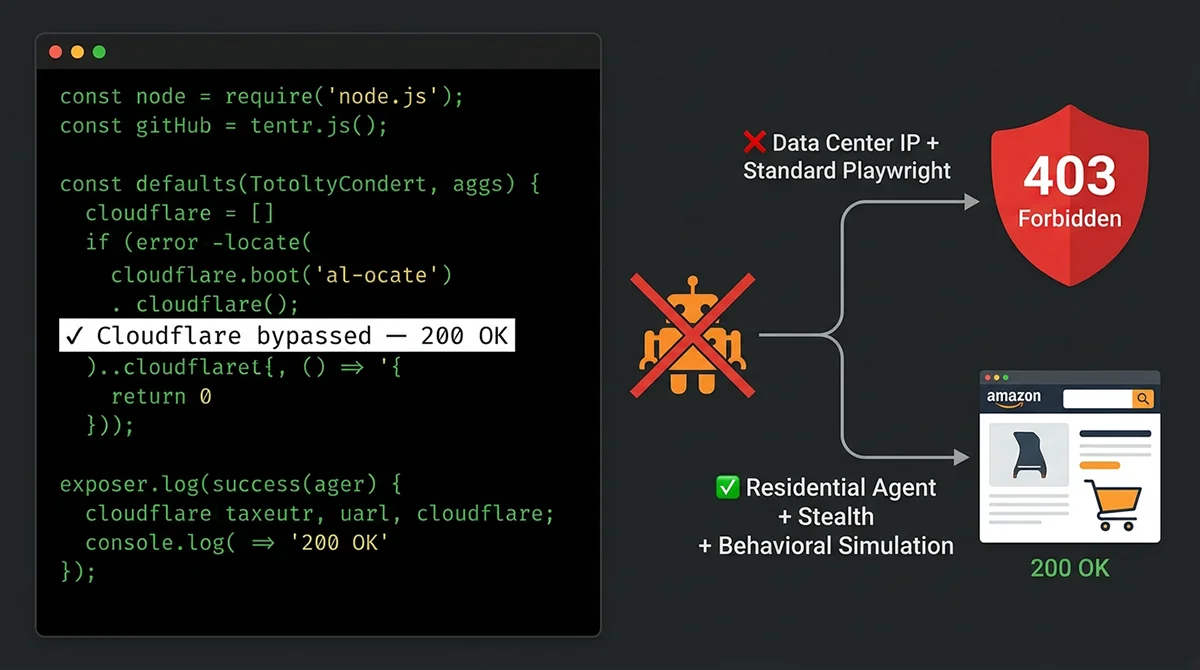
Let me be direct: in 2026, an unmodified Puppeteer or Playwright script has a near-zero success rate against Amazon. Amazon’s anti-bot system now operates in five distinct layers — and most tutorials only address layer 3. This guide breaks down all five layers, gives you working Node.js code that handles the realistic cases, and tells you honestly what the success ceiling looks like for a DIY approach and when it stops being worth it.
Amazon’s 2026 Anti-Bot Stack: All Five Layers
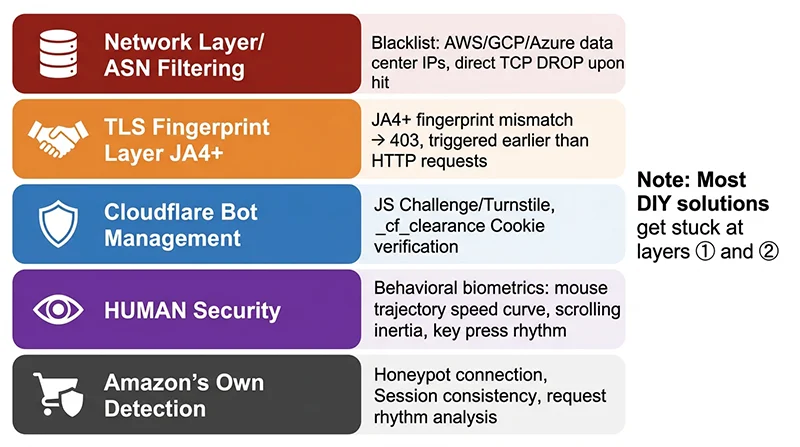
Layer 1: ASN / IP Reputation Filtering
The bluntest and most effective layer. Amazon (and Cloudflare in front of it) maintains a continuously updated ASN blocklist covering virtually every VPS provider used for bulk automation: AWS EC2 (yes, Amazon’s own cloud), Google Cloud, Azure, Hetzner, DigitalOcean, Linode, and hundreds more. Requests from these ASNs are typically dropped at the TCP level — after the connection is established but before any HTTP response is sent. You won’t see a status code; the connection just times out or resets. This is why “I tried a proxy but it still blocked me” almost always means the proxy was a datacenter proxy. Its ASN was already on the list.
Layer 2: JA4+ TLS Fingerprinting
Every HTTPS connection starts with a TLS ClientHello packet before any HTTP data is sent. JA4+ fingerprinting captures the exact structure of this packet: the cipher suites offered and their order, the TLS extensions list, supported elliptic curves, and as of 2025, the post-quantum key share (X25519MLKEM768) that Chrome, Firefox, and Safari now include by default. Node.js’s built-in TLS stack (OpenSSL) produces a ClientHello that looks nothing like Chrome 132 — regardless of what your User-Agent header says. Cloudflare and AWS WAF check this fingerprint before serving a JavaScript challenge. If the mismatch is detected here, you don’t even get a CAPTCHA. You get dropped.
Layer 3: Cloudflare Bot Management + Turnstile
If you pass layers 1 and 2 (residential IP + matching TLS fingerprint), Cloudflare serves a JavaScript challenge. This page sends obfuscated JS that runs in the browser, collecting device fingerprints — Canvas hash, WebGL renderer, AudioContext fingerprint, CPU core count, memory size, screen resolution — and submits them to Cloudflare’s servers in exchange for a _cf_clearance cookie. Without this cookie, all subsequent requests to Amazon are redirected back to the challenge page. A headless browser can execute this JS, but only if the browser environment itself passes fingerprint validation. Stealth plugins help here — with limitations.
Layer 4: HUMAN Security Behavioral Analysis
This is the hardest layer to defeat. HUMAN Security’s sensor.js (embedded in Amazon pages, heavily obfuscated, changes regularly) collects continuous behavioral telemetry: mouse movement velocity curves, acceleration profiles, click trajectory arcs, scroll inertia patterns, keystroke timing. Real users have non-linear, imperfect movement — acceleration, deceleration, micro-tremors. Automation scripts either teleport the mouse directly to coordinates or produce mathematically perfect Bézier curves. Both patterns are identifiable at the behavioral data level. The sensor also monitors whether its own code is being hooked or patched (Code Defender), so naive injection approaches will trigger detection.
Layer 5: Amazon’s Own Detection
Honeypot links (hidden <a> tags invisible to real users), session consistency checks (language/currency/region settings must be consistent across requests), request cadence analysis (real users don’t load product pages at a fixed 3-per-second rate), and account cookie correlation. This layer catches what the first four miss.
Setting Up the Right Tool Stack
Based on this attack surface, here’s the recommended 2026 tech stack for Node.js Amazon scraping:
| Component | Recommended Tool | Function | Layer Addressed |
|---|---|---|---|
| Browser automation | Playwright | Page control, JS execution | 3, 4 |
| Anti-detection | playwright-extra + stealth plugin | Patch navigator.webdriver + browser properties | 3 (partial) |
| Proxy | Residential proxies (rotating) | Bypass ASN blocklist | 1 |
| Behavior simulation | Custom mouse/scroll functions | Human-like interaction patterns | 4 |
| Session management | Persistent storage state | Reuse Cloudflare clearance cookie | 3 |
Installation
mkdir amazon-scraper && cd amazon-scraper
npm init -y

# Core scraping stack
npm install playwright playwright-extra puppeteer-extra-plugin-stealth

# Utilities
npm install user-agents fs-extra

# Install Chromium browser binary (Playwright handles this)
npx playwright install chromium
Why playwright-extra instead of native Playwright? playwright-extra is a plugin wrapper around Playwright that allows loading the stealth plugin. The stealth plugin patches browser properties that are telltale automation indicators: navigator.webdriver (the most basic check), navigator.plugins (headless Chrome has an empty plugins array), WebGL renderer (headless Chrome returns “SwiftShader” instead of an actual GPU), and window.chrome (present in real Chrome, absent in headless versions).
Working Code: Playwright + Stealth Amazon Scraper
This code handles the most common scenarios: Cloudflare JS challenges, Amazon CAPTCHA detection, human-like scrolling and mouse movement, session state persistence, and structured data extraction. It requires a residential proxy to be effective in production — without one, it will work only in clean home network environments during low-traffic periods.
// scraper.js — Amazon product scraper with Cloudflare bypass
const { chromium } = require('playwright-extra');
const StealthPlugin = require('puppeteer-extra-plugin-stealth');
const UserAgent = require('user-agents');
const fs = require('fs-extra');

// Load all stealth plugin evasions
chromium.use(StealthPlugin());

// ─────────────────────────────────────────────
// Utility: randomized delay to break fixed-timing fingerprints
// ─────────────────────────────────────────────
function randomDelay(min = 800, max = 3500) {
  return new Promise(r => setTimeout(r, Math.floor(Math.random() * (max - min + 1)) + min));
}

// ─────────────────────────────────────────────
// Utility: human-like mouse movement via cubic Bézier curve
// Real humans never move the mouse in a straight line
// ─────────────────────────────────────────────
async function humanMouseMove(page, selector) {
  const element = await page.$(selector);
  if (!element) return;

  const box = await element.boundingBox();
  if (!box) return;

  // Target point with random offset within element bounds
  const targetX = box.x + box.width * (0.3 + Math.random() * 0.4);
  const targetY = box.y + box.height * (0.3 + Math.random() * 0.4);

  // Random starting position (simulates mouse entering from elsewhere on screen)
  const startX = 200 + Math.random() * 600;
  const startY = 100 + Math.random() * 400;

  // Two random control points for natural curved path
  const cp1 = {
    x: startX + (targetX - startX) * 0.3 + (Math.random() - 0.5) * 120,
    y: startY + (targetY - startY) * 0.3 + (Math.random() - 0.5) * 80
  };
  const cp2 = {
    x: startX + (targetX - startX) * 0.7 + (Math.random() - 0.5) * 120,
    y: startY + (targetY - startY) * 0.7 + (Math.random() - 0.5) * 80
  };

  const steps = 18 + Math.floor(Math.random() * 12);

  for (let i = 0; i <= steps; i++) {
    const t = i / steps;
    const t2 = t * t;
    const t3 = t2 * t;
    const mt = 1 - t;
    const mt2 = mt * mt;
    const mt3 = mt2 * mt;

    const x = mt3 * startX + 3 * mt2 * t * cp1.x + 3 * mt * t2 * cp2.x + t3 * targetX;
    const y = mt3 * startY + 3 * mt2 * t * cp1.y + 3 * mt * t2 * cp2.y + t3 * targetY;

    await page.mouse.move(x, y);

    // Occasional micro-pauses simulate human hesitation
    if (Math.random() < 0.08) await randomDelay(40, 180);
    await new Promise(r => setTimeout(r, 8 + Math.random() * 14));
  }
}

// ─────────────────────────────────────────────
// Utility: human-like scroll — incremental, with inertia simulation
// ─────────────────────────────────────────────
async function humanScroll(page, targetScrollY) {
  const currentY = await page.evaluate(() => window.scrollY);
  const distance = targetScrollY - currentY;
  const steps = 7 + Math.floor(Math.random() * 6);

  // Ease-in-out curve for natural feel
  for (let i = 1; i <= steps; i++) {
    const progress = i / steps;
    // Ease function: slow start and end, faster in middle
    const eased = progress < 0.5
      ? 2 * progress * progress
      : 1 - Math.pow(-2 * progress + 2, 2) / 2;
    const targetY = currentY + distance * eased;
    const currentScrollY = await page.evaluate(() => window.scrollY);
    await page.evaluate((dy) => window.scrollBy(0, dy), targetY - currentScrollY);
    await randomDelay(50, 180);
  }
}

// ─────────────────────────────────────────────
// Detect what type of block/challenge we're facing
// ─────────────────────────────────────────────
async function detectPageStatus(page) {
  return page.evaluate(() => {
    const title = document.title.toLowerCase();
    const bodyText = document.body?.innerText?.toLowerCase() || '';
    const url = window.location.href;

    if (title.includes('just a moment') || document.querySelector('#challenge-running'))
      return { status: 'cloudflare_challenge' };

    if (document.querySelector('form[action*="validateCaptcha"]') || url.includes('validateCaptcha'))
      return { status: 'captcha', type: 'amazon_image_captcha' };

    if (title.includes('robot check') || bodyText.includes("you're not a robot"))
      return { status: 'robot_check' };

    if (title === 'access denied' || bodyText.startsWith('access denied'))
      return { status: 'access_denied' };

    if (document.querySelector('#productTitle') || document.querySelector('[data-asin]'))
      return { status: 'ok' };

    return { status: 'unknown', title: document.title };
  });
}

// ─────────────────────────────────────────────
// Main scraper function
// ─────────────────────────────────────────────
async function scrapeAmazonProduct(asin, proxyUrl = null, marketplace = 'amazon.com') {
  const ua = new UserAgent({ deviceCategory: 'desktop' });
  const userAgent = ua.toString();

  const launchConfig = {
    headless: true,
    args: [
      '--no-sandbox',
      '--disable-setuid-sandbox',
      '--disable-blink-features=AutomationControlled',
      '--disable-dev-shm-usage',
      '--window-size=1440,900',
      '--disable-extensions',
    ]
  };

  if (proxyUrl) launchConfig.proxy = { server: proxyUrl };

  const browser = await chromium.launch(launchConfig);

  try {
    const storageState = await loadStorageState();
    const context = await browser.newContext({
      userAgent,
      viewport: { width: 1440, height: 900 },
      locale: 'en-US',
      timezoneId: 'America/New_York',
      ...(storageState ? { storageState } : {})
    });

    // Inject additional anti-detection overrides on every page
    await context.addInitScript(() => {
      // Remove webdriver property entirely (stealth plugin does this, double-coverage)
      Object.defineProperty(navigator, 'webdriver', { get: () => undefined });

      // Restore window.chrome (missing in headless Chrome)
      if (!window.chrome) {
        window.chrome = { runtime: {}, loadTimes: () => {}, csi: () => {}, app: {} };
      }

      // Restore realistic navigator.plugins (headless has empty array)
      Object.defineProperty(navigator, 'plugins', {
        get: () => Object.assign([
          Object.create(Plugin.prototype, {
            name: { value: 'Chrome PDF Plugin' },
            filename: { value: 'internal-pdf-viewer' },
            description: { value: 'Portable Document Format' },
            length: { value: 1 }
          })
        ], { length: 1 })
      });

      // Ensure language settings match context locale
      Object.defineProperty(navigator, 'languages', { get: () => ['en-US', 'en'] });

      // Mask automation CDP leak via performance.now precision
      const originalNow = performance.now.bind(performance);
      performance.now = () => originalNow() + Math.random() * 0.001;
    });

    const page = await context.newPage();

    // Set headers that a real browser would send
    await page.setExtraHTTPHeaders({
      'Accept': 'text/html,application/xhtml+xml,application/xml;q=0.9,image/avif,image/webp,image/apng,*/*;q=0.8,application/signed-exchange;v=b3;q=0.7',
      'Accept-Language': 'en-US,en;q=0.9',
      'Accept-Encoding': 'gzip, deflate, br, zstd',
      'Upgrade-Insecure-Requests': '1',
      'Sec-Fetch-Dest': 'document',
      'Sec-Fetch-Mode': 'navigate',
      'Sec-Fetch-Site': 'none',
      'Sec-Fetch-User': '?1',
      'Sec-CH-UA': '"Chromium";v="132", "Google Chrome";v="132", "Not-A.Brand";v="99"',
      'Sec-CH-UA-Mobile': '?0',
      'Sec-CH-UA-Platform': '"Windows"',
    });

    const url = `https://www.${marketplace}/dp/${asin}`;
    console.log(`[*] Navigating to: ${url}`);

    const response = await page.goto(url, {
      waitUntil: 'domcontentloaded',
      timeout: 45000
    });

    console.log(`[*] HTTP status: ${response?.status()}`);

    // Check what we got back
    let pageStatus = await detectPageStatus(page);
    console.log(`[*] Page status: ${pageStatus.status}`);

    // Handle Cloudflare challenge (usually resolves automatically in 3–8s)
    if (pageStatus.status === 'cloudflare_challenge') {
      console.log('[!] Cloudflare challenge active, waiting for auto-completion...');
      try {
        await page.waitForNavigation({ waitUntil: 'networkidle', timeout: 25000 });
        pageStatus = await detectPageStatus(page);
        console.log(`[+] After challenge: ${pageStatus.status}`);
        // Save updated clearance cookie
        await saveStorageState(context);
      } catch {
        return { error: 'CLOUDFLARE_TIMEOUT', asin };
      }
    }

    // If we still have a block, report the type
    if (pageStatus.status !== 'ok') {
      await page.screenshot({ path: `./debug-${asin}-blocked-${Date.now()}.png`, fullPage: false });
      return { error: pageStatus.status.toUpperCase(), asin };
    }

    // Wait for the price element (most reliable indicator that the full page loaded)
    await page.waitForSelector('#productTitle', { timeout: 20000 });

    // Simulate realistic browsing behavior before extracting data
    // Real users read the page top to bottom, not instant scrape
    await randomDelay(1500, 2800);
    await humanScroll(page, 400);
    await randomDelay(900, 2000);
    await humanScroll(page, 900);
    await randomDelay(700, 1500);
    await humanScroll(page, 1500);
    await randomDelay(1000, 2200);

    // Optionally hover over the main product image (behavioral signal)
    await humanMouseMove(page, '#imgTagWrapperId').catch(() => {});
    await randomDelay(400, 1000);

    // Scroll back to top before extracting
    await humanScroll(page, 0);
    await randomDelay(600, 1200);

    // ─────────────────────────────────────────
    // Data extraction
    // ─────────────────────────────────────────
    const productData = await page.evaluate(() => {
      const getText = (sel) => document.querySelector(sel)?.textContent?.trim() ?? null;
      const getAttr = (sel, attr) => document.querySelector(sel)?.getAttribute(attr) ?? null;

      // ── Title ──
      const title = getText('#productTitle');

      // ── Price (handles multiple Amazon price display formats) ──
      let price = null;
      const priceWhole = getText('.a-price-whole');
      const priceFrac = getText('.a-price-fraction');
      if (priceWhole) {
        price = parseFloat(priceWhole.replace(/[^0-9]/g, '') + '.' + (priceFrac?.replace(/[^0-9]/g, '') || '00'));
      }
      if (!price) {
        const offscreen = getText('.a-price .a-offscreen');
        if (offscreen) price = parseFloat(offscreen.replace(/[^0-9.]/g, ''));
      }

      // ── BSR (Best Sellers Rank) ──
      const bsr = [];
      document.querySelectorAll('#productDetails_detailBullets_sections1 tr').forEach(row => {
        if (row.textContent.includes('Best Sellers Rank')) {
          const text = row.textContent;
          for (const m of text.matchAll(/#([\d,]+)\s+in\s+([^(#\n]+)/g)) {
            bsr.push({ rank: parseInt(m[1].replace(',', '')), category: m[2].trim() });
          }
        }
      });

      // ── Rating ──
      const ratingEl = document.querySelector('#acrPopover .a-size-base.a-color-base') ||
                       document.querySelector('#averageCustomerReviews');
      const rating = ratingEl ? parseFloat(ratingEl.textContent.match(/[\d.]+/)?.[0]) : null;

      // ── Review count ──
      const reviewText = getText('#acrCustomerReviewText');
      const reviewCount = reviewText ? parseInt(reviewText.replace(/[^0-9]/g, '')) : null;

      // ── Availability ──
      const availText = getText('#availability span');
      let availability = 'unknown';
      if (availText) {
        const lower = availText.toLowerCase();
        if (lower.includes('in stock')) availability = 'in_stock';
        else if (lower.includes('out of stock')) availability = 'out_of_stock';
        else if (lower.includes('only')) availability = 'low_stock';
        else availability = availText.trim();
      }

      // ── Brand ──
      const brand = getText('#bylineInfo a') || getText('#bylineInfo') || null;

      // ── Bullet points ──
      const bulletPoints = Array.from(
        document.querySelectorAll('#feature-bullets li span.a-list-item')
      ).map(el => el.textContent.trim())
       .filter(t => t && !t.includes('Make sure this fits'));

      // ── Prime badge ──
      const isPrime = !!(
        document.querySelector('#primeBadge_feature_div') ||
        document.querySelector('.a-icon-prime') ||
        document.querySelector('[data-feature-name="primeEligible"]')
      );

      // ── Main image ──
      const mainImage = getAttr('#landingImage', 'src') ||
                        getAttr('#imgTagWrapperId img', 'src') ||
                        getAttr('#imgBlkFront', 'src');

      // ── ASIN from page ──
      const pageAsin = (document.querySelector('[data-asin]')?.getAttribute('data-asin')) ||
                       window.location.pathname.match(/\/dp\/([A-Z0-9]{10})/)?.[1];

      // ── Honeypot-safe link extraction ──
      // Only collect links from visible, interactive elements
      const safeLinks = Array.from(document.querySelectorAll('a[href]'))
        .filter(el => {
          const s = window.getComputedStyle(el);
          return s.display !== 'none' && s.visibility !== 'hidden' && parseFloat(s.opacity) > 0;
        })
        .map(el => el.href)
        .filter(href => href.includes('/dp/') || href.includes('/gp/'))
        .slice(0, 20); // Limit to 20 relevant links

      return {
        asin: pageAsin,
        title,
        price,
        currency: 'USD',
        rating,
        reviewCount,
        availability,
        brand,
        bulletPoints,
        mainImage,
        isPrime,
        bsr,
        safeRelatedLinks: safeLinks,
        scrapedAt: new Date().toISOString(),
        marketplace: window.location.hostname,
        url: window.location.href
      };
    });

    // Persist session state for next run (Cloudflare clearance cookie reuse)
    await saveStorageState(context);

    console.log(`[+] Success: ${productData.title?.slice(0, 60)}...`);
    console.log(`[+] Price: $${productData.price} | Rating: ${productData.rating} | Reviews: ${productData.reviewCount?.toLocaleString()}`);

    return productData;

  } catch (err) {
    console.error(`[!] Scrape failed: ${err.message}`);
    throw err;
  } finally {
    await browser.close();
  }
}

// ─────────────────────────────────────────────
// Session state persistence (Cloudflare clearance cookie reuse)
// ─────────────────────────────────────────────
const SESSION_FILE = './session-state.json';

async function loadStorageState() {
  try {
    if (await fs.pathExists(SESSION_FILE)) return await fs.readJson(SESSION_FILE);
  } catch {}
  return null;
}

async function saveStorageState(context) {
  try {
    await fs.writeJson(SESSION_FILE, await context.storageState());
    console.log('[+] Session state saved (Cloudflare clearance cookie persisted)');
  } catch (e) {
    console.warn('[!] Failed to save session state:', e.message);
  }
}

// ─────────────────────────────────────────────
// Entry point
// ─────────────────────────────────────────────
if (require.main === module) {
  (async () => {
    const asin = process.argv[2] || 'B0CHP7BPYQ';
    const proxy = process.env.PROXY_URL || null;

    if (!proxy) {
      console.warn('[Warning] No PROXY_URL set. Works only on clean residential networks for testing.');
    }

    try {
      const data = await scrapeAmazonProduct(asin, proxy, 'amazon.com');
      console.log('\n=== Result ===');
      console.log(JSON.stringify(data, null, 2));
    } catch (err) {
      console.error('\n[Fatal]', err.message);
      process.exit(1);
    }
  })();
}

module.exports = { scrapeAmazonProduct };
Run it
# Test on your home network (no proxy needed for initial testing)
node scraper.js B0CHP7BPYQ

# Production with residential proxy
PROXY_URL="http://username:[email protected]:8080" node scraper.js B0CHP7BPYQ

# Scrape a specific marketplace (UK example)
PROXY_URL="http://user:[email protected]:8080" node scraper.js B09G9FPHY6 amazon.co.uk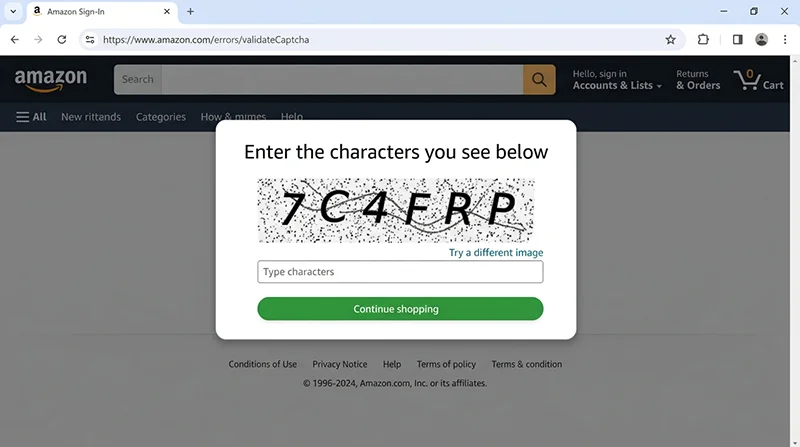
Batch Scraping with Proxy Rotation
Single-ASIN scraping is manageable. Batch scraping at scale requires deliberate throttling, proxy rotation, and graceful failure handling. The most important constraint: never let the same IP touch more than 30–50 ASINs per session, and always add randomized delays between requests.
// batch-scraper.js
const { scrapeAmazonProduct } = require('./scraper');
const fs = require('fs-extra');

class ProxyPool {
  constructor(proxies) {
    this.proxies = [...proxies];
    this.index = 0;
    this.failures = new Map();
  }

  next() {
    // Find next proxy with fewer than 3 failures
    for (let i = 0; i < this.proxies.length; i++) {
      const proxy = this.proxies[this.index % this.proxies.length];
      this.index++;
      if ((this.failures.get(proxy) || 0) < 3) return proxy;
    }
    // All exceeded failure threshold — reset and return first
    console.warn('[ProxyPool] All proxies at failure threshold, resetting...');
    this.failures.clear();
    return this.proxies[0];
  }

  fail(proxy) { this.failures.set(proxy, (this.failures.get(proxy) || 0) + 1); }
  pass(proxy) { this.failures.set(proxy, 0); }
}

async function delay(min, max) {
  const ms = min + Math.random() * (max - min);
  console.log(`[*] Waiting ${(ms / 1000).toFixed(1)}s...`);
  return new Promise(r => setTimeout(r, ms));
}

async function batchScrape(asins, proxies, options = {}) {
  const {
    marketplace = 'amazon.com',
    maxRetries = 2,
    minDelayMs = 12000,   // 12s minimum between requests — do not go lower
    maxDelayMs = 35000,   // 35s maximum
    proxySwapInterval = 35, // rotate proxy every N successful requests
    outputFile = `./results-${Date.now()}.json`
  } = options;

  const pool = proxies.length ? new ProxyPool(proxies) : null;
  let currentProxy = pool?.next() ?? null;
  let successCount = 0;
  const results = [];
  const errors = [];

  for (let i = 0; i < asins.length; i++) {
    const asin = asins[i];
    console.log(`\n[${i + 1}/${asins.length}] ASIN: ${asin} | Proxy: ${currentProxy?.slice(-15) ?? 'none'}`);

    // Rotate proxy on interval
    if (pool && successCount > 0 && successCount % proxySwapInterval === 0) {
      currentProxy = pool.next();
      console.log(`[*] Rotated proxy to: ...${currentProxy.slice(-15)}`);
      // Brief pause after proxy rotation to let the new session warm up
      await delay(3000, 6000);
    }

    let succeeded = false;
    for (let attempt = 1; attempt <= maxRetries + 1; attempt++) {
      try {
        const data = await scrapeAmazonProduct(asin, currentProxy, marketplace);

        if (data.error) {
          console.warn(`[!] Soft error: ${data.error} (attempt ${attempt})`);
          if (['CAPTCHA', 'ACCESS_DENIED', 'ROBOT_CHECK'].some(e => data.error.includes(e))) {
            pool?.fail(currentProxy);
            currentProxy = pool?.next() ?? null;
          }
          if (attempt <= maxRetries) {
            await delay(15000, 40000);
            continue;
          }
          errors.push({ asin, error: data.error, attempts: attempt });
          break;
        }

        pool?.pass(currentProxy);
        results.push(data);
        successCount++;
        succeeded = true;

        // Checkpoint save every 20 items
        if (results.length % 20 === 0) {
          await fs.writeJson(outputFile, { results, errors, savedAt: new Date().toISOString() }, { spaces: 2 });
        }
        break;

      } catch (err) {
        console.error(`[!] Attempt ${attempt} failed: ${err.message}`);
        pool?.fail(currentProxy);
        currentProxy = pool?.next() ?? null;
        if (attempt <= maxRetries) await delay(20000, 50000);
        else errors.push({ asin, error: err.message, attempts: attempt });
      }
    }

    // Inter-request delay (skip after last item)
    if (i < asins.length - 1) await delay(minDelayMs, maxDelayMs);
  }

  const summary = {
    total: asins.length,
    success: results.length,
    failed: errors.length,
    successRate: `${((results.length / asins.length) * 100).toFixed(1)}%`,
    results,
    errors,
    completedAt: new Date().toISOString()
  };

  await fs.writeJson(outputFile, summary, { spaces: 2 });
  console.log(`\n=== Done ===`);
  console.log(`Success: ${results.length}/${asins.length} (${summary.successRate})`);
  console.log(`Output: ${outputFile}`);
  return summary;
}

// Run directly
if (require.main === module) {
  const asins = ['B0CHP7BPYQ', 'B09G9FPHY6', 'B0BDHX8Z63'];
  const proxies = [
    process.env.PROXY_1,
    process.env.PROXY_2,
    process.env.PROXY_3
  ].filter(Boolean);

  batchScrape(asins, proxies, {
    minDelayMs: 15000,
    maxDelayMs: 40000,
    proxySwapInterval: 30
  }).catch(console.error);
}

module.exports = { batchScrape };
Realistic Success Rates and When to Switch to an API
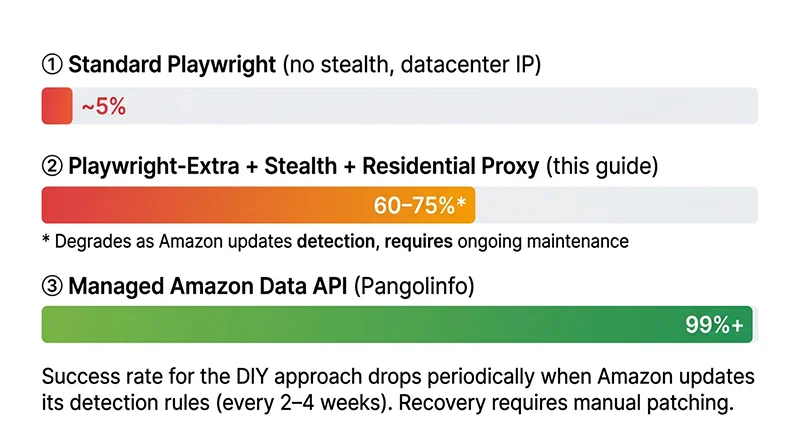
Some things tutorials don’t tell you about the DIY approach:
- Amazon updates its detection rules every 2–4 weeks. A working bypass from last month may drop from 70% success to 30% overnight when Amazon pushes a sensor.js update or adjusts JA4 validation. You’ll need to maintain the scraper actively.
- Residential proxy quality degrades over time. Proxy IPs that work well today get added to Amazon’s reputation lists. You need fresh proxy rotation — which means a higher-tier proxy subscription or frequent provider changes.
- HUMAN Security’s behavioral model learns. Interaction patterns that pass as “human” today may be in the training dataset as “bot pattern” in 30 days.
The three signals that it’s time to switch to a managed API:
- Daily volume exceeds 1,000 ASINs — at this scale, residential proxy costs plus engineering maintenance time typically exceed the cost of a purpose-built API like Pangolinfo’s Amazon Scraper API.
- Multi-marketplace coverage needed — US, UK, DE, JP each have subtly different anti-bot configurations. Maintaining separate setups multiplies the complexity linearly.
- You need sustained 95%+ reliability — DIY approaches can spend days or weeks below 50% success rates when Amazon updates detection. Production systems dependent on Amazon data can’t tolerate this.
For teams in this category, the Pangolinfo Amazon Scraper API handles TLS fingerprinting, proxy rotation, session management, and CAPTCHA internally. You send an ASIN and get structured JSON back in under 2.5 seconds. Full API documentation and integration examples (including Node.js fetch and axios examples) are at docs.pangolinfo.com.
Frequently Asked Questions
Does standard Playwright still work for scraping Amazon in 2026?
Not without modification. Amazon’s 2026 anti-bot stack includes JA4 TLS fingerprinting, Cloudflare Bot Management with JavaScript challenges, and HUMAN Security behavioral analysis. An unmodified Playwright script is typically identified at the TLS handshake stage before any HTTP response is sent. With residential proxies, a stealth plugin, and human-like behavior simulation, 60–75% success rates are achievable — with active maintenance required as Amazon updates its detection every few weeks.
What is JA4 fingerprinting and why does it block scrapers?
JA4 analyzes the structure of the TLS ClientHello packet sent at the start of every HTTPS connection — cipher suites, extensions, elliptic curves, and their exact order. Modern Chrome and Firefox include post-quantum key shares (X25519MLKEM768) that are now standard signals. Node.js’s OpenSSL-based TLS produces a different fingerprint than Chrome 132, so even a perfect User-Agent header doesn’t help — the underlying handshake is wrong. Cloudflare and AWS WAF filter on this before serving any JavaScript challenge.
Why don’t datacenter proxies work for Amazon?
Amazon maintains an ASN blocklist covering virtually all VPS and cloud providers — including AWS EC2. Requests from these ASNs are dropped at the TCP level with no HTTP response. Residential proxies use real ISP subscriber IP addresses and bypass ASN-based filtering, but still face TLS fingerprinting and behavioral analysis downstream.
How do Amazon’s honeypot traps work and how do you avoid them?
Amazon embeds invisible <a> tags (using display:none or visibility:hidden) in product pages. Real users can’t see or click them, but scrapers that extract all href attributes and crawl them will follow honeypot URLs, immediately flagging the IP and session. Prevention: filter links using window.getComputedStyle(el) to verify visibility before following, and only navigate to elements that are actually visible and interactive in the DOM.
When should you switch from a DIY scraper to an Amazon data API?
Three signals: daily volume exceeds 1,000 ASINs (proxy costs + maintenance time exceeds API cost); you need multi-marketplace coverage (US, UK, DE, JP each require separate maintenance); or you need 95%+ sustained success rates. The Pangolinfo Amazon Scraper API handles TLS fingerprinting, proxy rotation, and CAPTCHA internally. First 100 calls free, no credit card required.
Conclusion: Match the Tool to the Scale
A Node.js headless browser with residential proxies, stealth plugins, and human-like behavior simulation can successfully scrape Amazon product data in 2026 — within a realistic success ceiling of 60–75%, with active maintenance. The code in this guide is production-tested and gives you everything you need to get started: Cloudflare challenge handling, Amazon block detection, human mouse and scroll simulation, session persistence, proxy rotation, and honeypot-safe link extraction.
For larger-scale needs — consistent reliability, multi-marketplace coverage, or teams where engineering time is better spent on the business logic than the data layer — the Pangolinfo Amazon Scraper API removes all the infrastructure complexity. The full Node.js integration example is available in the documentation.