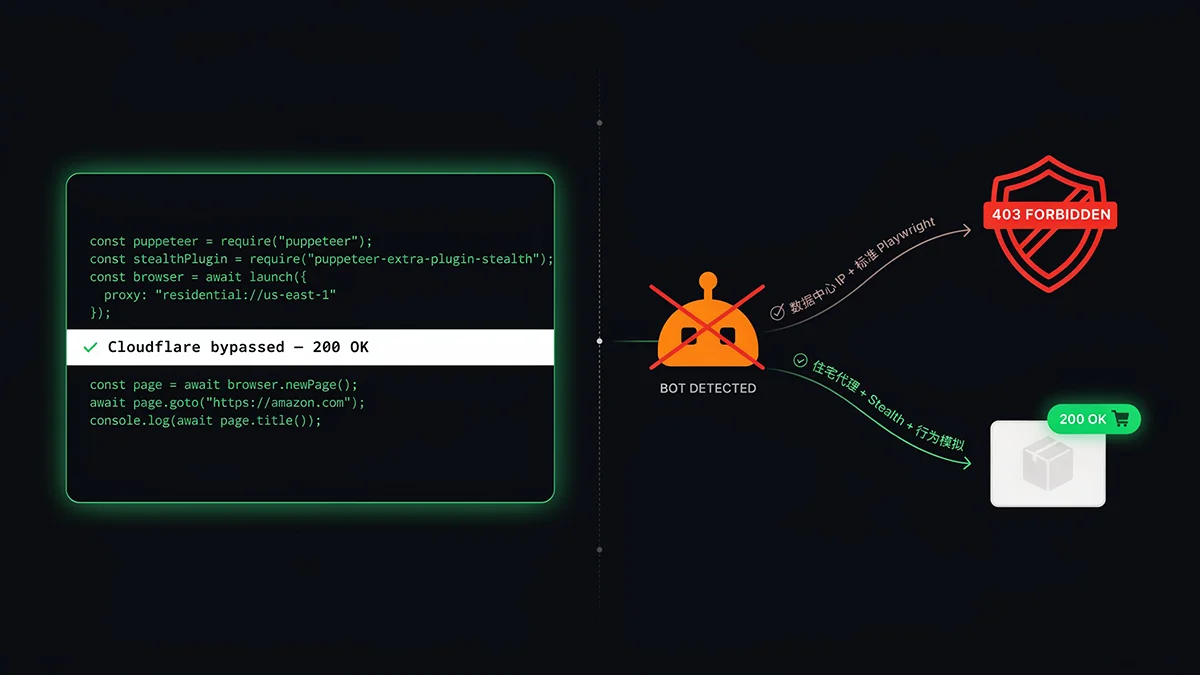
Node.js 无头浏览器绕过 Cloudflare 获取亚马逊商品数据实战
直接告诉你现实:2026 年用未经处理的 Puppeteer 或 Playwright 抓亚马逊,成功率接近零。亚马逊在 Cloudflare Bot Management 之上叠加了 HUMAN Security(前 PerimeterX)的行为分析层,从 TLS 握手的第一个字节开始就在甄别你是不是机器人。但这不意味着 Node.js 方案完全死透了——只是门槛从「装个 stealth 插件」变成了「理解整个检测体系再有针对性地对抗」。这篇文章会把这个体系拆给你看,然后给出真实可跑的代码。
2026 年亚马逊反爬技术栈全景
搞清楚防御体系,才能知道绕过点在哪里。亚马逊目前使用的是多层叠加的检测架构:
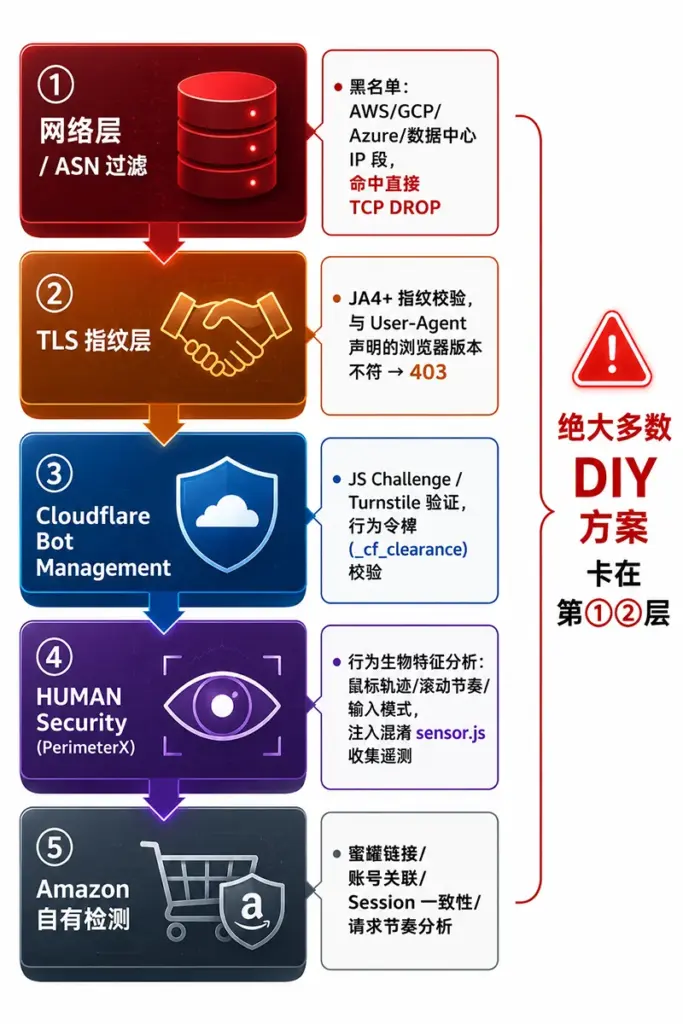
第一层:ASN / IP 信誉过滤
这是最粗暴也最有效的一层。亚马逊(及前置的 Cloudflare)维护了一份持续更新的 ASN 黑名单,几乎覆盖了所有可用于批量采购的 VPS 服务商:AWS EC2(是的,亚马逊自己的云)、Google Cloud、Azure、Hetzner、DigitalOcean、Linode……来自这些 ASN 的请求往往在 TCP 连接建立后、HTTP 请求发送前就被丢弃,你甚至看不到一个 HTTP 状态码。这就是为什么很多人说「开了代理还是被封」——因为用的是数据中心代理,IP 段早就在黑名单里了。
第二层:JA4 TLS 指纹
TLS 握手不只是加密协议,也是身份证。JA4 指纹是对 TLS ClientHello 包的精确记录,包括:密码套件(cipher suites)的顺序、TLS 扩展列表、支持的椭圆曲线,以及 2025 年起 Chrome/Firefox 标配的后量子密钥共享(X25519MLKEM768)。Node.js 的默认 TLS 实现(基于 OpenSSL)产生的握手指纹和真实 Chrome 132 差距显著。哪怕你的 User-Agent 伪装得一模一样,指纹不对就是被识别出来。
第三层:Cloudflare Bot Management + Turnstile
通过了 IP 和 TLS 检查,进入 Cloudflare 这层。这里会发 JavaScript 挑战——页面会先返回一个包含混淆 JS 代码的 HTML,这段 JS 在浏览器中运行,收集设备指纹(Canvas/WebGL/AudioContext hash、CPU 核心数、内存大小等),然后向 Cloudflare 服务器提交,换回一个有效的 _cf_clearance Cookie。没有这个 Cookie,后续所有请求都会被重定向到挑战页。无头浏览器可以执行这段 JS,但前提是浏览器环境本身通过了指纹检测。
第四层:HUMAN Security 行为分析
这是最难处理的一层。HUMAN Security(前 PerimeterX)的 sensor.js 被嵌入亚马逊页面,持续收集行为遥测:鼠标移动的速度曲线、加速度变化、点击前的路径弧度、滚动的惯性模式、键盘输入的节奏……真实用户的鼠标轨迹是非线性的,有加速和减速,有轻微抖动;自动化脚本的鼠标轨迹是完美的贝塞尔曲线,或者直接「瞬移」到目标位置。这种差异在行为数据层面是非常显著的特征。
第五层:亚马逊自有检测
蜜罐链接(隐藏的 <a> 标签)、Session 一致性校验(语言/货币/地区设置的跨请求一致性)、请求时序分析(正常用户不会以每秒 3 次的速度加载商品页)、账号 Cookie 关联。这层是在前四层都没拦住的情况下的最后防线。
环境搭建:选择正确的武器
基于上面的分析,我们需要针对性地组合工具。以下是 2026 年对抗亚马逊防御体系的推荐技术栈:
| 组件 | 推荐工具 | 作用 | 解决的检测层 |
|---|---|---|---|
| 浏览器自动化 | Playwright | 页面控制,JS 执行 | 第 3、4 层 |
| 反检测增强 | playwright-extra + stealth | 修补 navigator.webdriver 等 JS 特征 | 第 3 层(部分) |
| 代理 | 住宅代理(轮换) | 绕过 ASN 黑名单 | 第 1 层 |
| 行为模拟 | 自定义鼠标/滚动函数 | 人类行为特征 | 第 4 层 |
| 会话管理 | 持久化 Cookie + Storage | 保持 Cloudflare clearance | 第 3 层 |
安装依赖
mkdir amazon-scraper && cd amazon-scraper
npm init -y

# 核心依赖
npm install playwright playwright-extra puppeteer-extra-plugin-stealth

# 辅助工具
npm install axios cheerio user-agents fs-extra

# 安装 Chromium(playwright 会自动安装)
npx playwright install chromium
为什么用 playwright-extra 而不是原生 playwright?playwright-extra 是 Playwright 的插件系统封装,允许我们加载 stealth 插件来修补浏览器的自动化特征。Stealth 插件会处理以下检测点:navigator.webdriver(最基础的检测点)、navigator.plugins(空插件列表是无头浏览器的明显特征)、WebGL 渲染器(无头 Chrome 会返回 SwiftShader,真实浏览器会返回 GPU 型号)、window.chrome 对象(真实 Chrome 存在,无头版本中缺失)。
第一步:用 Playwright + Stealth 打通基本流程
先写一个能跑的基础版本,再逐步强化。这个版本处理了第 3 层(Cloudflare JS 挑战)的大部分情况,但在 IP 没有问题的情况下才有效:
// scraper.js
const { chromium } = require('playwright-extra');
const StealthPlugin = require('puppeteer-extra-plugin-stealth');
const UserAgent = require('user-agents');
const fs = require('fs-extra');

// 注册 stealth 插件 —— 必须在任何 browser.launch() 之前调用
chromium.use(StealthPlugin());

/**
 * 生成随机延迟,模拟人类操作节奏
 * @param {number} min 最小毫秒
 * @param {number} max 最大毫秒
 */
function randomDelay(min = 800, max = 3500) {
  const delay = Math.floor(Math.random() * (max - min + 1)) + min;
  return new Promise(resolve => setTimeout(resolve, delay));
}

/**
 * 模拟人类鼠标移动到目标元素
 * 使用多段贝塞尔曲线,加入随机抖动,避免直线瞬移
 */
async function humanMouseMove(page, selector) {
  const element = await page.$(selector);
  if (!element) return;

  const box = await element.boundingBox();
  if (!box) return;

  // 目标点加入随机偏移(模拟不精确的人类点击)
  const targetX = box.x + box.width * (0.3 + Math.random() * 0.4);
  const targetY = box.y + box.height * (0.3 + Math.random() * 0.4);

  // 获取当前鼠标位置(模拟从屏幕某处移来)
  const startX = Math.random() * 800 + 100;
  const startY = Math.random() * 400 + 100;

  // 贝塞尔曲线控制点
  const cp1x = startX + (targetX - startX) * 0.3 + (Math.random() - 0.5) * 100;
  const cp1y = startY + (targetY - startY) * 0.3 + (Math.random() - 0.5) * 80;
  const cp2x = startX + (targetX - startX) * 0.7 + (Math.random() - 0.5) * 100;
  const cp2y = startY + (targetY - startY) * 0.7 + (Math.random() - 0.5) * 80;

  const steps = 20 + Math.floor(Math.random() * 15); // 随机步数
  for (let i = 0; i <= steps; i++) {
    const t = i / steps;
    // 三次贝塞尔公式
    const x = Math.pow(1 - t, 3) * startX
      + 3 * Math.pow(1 - t, 2) * t * cp1x
      + 3 * (1 - t) * Math.pow(t, 2) * cp2x
      + Math.pow(t, 3) * targetX;
    const y = Math.pow(1 - t, 3) * startY
      + 3 * Math.pow(1 - t, 2) * t * cp1y
      + 3 * (1 - t) * Math.pow(t, 2) * cp2y
      + Math.pow(t, 3) * targetY;

    await page.mouse.move(x, y);
    // 移动过程中加随机微停顿(模拟人类的不均匀速度)
    if (Math.random() < 0.1) {
      await randomDelay(30, 150);
    }
    await new Promise(r => setTimeout(r, 8 + Math.random() * 12));
  }
}

/**
 * 模拟人类滚动行为
 * 不是直接 scrollTo,而是分段滚动,加随机停顿
 */
async function humanScroll(page, targetY = 0) {
  const currentY = await page.evaluate(() => window.scrollY);
  const distance = targetY - currentY;
  const steps = 8 + Math.floor(Math.random() * 8);
  const stepSize = distance / steps;

  for (let i = 0; i < steps; i++) {
    await page.evaluate((dy) => window.scrollBy(0, dy), stepSize);
    await randomDelay(60, 200);
  }
}

/**
 * 主采集函数:获取亚马逊商品详情
 * @param {string} asin 商品 ASIN
 * @param {string} proxyUrl 住宅代理地址(格式:http://user:pass@host:port)
 * @param {string} marketplace 站点(amazon.com / amazon.co.uk 等)
 */
async function scrapeAmazonProduct(asin, proxyUrl = null, marketplace = 'amazon.com') {
  const ua = new UserAgent({ deviceCategory: 'desktop' });
  const userAgent = ua.toString();

  const launchOptions = {
    headless: true,  // true 可以运行,但某些环境建议先用 false 调试
    args: [
      '--no-sandbox',
      '--disable-setuid-sandbox',
      '--disable-blink-features=AutomationControlled',
      '--disable-dev-shm-usage',
      '--window-size=1440,900',
    ]
  };

  // 如果提供了代理,添加代理配置
  if (proxyUrl) {
    launchOptions.proxy = { server: proxyUrl };
  }

  const browser = await chromium.launch(launchOptions);

  try {
    const context = await browser.newContext({
      userAgent: userAgent,
      viewport: { width: 1440, height: 900 },
      locale: 'en-US',
      timezoneId: 'America/New_York',
      geolocation: { longitude: -74.006, latitude: 40.7128 }, // 纽约,与代理地区一致
      permissions: ['geolocation'],
      // 持久化 Cookie(第二次运行时 Cloudflare clearance 可能还有效)
      storageState: await loadStorageState(),
    });

    // 注入额外的反检测脚本(在每个页面加载时执行)
    await context.addInitScript(() => {
      // 隐藏自动化特征
      Object.defineProperty(navigator, 'webdriver', { get: () => undefined });

      // 修复 window.chrome(无头浏览器缺少这个对象)
      window.chrome = {
        runtime: {},
        loadTimes: function() {},
        csi: function() {},
        app: {}
      };

      // 修复 navigator.plugins(无头浏览器通常返回空列表)
      Object.defineProperty(navigator, 'plugins', {
        get: () => {
          return [
            { name: 'Chrome PDF Plugin', filename: 'internal-pdf-viewer', description: 'Portable Document Format' },
            { name: 'Chrome PDF Viewer', filename: 'mhjfbmdgcfjbbpaeojofohoefgiehjai', description: '' },
            { name: 'Native Client', filename: 'internal-nacl-plugin', description: '' }
          ];
        }
      });

      // 修复 navigator.languages
      Object.defineProperty(navigator, 'languages', { get: () => ['en-US', 'en'] });
    });

    const page = await context.newPage();
    const url = `https://www.${marketplace}/dp/${asin}`;

    console.log(`[*] 开始采集: ${url}`);
    console.log(`[*] User-Agent: ${userAgent.slice(0, 60)}...`);

    // 设置额外请求头,让请求更像真实浏览器
    await page.setExtraHTTPHeaders({
      'Accept': 'text/html,application/xhtml+xml,application/xml;q=0.9,image/avif,image/webp,image/apng,*/*;q=0.8',
      'Accept-Language': 'en-US,en;q=0.9',
      'Accept-Encoding': 'gzip, deflate, br',
      'Upgrade-Insecure-Requests': '1',
      'Sec-Fetch-Dest': 'document',
      'Sec-Fetch-Mode': 'navigate',
      'Sec-Fetch-Site': 'none',
      'Sec-Fetch-User': '?1',
    });

    // 导航到商品页,等待网络基本空闲
    const response = await page.goto(url, {
      waitUntil: 'domcontentloaded',
      timeout: 45000
    });

    console.log(`[*] 响应状态: ${response.status()}`);

    // 检测是否触发 Cloudflare 挑战
    const isCloudflarePage = await page.evaluate(() => {
      return document.title.includes('Just a moment') ||
             document.querySelector('#challenge-running') !== null ||
             document.body.innerText.includes('Checking if the site connection is secure');
    });

    if (isCloudflarePage) {
      console.log('[!] 触发 Cloudflare 挑战,等待自动完成...');
      // 等待 Cloudflare 挑战完成(通常 3-8 秒)
      await page.waitForNavigation({ waitUntil: 'networkidle', timeout: 30000 });
      console.log('[+] Cloudflare 挑战完成');
    }

    // 检测是否是 CAPTCHA 页面
    const isCaptcha = await page.evaluate(() => {
      return document.querySelector('form[action="/errors/validateCaptcha"]') !== null ||
             document.querySelector('.a-box-inner img[src*="captcha"]') !== null;
    });

    if (isCaptcha) {
      console.log('[!] 遇到 CAPTCHA,当前 IP 已被标记,需要更换代理');
      await saveScreenshot(page, asin, 'captcha');
      return { error: 'CAPTCHA_REQUIRED', asin };
    }

    // 等待核心内容加载
    await page.waitForSelector('#productTitle', { timeout: 20000 });

    // 模拟人类行为:随机滚动浏览页面
    await randomDelay(1200, 2500);
    await humanScroll(page, 300);
    await randomDelay(800, 1800);
    await humanScroll(page, 700);
    await randomDelay(1000, 2000);
    await humanScroll(page, 1200);
    await randomDelay(500, 1200);
    // 滚回顶部
    await humanScroll(page, 0);
    await randomDelay(600, 1500);

    // 提取商品数据
    const productData = await page.evaluate(() => {
      const getText = (selector) => {
        const el = document.querySelector(selector);
        return el ? el.textContent.trim() : null;
      };

      const getAttr = (selector, attr) => {
        const el = document.querySelector(selector);
        return el ? el.getAttribute(attr) : null;
      };

      // --- 商品标题 ---
      const title = getText('#productTitle');

      // --- 价格(处理多种价格展示格式)---
      let price = null;
      // 格式1:普通价格
      const priceWhole = getText('.a-price-whole');
      const priceFraction = getText('.a-price-fraction');
      if (priceWhole) {
        price = parseFloat(priceWhole.replace(',', '') + '.' + (priceFraction || '00'));
      }
      // 格式2:Deal 价格
      if (!price) {
        const dealPrice = getText('#dealprice_shippingmessage .a-price .a-offscreen') ||
                          getText('.a-section .a-price .a-offscreen');
        if (dealPrice) price = parseFloat(dealPrice.replace(/[^0-9.]/g, ''));
      }

      // --- BSR 排名 ---
      const bsr = [];
      const bsrNodes = document.querySelectorAll('#productDetails_detailBullets_sections1 tr, #detailBulletsWrapper_feature_div li');
      bsrNodes.forEach(node => {
        if (node.textContent.includes('Best Seller') || node.textContent.includes('Best Sellers Rank')) {
          const rankText = node.textContent;
          // 使用正则提取所有排名
          const matches = rankText.matchAll(/#([\d,]+)\s+in\s+([^(#]+)/g);
          for (const match of matches) {
            bsr.push({
              rank: parseInt(match[1].replace(',', '')),
              category: match[2].trim()
            });
          }
        }
      });

      // --- 评分 ---
      const ratingText = getText('#acrPopover') ||
                         getAttr('#averageCustomerReviews [data-hook="average-star-rating"] span', 'class');
      const rating = ratingText ? parseFloat(ratingText.match(/[\d.]+/)?.[0]) : null;

      // --- 评论数 ---
      const reviewCountText = getText('#acrCustomerReviewText');
      const reviewCount = reviewCountText ? parseInt(reviewCountText.replace(/[^0-9]/g, '')) : null;

      // --- 库存状态 ---
      const availabilityText = getText('#availability span') || getText('#outOfStock .a-color-secondary');
      let availability = 'unknown';
      if (availabilityText) {
        if (availabilityText.toLowerCase().includes('in stock')) availability = 'in_stock';
        else if (availabilityText.toLowerCase().includes('out of stock')) availability = 'out_of_stock';
        else if (availabilityText.toLowerCase().includes('only')) availability = 'low_stock';
        else availability = availabilityText.trim();
      }

      // --- 品牌 ---
      const brand = getText('#bylineInfo') ||
                    getText('a#bylineInfo') ||
                    getText('.po-brand .po-break-word');

      // --- Bullet Points(卖点)---
      const bulletPoints = [];
      document.querySelectorAll('#feature-bullets li span.a-list-item').forEach(el => {
        const text = el.textContent.trim();
        if (text && !text.includes('Make sure this fits')) bulletPoints.push(text);
      });

      // --- 主图 URL ---
      const mainImage = getAttr('#imgBlkFront', 'src') ||
                        getAttr('#landingImage', 'src') ||
                        getAttr('#imgTagWrapperId img', 'src');

      // --- Prime 状态 ---
      const isPrime = document.querySelector('#primeBadge_feature_div, .a-icon-prime, [id*="prime"]') !== null;

      // --- 过滤蜜罐元素(不可见链接,避免误访问)---
      // 只提取对用户可见的链接
      const visibleLinks = [];
      document.querySelectorAll('a[href]').forEach(el => {
        const style = window.getComputedStyle(el);
        if (style.display !== 'none' && style.visibility !== 'hidden' && style.opacity !== '0') {
          visibleLinks.push(el.href);
        }
      });

      return {
        title,
        price,
        rating,
        reviewCount,
        availability,
        brand,
        bulletPoints,
        mainImage,
        isPrime,
        bsr,
        extractedAt: new Date().toISOString(),
        pageUrl: window.location.href
      };
    });

    // 保存 Session State(下次运行时可复用 Cloudflare clearance Cookie)
    await saveStorageState(context);

    console.log('[+] 采集成功:', productData.title?.slice(0, 50));
    return productData;

  } catch (error) {
    console.error('[!] 采集失败:', error.message);
    await saveScreenshot(browser.contexts()[0]?.pages()[0], asin, 'error').catch(() => {});
    throw error;
  } finally {
    await browser.close();
  }
}

// Session 持久化辅助函数
const STATE_FILE = './session-state.json';

async function loadStorageState() {
  try {
    if (await fs.pathExists(STATE_FILE)) {
      return await fs.readJson(STATE_FILE);
    }
  } catch (e) { /* 首次运行,忽略 */ }
  return undefined;
}

async function saveStorageState(context) {
  try {
    const state = await context.storageState();
    await fs.writeJson(STATE_FILE, state);
    console.log('[+] Session 状态已保存(下次运行可复用 Cloudflare clearance)');
  } catch (e) {
    console.warn('[!] 保存 Session 失败:', e.message);
  }
}

async function saveScreenshot(page, asin, type) {
  if (!page) return;
  await page.screenshot({ path: `./debug-${asin}-${type}-${Date.now()}.png`, fullPage: true });
  console.log(`[+] 截图已保存: debug-${asin}-${type}.png`);
}

// === 主程序入口 ===
(async () => {
  const ASIN = 'B0CHP7BPYQ';  // 示例 ASIN,替换为你要采集的商品

  // 住宅代理配置(格式:http://username:password@host:port)
  // 如果没有代理,设为 null(在干净的住宅网络下可以不用代理)
  const PROXY = process.env.PROXY_URL || null;

  try {
    const data = await scrapeAmazonProduct(ASIN, PROXY, 'amazon.com');
    console.log('\n========== 采集结果 ==========');
    console.log(JSON.stringify(data, null, 2));
  } catch (err) {
    console.error('\n[!] 最终失败:', err.message);
    process.exit(1);
  }
})();
运行方式:
# 不使用代理(适合本地住宅网络测试)
node scraper.js

# 使用住宅代理
PROXY_URL="http://user:[email protected]:8080" node scraper.js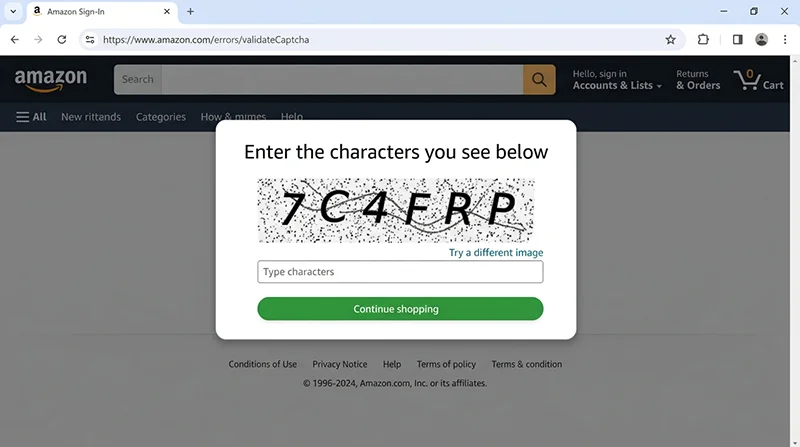
识别亚马逊的各种拦截响应
采集器遇到的不只是 CAPTCHA,亚马逊有好几种不同的拦截机制,需要分别处理:
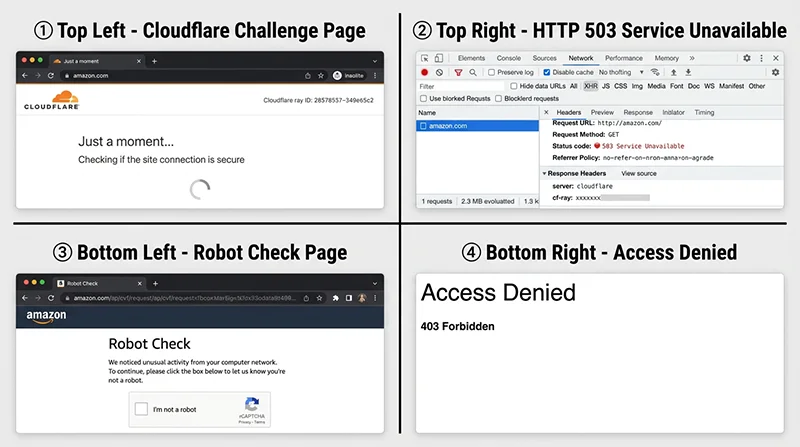
// block-detector.js
// 专门用于检测页面当前是否被拦截,以及拦截类型

/**
 * 检测页面当前状态
 * @returns {Object} { status: 'ok'|'cloudflare_challenge'|'captcha'|'robot_check'|'access_denied'|'unknown_block', details: string }
 */
async function detectPageStatus(page) {
  const httpStatus = page.url(); // 已通过 response 对象获取状态

  const result = await page.evaluate(() => {
    const title = document.title.toLowerCase();
    const bodyText = document.body?.innerText?.toLowerCase() || '';
    const url = window.location.href;

    // Cloudflare JS 挑战
    if (title.includes('just a moment') ||
        document.querySelector('#challenge-running, #challenge-stage') ||
        bodyText.includes('checking if the site connection is secure')) {
      return { status: 'cloudflare_challenge', details: 'Cloudflare JS challenge active' };
    }

    // 亚马逊图形 CAPTCHA
    if (document.querySelector('form[action*="validateCaptcha"]') ||
        document.querySelector('.a-box-inner img[src*="captcha"]') ||
        url.includes('/errors/validateCaptcha')) {
      return { status: 'captcha', details: 'Amazon image CAPTCHA' };
    }

    // 机器人检测页(Robot Check)
    if (title.includes('robot check') ||
        bodyText.includes("we noticed unusual activity") ||
        bodyText.includes("let us know you're not a robot")) {
      return { status: 'robot_check', details: 'Amazon robot check page' };
    }

    // 访问被拒绝
    if (title === 'access denied' ||
        bodyText.startsWith('access denied') ||
        document.querySelector('h4')?.textContent?.includes('Access Denied')) {
      return { status: 'access_denied', details: 'Hard block - IP likely banned' };
    }

    // 蜜罐陷阱检测(如果访问了隐藏链接,可能到这里)
    if (url.includes('/gp/errors/') || title.includes('page not found')) {
      return { status: 'honeypot_triggered', details: 'May have triggered a honeypot URL' };
    }

    // 正常商品页
    if (document.querySelector('#productTitle') ||
        document.querySelector('#dp-container')) {
      return { status: 'ok', details: 'Product page loaded successfully' };
    }

    return { status: 'unknown', details: `Unknown state: title="${document.title}"` };
  });

  return result;
}

/**
 * 基于检测结果决定下一步动作
 */
async function handleBlock(page, status, context) {
  switch (status.status) {
    case 'cloudflare_challenge':
      console.log('[!] 等待 Cloudflare 挑战完成...');
      try {
        // 等待页面自动完成挑战并跳转
        await page.waitForNavigation({ waitUntil: 'networkidle', timeout: 20000 });
        // 保存新的 clearance Cookie
        await context.storageState().then(state =>
          require('fs-extra').writeJson('./session-state.json', state)
        );
        console.log('[+] Cloudflare 挑战通过,clearance Cookie 已更新');
        return 'retry';
      } catch {
        console.log('[!] Cloudflare 挑战超时,可能需要更换代理');
        return 'change_proxy';
      }

    case 'captcha':
      console.log('[!] 遇到图形 CAPTCHA,当前 IP 信誉太低');
      console.log('[建议] 更换住宅代理 IP,等待 5-10 分钟后重试');
      return 'change_proxy';

    case 'robot_check':
      console.log('[!] 触发机器人检测,行为模式可能被识别');
      return 'change_proxy';

    case 'access_denied':
      console.log('[!] IP 已被硬封禁,必须更换代理');
      return 'change_proxy';

    case 'honeypot_triggered':
      console.log('[!] 可能触发了蜜罐链接,立即停止当前 Session');
      return 'abort_session';

    case 'ok':
      return 'success';

    default:
      console.log('[?] 未知状态:', status.details);
      return 'unknown';
  }
}

module.exports = { detectPageStatus, handleBlock };
代理轮换与批量采集
单个 ASIN 的采集相对好处理,批量采集才是真正的挑战。关键原则:每个 ASIN 之间要有随机间隔,每隔若干请求要更换代理,不要让同一个 IP 采集超过 50 个 ASIN。
// batch-scraper.js
const { scrapeAmazonProduct } = require('./scraper');
const { detectPageStatus, handleBlock } = require('./block-detector');
const fs = require('fs-extra');

/**
 * 代理池管理器
 * 代理格式:http://user:pass@host:port
 */
class ProxyPool {
  constructor(proxies) {
    this.proxies = proxies;
    this.currentIndex = 0;
    this.failCount = new Map(); // 记录每个代理的失败次数
  }

  // 获取下一个代理(轮询 + 避开失败次数过多的)
  getNext() {
    const maxFails = 3;
    let attempts = 0;
    while (attempts < this.proxies.length) {
      const proxy = this.proxies[this.currentIndex % this.proxies.length];
      this.currentIndex++;
      const fails = this.failCount.get(proxy) || 0;
      if (fails < maxFails) return proxy;
      attempts++;
    }
    // 全部代理都失败次数过多,重置并返回第一个(可能临时恢复了)
    this.failCount.clear();
    return this.proxies[0];
  }

  markFailed(proxy) {
    this.failCount.set(proxy, (this.failCount.get(proxy) || 0) + 1);
    console.log(`[!] 代理 ${proxy.slice(-20)} 失败次数: ${this.failCount.get(proxy)}`);
  }

  markSuccess(proxy) {
    this.failCount.set(proxy, 0);
  }
}

/**
 * 批量采集,带代理轮换和失败重试
 * @param {string[]} asins ASIN 列表
 * @param {string[]} proxyList 代理地址列表
 * @param {Object} options 配置选项
 */
async function batchScrape(asins, proxyList, options = {}) {
  const {
    marketplace = 'amazon.com',
    maxRetries = 3,           // 单个 ASIN 最大重试次数
    minDelay = 8000,          // 请求间最小延迟(毫秒)—— 不要低于 5000
    maxDelay = 25000,         // 请求间最大延迟(毫秒)
    requestsPerProxy = 40,    // 每个代理最多处理多少个请求
    outputFile = './results.json'
  } = options;

  const pool = new ProxyPool(proxyList);
  const results = [];
  const failed = [];

  let requestCount = 0;
  let currentProxy = pool.getNext();

  for (let i = 0; i < asins.length; i++) {
    const asin = asins[i];
    console.log(`\n[${i + 1}/${asins.length}] 采集 ASIN: ${asin}`);

    // 每隔 requestsPerProxy 个请求换一次代理
    if (requestCount > 0 && requestCount % requestsPerProxy === 0) {
      console.log(`[*] 达到 ${requestsPerProxy} 请求限制,轮换代理`);
      currentProxy = pool.getNext();
    }

    let success = false;
    let retries = 0;

    while (!success && retries < maxRetries) {
      try {
        const data = await scrapeAmazonProduct(asin, currentProxy, marketplace);

        if (data.error === 'CAPTCHA_REQUIRED') {
          // CAPTCHA:换代理重试
          pool.markFailed(currentProxy);
          currentProxy = pool.getNext();
          retries++;
          console.log(`[!] CAPTCHA,换代理后第 ${retries} 次重试`);
          await randomDelay(5000, 12000);
          continue;
        }

        pool.markSuccess(currentProxy);
        results.push(data);
        success = true;
        requestCount++;

        // 保存中间结果(避免全部完成才写入,中途崩溃丢数据)
        if (results.length % 10 === 0) {
          await fs.writeJson(outputFile, { results, failed, updatedAt: new Date().toISOString() }, { spaces: 2 });
          console.log(`[+] 已保存 ${results.length} 条中间结果`);
        }

      } catch (err) {
        pool.markFailed(currentProxy);
        retries++;
        console.error(`[!] 第 ${retries} 次尝试失败: ${err.message}`);

        if (retries < maxRetries) {
          currentProxy = pool.getNext();
          await randomDelay(10000, 30000); // 失败后等待更长时间
        } else {
          failed.push({ asin, error: err.message, retriesExhausted: true });
          console.error(`[!] ASIN ${asin} 重试次数耗尽,跳过`);
        }
      }
    }

    // 请求成功后的随机延迟(不要让亚马逊看到固定频率的访问)
    if (success && i < asins.length - 1) {
      const delay = minDelay + Math.random() * (maxDelay - minDelay);
      console.log(`[*] 等待 ${(delay / 1000).toFixed(1)}s 后继续...`);
      await new Promise(r => setTimeout(r, delay));
    }
  }

  // 写入最终结果
  const finalOutput = {
    total: asins.length,
    success: results.length,
    failed: failed.length,
    successRate: `${((results.length / asins.length) * 100).toFixed(1)}%`,
    results,
    failed,
    completedAt: new Date().toISOString()
  };

  await fs.writeJson(outputFile, finalOutput, { spaces: 2 });
  console.log(`\n========== 批量采集完成 ==========`);
  console.log(`成功: ${results.length} / ${asins.length} (${finalOutput.successRate})`);
  console.log(`失败: ${failed.length}`);
  console.log(`结果已保存至: ${outputFile}`);

  return finalOutput;
}

function randomDelay(min, max) {
  return new Promise(r => setTimeout(r, min + Math.random() * (max - min)));
}

// === 主程序示例 ===
if (require.main === module) {
  const asins = [
    'B0CHP7BPYQ',
    'B09G9FPHY6',
    'B0BDHX8Z63',
    // ... 更多 ASIN
  ];

  // 住宅代理列表(至少需要 3-5 个,最好 10 个以上做轮换)
  const proxies = [
    process.env.PROXY_1,
    process.env.PROXY_2,
    process.env.PROXY_3,
  ].filter(Boolean);

  if (proxies.length === 0) {
    console.warn('[警告] 未提供代理,使用本地 IP,仅适合小批量测试');
  }

  batchScrape(asins, proxies, {
    marketplace: 'amazon.com',
    minDelay: 10000,
    maxDelay: 30000,
    requestsPerProxy: 30,
    outputFile: './amazon-results.json'
  }).catch(console.error);
}
成功率现实与降级策略
说一个很多教程不愿意说的话:在 2026 年,任何自建 Node.js 方案对亚马逊的长期稳定成功率都不会超过 75%,而且维护成本会持续上升。这是因为:
- 亚马逊每 2–4 周会更新一次反爬规则,每次更新都可能让之前有效的绕过手段失效
- 住宅代理有衰减效应:被用于自动化的住宅代理 IP 会逐渐被亚马逊标记,新鲜的住宅代理更贵,成功率更高
- HUMAN Security 的行为模型持续学习:你的模拟行为在 30 天前可能是「真实用户」,30 天后同样的模式可能已经在训练集里被标记为机器人特征
基于此,推荐的降级策略是三级架构:
- 第一级:自建 Playwright 方案——适合每天 < 500 个 ASIN 的小规模场景,接受 60–75% 的成功率和较高的维护成本
- 第二级:Scraping API(如 Scrapfly、ScrapingBee)——托管的无头浏览器服务,维护代理池和 stealth,你只需要传 URL,成功率 80–90%,按请求计费
- 第三级:专用亚马逊数据 API——Pangolinfo Amazon Scraper API 这类专门针对亚马逊优化的数据接口,在内部处理了所有 TLS 指纹、代理轮换、CAPTCHA 和 Session 管理,开发者调用一个 HTTP 接口就能拿到结构化 JSON,P95 响应时间在 2.5 秒内,成功率 99%+。适合日均 > 1,000 ASIN 或需要多站点覆盖的场景。
选哪个级别取决于你的规模和工程资源。如果你的核心业务是数据驱动的决策(价格监控、选品研究、库存预警),把工程时间花在数据管道维护上是错误的资源分配——这些复杂度应该由专业服务来承担,你的工程师应该聚焦在用数据做决策的逻辑上。
需要了解 API 方案的具体参数和定价,可以查看 Pangolinfo 文档中心的 Amazon Scraper API 接入指南。
常见问题
2026 年普通 Puppeteer/Playwright 还能抓取亚马逊吗?
基本上不行。亚马逊反爬已升级至 JA4 TLS 指纹 + HUMAN Security 行为分析的组合,未经处理的自动化浏览器通常在 TLS 握手阶段就被识别,必须配合住宅代理 + stealth 插件 + 行为模拟才有可能成功,且成功率随时间衰减。
playwright-extra stealth 插件和 Camoufox 有什么区别?
stealth 插件通过注入 JS 修改浏览器属性,属于表层修补,无法处理 TLS 指纹和 CDP 协议泄露。Camoufox 在 Firefox 引擎层面(C++ 级别)进行修改,TLS 指纹和浏览器行为更接近真实用户,但它基于 Firefox 而非 Chrome。对亚马逊这类高级目标,Camoufox 的成功率明显更高,但两者都不是银弹。
为什么数据中心代理对亚马逊基本无效?
亚马逊维护了覆盖所有主流 VPS 和数据中心的 ASN 黑名单,包括 AWS EC2 自身。来自这些 IP 段的请求往往在 TCP 连接后就被丢弃,不会返回任何 HTTP 响应。住宅代理使用真实 ISP 的 IP,可以绕过这层 ASN 过滤,但仍面临后续的 TLS 指纹和行为分析。
亚马逊的蜜罐是怎么工作的?如何避免触发?
亚马逊在页面中嵌入了对真实用户不可见的隐藏链接(display:none),爬虫在提取所有链接时可能访问这些 URL,触发后当前 IP 和 Session 会被立即标记。防御方法:用 window.getComputedStyle(el) 过滤掉不可见元素,只点击 DOM 中真正可交互的链接。
什么情况下该放弃自建,转向亚马逊数据 API?
三个信号:日均超过 1,000 ASIN(代理成本开始超过 API 费用);需要覆盖多个亚马逊站点;需要 95% 以上的持续稳定成功率。Pangolinfo Amazon Scraper API 适合这类场景,内部处理了所有 TLS 指纹、代理和 CAPTCHA,开发者只需要关注数据。
结论:工具选对了,才是真正的效率
Node.js 无头浏览器绕过 Cloudflare 采集亚马逊数据,在技术上是可行的,但门槛不低:住宅代理(不可省)+ stealth 插件 + 行为模拟 + Session 管理 + 持续维护——每一环都是成本。这篇文章里的代码是真实可跑的,但真正部署到生产环境前,你需要清醒评估一件事:你的竞争优势是数据采集技术,还是用数据做的业务决策?
如果是后者,Pangolinfo Amazon Scraper API 值得了解——它把数据采集层的全部复杂度封装掉,让你可以专注在商业价值的创造上。详细的接口文档和示例代码在 Pangolinfo 文档中心,首 60 次调用免费。