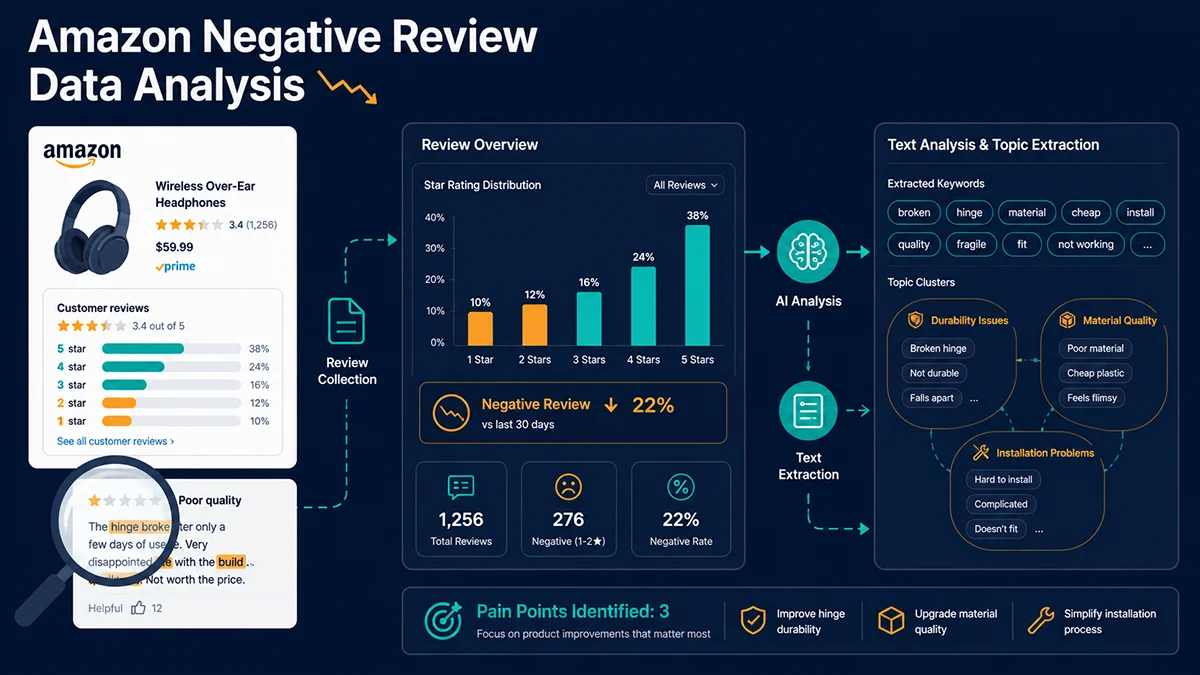
Amazon Negative Review Data Analysis
Amazon negative review data analysis is not about complaint management — it is about converting validated competitor failures into your differentiation strategy. One negative review is feedback; thirty similar reviews across a category reveal a market gap; when a specific pain point appears across 60%+ of the top 20 competitor ASINs, you have found the fastest path to a competitive moat.
Most articles on this topic recycle the same three-step framework: collect, categorize, improve. The output is advice like “address quality issues and update your listing.” If that level of analysis is driving your product decisions, you are not outcompeting anyone — you are reacting to the same signals every other seller in your category is reading. The methodology gap is not in knowing that negative reviews contain useful information; it is in having a systematic, quantified, and consistently executed process that turns that information into actions your competitors cannot see or replicate as quickly.
Amazon’s 2024 rollout of AI-generated “Customers Say” summaries added a new urgency to this work. Recurring complaint themes now surface on the product detail page’s first screen, compressing the window between a quality problem appearing in reviews and that problem visibly damaging conversion rates. The question is no longer whether to analyze negative reviews — it is whether your analysis system is fast and structured enough to catch problems before Amazon’s own AI broadcasts them to every potential buyer who looks at your listing.
Why Is Your Negative Review Analysis Not Working?
Review analysis fails not because the method is wrong, but because three common errors undermine its practical value before any insight reaches the product team.
The first error is analyzing only your own reviews instead of your competitors’. Your own negative reviews tell you where you are failing. Competitors’ negative reviews tell you where the entire market is failing — which is where your opportunity to differentiate actually lives. A complete Amazon negative review data analysis workflow treats self-reviews as a quality management input and competitor reviews as a product strategy input. They serve different purposes and require different analytical frameworks.
The second error is relying on static review percentages instead of dynamic velocity metrics. A product’s overall negative rate is a historical average that gets diluted by every positive review it has ever received. A product that has been live for two years and suddenly starts accumulating negative reviews in a specific week will not show a meaningful change in its aggregate rating for months — by which time the damage is done. Dynamic monitoring of review velocity catches these inflection points weeks earlier.
The third error is categorizing at too high a level to act on. “Packaging issues” is not an actionable finding. Is it the structural integrity of the outer carton? The absence of protective foam inserts? The gap between packaging quality and a premium price point that sets buyer expectations too high? Each of these leads to a different corrective action, a different conversation with your supplier, and a different update to your listing or A+ content. If your analysis cannot generate a specific, ownable task, it has not gone deep enough.
Method 1: Negative Review Velocity Ratio (NRV Ratio) — The Dynamic Early Warning Indicator
The Negative Review Velocity Ratio measures how the proportion of negative reviews in recent inbound feedback compares to the product’s historical baseline. The formula:
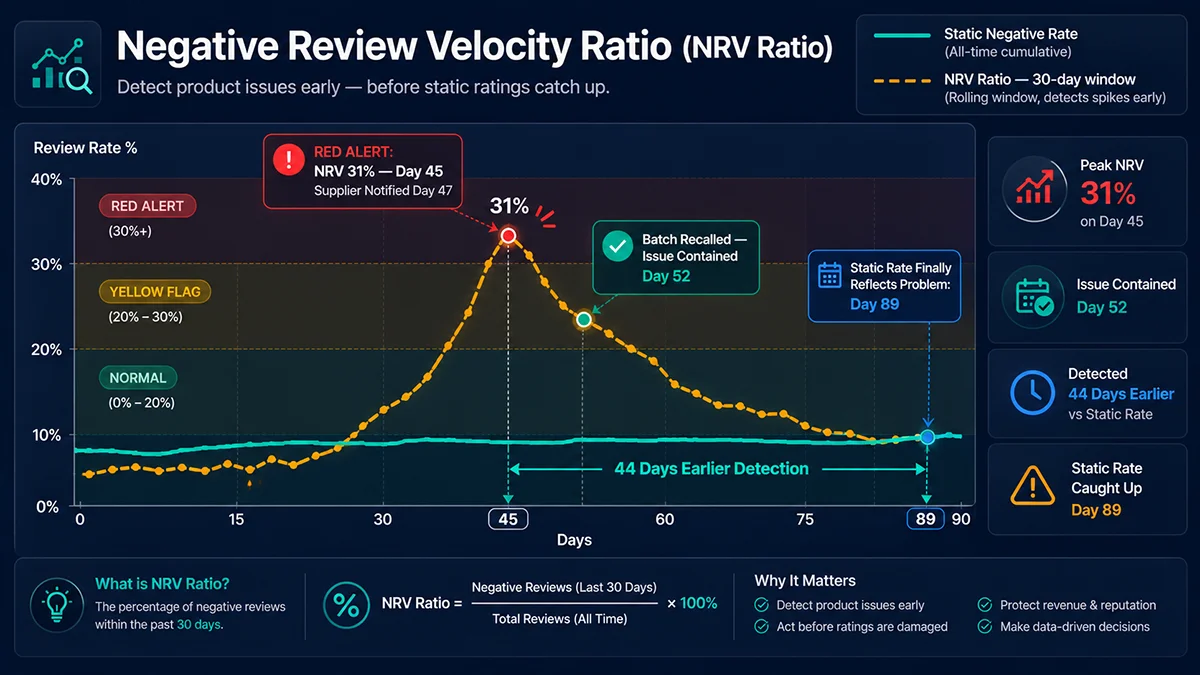
dashed amber line (NRV spiking to 31% at day 45 with red alert annotation), dotted vertical
lag indicator at day 89, double arrow showing 44-day detection advantage, three background
threshold bands (green/yellow/red).
NRV Ratio = New negative reviews (last 30 days) ÷ Total new reviews (last 30 days)
A concrete example from kitchen knife category monitoring: ASIN B09XXXX had a stable lifetime negative rate of 9%. Standard monthly reporting would show no concern. But NRV Ratio tracking revealed that in a 30-day window, the ratio had jumped to 31%. Investigation traced the problem to a batch of handle screws from a substitute supplier — several dozen units shipped with insufficiently torqued fasteners, causing the handle to loosen after moderate use. Buyers were reporting this within two to four weeks of delivery.
By the time this batch problem would have moved the aggregate rating from 9% to anything visible (say, 11%), another six weeks of negative reviews would have accumulated. NRV Ratio caught it in week one. The seller was able to halt FBA replenishment of that batch, initiate proactive outreach to affected buyers, and source replacement screws — before the problem became a BSR event.
Suggested alert thresholds: NRV Ratio 10–20%: monitor and log; 20–30%: yellow flag — review recent orders and fulfillment logs; above 30%: red alert — pause advertising budget, contact supplier, track return rate for the affected period.
Method 2: Cross-ASIN Negative Review Clustering — Finding the Category’s Blind Spots
A single competitor’s negative reviews are a data point. The aggregated negative reviews from the top 15–20 BSR products in a category are a competitive intelligence map. This is where Amazon negative review data analysis transitions from operational improvement to strategic positioning.
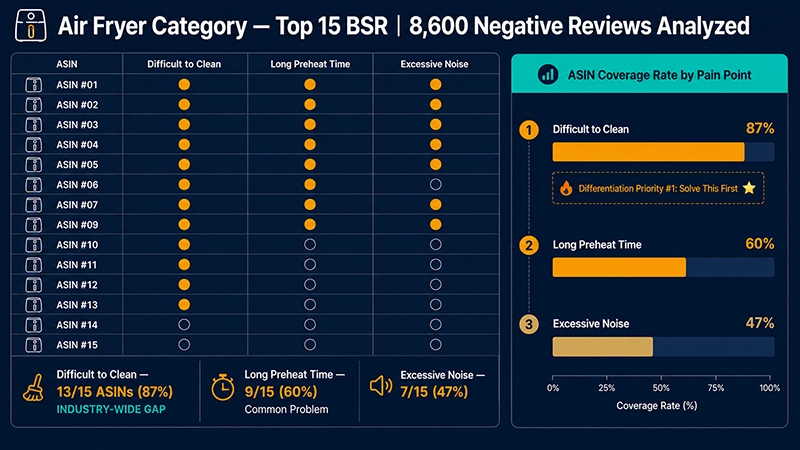
To illustrate: an analysis of the air fryer category using Pangolinfo Reviews Scraper API collected approximately 8,600 negative reviews across the top 15 BSR products (January–March 2025, US marketplace). After keyword extraction and clustering, three themes emerged with high ASIN coverage rates:
“Difficult to clean” — 13 of 15 ASINs (87% coverage). The specific complaints consistently pointed to interior coating that traps food residue and non-detachable baskets that prevent thorough cleaning. This theme appeared across all price tiers, indicating it is a structural limitation of the current supply chain design rather than a specific manufacturer’s failure.
“Long preheat time” — 9 of 15 ASINs (60% coverage). User expectation in this category is a preheat time under three minutes; the majority of products took five to eight minutes, with buyers explicitly writing “takes forever to preheat” and “not ready when I am.”
“Excessive noise” — 7 of 15 ASINs (47% coverage). Several reviews referenced noise levels compared to vacuum cleaners, suggesting an expectation gap between how air fryers are marketed (often as a quiet, convenient appliance) and their actual acoustic profile.
Any seller entering the air fryer category with a product that solves the cleaning problem — detachable, dishwasher-safe inner basket with a non-stick coating that actually performs — and leads with that solution in the primary bullet point and A+ hero image, is speaking directly to the frustration that 87% of the existing category’s buyers have already expressed. That is not marketing; that is executing against a competitor intelligence map that the data generated.
Method 3: AI “Customers Say” Summary Monitoring — The 2024 Review Amplifier
Customers Say text returned; (2) negative keyword detection with amber-highlighted phrases;
(3) week-over-week document diff showing newly appeared keywords; (4) action fork split into
green path (own ASIN — update listing within 48h) and amber path (competitor ASIN — run
targeted ads against their weakness); connected by teal arrows on deep navy card backgrounds.
Amazon’s AI-generated “Customers Say” feature, deployed broadly across the US marketplace in 2024, extracts recurring themes from customer reviews and displays them as a labeled summary at the top of the review section on product detail pages. The summary covers both positive themes (“easy to assemble,” “good value”) and negative themes (“difficult to clean,” “arrived damaged”).
The practical consequence for Amazon negative review data analysis is significant: before this feature, a recurring complaint required a buyer to scroll through the review section to encounter it. Now, it appears on the first screen of the product page for every visitor — including buyers who came in from a sponsored ad and were not planning to read reviews at all. A product with a 4.2-star rating and 91% positive reviews can still have “poor material quality” as a prominent Customers Say label if that theme appears with enough consistency.
For monitoring purposes, this means tracking the Customers Say text for your own ASINs and your top competitors’ ASINs should run on a weekly cycle. The Pangolinfo Reviews Scraper API returns the full Customers Say summary text alongside individual review data, so you do not need a separate product detail page fetch to capture it. If a negative keyword appears in a competitor’s summary that maps to a problem your product does not have, use that as a point of emphasis in your ad creative and listing bullet points — because every buyer who clicked on your competitor’s listing already saw that AI summary label.
Method 4: Dimensional Breakdown Analysis — From “Packaging Problem” to 4 Executable Tasks
The most common failure mode in negative review analysis is leaving findings at a category level too broad to generate a specific corrective action. Here is a worked example of dimensional breakdown applied to a single review:
Original negative review (1 star): “The packaging was terrible, arrived completely crushed and one side was dented. Not what I paid for at this price point.”
Coarse classification: Packaging / Shipping Issue ✗ (still not actionable)
Dimensional breakdown:
① Structural integrity: “completely crushed” → suggests insufficient corrugated wall thickness or no inner foam support. Action: require supplier to switch to double-wall corrugated box with minimum 40 lb burst strength; add EPE foam corner inserts.
② Product protection layer: if the external box is dented and the product is also dented, the product is contacting the box walls directly. Action: add bubble wrap wrap or molded pulp insert around the product body.
③ Perceived value gap: “not what I paid for at this price point” indicates that buyer price expectations set a packaging quality standard that the current packaging does not meet. Action: this is a listing management issue, not just a supply chain issue — either improve packaging or add a main image that sets packaging expectations accurately.
④ Quality inspection gap: “dented” arriving at buyer suggests no receiving inspection before FBA shipment. Action: implement pre-FBA inbound inspection protocol that rejects units with cosmetic damage.
Four specific, ownable corrective actions from one review. If your analysis process is generating findings at the “improve packaging” level rather than the “switch to double-wall corrugated with EPE foam corners” level, the analysis has not reached a level of specificity that can close the loop between insight and implementation.
Method 5: Time-Series Analysis — The Seasonal Problem Hidden in Averages
Some product failures are cyclical, and they are completely invisible in aggregate statistics. Consider this example: an outdoor folding chair (ASIN B07XXXXX) with a stable annual negative review rate of 8.5%. Nothing in the monthly dashboard would flag a concern.
Plotting negative reviews by month over a 24-month period reveals a sharp spike every July–August and again every November–December. Drilling into the July cluster, the dominant theme is “weld joint cracking” after moderate use. A reasonable hypothesis from the category-level analysis would be “manufacturing defect at the weld point” — leading to a conversation with the factory about quality control on weld seam inspection.
The actual root cause was different: the welds were fine at the time of manufacture. The problem was that FBA warehouse summer temperatures in certain fulfillment centers exceed 85°F (29°C), and this specific alloy’s stress characteristics change at elevated temperatures. Units that sat in warm storage for 45+ days before shipping arrived at the buyer already carrying micro-fractures in the stress-bearing joints — fractures that became visible with normal use within two to four weeks of delivery.
The correct solution was not changing the manufacturing spec; it was adjusting the summer FBA replenishment strategy to keep inventory turnover under 30 days in summer months, avoiding long warehouse dwell time. Static aggregate analysis would have generated the wrong corrective action. Time-series analysis pointed at the real cause.
Method 6: Review-Keyword Correlation Analysis — Directly Prioritizing SEO and PPC Actions
This method bridges the gap between Amazon negative review data analysis and search optimization by finding the intersection between what buyers complain about and what buyers search for.
The workflow: extract the top negative keyword themes from your review corpus, then cross-reference those themes against Amazon search term reports (from advertising backend) or third-party keyword tools. Look for cases where a high-frequency complaint term has a corresponding high-volume search query that buyers use when looking for a product that does not have that problem.
Example: if “hard to assemble” appears 47 times across competitor negative reviews, check what search volume exists for queries like “easy to assemble [product category],” “no tools required [product category],” or “quick setup [product category].” If those queries have combined monthly search volume of 8,000+, you have found not just a product improvement priority but a keyword targeting opportunity. The updated listing bullet point becomes: “5-Minute Assembly — No Tools Required” — a direct response to the competitor pain point, written in the language buyers use when they search.
This approach transforms Amazon negative review data analysis from an internal quality management exercise into a three-dimensional optimization driver: product spec, listing copy, and PPC keyword selection, all aligned around the same validated buyer frustration.
How to Get Amazon Review Data: Three Methods Compared
Every methodology described above depends on having structured, reliable review data at scale. This is where most sellers encounter an underestimated technical barrier.
Amazon does not offer a public review data API. The platform has deployed three layers of protection against bulk review extraction: IP-based rate limiting that triggers CAPTCHA challenges after a threshold of requests from the same address, login walls that require an authenticated session to access review content (significantly expanded in 2024), and JavaScript-rendered dynamic content that makes traditional HTML parsing return empty review sections.
These three barriers compound: even if you navigate IP rotation, you face the login wall; even if you manage sessions, the JS rendering requires a headless browser, which dramatically slows throughput and increases detection risk. A self-built scraper that worked reliably in 2022 may have success rates below 60% today without significant ongoing maintenance to address each new Amazon countermeasure.
Option 1: Amazon SP-API
Official channel, highest data reliability, but restricted entirely to buyer feedback on your own listings. Cannot be used to analyze competitor ASINs. Valid for monitoring your own product’s review health; insufficient for any competitive intelligence use case.
Option 2: Managed third-party review scraping API (Recommended)
Services like Pangolinfo Reviews Scraper API maintain the infrastructure required to handle anti-bot countermeasures, authenticated session management, and JavaScript rendering on the service provider’s side. A single authenticated HTTP POST returns structured JSON with complete review data: review text, star rating, review date, buyer locale, Verified Purchase status, Helpful Vote count, and — since the 2024 feature launch — the Customers Say AI summary text for that ASIN. For teams conducting cross-ASIN competitor analysis across 20–50+ listings, this is the only approach that delivers consistent throughput without dedicated scraping infrastructure investment.
Option 3: Local browser automation (Selenium/Playwright)
Capable of handling login walls and JavaScript rendering through browser session simulation, but requires active maintenance as Amazon updates page structure and bot detection logic. Concurrency is limited by available IP resources and local machine constraints. Sustained high-volume operation risks flagging the associated Amazon account for automated access patterns. For systematic long-term competitor monitoring, the operational burden is not sustainable for most teams.
Production Implementation: Batch Negative Review Analysis with Reviews Scraper API
import requests
import json
from collections import Counter
import re
from datetime import datetime, timedelta
from typing import Optional

# Pangolinfo Reviews Scraper API
# Docs: https://docs.pangolinfo.com/en-api-reference/universalApi/universalApi
API_KEY = "your_api_key_here"
REVIEWS_ENDPOINT = "https://api.pangolinfo.com/amazon/reviews"


def fetch_negative_reviews(asin: str, marketplace: str = "US",
                            max_pages: int = 5) -> list[dict]:
    """
    Batch-fetch 1-2 star reviews for a given ASIN.
    Returns an empty list on persistent failure rather than raising.
    """
    all_reviews = []

    for page in range(1, max_pages + 1):
        try:
            resp = requests.post(
                REVIEWS_ENDPOINT,
                headers={"Authorization": f"Bearer {API_KEY}"},
                json={
                    "asin": asin,
                    "country": marketplace,
                    "star_filter": "critical",   # 1–2 stars only
                    "sort_by": "recent",
                    "page": page,
                    "output": "json"
                },
                timeout=20
            )
            resp.raise_for_status()
            reviews = resp.json().get("reviews", [])

            if not reviews:
                break

            all_reviews.extend(reviews)

        except Exception as e:
            print(f"[SKIP] {asin} page {page}: {e}")
            break

    return all_reviews


def compute_nrv_ratio(negative_reviews: list[dict],
                       total_reviews: list[dict],
                       lookback_days: int = 30) -> dict:
    """
    Compute the Negative Review Velocity Ratio over the last N days.

    Alert thresholds:
      NRV < 0.20  → normal, log and continue
      NRV 0.20–0.30 → yellow flag, investigate
      NRV > 0.30  → red alert, pause ads, contact supplier
    """
    cutoff = datetime.now() - timedelta(days=lookback_days)

    def parse_date(review: dict) -> Optional[datetime]:
        try:
            return datetime.fromisoformat(review.get("date", ""))
        except (ValueError, TypeError):
            return None

    recent_negative = sum(
        1 for r in negative_reviews
        if (d := parse_date(r)) and d >= cutoff
    )
    recent_total = sum(
        1 for r in total_reviews
        if (d := parse_date(r)) and d >= cutoff
    )

    nrv = recent_negative / recent_total if recent_total > 0 else 0

    alert_level = "RED" if nrv > 0.30 else ("YELLOW" if nrv > 0.20 else "NORMAL")

    return {
        "nrv_ratio": round(nrv, 3),
        "recent_negative": recent_negative,
        "recent_total": recent_total,
        "lookback_days": lookback_days,
        "alert_level": alert_level
    }


def extract_themes(reviews: list[dict],
                   top_n: int = 20,
                   min_word_length: int = 4) -> list[tuple[str, int]]:
    """
    Extract top keyword themes from review text.
    In production, replace with spaCy NLP or a topic model for better results.
    """
    STOPWORDS = {
        'this', 'that', 'they', 'them', 'with', 'have', 'from', 'would',
        'were', 'been', 'more', 'your', 'just', 'also', 'when', 'very',
        'like', 'what', 'will', 'even', 'only', 'than', 'some', 'then',
        'time', 'product', 'item', 'order', 'amazon', 'received', 'bought'
    }

    all_words = []
    for review in reviews:
        # Weight by Helpful Votes — higher-voted reviews signal broader relevance
        weight = 1 + int(review.get("helpful_votes", 0) ** 0.5)
        text = f"{review.get('title', '')} {review.get('body', '')}".lower()
        words = re.findall(r'\b[a-z]{4,}\b', text)
        filtered = [w for w in words if w not in STOPWORDS]
        all_words.extend(filtered * weight)

    return Counter(all_words).most_common(top_n)


def run_cross_asin_analysis(asin_list: list[str],
                             marketplace: str = "US") -> dict:
    """
    Aggregate negative review themes across a group of competitor ASINs.
    Returns a dict of keyword → count, weighted by Helpful Votes.
    """
    aggregated = Counter()
    asin_coverage = {}  # word → set of ASINs where it appeared

    for asin in asin_list:
        print(f"Analyzing {asin}...")
        reviews = fetch_negative_reviews(asin, marketplace)

        if not reviews:
            print(f"  No data for {asin}, skipping.")
            continue

        themes = extract_themes(reviews, top_n=30)
        asin_themes = {word for word, _ in themes}

        for word, count in themes:
            aggregated[word] += count
            asin_coverage.setdefault(word, set()).add(asin)

        top_issue = themes[0][0] if themes else "N/A"
        print(f"  {len(reviews)} negative reviews · top issue: '{top_issue}'")

    total_asins = len(asin_list)

    # Report: rank by ASIN coverage rate (industry-wide pain points first)
    print(f"\n{'='*55}")
    print(f"Cross-ASIN Negative Review Clustering: Top 10 Themes")
    print(f"Analyzed {total_asins} ASINs in {marketplace} marketplace")
    print(f"{'='*55}")

    coverage_ranked = sorted(
        [(w, len(asins), len(asins)/total_asins, aggregated[w])
         for w, asins in asin_coverage.items()],
        key=lambda x: x[1], reverse=True
    )

    for word, asin_count, coverage, total_mentions in coverage_ranked[:10]:
        print(f"  '{word}': {asin_count}/{total_asins} ASINs "
              f"({coverage:.0%} coverage) · {total_mentions} total mentions")

    return aggregated, asin_coverage


# Example: air fryer category competitor analysis
if __name__ == "__main__":
    competitor_asins = [
        "B09AIR1111", "B09AIR2222", "B09AIR3333",
        "B09AIR4444", "B09AIR5555", "B09AIR6666",
        "B09AIR7777", "B09AIR8888", "B09AIR9999",
        "B09AIR0000"
    ]

    keywords, coverage = run_cross_asin_analysis(
        competitor_asins, marketplace="US"
    )

    print("\n=== Prioritized Differentiation Opportunities ===")
    print("Theme (>60% ASIN coverage = industry-wide pain point):")
    for word, asins, cov_rate, _ in sorted(
        [(w, len(a), len(a)/len(competitor_asins), 0)
         for w, a in coverage.items()],
        key=lambda x: x[1], reverse=True
    )[:3]:
        if cov_rate > 0.60:
            print(f"  ✦ '{word}' ({cov_rate:.0%}) → INDUSTRY BLIND SPOT: "
                  f"solving this creates a moat")
        else:
            print(f"  · '{word}' ({cov_rate:.0%}) → opportunity but not universal")
5 Critical Details That Undermine Negative Review Analysis
1. Outlier reviews distorting your findings. Every product has 0.5–1% of reviews that are emotionally driven, represent shipping exceptions outside your control, or reflect buyer error. A process that treats all negative reviews equally gives these outliers disproportionate influence. Implement a minimum frequency filter: do not act on a theme unless it appears five or more times across your sample. Helpful Vote weighting (as shown in the code above) also naturally downweights outliers, since idiosyncratic complaints rarely accumulate votes from other buyers who found them helpful.
2. Ignoring Helpful Vote as a signal amplifier. A review with 340 Helpful Votes is not just one data point — it is evidence that 340 other buyers read it and agreed it reflected their experience or their concern. In your NLP pipeline, weight high-vote reviews proportionally. A theme that appears in 20 low-vote reviews might represent one vocal buyer’s specific circumstance; the same theme in 8 reviews averaging 80 Helpful Votes each represents a signal with audience validation behind it.
3. Aggregating across marketplaces without segmentation. UK buyers and US buyers can have substantially different expectations for the same product — different standards for build quality, different tolerance for instruction complexity, different ambient use conditions. Cross-marketplace aggregation produces noise. Run separate clustering models for each marketplace, then compare: does a problem appear in one marketplace but not another? That cross-marketplace difference may itself be diagnostic (a cold-climate material failure, a regulatory compliance gap, a localization issue with instructions).
4. Misreading high negative rate + high sales volume. A product with 15% negative reviews and 4,000 monthly units is not a failed product — it is a validated market with unmet demand. Buyers are tolerating significant frustration because the product satisfies a genuine need that no available alternative addresses adequately. That combination — high volume, high negative rate, concentrated negative theme — is precisely the profile of a category worth entering with a specifically improved product. Do not filter out high-negative-rate ASINs from your competitive research; they are often the most informative data points in the set.
5. Failing to close the feedback loop. Analysis without a defined measurement cycle is guesswork with extra steps. After implementing a product change or updating a listing, set a 45-day calendar reminder to pull fresh negative review data and re-run your NRV Ratio and theme analysis. Did the targeted complaint frequency decrease? Did a new theme emerge? The loop between analysis → action → measurement → re-analysis is what turns Amazon negative review data analysis from a one-time project into a compounding operational advantage.
Building a Production Review Analysis System with Pangolinfo Reviews Scraper API
The six methodologies above all depend on a single prerequisite: consistent, structured access to Amazon review data at the volume and frequency your analysis requires. For teams that have tried to self-manage this infrastructure, the experience is familiar — initial success with a scraped sample, then gradually degrading success rates as Amazon’s countermeasures detect the pattern, then an urgent engineering sprint to restore the data pipeline, then another Amazon update that resets the cycle.
Pangolinfo Reviews Scraper API handles the infrastructure layer — anti-bot countermeasures, authenticated session management, JavaScript rendering — as a managed service, so your engineering effort goes into the analysis pipeline rather than the data collection mechanics.
Key capabilities for the methodologies in this article:
Star filter parameter: pass `star_filter=critical` to return only 1–2 star reviews, reducing API usage by 60–70% compared to fetching all reviews and filtering locally. For teams running daily NRV Ratio calculations across 200+ ASINs, this parameter materially affects monthly API cost.
Full metadata per review: each returned review object includes review date (required for NRV Ratio time-window calculations), Helpful Vote count (required for weighted theme analysis), Verified Purchase status (essential for filtering non-authentic reviews), and buyer locale (required for marketplace segmentation).
Customers Say AI summary included: the product-level Customers Say text is returned in the API response alongside individual reviews — no separate product page fetch required. This enables you to build an automated pipeline that monitors both the granular review signal and the AI summary signal in a single API call per ASIN.
Multi-marketplace support: switching between US, UK, DE, JP, CA, and MX requires only a `country` parameter change — no separate integration or credential management per marketplace. For the cross-marketplace segmentation analysis described in the caveats section, this means your data collection pipeline is marketplace-agnostic by design.
Conclusion: Amazon Negative Review Analysis Is a Compounding Asset, Not a One-Time Audit
The six methodologies in this guide — NRV Ratio velocity monitoring, cross-ASIN clustering, Customers Say AI summary tracking, dimensional breakdown analysis, time-series seasonal analysis, and review-keyword correlation — are not parallel tracks. They are a reinforcing system. NRV Ratio tells you when to run deeper analysis. Cross-ASIN clustering tells you where to differentiate. Customers Say monitoring tells you how quickly your analysis needs to produce a response. Dimensional breakdown tells you what specifically to change. Time-series analysis tells you whether a problem is structural or situational. Keyword correlation tells you how to communicate the solution to buyers who are already searching for it.
What this system requires is clean, timely, structured review data at scale — which is the piece that breaks for most teams trying to run it. Use Pangolinfo Reviews Scraper API to solve the data layer, and your analytical capacity becomes the constraint rather than your data collection infrastructure.
Frequently Asked Questions
What is the core value of Amazon negative review data analysis?
The core value is not complaint management — it is converting validated competitor failures into your differentiation strategy. When 60%+ of the top competitor ASINs in a category share the same negative review theme, that theme is an industry-wide gap. Solve it and communicate the solution in your primary bullet point, and you address the frustration that buyers are already experiencing across every competitor they considered before finding your listing.
What is the Negative Review Velocity Ratio (NRV Ratio) and how do I calculate it?
NRV Ratio = new negative reviews (last 30 days) ÷ total new reviews (last 30 days). This dynamic metric catches quality problems 3–4 weeks before they become visible in aggregate ratings. Alert thresholds: 20–30% is a yellow flag requiring investigation; above 30% is a red alert requiring immediate action — pause advertising, contact the supplier, and track returns from the affected period.
Does Amazon restrict review data collection? What are the compliant options?
Amazon has three protection layers: IP-based rate limiting, login walls (expanded significantly in 2024), and JavaScript-rendered dynamic content. Three options: (1) SP-API — official but limited to your own store; (2) Third-party review APIs like Pangolinfo Reviews Scraper API — handles all three barriers, returns structured JSON; (3) Local browser automation — high maintenance, account risk. For competitor monitoring at scale, option 2 is the most practical choice.
How does the AI “Customers Say” summary change negative review analysis?
Amazon’s Customers Say feature surfaces recurring negative themes on the product detail page’s first screen, visible to every visitor regardless of whether they planned to read reviews. This compresses the window between a quality problem appearing and it visibly affecting conversion. Weekly monitoring of Customers Say text — for your own ASINs and competitors’ — should be a standard part of your Amazon negative review data analysis workflow.
How do you perform cross-ASIN negative review clustering?
Steps: (1) Batch-collect 1-2 star reviews from the top 15-20 BSR products in your target category; (2) Extract keywords from review text; (3) Aggregate keyword counts across all ASINs; (4) Calculate ASIN coverage rate for each theme. Themes with 60%+ ASIN coverage are industry-wide pain points — solving them creates a competitive moat because every buyer in the category has already experienced that frustration with the products currently available.
Article Summary
This guide presents six advanced methodologies for Amazon negative review data analysis, each addressing a specific blind spot in standard review management approaches: NRV Ratio for dynamic early warning, cross-ASIN clustering for category intelligence, Customers Say AI monitoring for first-screen impact, dimensional breakdown for actionable specificity, time-series analysis for cyclical patterns, and keyword correlation for SEO/PPC alignment. The guide also provides a complete technical breakdown of Amazon review data extraction — covering SP-API limitations, managed scraping API capabilities, and self-built automation trade-offs — with production Python code for batch negative review analysis. Real category examples throughout (air fryers, kitchen knives, outdoor furniture) ground each methodology in concrete data patterns.
Start building your Amazon negative review data analysis pipeline today — try Pangolinfo Reviews Scraper API, view API documentation and turn every competitor complaint into a data-driven differentiation signal.