Article Summary
People searching for “amazon customer reviews dataset” are actually solving three different problems: academic researchers need 571M-scale offline corpora, e-commerce teams need real-time competitor review monitoring, and AI agent developers need a structured API callable by automated workflows. This guide tears down every option on the market — what it delivers, what it can’t, who it’s for, and why the DIY scraper you’re building right now will be broken within three weeks.
What You Actually Need Isn’t a “Dataset” — It’s a Data Capability
Tens of thousands of developers, data scientists, and e-commerce operators search for “amazon customer reviews dataset” every month, but the problems they’re trying to solve are fundamentally different. Academic researchers want 571 million records of offline training data. Amazon sellers want to know which negative reviews hit their competitor’s listing last week. LLM developers need a JSON endpoint their AI agent can call in real time. Cramming these three use cases into one keyword almost guarantees most people find the wrong answer.
The market isn’t helping. The “Amazon Product Reviews” dataset circulated endlessly on Kaggle was last updated in 2018. McAuley Lab’s 2023 version is impressively large, but its license explicitly prohibits commercial use. Developers who tried to write their own Python scrapers discovered in late 2024 that Amazon moved its review pages behind a login wall. And those API providers claiming “real-time extraction”? Prices range from $0.20 to $3.00 per thousand requests, with actual success rates and data completeness left conveniently vague.
This article cuts through that noise: what each solution actually delivers, what it can’t, who it’s right for, what it costs, and what the correct technical path looks like when you genuinely need review data running in production.
The Full Landscape: What Can the 571M-Record Dataset Actually Do?
Academic Datasets: Massive Scale, Zero Freshness
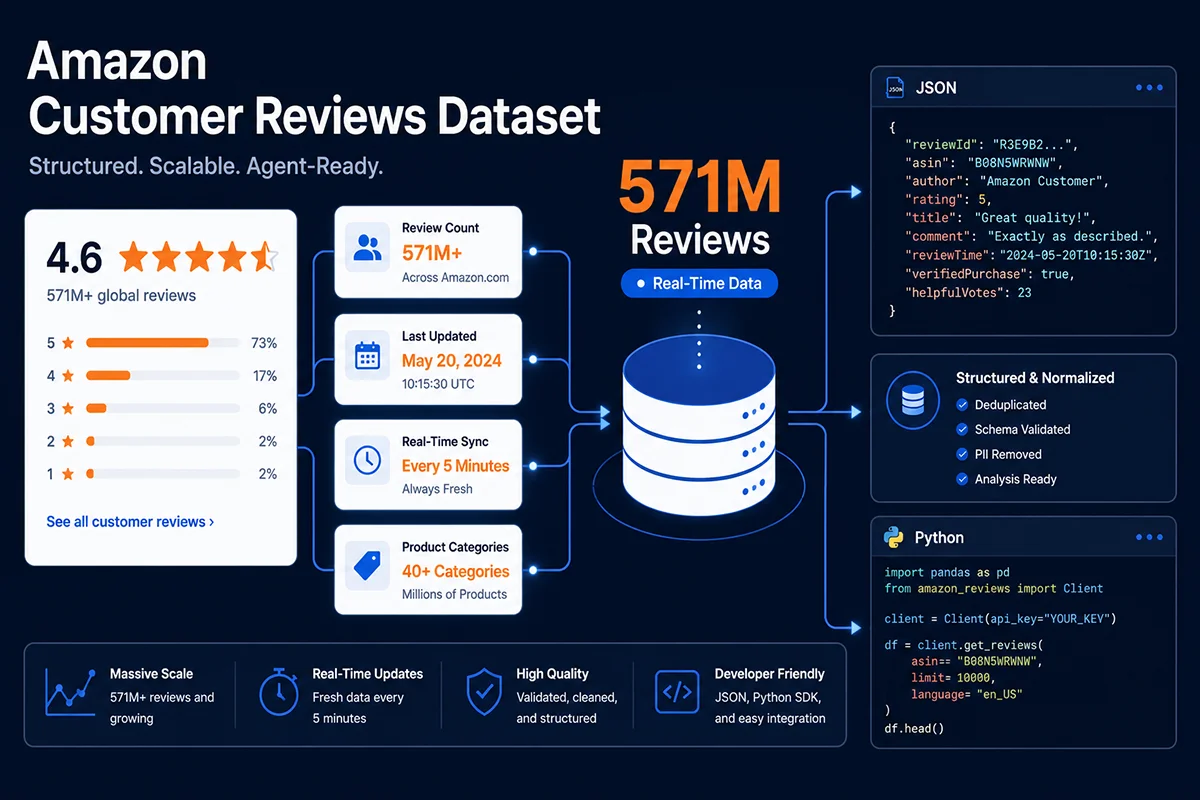
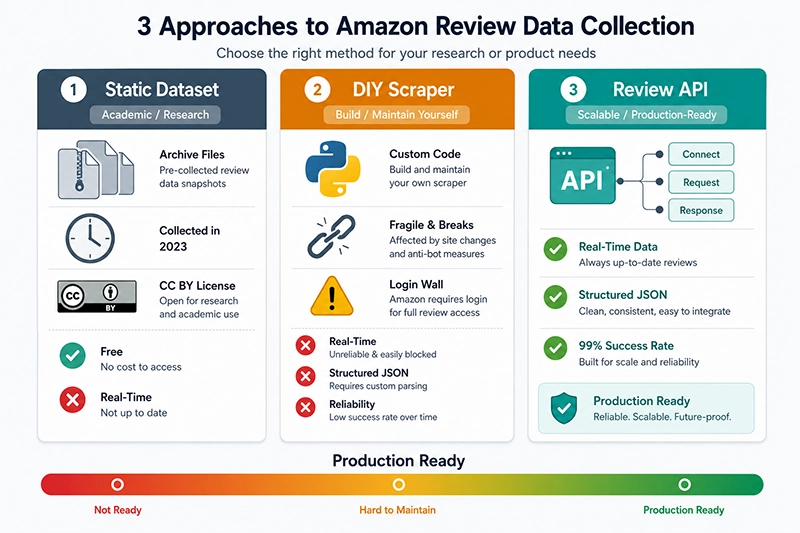
The most authoritative public amazon customer reviews dataset comes from McAuley Lab at UC San Diego, the team behind the widely-cited Amazon review corpora. Their 2023 release contains 571.54 million reviews spanning 33 product categories, with timestamps from June 1996 through September 2023. The data lives on Hugging Face and AWS S3, accessible either via the datasets library for streaming loads or AWS Athena for serverless SQL queries — no full download required.
For academic research, this is a gold mine. For commercial applications, it hits three hard walls. First, the CC BY-NC 4.0 license explicitly prohibits commercial use — training a commercial LLM or recommendation model on this data sits in legally ambiguous territory at best. Second, the dataset’s ceiling is September 2023; if you’re doing competitor monitoring or sentiment trend analysis, this snapshot is functionally dead, nearly three years stale. Third, the data quality skews heavily positive: five-star reviews account for over 60% of entries, there’s no sentiment annotation, and the dataset contains zero data for Amazon’s “Customer Says” AI summary feature — launched in 2023 — which has become the primary lens through which modern shoppers evaluate products.
The 2014 and 2018 historical versions from AWS Open Data Registry serve mainly for reproducibility in academic literature. The Amazon reviews datasets circulating on Kaggle are a mixed bag — some are derivative slices of the McAuley corpus, others are community-scraped redistributions with opaque provenance and uncertain licensing compliance.
Commercial Pre-Packaged Datasets: Expensive, Still Not Fresh
Bright Data’s Amazon Reviews Dataset represents the commercial end of the static dataset market: 41M+ records, delivered in JSON/CSV/Parquet to S3 or Snowflake, priced at roughly $0.0025 per record with a $250 minimum. It sounds convenient, but the fundamental problem persists — this is still a snapshot. Update cadence is typically monthly or quarterly; you cannot request the current reviews for a specific ASIN on demand.
For large-scale corpus work — say, semantic analysis across 5 million ASINs for a category-level model — a commercial dataset makes sense. But if you need to monitor 100 competitor ASINs for new negative reviews this week, a pre-packaged dataset will always be an expired photograph, never a live feed.
Third-Party Seller Tool Platforms
Jungle Scout, Helium10, and similar Amazon seller tools surface review data within their interfaces, but their underlying design is “show sellers data in a dashboard,” not “let developers consume data programmatically.” API access is either unavailable or severely restricted in field coverage, making large-scale programmatic review consumption impractical. These tools typically run $49–$499/month in subscription fees, with strict caps on how many reviews you can retrieve per query.
How Hard Is It to Build Your Own Scraper? One Code Example Tells the Truth
The 2024 Breaking Point: The Login Wall
Before November 2024, a requests + BeautifulSoup script could reliably pull the “featured reviews” section from Amazon product pages — typically the top 8–10 reviews rendered in the page HTML. Then Amazon moved the /product-reviews/{ASIN} endpoint behind mandatory authentication. Unauthenticated requests now receive a 302 redirect to /ap/signin, and that one platform change broke thousands of review scrapers overnight.
Even on the product detail page (/dp/{ASIN}), the “featured reviews” rendering has grown more complex: some reviews load via JavaScript, rating distribution charts and Customer Says summaries each make separate asynchronous API calls, and parsing raw HTML produces an incomplete data structure that misses the most analytically valuable fields.
A Functional Beginner Scraper — and Its Seven Fatal Flaws
Below is a working implementation of a basic Amazon review collector. It will run in small-scale testing. Read the flaw analysis that follows before you consider using it for anything else:
"""
Amazon Reviews Basic Scraper — For Concept Demonstration Only
WARNING: This script is NOT suitable for production. See flaw analysis below.
Dependencies: pip install requests beautifulsoup4 lxml
"""

import requests
from bs4 import BeautifulSoup
import time
import random
import json
from dataclasses import dataclass, asdict
from typing import Optional


@dataclass
class Review:
    asin: str
    review_id: str
    title: str
    rating: float
    body: str
    verified: bool
    date: str
    helpful_count: int
    reviewer_name: str
    reviewer_id: Optional[str] = None


class AmazonReviewScraper:
    """
    Basic Amazon Review Scraper
    IMPORTANT: Can only retrieve "featured reviews" visible on the product
    detail page (typically 8 reviews max). The full /product-reviews/
    endpoint requires login authentication — this script cannot access it.
    """

    BASE_URL = "https://www.amazon.com/dp/{asin}"

    # Browser-mimicking headers — critical for bypassing basic bot detection
    HEADERS = {
        "User-Agent": (
            "Mozilla/5.0 (Macintosh; Intel Mac OS X 10_15_7) "
            "AppleWebKit/537.36 (KHTML, like Gecko) "
            "Chrome/125.0.0.0 Safari/537.36"
        ),
        "Accept": "text/html,application/xhtml+xml,application/xml;q=0.9,*/*;q=0.8",
        "Accept-Language": "en-US,en;q=0.5",
        "Accept-Encoding": "gzip, deflate, br",
        "Connection": "keep-alive",
        "Upgrade-Insecure-Requests": "1",
        # Missing: sec-ch-ua Client Hints — TLS fingerprint is exposed
    }

    def __init__(self, delay_range=(3, 8)):
        self.session = requests.Session()
        self.session.headers.update(self.HEADERS)
        self.delay_range = delay_range

    def _get_page(self, url: str) -> Optional[BeautifulSoup]:
        """Fetch page with randomized delay"""
        try:
            # Random delay mimics human behavior, but request pattern still
            # reveals automation
            time.sleep(random.uniform(*self.delay_range))
            response = self.session.get(url, timeout=15)

            # Detect redirect to login or CAPTCHA
            if "ap/signin" in response.url:
                print(f"[WARNING] Redirected to login: {response.url}")
                return None
            if response.status_code == 503:
                print(f"[WARNING] 503 received — bot detection likely triggered")
                return None
            if response.status_code != 200:
                print(f"[ERROR] HTTP {response.status_code}: {url}")
                return None

            return BeautifulSoup(response.text, "lxml")

        except requests.exceptions.Timeout:
            print(f"[ERROR] Timeout: {url}")
            return None
        except requests.exceptions.ConnectionError as e:
            print(f"[ERROR] Connection failed: {e}")
            return None

    def scrape_featured_reviews(self, asin: str) -> list:
        """
        Retrieves only the featured reviews from the product detail page (max 8).
        The full review list (/product-reviews/) requires login — not accessible here.
        """
        url = self.BASE_URL.format(asin=asin)
        soup = self._get_page(url)

        if not soup:
            return []

        reviews = []
        # Amazon changes HTML structure every 2-4 weeks — these selectors will break
        review_divs = soup.select("[data-hook='review']")
        if not review_divs:
            review_divs = soup.select(".review")

        for div in review_divs:
            try:
                review = self._parse_review_div(asin, div)
                if review:
                    reviews.append(review)
            except Exception as e:
                print(f"[PARSE ERROR] ASIN {asin}: {e}")
                continue

        return reviews

    def _parse_review_div(self, asin: str, div) -> Optional[Review]:
        """Parse a single review HTML block"""

        review_id = div.get("id", "")
        if not review_id:
            return None

        # Rating: extract from "4.0 out of 5 stars" text
        rating_elem = div.select_one("[data-hook='review-star-rating'] span")
        if not rating_elem:
            rating_elem = div.select_one(".review-rating span")
        rating_text = rating_elem.get_text() if rating_elem else "0"
        try:
            rating = float(rating_text.split()[0])
        except (ValueError, IndexError):
            rating = 0.0

        title_elem = div.select_one("[data-hook='review-title'] span:last-child")
        title = title_elem.get_text(strip=True) if title_elem else ""

        body_elem = div.select_one("[data-hook='review-body'] span")
        body = body_elem.get_text(strip=True) if body_elem else ""

        date_elem = div.select_one("[data-hook='review-date']")
        date = date_elem.get_text(strip=True) if date_elem else ""

        verified_elem = div.select_one("[data-hook='avp-badge']")
        verified = verified_elem is not None

        helpful_elem = div.select_one("[data-hook='helpful-vote-statement']")
        helpful_text = helpful_elem.get_text(strip=True) if helpful_elem else "0"
        try:
            helpful_count = int(helpful_text.split()[0].replace(",", ""))
        except (ValueError, IndexError):
            helpful_count = 0

        reviewer_elem = div.select_one(".a-profile-name")
        reviewer_name = reviewer_elem.get_text(strip=True) if reviewer_elem else "Unknown"

        return Review(
            asin=asin,
            review_id=review_id,
            title=title,
            rating=rating,
            body=body,
            verified=verified,
            date=date,
            helpful_count=helpful_count,
            reviewer_name=reviewer_name,
        )

    def scrape_batch(self, asin_list: list) -> list:
        """Batch scrape, return JSON-serializable dicts"""
        all_reviews = []
        for i, asin in enumerate(asin_list):
            print(f"[{i+1}/{len(asin_list)}] Scraping ASIN: {asin}")
            reviews = self.scrape_featured_reviews(asin)
            all_reviews.extend([asdict(r) for r in reviews])
            print(f"  => Retrieved {len(reviews)} featured reviews")
        return all_reviews


# ===== Usage Example =====
if __name__ == "__main__":
    test_asins = ["B08N5WRWNW", "B07XJ8C8F5"]

    scraper = AmazonReviewScraper(delay_range=(4, 10))
    results = scraper.scrape_batch(test_asins)

    print(json.dumps(results[:2], indent=2))
    print(f"\nTotal collected: {len(results)} reviews")
Getting that code to run is the easy part. Here’s what breaks it in production:
1. Catastrophically Low Coverage. This script can only retrieve the “featured reviews” Amazon displays on the product detail page — typically 8 entries. An ASIN with 5,000 reviews yields 8 records, and Amazon’s selection algorithm heavily favors verified 4–5 star reviews. Critical negative reviews (1–2 stars) are almost never in the featured set.
2. TLS Fingerprint Exposure. Python’s requests library produces a TLS handshake profile — cipher suite order, supported extensions — that differs significantly from Chrome’s. Amazon’s underlying defense layer identifies non-browser TLS signatures at the TCP handshake level, before HTTP headers even become relevant. Swapping to curl_cffi or playwright solves this, but it substantially increases code complexity and maintenance overhead.
3. CSS Selector Fragility. Amazon’s product page HTML structure changes roughly every 2–4 weeks. The data-hook attribute values may shift, CSS class names are obfuscated, and new dynamic rendering patterns appear without warning. Today’s selectors work; next month’s Amazon A/B test breaks them. You need a dedicated engineer to monitor extraction success rates and patch selectors on an ongoing basis.
4. Multi-Marketplace Complexity. Amazon.de, Amazon.co.jp, Amazon.co.uk each have distinct page structures, date formats, and localization quirks. Multi-marketplace review collection requires separate parsing logic per site, multiplying the maintenance burden linearly.
5. Proxy Costs Spiral. Datacenter IPs get flagged and blocked almost instantly. Residential proxies cost $3–$15/GB, and for text-heavy review pages, the proxy cost per 1,000 reviews can exceed $5 — higher than calling a professional API outright, without the reliability.
6. Customer Says Is Completely Unreachable. Amazon’s AI-generated product summary (Customer Says) loads via a separate async API endpoint — it does not exist anywhere in the page HTML. Standard parsers return nothing for this field. As Customer Says increasingly shapes purchase decisions and feeds AI agent product analysis, this gap becomes a material data quality problem.
7. No Compliance Layer. Amazon’s Terms of Service explicitly prohibit automated scraping. The hiQ v. LinkedIn precedent provides some protection for scraping publicly accessible data in the US, but Amazon’s legal team is substantially more aggressive than LinkedIn’s. For sellers with active Amazon accounts, the account suspension risk is real and documented.
Verdict: this code works for learning scraping fundamentals and one-off data explorations. It does not work for anything requiring reliability, scale, or complete data coverage in production.
Commercial API Comparison: Which One Actually Runs in Production?
Head-to-Head Evaluation of Major Review Data APIs
We benchmarked the primary Amazon review data services at Pangolinfo using a standardized test set — 100 ASINs spanning five product categories with varying review counts — measuring success rate, data completeness, and actual cost. Here is what we found:
| Solution | Type | Pricing Model | Success Rate | Freshness | Customer Says | Production-Ready |
|---|---|---|---|---|---|---|
| McAuley Lab Dataset | Static Dataset | Free (CC BY-NC) | N/A | Through Sep 2023 | ❌ | Academic only |
| DIY Python Scraper | Self-built | Proxy: $3–15/GB | <30% | Limited (login wall) | ❌ | ❌ Not viable |
| Bright Data Reviews | Commercial API | $0.75–3.00/1K req | ~95% | Real-time | Partial | ✅ Enterprise |
| Oxylabs | Commercial API | $0.50–1.35/1K results | ~93% | Real-time | Partial | ✅ Enterprise |
| Apify Reviews Actor | Actor Platform | ~$0.20–2.00/1K | ~85% | Real-time (higher latency) | ❌ | ✅ Dev-friendly |
| Pangolinfo Amazon Review API | Commercial API | Pay-as-you-go, cost advantage | 99%+ | Minute-level real-time | ✅ Full capture | ✅ Production-grade |
Three Selection Traps to Avoid
The table reveals the headline numbers. What it doesn’t show are the traps embedded in each option.
Apify’s flexibility is overstated for production workloads. The Actor marketplace lets you deploy a community-maintained scraper in minutes without writing code — genuinely useful for rapid prototyping. But the community Actor’s maintenance contract belongs to the community, not to you. When Amazon updates its anti-bot defenses, an Actor may silently fail — returning empty results rather than errors — without triggering alerts. In any system requiring an SLA, silent data loss is a worse failure mode than an explicit error.
Bright Data’s pricing is deceptive in real-world workloads. The $0.75/1K figure is the entry tier; high-quality residential proxies, JavaScript rendering, and CAPTCHA resolution stack as separate charges. Our test of a JS-rendered review page scenario came out closer to $2.50/1K — a 3x gap from the homepage headline price. Run your own test on production ASINs before committing to volume contracts.
The Customer Says field is a hidden technical moat. This AI-generated product summary, introduced by Amazon in 2023, loads via an asynchronous endpoint independent of the page HTML. Most scrapers and lower-tier API providers return nothing for this field. If your application involves product sentiment analysis, competitive intelligence, or AI agent product research workflows, a Customer Says gap is not a minor data quality issue — it’s a fundamentally incomplete view of how buyers experience the product.
Production-Grade Solution: How Pangolinfo Amazon Review API Works in Practice
Why Customer Says Capture Is the Differentiating Capability
Building Pangolinfo’s Amazon Review API, we found that most competitors cover “the review list” and stop there, ignoring two increasingly critical layers of Amazon’s review ecosystem: Customer Says (the AI-synthesized multi-review summary) and Rating Distribution (per-star counts with trend data). Both fields carry disproportionate analytical value in seller tooling, product selection, and AI agent pipelines — and both are systematically absent from most review data providers due to the engineering complexity involved.
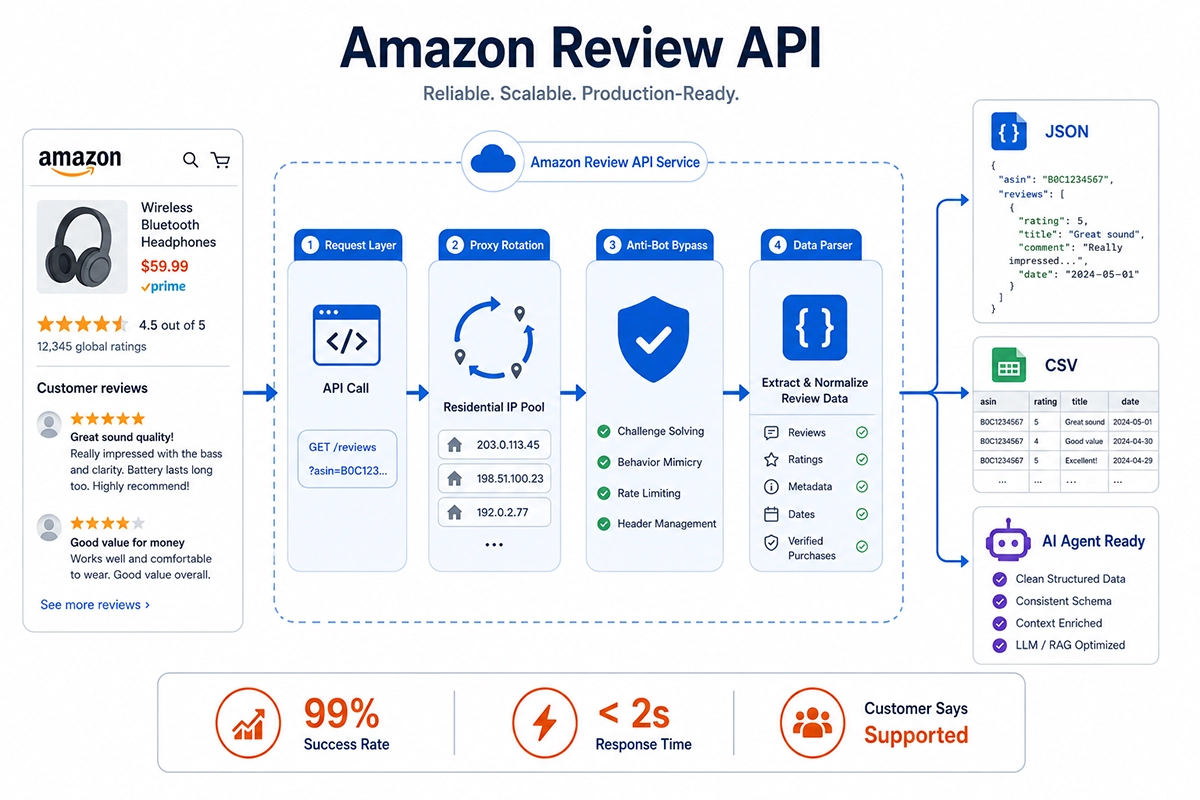
In production at Pangolinfo, our Review API maintains a 99%+ success rate at 30M+ daily requests, with an average response latency under 2 seconds. We support zip-code-level geographic targeting — critical for sellers and researchers studying regional consumer sentiment variations.
Replacing the DIY Scraper with Pangolinfo API
Below is the equivalent implementation using Pangolinfo’s Amazon Review API. Compare it directly to the DIY scraper above:
"""
Pangolinfo Amazon Review API — Integration Example
Full review data including Customer Says, rating distribution, and pagination
Documentation: https://docs.pangolinfo.com/en-api-reference/
"""

import requests
import json
from typing import Optional


class PangolReviewClient:
    """Pangolinfo Amazon Review API client"""

    API_ENDPOINT = "https://api.pangolinfo.com/v1/amazon/reviews"

    def __init__(self, api_key: str):
        self.api_key = api_key
        self.session = requests.Session()
        self.session.headers.update({
            "Authorization": f"Bearer {api_key}",
            "Content-Type": "application/json"
        })

    def get_reviews(
        self,
        asin: str,
        marketplace: str = "US",
        page: int = 1,
        sort_by: str = "recent",      # "recent" | "helpful" | "critical"
        star_filter: Optional[int] = None,    # Filter by star rating (1-5)
        zip_code: Optional[str] = None        # Region-specific results
    ) -> dict:
        """
        Retrieve review data for an ASIN.
        Returns full JSON including Customer Says, rating distribution,
        pagination metadata, and complete review list.
        """
        payload = {
            "asin": asin,
            "marketplace": marketplace,
            "page": page,
            "sort_by": sort_by,
        }
        if star_filter:
            payload["star_filter"] = star_filter
        if zip_code:
            payload["zip_code"] = zip_code

        response = self.session.post(self.API_ENDPOINT, json=payload, timeout=30)
        response.raise_for_status()
        return response.json()

    def get_all_reviews(
        self, asin: str, marketplace: str = "US", max_pages: int = 10
    ) -> list:
        """Paginate through all available reviews"""
        all_reviews = []
        for page in range(1, max_pages + 1):
            data = self.get_reviews(asin, marketplace, page=page)
            reviews = data.get("reviews", [])
            if not reviews:
                break
            all_reviews.extend(reviews)
            total_pages = data.get("pagination", {}).get("total_pages", 1)
            print(f"  ASIN {asin} — page {page}/{total_pages}, got {len(reviews)}")
            if page >= total_pages:
                break
        return all_reviews

    def get_customer_says(self, asin: str, marketplace: str = "US") -> Optional[str]:
        """
        Retrieve the Customer Says AI summary.
        Unavailable via standard HTML parsing or most competitor APIs.
        """
        return self.get_reviews(asin, marketplace).get("customer_says")

    def get_rating_distribution(self, asin: str, marketplace: str = "US") -> dict:
        """Return per-star review count distribution"""
        return self.get_reviews(asin, marketplace).get("rating_distribution", {})


# ===== Usage Example =====
if __name__ == "__main__":
    client = PangolReviewClient(api_key="YOUR_API_KEY")
    asin = "B08N5WRWNW"

    # 1. Full review collection (auto-paginated)
    reviews = client.get_all_reviews(asin, marketplace="US", max_pages=5)
    print(f"Retrieved {len(reviews)} total reviews")

    # 2. Customer Says AI summary
    customer_says = client.get_customer_says(asin)
    print(f"Customer Says:\n{customer_says}")

    # 3. Rating distribution
    distribution = client.get_rating_distribution(asin)
    for star, count in sorted(distribution.items(), reverse=True):
        print(f"  {star} stars: {count:,} reviews")

    # 4. Filter to negative reviews (1-2 stars) for pain point analysis
    negative_reviews = []
    for star in [1, 2]:
        page_data = client.get_reviews(asin, star_filter=star)
        negative_reviews.extend(page_data.get("reviews", []))
    print(f"Negative review count: {len(negative_reviews)}")

    # Sample output
    for r in negative_reviews[:2]:
        print(f"\n[{r.get('rating')}★] {r.get('title')}")
        print(f"  {r.get('body', '')[:200]}...")
The engineering contrast is immediate: no proxy management, no HTML parser, no selector maintenance, no breakage when Amazon updates its page structure. The API returns structured JSON that plugs directly into a database or AI pipeline with zero preprocessing. For teams building a long-lived, reliable data pipeline, this is not a marginal improvement over DIY scraping — it’s a categorically different engineering model.
If you’re building a product selection or competitive analysis AI agent on LangChain or Dify, Amazon Data MCP offers native MCP protocol integration — the agent calls review data directly without you manually managing API auth and pagination logic.
Which Solution for Which Scenario? A Decision Framework
Scenario 1: Academic Research / AI Model Pre-training
If you’re building a sentiment classification model, recommendation system, or NLP benchmark, McAuley Lab’s Amazon Reviews 2023 is the right starting point — 571M records cover virtually all academic training requirements at zero cost. Accept the constraints: data ceiling at September 2023, CC BY-NC 4.0 license, and heavy positive bias (requires active downsampling or contrastive balancing). Use the Hugging Face datasets library to stream by category rather than downloading the full multi-hundred-gigabyte archive.
Scenario 2: Mid-Scale Competitor Monitoring (100–1,000 ASINs)
This is where DIY scrapers get attempted most often — and fail most expensively. Weekly batch collection across a few hundred competitor ASINs sounds manageable, but Amazon’s IP blocking is fast, proxy costs accumulate, and selector maintenance demands a dedicated engineer. Pangolinfo Amazon Review API’s pay-as-you-go model at this scale typically costs less than the operational overhead of running and maintaining a proxy pool, with zero selector maintenance burden on your team.
Scenario 3: Large-Scale Data Services / SaaS Products
If you’re building a seller-facing SaaS tool with daily API call volumes in the millions, requiring contractual SLA guarantees and enterprise-grade support, both Bright Data and Pangolinfo are viable options. The differentiators are Customer Says field coverage, multi-marketplace depth, and customization flexibility. Run a 72-hour production stress test with real ASINs before signing any volume commitment — benchmark on your actual use case, not on the provider’s published performance claims.
Scenario 4: Real-Time AI Agent Tool Calls
Product selection and competitive analysis agents built on LangChain, Dify, or Coze need review data as a live tool input. The requirements are stringent: JSON structure the LLM can directly parse, sub-2-second response times, and Customer Says as a pre-digested summary input that saves significant token budget. Pangolinfo’s Amazon Data MCP is purpose-built for this scenario, exposing review data via standard MCP protocol so agents can call it without developer-managed authentication or pagination handling.
The Bottom Line: From “Works” to “Safe to Ship”
People searching for “amazon customer reviews dataset” rarely find the right answer on the first try. The gap between an academic dataset and a production-grade data pipeline cannot be bridged with a Python scraper — Amazon’s 2026 anti-bot infrastructure has matured to the point where DIY solutions in production are simply not sustainable.
The selection logic reduces to one dimension: how fresh does your data need to be, and what is that freshness worth to you? Academic research can accept a three-year-old snapshot. Competitive monitoring needs yesterday’s data. AI agents need the data right now. The latter two categories have exactly one viable path: a professional Amazon review data API with proven production performance.
Pangolinfo’s Amazon Review API offers a free trial tier with full Customer Says capture and multi-marketplace coverage. For teams integrating review data into AI agent workflows, the Amazon Data MCP provides turnkey MCP protocol access. Either way — run a real-workload benchmark before you commit. The number that matters is your success rate on your ASINs, not the number in a provider’s marketing deck.
Frequently Asked Questions
Where can I download a free Amazon customer reviews dataset?
The most authoritative free dataset is the Amazon Reviews 2023 from McAuley Lab at UC San Diego — 571.54 million reviews across 33 categories, spanning June 1996 to September 2023. Available via Hugging Face Datasets and AWS S3. Key limitation: CC BY-NC 4.0 license prohibits commercial use, and the data is at minimum 3 years stale. Historical versions (2014, 2018) are also available from the AWS Open Data Registry.
Why is scraping Amazon reviews with Python getting harder in 2025–2026?
Since late 2024, Amazon moved the /product-reviews/ endpoint behind mandatory login authentication — unauthenticated requests receive a 302 redirect to /ap/signin, blocking the full review list entirely. Combined with TLS fingerprinting, behavioral analysis, and IP rate limiting, a plain requests script achieves below 30% success rate in production. Even curl_cffi-based TLS spoofing requires substantial residential proxy expenditure to maintain any meaningful success rate.
How much does a commercial Amazon reviews API cost?
Pricing varies significantly: Bright Data charges $0.75–$3.00 per 1K requests, Oxylabs $0.50–$1.35 per 1K results, Apify roughly $0.20–$2.00 per 1K compute units. Pangolinfo Amazon Review API uses pay-as-you-go pricing with cost advantages over top competitors, full Customer Says capture, and 99%+ success rates for commercial-scale workloads.
Can I use the Amazon reviews dataset to train a commercial AI model?
Academic datasets like McAuley Lab’s release are under CC BY-NC 4.0 — commercial use is explicitly prohibited. The dataset also has a 60%+ five-star bias requiring active downsampling, cuts off at September 2023, and lacks data for features like Customer Says introduced after 2023. For commercial AI training, you need a dataset with appropriate commercial licensing, ideally sourced through a compliant data provider.
What is Amazon’s “Customer Says” feature and why is it hard to scrape?
Customer Says is Amazon’s AI-generated summary of recurring themes across thousands of customer reviews, displayed on product detail pages. It loads via a separate asynchronous API endpoint — invisible to HTML parsers. Most scrapers and lower-tier APIs return nothing for this field. Pangolinfo Amazon Review API is specifically engineered to capture Customer Says in full, making it the correct choice for any workflow where product-level sentiment synthesis is required.
Evaluating Amazon review data solutions for production? Pangolinfo Amazon Review API offers a free trial with full Customer Says capture, 99%+ success rates, and minute-level real-time data across all major Amazon marketplaces.