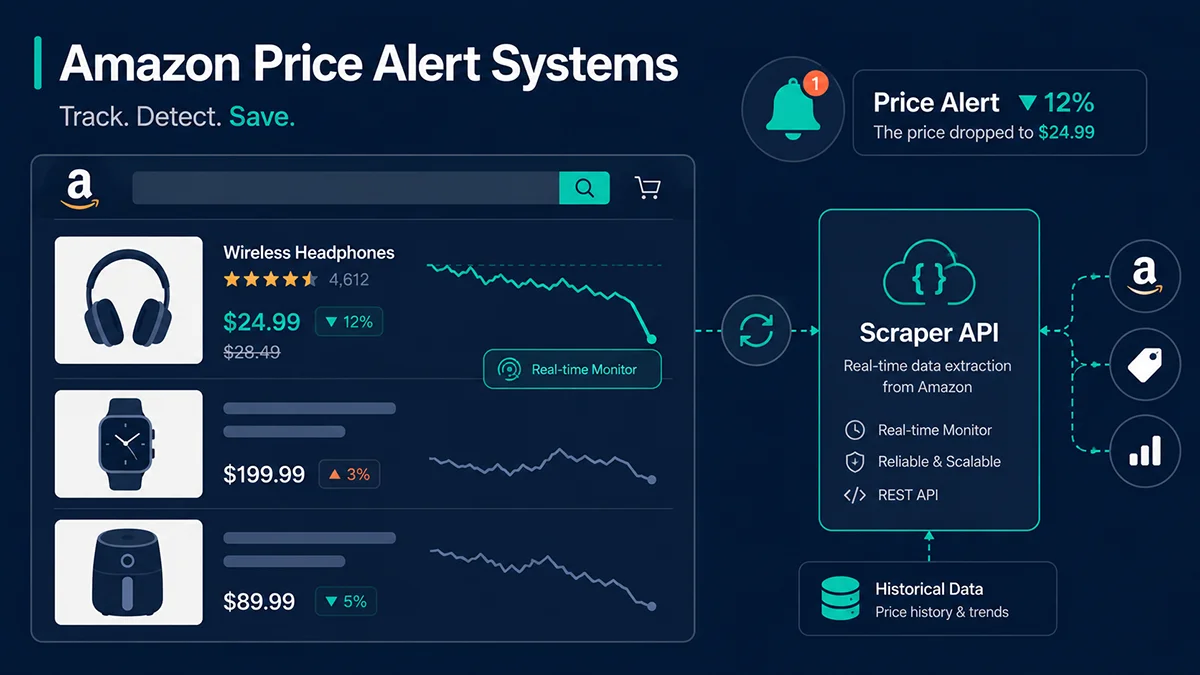
An Amazon price alert system is an automated mechanism that detects competitor price changes and notifies you in real time — so your repricing decisions always arrive before the window closes. It monitors target ASINs continuously, fires alerts when prices cross defined thresholds, and turns manual price-checking from a daily chore into a passive background process.
If you manage more than 50 SKUs on Amazon, you have almost certainly lost a Buy Box overnight without knowing why until the next morning. The competing seller didn’t stay up watching your listing — they had a system doing it for them. According to Jungle Scout’s 2025 State of the Amazon Seller Report, 61% of sellers in competitive categories reported that a price response delay exceeding four hours led to a single-day order volume decline of more than 15%. That isn’t bad luck. It is a systems gap.
Why Is Price Response Latency Amazon’s Most Underestimated Cost?
The damage from slow price response rarely appears as a clean line item in your P&L. It gets absorbed into “increased competition” or “traffic fluctuation” — which makes it easy to ignore the real cause. Amazon’s Buy Box algorithm recalculates ownership dynamically, factoring in price, fulfillment speed, seller rating, and inventory depth. In most consumer categories, price remains the single highest-weighted variable. When your price sits 3% to 5% above a competitor’s, traffic allocation visibly tilts toward them — and in active price wars, that shift can happen within two to three hours.
What makes this harder to manage manually is that Amazon price movements are not linear. During major sales events, top competitors in fast-moving categories adjust their prices more than 12 times per day. Large-volume sellers already run automated repricing tools (Repricers) that respond in minutes. Without an Amazon price alert system, you are making daily decisions based on data that is already hours stale — competing in a different time dimension entirely.
What Is an Amazon Price Alert System? Core Components and How It Works
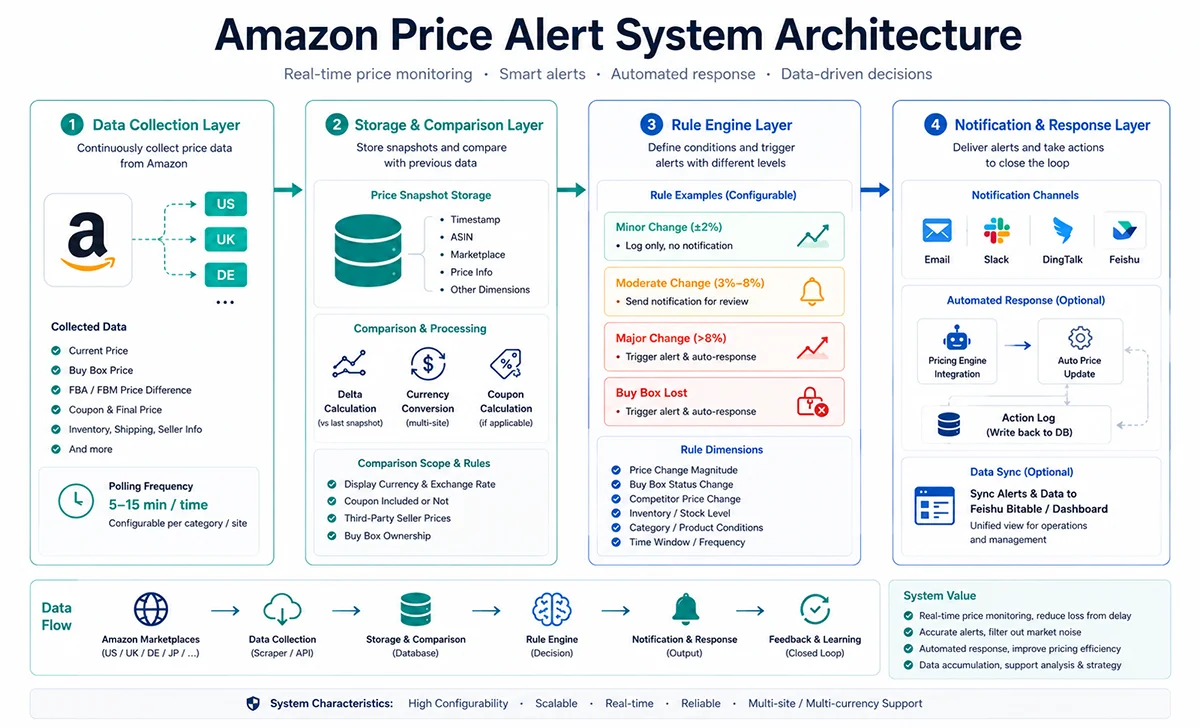
A complete Amazon price alert system consists of four essential modules. Removing any one of them creates a gap that undermines the entire system’s value.
The data collection layer is the system’s circulatory system. It periodically fetches current prices, Buy Box prices, FBA vs. FBM price spreads, and Coupon-adjusted net prices for target ASINs. The critical parameters here are polling frequency and data accuracy — hourly polling is adequate for slow-moving categories, but in fast-moving goods or electronics accessories, 5–15 minute intervals are necessary to keep pace with competitor repricing.
The storage and comparison layer stores each price snapshot in a database and calculates the delta against the previous snapshot. This sounds straightforward, but several details matter: currency normalization for multi-marketplace monitoring, whether Coupon discounts count toward the effective competitive price, and whether third-party seller offers are included in the comparison. A well-designed storage schema here also becomes the foundation for price history curves and trend forecasting later.
The trigger rule engine is the system’s brain — it defines “under what conditions does an alert fire.” A well-designed rule engine is not a simple “any price change triggers an alert” switch. It operates in tiers: small fluctuations (±2% or less) are logged silently; moderate changes (3%–8%) push notifications for human review; large price drops or Buy Box loss trigger automated response flows. The quality of your rule design determines whether the system is a smart assistant or a noise machine.
The notification and response layer is the system’s output. At the basic level: email and Slack/DingTalk/Lark webhooks. At the advanced level: direct integration with a repricing system that executes price changes automatically and writes the action log back to the database, closing the loop. Some teams also pipe alert data into collaborative tools like Airtable or Lark (Feishu) multi-dimensional tables so operations and management can see the pricing war in a unified view.
What Are the Real Engineering Challenges When Building This?
Most sellers who attempt to build an Amazon price alert system discover that the code is not the hard part — it is data acquisition. Amazon does not expose a publicly accessible price query API. The SP-API is restricted to sellers querying data from their own authorized account; it cannot be used to monitor a competitor’s listing. That means competitor price monitoring requires web scraping — and this introduces three genuine engineering challenges.
First, anti-bot mechanisms. Amazon’s bot detection is among the most sophisticated in e-commerce. Frequent, regular-interval requests quickly trigger CAPTCHA challenges or IP bans, causing data outages precisely when you need the data most — during a competitor’s aggressive pricing move.
Second, parsing maintenance. Amazon’s product page HTML structure changes periodically. Self-built scraper parsing logic requires ongoing maintenance, and each page redesign risks silently breaking field extraction — often discovered only after several days of corrupt data have already affected pricing decisions.
Third, scaled concurrency. Monitoring 1,000 ASINs at 15-minute intervals requires approximately 96,000 daily requests. This demands a rotating proxy IP pool, a request queue, and an error retry mechanism — adding significant technical overhead and operational cost.
How to Get Amazon Price Data: Three Approaches Compared
There are three realistic paths to solve the data source problem, each with distinct trade-offs.
Amazon SP-API is officially sanctioned and returns accurate data. The hard constraint: it only covers your own seller account’s data — you cannot monitor competitor ASINs through it. It also requires developer registration, a qualification review, and a multi-week application process. It is the right tool for managing your own pricing, but it cannot substitute for competitor monitoring.
Self-built scrapers offer maximum flexibility, but the total cost of ownership is routinely underestimated. You need a dedicated engineer to maintain proxy IP rotation, respond to anti-bot rule changes, and iterate on parsing templates. Based on data from teams we work with, a production-stable Amazon scraper system requires 20–40 hours of engineering maintenance per month — and still delivers lower reliability than a managed API.
Third-party scraper APIs like Pangolinfo Amazon Scraper API pre-solve the three hard problems: anti-bot handling, HTML parsing, and concurrent scaling. They return structured JSON that covers current price, Buy Box details, Prime status, offer listings, and Coupon discounts in a single HTTP call. This approach is best suited for small-to-mid-sized teams who need to ship quickly, or for larger teams that want a reliable, maintainable data foundation without the overhead of scraper infrastructure.
How to Build an Amazon Price Alert System: A Working Minimum Viable Version
Below is a Python implementation that walks through the core pipeline — from fetching price data to firing notifications. Any operations team member with basic Python familiarity can get this running in an afternoon.
Step 1: Fetch Real-Time Price Data via API
import requests
import json

# Pangolinfo Amazon Scraper API configuration
# Docs: https://docs.pangolinfo.com/en-api-reference/universalApi/universalApi
API_KEY = "your_api_key_here"
API_ENDPOINT = "https://api.pangolinfo.com/amazon/product"

def get_amazon_price(asin: str, marketplace: str = "US") -> dict:
    """
    Fetch a real-time price snapshot for a given ASIN.
    :param asin: Amazon Standard Identification Number
    :param marketplace: Marketplace code (US/UK/DE/JP/CA etc.)
    :return: Dict containing price, Buy Box, seller details
    """
    headers = {
        "Authorization": f"Bearer {API_KEY}",
        "Content-Type": "application/json"
    }
    payload = {
        "asin": asin,
        "country": marketplace,
        "render_js": False,   # Price data doesn't need JS rendering — faster response
        "output": "json"
    }

    response = requests.post(API_ENDPOINT, headers=headers, json=payload, timeout=15)
    response.raise_for_status()
    data = response.json()

    return {
        "asin": asin,
        "current_price": data.get("price", {}).get("amount"),
        "currency": data.get("price", {}).get("currency", "USD"),
        "buybox_price": data.get("buybox", {}).get("price"),
        "buybox_seller": data.get("buybox", {}).get("seller_name"),
        "is_prime": data.get("is_prime", False),
        "coupon_discount": data.get("coupon", {}).get("discount_amount", 0),
        "timestamp": data.get("fetched_at")
    }

# Test call
if __name__ == "__main__":
    result = get_amazon_price("B08N5WRWNW", "US")
    print(json.dumps(result, indent=2))
Step 2: Price Comparison and Trigger Logic
import sqlite3
from datetime import datetime

def init_db(db_path: str = "price_monitor.db"):
    """Initialize the price history database."""
    conn = sqlite3.connect(db_path)
    conn.execute("""
        CREATE TABLE IF NOT EXISTS price_history (
            id INTEGER PRIMARY KEY AUTOINCREMENT,
            asin TEXT NOT NULL,
            marketplace TEXT DEFAULT 'US',
            current_price REAL,
            buybox_price REAL,
            buybox_seller TEXT,
            recorded_at TIMESTAMP DEFAULT CURRENT_TIMESTAMP
        )
    """)
    conn.commit()
    return conn

def check_and_alert(asin: str, new_data: dict, conn: sqlite3.Connection,
                    threshold_pct: float = 5.0) -> dict | None:
    """
    Compare against the last recorded price; return alert dict if threshold is exceeded.
    :param threshold_pct: Price change % that triggers an alert (default: 5%)
    """
    cursor = conn.execute(
        "SELECT buybox_price FROM price_history WHERE asin=? ORDER BY recorded_at DESC LIMIT 1",
        (asin,)
    )
    row = cursor.fetchone()

    # Store this snapshot
    conn.execute(
        "INSERT INTO price_history (asin, current_price, buybox_price, buybox_seller) VALUES (?,?,?,?)",
        (asin, new_data["current_price"], new_data["buybox_price"], new_data["buybox_seller"])
    )
    conn.commit()

    if row is None:
        return None  # First capture — no historical baseline to compare against

    last_price = row[0]
    new_price = new_data["buybox_price"]

    if last_price and new_price:
        change_pct = (new_price - last_price) / last_price * 100
        if abs(change_pct) >= threshold_pct:
            return {
                "asin": asin,
                "last_price": round(last_price, 2),
                "new_price": round(new_price, 2),
                "change_pct": round(change_pct, 2),
                "direction": "↓ Price Drop" if change_pct < 0 else "↑ Price Increase",
                "buybox_seller": new_data["buybox_seller"],
                "alert_time": datetime.now().strftime("%Y-%m-%d %H:%M:%S")
            }
    return None
Step 3: Send Alert Notifications (Webhook + Email)
import smtplib
from email.mime.text import MIMEText

def send_webhook_alert(webhook_url: str, alert: dict):
    """Push to Slack / Lark / DingTalk Webhook."""
    message = (
        f"🚨 Amazon Price Alert\n"
        f"ASIN: {alert['asin']}\n"
        f"Price change: ${alert['last_price']} → ${alert['new_price']} "
        f"({alert['direction']} {abs(alert['change_pct'])}%)\n"
        f"Current Buy Box seller: {alert['buybox_seller']}\n"
        f"Alert time: {alert['alert_time']}"
    )
    payload = {"text": message}  # Slack format; adjust for Lark/DingTalk schemas
    requests.post(webhook_url, json=payload)

def send_email_alert(smtp_config: dict, alert: dict, recipients: list):
    """Send a price alert via email."""
    subject = f"[Price Alert] ASIN {alert['asin']} {alert['direction']} {abs(alert['change_pct'])}%"
    body = f"""
    Amazon Price Alert Notification

    ASIN: {alert['asin']}
    Price change: ${alert['last_price']} → ${alert['new_price']}
    Change magnitude: {alert['direction']} {abs(alert['change_pct'])}%
    Current Buy Box seller: {alert['buybox_seller']}
    Triggered at: {alert['alert_time']}

    Please review your repricing strategy promptly.
    """
    msg = MIMEText(body, "plain", "utf-8")
    msg["Subject"] = subject
    msg["From"] = smtp_config["user"]
    msg["To"] = ", ".join(recipients)

    with smtplib.SMTP_SSL(smtp_config["host"], smtp_config["port"]) as server:
        server.login(smtp_config["user"], smtp_config["password"])
        server.sendmail(smtp_config["user"], recipients, msg.as_string())
These three modules form a minimum viable Amazon price alert system. Combine them, add a scheduler (Linux cron or Python APScheduler) running every 15 minutes, and you have continuous coverage across hundreds of ASINs.
What Problems Will You Hit in Production?
The theory is clean. The real-world implementation introduces several friction points that code alone cannot resolve.
Polling frequency vs. cost trade-offs. Higher frequency means more API calls and higher spend. For 1,000 ASINs polled every 15 minutes, you are running roughly 96,000 daily requests. The practical solution is tiered monitoring: high-frequency coverage for your top 20% of ASINs (which typically drive 80% of revenue), lower frequency for long-tail SKUs, and a global frequency surge before major sales events like Prime Day or Black Friday.
Alert fatigue. A threshold set too low floods your team with dozens or hundreds of daily notifications. Within weeks, alerts get ignored or filtered out — defeating the entire purpose. The solution is a cooldown period: once an ASIN triggers an alert, suppress re-alerts for two hours unless the price moves significantly further in the same direction or recovers and drops again.
Data outage handling. When the API service has a temporary interruption or timeout, the system needs a clear degradation strategy: log the error, skip the polling cycle, and rely on the next successful fetch for comparison rather than falsely flagging a non-existent price movement. Corrupted alerts are worse than no alerts — they erode team trust in the system.
Multi-marketplace price correlation. If you operate across US, UK, and DE marketplaces simultaneously, currency fluctuations affect what “competitive price” actually means. One useful enhancement is converting all marketplace prices to USD equivalents before comparison, making it straightforward to spot systematic pricing anomalies across regions.
How Does an Amazon Price Monitoring System Connect to Automated Repricing?
A price alert system that only notifies — but does not act — still depends on human availability for execution. Response time is bounded by whether someone is awake and watching. The more complete architecture links the alert system to repricing logic, creating a closed loop: detect → decide → execute → log.
The repricing rule design centers on two protective boundaries: a floor price (calculated from FBA cost plus minimum acceptable margin) and a ceiling price (avoiding pricing so high that conversion drops). Within those bounds, the system follows competitor prices automatically. When a competitor drops below your floor, the system stops following and escalates to human review, preventing a race to the bottom on margin.
When paired with AMZ Data Tracker, you can view price history, repricing actions, and order volume changes in a unified data dashboard — making it straightforward to evaluate whether each repricing action actually improved sales conversion, and iteratively sharpen your pricing strategy over time.
Building a Production-Grade Amazon Price Tracking Tool with Pangolinfo API
Once you decide to move your Amazon price alert system from an experimental script to a production system, the data layer becomes the most consequential architectural decision. Self-built scrapers look cheaper on paper until you factor in the ongoing engineering cost: proxy pool procurement and rotation, anti-bot countermeasures, parsing template maintenance after Amazon page updates. Teams that have gone through this often find that the total cost of ownership exceeds what a managed API would have cost — with worse reliability.
Pangolinfo Amazon Scraper API is purpose-built for Amazon price monitoring scenarios. The capabilities most relevant to building a production Amazon price alert system include:
Minute-level data freshness. The API’s caching strategy ensures that the same ASIN returns a fresh price snapshot within 5–15 minutes. For high-frequency core SKU monitoring, a parameter flag forces a live fetch that bypasses cache entirely.
Structured JSON output. No self-written HTML parsing required. Pull fields directly — `buybox.price`, `offers[0].price`, `coupon.discount_amount` — from a stable, documented schema. Integration cost is low and ongoing maintenance is near zero.
Multi-marketplace via a single interface. Switch markets with a `country` parameter across US, UK, DE, JP, CA, MX, and other major Amazon marketplaces. No code changes needed — the same system handles multi-region monitoring out of the box.
Complete Buy Box seller details. Beyond the Buy Box price, the API returns the current Buy Box winner’s seller name, rating, and Prime eligibility. This lets your system assess competitive landscape shifts — not just raw number changes.
For teams integrating price data into AI Agent workflows, the Pangolinfo Amazon Scraper Skill exposes these price monitoring capabilities as an MCP tool, allowing AI Agents to query live Amazon prices on demand, generate repricing recommendations, and feed real-time data directly into decision-making flows.
Conclusion: An Amazon Price Alert System Is Competitive Infrastructure, Not a Nice-to-Have
An Amazon price alert system is not just about getting notified when a competitor’s price changes. It is the foundation of moving from gut-feel pricing to data-driven decision-making — a shift that compounds over time as your pricing strategy becomes more precise and your response latency shrinks from hours to minutes. From a minimum viable version (Python + API + Webhook) to a production-grade system (tiered monitoring + automated repricing + multi-marketplace coverage), the technical barrier is lower than most teams assume. The real difficulty is data source reliability and trigger rule design.
If your team is still manually checking competitor prices or reviewing daily reports to catch price movements — this system belongs at the top of your roadmap. Use Pangolinfo Amazon Scraper API as the data layer, and you can have a working minimum viable version running within a single business day, then scale from there once the value is validated.
Frequently Asked Questions
What is an Amazon price alert system?
An Amazon price alert system is an automated monitoring tool that continuously fetches price data for target ASINs and sends notifications via email, Webhook, or Slack the moment prices cross a defined threshold — such as a competitor cutting their price by 5% or losing the Buy Box. It turns reactive firefighting into proactive price management.
Why not just use Keepa or CamelCamelCamel?
Keepa’s free tier has limited daily API credits, making bulk competitor monitoring expensive. CamelCamelCamel has shut down its public API entirely. More critically, both tools update prices hourly at best — but price wars on Amazon are often decided in minutes. A self-built system using a scraper API can poll every 5–15 minutes, compressing your response window to under five minutes.
How does an Amazon price alert system get real-time price data?
Three main approaches: (1) Amazon SP-API — official but restricted to your own account data, cannot monitor competitors; (2) Third-party scraper APIs like Pangolinfo Amazon Scraper API — supports bulk ASIN queries, minute-level updates, no seller authorization required, ideal for competitor monitoring; (3) Self-built scrapers — maximum flexibility but highest maintenance cost. For competitor monitoring, third-party APIs offer the best cost-to-reliability ratio.
How much does it cost to build an Amazon price alert system?
A basic setup monitoring 500 ASINs with hourly polling costs roughly: server $10–20/month (even less with serverless functions) + data API fees ~$50–80/month (500 ASINs × 24 polls/day × 30 days = 360,000 requests) + notification service $0–5/month. Total: under $100/month — far cheaper than Helium10 at $3,600/year.
How should I design the price alert trigger logic?
A three-tier approach works best. Level 1 (Info): competitor price changes more than 3% — log silently. Level 2 (Warning): Buy Box price drops more than 5% below your listing — push Slack/email for manual review. Level 3 (Critical): competitor price falls below your cost floor or triggers a Deal page — execute automated repricing and alert the account manager. This tiered design prevents alert fatigue while ensuring critical events get immediate attention.
Start building your Amazon price alert system today — try Pangolinfo Amazon Scraper API and turn every competitor price move into a timely, actionable signal.