Amazon product description HTML parsing sounds straightforward — until you actually try it. You write a scraper, pick a CSS selector for the product description, run it against 100 ASINs, and it works. Then you try it against an apparel listing, an electronics product, and a grocery item — and discover that all three use completely different DOM structures for the same data field. Then Amazon ships a quarterly update, and half your selectors silently stop working.
This guide cuts through the frustration with a field-by-field breakdown of Amazon’s product description HTML structure: the actual DOM selectors that work across categories, how to build in fallback logic when selectors break, and where Pangolinfo’s open-source parser template fits into your stack.
What Makes Amazon Product Description HTML Parsing Genuinely Hard?
Three compounding problems make Amazon product description HTML parsing significantly more difficult than scraping a typical structured website:
Problem 1: Structural diversity across categories. Amazon uses category-specific page templates. The “Feature Bullets” section has one HTML structure for apparel, a different structure for electronics, and yet another for grocery. A selector that works perfectly for 10,000 electronics ASINs will fail completely on 3,000 apparel ASINs — with no error message, just silently empty data.
Problem 2: Parallel A/B template versions. Amazon continuously A/B tests page layouts. At any given time, the same product URL might return one of two or three different DOM structures depending on which test cohort the request falls into. Scrapers that work on one request may fail on the next request to the same ASIN.
Problem 3: Quarterly DOM updates. Amazon redesigns page sections approximately every quarter without announcement. Our internal monitoring shows that a typical structural update breaks 15–30% of field-level selectors. For teams with active production scrapers, this means emergency engineering time every 2–3 months.
The Five Core Amazon Product Description HTML Modules: Selectors and Structure
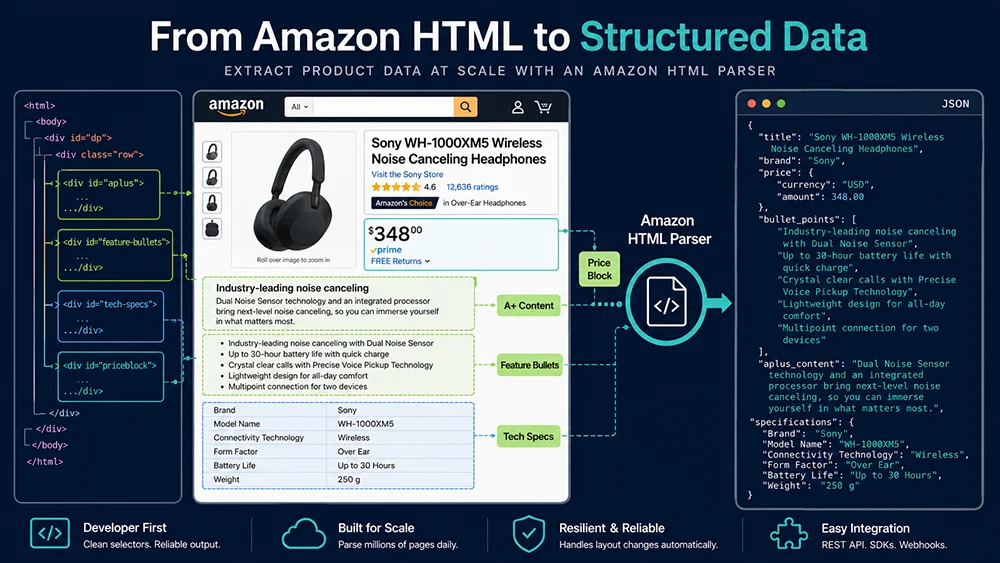
Amazon product pages are modular — each content section lives in a named container with a unique ID. Here are the five most important description modules for product data extraction:
Module 1: Product Title
The primary selector #productTitle covers approximately 94.7% of ASINs. The remaining 5.3% require fallback to h1.a-size-large span or extracting from the page’s <title> tag. Always apply .strip() after extraction — Amazon title elements contain significant leading/trailing whitespace and inline newlines.
Module 2: Feature Bullets (Product Description Points)
Feature Bullets are the 5-point product highlight section — arguably the highest-value text field for competitive intelligence and listing optimization use cases. Two parallel structures:
- Standard layout (most categories):
#feature-bullets ul li span.a-list-item - New layout (apparel, grocery, some home categories):
#productFactsDesktopExpander li span.a-list-item
from bs4 import BeautifulSoup
from typing import Optional

def extract_feature_bullets(html: str) -> list[str]:
    """
    Extract Amazon Feature Bullets with dual-selector fallback strategy.

    Covers both the standard layout and the newer category-specific layout.
    Returns empty list (not None) when no bullets found — callers should check
    length, not truthiness, to distinguish "no bullets" from "parse error".
    """
    soup = BeautifulSoup(html, "lxml")
    bullets = []

    # Primary: standard layout (electronics, home goods, most categories)
    container = soup.select_one("#feature-bullets")
    if container:
        items = container.select("ul li span.a-list-item")
        bullets = [item.get_text(strip=True) for item in items]
        bullets = [b for b in bullets if len(b) > 5]  # filter UI artifacts

    # Fallback: newer category layout (apparel, grocery, beauty)
    if not bullets:
        container = soup.select_one("#productFactsDesktopExpander")
        if container:
            items = container.select("li span.a-list-item")
            bullets = [item.get_text(strip=True) for item in items]
            bullets = [b for b in bullets if len(b) > 5]

    # Filter out "Show more" / "See more" UI text that sometimes leaks in
    bullets = [b for b in bullets if "show more" not in b.lower()
               and "see more" not in b.lower()]

    return bullets
Module 3: A+ Content (Enhanced Brand Content)
A+ Content is the rich-media section available to brand-registered sellers. It’s server-rendered (available in static HTML) and lives in #aplus3p_feature_div (current) or #aplus (legacy). The internal DOM structure is entirely custom per brand — there’s no standardized field structure to extract. The practical approach: extract the full innerHTML for rich-text preservation, or strip non-text tags for plain-text output:
def extract_aplus_content(html: str) -> dict:
    """
    Extract A+ Content in two formats:
    - 'html': full innerHTML for AI training data or rich-text display
    - 'text': plain text only for semantic analysis

    Returns {'has_aplus': False, 'html': '', 'text': ''} when A+ is absent.
    """
    soup = BeautifulSoup(html, "lxml")
    result = {"has_aplus": False, "html": "", "text": ""}

    # Try current container first, then legacy
    aplus = soup.select_one("#aplus3p_feature_div") or soup.select_one("#aplus")
    if not aplus:
        return result

    result["has_aplus"] = True
    result["html"] = str(aplus)  # full HTML with structure preserved

    # Strip scripts, styles, and images for plain text extraction
    for tag in aplus.find_all(["script", "style", "img", "video"]):
        tag.decompose()

    text = " ".join(aplus.get_text(separator=" ", strip=True).split())
    result["text"] = text

    return result
Module 4: Technical Specifications (Tech Specs)
The Technical Specifications table is critical for electronics, appliances, and tools categories. It appears in two distinct HTML layouts — both need to be handled:
| Layout | Primary Selectors | Structure |
|---|---|---|
| Table format | #productDetails_techSpec_section_1 tr#productDetails_techSpec_section_2 tr |
<th> = spec name, <td> = spec value |
| List format | #detailBullets_feature_div ul li |
Two <span> elements per <li>: name and value |
def extract_tech_specs(html: str) -> dict[str, str]:
    """
    Extract technical specifications from Amazon product pages.
    Handles both table-format (electronics) and list-format (general categories).
    """
    soup = BeautifulSoup(html, "lxml")
    specs = {}

    # Layout 1: Table format
    table_ids = [
        "productDetails_techSpec_section_1",
        "productDetails_techSpec_section_2",
        "productDetails_detailBullets_sections1"
    ]
    for table_id in table_ids:
        table = soup.find(id=table_id)
        if table:
            for row in table.select("tr"):
                th = row.find("th")
                td = row.find("td")
                if th and td:
                    key = th.get_text(strip=True)
                    val = td.get_text(strip=True)
                    if key and val:
                        specs[key] = val
            if specs:
                return specs  # found table specs, return immediately

    # Layout 2: List format (fallback)
    bullets_div = soup.find(id="detailBullets_feature_div")
    if bullets_div:
        for li in bullets_div.select("ul li"):
            spans = li.find_all("span", recursive=False)
            if len(spans) >= 2:
                key = spans[0].get_text(strip=True).rstrip(":")
                val = spans[1].get_text(strip=True)
                if key and val:
                    specs[key] = val

    return specs
Module 5: Product Description
The legacy product description lives in #productDescription. When a seller has A+ Content, this container is often hidden via CSS (display:none). Extraction pattern: check visibility before extracting, and skip empty containers.
Pangolinfo Open-Source Parser Template: What It Does and When to Use It
Pangolinfo has open-sourced a Go-based Amazon keyword search results page parser at github.com/Pangolin-spg/amazon-walmart-shopify-scrape-api. It covers title, ASIN, price, rating, review count, and main image extraction from keyword search result HTML.
The open-source template’s positioning is explicit in the README: “This parser focuses on parsing locally-stored HTML source files. It does not include network requests, IP proxy handling, or CAPTCHA processing.” That’s the right scope — it’s a parsing library, not a full scraping system.
Use the open-source template when:
- You’re learning how Amazon’s HTML structure works and want reference parsing logic
- You have a local corpus of Amazon HTML files and need offline extraction
- You’re building a custom parser and want a well-structured Go codebase to reference
- You need to quickly validate whether a specific field is extractable from a given page snapshot
# Clone the Pangolinfo open-source parser repository
git clone https://github.com/Pangolin-spg/amazon-walmart-shopify-scrape-api.git
cd amazon-walmart-shopify-scrape-api

# Install Go dependencies
go mod tidy

# Run the parser tests against included HTML fixtures
go test ./... -v
Production Parsing: Pangolinfo Scraper API with amzProductDetail Parser
For production Amazon product description HTML parsing — where you need reliable, large-scale extraction without maintaining your own DOM selectors — Pangolinfo Scraper API provides a managed parsing service. Specify "parserName": "amzProductDetail" to receive a fully structured JSON response covering all description fields.
import requests
import json
from typing import Optional, Dict, Any

API_KEY = "your_pangolinfo_api_key"

def parse_amazon_product_description(
    asin: str,
    marketplace: str = "US"
) -> Optional[Dict[str, Any]]:
    """
    Parse Amazon product description fields via Pangolinfo Scrape API.

    Returns structured data including:
    - title: Product title (string)
    - feature_bullets: List of bullet points (array of strings)
    - description: Plain-text product description (string)
    - aplus_content: A+ Content in both HTML and plain-text formats
    - tech_specs: Key-value dict of technical specifications
    - has_aplus: Boolean flag for A+ Content presence
    - product_overview: Category-specific product overview table (where available)

    The API handles DOM version detection, category-specific template switching,
    and selector updates transparently — no manual maintenance required.
    """
    response = requests.post(
        "https://api.pangolinfo.com/v1/amazon/product",
        headers={
            "Authorization": f"Bearer {API_KEY}",
            "Content-Type": "application/json"
        },
        json={
            "asin": asin,
            "marketplace": marketplace,
            "parserName": "amzProductDetail",
            "formats": ["json"],
            "fields": [
                "title",
                "feature_bullets",
                "description",
                "aplus_content",
                "tech_specs",
                "has_aplus",
                "product_overview"
            ]
        },
        timeout=30
    )
    response.raise_for_status()
    data = response.json()
    return data.get("data", {})


# Example: Parse and export product description data
product = parse_amazon_product_description("B08N5WRWNW", marketplace="US")

if product:
    print(f"Title: {product.get('title', 'N/A')[:80]}")
    print(f"Feature Bullets: {len(product.get('feature_bullets', []))} points")
    print(f"A+ Content: {'Present' if product.get('has_aplus') else 'Absent'}")
    print(f"Tech Specs: {len(product.get('tech_specs', {}))} fields")

    with open("product_description.json", "w") as f:
        json.dump(product, f, indent=2, ensure_ascii=False)
Choosing the Right Approach: Open-Source Template vs. Scraper API
| Dimension | Custom Scraper | Pangolinfo Open-Source Template | Pangolinfo Scraper API |
|---|---|---|---|
| Initial setup | 2–4 weeks engineering | Clone & run immediately | API key + 10 lines of code |
| Ongoing maintenance | High (quarterly selector updates) | Medium (track DOM changes) | None (server-side maintenance) |
| Network + proxy infrastructure | Build your own | Build your own | Included |
| A+ Content support | Custom implementation | Not included (search pages only) | Full (HTML + plain text) |
| Multi-category reliability | Depends on maintenance quality | Keyword results pages only | Dynamic adaptation across all categories |
Frequently Asked Questions
Why is Amazon product description HTML parsing harder than scraping regular websites?
Three compounding factors: structural diversity across categories (same field, different DOM per category), A/B page template testing (multiple DOM versions active simultaneously), and quarterly DOM updates that silently break 15–30% of selectors. Maintain 2–3 fallback selectors per field and monitor extraction success rates in production.
What is the correct HTML selector for Amazon Feature Bullets?
#feature-bullets ul li span.a-list-item for most categories; #productFactsDesktopExpander li span.a-list-item for apparel and grocery. Use both selectors in parallel — the first non-empty result wins.
How do I extract Amazon A+ Content from HTML?
Select #aplus3p_feature_div (current) or #aplus (legacy). Extract full innerHTML for rich-text preservation, or strip non-text tags for plain-text output. A+ Content is server-rendered and available in static HTML — no JavaScript execution needed.
What does the Pangolinfo open-source Amazon parser template cover?
The Go library at github.com/Pangolin-spg/amazon-walmart-shopify-scrape-api covers keyword search results page parsing (title, ASIN, price, rating, review count). It operates on local HTML files only — no network requests. For product detail pages with A+ Content, Feature Bullets, and Tech Specs extraction, use Pangolinfo Scraper API with parserName: "amzProductDetail".
What are the HTML selectors for Amazon Technical Specifications?
Table format: #productDetails_techSpec_section_1 tr (th=name, td=value). List format: #detailBullets_feature_div ul li (two spans per item). Parse both layouts and return whichever yields results.
Summary: The Right Architecture for Amazon Product Description HTML Parsing
Amazon product description HTML parsing requires more engineering discipline than most data extraction tasks — primarily because of DOM diversity across categories, continuous A/B testing, and quarterly structural updates. The practical path forward depends on your scale and resource constraints: use Pangolinfo’s open-source Go template for learning and offline processing; use Pangolinfo Scraper API for production-scale extraction where reliability and maintenance overhead matter.
For teams integrating Amazon description data into AI workflows, the Pangolinfo Amazon Scraper Skill enables direct integration with AI agents via MCP, enabling pipelines like “fetch competitor descriptions → analyze listing quality → generate optimization recommendations” — all without manual HTML parsing.
→ Full API documentation | Open-source parser repo | Free trial console