How to Scrape Amazon Product Data with Python in 2026: Beating TLS Fingerprinting
Amazon’s anti-bot infrastructure has evolved far beyond simple IP blocking — in 2026, it fingerprints your TLS handshake before serving a single byte of HTML, which means the standard requests library is effectively blind and can no longer be used to scrape Amazon product data reliably. This guide teaches you how to scrape amazon product data with python in this new landscape: it systematically breaks down Amazon’s five-layer bot detection architecture (TLS fingerprinting, HTTP/2 frame analysis, behavioral scoring, silent CAPTCHA, and honeypot traps), provides a complete curl_cffi-based bypass with production-grade Python code including retry logic, rate limiting, and tiered exception handling, and uses real 2026 cost data to show when a DIY scraper stops making engineering sense and a managed Amazon Scraper API is the rational choice.
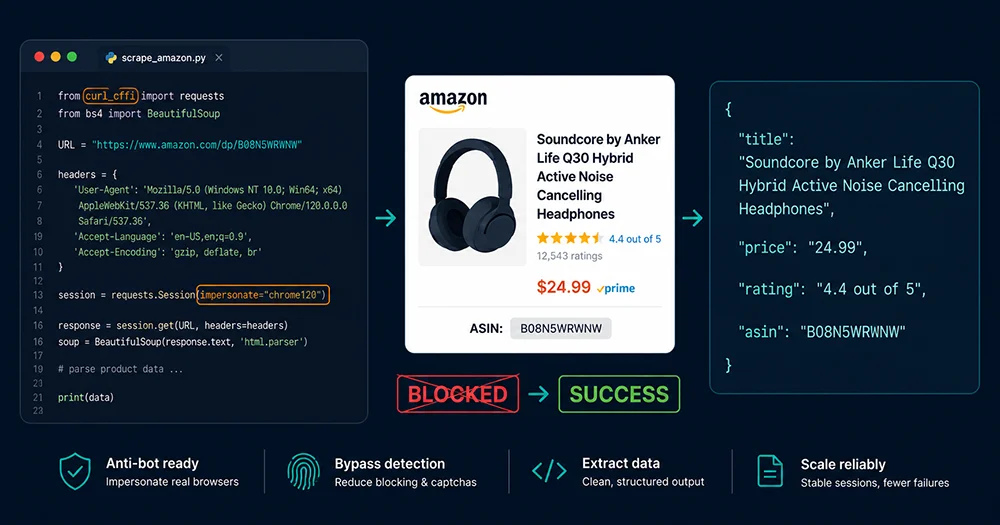
You can get Python scraping Amazon in 20 lines of code. In 2026, Amazon won’t let you reach line 20. The standard requests library fails at the TLS handshake — before any HTML is served — because Amazon’s Bot Manager fingerprints your Python TLS stack and blocks it on the spot. The approach that actually works at scale is curl_cffi: it drives libcurl to impersonate Chrome’s complete TLS fingerprint, making your Python process look identical to a real browser at the network layer. This guide covers both sides: the code that runs, and the cost math that tells you when to switch to a managed Amazon Scraper API instead.
What Data Can You Actually Scrape from an Amazon Product Page?
Before writing a single line of Python, it helps to know exactly what you’re targeting. A standard ASIN page (amazon.com/dp/B0XXXXXX) exposes the following data in its public HTML:
- Product title — the full Listing name including brand, model, and variant descriptors, typically 80–200 characters
- Price — current price, list price, deal price, Subscribe & Save discount, and sometimes Coupon amounts, scattered across 5–7 separate DOM nodes
- Star rating and review count — aggregate rating (e.g., 4.3 stars) and total review quantity, as two independent fields
- ASIN — Amazon’s unique product identifier, buried inside an
<input name="ASIN">element or the page URL - Images — high-resolution main image and gallery URLs, embedded as JSON inside a
<script>tag rather than in<img>src attributes - Bullet point features — the seller’s 5 core selling points, the primary persuasion copy on any Listing
- Product description and A+ content — longer HTML content blocks; brand-registered sellers may have rich A+ modules
- Best Sellers Rank (BSR) — real-time rank in the parent category and 1–2 sub-categories, the core metric for product research
- Dimensions and weight — required for FBA fee estimation
- Availability and shipping — in-stock status, Prime badge, estimated delivery date
All of this data is public HTML — accessing it isn’t the hard part. The hard part is how Amazon identifies you as a bot and blocks you before you’ve finished your second request.
How Does Amazon’s Anti-Bot System Actually Work in 2026?
Most tutorials describe “getting blocked by Amazon” as an outcome without explaining the mechanism. Understanding the technical layers of the detection system is what separates code that works from code that runs out of retries and gives up.
Layer 1: TLS Fingerprinting — The Hardest Gate to Pass
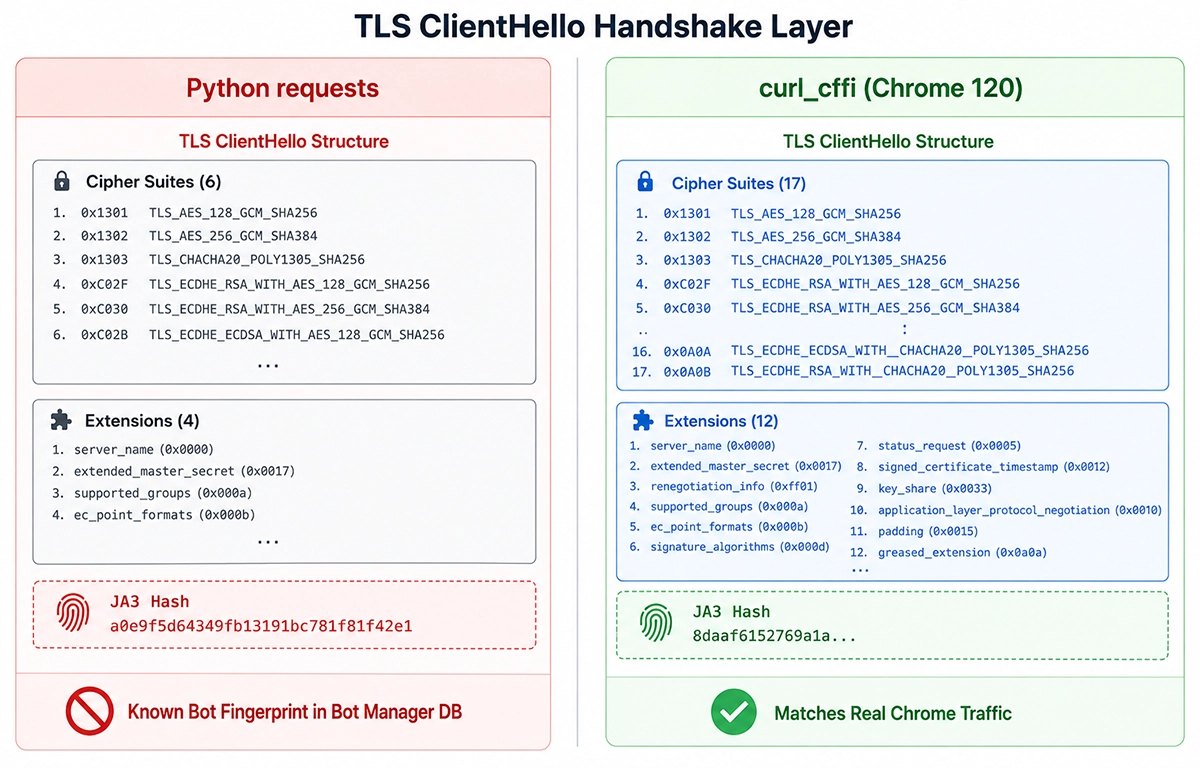
A TLS handshake happens before any HTTP data is transferred. When your Python script opens an HTTPS connection to amazon.com, the server receives a ClientHello message containing your client’s supported cipher suite list, TLS extension list, elliptic curve parameters, and more. Hash these fields together and you get a JA3 fingerprint (or the newer JA4). The problem: Python’s requests library uses urllib3 + OpenSSL, producing a ClientHello with a fixed cipher suite order and extension list that matches no real browser — it’s a distinctly Python-shaped fingerprint. Amazon’s Bot Manager (HUMAN Security, formerly PerimeterX) maintains a database of known malicious fingerprints, and Python’s TLS signature has been in that list for years. It doesn’t matter how clean your IP is or how realistic your request headers look — the handshake already gave you away.
Layer 2: HTTP/2 SETTINGS Frame Fingerprinting
Modern browsers communicate over HTTP/2, and the SETTINGS frame sent at connection startup carries its own fingerprint — specific initial window sizes, header table sizes, and concurrent stream settings. Chrome’s SETTINGS values are distinct and well-documented. requests defaults to HTTP/1.1, and even when forced onto HTTP/2, its SETTINGS parameters don’t match any real browser. curl_cffi‘s impersonate parameter handles both TLS fingerprint and HTTP/2 SETTINGS simultaneously, passing both layers in a single configuration parameter.
Layer 3: Behavioral Analysis — Session-Level Detection
Even after clearing the TLS and HTTP/2 gates, Amazon analyzes your behavioral pattern across the session:
- Request timing — real users spend 30–120 seconds reading a product page; scrapers typically fire requests every 1–3 seconds
- Cookie state — real browsers accumulate session cookies, preference cookies, and browsing history cookies; scrapers tend to have inconsistent or missing cookie state across requests
- Referer chain — a real user arrives at a product detail page from a search results page, so the Referer header is
amazon.com/s?k=...; scrapers hitting/dp/URLs directly have no organic Referer - Accept-Language vs. IP geolocation consistency —
Accept-Language: en-USwith an IP geolocating to Dhaka, Bangladesh triggers an immediate flag
Layer 4: Silent CAPTCHA — The Hardest Failure Mode to Debug
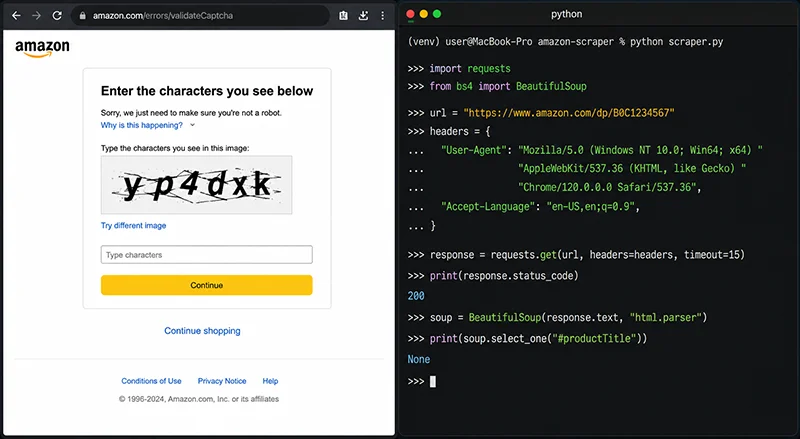
Amazon’s craftiest anti-bot technique isn’t returning a 403 or 503. It returns HTTP 200, but the HTML body is a CAPTCHA verification page or a “Robot Check” page rather than product data. Your scraper sees response.status_code == 200 and assumes success, but soup.select_one("#productTitle") returns None. Without explicitly inspecting the raw HTML, this failure propagates silently through your entire dataset, corrupting the output without a single error log entry.
Layer 5: Honeypot Links
Amazon pages occasionally embed links that are invisible to human users — hidden with CSS, or colored to match the background. Real users never click them; scrapers that parse every <a href> and follow links indiscriminately will trigger these traps, instantly flagging the IP as a bot. Your scraping logic needs to filter for visible, interactable elements only — not blindly consume everything in the DOM.
Navigating all five layers simultaneously is the core engineering challenge of scraping Amazon at scale. If bypassing each layer independently sounds like more infrastructure than your team wants to own, Pangolinfo’s Amazon Scraper API handles all of them transparently — the next sections cover the DIY code path first, then the cost comparison.
curl_cffi: The Right Way to Scrape Amazon with Python in 2026
curl_cffi is a Cython-binding library that drives libcurl directly. Its key parameter is impersonate — it lets you specify Chrome, Firefox, or Safari and get the full TLS fingerprint plus HTTP/2 SETTINGS for that browser, out of the box. The API is nearly identical to requests, so migration costs almost nothing.
Installation
# curl_cffi ships with pre-compiled libcurl-impersonate binaries — no build dependencies needed
pip install curl-cffi beautifulsoup4 lxml tenacity
Single Product Scraper: Complete Working Code
"""
Amazon Product Data Scraper (curl_cffi edition)
Tested 2026 — bypasses TLS/JA4 fingerprint detection
Requirements: pip install curl-cffi beautifulsoup4 lxml tenacity
"""

import json
import random
import time
import logging
from dataclasses import dataclass, field
from typing import Optional

from curl_cffi import requests as cffi_requests
from bs4 import BeautifulSoup
from tenacity import retry, stop_after_attempt, wait_exponential, retry_if_exception_type

# ── Logging ───────────────────────────────────────────────────────────────────
logging.basicConfig(
    level=logging.INFO,
    format="%(asctime)s [%(levelname)s] %(message)s",
    datefmt="%Y-%m-%d %H:%M:%S",
)
logger = logging.getLogger(__name__)


# ── Data Model ────────────────────────────────────────────────────────────────
@dataclass
class AmazonProduct:
    asin: str
    title: Optional[str] = None
    brand: Optional[str] = None
    price: Optional[str] = None
    price_whole: Optional[str] = None
    list_price: Optional[str] = None
    rating: Optional[str] = None
    review_count: Optional[str] = None
    bullet_points: list = field(default_factory=list)
    bsr: list = field(default_factory=list)
    main_image: Optional[str] = None
    marketplace: str = "www.amazon.com"
    url: Optional[str] = None
    is_captcha: bool = False
    scraped_at: Optional[str] = None


# ── Request Header Templates ──────────────────────────────────────────────────
# curl_cffi's impersonate parameter handles TLS automatically.
# We still control HTTP-layer headers to match real browser behavior.
HEADERS_TEMPLATES = [
    {
        "Accept": "text/html,application/xhtml+xml,application/xml;q=0.9,image/avif,image/webp,image/apng,*/*;q=0.8,application/signed-exchange;v=b3;q=0.7",
        "Accept-Language": "en-US,en;q=0.9",
        "Accept-Encoding": "gzip, deflate, br",
        "Cache-Control": "max-age=0",
        "Sec-Fetch-Dest": "document",
        "Sec-Fetch-Mode": "navigate",
        "Sec-Fetch-Site": "none",
        "Sec-Fetch-User": "?1",
        "Upgrade-Insecure-Requests": "1",
    },
    {
        "Accept": "text/html,application/xhtml+xml,application/xml;q=0.9,*/*;q=0.8",
        "Accept-Language": "en-GB,en;q=0.5",
        "Accept-Encoding": "gzip, deflate, br",
        "DNT": "1",
        "Connection": "keep-alive",
        "Upgrade-Insecure-Requests": "1",
        "Sec-Fetch-Dest": "document",
        "Sec-Fetch-Mode": "navigate",
        "Sec-Fetch-Site": "cross-site",
    },
]

# curl_cffi supported browser impersonation targets
IMPERSONATE_TARGETS = [
    "chrome120",
    "chrome124",
    "chrome131",
]


def _get_random_headers() -> dict:
    return random.choice(HEADERS_TEMPLATES)


def _get_random_impersonate() -> str:
    return random.choice(IMPERSONATE_TARGETS)


def _is_captcha_page(soup: BeautifulSoup) -> bool:
    """
    Detect whether Amazon returned a CAPTCHA / robot-check page.
    Amazon's silent CAPTCHA returns HTTP 200 but the body is a
    verification form, not product data. Always check before parsing.
    """
    captcha_indicators = [
        soup.select_one("form[action='/errors/validateCaptcha']"),
        soup.select_one("#captchacharacters"),
        soup.find("input", {"id": "captchacharacters"}),
    ]
    if any(captcha_indicators):
        return True

    # Check page title for bot-check keywords
    title_tag = soup.find("title")
    if title_tag and title_tag.string:
        title_text = title_tag.string.lower()
        if any(kw in title_text for kw in ["robot check", "sorry!", "automated access", "api gateway"]):
            return True

    # If the page is unusually short and has no #productTitle, assume interception
    page_text = soup.get_text(strip=True)
    if len(page_text) < 2000 and not soup.select_one("#productTitle"):
        return True

    return False


def _extract_price(soup: BeautifulSoup) -> tuple[Optional[str], Optional[str]]:
    """
    Extract current price and list/strike-through price.
    Amazon distributes price data across multiple DOM nodes —
    a multi-level fallback chain is required for reliable extraction.

    Returns: (current price string, list price string)
    """
    price = None
    list_price = None

    # Method 1: New price container (dominant since 2023)
    price_block = soup.select_one(".a-price[data-a-color='price'] .a-offscreen")
    if price_block:
        price = price_block.get_text(strip=True)

    # Method 2: Legacy whole + fraction split format
    if not price:
        whole = soup.select_one("span.a-price-whole")
        fraction = soup.select_one("span.a-price-fraction")
        if whole:
            price = f"${whole.get_text(strip=True)}"
            if fraction:
                price = f"${whole.get_text(strip=True)}{fraction.get_text(strip=True)}"

    # Method 3: Deal / sale price block
    if not price:
        deal_tag = soup.select_one("#priceblock_dealprice, #priceblock_saleprice")
        if deal_tag:
            price = deal_tag.get_text(strip=True)

    # Method 4: Core price display module
    if not price:
        core_tag = soup.select_one("#corePriceDisplay_desktop_feature_div .a-offscreen")
        if core_tag:
            price = core_tag.get_text(strip=True)

    # Extract list/strike-through price
    list_price_tag = soup.select_one(".a-price[data-a-color='secondary'] .a-offscreen")
    if not list_price_tag:
        list_price_tag = soup.select_one("#listPrice, .a-text-price .a-offscreen")
    if list_price_tag:
        list_price = list_price_tag.get_text(strip=True)

    return price, list_price


def _extract_bsr(soup: BeautifulSoup) -> list:
    """
    Extract Best Sellers Rank entries.
    A product may rank simultaneously in a parent category and 1–2 sub-categories.
    """
    bsr_list = []

    bsr_section = soup.select_one("#detailBulletsWrapper_feature_div, #productDetails_feature_div")
    if bsr_section:
        for li in bsr_section.select("li, tr"):
            text = li.get_text(" ", strip=True)
            if "Best Sellers Rank" in text or "Amazon Best Sellers Rank" in text:
                bsr_list.append(text)
                break

    if not bsr_list:
        sales_rank = soup.select_one("#SalesRank")
        if sales_rank:
            bsr_list.append(sales_rank.get_text(" ", strip=True))

    return bsr_list


def _extract_images(soup: BeautifulSoup) -> Optional[str]:
    """
    Amazon's main image URLs are embedded in a JSON object inside a
    <script> tag (the colorImages variable) — far more reliable than
    parsing <img> src attributes, which are often low-resolution thumbnails.
    """
    import re
    scripts = soup.find_all("script", type="text/javascript")
    for script in scripts:
        if script.string and "'colorImages'" in script.string:
            match = re.search(r'"hiRes":"(https://[^"]+)"', script.string)
            if match:
                return match.group(1)
            match = re.search(r'"large":"(https://[^"]+)"', script.string)
            if match:
                return match.group(1)
    # Fallback: grab data-old-hires from #landingImage
    img_tag = soup.select_one("#landingImage[data-old-hires]")
    if img_tag:
        return img_tag.get("data-old-hires")
    return None


def _parse_product_page(html: str, asin: str, marketplace: str, url: str) -> AmazonProduct:
    """
    Parse product HTML into an AmazonProduct data object.
    """
    from datetime import datetime, timezone

    soup = BeautifulSoup(html, "lxml")
    product = AmazonProduct(asin=asin, marketplace=marketplace, url=url)
    product.scraped_at = datetime.now(timezone.utc).isoformat()

    # CAPTCHA check — always run first
    if _is_captcha_page(soup):
        product.is_captcha = True
        logger.warning(f"CAPTCHA detected for ASIN {asin}")
        return product

    # Title
    title_tag = soup.select_one("#productTitle")
    product.title = title_tag.get_text(strip=True) if title_tag else None

    # Brand
    brand_tag = soup.select_one("#bylineInfo, #brand")
    if brand_tag:
        brand_text = brand_tag.get_text(strip=True)
        product.brand = (
            brand_text
            .replace("Brand: ", "")
            .replace("Visit the ", "")
            .replace(" Store", "")
            .strip()
        )

    # Price
    product.price, product.list_price = _extract_price(soup)

    # Rating
    rating_tag = soup.select_one("span[data-hook='rating-out-of-text'], #acrPopover")
    if rating_tag:
        product.rating = (rating_tag.get("title") or rating_tag.get_text()).strip()

    # Review count
    review_tag = soup.select_one("#acrCustomerReviewText")
    product.review_count = review_tag.get_text(strip=True) if review_tag else None

    # Bullet points
    bullets = []
    for li in soup.select("#feature-bullets ul li:not(.aok-hidden) span.a-list-item"):
        text = li.get_text(strip=True)
        if text and len(text) > 5:
            bullets.append(text)
    product.bullet_points = bullets

    # BSR
    product.bsr = _extract_bsr(soup)

    # Main image
    product.main_image = _extract_images(soup)

    return product


# ── Core Scrape Function (with retry) ─────────────────────────────────────────
@retry(
    stop=stop_after_attempt(3),
    wait=wait_exponential(multiplier=2, min=4, max=30),
    retry=retry_if_exception_type((Exception,)),
    reraise=True,
)
def scrape_amazon_product(
    asin: str,
    marketplace: str = "www.amazon.com",
    proxy: Optional[str] = None,
) -> AmazonProduct:
    """
    Scrape a single Amazon product page using curl_cffi.

    Args:
        asin: Amazon product identifier (e.g. 'B0CXXX')
        marketplace: Amazon domain (default US storefront)
        proxy: Proxy URL in format 'http://user:pass@host:port' (optional)

    Returns:
        AmazonProduct data object

    Raises:
        tenacity.RetryError — after 3 failed attempts
    """
    url = f"https://{marketplace}/dp/{asin}"
    headers = _get_random_headers()
    impersonate = _get_random_impersonate()

    # Polite delay: 2.5–6 second random interval, simulating real reading pace
    delay = random.uniform(2.5, 6.0)
    logger.info(f"Fetching ASIN {asin} | impersonate={impersonate} | delay={delay:.1f}s")
    time.sleep(delay)

    proxies = {"https": proxy, "http": proxy} if proxy else None

    response = cffi_requests.get(
        url,
        headers=headers,
        impersonate=impersonate,
        proxies=proxies,
        timeout=20,
        allow_redirects=True,
    )

    if response.status_code not in (200, 301, 302):
        raise ValueError(f"Unexpected status {response.status_code} for ASIN {asin}")

    return _parse_product_page(response.text, asin, marketplace, url)


# ── Entry Point ───────────────────────────────────────────────────────────────
if __name__ == "__main__":
    TEST_ASIN = "B0CXZXZXZX"  # Replace with a real ASIN
    PROXY = None  # e.g. "http://user:[email protected]:8000"

    product = scrape_amazon_product(TEST_ASIN, proxy=PROXY)

    if product.is_captcha:
        print("⚠️  CAPTCHA hit — rotate proxy or increase request delay")
    else:
        print(json.dumps(product.__dict__, indent=2, ensure_ascii=False))
What Does This Actually Return?
With a clean proxy and reasonable request pacing, the output looks like this:
{
  "asin": "B0CXZXZXZX",
  "title": "Example Product — Premium Edition, 500ml, 6-Pack (SGS Certified)",
  "brand": "ExampleBrand",
  "price": "$24.99",
  "list_price": "$29.99",
  "rating": "4.3 out of 5 stars",
  "review_count": "2,841 ratings",
  "bullet_points": [
    "SGS-certified food-grade material, meets US FDA standards",
    "Dishwasher safe, BPA-free, lead-free, cadmium-free",
    "Fits standard car cup holders (3.5-inch diameter), keeps drinks hot/cold 12 hours",
    "18-month manufacturer warranty, no-questions-asked replacement",
    "Ships from US warehouse, Prime next-day delivery"
  ],
  "bsr": ["#1,243 in Kitchen & Dining (#18 in Water Bottles)"],
  "main_image": "https://m.media-amazon.com/images/I/61xxxx.jpg",
  "marketplace": "www.amazon.com",
  "url": "https://www.amazon.com/dp/B0CXZXZXZX",
  "is_captcha": false,
  "scraped_at": "2026-06-10T01:00:00+00:00"
}
If you want to skip straight to structured JSON without writing any parsing logic, the Pangolinfo Amazon Scraper API returns an identical field set as typed data — prices as floats, BSR as a structured array, images separated by role. Full field reference and response schema are documented in the Amazon Product endpoint docs.
Batch Scraping: Async + Proxy Rotation for Production
Single-product works. Now the real challenge: scale. curl_cffi supports async via AsyncSession, and combined with proxy rotation, you can push throughput significantly higher without triggering Amazon’s rate limits — provided you keep request pacing reasonable.
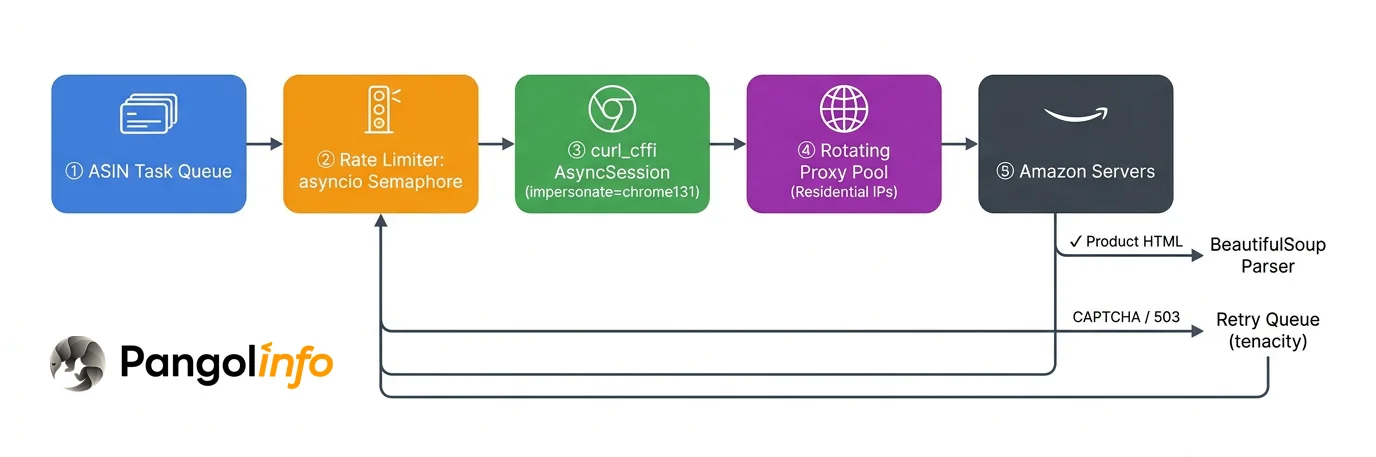
"""
Amazon Batch Async Scraper (Production Grade)
curl_cffi AsyncSession + asyncio Semaphore rate limiting + proxy rotation + CSV output
Requirements: pip install curl-cffi beautifulsoup4 lxml tenacity
"""

import asyncio
import csv
import json
import random
import logging
from dataclasses import asdict
from typing import Optional

from curl_cffi.requests import AsyncSession

# Reuse AmazonProduct, _parse_product_page, HEADERS_TEMPLATES from above

logger = logging.getLogger(__name__)


class ProxyRotator:
    """
    Simple proxy rotator with random selection and failure marking.
    In production, prefer a rotating endpoint from Bright Data or Smartproxy
    over maintaining a static IP list manually.
    """

    def __init__(self, proxy_list: list[str]):
        self._proxies = proxy_list
        self._failed: set = set()

    def get(self) -> Optional[str]:
        available = [p for p in self._proxies if p not in self._failed]
        if not available:
            logger.warning("All proxies exhausted, falling back to direct connection (high risk)")
            return None
        return random.choice(available)

    def mark_failed(self, proxy: str):
        self._failed.add(proxy)
        logger.warning(f"Proxy marked failed: {proxy[:30]}...")


async def fetch_one(
    session: AsyncSession,
    asin: str,
    proxy_rotator: ProxyRotator,
    semaphore: asyncio.Semaphore,
    marketplace: str = "www.amazon.com",
) -> dict:
    """
    Fetch a single ASIN under Semaphore concurrency control.
    """
    url = f"https://{marketplace}/dp/{asin}"
    proxy = proxy_rotator.get()
    impersonate = random.choice(["chrome120", "chrome124", "chrome131"])
    headers = random.choice(HEADERS_TEMPLATES)

    async with semaphore:
        # Human-like delay: 3–8 seconds between requests
        await asyncio.sleep(random.uniform(3.0, 8.0))

        try:
            proxies = {"https": proxy, "http": proxy} if proxy else None
            response = await session.get(
                url,
                headers=headers,
                impersonate=impersonate,
                proxies=proxies,
                timeout=25,
            )

            if response.status_code == 503:
                if proxy:
                    proxy_rotator.mark_failed(proxy)
                raise ValueError(f"503 for {asin} — proxy rotated")

            product = _parse_product_page(response.text, asin, marketplace, url)
            status = "captcha" if product.is_captcha else "success"
            logger.info(f"[{status.upper()}] ASIN {asin}")
            return asdict(product)

        except Exception as e:
            logger.error(f"[FAILED] ASIN {asin}: {e}")
            return {"asin": asin, "error": str(e)}


async def scrape_batch(
    asins: list[str],
    proxy_list: list[str],
    output_file: str = "amazon_products.json",
    max_concurrency: int = 3,
    marketplace: str = "www.amazon.com",
):
    """
    Batch async scrape entry point.

    max_concurrency=3 is a conservative setting for residential proxies.
    With a high-quality rotating proxy service, you can push to 5–8,
    but exceeding that tends to increase CAPTCHA rates significantly.
    """
    proxy_rotator = ProxyRotator(proxy_list)
    semaphore = asyncio.Semaphore(max_concurrency)

    async with AsyncSession() as session:
        tasks = [
            fetch_one(session, asin, proxy_rotator, semaphore, marketplace)
            for asin in asins
        ]
        results = await asyncio.gather(*tasks, return_exceptions=False)

    # Write JSON output
    with open(output_file, "w", encoding="utf-8") as f:
        json.dump(results, f, indent=2, ensure_ascii=False)

    # Write CSV output (for Excel / database import)
    csv_file = output_file.replace(".json", ".csv")
    if results:
        fieldnames = [k for k in results[0].keys() if k != "bullet_points"]
        with open(csv_file, "w", newline="", encoding="utf-8") as f:
            writer = csv.DictWriter(f, fieldnames=fieldnames + ["bullet_points_str"])
            writer.writeheader()
            for row in results:
                row_copy = {k: v for k, v in row.items() if k != "bullet_points"}
                row_copy["bullet_points_str"] = " | ".join(row.get("bullet_points", []))
                writer.writerow(row_copy)

    success = sum(1 for r in results if not r.get("error") and not r.get("is_captcha"))
    captcha = sum(1 for r in results if r.get("is_captcha"))
    failed = sum(1 for r in results if r.get("error"))
    logger.info(f"Done: {success} success, {captcha} CAPTCHA, {failed} failed | Output: {output_file}")
    return results


# ── Usage Example ─────────────────────────────────────────────────────────────
if __name__ == "__main__":
    ASINS_TO_SCRAPE = [
        "B0CXZ1", "B0CXZ2", "B0CXZ3", "B0CXZ4", "B0CXZ5",
    ]

    PROXY_LIST = [
        "http://user1:[email protected]:8001",
        "http://user2:[email protected]:8002",
        "http://user3:[email protected]:8003",
    ]

    asyncio.run(
        scrape_batch(
            asins=ASINS_TO_SCRAPE,
            proxy_list=PROXY_LIST,
            output_file="output/amazon_products.json",
            max_concurrency=3,
        )
    )
Realistic Success Rate Expectations
Actual numbers vary significantly by proxy quality. Using a tier-1 residential proxy service (Bright Data, Smartproxy) with curl_cffi Chrome fingerprinting, small-batch scraping (1,000–3,000 pages/day) can sustain 80–90% success rates. Push that to 10,000+ pages/day and success typically drops to 60–75%, with CAPTCHA hit rates climbing noticeably and proxy costs climbing in parallel. This isn’t a code quality problem — it’s Amazon’s cross-IP behavioral correlation kicking in at scale.
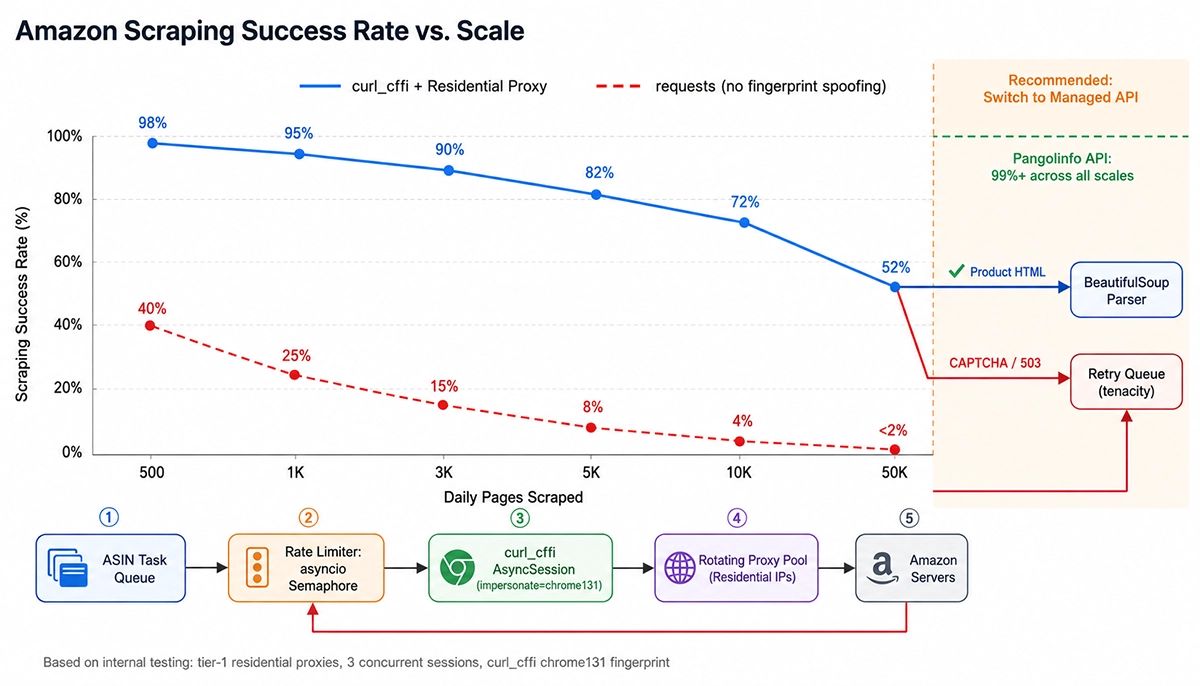
At the scale where DIY success rates start degrading, Pangolinfo’s Amazon Scraper API maintains 99%+ delivery across all volume tiers — the managed infrastructure absorbs the fingerprinting and CAPTCHA load invisibly. The next section breaks down exactly where the cost crossover happens.
The Real Cost of Scaling a DIY Amazon Scraper
The technical hurdles are only part of the picture. Once you understand the mechanics, the next question is whether running your own scraper at scale actually makes financial sense.
Selector Maintenance: The Invisible Weekly Tax
Amazon continuously A/B tests its product pages — sometimes for conversion rate optimization, sometimes for internal engineering refactors. A selector that extracts price cleanly in January may fail silently by April because a new price container structure rolled out to 30% of traffic. The code above uses a 4-level fallback chain for price extraction — that’s not over-engineering, it’s the minimum viable approach for a production scraper. In reality, handling all price variants (standard price, Deal price, Subscribe & Save, B2B pricing, out-of-stock state) typically requires 10–15 selectors, and at least one of them will break every 1–3 months. Engineering teams maintaining mid-scale Amazon scrapers consistently report 2–4 hours per week consumed by selector maintenance alone — not building new features, just keeping the existing scraper functional.
Proxy Costs: The Linear Overhead That Scales With You
Data center proxies ($0.5–2/GB) are effectively worthless against Amazon’s TLS fingerprinting. Only residential proxies ($5–15/GB) reliably pass the fingerprint check. At roughly 150–200KB per compressed product page:
- 1,000 pages/day: ~150–200MB → proxy cost ~$0.75–3/day
- 10,000 pages/day: ~1.5–2GB → proxy cost ~$7.50–30/day ($225–900/month)
- 100,000 pages/day: ~15–20GB → proxy cost ~$75–300/day ($2,250–9,000/month)
This excludes CAPTCHA solving fees (third-party services typically run $1–3 per 1,000 CAPTCHAs), compute costs, and the fully-loaded engineering time for incident response when Amazon pushes an update that breaks your selectors overnight.
Multi-Marketplace Coverage: Not a Translation, a Rewrite
If you need data from amazon.co.uk, amazon.de, amazon.co.jp, and amazon.ca alongside the US storefront, the complexity doesn’t multiply by four — it multiplies by eight or more. Japan’s price field class names differ from the US structure. Germany’s product detail modules rely on JavaScript-rendered components that vary from the US pattern. The UK’s BSR taxonomy is entirely different from the US one. Each marketplace requires an independent selector set with its own maintenance cycle. A scraper that covers five marketplaces is really five scrapers with shared infrastructure.
By contrast, the Pangolinfo Amazon Scraper API covers 10+ marketplaces with a single marketplace parameter — no separate selector sets, no independent maintenance cycles. Supported marketplace codes and field availability per region are listed in the marketplace coverage docs.
When DIY Stops Making Sense: Pangolinfo Amazon Scraper API
A managed Amazon Scraper API isn’t about skipping code — it’s about moving the anti-bot infrastructure maintenance burden entirely off your engineering team so your code can focus on what to do with the data rather than how to get it past Amazon’s defenses. The same product data, with Pangolinfo’s API:
"""
Pangolinfo Amazon Scraper API — Python Example
No proxy management. No CAPTCHA handling. No selector maintenance.
"""

import requests
import json
from typing import Optional


API_KEY = "your_pangolinfo_api_key"
BASE_URL = "https://api.pangolinfo.com/v1"


def get_amazon_product(
    asin: str,
    marketplace: str = "US",
    include_fields: Optional[str] = None,
) -> dict:
    """
    Retrieve Amazon product data via Pangolinfo API.

    Args:
        asin: Amazon product identifier
        marketplace: Storefront code (US, UK, DE, JP, CA, FR, IT, ES, etc.)
        include_fields: Comma-separated field names to return (omit for all fields)

    Returns:
        Fully structured product data dict
    """
    params = {
        "asin": asin,
        "marketplace": marketplace,
    }
    if include_fields:
        params["include_fields"] = include_fields

    response = requests.get(
        f"{BASE_URL}/amazon/product",
        params=params,
        headers={"Authorization": f"Bearer {API_KEY}"},
        timeout=30,
    )
    response.raise_for_status()
    return response.json()


# ── Async Batch Version ───────────────────────────────────────────────────────
import asyncio
import aiohttp


async def get_amazon_product_async(
    session: aiohttp.ClientSession,
    asin: str,
    marketplace: str = "US",
) -> dict:
    url = f"{BASE_URL}/amazon/product"
    params = {"asin": asin, "marketplace": marketplace}
    headers = {"Authorization": f"Bearer {API_KEY}"}

    async with session.get(url, params=params, headers=headers) as resp:
        return await resp.json()


async def batch_fetch(asins: list[str], marketplace: str = "US") -> list[dict]:
    async with aiohttp.ClientSession() as session:
        tasks = [get_amazon_product_async(session, asin, marketplace) for asin in asins]
        return await asyncio.gather(*tasks)


# ── Usage ─────────────────────────────────────────────────────────────────────
if __name__ == "__main__":
    # Single product
    result = get_amazon_product("B0CXZXZXZX", marketplace="US")
    print(json.dumps(result, indent=2, ensure_ascii=False))

    # Batch (5 ASINs, concurrent)
    asins = ["B0001", "B0002", "B0003", "B0004", "B0005"]
    results = asyncio.run(batch_fetch(asins))
    print(f"Fetched {len(results)} products")
API Response Structure
The response is fully typed structured JSON — prices parsed to numeric types, BSR split into structured arrays, images separated by role — no data cleaning logic required on your side:
{
  "success": true,
  "data": {
    "asin": "B0CXZXZXZX",
    "title": "Example Product — Premium Edition, 500ml, 6-Pack",
    "brand": "ExampleBrand",
    "price": {
      "current": 24.99,
      "currency": "USD",
      "list_price": 29.99,
      "deal_price": null,
      "coupon": "Extra 5% off with coupon"
    },
    "rating": 4.3,
    "review_count": 2841,
    "bullet_points": [
      "SGS-certified food-grade material",
      "Dishwasher safe, BPA-free"
    ],
    "bsr": [
      {"rank": 1243, "category": "Kitchen & Dining"},
      {"rank": 18, "category": "Water Bottles"}
    ],
    "images": {
      "main": "https://m.media-amazon.com/images/I/xxx.jpg",
      "gallery": [
        "https://m.media-amazon.com/images/I/yyy.jpg",
        "https://m.media-amazon.com/images/I/zzz.jpg"
      ]
    },
    "dimensions": {
      "length_inches": 9.8,
      "width_inches": 3.5,
      "height_inches": 3.5,
      "weight_pounds": 0.88
    },
    "availability": "In Stock",
    "is_prime": true,
    "marketplace": "US",
    "scraped_at": "2026-06-10T01:00:00Z"
  },
  "credits_used": 1,
  "credits_remaining": 9999
}
DIY Python Scraper vs. Pangolinfo Amazon Scraper API: Full Comparison
| Dimension | DIY Python (curl_cffi + Residential Proxy) | Pangolinfo Amazon Scraper API |
|---|---|---|
| Time to first data | 2–6 hours (proxy setup + debugging) | 15 minutes (get API key, make first call) |
| Small-scale success rate (<1K/day) | 80–90% (curl_cffi + residential proxy) | 99%+ |
| Scale-up success rate (10K+/day) | 60–75% (costs rise sharply) | 99%+ (managed infrastructure) |
| CAPTCHA handling | Manual detection + third-party solver ($1–3/1K) | Built-in, transparent to caller |
| Proxy cost (10K pages/day) | $7.50–30/day (residential) | Included in API pricing |
| Selector maintenance | 2–4 hours/week of engineering time | Zero — API adapts to page changes automatically |
| Multi-marketplace | Separate selector set per marketplace | Single parameter switches between 10+ marketplaces |
| Data structure | Manual cleaning, inconsistent types | Fully typed JSON, uniform schema |
| All-in cost (10K pages/day) | $40–80+ (proxies + CAPTCHA + eng. time) | ~$15.40 ($1.54 per 1,000 requests) |
| Scale ceiling | Effectively tens of thousands/day before instability | Hundreds of millions/day |
Pangolinfo’s Amazon Scraper API covers six endpoint types: product detail, search results, reviews, Best Sellers rankings, category pages, and seller profiles — one integration covers the entire Amazon data pipeline. For teams that need to monitor competitor reviews specifically, the Amazon Reviews Scraper API returns structured review data with filters for star rating, date range, and geography, eliminating the need to maintain a pagination-aware review scraper separately.
Frequently Asked Questions
Does Python scraping still work on Amazon in 2026?
Yes, but the difficulty has increased substantially compared to 2–3 years ago. Amazon rolled out TLS fingerprint detection across 2024–2025, meaning the standard requests library gets identified at the handshake stage — before any product HTML is served. The approach that actually works in 2026 is curl_cffi: it uses libcurl to replicate Chrome’s JA3/JA4 TLS fingerprint, making your Python requests indistinguishable from real browser traffic at the network layer. Rotating residential proxies and proper request pacing remain essential even with fingerprint spoofing.
Why does requests return a 503 or empty page on Amazon?
Amazon’s Bot Manager (HUMAN Security) performs the first filtering pass at the TLS handshake — before any HTTP content is transmitted. Python requests uses urllib3 + OpenSSL, producing a ClientHello with cipher suite ordering and extension lists that match no real browser. The system decides to block the connection before returning a single byte of HTML. That’s why even a clean residential IP returns a 503 or a CAPTCHA-wrapped 200 — the problem is at the TLS layer, not the IP layer.
What is the core difference between curl_cffi and requests?
requests builds TLS connections through urllib3 + OpenSSL, producing a fixed Python-shaped ClientHello fingerprint that modern anti-bot systems recognize immediately. curl_cffi binds directly to libcurl and lets you specify Chrome, Firefox, or Safari impersonation — replicating the full TLS fingerprint (JA3, JA4) and HTTP/2 SETTINGS frames. The two libraries have nearly identical APIs, migration costs almost nothing, and the difference in Amazon success rates is orders of magnitude.
What data fields can I scrape from an Amazon product page?
A standard ASIN page exposes: product title, brand, price (current, list, deal, subscribe & save), star rating, review count, ASIN, main and gallery image URLs, bullet point features, product description and A+ content, Best Sellers Rank (parent and sub-category), dimensions and weight, availability and shipping status (Prime badge, estimated delivery). Using Pangolinfo’s Amazon Scraper API returns all of these as typed, structured JSON with no parsing logic required.
When should I switch from a DIY scraper to an Amazon Scraper API?
Several clear signals: daily volume exceeds 5,000 product pages and proxy costs start compounding; selector maintenance consumes more than 2 hours of engineering time per week; CAPTCHA failure rates create unacceptable data gaps; or you need coverage across multiple Amazon marketplaces. Pangolinfo’s Amazon Scraper API starts at $1.54 per 1,000 requests — 10,000 pages/day costs ~$15.40, while a self-managed setup at the same scale runs $40–80/day fully loaded. First 100 requests are free, no credit card required.
Next Steps: Pick the Right Tool and Stop Pouring Engineering Into the Wrong Layer
The right starting point for scraping Amazon product data with Python in 2026 is curl_cffi, not requests. TLS fingerprint detection has made the latter almost completely ineffective against Amazon — this isn’t a configuration problem, it’s a fundamental technical layer mismatch. The code in this guide — curl_cffi impersonation, multi-selector fallback chains, silent CAPTCHA detection, async batch scraping, proxy rotation — is a battle-tested starting point that works at moderate scale out of the box.
At the same time, this guide doesn’t paper over the other reality: once you’re past 5,000–10,000 pages/day, proxy costs, selector maintenance overhead, and CAPTCHA failure rates turn the economics ugly fast. Pangolinfo’s Amazon Scraper API isn’t just “scraping as a service” — it moves the entire anti-bot infrastructure maintenance burden off your team. Your engineering capacity should go toward data analysis and business logic, not chasing Amazon’s weekly page structure changes.
Ready to get Amazon product data without maintaining a scraper? Explore the Pangolinfo Amazon Scraper API →
Or check the API Documentation for complete Python, Node.js, and cURL code examples with full endpoint schemas.