Your competitor just dropped their price by $2. The Buy Box flipped instantly. Your conversion rate dropped 40% before you even noticed. According to Jungle Scout’s 2025 State of the Amazon Seller Report, 82% of Amazon sales go through the Buy Box—and ownership can shift every 15–30 minutes as sellers reprice dynamically. If you’re not tracking Buy Box changes in real time, you’re navigating blind.
The challenge isn’t a lack of data—Amazon displays Buy Box seller, price, and fulfillment type publicly on every product page. The challenge is Amazon Buy Box data scraping at the scale and frequency that repricing and brand monitoring systems demand. JavaScript-rendered DOM nodes, TLS fingerprint checks, behavioral analysis, and IP throttling make high-volume, low-latency collection genuinely difficult. Many tool developers discover this the hard way: what works for 1,000 daily requests collapses completely at 100,000.
This article cuts straight to what matters: the data fields you actually need, why self-built scrapers hit a wall, and how to build a production-grade Buy Box monitoring pipeline using a commercial API that handles the infrastructure complexity so your team can focus on pricing logic.
Why Is Amazon Buy Box Data Scraping Harder Than It Looks?
Amazon product detail pages aren’t static HTML documents. The Buy Box section—including the current seller name, price, and fulfillment badge—loads via asynchronous JavaScript after the initial page shell is served. Traditional HTTP clients using requests or httpx retrieve only the empty shell; the critical Buy Box fields simply aren’t there.
That’s the baseline problem. The harder layer is Amazon’s anti-scraping infrastructure, which has grown substantially since 2023. The system now combines TLS fingerprint analysis (detecting non-browser client signatures), behavioral heuristics (flagging request patterns that don’t match human browsing), CAPTCHA challenges, and rotating IP block lists. A residential proxy pool alone—the standard workaround from three years ago—is no longer sufficient. According to testing published in multiple open-source scraping communities, raw success rates without advanced anti-detection typically land below 35% for high-frequency ASIN requests.
What Buy Box Fields Actually Matter? A Data Schema Breakdown
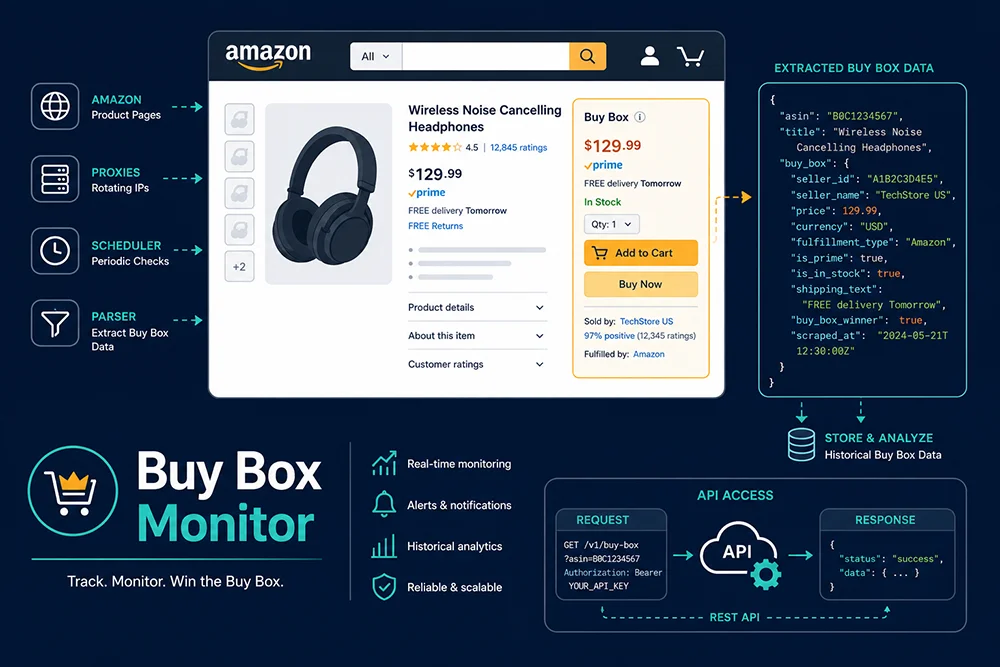
Before discussing implementation, it’s worth being precise about data requirements. Many teams over-engineer their scraping setup to capture fields they never use, while missing the two or three signals that actually drive repricing decisions. Here’s the field taxonomy that matters:
| Field Category | Specific Fields | Business Application |
|---|---|---|
| Buy Box Winner Identity | Seller ID, Store Name, Seller Rating | Competitor identification, brand authorization monitoring |
| Price Data | Buy Box Price, Shipping Cost, Coupon Status | Repricing baseline, price floor calculations |
| Fulfillment Type | FBA / FBM / Amazon Retail, Prime Badge | Competitive cost structure analysis |
| Inventory Status | In Stock / Out of Stock / Limited Quantity | Stockout opportunism, demand signals |
| Competing Seller List | Other seller prices, fulfillment types, offer counts | Full market pricing distribution |
The FBA vs. FBM distinction deserves special emphasis. Amazon’s Buy Box algorithm gives inherent preference to FBA sellers due to faster delivery and lower return rates. If your Buy Box monitoring API data doesn’t capture fulfillment type, you’ll misread competitive pressure: a FBM seller at the same price as you presents a completely different threat profile than a FBA seller at the same price. Getting this wrong leads to unnecessary repricing that erodes margins.
DIY Scraper vs. Commercial API: Which Route Fits Your Scale?
Self-built scrapers aren’t categorically wrong—they have a valid niche. For teams running under 1,000 daily ASIN requests with tolerance for occasional failures, a Playwright-based setup with a modest proxy pool can work. The economics change sharply as volume grows.
Here’s a realistic total cost comparison at 100,000 daily ASIN detail page requests:
| Approach | Monthly Direct Cost | Engineering Maintenance | Success Rate | Data Latency |
|---|---|---|---|---|
| DIY (Residential Proxies + Playwright) | $2,400–$4,800 | 40–80 hrs/month | 55–75% | Unstable (min to hours) |
| Pangolinfo Scrape API | ~$800–$1,500 at equivalent scale | <5 hrs/month | >95% | Stable 5–15 min |
| SaaS Subscription (Dashboard) | $3,000–$8,000 (fixed seat pricing) | 0 | Platform-dependent | Usually 1–6 hours |
The maintenance hours number isn’t abstract—it represents engineers debugging proxy failures, updating parsing selectors after Amazon UI changes, handling CAPTCHA solve integrations, and managing retry queues. Every hour spent on scraping infrastructure is an hour not spent on repricing algorithm improvements or feature development. For teams building repricing tools as a core product, this opportunity cost compounds quickly.
Building a Buy Box Monitor with Pangolinfo Scrape API
Pangolinfo Scrape API supports structured extraction from Amazon product detail pages across all major marketplaces (US, UK, DE, JP, CA, and more). Buy Box fields are included in the default product detail parsing template—no additional configuration required. Here’s a complete Python implementation for real-time Amazon Buy Box data scraping:
import requests
import json
from typing import Optional

API_KEY = "your_pangolinfo_api_key"
BASE_URL = "https://api.pangolinfo.com/v1/scrape"

def scrape_buy_box(asin: str, marketplace: str = "US") -> Optional[dict]:
    """
    Scrape Amazon Buy Box data for a given ASIN.

    Args:
        asin: Amazon Standard Identification Number (e.g., B0CXXX1234)
        marketplace: Target marketplace code (US, UK, DE, JP, CA, etc.)

    Returns:
        Structured dictionary with Buy Box and competing seller data,
        or None if the request fails.
    """
    payload = {
        "url": f"https://www.amazon.com/dp/{asin}",
        "marketplace": marketplace,
        "parse_type": "product_detail",
        "include_buybox": True,
        "include_offers": True         # Include competing seller list
    }

    try:
        response = requests.post(
            BASE_URL,
            headers={
                "Authorization": f"Bearer {API_KEY}",
                "Content-Type": "application/json"
            },
            json=payload,
            timeout=30
        )
        response.raise_for_status()
        return response.json()

    except requests.exceptions.RequestException as e:
        print(f"Request failed for ASIN {asin}: {e}")
        return None


def analyze_buy_box_position(asin: str, my_seller_id: str) -> dict:
    """
    Determine competitive position relative to current Buy Box winner.

    Returns:
        Action recommendation: 'hold', 'reprice', or 'wait'
    """
    data = scrape_buy_box(asin)
    if not data:
        return {"action": "error", "reason": "Data unavailable"}

    buy_box = data.get("buy_box", {})
    winner_seller_id = buy_box.get("seller_id", "")
    winner_fulfillment = buy_box.get("fulfillment_type", "")
    winner_price = float(buy_box.get("price", 0))
    winner_stock = buy_box.get("availability", "")

    # Case 1: We own the Buy Box — hold position
    if winner_seller_id == my_seller_id:
        return {
            "action": "hold",
            "current_price": winner_price,
            "reason": "We own the Buy Box"
        }

    # Case 2: Competitor is out of stock — wait for natural regain
    if winner_stock == "out_of_stock":
        return {
            "action": "wait",
            "reason": "Buy Box winner is out of stock — monitor for natural regain"
        }

    # Case 3: FBM competitor — FBA advantage may allow price parity
    if winner_fulfillment == "FBM":
        return {
            "action": "reprice",
            "target_price": winner_price,
            "reason": "FBM competitor at same price — FBA advantage should flip Buy Box"
        }

    # Case 4: FBA competitor — need price undercut
    return {
        "action": "reprice",
        "target_price": round(winner_price - 0.01, 2),
        "reason": f"FBA competitor at ${winner_price} — minimal undercut recommended"
    }


# Example usage
result = analyze_buy_box_position("B0CXXX1234", "YOUR_SELLER_ID")
print(json.dumps(result, indent=2))
The API response schema is clean and directly queryable:
{
  "asin": "B0CXXX1234",
  "marketplace": "US",
  "scraped_at": "2026-06-02T10:15:22Z",
  "buy_box": {
    "seller_id": "A3ABC123DEF456",
    "seller_name": "BrandX Official Store",
    "seller_rating": 4.8,
    "price": 29.99,
    "shipping": 0.00,
    "total_price": 29.99,
    "fulfillment_type": "FBA",
    "is_prime": true,
    "availability": "in_stock",
    "condition": "New"
  },
  "other_sellers": [
    {
      "seller_id": "A7XYZ987GHI321",
      "seller_name": "ThirdPartyReseller",
      "price": 31.49,
      "fulfillment_type": "FBM",
      "is_prime": false
    }
  ]
}
For teams managing 1,000+ SKUs, Pangolinfo Scrape API also supports async batch submission: submit a list of ASINs in a single request, and results are delivered via webhook when processing completes. This eliminates client-side concurrency management and integrates cleanly with event-driven repricing architectures.
For AI-native workflows, the Pangolinfo Amazon Scraper Skill exposes Buy Box data collection directly through the MCP protocol, allowing Claude, GPT, and other agents to pull live Buy Box data mid-conversation and generate repricing recommendations without requiring a separate data API integration.
From Data to Action: Driving Repricing Decisions with Buy Box Signals
Raw Buy Box data becomes valuable only when translated into consistent decision logic. A production-grade repricing system typically layers three judgment levels on top of the real-time Amazon Buy Box ownership tracking data:
Level 1 — Ownership check. If you currently hold the Buy Box, the primary question is margin health, not competitiveness. Aggressive repricing when you already own the Buy Box destroys margin for no gain. Hold position unless margin buffer allows upward price testing.
Level 2 — Competitor structure analysis. When the Buy Box is lost, the fulfillment type of the winner determines your response. FBM winner with equal price? Your FBA status gives you an algorithmic advantage—price parity may be sufficient to flip the Box without a cut. FBA winner more than $1 below you? Check their inventory status first. A competitor with 3 units left at a low price isn’t a sustained threat—patience often beats an immediate price cut.
Level 3 — Margin floor protection. Every repricing rule must operate above a calculated floor: COGS + FBA fulfillment fees + advertising cost per unit. The advertising component is frequently overlooked and dynamic. Failing to account for it means winning the Buy Box at a loss—a situation that scales destructively during high-traffic events like Prime Day.
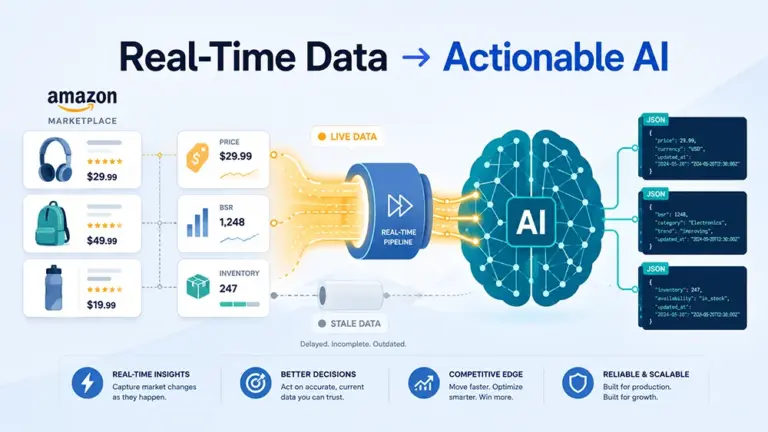
This three-level framework, combined with how to scrape Amazon Buy Box price and seller data with API at 5–15 minute refresh intervals, compresses repricing response time from hours (manual monitoring) to minutes—a meaningful edge during peak demand windows.
Conclusion: Buy Box Data Is the Central Nervous System of Amazon Pricing
Amazon Buy Box data scraping isn’t optional infrastructure for serious sellers and tool developers—it’s foundational. With 82% of sales flowing through the Buy Box, the information asymmetry between teams with real-time Buy Box monitoring and those without is substantial and growing as dynamic pricing adoption accelerates.
Self-built scrapers remain viable at low volume, but the operational complexity of maintaining them at scale consistently outweighs the cost savings. Pangolinfo Scrape API provides production-grade Amazon Buy Box data scraping with greater than 95% success rates, sub-15-minute data freshness, and multi-marketplace coverage under a single API contract—letting engineering teams focus on the pricing logic that creates competitive advantage rather than the infrastructure that enables data collection.
Start with a free test run at the Pangolinfo Console to inspect the Buy Box JSON schema before committing to any implementation approach. The response structure speaks for itself.
FAQ: Amazon Buy Box Data Scraping
What fields are essential for Amazon Buy Box data scraping?
A complete Amazon Buy Box data scraping setup should capture: current Buy Box winner (Seller ID and store name), Buy Box price (including shipping), fulfillment type (FBA/FBM), inventory availability status, Prime eligibility flag, and the competing seller list. For repricing systems, historical price time-series data is also needed to calculate volatility ranges and set floor prices.
Can I build my own Python scraper to collect Buy Box data?
Technically yes, but scaling is expensive. Amazon deploys CAPTCHA challenges, JavaScript rendering gates, TLS fingerprint detection, and IP blocking against high-frequency scrapers. Maintaining a residential proxy pool, anti-detection browser, and up-to-date parsing templates typically costs more in engineering hours than a commercial API solution. At 50,000+ daily ASIN requests, commercial APIs almost always win on total cost of ownership.
How frequently should I poll Buy Box data for repricing?
It depends on your use case. Dynamic repricing tools need 5–15 minute refresh cycles. Brand protection and unauthorized seller monitoring can work with 1–2 hour intervals. Market research reports function fine with daily snapshots. Pangolinfo Scrape API supports on-demand real-time pulls, so you can assign different polling frequencies to different ASIN tiers based on competitive pressure.
Does Amazon Buy Box data scraping work across international marketplaces?
Yes, but each marketplace has distinct page structures, pricing logic, and localization rules. Pangolinfo Scrape API handles multi-marketplace scraping through a single marketplace parameter (US, UK, DE, JP, CA, etc.), with dedicated parsing templates maintained per site. You don’t need to build or maintain separate scrapers for each region.
Is Amazon Buy Box data scraping legal?
Collecting publicly displayed pricing and seller information from Amazon product pages is fundamentally different from violating SP-API terms of service. Major commercial data providers including Jungle Scout, Helium 10, and Pangolinfo have operated this type of service for years without legal action from Amazon. The key boundaries: don’t disrupt platform operations and don’t use data to commit fraud or manipulate prices deceptively.
Start building your Buy Box monitoring system today. Try Pangolinfo Scrape API with free credits—no commitment required.
Full field documentation available at the Pangolinfo API Documentation Center.