Amazon Alexa Competitor Ranking Monitor
Most sellers monitor competitors by watching BSR, prices, and review counts. These are all valuable — but they’re all lagging indicators. By the time a competitor’s BSR shows a meaningful shift, the competitive dynamics that caused it typically started 4–8 weeks earlier.
Alexa for Shopping recommendation data is a leading indicator. When a competitor ASIN starts appearing consistently in Alexa’s recommendation groups for your core keywords, it means their listing content is winning Alexa’s semantic approval — and that typically precedes measurable sales impact by several weeks. See the signal early, and you have time to respond before the situation becomes entrenched.
Why Alexa Recommendation Ranking Is a New Competitive Dimension
The Blind Spot in Traditional Ranking Monitoring
Traditional competitive ranking tools track keyword search result positions (organic ranking) and Sponsored Products placement. These remain important after Alexa took over the search bar — but they have a new structural blind spot:
- Alexa’s AI summary (
contentfield) now occupies the top of search results pages, but traditional tools can’t track which brands the AI summary names by name - Alexa’s grouped product recommendations (
productsfield) are an entirely new presentation format not captured by traditional rank trackers - Alexa’s follow-up questions (
follow_up_questions) shape users’ next decision steps — completely invisible to traditional tools
Alexa Recommendation Ranking vs. Traditional Metrics
| Monitoring Dimension | Traditional Rank Tools | Alexa API Tracking |
|---|---|---|
| Signal timing | Lagging (reflects after sales changes) | Leading (reflects listing changes within 1–2 weeks) |
| What’s tracked | Keyword organic rank / ad positions | AI summary brand mentions / recommendation group position / AI descriptions |
| Signal type | Outcome metric (changes that already happened) | Process metric (optimizations currently in progress) |
| Competitor action detection | Price changes, ad spend increases | Listing semantic upgrades, scene coverage expansion |
| Decision utility | Post-hoc analysis | Pre-impact early warning |
The 3 Dimensions of Alexa Competitor Ranking
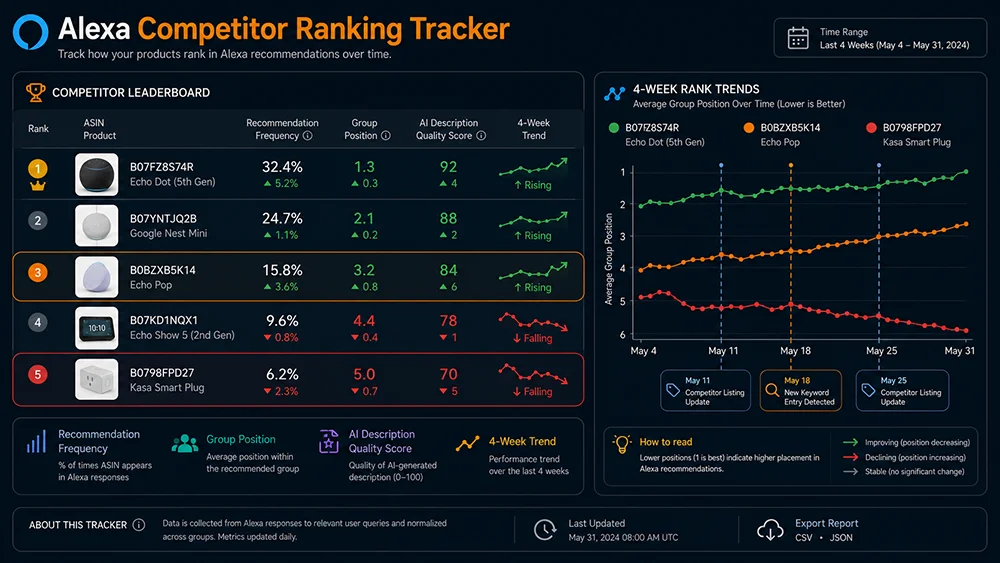
Alexa recommendation ranking isn’t a single number — it’s a competitive landscape defined by three interrelated dimensions. Effective competitor monitoring requires tracking all three simultaneously.
Dimension 1: Recommendation Appearance Rate
Definition: The percentage of Alexa API queries for a given keyword that return a competitor ASIN in the products field.
How to calculate: Run 5 Alexa API queries for the same keyword. Count how many times the target ASIN appears. Appearance rate = appearances / 5 (e.g., 3/5 = 60%).
Interpretation:
- >80%: Stable high-frequency — the competitor has established strong semantic positioning; difficult to displace quickly
- 40–80%: Contested zone — competitor is present but position is not yet locked in; optimization opportunity exists
- <40%: Sporadic appearance — weak semantic match; not yet a primary competitive threat
Dimension 2: Recommendation Group Placement
Definition: The semantic positioning of the recommendation group where a competitor ASIN appears (products[].title) and its rank within that group.
Why it matters: Alexa’s recommendation group names directly reflect how the AI understands a product’s primary value. The same ASIN appearing in a “Best for Apartments” group versus a “Budget Options” group reflects entirely different competitive dynamics and value positioning.
Key tracking signals:
- A competitor moving from a low-value group (“Budget”) into a high-value group (“Best Overall”) is a significant upward signal
- A competitor entering the same group you currently occupy means direct competitive escalation in that semantic space
- Changes in the group name itself reveal how Alexa’s interpretation of a competitor’s listing is evolving
Dimension 3: AI Description Content Quality
Definition: The AI-generated description text Alexa produces for a competitor ASIN when recommending it (products[].items[].describe).
Why it matters: The describe field is Alexa’s semantic extraction of what it considers the competitor’s core value. When a competitor’s describe content shifts from vague to specific — from generic claims to concrete numbers and use scenarios — that’s a direct signal that their listing has undergone effective AEO optimization and Alexa has recognized it.
Quality comparison:
- Low-quality describe (weak AEO): “A sturdy metal bed frame with easy assembly and good durability.” — no scene, no number, no differentiation
- High-quality describe (strong AEO): “A tool-free queen frame built for apartment renters — assembles in 30 minutes, holds up to 2,000 lbs, and works without a box spring.” — specific scene, specific numbers, clear differentiation
When a primary competitor’s describe content shifts from the first form to the second, this is the most direct AEO optimization completion signal available — requiring an immediate response.
5-Step Data Collection SOP
Step 1: Build Your Competitor Watch List
Select 5–10 core competitor ASINs using these criteria:
- Price overlap within ±20% of your pricing — direct substitutes for the same buyer
- Current Alexa recommendation presence — ASINs already appearing frequently in Alexa results are the most immediate threats
- Recent BSR velocity — rapidly rising new entrants often accompany active listing optimization
- Review count rankings — top 10 review-count products in your category are structural competitive references
Step 2: Define Your Keyword Monitoring Set
Cover three keyword types:
- Core keywords (3–5): Primary traffic keywords, e.g., “queen bed frame”
- Scene-based keywords (3–5): Intent-specific context queries, e.g., “queen bed frame apartment,” “queen bed frame no box spring”
- Long-tail decision keywords (2–3): High-purchase-intent queries, e.g., “queen metal bed frame easy assembly under 200”
Step 3: Establish Your Baseline Snapshot
For each monitored keyword, run 5 consecutive Pangolinfo Alexa API queries and record:
- Each competitor ASIN’s appearance frequency (appearances / 5)
- The recommendation group name (
products[].title) for each appearance - The AI description text (
describe) for each appearance - Your own brand’s appearance frequency in the
contentfield
Store this data as a timestamped baseline snapshot. See the Developer Tutorial for recommended JSON storage schema.
Step 4: Run Periodic Update Cycles
| Cadence | When to Use | Queries per Keyword |
|---|---|---|
| Weekly | High-competition categories / promotional seasons / visible competitor listing activity | 5 queries |
| Bi-weekly | Standard monitoring / relatively stable competitive landscape | 5 queries |
| Monthly | Low-competition niche categories / maintenance monitoring | 3 queries |
Step 5: Configure Alert Thresholds
- Competitor appearance rate changes by more than 25% in a single week (up or down) → trigger deep analysis
- Competitor enters the same recommendation group you currently occupy → immediately start defensive optimization
- Competitor
describecontent shifts from vague to specific → analyze their listing changes and formulate a response - Your own brand visibility declines for 2 consecutive weeks → run the Listing Optimization Skill diagnostic
4-Week Case Study: Tracking a Competitive Shift in Real Time
Data from a home goods seller’s actual monitoring records (brand/ASIN anonymized). Target keyword: “queen bed frame small apartment.”
Week 0: Baseline Snapshot
| ASIN | Appearance Rate | Group Placement | Describe Quality |
|---|---|---|---|
| Brand A (self) | 80% (4/5) | Best for Apartments | High — contains scene + specific numbers |
| Competitor B | 40% (2/5) | Budget Options | Low — generic, no specific claims |
| Competitor C | 20% (1/5) | Sporadic, no consistent group | Minimal semantic content |
Week 2: Anomaly Detected
| ASIN | Appearance Rate | Change | Describe Change |
|---|---|---|---|
| Brand A (self) | 60% (3/5) | ⬇ −20% | No change |
| Competitor B | 80% (4/5) | ⬆ +40% | Upgraded to high-quality: “30-min tool-free assembly, no box spring needed, apartment-ready” |
| Competitor C | 40% (2/5) | ⬆ +20% | Slight improvement |
Signal interpretation: Competitor B’s describe content shifted from low to high quality in 2 weeks. This almost certainly indicates a targeted “apartment scene” AEO optimization was completed — and Alexa’s system has already recognized and acted on it. The listing update most likely happened in weeks 1–2 and the ranking impact was immediate.
Response Actions (Weeks 2–3)
- Ran Listing Optimization Skill on Brand A’s core ASIN → diagnosed that Competitor B had added a specific assembly time claim (“30 minutes”) to their title that Brand A’s listing only vaguely referenced (“easy assembly”)
- Updated Brand A’s title to include “30-Min Tool-Free Assembly” as a specific numeric claim
- Added an explicit “apartment-ready” framing to the first bullet to reinforce scene specificity
- Continued monitoring Competitor B for any further expansion into adjacent scene keywords
Week 4: Validation
- Brand A appearance rate recovered to 80% (4/5)
- Competitor B stabilized at 80% — both brands now co-appear in the “Best for Apartments” group
- Competitor B’s describe content showed no further quality upgrade — their AEO push appears to have paused
Key insight: The full competitive cycle — from detecting Competitor B’s optimization to Brand A’s recovered position — took approximately 3 weeks. Without the monitoring system, this shift would likely have been detected through sales decline data 4–6 weeks later — at which point Competitor B would have accumulated two months of compounding advantage that’s structurally much harder to reverse.
Response Playbook: 4 Competitive Scenarios
Scenario 1: Competitor consistently below you (<40% appearance rate)
Action: Maintain current position, stay on standard monitoring cadence. Direct resources toward early detection of emerging challengers rather than defending against non-threatening competitors.
Scenario 2: Competitor rising rapidly into contested zone (40–80%)
Action:
- Immediately analyze the competitor’s
describecontent changes to identify their AEO optimization direction - Cross-reference with your listing — run defensive optimization on the specific dimensions the competitor is strengthening
- Use the Listing Optimization Skill to identify your AI readability gaps and prioritize closing the most critical ones first
Scenario 3: Competitor exceeds you and enters your recommendation group (>80%, same group)
Action:
- Immediately run AEO diagnostic — identify differentiating scene dimensions the competitor has not yet dominated and position your listing there
- Consider defensive Prompts ad deployment on affected keywords to maintain conversational flow coverage while organic optimization takes effect
- If the competitor has been dominant for 2+ consecutive months, reassess your strategy on that core keyword — it may be more efficient to own an adjacent scene keyword than to fight for a contested core term
Scenario 4: Your own ranking drops but no competitor shows obvious changes
Action: This may indicate an Alexa model update or category-level recommendation logic shift. Run a comprehensive Listing Optimization Skill AI readability diagnostic. Simultaneously check whether new follow-up question dimensions have emerged in your keyword set — Alexa may have updated what it considers high-priority decision factors in your category.
FAQ
How is competitor ranking monitoring different from the Ad Monitoring Skill? Which should I use?
The two are complementary at different analysis granularities. The Ad Monitoring Skill focuses on brand-level overall Alexa visibility and Prompts ad dynamics — suitable for tracking macro competitive landscape shifts. Competitor ranking monitoring focuses on ASIN-level recommendation position and AI description content changes — suitable for granular, competitor-specific strategic analysis. For larger sellers, use the Ad Monitoring Skill for broad scanning and competitor ranking monitoring for deep-dive analysis when the Skill surfaces an anomaly.
Each query returns different Alexa recommendations — is the data reliable?
Alexa recommendations have inherent variance — this is a normal characteristic of AI generative systems. This is exactly why we recommend 5 queries per keyword rather than relying on a single result. A 5-query average appearance rate has significantly higher statistical reliability than any single data point. An ASIN appearing once in 5 queries is sporadic; appearing consistently in 4–5 of 5 queries is a robust signal. Think of it like sampling — more samples give you a more reliable estimate of the underlying recommendation probability.
Should I build my own monitoring pipeline or use the Console interface?
Both are valid, depending on team capabilities. If your team has development resources, a custom collection script gives you more control over storage format and automation — see the Python/Node.js examples in the Developer Tutorial. If you don’t have developer resources, the Pangolinfo Console provides a visual monitoring project interface where you can configure periodic collection and alert rules without writing code — designed for operations teams to use directly.
The Bottom Line
Alexa competitor ranking monitoring gives you a 4–6 week information advantage over sellers who only track BSR. The three monitoring dimensions — appearance rate, group placement, AI description quality — together form a competitive early warning system that’s more sensitive to meaningful listing strategy changes than any sales-based metric.
The minimum viable system: select 5–10 competitor ASINs, run 5-query sweeps every 2 weeks across 8–12 keywords, save timestamped snapshots, set simple alert conditions. Once systematized, the operational load is manageable — and the competitive intelligence it provides is structurally unavailable through any traditional monitoring approach.
→ Pillar Page: Amazon Alexa API Complete Guide
→ Data collection foundation: Alexa API Developer Tutorial
→ Listing response tool: Listing Optimization Skill Guide
→ Ad-level monitoring: Ad Monitoring Skill Guide
Start your Alexa competitor ranking monitoring project at the Pangolinfo Console. Run your first 5-query keyword sweep to establish a competitive baseline snapshot. Full Alexa API data field reference: Amazon Alexa API Product Page.