1. The Execution Layer: Why n8n Closes the Series
The five previous installments of this series all answered the same question in different rooms: how does an agent touch live Amazon data? Meta Muse took a custom connector, Claude Code a --header flag, ChatGPT a Developer Mode Token, Workbuddy a Skill marketplace, IDE agents an in-editor skill. Every one of them assumes someone is sitting in front of the chat window, asking.
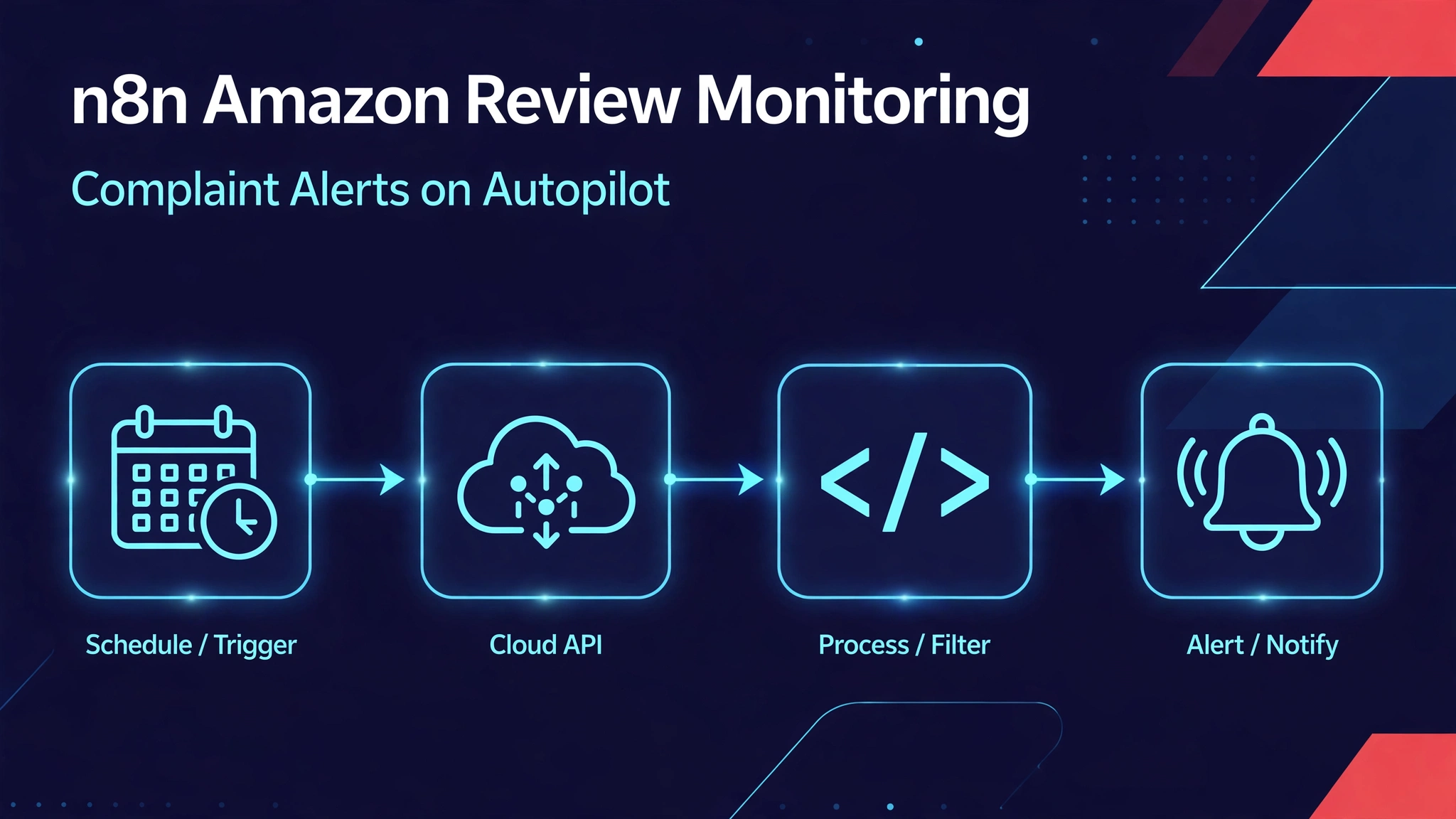
n8n removes the person. It is the unattended execution layer: workflows that wake up on a schedule, pull data, decide, and notify — while you sleep. If the pillar argued why an agent needs live commercial data (hub guide), this installment is about who runs the errand when nobody is watching.
One honest framing up front: Pangolinfo has no native n8n node. ScrapeHero shipped one in September 2026. What follows is the generic, fully working path — Schedule Trigger plus HTTP Request plus credentials — with no claim that it beats a native integration. It wins on a different axis: it runs the exact complaint-mining protocol this series has been measuring since October 12, automatically.
2. Pattern 1: Scheduled Review Mining → Complaint Alerts
This is the pattern worth building in full, because it occupies a genuine gap: plenty of n8n templates monitor Amazon prices; almost nothing walks through monitoring Amazon reviews for emerging complaints. The workflow runs daily, fetches the newest reviews for your ASINs, classifies 1–2 star reviews by complaint theme, remembers what it already saw, and pings Slack only when something new and bad appears. Every run is archived to Google Sheets.
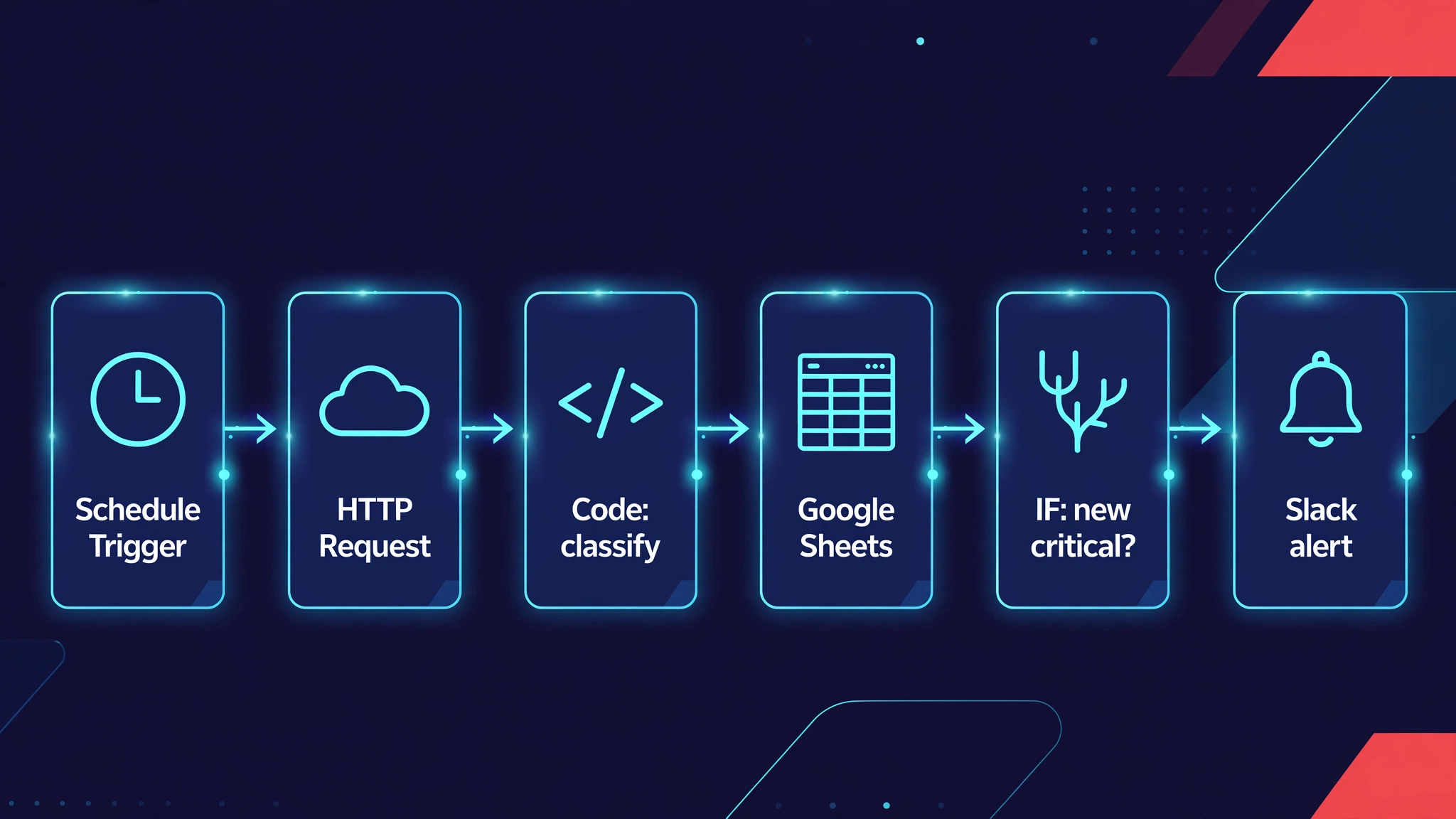
Node 1 — Schedule Trigger: daily 02:00 UTC
Cadence is a design decision, not a default. Reviews accumulate on a daily rhythm, Amazon’s review pages settle overnight US time, and — critically — every extra run costs API credits (§4 does the math). Daily at 02:00 UTC is the series’ standing measurement protocol: same time, same ASINs, comparable numbers.
Node 2 — HTTP Request: the Pangolinfo review call
No native node, so this node is the integration. Configuration:
- Method: POST — URL:
https://scrapeapi.pangolinfo.com/api/v1/scrape - Authentication: Generic Auth Type → HTTP Header Auth. Create one credential named
Pangolinfo Bearer: NameAuthorization, ValueBearer <your-token>. The key lives in the credential, never in the workflow JSON, never in an expression. - Body (JSON):
{
  "url": "https://www.amazon.com/product-reviews/B0FQFB8FMG",
  "parserName": "amzReview",
  "format": "json"
}
parserName: amzReview selects the review parser; format: json returns structured data (1 credit per request per the docs’ format pricing). For more ASINs, duplicate this node or loop over an ASIN list — the blueprint keeps one ASIN so the JSON stays readable.
The response envelope looks like this (field names verified against the official docs):
{
  "code": 0, "message": "ok",
  "data": { "json": [ { "code": 0, "data": {
      "reviews": [
        { "reviewId": "R12W2XCCBZMJK9", "title": "...", "content": "...",
          "star": "5.0 out of 5 stars", "author": "DJPizzaboi",
          "date": "July 20, 2025", "helpful": "4 people found this helpful",
          "purchased": true, "vineVoice": false, ... }
      ] } } ],
    "url": "...", "taskId": "..." }
}
The Code node reads data.json[0].data.reviews. That path is the contract everything downstream depends on.
Node 3 — Code: classify, and remember
This node does two jobs the HTTP node cannot: it decides what counts as a complaint, and it remembers what it already alerted on so you don’t get pinged about the same review twice. Paste this into a Code node set to “Run Once for All Items”:
const staticData = $getWorkflowStaticData('global');
const seen = staticData.seenReviewIds || {};

const THEMES = [
  { id: 'noise',   label: 'Noise / audio',   kws: ['noise', 'anc', 'sound quality', 'hiss'] },
  { id: 'pairing', label: 'Pairing / connection', kws: ['pair', 'connect', 'bluetooth', 'drop'] },
  { id: 'battery', label: 'Battery',         kws: ['battery', 'charge', 'drain', 'dies'] },
  { id: 'compat',  label: 'Compatibility',   kws: ['compatib', 'not work with', 'ipad', 'iphone'] },
  { id: 'defect',  label: 'Defect / QC',     kws: ['broke', 'stopped working', 'defect', 'dead on arrival'] },
];

const results = [];
for (const item of $input.all()) {
  const payload = item.json?.data?.json?.[0]?.data || {};
  const reviews = payload.reviews || [];
  const asin = payload.asin || 'B0FQFB8FMG';
  const seenIds = new Set(seen[asin] || []);
  const fresh = [];

  for (const r of reviews) {
    const id = r.reviewId || `${r.author}-${r.date}`;
    if (seenIds.has(id)) continue;
    seenIds.add(id);
    if (!/^([12])\.0/.test(String(r.star || ''))) continue; // 1–2 stars only
    const text = `${r.title || ''} ${r.content || ''}`.toLowerCase();
    const themes = THEMES
      .filter(t => t.kws.some(k => text.includes(k)))
      .map(t => t.label);
    fresh.push({
      reviewId: id, date: r.date, star: r.star, author: r.author,
      title: r.title, helpful: r.helpful, verified: r.purchased, themes,
    });
  }
  seen[asin] = [...seenIds];
  results.push({
    json: {
      asin,
      newCritical: fresh.length,
      totalScanned: reviews.length,
      themes: [...new Set(fresh.flatMap(f => f.themes))],
      samples: fresh.slice(0, 5),
    },
  });
}
staticData.seenReviewIds = seen;
return results;
Three things worth noticing. First, the star filter is a regex on the docs’ literal format ("5.0 out of 5 stars") — 1–2 stars count as complaints, everything else is noise for this workflow. Second, verified: r.purchased carries the verified-purchase flag through, because a complaint from a verified buyer outranks an anonymous one. Third, the delta memory uses $getWorkflowStaticData('global'), n8n’s built-in per-workflow persistence — no database needed for the “only alert on new” behavior.
One real gotcha, documented because it bites: the Code node has no fetch. If your Code node ever needs to call HTTP itself, use require('https'). Here you don’t need to — the HTTP Request node already did the fetching.
Node 4 — Google Sheets: archive every run
Append-only sheet, one row per run: date, ASIN, reviews scanned, new critical count, themes, top sample title. This is the unglamorous part that makes the workflow trustworthy six months later — when someone asks “when did the pairing complaints start?”, the answer is a filter, not a memory.
Node 5 — IF: is there anything new and bad?
Condition: {{ $json.newCritical }} greater than 0 (number). True → Slack. False → stop. The workflow is quiet by design; silence is the normal output.
Node 6 — Slack: the alert
Post to your channel (create the Slack credential once):
🚨 {{ $json.newCritical }} new critical review(s) — {{ $json.asin }}
Themes: {{ $json.themes.join(', ') || 'unclassified' }}
Top: "{{ $json.samples[0].title }}" ({{ $json.samples[0].star }}, {{ $json.samples[0].helpful }}, verified: {{ $json.samples[0].verified }})
Swap Slack for Telegram, email, or a webhook — the decision logic doesn’t care.
The importable workflow
The six nodes above, ready to import (Workflow → Import from JSON). Create the Pangolinfo Bearer header-auth credential and the Slack/Sheets credentials first; paste your sheet ID where marked. Node typeVersion values match n8n 1.x — if your instance prompts to upgrade a node on import, accept it.
{
  "name": "Pangolinfo Amazon Review Complaint Alerts",
  "nodes": [
    {
      "parameters": { "rule": { "interval": [{ "field": "hours", "hoursInterval": 24 }] } },
      "id": "n8n-schedule-1",
      "name": "Daily 02:00 UTC",
      "type": "n8n-nodes-base.scheduleTrigger",
      "typeVersion": 1.2,
      "position": [240, 300]
    },
    {
      "parameters": {
        "method": "POST",
        "url": "https://scrapeapi.pangolinfo.com/api/v1/scrape",
        "authentication": "genericAuth",
        "genericAuthType": "httpHeaderAuth",
        "sendBody": true,
        "specifyBody": "json",
        "jsonBody": "={\n  \"url\": \"https://www.amazon.com/product-reviews/B0FQFB8FMG\",\n  \"parserName\": \"amzReview\",\n  \"format\": \"json\"\n}",
        "options": { "timeout": 60000 }
      },
      "credentials": { "httpHeaderAuth": { "id": "", "name": "Pangolinfo Bearer" } },
      "id": "n8n-http-1",
      "name": "Fetch Reviews (Pangolinfo)",
      "type": "n8n-nodes-base.httpRequest",
      "typeVersion": 4.2,
      "position": [460, 300]
    },
    {
      "parameters": { "mode": "runOnceForAllItems", "jsCode": "/* Paste the classifier from Node 3 above */" },
      "id": "n8n-code-1",
      "name": "Classify & Delta",
      "type": "n8n-nodes-base.code",
      "typeVersion": 2,
      "position": [680, 300]
    },
    {
      "parameters": {
        "resource": "sheetWithinDocument",
        "operation": "append",
        "documentId": { "__rl": true, "value": "YOUR_SHEET_ID", "mode": "id" },
        "sheetName": { "__rl": true, "value": "review_alerts", "mode": "name" },
        "columns": {
          "mappingMode": "defineBelow",
          "value": {
            "date": "={{ $now.toISO() }}",
            "asin": "={{ $json.asin }}",
            "scanned": "={{ $json.totalScanned }}",
            "new_critical": "={{ $json.newCritical }}",
            "themes": "={{ $json.themes.join('; ') }}"
          },
          "matchingColumns": [],
          "schema": []
        },
        "options": {}
      },
      "id": "n8n-sheets-1",
      "name": "Archive to Sheets",
      "type": "n8n-nodes-base.googleSheets",
      "typeVersion": 4,
      "position": [900, 300]
    },
    {
      "parameters": {
        "conditions": {
          "options": { "caseSensitive": true, "leftValue": "", "typeValidation": "loose" },
          "conditions": [
            { "id": "cond-1", "leftValue": "={{ $json.newCritical }}",
              "rightValue": 0, "operator": { "type": "number", "operation": "larger" } }
          ],
          "combinator": "and"
        },
        "options": {}
      },
      "id": "n8n-if-1",
      "name": "New Critical?",
      "type": "n8n-nodes-base.if",
      "typeVersion": 2,
      "position": [1120, 300]
    },
    {
      "parameters": {
        "resource": "message",
        "operation": "post",
        "channel": "={{ 'YOUR_CHANNEL_ID' }}",
        "text": "=🚨 {{ $json.newCritical }} new critical review(s) — {{ $json.asin }}\nThemes: {{ $json.themes.join(', ') || 'unclassified' }}\nTop: \"{{ $json.samples[0].title }}\" ({{ $json.samples[0].star }}, {{ $json.samples[0].helpful }})",
        "otherOptions": {}
      },
      "id": "n8n-slack-1",
      "name": "Slack Alert",
      "type": "n8n-nodes-base.slack",
      "typeVersion": 2,
      "position": [1340, 220]
    }
  ],
  "connections": {
    "Daily 02:00 UTC": { "main": [[{ "node": "Fetch Reviews (Pangolinfo)", "type": "main", "index": 0 }]] },
    "Fetch Reviews (Pangolinfo)": { "main": [[{ "node": "Classify & Delta", "type": "main", "index": 0 }]] },
    "Classify & Delta": { "main": [[{ "node": "Archive to Sheets", "type": "main", "index": 0 }]] },
    "Archive to Sheets": { "main": [[{ "node": "New Critical?", "type": "main", "index": 0 }]] },
    "New Critical?": { "main": [
      [{ "node": "Slack Alert", "type": "main", "index": 0 }],
      []
    ] }
  },
  "active": false,
  "settings": { "executionOrder": "v1" }
}
3. Pattern 2: Price/BSR Snapshots — The Short, Honest Version
The same HTTP Request node with a different parser gives you scheduled price snapshots: parserName: amzProductDetail, content: B0FQFB8FMG, site: amz_us, format: json → append price, rating, and review count to Sheets. Two paragraphs is all this pattern gets, deliberately: n8n price monitoring is a red ocean. ScrapeHero ships a native n8n node (September 2026), Bright Data and ScrapeOps publish official templates, and the Schedule → fetch → compare → alert shape is thoroughly covered. If you want the native-node experience, evaluate theirs. This guide’s contribution is the generic HTTP path for everything their templates don’t cover — starting with Pattern 1.
4. Scheduling × Credits: Do the Budget Before You Automate
Automation multiplies cost by cadence. The formula:
monthly cost ≈ ASINs × runs per day × 30 × credits per request
| Setup | Requests/day | Requests/month | At docs’ json rate (1 credit/req) | Fits 60 free? |
|---|---|---|---|---|
| 3 ASINs × daily | 3 | ~90 | ~90 credits | No → drop to twice weekly (~24/mo), or upgrade |
| 1 ASIN × daily | 1 | ~30 | ~30 credits | Yes, with room |
Two honest footnotes. First, the per-request rate above is the docs’ format: json pricing; review-parser billing follows your console — our MCP-side measurement priced review pages at 5 credits each, so budget high and reconcile against the first invoice before raising cadence. Second, the free tier resets monthly (60 credits, use-or-lose for the purpose of this math) — a workflow that fits in month one fits every month.
5. What n8n Can’t Do
Three boundaries, stated plainly so the workflow isn’t asked to be something it isn’t. It isn’t realtime. A schedule is a schedule — daily is the sane default for complaints; minute-level polling is possible and mostly a way to burn credits. It doesn’t solve anti-scraping. CAPTCHAs, IP rotation, and parser maintenance live on the API side; n8n just holds the schedule and the credentials. There’s no native Pangolinfo node — whether one should exist is a roadmap conversation, not a promise in this guide. For why an agent needs live data at all — the grounding argument this whole series rests on — that’s the hub guide, not this page.
6. Verification Status: What Was Checked, What Was Not
✅ The REST contract — endpoint (POST https://scrapeapi.pangolinfo.com/api/v1/scrape), parser names (amzReview, amzProductDetail), header-auth shape, format: json pricing, and the review field names (reviewId, star, helpful, purchased, …) — verified against the official docs on 2026-10-19. ✅ The reference numbers (AirPods Pro 3, US, 4,269 reviews / 1,392 critical as of 2026-10-12) are the series’ standing MCP measurement, executed for real. ✅ The red-ocean read — ScrapeHero’s native n8n node (Sept 2026), Bright Data / ScrapeOps / Crawlbase templates — from the 2026-10-14 SERP recon. ⚠️ The workflow JSON above was not executed in a live n8n instance by our team. Import it, run once manually, watch the Code node’s output, then activate the schedule. ⚠️ Review pagination and filter parameters follow the docs’ current version — confirm before building multi-page loops. Node typeVersions match n8n 1.x; accept the upgrade prompt on import if your instance is newer.
7. Related Reading
- How to Connect AI Agents to Real-Time Amazon Data: The Complete Guide — the hub: the grounding argument and the three integration patterns
- How to Connect Real-Time Amazon Data to ChatGPT (MCP): The Complete Guide — the attended counterpart: what changes when a human is in the loop to confirm
- Amazon Review API — the review data engine behind the workflow
- Amazon Data MCP — the 20-tool server for the conversational side of the same data
- Pangolinfo API docs — the REST contract this workflow is built on
8. Series Navigation
This guide is part of the series How to Connect AI Agents to Real-Time Amazon Data: The Complete Guide — the hub. Installments:
- Meta Muse — custom MCP connector, verified end to end.
- Claude Code — CLI, Desktop, and web paths compared, with the auth-surface breakdown.
- ChatGPT — Developer Mode custom connector with Token auth; the attended counterpart to this guide’s unattended pattern.
- Workbuddy — Skill-ecosystem path: marketplace Skill, MCP connector, and Expert bundle compared.
- IDE agents — MCP and skills inside the editor.
- n8n — this guide: scheduled review mining and complaint alerts, the unattended execution layer.