
1. Definition: ChatGPT Is the World’s Most-Used Chat Agent
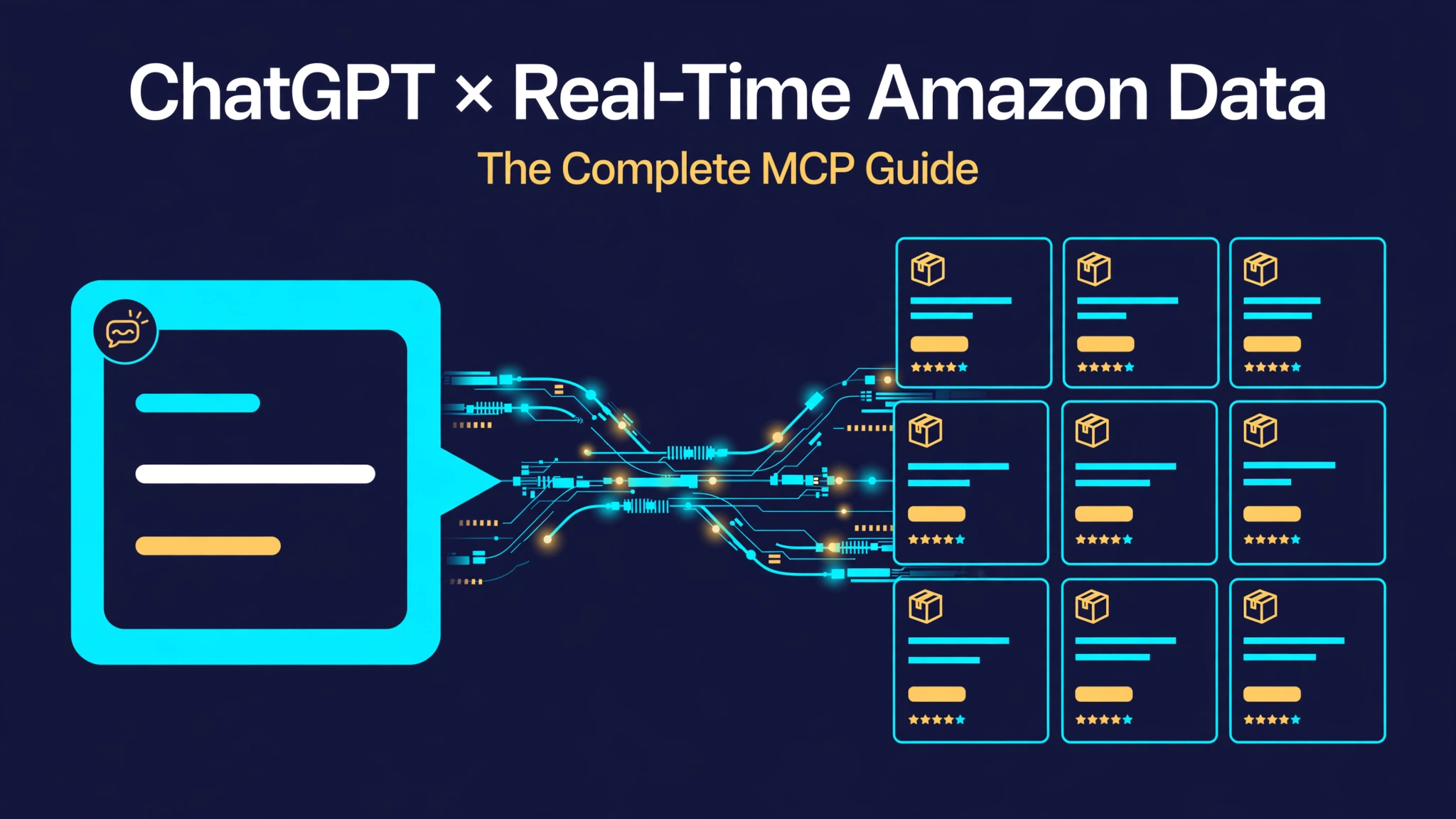
ChatGPT is the conversational agent with the largest installed user base on earth, and since OpenAI’s DevDay in October 2025 it is also an MCP client. Through Developer Mode, ChatGPT accepts custom MCP connectors — the settings surface now labels them “apps” — and calls their tools mid-conversation, asking the user to confirm before any write action.
This is the operative fact of the present guide. The Pangolinfo MCP server exposes one endpoint — https://mcp.pangolinfo.com/mcp — with one authentication scheme: an API key transmitted as an Authorization: Bearer header. Twenty tools hang off that endpoint (19 data tools plus the free self-inspection tool pangolinfo_capabilities). ChatGPT’s connector setup offers three authentication options — None, OAuth, or Token — and the Token option accepts a static Bearer token directly: paste the Pangolinfo API key, and the connector’s tools register automatically.
The connection problem is therefore not “does ChatGPT support MCP” — it does — but whether your plan and your network position satisfy the client’s two gates: a paid plan (Plus, Pro, Business, Enterprise, or Edu; Free and Go are excluded), and a remote HTTPS endpoint. Pangolinfo’s server is remote HTTPS by design, so the second gate is already passed — ChatGPT cannot launch local stdio servers, and the constraint that blocks local tools simply does not apply here. Where friction exists, it lives entirely on the client side: the plan tier, and the session model.
This is the key difference from the other installments of this series. The Meta Muse installment verified the full connection flow end to end inside the Muse client on 2026-10-12 (secure credential flow, Bearer key accepted). The Claude Code installment found the opposite shape: the CLI --header path is the main route, while claude.ai’s web connector is oriented around OAuth and does not officially accept a static Bearer token. ChatGPT sits between the two — its web connector takes the Token directly, so the web path is the main path here, with no tunnel and no config file.
2. Argument: A Commerce Agent Cannot Be a Blind General
Start with the background. More and more e-commerce companies wire agents into daily operations: merchandising teams have agents sweep categories, size demand, and rank opportunities; operations teams have agents watch reviews, mine complaints, and flag reputation reversals; ads and pricing teams have agents track competitor prices and Buy Box changes — producing conclusions, and in some setups participating directly in the operation itself: repricing, restocking, pausing ads. These decisions share one property: they are made about the real Amazon, and they run on massive, real-time, verifiable data. An agent without data is a general without reconnaissance: the more decisively it commands, the more spectacularly it errs.
An AI agent’s parametric knowledge — what it “knows” from training — has three structural limits in this setting: it is frozen in time, it contains no counts, and it carries no provenance. It does not know what happened yesterday, it cannot count “how many,” and it cites nothing.
ChatGPT sharpens the stakes twice. First, it is the widest conversational surface in the industry: an ungrounded claim produced here propagates further than the same claim produced anywhere else, so the cost of hallucination scales with the audience. Second, ChatGPT’s connector calls are session-bound — the model touches the MCP server only while a driven session is open. Between chats, nothing is watching your warehouse. Grounding makes ChatGPT an excellent analyst inside a session; it does not make it a standing watch. The monitoring story belongs to a different installment (scheduled REST workflows via n8n, forthcoming) — this guide states the boundary explicitly rather than letting the reader discover it by disappointment.
Consider the control condition. Ask a ChatGPT client with no data connection: “What are the main complaint themes in AirPods Pro 3 reviews?” The characteristic answer names plausible themes — noise cancellation, fit, price — but supplies no counts, no dates, and no verified-purchase markers. Worse, it carries a contamination risk from the previous generation: memories of the older AirPods Pro 2 can leak into an answer about the Pro 3, and nothing in the output lets the reader detect the substitution.
The argument, then: for commercial questions, the deficit of an ungrounded agent is not eloquence but verifiability. A claim without a number, a timestamp, or a source is not a finding; it is a hypothesis wearing a finding’s clothes. The rest of this guide is the procedure for replacing the hypothesis with measurements.
3. Two Paths Compared: The Same Endpoint, a Client-Side Gate
| Path 1 — Developer Mode custom connector (recommended) | Path 2 — Custom GPT with Actions (alternative) | |
|---|---|---|
| How the key is supplied | Settings → Apps & Connectors → Create; Authentication: Token; paste the Pangolinfo API key | Custom GPT builder → Configure → Actions; import an OpenAPI schema wrapping the Pangolinfo REST API; key in the action’s authentication field |
| Plan requirement | Paid plan only: Plus, Pro, Business, Enterprise, Edu. Free and Go are excluded | Same plan gating for GPT building/sharing applies per OpenAI’s current terms |
| Transport | Remote HTTPS required — satisfied: https://mcp.pangolinfo.com/mcp |
HTTPS REST endpoints; the OpenAPI schema is authored by you |
| Verification status | Procedure compiled from multiple 2026 connector guides; consistent on the Token option accepting a Bearer token. Not executed inside a ChatGPT client by our team (see Section 6) | Standard Custom GPT Actions pattern; more manual wiring than the connector path |
| Best for | Chat workflows on chatgpt.com — the main path | A shareable, branded GPT for a team (“ask our Amazon analyst”) |
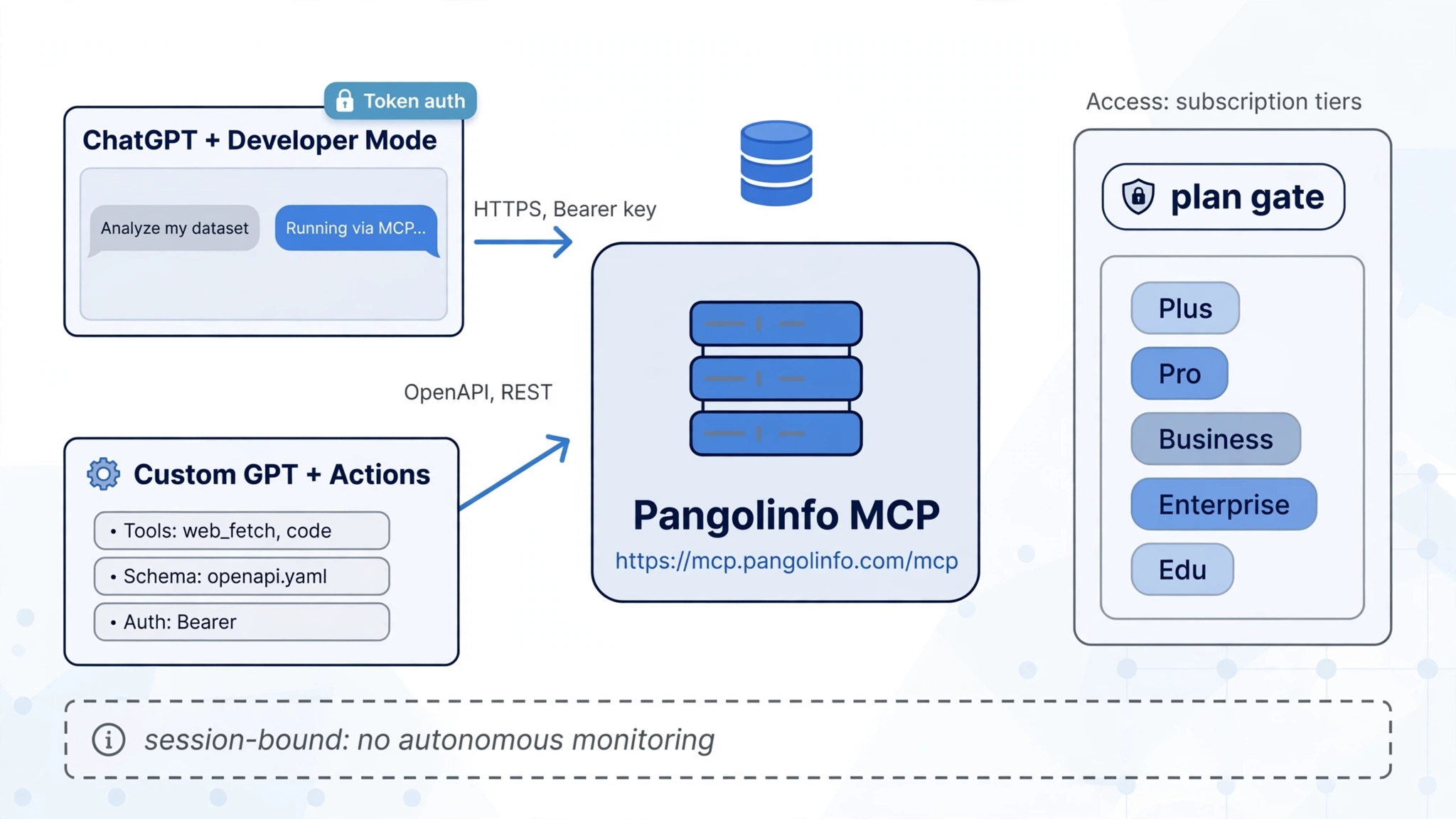
The core insight of this installment: the endpoint is client-agnostic; ChatGPT’s gate is the plan tier, not the protocol. Pangolinfo’s MCP server needs nothing special for ChatGPT — the same public HTTPS server the Muse and Claude installments use. What decides success is whether your ChatGPT plan exposes Developer Mode, and whether you pick Token rather than OAuth at the authentication step. A common failure mode, worth naming: users on the Free plan follow the setup steps and find no Developer Mode toggle — that is the plan gate, not a bug.
Two UI facts, stated with their shelf life: the connectors surface was renamed to “apps” in December 2025, and Developer Mode is explicitly a beta. Menu names and plan details move; verify against OpenAI’s current documentation before relying on them.
The honest boundary: what the connection cannot do
Stating the ceiling is part of the guide. First, session-bound execution: ChatGPT calls the connector’s tools only while you are driving a session. It will not re-check a price overnight, watch a review count, or alert you to a Buy Box change on its own — there is no documented way to subscribe it to triggers or webhooks. For standing watch, the series’ forthcoming n8n installment covers scheduled REST workflows. Second, write actions require per-action confirmation; the read-only Pangolinfo tools (search, reviews, prices, product data) need none, which is why the fit here is research, not operation. Third, on workspace plans an administrator can disable Developer Mode — the toggle’s absence may be policy, not plan tier.
4. From Signup to First Call: Three Steps
4.1 Sign up for Pangolinfo
Open pangolinfo.com and click “Start Free Trial” — this takes you to tool.pangolinfo.com to create your account. New accounts include a free tier of 60 credits per month (reset monthly); every test in this guide costs single-digit points, so the free tier is enough to run it end to end.
4.2 Get your API key
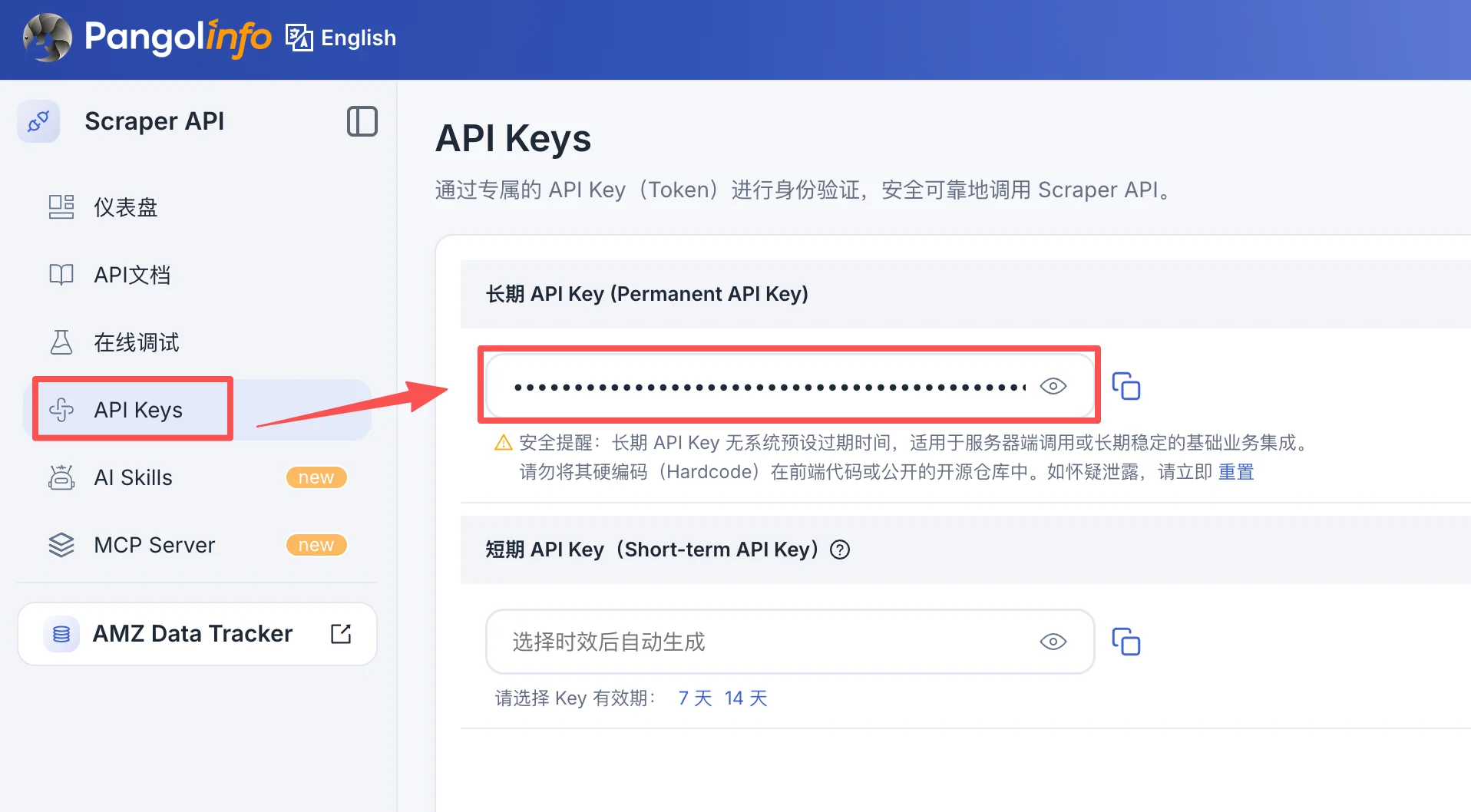
Sign in to the tool.pangolinfo.com dashboard and copy your API key from the API key page. Use a long-lived key — short-lived keys expire and silently break the connection — and issue separate keys per environment. Never paste the key into chat text that might be shared or logged; the connector’s Token field is the only place it belongs.
4.3 Connect it in ChatGPT
Path 1 — Developer Mode custom connector.
- Click your profile icon (top-left in ChatGPT) → Settings → Apps & Connectors → Advanced Settings → toggle Developer Mode on.
- In Apps & Connectors, choose Create and fill in: Name (e.g.
Pangolinfo Amazon Data), a one-line Description, Connector URLhttps://mcp.pangolinfo.com/mcp, Authentication: Token. - Paste your Pangolinfo API key into the Token field and create the connector. The 20 tools register automatically.
Verify the connection by asking in a chat: “use search_amazon to search for wireless earbuds.” A returned list of real ASINs means the connector is live. You do not pick tools manually — ChatGPT decides which tool to call from your request.
Path 2 — Custom GPT with Actions. In the GPT builder’s Configure tab, add an Action and import an OpenAPI schema describing the Pangolinfo REST endpoints you need (search, reviews, product), with the API key in the action’s authentication. More manual than the connector path; the payoff is a shareable GPT with its own instructions and branding.
5. The First Test: The Series’ Reference Measurement
Every installment of this series runs the same reference measurement so results are comparable across agents. The measurement was taken on 2026-10-12 directly against the Pangolinfo MCP endpoint — the same endpoint your ChatGPT connector calls — using the series’ fixed protocol:
| Step | Tool call | Parameters | Result | Cost |
|---|---|---|---|---|
| 1. Discover | search_amazon |
{"keyword":"wireless earbuds","site":"amz_us","page":1} |
5 real results, including AirPods Pro 3 (ASIN B0FQFB8FMG) |
1 credit |
| 2. Mine complaints | get_amazon_reviews |
{"asin":"B0FQFB8FMG","site":"amz_us","pageCount":1,"filterByStar":"critical","sortBy":"helpful"} |
1,392 critical reviews out of 4,269 total | 5 credits/page |
The facts the measurement establishes: Apple AirPods Pro 3, US marketplace, 4,269 reviews with 1,392 critical (1–2 star); the most recent review dated 2026-10-10, two days before the test — data is live, not cached. Every review carries a verified-purchase flag and a helpful-vote count. The dominant complaint themes, ranked by helpfulness: weak low-frequency noise cancellation (engine hum leaking through), units failing after roughly three months, difficult pairing with iPhone, incompatibility with iPad 7 features, battery and Find My issues.
Once your connector is live, reproduce the measurement conversationally. Three prompts, in order:
- “Search Amazon US for wireless earbuds and give me the ASIN of the Apple AirPods Pro 3.”
- “Pull the critical reviews for that ASIN, sorted by most helpful.”
- “What are the main complaint themes? Give me counts, not just themes.”
If ChatGPT’s answer carries numbers, dates, and verified-purchase markers, the grounding is working. If it drifts into plausible generalities, check that the connector — not the model’s memory — answered: ask it which tool it called.
6. Verification Status: What Was Checked, What Was Not
- ✅ MCP endpoint
https://mcp.pangolinfo.com/mcp, the 20-tool list, and the Section 5 measurement: executed directly against the MCP protocol by our team on 2026-10-12 (11 credits, within the monthly free tier). - ✅ ChatGPT Developer Mode custom-connector procedure and the Token-auth option: compiled from multiple 2026 connector guides, consistent across independent sources.
- ✅ Plan gating (Plus/Pro/Business/Enterprise/Edu; Free/Go excluded) and the remote-HTTPS-only transport rule: consistent across the same sources.
- ⚠️ The connector setup was not executed inside a ChatGPT client by our team — client access varies by plan, and Developer Mode is a beta whose UI moves. Menu paths should be verified against OpenAI’s current documentation.
- ⚠️ The Section 5 in-conversation prompts describe the expected flow once connected; the underlying measurement they reproduce is the verified endpoint run above.
- Billing: tool calls bill at the same credit rates as the matching REST endpoints (search ≈ 1 credit/page, reviews ≈ 5 credits/page); free tier is 60 credits per month, reset monthly.
7. Related Reading
- How to Connect AI Agents to Real-Time Amazon Data: The Complete Guide — the hub guide for this series
- How to Connect Real-Time Amazon Data to Meta Muse (MCP): The Complete Guide — the Muse installment: custom connector verified end to end inside the client
- How to Connect Real-Time Amazon Data to Claude Code (MCP): The Complete Guide — the Claude Code installment: CLI, Desktop, and web paths compared, with the auth-surface breakdown
- Amazon Review API — the review data engine behind the MCP’s review tools
- Amazon Data MCP — the full 20-tool server this guide connects to ChatGPT
- Amazon Scraper Skill — the Skill-format integration for agent IDEs and OpenClaw
8. Series Navigation
This guide is part of the series How to Connect AI Agents to Real-Time Amazon Data: The Complete Guide — the hub. Installments:
- Meta Muse — custom MCP connector, verified end to end inside the Muse client.
- Claude Code — CLI, Desktop, and web paths compared, with the auth-surface breakdown.
- ChatGPT — this guide: Developer Mode custom connector with Token auth, Custom GPT Actions compared, the session boundary stated.
- Tencent Workbuddy — open platform and skill ecosystem, domestic and international editions.
- IDE agents — MCP and skills inside the editor.
- n8n / Make — scheduled REST workflows for continuous monitoring.