
1. Definition: What Muse Is — and the Boundary Amazon Drew Around It
Definition first. Muse is Meta’s personal AI agent, released on September 8, 2026. It runs on muse.ai and on iOS, Android, Mac, and WhatsApp, and is currently available only in the United States and Canada. Access is tiered: a free tier with usage limits, Power at $20/month, Maximum at $100/month.
Twelve days after launch — on September 20, 2026 — Amazon disabled Muse’s ability to complete purchases on Amazon (reported by shipwithmuse.live). The restriction is transactional: it removes checkout, not observation. Reading Amazon’s public catalog, prices, and review data is unaffected.
This boundary defines the scope of the present guide. Muse cannot buy on Amazon; it can, however, research Amazon — provided it is given a live data source. The operative question is therefore not whether Muse is “blocked from Amazon,” but which Amazon capabilities survive the block, and what infrastructure restores the ones that matter for research.
2. Argument: Why an AI Agent Requires Live Commercial Data
An AI agent’s parametric knowledge — what it “knows” from training — has three structural limits when applied to commerce: it is frozen in time, it contains no counts, and it carries no provenance.
Consider the control condition. Ask a model with no data connection: “What are the main complaint themes in AirPods Pro 3 reviews?” The characteristic answer names plausible themes — noise cancellation, fit, price — but supplies no counts, no dates, and no verified-purchase markers. Worse, it carries a contamination risk from the previous generation: memories of the older AirPods Pro 2 can leak into an answer about the Pro 3, and nothing in the output lets the reader detect the substitution.
The argument, then: for commercial questions, the deficit of an ungrounded agent is not eloquence but verifiability. A claim without a number, a timestamp, or a source is not a finding; it is a hypothesis wearing a finding’s clothes.
3. From Signup to First Call: Three Steps
3.1 Sign up for Pangolinfo
Open pangolinfo.com and click “Start Free Trial” — this takes you to tool.pangolinfo.com to create your account. New accounts include 60 free requests; every test in this guide costs single-digit points, so the free tier is enough to run it end to end.
3.2 Get your API key
Sign in to the tool.pangolinfo.com dashboard and copy your API key from the API key page. Use a long-lived key — short-lived keys expire and silently break the connection — and issue separate keys per environment. Never paste the key into chat text that might be shared or logged.
3.3 Connect it in Muse
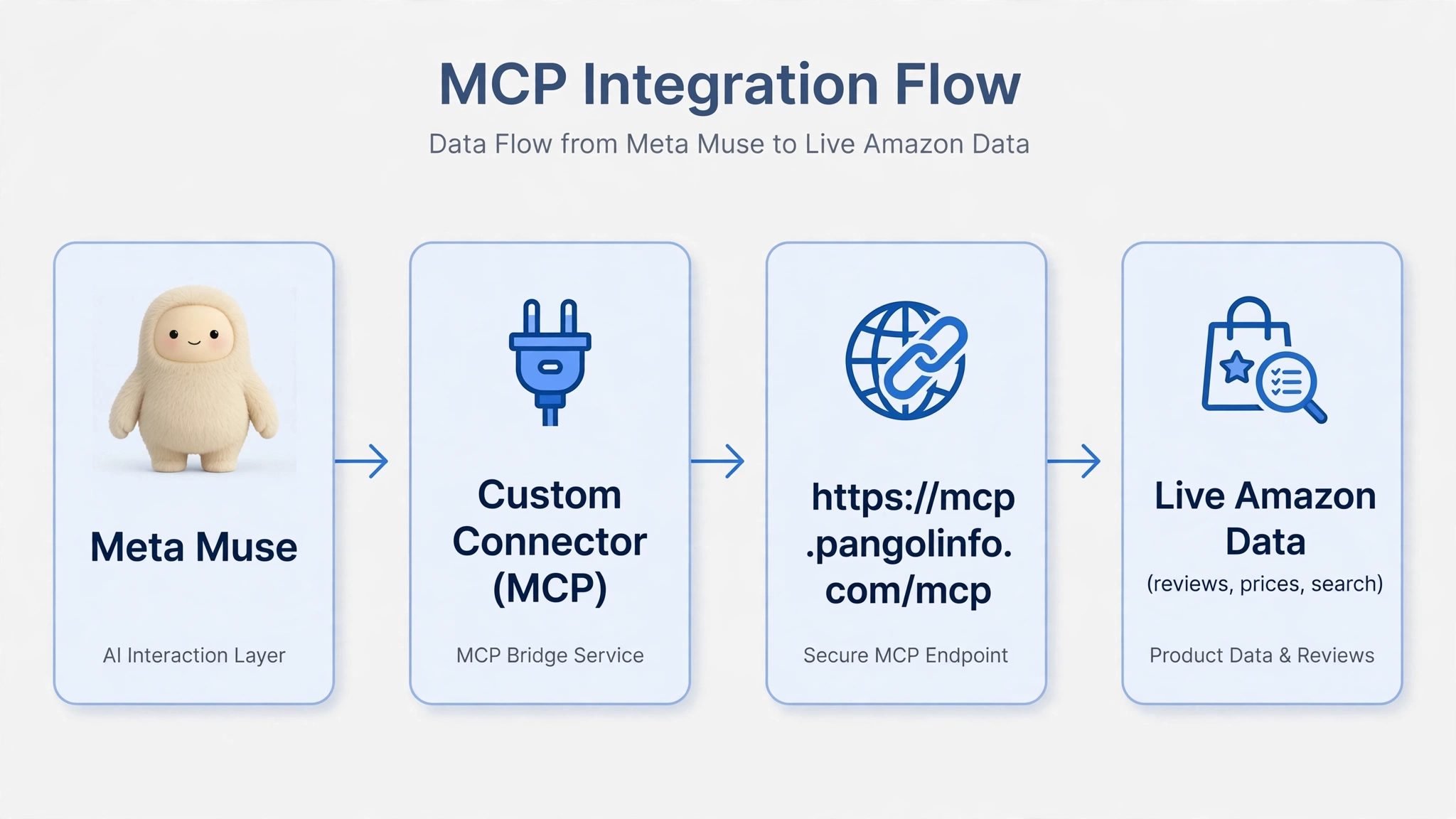
Muse consumes MCP servers through “custom connectors,” via two equivalent paths:
Path A — Settings. Muse → Settings → Connectors → Add custom connector → paste https://mcp.pangolinfo.com/mcp → complete the secure credential flow with the key from the previous step (transmitted as an Authorization: Bearer header; the key itself never enters the chat) → click Connect.
Path B — In conversation. Tell Muse: “Build a custom integration to Pangolinfo’s MCP server at https://mcp.pangolinfo.com/mcp, Bearer auth.” Muse generates a connector card with a Connect button, which opens the same secure credential flow.
Path A has been completed by our team inside the Muse client. Menu names should be verified against the current Meta Help Center before being relied upon.
Verify the connection. After connecting, ask “use search_amazon to search for wireless earbuds” — a returned list of real ASINs means the connection is live.
Reference configuration (generic MCP client):
{
  "mcpServers": {
    "pangolinfo": {
      "url": "https://mcp.pangolinfo.com/mcp",
      "headers": { "Authorization": "Bearer <YOUR_API_KEY>" }
    }
  }
}
3.4 Alternative: Amazon Scraper Skill
If your agent lives in a development environment (OpenClaw or a compatible agent IDE), the Skill form is an alternative: install the Amazon Scraper Skill from ClawHub into your workspace, with amzProductDetail / amzReview / amzBestSellers engines covering product detail, reviews, and bestseller lists. Same Pangolinfo data backend; only the access surface differs.
4. The Controlled Test: One Prompt, Two Data Conditions
Test protocol (tested 2026-10-12). Every call below was executed live against https://mcp.pangolinfo.com/mcp on October 12, 2026, through the connector verified in Section 3.
Step 1 — Discovery. search_amazon {"keyword":"wireless earbuds","site":"amz_us","page":1} returned five live results. The test target: ASIN B0FQFB8FMG, Apple AirPods Pro 3, 4.4 stars across 16,350 ratings.
Step 2 — Complaint mining. get_amazon_reviews {"asin":"B0FQFB8FMG","site":"amz_us","pageCount":1,"filterByStar":"critical","sortBy":"helpful"} returned 1,392 critical reviews out of 4,268 total, with the most recent review dated October 10, 2026 — two days before the test, confirming the data is live rather than a cached historical snapshot. Ranked by helpfulness, the dominant complaint themes were:
- software regressions after updates (“Don’t recommend unless Apple resolves software issues”);
- noise cancellation underperforming expectations;
- units failing within 4–6 months, including one reviewer already on a second warranty replacement;
- incoming-call handling problems.
Each review carries verified-purchase flags and helpful-vote counts — precisely the provenance markers the control condition lacks.
The control (no data). The same prompt answered from parametric knowledge alone yields theme names without counts, without dates, without verification — and with the structural risk of Pro 2 contamination described in Section 2.
Inference. The difference between the two answers is not prose quality but evidentiary status. Every substantive claim in the data-backed answer is checkable: a count (1,392 critical of 4,268), a timestamp (October 10, 2026), a purchase flag. That is the entire content of “grounding”: replacing assertions with measurements.
5. Tool Inventory: The Review-Mining Surface
A tools/list call on 2026-10-12 enumerated 20 tools on the Pangolinfo MCP server. (Pangolinfo’s product page describes 19 data tools plus the free self-inspection tool pangolinfo_capabilities; the listing call returns both.) The review-mining-relevant parameters are real schema, verified in the test above: get_amazon_reviews accepts filterByStar (e.g. critical) and sortBy (e.g. helpful).
The canonical chain for complaint research is three tools: search_amazon for ASIN discovery → get_amazon_product for listing context → get_amazon_reviews with filterByStar=critical and sortBy=helpful for the complaint surface. The agent selects and chains these automatically from a single natural-language prompt; no orchestration code is required.
6. Cost and Security
MCP calls are billed per successful call at the same credit rates as the matching REST API endpoints — review calls are billed per page (5 credits/page on current pricing), and free testing is available. Credentials travel through the client’s secure credential flow as a Bearer header; never paste an API key into conversation text that may be shared or logged. For read-only research, a single allow on first use is sufficient. Issue a separate key per teammate or environment to keep usage cleanly isolated.
7. Related Reading
- How to Connect AI Agents to Real-Time Amazon Data: The Complete Guide — the hub guide for this series
- How to Connect Real-Time Amazon Data to Claude Code (MCP): The Complete Guide — the Claude Code installment: CLI, Desktop, and claude.ai compared
- How to Connect Real-Time Amazon Data to ChatGPT (MCP): The Complete Guide — the ChatGPT installment: Developer Mode custom connector with Token auth
- How to Connect Real-Time Amazon Data to Tencent Workbuddy (Skill Ecosystem): The Complete Guide — the Workbuddy installment: open platform and skill ecosystem, domestic and international editions
- IDE Agents and Amazon Data: Connecting Amazon Data MCP to Cursor, VS Code, Windsurf, Zed, and Trae — the IDE-agent installment: MCP and skills inside the editor
- n8n Amazon Review Monitoring: Complaint Alerts on Autopilot — The Complete Guide — the n8n installment: scheduled REST workflows for continuous monitoring
- Amazon Review API — the review data engine behind the MCP’s review tools
- Amazon Data MCP — the full 19-tool server this guide connects to Muse
- Amazon Scraper Skill — the Skill-format integration for agent IDEs and OpenClaw
- Amazon Scraper API — the REST entry point for batch and pipeline work
8. FAQ
Is the free API key enough to complete this tutorial? Yes. Signup includes 60 free requests; the full test chain in this guide (search_amazon to discover the ASIN, get_amazon_reviews to pull reviews, critical filter to mine complaints) costs single-digit points. Upgrade only after you have run it end to end.
Can Muse purchase products on Amazon? No. Since September 20, 2026, Amazon has blocked Muse-initiated purchases. Research and data access are unaffected — which is the premise of this guide.
Is my API key safe in Muse’s connector flow? The key is submitted through the connector’s secure credential flow as a Bearer header, never pasted into chat text. Use a permanent key — short-lived keys expire and silently break the integration — and rotate keys per environment.
Was the in-Muse connection flow itself verified? Yes — completed by our team inside the Muse client (Settings → Connectors → Add custom connector, pasting the MCP endpoint and submitting the key through the secure credential flow). The Section 4 test data was pulled through that live connection. Verify menu names against the current Meta Help Center.