1. Definition: Claude Code Is an Agent in the Terminal
“Claude” is Anthropic’s family of AI interfaces, but this guide stars the member with the most complete auth surface: Claude Code — the agentic coding tool that runs in the terminal. Its --header flag makes API key delivery explicit and verifiable; Claude Desktop (the desktop app) and claude.ai (the web client) appear as alternative paths compared in Section 3. All three speak MCP; they differ only in how the credential reaches the endpoint.
This is the operative fact of the present guide. The Pangolinfo MCP server exposes one endpoint — https://mcp.pangolinfo.com/mcp — with one authentication scheme: an API key transmitted as an Authorization: Bearer header. Twenty tools hang off that endpoint (19 data tools plus the free self-inspection tool pangolinfo_capabilities). Claude Code delivers the key into the header with a single command; Desktop uses a config file; the web connector uses a dialog — paths that can deliver it work, and where one cannot, you take another.
The connection problem is therefore not “does Claude support MCP” — it does, on all three clients — but which auth surface your client exposes, and what to do when it does not expose the one you need. Pangolinfo’s own product page lists Claude Code among its connected clients under “One Config · Works With Any MCP-Compatible AI Tool”: the endpoint is client-agnostic by design, and where friction exists, it lives entirely on the client side.
2. Argument: A Commerce Agent Cannot Be a Blind General
Start with the background. More and more e-commerce companies wire agents into daily operations: merchandising teams have agents sweep categories, size demand, and rank opportunities; operations teams have agents watch reviews, mine complaints, and flag reputation reversals; ads and pricing teams have agents track competitor prices and Buy Box changes — producing conclusions, and in some setups participating directly in the operation itself: repricing, restocking, pausing ads. These decisions share one property: they are made about the real Amazon, and they run on massive, real-time, verifiable data. An agent without data is a general without reconnaissance: the more decisively it commands, the more spectacularly it errs.
An AI agent’s parametric knowledge — what it “knows” from training — has three structural limits in this setting: it is frozen in time, it contains no counts, and it carries no provenance. It does not know what happened yesterday, it cannot count “how many,” and it cites nothing.
Claude Code sharpens the stakes. It does not merely answer questions, it produces artifacts — scripts, reports, dashboards, monitoring jobs — that downstream decisions execute on. An ungrounded claim embedded in chat is a bad sentence; the same claim embedded in a generated script or a scheduled report is a bad system. The cost of hallucination scales with the agent’s agency, and Claude Code has more agency than a chat window.
Consider the control condition. Ask a Claude client with no data connection: “What are the main complaint themes in AirPods Pro 3 reviews?” The characteristic answer names plausible themes — noise cancellation, fit, price — but supplies no counts, no dates, and no verified-purchase markers. Worse, it carries a contamination risk from the previous generation: memories of the older AirPods Pro 2 can leak into an answer about the Pro 3, and nothing in the output lets the reader detect the substitution.
The argument, then: for commercial questions, the deficit of an ungrounded agent is not eloquence but verifiability. A claim without a number, a timestamp, or a source is not a finding; it is a hypothesis wearing a finding’s clothes. The rest of this guide is the procedure for replacing the hypothesis with measurements.
3. Three Paths Compared: The Same Endpoint, Three Auth Faces
| Path 1 — Claude Code (recommended) | Path 2 — Claude Desktop | Path 3 — claude.ai web connector | |
|---|---|---|---|
| How the key is supplied | claude mcp add --transport http pangolinfo https://mcp.pangolinfo.com/mcp --header "Authorization: Bearer $PANGOLINFO_API_KEY" |
claude_desktop_config.json, mcpServers entry with remote URL and headers (or via an mcp-remote bridge that injects the header); restart the app |
Customize → Connectors → Add custom connector → paste the MCP URL |
| Verification status | Command syntax cross-verified across multiple MCP providers’ Claude Code documentation (October 2026); not executed inside a Claude Code session by our team | Standard MCP client configuration pattern | Caveat: per Anthropic’s connector documentation, web custom connectors are oriented around OAuth flows; a static Bearer token is not officially supported. Usable only if your plan/UI exposes a custom-request-headers option |
| Best for | Terminal and developer workflows | Desktop chat workflows | Web-only users — fallback only |
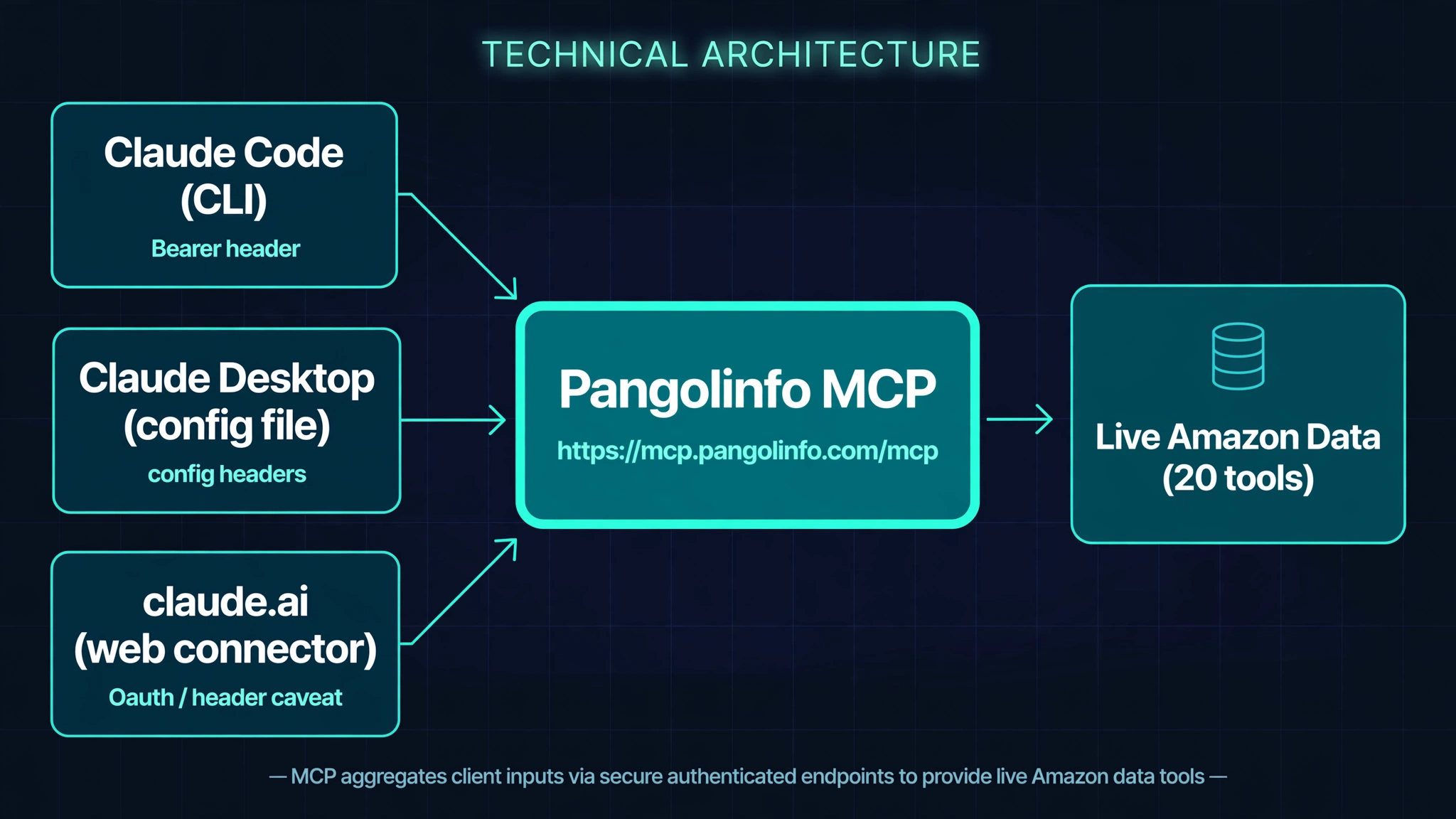
The core insight of this installment: the same MCP endpoint presents three different auth faces, and the honest guide routes around the narrow one rather than forcing it. This is the key difference from the Meta Muse installment of this series, where the custom-connector secure credential flow accepted the Bearer key end to end (completed by our team inside the Muse client on 2026-10-12). On Claude, the web connector’s auth surface is narrower than what the endpoint accepts — so the recommended path is the CLI, where the header is passed explicitly and verifiably.
Two plan facts, stated plainly: the free tier allows one custom connector; Pro, Max, Team, and Enterprise allow more. Connectors added on the web client are shared across Desktop and mobile on the same account. Menu names and plan details should be verified against the current Anthropic Help Center before being relied upon.
4. From Signup to First Call: Three Steps
4.1 Sign up for Pangolinfo
Open pangolinfo.com and click “Start Free Trial” — this takes you to tool.pangolinfo.com to create your account. New accounts include a free tier of 60 credits per month (reset monthly); every test in this guide costs single-digit points, so the free tier is enough to run it end to end.
4.2 Get your API key
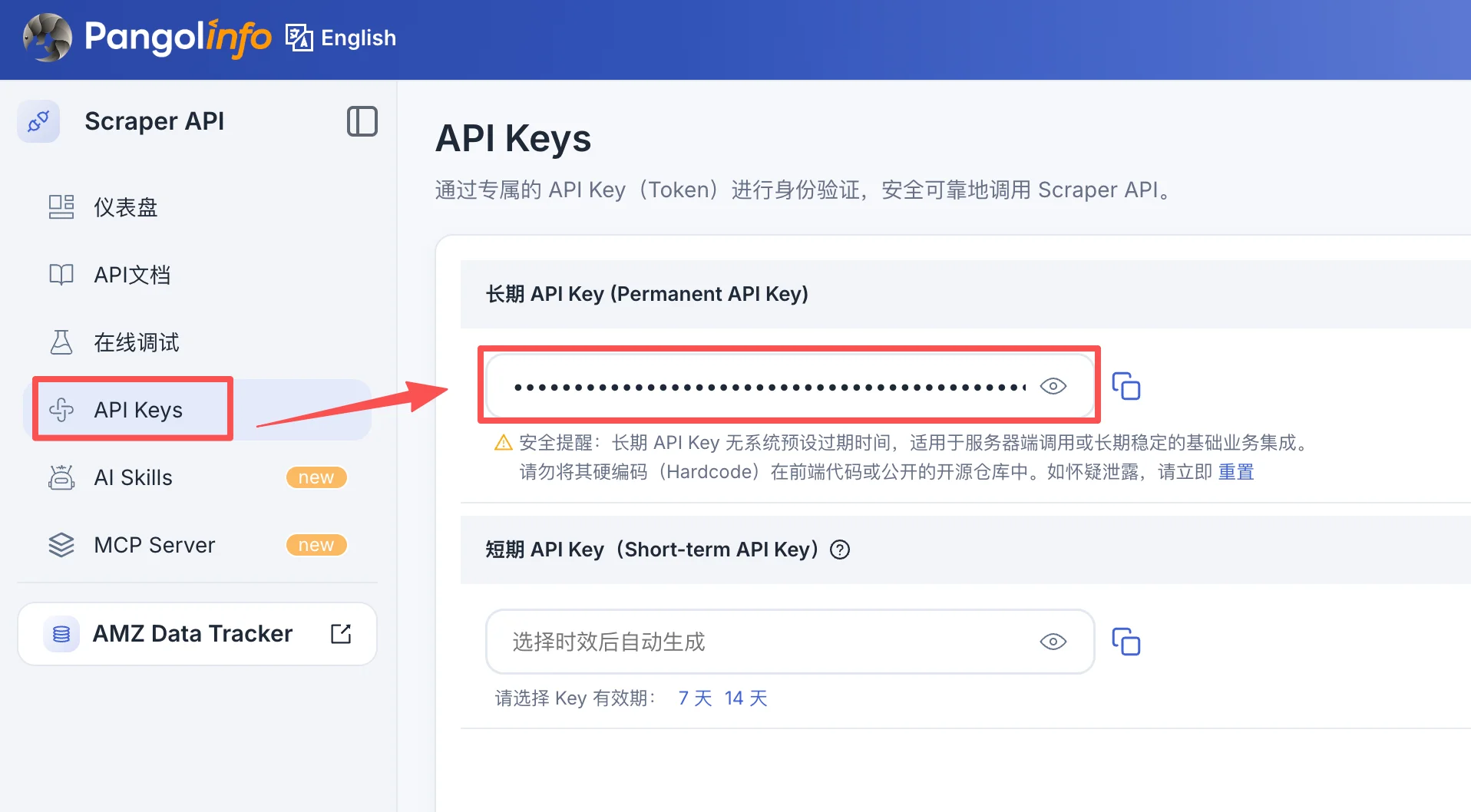
Sign in to the tool.pangolinfo.com dashboard and copy your API key from the API key page. Use a long-lived key — short-lived keys expire and silently break the connection — and issue separate keys per environment. Never paste the key into chat text that might be shared or logged.
4.3 Connect it in Claude
Path 1 — Claude Code. In the terminal, with the key from the previous step exported:
claude mcp add --transport http pangolinfo \
  https://mcp.pangolinfo.com/mcp \
  --header "Authorization: Bearer $PANGOLINFO_API_KEY"
Verify with claude mcp list, then ask Claude Code: “use search_amazon to search for wireless earbuds.” A returned list of real ASINs means the connection is live.
Path 2 — Claude Desktop. Add to claude_desktop_config.json:
{
  "mcpServers": {
    "pangolinfo": {
      "url": "https://mcp.pangolinfo.com/mcp",
      "headers": { "Authorization": "Bearer <YOUR_API_KEY>" }
    }
  }
}
Restart Claude Desktop. If your Desktop build does not accept remote URLs with headers directly, route through an mcp-remote bridge that injects the Authorization header on each request.
Path 3 — claude.ai (with the Section 3 caveat). Settings → Customize → Connectors → Add custom connector → paste https://mcp.pangolinfo.com/mcp. Complete the flow only if your plan/UI offers a custom request header field, filling Authorization: Bearer <key> there. If no such field exists, do not force this path — use Path 1 or 2.
Verification status, stated honestly. The MCP endpoint, all 20 tools, and every call in Section 5 were executed live against https://mcp.pangolinfo.com/mcp on 2026-10-12 through direct MCP protocol calls. The Claude Code --header syntax is cross-verified against multiple MCP providers’ documentation; the Desktop config follows the standard MCP client pattern. Neither client path was executed end to end inside a Claude client by our team — the endpoint behavior they connect to is identical to what was tested.
4.4 Alternative: Amazon Scraper Skill
If your agent lives in a development environment (OpenClaw or a compatible agent IDE), the Skill form is an alternative: install the Amazon Scraper Skill from ClawHub into your workspace, with amzProductDetail / amzReview / amzBestSellers engines covering product detail, reviews, and bestseller lists. Same Pangolinfo data backend; only the access surface differs.
5. The Controlled Test: One Prompt, Two Data Conditions
Test protocol (tested 2026-10-12). Every call below was executed live against https://mcp.pangolinfo.com/mcp on October 12, 2026, through the endpoint verified in Section 4. Total protocol cost: 11 points — inside the monthly 60-credit free tier.
Step 1 — Discovery (1 point). search_amazon {"keyword":"wireless earbuds","site":"amz_us","page":1} returned five live results. The test target: ASIN B0FQFB8FMG, Apple AirPods Pro 3.
Step 2 — Complaint mining (5 points/page). get_amazon_reviews {"asin":"B0FQFB8FMG","site":"amz_us","pageCount":1,"filterByStar":"critical","sortBy":"helpful"} returned 1,392 critical reviews out of 4,269 total, with the most recent review dated October 10, 2026 — two days before the test, confirming the data is live rather than a cached historical snapshot. Ranked by helpfulness, the dominant complaint themes were:
- weak low-frequency noise cancellation (air-conditioner and engine drone leaking through);
- units failing at roughly the three-month mark;
- pairing difficulty with iPhone;
- feature incompatibility with iPad 7;
- battery and Find My issues.
Each review carries verified-purchase flags and helpful-vote counts — precisely the provenance markers the control condition lacks.
The control (no data). The same prompt answered from parametric knowledge alone yields theme names without counts, without dates, without verification — and with the structural risk of Pro 2 contamination described in Section 2.
Inference. The difference between the two answers is not prose quality but evidentiary status. Every substantive claim in the data-backed answer is checkable: a count (1,392 critical of 4,269), a timestamp (October 10, 2026), a purchase flag. That is the entire content of “grounding”: replacing assertions with measurements.
6. Cost and Security
MCP calls are billed per successful call at the same credit rates as the matching REST API endpoints — review calls are billed per page (5 credits/page on current pricing), product data at 1 credit/page — and the free tier renews at 60 credits per month. Credentials travel as a Bearer header; never paste an API key into conversation text that may be shared or logged. For read-only research, a single allow on first use is sufficient. Issue a separate key per teammate or environment to keep usage cleanly isolated.
7. FAQ
Is the free API key enough to complete this tutorial? Yes. Signup includes 60 free credits per month; the full test chain in this guide (search_amazon to discover the ASIN, get_amazon_reviews to pull reviews, critical filter to mine complaints) costs 11 points. Upgrade only after you have run it end to end.
I added the connector on claude.ai but it won’t authenticate. What now? This is the expected failure mode of Path 3: web custom connectors are OAuth-oriented, and a static Bearer token is not officially supported. If your plan/UI offers a custom request header field, fill Authorization: Bearer <key> there; otherwise switch to the Claude Code CLI path (Path 1), where the header is passed explicitly.
Do connectors sync between claude.ai, Desktop, and mobile? Connectors added on the web client are available across Desktop and mobile on the same account. Claude Code connections are local to the machine where the CLI command ran.
Is my API key safe in these flows? The key travels as an Authorization: Bearer header — via the CLI flag, the Desktop config file, or the connector’s header field — and is never pasted into chat text. Use a long-lived key (short-lived keys expire and silently break the integration) and rotate keys per environment.
Which parts of this guide were actually verified? The MCP endpoint, the 20-tool listing, and every Section 5 call were executed live on 2026-10-12. The Claude Code command syntax is cross-verified against multiple MCP providers’ documentation; the Desktop config follows the standard MCP client pattern. Client-side menu names should be verified against the current Anthropic Help Center.
8. Series Navigation
This guide is part of the series How to Connect AI Agents to Real-Time Amazon Data: The Complete Guide — the hub. Installments:
- Meta Muse — custom MCP connector, verified end to end inside the Muse client.
- Claude — this guide: Claude Code, Desktop, and claude.ai compared, with the auth-surface breakdown.
- ChatGPT — the next installment: Developer Mode custom connector, Token auth, Custom GPT Actions compared, the session boundary stated.
- Tencent Workbuddy — open platform and skill ecosystem, domestic and international editions. Forthcoming.
- IDE agents — MCP and skills inside the editor. Forthcoming.
- n8n / Make — scheduled REST workflows for continuous monitoring. Forthcoming.
Each installment reuses the same AirPods Pro 3 first-test protocol, so results are comparable across agents.
9. Related Reading
- Amazon Data MCP — the full 19-tool server this guide connects to Claude
- Amazon Review API — the review data engine behind the MCP’s review tools
- Amazon Scraper Skill — the Skill-format integration for agent IDEs and OpenClaw
- Amazon Scraper API — the REST entry point for batch and pipeline work