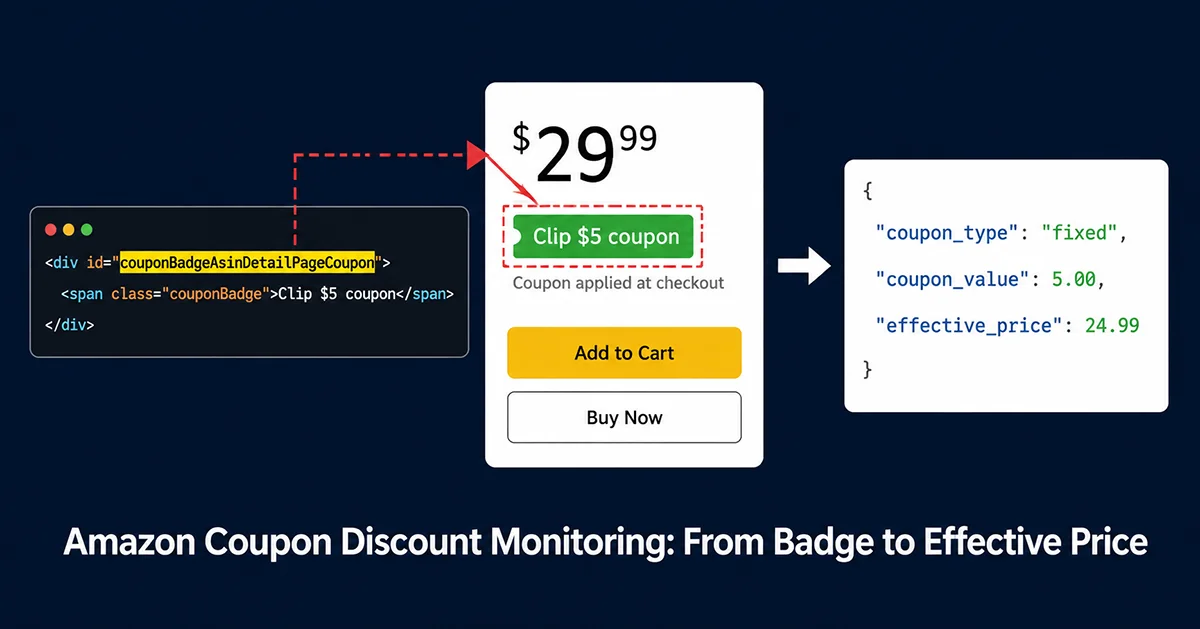
Amazon coupon discount data monitoring isn’t an optional refinement to your price intelligence stack — it’s the difference between knowing a competitor’s list price and knowing what consumers actually pay, which are often two very different numbers.
What Is Amazon Coupon Discount Data Monitoring?
That green badge on an Amazon product page — “Clip $5 coupon” or “Save 15% with coupon” — is easy to overlook when you’re monitoring prices programmatically. It shouldn’t be. When a competitor’s Buy Box shows $29.99 but they’ve attached a $5 coupon, consumers see a checkout price of $24.99. If your price intelligence only tracks the Buy Box number, you’re building competitive strategy on a systematically incomplete picture.
Amazon coupon discount data monitoring is the practice of collecting coupon information from Amazon product pages and tracking how it changes over time. A complete coupon snapshot captures:
- Discount type: percentage (e.g., “Save 15%”) or fixed amount (e.g., “Clip $5 coupon”)
- Discount value: the specific number — percentage points or currency amount
- Activation mechanism: clip-to-activate (requires consumer action, deducted at checkout) vs. auto-applied
- Validity period: coupons tied to promotions expire — timestamps matter
- Stacking relationships: whether coupon runs alongside a Lightning Deal or Subscribe & Save discount
The Four Amazon Coupon Types You Need to Monitor
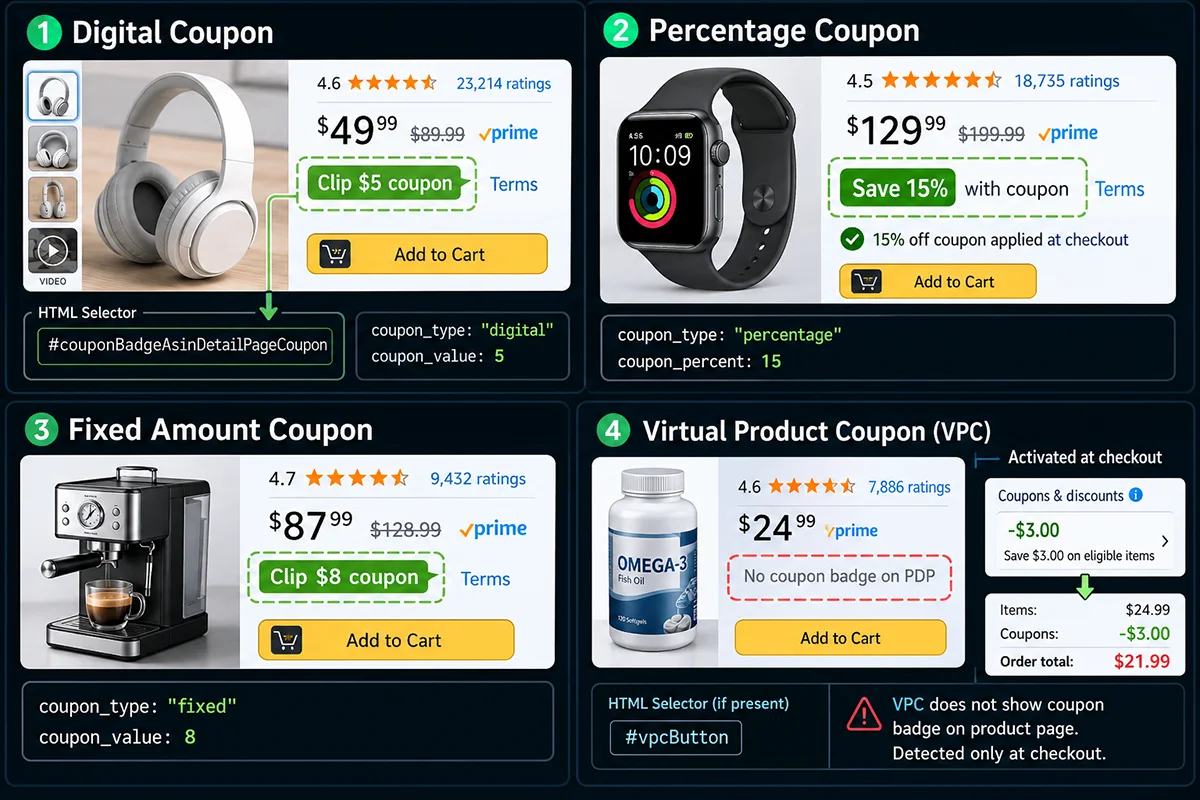
Amazon coupons appear in several distinct forms, each with different HTML structure and extraction requirements. Understanding these variations is necessary before designing a monitoring system.
- Digital Coupon (Clip Coupon): The most common form — a green badge consumers click to “clip,” with the discount applied automatically at checkout. Renders in a dedicated DOM node on the product detail page.
- Percentage Coupon: “Save 15% with coupon” format. Badge text follows a predictable pattern, relatively straightforward to parse once you have the rendered DOM.
- Fixed Amount Coupon: “Clip $5 coupon” format. Requires parsing currency symbols that vary by marketplace ($, £, €, ¥, ₹).
- Virtual Product Coupon (VPC): Less common, rendered via
#vpcButtonrather than the standard badge container. Sometimes activates only at the cart stage without a visible page badge.
Why Does Amazon Coupon Discount Monitoring Matter?
The direct challenge: if you’re already monitoring Buy Box prices, why add coupon tracking?
Because Buy Box price is what sellers set. Effective price is what consumers pay. The gap between them — a coupon — directly determines competitive conversion position. A competitor at $35 Buy Box with a $10 coupon is effectively at $25. If you’re at $28 with no coupon, you’re behind on price despite appearing ahead in the Buy Box comparison.
Use Case 1: Detecting “Inflated Price + Large Coupon” Strategies
A common Amazon competitive tactic: set a high Buy Box price, attach a large coupon, create the visual impression of a deep discount (“Save 40% — was $49.99, now effectively $29.99”). Without coupon monitoring, this competitor looks like a non-threat with a high price. With it, you see they’re actually your most price-aggressive competitor.
Use Case 2: Buy Box Competition with Complete Effective Price Data
Amazon’s Buy Box algorithm considers pricing competitiveness, but based on reported prices, not coupon-inclusive effective prices. Consumers make purchase decisions based on what they see — which includes the coupon badge. This creates a divergence: you can hold the Buy Box while a competitor’s coupon-adjusted price is pulling conversion away from you.
Use Case 3: Promotional Cadence Intelligence
Historical coupon data reveals promotional rhythm patterns: How many days before Prime Day does this competitor activate coupons? What discount level do they typically run? How long do coupons persist after major events? This time-series pattern is directly useful for planning your own promotional calendar.
Use Case 4: AI Pricing Agent Data Quality
AI-driven pricing systems that don’t receive coupon data as part of their competitor price inputs will systematically overestimate competitor effective prices. Every pricing decision made on incomplete data compounds the error. Complete effective price — including coupon layers — is the minimum viable input for AI pricing accuracy.
What Makes Amazon Coupon Discount Data Monitoring Difficult?
The challenges stack up in ways that aren’t obvious until you’ve tried to build a working coupon monitoring pipeline. Here are the six that matter most.
Challenge 1: JavaScript Rendering Requirement
This is the foundational technical barrier. The Amazon coupon badge is not in server-rendered HTML — it’s injected by JavaScript after the DOM loads. A standard HTTP request with requests + BeautifulSoup returns an empty container where the badge should be. You need a headless browser (Playwright, Puppeteer) that executes JavaScript and waits for the rendering cycle to complete.
The practical consequence: every coupon monitoring request costs more in time and compute than a static HTML fetch. Playwright instance startup, page navigation, and JS execution add 3-8 seconds per request. For monitoring 500 ASINs hourly, this compounds into infrastructure scale questions.
[IMAGE PLACEHOLDER] Side-by-side screenshot or code comparison: Left: Raw HTML from requests.get() — couponBadgeAsinDetailPageCoupon container exists but is empty (no badge content). Right: DOM after Playwright rendering — same container filled with complete coupon badge HTML and text. Red arrows pointing to the key difference areas. Bottom annotation: “Static request → empty node; After JS render → coupon data present” alt: Amazon coupon badge DOM comparison: empty container in static HTTP response vs fully populated badge after Playwright JavaScript rendering caption: Why static scrapers miss Amazon coupons: the badge container exists in the initial HTML but populates only after JavaScript execution
Challenge 2: Selector Instability Across Categories and Marketplaces
Even with headless browser rendering, the coupon badge location isn’t fixed. Depending on product category, marketplace, and active A/B test variant, coupons may appear at:
#couponBadgeAsinDetailPageCoupon— primary selector, price box area.couponBadge— class-based, used in layout variants#vpcButton— VPC coupon, separate DOM structure- SERP coupon tags — completely different HTML structure from detail page badges
Amazon frontend updates approximately quarterly, shifting selectors and causing silent extraction failures. A scraper that worked reliably for three months can start returning empty coupon data without any error signals.
Challenge 3: Text Parsing Varies by Marketplace and Language
“Save 15% with coupon” (US), “15% Coupon” (UK), “15% mit Coupon sparen” (DE). Currency symbols for fixed coupons: $, £, €, ¥, ₹. A production coupon parser needs locale-aware regex patterns for each marketplace, plus handling for edge cases like “$5.00” vs “$5” vs “5 dollars off.”
Challenge 4: Coupon + Deal Stacking Creates Ambiguous Page States
When a Lightning Deal is active, the coupon badge may be hidden or visually suppressed even if the coupon is still technically valid. A monitoring system that sees “no coupon during deal period” and logs null may be recording a false negative — the coupon will reappear after the deal expires. Correctly handling stacked promotions requires validating deal state before interpreting absence of coupon badge as “no coupon.”
Challenge 5: Anti-Scraping Causes Silent Rendering Failures
Amazon’s Cloudflare protection applies to headless browsers as well as HTTP clients — browser fingerprinting (TLS JA4+, Canvas fingerprint), behavioral signals (mouse movement patterns, timing), and request frequency all factor into detection. When flagged, Amazon may serve a degraded page that loads without the coupon module but returns a 200 status code. Your scraper records “no coupon” with no error signal. This silent failure mode is harder to detect than an explicit block.
Challenge 6: Coupon Validity vs. Scraping Failure Disambiguation
When a coupon disappears between two monitoring cycles, two explanations exist: the coupon expired or was removed; or the scraping failed (rendering timeout, IP rate-limited, degraded page served). Treating every null result as “coupon removed” leads to false alerts. A reliable system needs retry logic and multi-source validation before logging a coupon removal event.
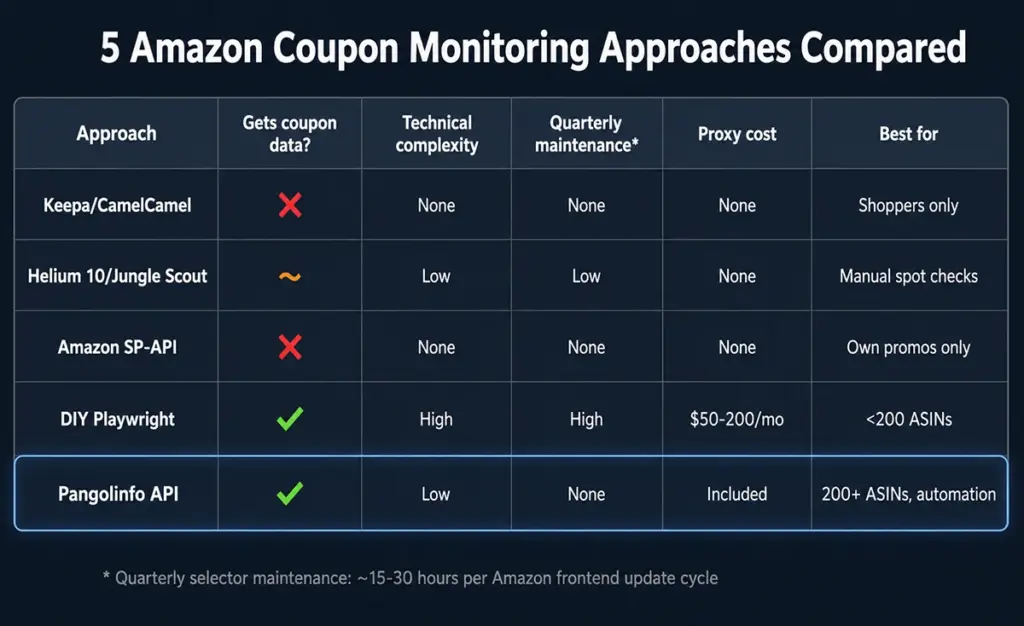
Five Approaches to Amazon Coupon Discount Monitoring: Tradeoffs and Use Cases
Approach 1: Consumer Tools (Keepa, CamelCamelCamel)
Can they get coupon data? No. These tools record historical Buy Box prices — not coupon-adjusted effective prices, and not coupon fields specifically.
Best for: Individual shoppers checking price history. Not useful for any seller competitive monitoring use case.
Approach 2: Seller SaaS Platforms (Helium 10, Jungle Scout)
Can they get coupon data? Partially. Some platforms show current coupon status during manual product research, but don’t offer programmatic API access to raw coupon data or historical tracking.
Strengths: Low technical barrier, useful for manual spot checks.
Limitations: No batch automation; data locked in platform UI; daily update frequency at best; no coupon history.
Best for: Small teams doing low-frequency manual competitive research.
Approach 3: Amazon SP-API
Can it get coupon data? No — and this is one of the most common misconceptions among sellers building price intelligence systems. The Pricing API, Catalog Items API, and Product Advertising API all lack coupon fields for competitor ASINs. This isn’t a rate limit problem; the data simply isn’t available through these endpoints.
Best for: Managing your own promotions (Promotions API). Not applicable to competitive coupon monitoring.
Approach 4: DIY Headless Browser Scraper
Can it get coupon data? Yes — this is the only self-hosted approach that can. But the engineering overhead is substantial.
Working implementation:
import asyncio
import re
from playwright.async_api import async_playwright, Page
from typing import Optional
import logging

logging.basicConfig(level=logging.INFO)

# Multi-selector fallback chain for Amazon coupon badge
COUPON_SELECTORS = [
    "#couponBadgeAsinDetailPageCoupon",
    ".couponBadge",
    "#vpcButton",
    "[data-feature-name='couponBadge']",
]

# Coupon text parsing patterns (supports US/UK/DE/JP marketplaces)
COUPON_PATTERNS = [
    (r"(?:save|apply|clip|get)\s+(\d+(?:\.\d+)?)%\s*(?:coupon|off|discount)?",
     "percentage"),
    (r"(?:clip|save|get|apply)\s*[$£€¥₹]?\s*(\d+(?:\.\d+)?)\s*(?:coupon|off|discount)?",
     "fixed"),
    (r"(\d+(?:\.\d+)?)%\s*(?:coupon|off)", "percentage"),
    (r"[$£€¥₹]\s*(\d+(?:\.\d+)?)\s*(?:coupon|off)?", "fixed"),
]


def parse_coupon_text(text: str) -> Optional[dict]:
    """Parse coupon badge text into structured type + value."""
    if not text:
        return None
    for pattern, coupon_type in COUPON_PATTERNS:
        match = re.search(pattern, text.lower().strip(), re.IGNORECASE)
        if match:
            try:
                return {
                    "coupon_type": coupon_type,
                    "coupon_value": float(match.group(1)),
                    "coupon_text_raw": text.strip()
                }
            except (ValueError, IndexError):
                continue
    return None


async def extract_coupon(page: Page, asin: str) -> Optional[dict]:
    """Extract coupon data from a rendered Playwright page."""
    for selector in COUPON_SELECTORS:
        try:
            el = await page.query_selector(selector)
            if not el or not await el.is_visible():
                continue
            text = await el.inner_text()
            if text and len(text.strip()) >= 3:
                result = parse_coupon_text(text)
                if result:
                    result["selector_used"] = selector
                    logging.info(f"[{asin}] Coupon found: {result}")
                    return result
        except Exception as e:
            logging.debug(f"[{asin}] Selector {selector} error: {e}")
    logging.info(f"[{asin}] No coupon detected")
    return None


async def scrape_coupon(asin: str, marketplace: str = "US",
                         proxy: str = None) -> dict:
    """Fetch coupon data for one ASIN using Playwright."""
    domains = {
        "US": "www.amazon.com", "UK": "www.amazon.co.uk",
        "DE": "www.amazon.de", "JP": "www.amazon.co.jp", "FR": "www.amazon.fr"
    }
    url = f"https://{domains.get(marketplace, 'www.amazon.com')}/dp/{asin}"
    result = {"asin": asin, "marketplace": marketplace, "coupon": None, "error": None}

    async with async_playwright() as p:
        launch_opts = {}
        if proxy:
            launch_opts["proxy"] = {"server": proxy}

        browser = await p.chromium.launch(headless=True, args=["--no-sandbox"])
        ctx = await browser.new_context(
            user_agent="Mozilla/5.0 (Windows NT 10.0; Win64; x64) AppleWebKit/537.36 Chrome/125.0.0.0",
            viewport={"width": 1920, "height": 1080}, locale="en-US"
        )
        page = await ctx.new_page()

        try:
            await page.goto(url, wait_until="domcontentloaded", timeout=30000)
            await page.wait_for_selector(
                "#corePriceDisplay_desktop_feature_div, #price", timeout=10000
            )
            await asyncio.sleep(2)  # Wait for JS injection
            result["coupon"] = await extract_coupon(page, asin)
        except Exception as e:
            result["error"] = str(e)
        finally:
            await browser.close()

    return result
Strengths: Full control; can capture any page-visible information; highly customizable.
Limitations: 2-4 week development for a production-stable pipeline; quarterly selector maintenance; residential proxy cost $50-200/month; 5-15% silent failure rate from anti-scraping; multi-marketplace requires separate parsing configs.
Best for: Teams with dedicated engineering capacity, full pipeline control required, <200 ASIN daily monitoring scale.
Approach 5: Pangolinfo Amazon Scraper API (Recommended)
Can it get coupon data? Yes — complete structured coupon fields in a single API call, with server-side handling of all rendering, selector, and parsing complexity.
Building Amazon Coupon Monitoring with Pangolinfo Amazon Scraper API
Pangolinfo Amazon Scraper API handles JavaScript rendering, multi-selector fallback, coupon text parsing, and multi-marketplace normalization on the server side. The calling application receives structured JSON — no headless browser management, no proxy pools, no selector maintenance.
Coupon Fields Returned
{
  "asin": "B0CHP7BPYQ",
  "marketplace": "US",
  "buybox_price": 29.99,
  "list_price": 39.99,
  "coupon_type": "fixed",
  "coupon_value": 5.00,
  "coupon_text": "Clip $5 coupon",
  "coupon_applies_at": "checkout",
  "deal_price": null,
  "subscribe_save_price": 26.99,
  "effective_price": 24.99,
  "buybox_seller_id": "AMAZON",
  "buybox_is_amazon": true,
  "fetched_at": "2026-06-22T09:00:00Z"
}
The effective_price field is pre-calculated: min(deal_price, buybox_price) - coupon_discount (percentage or fixed, as appropriate), giving the lowest price consumers would see at checkout without manual formula implementation.
Python Implementation: Scheduled Coupon Monitoring with Event Detection
import requests
import json
import time
import logging
from datetime import datetime, timezone
from pathlib import Path
from typing import Optional

logging.basicConfig(level=logging.INFO, format="[%(asctime)s] %(levelname)s: %(message)s")

PANGOLINFO_API_KEY = "your_api_key_here"
API_ENDPOINT = "https://api.pangolinfo.com/v1/amazon/product"

FIELDS = [
    "buybox_price", "buybox_seller_id", "buybox_is_amazon",
    "list_price", "deal_price", "deal_ends_at",
    "coupon_type", "coupon_value", "coupon_text", "coupon_applies_at",
    "subscribe_save_price", "effective_price", "offer_count"
]


def fetch_coupon_snapshot(asin: str, marketplace: str = "US") -> Optional[dict]:
    """Fetch structured coupon + price data for one ASIN via Pangolinfo API."""
    try:
        r = requests.post(
            API_ENDPOINT,
            headers={"Authorization": f"Bearer {PANGOLINFO_API_KEY}"},
            json={"asin": asin, "marketplace": marketplace, "fields": FIELDS},
            timeout=30
        )
        r.raise_for_status()
        d = r.json().get("data", {})
        d.update({"_asin": asin, "_fetched_at": datetime.now(timezone.utc).isoformat()})
        return d
    except Exception as e:
        logging.error(f"[{asin}] Error: {e}")
        return None


class CouponEventDetector:
    """Stateful detector that compares consecutive snapshots and emits change events."""

    def __init__(self):
        self._state: dict[str, dict] = {}

    def process(self, snapshot: dict) -> list[dict]:
        asin = snapshot.get("_asin", "?")
        prev = self._state.get(asin, {})
        ts = snapshot.get("_fetched_at", "")
        events = []

        has_coupon = bool(snapshot.get("coupon_type"))
        had_coupon = prev.get("has_coupon", False)

        if has_coupon and not had_coupon:
            events.append({
                "event": "COUPON_ADDED", "asin": asin,
                "coupon_type": snapshot.get("coupon_type"),
                "coupon_value": snapshot.get("coupon_value"),
                "effective_price": snapshot.get("effective_price"),
                "ts": ts
            })
            logging.warning(
                f"🎫 NEW COUPON: {asin} | {snapshot.get('coupon_type')}="
                f"{snapshot.get('coupon_value')} | Effective=${snapshot.get('effective_price')}"
            )

        elif not has_coupon and had_coupon:
            events.append({
                "event": "COUPON_REMOVED", "asin": asin,
                "prev_value": prev.get("coupon_value"), "ts": ts
            })
            logging.warning(f"❌ COUPON REMOVED: {asin}")

        elif has_coupon and had_coupon:
            pv = prev.get("coupon_value", 0)
            cv = snapshot.get("coupon_value", 0)
            if cv != pv:
                events.append({
                    "event": "COUPON_CHANGED", "asin": asin,
                    "old_value": pv, "new_value": cv, "ts": ts
                })
                logging.warning(f"🔄 COUPON CHANGED: {asin} | {pv} → {cv}")

        # High-priority: coupon + deal stacking
        if has_coupon and snapshot.get("deal_price"):
            events.append({
                "event": "COUPON_PLUS_DEAL", "asin": asin,
                "deal_price": snapshot.get("deal_price"),
                "coupon_value": snapshot.get("coupon_value"),
                "effective_price": snapshot.get("effective_price"),
                "ts": ts
            })
            logging.warning(
                f"🔥 COUPON+DEAL STACK: {asin} | "
                f"Deal=${snapshot.get('deal_price')} + Coupon={snapshot.get('coupon_value')} | "
                f"Effective=${snapshot.get('effective_price')}"
            )

        self._state[asin] = {
            "has_coupon": has_coupon,
            "coupon_value": snapshot.get("coupon_value"),
            "effective_price": snapshot.get("effective_price")
        }
        return events


def run_coupon_monitor(asins: list[str], marketplace: str = "US",
                        interval_minutes: int = 60,
                        snapshots_file: str = "coupon_snapshots.jsonl",
                        events_file: str = "coupon_events.jsonl",
                        max_cycles: Optional[int] = None):
    """Main monitoring loop with event detection and JSONL storage."""
    snaps_path = Path(snapshots_file)
    events_path = Path(events_file)
    detector = CouponEventDetector()
    cycle = 0

    logging.info(f"Starting coupon monitor: {len(asins)} ASINs | {marketplace} | {interval_minutes}min interval")

    while max_cycles is None or cycle < max_cycles:
        cycle += 1
        logging.info(f"\n=== Cycle {cycle} | {datetime.now().strftime('%Y-%m-%d %H:%M')} ===")

        snapshots, all_events = [], []
        for i, asin in enumerate(asins, 1):
            s = fetch_coupon_snapshot(asin, marketplace)
            if not s:
                continue
            events = detector.process(s)
            snapshots.append(s)
            all_events.extend(events)
            logging.info(
                f"  [{i}/{len(asins)}] {asin}: "
                f"BB=${s.get('buybox_price','N/A')} | "
                f"Coupon={'✓ ' + str(s.get('coupon_value')) if s.get('coupon_type') else '✗'} | "
                f"Deal={'✓' if s.get('deal_price') else '✗'} | "
                f"Effective=${s.get('effective_price','N/A')}"
            )
            time.sleep(0.5)

        with open(snaps_path, "a", encoding="utf-8") as f:
            for s in snapshots:
                f.write(json.dumps(s) + "\n")

        if all_events:
            with open(events_path, "a", encoding="utf-8") as f:
                for e in all_events:
                    f.write(json.dumps(e) + "\n")

        logging.info(f"Cycle {cycle}: {len(snapshots)}/{len(asins)} OK | {len(all_events)} events")

        if max_cycles is None or cycle < max_cycles:
            time.sleep(interval_minutes * 60)


if __name__ == "__main__":
    run_coupon_monitor(
        asins=["B0CHP7BPYQ", "B09G9FPHY6", "B08N5WRWNW"],
        marketplace="US",
        interval_minutes=60,
        max_cycles=None
    )
Full API documentation: docs.pangolinfo.com
Pangolinfo vs. DIY: Core Comparison
| Dimension | DIY Playwright Scraper | Pangolinfo API |
|---|---|---|
| Coupon data coverage | Depends on maintenance state | Complete fields, server-maintained |
| JS rendering | Self-managed headless browser | Server-side, transparent |
| Selector maintenance | Quarterly breaks, manual fixes | Server updates, no caller changes |
| Multi-marketplace | Separate configs per site | Single API, marketplace parameter |
| Residential proxy | $50-200/month, self-managed | Included, no extra cost |
| Silent failure rate | 5-15% (varies with anti-scraping state) | Server-side retry, high reliability |
| Initial development | 2-4 weeks | 1 day (API integration) |
Monitoring Approach Selection Guide
| Use Case | ASIN Scale | Recommended Approach |
|---|---|---|
| Manual spot checks, no automation | <50 | Helium 10 / Jungle Scout |
| Own promotions management only | Own ASINs | SP-API Promotions API |
| DIY with full engineering control | <200/day | DIY Playwright + residential proxy |
| Reliable batch competitor monitoring | 200-5,000+ | Pangolinfo API |
| AI pricing agent data supply | Dynamic/on-demand | Pangolinfo MCP Skill |
Frequently Asked Questions
What is Amazon coupon discount data monitoring?
The systematic collection of coupon information from Amazon product pages (type, value, activation mechanism, validity) and tracking of changes over time. The core value: calculating the effective price consumers actually pay at checkout — the price that drives purchase decisions, which is often significantly lower than the Buy Box price alone.
Why doesn’t SP-API return Amazon coupon discount data?
SP-API Pricing endpoints cover Buy Box prices and offer listings only. Amazon’s coupon system is managed separately from the pricing system, and competitor coupon data is not exposed through any SP-API endpoint. Competitive coupon monitoring requires page-level scraping.
Where is the Amazon coupon badge in HTML, and what are the extraction pitfalls?
Primary selector: #couponBadgeAsinDetailPageCoupon. Fallbacks: .couponBadge, #vpcButton. Critical pitfall: the badge is JavaScript-rendered and absent from static HTTP responses. Headless browser required. Selectors change quarterly; monitoring selector hit rates is essential for detecting silent failures.
What business use cases does Amazon coupon data monitoring serve?
Four core cases: detecting competitors using inflated-price + large-coupon strategies; understanding true competitive price position inclusive of coupons; tracking promotional cadence patterns (Prime Day, Black Friday timing); supplying AI pricing agents with complete effective price data rather than Buy Box-only prices.
How does Pangolinfo API handle Amazon coupon monitoring?
Server-side JavaScript rendering, multi-selector fallback, text parsing, and multi-marketplace normalization. Single API call returns coupon_type, coupon_value, coupon_text, coupon_applies_at, and pre-calculated effective_price. No headless browser or proxy management required on the caller’s side. Details: docs.pangolinfo.com.
Conclusion
Amazon coupon discount data monitoring is the last major gap in most seller price intelligence stacks. The technical barriers — JavaScript rendering requirement, selector instability, anti-scraping enforcement, silent failure modes — make it harder than it looks. SP-API doesn’t cover it. Consumer tools don’t cover it. SaaS platforms cover it partially, without programmatic access.
For teams building competitive price intelligence that reflects what consumers actually see: Pangolinfo Amazon Scraper API provides complete, structured coupon fields — coupon_type, coupon_value, and calculated effective_price — with server-side maintenance of all rendering and parsing complexity.
🚀 Get started: Try Pangolinfo Amazon Scraper API → Start here | API documentation