Amazon niche research data analysis
Most Amazon sellers with three or more years on the platform have lived through the same disappointment: a research tool flags a category as an “8.7 opportunity score,” inventory gets ordered, and three months later the listing is buried because the top three sellers absorb every click. The failure isn’t in the effort — it’s that Amazon niche research data analysis stopped at the surface metric and never broke down to the ASIN level where actual decisions live.
A research framework that actually holds up has to answer three concrete questions before any sourcing dollar moves. How concentrated is the demand among the top sellers in this category? How many reviews does a new listing need before the algorithm treats it as a real contender? And what unmet need is hiding inside the negative reviews of the existing winners? Without ASIN-level data on all three, an opportunity score is just a guess wrapped in a number.
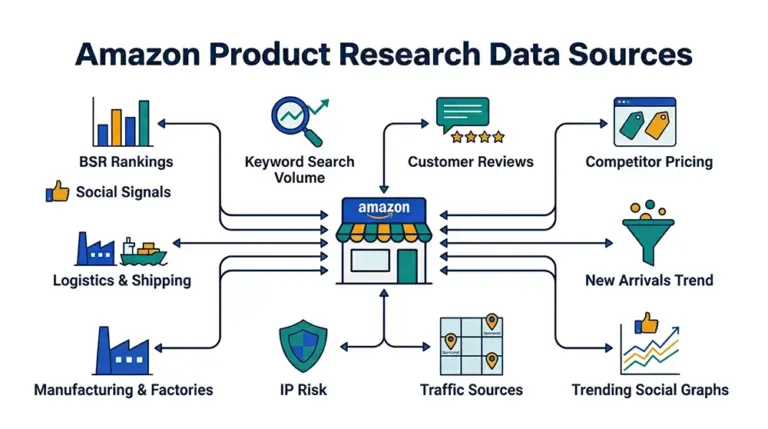
Why BSR Alone Will Get You Burned
Best Sellers Rank is the opening line of every Amazon sourcing tutorial, and looking at BSR in isolation is also a 2018 playbook. A category where BSR ranks 1 through 10 each move 5,000 units a month and ranks 11 through 100 collapse to 200 units a month is not “a hot category” — it’s a category whose demand has been firmly captured by the top tier. New entrants aren’t competing for users; they’re competing against incumbent ad budgets and brand equity.
The deeper trap is in how BSR updates. Amazon refreshes BSR roughly hourly, but sales contributions are weighted with a lag, so yesterday’s spike shows up in today’s rank. A single snapshot taken on the day you research a category captures the past, not the trend. To judge whether a category is genuinely worth entering, you need at least 30 days of BSR time-series data so you can distinguish a seasonal pulse from steady growth from a one-product surge that drags the entire category number upward.
The third overlooked detail: BSR is reported per browse node, but Amazon often files the same product across multiple subcategories. A product can sit at rank 5,000 in “Home & Kitchen” and rank 3 in “Kitchen & Dining > Coffee, Tea & Espresso > Coffee Filters.” If your Amazon category research analytics only looks at the parent node, you miss the niche-level winners entirely. The granularity has to drop to the leaf browse node; anything above that is screening, not analysis.
Six Metrics That Actually Decide Entry
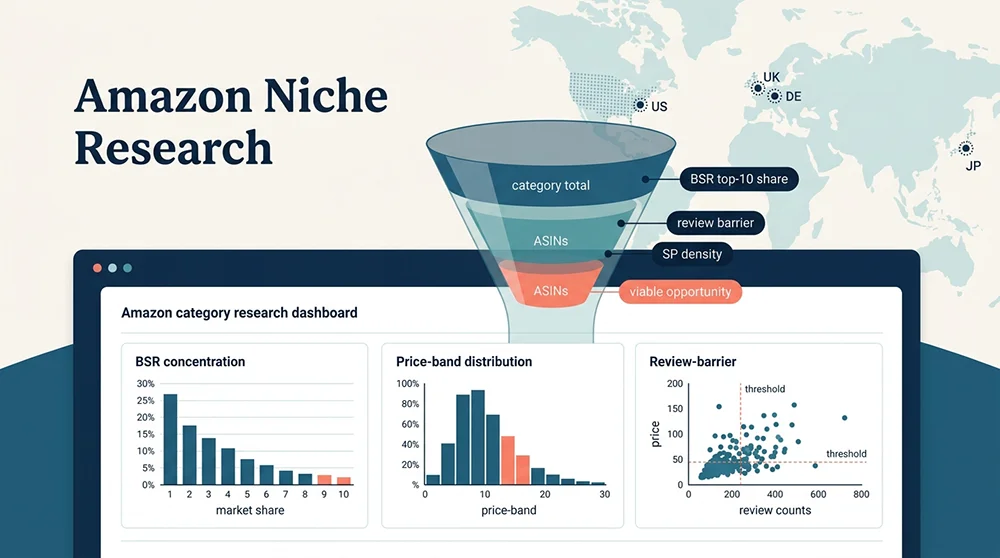
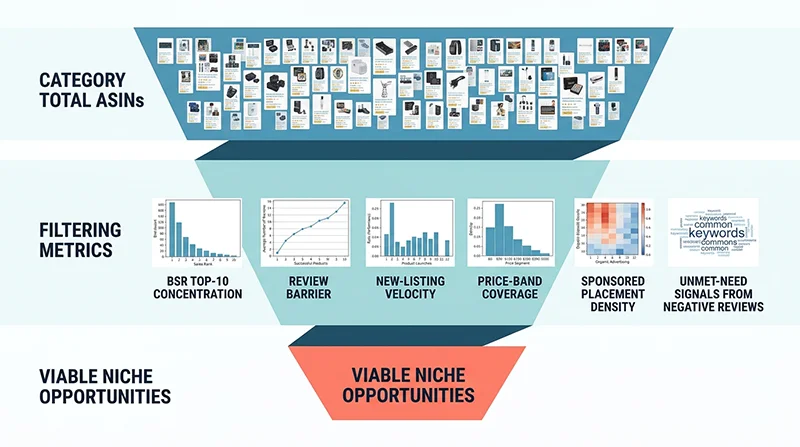
Pry open the black box of any commercial niche research tool and the underlying judgment splits into six independent dimensions. Each one needs full-category ASIN data, not just the visible top 100, to be reliable.
1. BSR Concentration — Is the Market Locked?
Method: pull the top 100 ASINs of the leaf browse node, estimate trailing 30-day sales for each, and compute CR10 = sum of top 10 sales divided by sum of top 100 sales. The metric answers a blunt question — if I fight my way into the top 100, what slice of the pie do I actually get?
Heuristic thresholds: CR10 above 70% is a textbook red ocean — the top tier owns the demand and a new entrant without a channel or patent edge will not move the needle in the first quarter. CR10 between 40% and 60% is a fragmented market with room for long-tail entry. CR10 below 30% often means the category itself lacks demand, not that it’s a blue ocean. The actionable window typically lands between 35% and 55%.
2. Review Barrier — How Many Reviews to Stand Up?
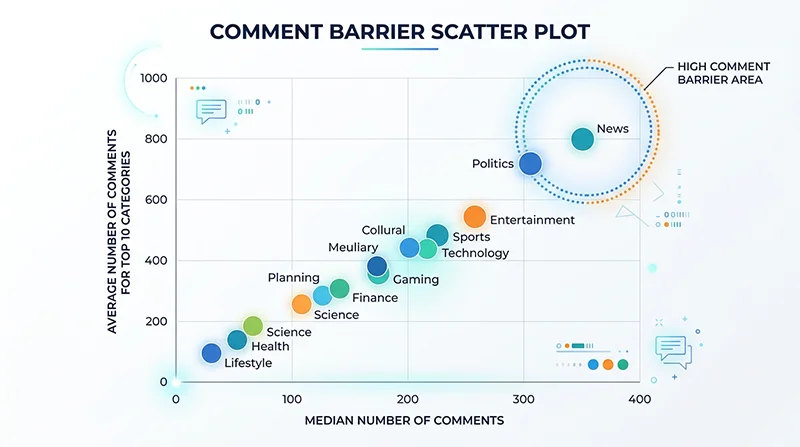
Review count remains one of the strongest weight factors in Amazon’s ranking model and the hardest resource for a new seller to bootstrap quickly. How to analyze Amazon BSR data for product selection is incomplete without a quantified review barrier — “the category has lots of reviews” is not a number you can plan against.
Concrete computation: take the top 50 ASINs by BSR in the target category and look at the median and 25th percentile of review counts. If the P25 (the lower-quartile threshold) already sits above 1,500 reviews, even joining the top 50 requires at least four-figure social proof — call it six to nine months of patient review accumulation for a brand-new listing. If P25 lands between 200 and 500, the category still admits low-review listings into the top 50, which means the cold-start window is open.
3. New-Listing Velocity — Does the Algorithm Welcome New Entrants?
Definition: the count of ASINs first observed within the last 90 days that currently rank inside category top 200. The metric tells you, structurally, how willing Amazon’s algorithm is to surface new listings in this niche.
A velocity above 15 is a strong tailwind — the category has demonstrable algorithmic tolerance for newcomers. A velocity below 5 is an oligopoly signal; entry isn’t impossible but you should plan for a 12-month-plus burn before payback. Capturing this metric is the hardest of the six because it requires weekly category snapshots compared against a historical ASIN ledger, not a one-time scrape.
4. Price-Band Coverage — Is Your Target Price Crowded?
Plot the prices of the top 200 ASINs as a histogram. If your intended price point is $25 but the $20–$30 band already holds 80 listings, the differentiation room is microscopic. If the $40–$50 band has only five listings and they’re all selling well, that band is the entry window.
The advanced version of price-band analysis crosses it with review counts: filter for ASINs with fewer than 500 reviews that still rank in category top 100, then look at the median price of that subset. That price is, empirically, the easiest entry anchor for a new listing in that category. No off-the-shelf tool exposes this cross-filter directly — it has to be built from raw data.
5. Sponsored Placement Density — How Much Organic Traffic Is Left?
This one is chronically underweighted. Open any Amazon search result page and the first two screens routinely contain six to eight Sponsored Products slots. If your target keyword’s SERP shows more than 40% sponsored coverage in the top results, a new listing without an ad budget will get almost no organic visibility.
Method: scrape the SERP for the target head keyword and count the share of the top 48 positions marked as Sponsored. If that ratio stays above 35% over multiple snapshots, plan to allocate at least 25% of revenue to ads during cold start. Reliable Sponsored placement detection is non-trivial — most generic scrapers miss 20% to 40% of SP slots — and the precision of Amazon data scraping directly determines the precision of this metric.
6. Negative-Review Mining — What Are Customers Still Complaining About?
The first five metrics answer “should I enter?” The sixth answers “if I enter, what do I differentiate on?” Pull every 1- to 3-star review for the top 30 ASINs in the target category, run frequency clustering on the text, and you have a ready-made list of unmet needs.
In practice, negative reviews in a single category cluster tightly around three to five concrete complaints. A coffee-filter category that looks saturated on the surface might reveal that 60% of negatives concentrate on “bleach taste,” “cup size only fits one brewer model,” and “fragile packaging.” If your product credibly addresses one of those, your listing’s bullet points and A+ content have a built-in conversion narrative. Amazon’s Customer Says widget surfaces aggregated keywords but caps the display at 6 to 10 tags — the long tail of unmet needs only emerges when you process the full review corpus.
Off-the-Shelf Tools vs. Data-Driven Pipeline
Established research tools — Helium 10, Jungle Scout, Sellersprite — provide opportunity scores and market segmentation, but they share three structural limits.
First, the data is pre-aggregated. Tools surface category-level summaries, but real sourcing decisions need ASIN-level raw data: a specific competitor’s 90-day BSR trajectory, its review text corpus, its price change cadence. Aggregation strips the ability to interrogate why an opportunity score landed where it did.
Second, refresh frequency is gated by subscription tier. Base tiers typically refresh on a 24- or 48-hour cycle, which is too slow for new-launch monitoring or sponsored-placement tracking. Buying minute-level freshness scales subscription cost rapidly.
Third, metrics inside the tool can’t be recombined. Trying to filter for “ASINs with under 500 reviews that still rank in category top 100” usually means exporting a CSV and pivoting in Excel. Once your sourcing logic enters cross-metric territory, the closed surface area of a tool becomes the bottleneck.
The alternative is to pull ASIN-level raw data directly through a data API and build the analytical model in your own BI stack or Python notebook. Higher upfront effort, but once the pipeline exists the marginal cost of every subsequent category analysis is close to zero, and every analytical decision is transparent and auditable.
Building Your Niche Research Stack on Pangolinfo Scrape API
Translating the six metrics into engineering, the underlying data layer needs three properties: full-category ASIN coverage by leaf browse node, time-series tracking of BSR and price, and complete review text rather than aggregated summaries. The Pangolinfo Scrape API is purpose-built for this — full Amazon coverage, batched real-time scraping, structured JSON output that drops directly into a BI dashboard or warehouse.
Mapping to the six metrics: BSR concentration and new-listing velocity are powered by the category bestseller endpoint, pulling top-100/top-200 ASINs with sales estimates per browse node; review barrier and negative-review mining run on the Reviews Scraper API, which returns full review text plus the complete Customer Says high-frequency keyword set rather than the truncated top six; sponsored placement density runs on the SERP endpoint, where Pangolinfo’s SP detection rate sits above 98% — best-in-class in the industry; price-band analysis flows from the product detail endpoint, time-series stored.
For teams that prefer a managed dashboard over self-hosted analytics, AMZ Data Tracker wraps the same six metrics into category-subscribed dashboards with daily refresh and built-in NLP clustering on negative reviews. If there’s no dedicated data engineer in the team, this is the faster route into the framework.
For teams running niche scans across dozens or hundreds of candidate categories, the Amazon Niche Data API ships pre-aggregated category-level opportunity metrics, removing the need to compute BSR concentration and review percentiles from scratch.
A Minimum-Viable Code Example
The Python snippet below pulls the top 100 ASINs of a target browse node and computes BSR concentration (CR10). It’s the simplest of the six metrics; once this pipeline is wired up, the others are just additional endpoints feeding the same warehouse.
import requests
import pandas as pd

API_KEY = "your_pangolinfo_api_key"
# Pangolinfo Amazon Scrape API (synchronous v1 endpoint).
# Business type is selected via the parserName field — one of:
# amzProductDetail / amzKeyword / amzProductOfCategory /
# amzProductOfSeller / amzBestSellers / amzNewReleases.
# Response shape: { code, message, data: { json: [...], url, taskId } }
# Full docs: https://docs.pangolinfo.com/en-api-reference/universalApi/universalApi
BASE_URL = "https://scrapeapi.pangolinfo.com/api/v1/scrape"
SITE_MAP = {"US": "www.amazon.com", "DE": "www.amazon.de",
            "UK": "www.amazon.co.uk", "JP": "www.amazon.co.jp"}

def fetch_category_listings(node_id, marketplace="US", zipcode="10041"):
    """Fetch a category's product listings via the amzProductOfCategory parser."""
    payload = {
        "parserName": "amzProductOfCategory",
        "content": node_id,                       # category Browse Node ID
        "site": SITE_MAP[marketplace],
        "format": "json",                         # also: rawHtml / markdown
        "bizContext": {"zipcode": zipcode},       # zipcode targeting
    }
    headers = {
        "Authorization": f"Bearer {API_KEY}",
        "Content-Type": "application/json",
    }
    resp = requests.post(BASE_URL, json=payload, headers=headers, timeout=30)
    resp.raise_for_status()
    return resp.json()["data"]["json"]            # parsed structured listings

def compute_cr10(listings):
    """CR10 = top-10 sales share of top-100 total sales.
    Note: Amazon only exposes BSR (bestSellersRank), not raw sales volume.
    The estimated_monthly_sales field below has to be derived from BSR
    (industry sales-estimator formulas) or sourced directly from the
    AMZ Data Tracker dashboard, which ships pre-derived sales estimates."""
    df = pd.DataFrame(listings)
    df = df.sort_values("estimated_monthly_sales", ascending=False).reset_index(drop=True)
    top10 = df.head(10)["estimated_monthly_sales"].sum()
    total = df.head(100)["estimated_monthly_sales"].sum()
    return top10 / total if total > 0 else 0

# Example: analyze the Coffee Filters subcategory (Browse Node ID 2251606011)
data = fetch_category_listings(node_id="2251606011", marketplace="US")
cr10 = compute_cr10(data)

print(f"CR10: {cr10:.1%}")
if cr10 > 0.70:
    print("→ Red ocean. Top tier locked. Avoid unless you have channel/IP edge.")
elif 0.35 <= cr10 <= 0.55:
    print("→ Fragmented market with long-tail room. Proceed to the next metric.")
else:
    print("→ Either too fragmented or demand-poor. Cross-check absolute volume.")
Extending this skeleton into the full six-metric framework adds five more endpoints and their corresponding aggregation functions, but the architecture stays identical. Every metric is transparent, version-controllable, and reproducible — which is what moves Amazon sourcing from gut feel to engineering discipline.
Treating Sourcing as Iterable Data Engineering
The point of Amazon niche research data analysis isn’t to find the single best research tool — it’s to migrate sourcing decisions from intuition onto an explainable data framework. BSR concentration tells you the market structure, the review barrier tells you the time cost, new-listing velocity tells you how the algorithm feels about newcomers, the price-band histogram tells you where pricing room exists, sponsored placement density tells you the cost of organic visibility, and negative-review clustering tells you the differentiation anchor. Cross-reference the six and “should I enter this category?” stops being a coin flip.
The compounding payoff comes after the pipeline is automated. Scanning 100 candidate subcategories per week with the six metrics scoring automatically lets the team focus deep research on the five to ten most promising. That is the leverage that tool-based sourcing can’t reproduce.
If you’re scoping a new product line, take one or two candidate categories and run them through the six dimensions before placing a single order. The gap between intuition and the framework is usually the cheapest possible introduction to data-driven sourcing.
Try it now: Sign up for the Pangolinfo Scrape API(View API Documentation) free tier and run real data on your target category, or jump straight into the six-metric dashboard with AMZ Data Tracker.