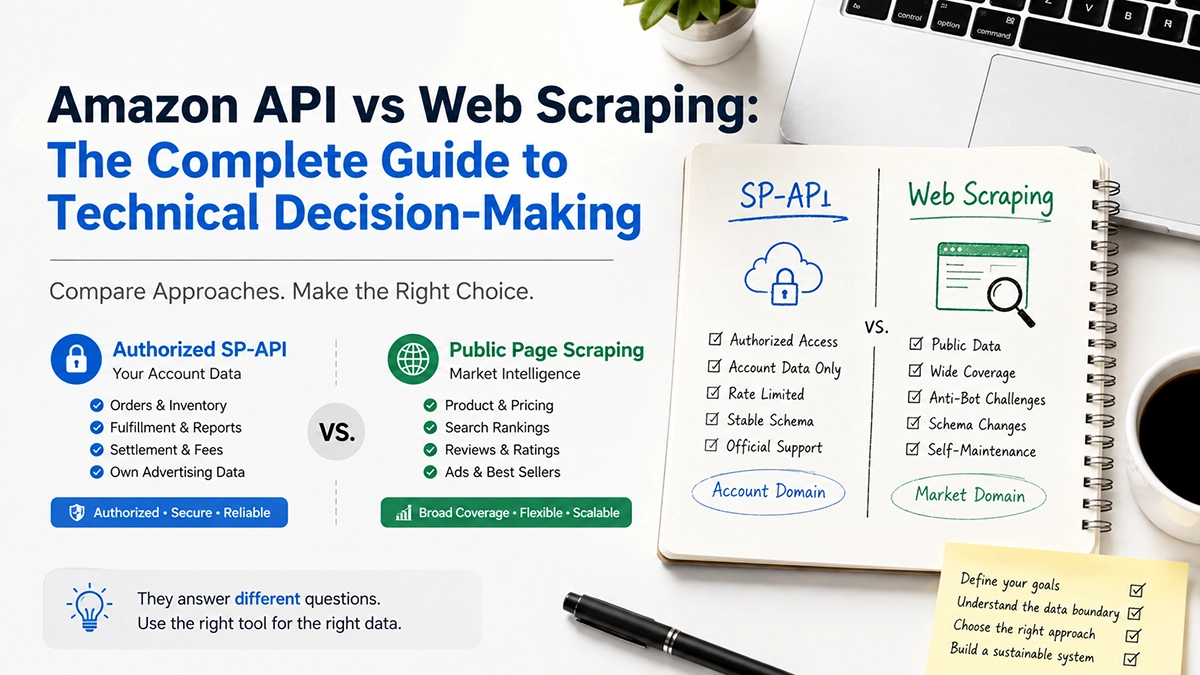
The Amazon API and web scraping are not either-or. The official SP-API covers your own account; public page collection covers competitors and the wider market. They answer different questions, and most mature production systems run both. This guide covers the authorization boundary, the public-versus-private line, a like-for-like cost comparison, a hybrid architecture you can implement, and a decision table keyed to your actual task.
“Should we use the official API or just scrape?” is a question that keeps teams stuck, and it is stuck because it is asked wrong. It assumes the two are alternative implementations of the same thing, so the comparison collapses into which is more compliant, cheaper or more stable. In reality they retrieve two different classes of data. The official interface gives you your account; public pages give you the market. Once that lands, the route debate disappears and what remains is an architectural division of labour. For the broader selection framework, start with Amazon Data API: The Complete Buyer’s Guide.
1. Why “either-or” is the wrong frame
Nearly every comparison article on this topic stages the official API and scraping as two opponents and produces a pros-and-cons table. It reads well and it misleads the decision.
The reason is that their data domains barely overlap. The SP-API is scoped strictly to your seller account: orders, inventory, fulfillment, your own listings, your own advertising performance. It answers “how is my business doing right now”. Public page collection returns product information, search results, reviews, best seller ranks and sponsored placements. It answers “how is the market doing right now”.
Those are different questions. You would not use the official API to check a competitor’s price, because it is not designed to expose that data. You would not scrape your own orders, because they sit behind login and are account-private.
So the useful question is not “which one” but “which of my questions are account-domain and which are market-domain”. The former goes through the official interface, the latter through public data. For most teams the answer is: both.
2. The authorization boundary: where each route gets its legitimacy
Compliance discussions tend to slide into an unanswerable “which is more legal”. The two routes draw legitimacy from entirely different sources, and what determines compliance is what you collect, not which method you use.
Official SP-API: contractual authorization
The SP-API is legitimate through an explicit agreement chain: developer registration, seller authorization via Login with Amazon, and role-based access granting the minimum necessary scope. Operations touching personally identifiable information require a separate restricted role and review. What you can violate is the developer agreement and data protection policy, and the consequence is revoked authorization.
The boundary is clear but narrow: only the data a seller has actively authorized your application to access. You cannot see other sellers’ orders, and you cannot see market-level ranking data.
Public page collection: terms and robots directives
Collecting public pages is not authorized by contract. It sits under the platform’s conditions of use, robots directives and rate limits. There is no signed agreement, but that is not the same as prohibition — publicly visible, non-personal page information can generally be collected, which is long-standing industry practice.
Risk rises with three specific things, and these are what actually deserve attention:
- Login-gated content — anything visible only after signing in has clearly crossed the “public” line.
- Personal data — buyer names, addresses and contact details are personal data governed by data protection law and should not be collected.
- Aggressive request rates — traffic heavy enough to affect site operation shifts the activity from reading public information to interfering with a service.
The one-line test: is the data publicly visible and non-personal? The method is irrelevant. Misusing PII through the official interface is still a violation; collecting a fully public page can still be compliant.
3. Public vs private: a boundary that matters more than the method

Draw the line by data domain rather than by collection method and the architecture becomes obvious.
| Category | Contents | Nature | Route |
|---|---|---|---|
| Product facts | Title, brand, price, rating, variants, availability, BSR | Publicly visible | Public collection |
| Search and ads | Keyword, organic rank, ad rank, ad type, creative | Publicly visible | Public collection |
| Review content | Rating, body, date, verified purchase, variant attribution | Publicly visible | Public collection |
| Ranks and categories | Best Sellers rank, category tree, filters | Publicly visible | Public collection |
| Orders and fulfillment | Order detail, shipment status, returns | Account-private | SP-API (authorized) |
| Buyer information | Name, address, contact details | Account-private + personal | SP-API (restricted PII role) |
| Inventory and settlement | Inventory detail, settlement reports, fees | Account-private | SP-API (authorized) |
| Own ad performance | Spend, impressions, clicks, ACOS | Account-private | SP-API (authorized) |
Note the last column: the route follows from the nature of the data, not from preference. This is also why “can we just use the official API” is answered no in most teams — you need market data, and it is outside the official interface’s authorization scope.
A public page field sample
Here is what structured public page data typically looks like. Every field below is public and non-personal:
{
  "asin": "B0CXYZ1234",
  "marketplace": "amazon.com",
  "title": "Stainless Steel Insulated Water Bottle, 32 oz",
  "price": { "current": 34.99, "currency": "USD", "listPrice": 44.99 },
  "rating": { "average": 4.6, "count": 12847 },
  "bsr": [ { "category": "Sports & Outdoors", "rank": 128 } ],
  "availability": "In Stock",
  "sponsored": false,
  "fetchedAt": "2026-08-30T10:22:41Z"
}
There is no buyer information here and nothing requiring seller authorization. That is the compliance basis for public collection. By contrast, orders, buyer addresses and settlement detail never appear on public pages — they are only reachable through the SP-API after explicit seller authorization.
If these public fields drift in name, type or nullability after a page redesign, downstream aggregation starts computing the wrong thing. The full field contract and type definitions are covered in Amazon data API JSON schema.
4. Coverage, rate limits and maintenance cost, compared on one task
Since the two are complementary, a fair side-by-side only makes sense on the same task. The comparison below is scoped to one question: obtaining public market data such as products and search results.
| Dimension | Official SP-API | Self-built scraping | Specialized Amazon data API |
|---|---|---|---|
| Can it return public market data? | No — outside authorization scope | Yes, bounded by anti-bot | Yes, coverage already structured |
| Coverage breadth | Own account only | Custom; deep pages often limited | Product, search, review, ranks, ads |
| Throttling | Per-operation limits; needs queueing and backoff | Self-managed via rate control | Quota-based, usually negotiable |
| Field contract | Official and stable | Your own; drifts with the page | Normalized business fields with schema |
| Maintenance | Low — follows official versions | High — anti-bot, rendering, parsing | Low — parsing lives at the interface |
| Compliance boundary | Clearest | Your own assessment | Public data; vendor should document |
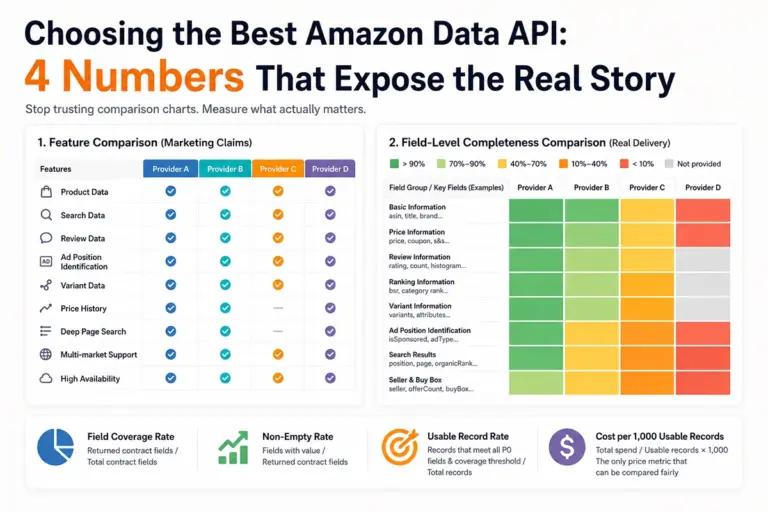
The table above stops at the dimension level. To go field by field, which providers cover which fields and where the gaps cluster, see the field-level comparison of leading Amazon data APIs.
What SP-API throttling actually costs you
The SP-API uses a token bucket model: each operation has its own request rate and quota, and quota refills continuously at that rate. For some operations the initial quota and refill rate also scale with seller business volume. Three practical consequences:
- High-frequency polling of orders or inventory requires queueing with backoff, or you get throttled errors.
- Quotas are independent per operation, so each needs its own model — a single “total call volume” estimate will be wrong.
- Concrete values change as Amazon adjusts them. Verify current figures in the official documentation rather than reusing numbers from older docs.
This is routinely overlooked: even though the official interface is free, throttling converts into engineering complexity. If you need high-frequency, high-volume data, the rate limit is itself a design workload.
The real cost of self-built scraping
The cost is not servers. It is four recurring categories: anti-bot maintenance as detection rules change, rendering as more content depends on JavaScript, parsing and field drift requiring selector rewrites plus history backfill after every redesign, and incident debugging.
The conversion is straightforward. A team spending 0.3 engineer-days a month maintaining a collection pipeline, priced at real internal cost, usually exceeds the annual bill for a mid-sized API volume over a year — and that cost recurs every quarter.
The way out of those four recurring costs is to hand collection and structuring to a service. Building a pipeline without maintaining scrapers is covered in how to build an Amazon data pipeline. The pricing metric on the buy side, per request or per usable record, decides whether that comparison holds, in Amazon data API pricing.
5. Hybrid architecture: running both routes together

Since the routes are complementary, the production architecture should accommodate both and converge them at the ingestion layer. A recommended shape:
[Authorized domain · SP-API]        [Public domain · collection]
  Orders / inventory / fulfillment    Products / search / reviews
  Settlements / own ad performance    Ranks / categories / ads
        ↓                                      ↓
  Auth and token management            Fetch · render · parse · anti-bot
        ↓                                      ↓
        └──────────→ [Unified ingestion] ←─────┘
                     field mapping · type validation
                     failure classification · quality gates
                              ↓
              Business systems / data pipelines / AI agents
Three design points:
The unified ingestion layer is not optional. Both routes map into one internal model there, with strict type validation. When either side changes, errors are caught at that layer instead of propagating downstream.
Classify failures separately. Throttling errors from the official interface, blocked pages from public collection, and missing fields common to both should be three separate counters with separate alerts. Merged into one error log, you cannot tell whether the problem is quota, anti-bot or coverage.
Do not substitute one route for the other. The most common design mistake is trying to infer your own orders from public collection — impossible and inappropriate — or estimating market share from the official interface, which is out of scope. Keep each route inside its own data domain.
6. Compliance checklist
Before going live, confirm each item:
1. Collect only publicly visible pages; nothing behind login.
2. Do not collect buyer names, addresses or contact details.
3. Respect robots directives, cap request rates, avoid affecting site operation.
4. Record a legal basis and compliance assessment before scaling.
5. Retain capture timestamps and source for traceability.
Official interface side
6. Complete developer registration and obtain explicit seller authorization via LWA.
7. Request the minimum necessary role; apply separately for restricted PII roles.
8. Implement queueing and backoff for token bucket throttling.
9. Honor the data protection policy; do not use or retain authorized data beyond scope.
10. Track official deprecation schedules and allow migration time.
Rule of thumb: public and non-personal → collectable; login-gated or containing personal information → must go through the authorized interface; when unsure, default to the stricter side.
This checklist stays on the authorization boundary. The four controls for what happens after data enters your system, classification, minimization, retention and deletion, are covered in the Amazon data API compliance checklist.
7. Decision table: match your task to a route
Skip the route debate and read your task off the table.
| Your task | Data domain | Route | Notes |
|---|---|---|---|
| Sync your own orders and fulfillment | Account-private | SP-API | Only compliant source; no third party needed |
| Manage your inventory and settlements | Account-private | SP-API | Same |
| Monitor competitor price and stock | Public market | Public collection / specialized API | Not offered by the official interface |
| Track keyword organic rank | Public market | Public collection / specialized API | Ads must be separable from organic |
| Analyse competitor ad placements | Public market | Public collection / specialized API | Sponsored recognition needs its own evaluation |
| Run review insights for product improvement | Public market | Public collection / specialized API | Requires variant attribution to be actionable |
| Need both orders and competitor monitoring | Both | Hybrid architecture | Converge at the ingestion layer |
| Only your own operating data | Account-private | SP-API only | Public collection only adds compliance surface |
The last row deserves emphasis: if your requirements stop at your own operations, do not add public collection. That is not conservatism, it is avoiding compliance and maintenance cost for coverage you will never use.
FAQ
Is using the Amazon SP-API more compliant than scraping?
Both are legitimate for different scopes. The SP-API is governed by an explicit developer agreement and data protection policy covering your own seller data. Scraping public pages operates under terms of use and robots directives instead. Compliance depends on what you collect, not on which method you use.
Can the Amazon SP-API return competitor data?
No. The SP-API is scoped to data tied to your own seller account, covering orders, inventory, your listings and your advertising performance. It does not expose market-wide competitor data, category rankings or other sellers’ listings. Competitor intelligence requires public page data.
Does scraping Amazon violate its terms of service?
It can, depending on what and how you collect. Amazon’s conditions of use restrict automated access, and practical risk rises with login-gated pages, personal data and aggressive request rates. Stay on public non-personal fields, respect robots directives and rate limits, and record a legal basis before scaling.
Can you combine the official Amazon API and web scraping?
Yes, and most production systems do. A common split is the SP-API for account data such as orders, inventory and your own listings, plus a public data source for competitors, categories, search results and sponsored placements. The two answer different questions and rarely overlap.
When should you use only the official Amazon API and skip scraping?
When your requirements are limited to your own operations: orders, inventory, fulfillment, your own listings and your own advertising performance. Adding a public data source then buys coverage you will not use and adds compliance surface you do not need.
References: Amazon Selling Partner API official documentation (authorization, roles and throttling model), Amazon conditions of use and robots notices, and Pangolinfo published service metrics.
Next step: use the decision table in section 7 to split your requirements into account-domain and market-domain. When the market side needs products, search, reviews, ranks and sponsored placements, Amazon Scraper API and Amazon Review API cover those objects; for agents calling data directly, use Amazon Data MCP. You can get an API key from the console and run an acceptance pass, or read the Amazon Data MCP documentation. For the broader selection framework, see Amazon Data API: The Complete Buyer’s Guide.