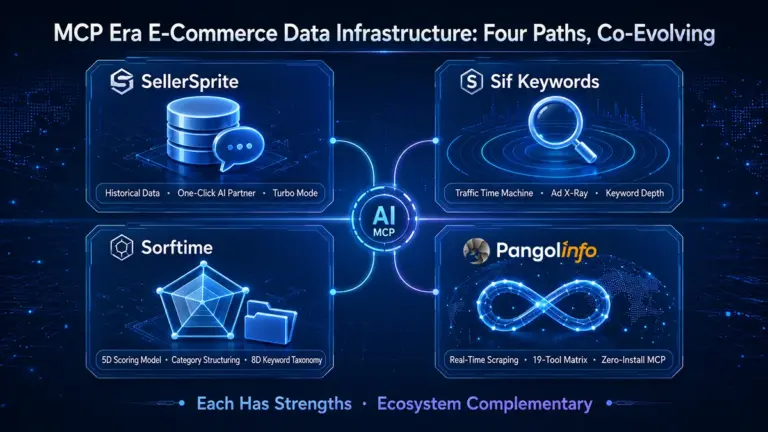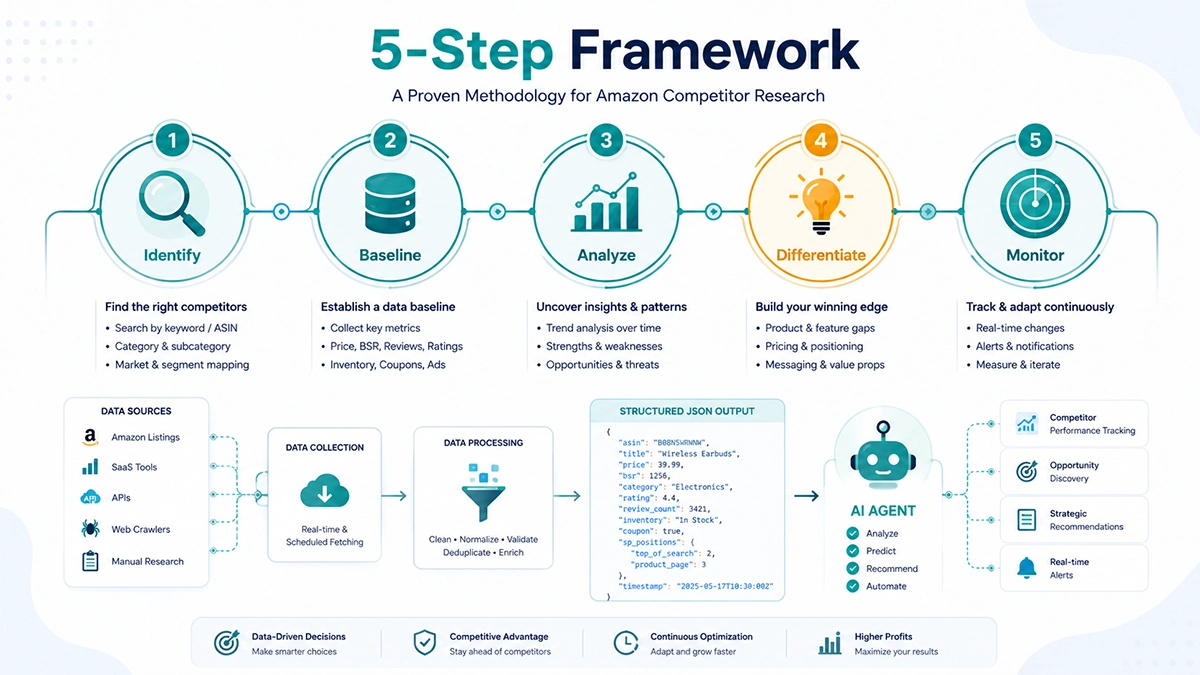
TL;DR: Your AI agent needs real-time Amazon data to do product research, competitor monitoring, and market analysis — but traditional tools (Helium 10, Jungle Scout) don’t offer agent-friendly access. Pangolinfo’s Amazon Data MCP connects any MCP-compatible AI tool (Claude Code, Codex, Cursor, Windsurf) to 19 structured Amazon data tools in under 3 minutes. No SDK, no installation, no scraping maintenance. This guide covers all three access methods (MCP, REST API, Skill), step-by-step configuration for each major AI tool, and what you can actually build once connected.
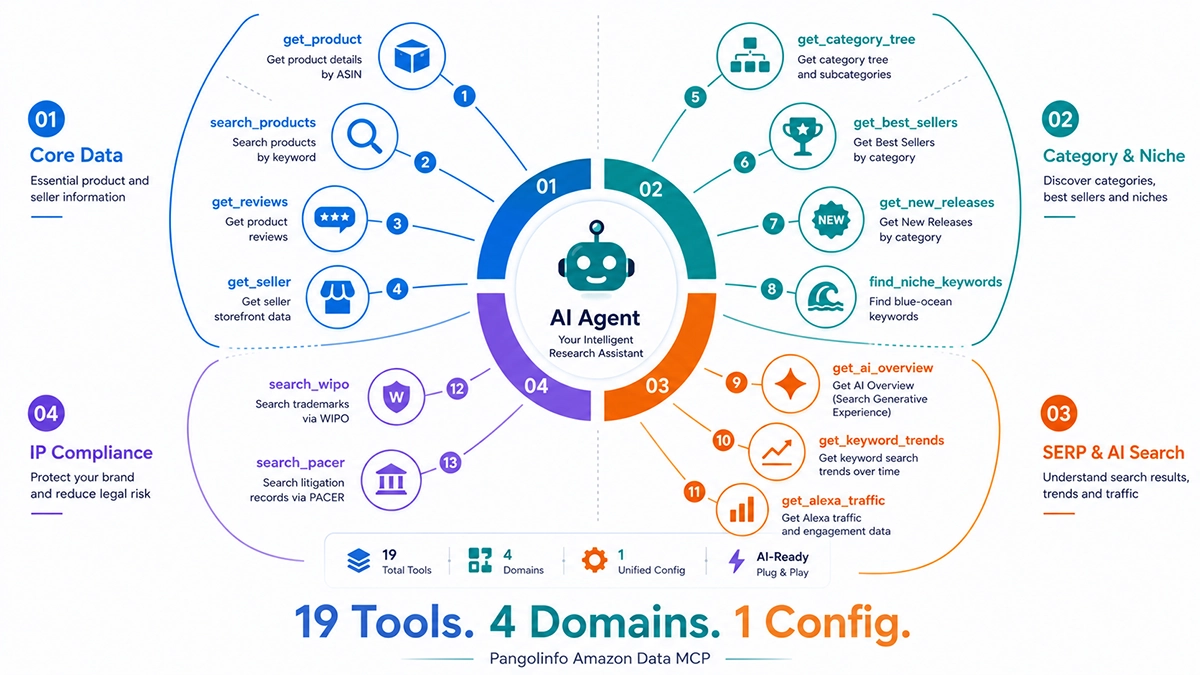
Pangolinfo Amazon Data MCP Tool Ecosystem
How Can AI Agents Access Amazon Data? Three Methods Compared
You have three options for giving your AI agent access to Amazon data: MCP for interactive research, REST API for automated pipelines, and Agent Skill for native workflow integration. All three connect to the same data engine — the difference is how your agent interacts with it.
Before MCP became the industry standard in 2025, the dominant workflow was what we at Pangolinfo call the copy-paste loop: you ask your AI to write a scraper script, run it manually in a terminal, copy the results, paste them back into the chat, and repeat. Each cycle requires human intervention. Each interruption breaks the agent’s chain of thought. It’s the difference between having a research assistant and having a research tool.
MCP changes this entirely. Your agent discovers what tools are available, decides which to call, and receives structured JSON it can immediately reason about — all without you touching a terminal. But MCP isn’t always the right choice. Here’s how the three options compare.
Method 1: MCP (Model Context Protocol) — Best for Interactive Research
MCP is a protocol that lets AI agents discover and call external tools. Think of it as giving your agent a menu of capabilities rather than making it guess what’s possible. You add a configuration block to your AI tool, and suddenly your agent can search Amazon products, pull reviews, analyze categories, and check trademark databases — all by calling the right tool at the right time.
The key advantage is autonomous discovery. A well-designed MCP server — like Pangolinfo’s Amazon Data MCP — includes a pangolinfo_capabilities self-description tool. When your agent starts, it calls this tool first, learns all 19 available operations, their parameters, and their return formats. From that point on, it decides which tool to invoke based on your question — no manual instruction needed.
In our testing at Pangolinfo, agents using MCP complete product research tasks 4-6x faster than the copy-paste loop approach, with fewer errors because there’s no manual data transfer step where information gets lost or reformatted incorrectly.
Method 2: REST API — Best for Batch Automation and Scheduled Pipelines
REST API is the workhorse for automation. If you need to scan 5,000 ASINs for price changes every hour, or pull daily review updates across your entire catalog, or trigger data collection from a CI/CD pipeline — REST API is the right choice. It’s predictable, idempotent, and integrates with any programming language or automation framework.
Pangolinfo’s Scraper API handles over 30 million requests per day with 99% success rate and median response latency of ~3 seconds. The same data engine powers both the MCP and API products, so you can use MCP for interactive exploration and API for production automation without switching data providers or learning different response formats.
Method 3: Agent Skill — Best for Native Agent Workflows
For teams building complex agent workflows — multi-step research pipelines, automated report generation, continuous monitoring loops — the Pangolinfo Amazon Scraper Skill provides a higher-level abstraction. Instead of calling individual tools, your agent invokes a Skill that packages multiple data operations into coherent workflows: “do a full product audit,” “scan this category for blue-ocean opportunities,” “monitor these 50 ASINs and alert on changes.”
The Skill approach is particularly powerful in OpenClaw-based agents, where Skills are a native part of the agent’s tool-calling architecture. It reduces the cognitive load on the LLM — instead of coordinating 5-7 individual MCP tool calls, the agent delegates to a single Skill that handles the orchestration internally.
When to Use Which: Decision Matrix
| Scenario | MCP | REST API | Skill |
|---|---|---|---|
| Interactive product research with Claude Code/Codex | ✓ Best | Possible | Overkill |
| Hourly price monitoring across 500+ ASINs | Not designed for this | ✓ Best | Possible |
| Multi-step agent workflow (research → analyze → report) | Possible | Requires orchestration | ✓ Best |
| CI/CD pipeline data ingestion | N/A | ✓ Best | N/A |
| Ad-hoc category exploration | ✓ Best | Manual coding | Possible |
| Automated daily competitor reports | Possible | ✓ Best | Good fit |
Which AI Coding Tools Can Connect to Amazon Data via MCP?
As of mid-2026, every major AI coding tool supports MCP. But the configuration method varies — some use JSON files, some use TOML, and some use a GUI settings panel. Here’s the compatibility landscape.
Full MCP Support (2026)
| AI Tool | Type | MCP Config Format | Remote HTTP MCP | Agent Mode Strength |
|---|---|---|---|---|
| Claude Code | CLI Agent | JSON (mcp.json) | ✓ | Highest (46% satisfaction, Stack Overflow 2025) |
| Codex CLI | CLI Agent | TOML (config.toml) | ✓ | High (growing fast) |
| Cursor | AI IDE | GUI Settings Panel | ✓ | Strong IDE integration |
| Windsurf | AI IDE | JSON | ✓ | Good multi-file editing |
| Cline | VS Code Plugin | JSON | ✓ | Flexible BYOM |
| Gemini CLI | CLI Agent | JSON | ✓ | 1M token context window |
| Aider | CLI Agent | YAML/JSON | ✓ | Strong git integration |
The key takeaway: if your AI tool supports MCP, it can connect to Pangolinfo’s Amazon Data MCP. The configuration is a one-time setup — add the endpoint URL and your API key, restart the tool, and 19 data tools become available to your agent. Dedicated step-by-step tutorials for each major platform are linked in the “Further Reading” section at the bottom of this guide.
How to Connect Your Agent in 3 Minutes: Universal Quick Start
Step 1: Get Your API Key
Sign up for a free account at tool.pangolinfo.com, navigate to the API Keys section, and generate a key. The free tier includes enough quota to test all 19 tools and build your first workflows.
Step 2: Add the MCP Configuration Block
The configuration differs by tool, but the pattern is the same. For Claude Code, add this to your mcp.json:
{
  "mcpServers": {
    "pangolinfo-amazon": {
      "type": "http",
      "url": "https://api.pangolinfo.com/mcp",
      "headers": {
        "Authorization": "Bearer YOUR_API_KEY"
      }
    }
  }
}
For Codex CLI, the equivalent goes in config.toml:
[mcp_servers.pangolinfo-amazon]
type = "http"
url = "https://api.pangolinfo.com/mcp"
headers = { Authorization = "Bearer YOUR_API_KEY" }
For Cursor, open Settings → MCP → Add Server, enter the name “pangolinfo-amazon” and the endpoint URL with your API key in the headers field. The GUI handles the JSON generation.
For detailed, tool-specific configuration instructions including troubleshooting common errors, see our platform-specific tutorials: Claude Code, Codex CLI, Cursor, and the Universal MCP Guide for Windsurf, Cline, Gemini CLI, Aider, and other MCP-compatible tools.
Step 3: Verify the Connection
Restart your AI tool, then ask your agent to run a self-check:
Use the pangolinfo_capabilities tool to check what's available.Your agent should respond with a list of all 19 available tools, their parameters, and return formats. From here, your agent already knows what it can do — just ask naturally: “Find the current Best Sellers in the Kitchen & Dining category,” or “Pull reviews for ASIN B0XXXXXXX and analyze the most common complaints.”
What Can Your AI Agent Do With Amazon Data? 19 Tools × 6 Workflows
Once connected, your AI agent gains access to 19 structured data tools organized across four domains. Here’s what each domain covers — and the 6 preset workflows we’ve designed to get you started immediately.
Core Data Tools: Products, Search, Reviews, Sellers
These tools give your agent the fundamental building blocks of Amazon data. get_product returns complete product details including price, BSR, dimensions, variations, buy box status, and sponsored ad positions (with 98% SP ad collection rate — industry-leading accuracy). search_products runs Amazon search queries and returns paginated results with all visible listing data. get_reviews pulls complete review data including the full Customer Says text — not just star ratings, but what verified purchasers actually wrote. get_seller retrieves a seller’s full storefront catalog.
The review data is where things get interesting for AI agents. Unlike tools that only return aggregated ratings, Pangolinfo captures the complete Customer Says text. Feed that into an LLM and it can identify specific product complaints, track sentiment trends over time, and surface feature requests buried in thousands of reviews — things no dashboard can do.
Category & Niche Analysis: Finding Blue Oceans
Eight tools in this domain cover the full category intelligence workflow. get_category_tree traverses Amazon’s category hierarchy. get_best_sellers and get_new_releases pull the top 100 products in any category. find_niche_keywords discovers low-competition, high-search-volume keyword opportunities. Filtering tools let your agent screen categories by price range, rating threshold, and BSR bracket — reducing a category of 50,000 products to 12 viable candidates in seconds.
SERP & AI Search: Understanding Amazon’s Search Landscape
As Amazon integrates AI-generated summaries into search results (similar to Google’s AI Overviews), understanding the search landscape requires new tools. get_ai_overview captures AI-generated content in Amazon SERPs. get_keyword_trends tracks search volume and competition over time. get_alexa_traffic pulls Alexa rank and engagement metrics — useful for evaluating a brand’s overall web presence beyond Amazon.
IP Compliance: Trademarks and Patent Litigation
search_wipo queries the WIPO Global Brand Database for trademark registrations. search_pacer checks US federal court records for patent litigation involving specific companies or products. These tools catch IP risks before you invest in a product — something that typically requires a lawyer or expensive subscription service.
6 Preset Workflows to Start Immediately
- Full Product 360° Audit — Product details + reviews + seller info + IP check. One prompt, comprehensive output.
- Blue Ocean Category Scan — Category tree traversal → ASIN filtering → niche keyword discovery → competition scoring → market report. Finds categories where demand outpaces supply.
- Trademark Compliance Screen — WIPO search → PACER litigation check → cross-reference with product listings. Flags IP risks before you order inventory.
- AI Search Landscape Analysis — AI Overview capture → keyword trends → organic vs sponsored ranking. Understands how Amazon’s AI features are reshaping discoverability.
- Seller Full Catalog Audit — Seller storefront → product listing quality → review sentiment → pricing strategy → competitive positioning.
- Offline Retail Coverage Map — Brand presence → retail location data → market coverage gaps. Bridges Amazon data with physical retail intelligence.
Complete Tool Reference
| Domain | Tool | What It Returns |
|---|---|---|
| Core Data | get_product | Full product details (price, BSR, variations, buy box, SP ads) |
| search_products | Amazon search results (paginated, all listing data) | |
| get_reviews | Complete reviews with Customer Says text | |
| get_seller | Seller storefront full catalog | |
| Category & Niche | get_category_tree | Amazon category hierarchy traversal |
| get_best_sellers | Top 100 products in any category | |
| get_new_releases | New Releases top 100 (hot & rising products) | |
| find_niche_keywords | Low-competition, high-volume keyword opportunities | |
| filter_by_price | ASIN filtering by price range | |
| filter_by_rating | ASIN filtering by review rating | |
| filter_by_bsr | ASIN filtering by Best Sellers Rank | |
| filter_by_review_count | ASIN filtering by number of reviews | |
| SERP & AI Search | get_ai_overview | AI-generated content in Amazon SERPs |
| get_keyword_trends | Search volume and competition trends | |
| get_alexa_traffic | Alexa rank and engagement metrics | |
| IP Compliance | search_wipo | WIPO Global Brand Database trademark search |
| search_pacer | US federal court patent litigation records |
Why Can’t Traditional Amazon Tools or SP-API Serve AI Agents?
The Agent Blind Spot of Traditional SaaS Tools
Helium 10, Jungle Scout, and Keepa are excellent products — for humans. They present data through dashboards, charts, and interactive filters designed for human eyes and mouse clicks. But an AI agent cannot “look at” a dashboard. It cannot “click” a filter dropdown. It needs structured, programmatic access to the underlying data.
As of June 2026, none of the major traditional Amazon seller tools offer MCP servers or agent-friendly APIs. This isn’t a temporary gap — it’s a fundamental architectural difference. These tools were built in an era when the only consumer of data was a human sitting in front of a screen. Retrofitting agent accessibility onto a dashboard-first architecture requires rebuilding the data layer from scratch.
The Bain & Company 2025 technology report on Agentic AI identifies this exact dynamic: the transition from “system of record” (where humans consume data through UIs) to “agent operating system” (where agents consume data through structured APIs) is a fundamental architectural shift, not an incremental feature addition. Traditional SaaS products built on the former paradigm face a structural disadvantage when agents become the primary data consumers.
The Coverage Gap of SP-API
Amazon’s Selling Partner API (SP-API) is the official data access channel for sellers — and it’s powerful for what it covers. Order data, inventory, advertising metrics, FBA shipments. But SP-API has critical coverage gaps for the data AI agents most need:
- No review data. SP-API does not expose customer reviews. Your agent cannot analyze review sentiment, identify product complaints, or track competitor review trends through SP-API alone.
- No Best Sellers or New Releases. The public-facing ranking data that reveals market dynamics is not available through SP-API.
- 3-7 day approval process. Getting SP-API access requires application, approval, and compliance documentation — hardly “connect in 3 minutes.”
- Engineering overhead. SP-API’s authentication model (LWA tokens, rotating credentials) requires non-trivial engineering to maintain. It’s API access, but it’s not agent-friendly API access.
SP-API MCP servers like DataDoe ($97/month) bridge some of the engineering gap but inherit all the coverage limitations — they can only return what SP-API provides, and SP-API doesn’t provide the public-facing data that matters most for competitor analysis, market research, and product discovery.
The Maintenance Hell of DIY Scrapers
Many developers’ first instinct is to write their own Amazon scraper. It seems manageable at first — a Python script with BeautifulSoup, maybe Selenium for JavaScript-rendered content. Then reality sets in:
- CAPTCHA escalation. Amazon’s anti-bot systems are among the most sophisticated on the web. What works today breaks tomorrow.
- IP rotation and proxy management. Running at meaningful scale requires residential proxy infrastructure, which costs hundreds to thousands per month.
- Page structure changes. Amazon A/B tests their page layouts constantly. A selector that works for the US marketplace may fail for UK or DE. Maintaining parsers across 20+ marketplaces is a full-time engineering job.
- Token waste. Raw HTML pages from Amazon can be 2-5MB each. Feeding that to an LLM burns tokens on navigation markup, JavaScript blobs, and tracking pixels. Structured JSON from Pangolinfo eliminates this overhead — agents process the data, not the wrapper.
In our experience at Pangolinfo — processing 30M+ requests per day at 99% success rate — the infrastructure cost of a reliable Amazon scraping system at scale runs 5-10x the cost of using a purpose-built data API. And that’s before accounting for engineering time.
Frequently Asked Questions About Connecting AI Agents to Amazon Data
What is the fastest way to connect my AI agent to Amazon data?
The fastest way is through Pangolinfo’s Amazon Data MCP. Register for a free API key at tool.pangolinfo.com, then add one JSON/TOML config block to your AI tool (Claude Code, Codex, Cursor). No installation, no SDK. Your agent can call 19 tools covering products, reviews, Best Sellers, SERP data, and IP compliance in under 3 minutes.
Can Claude Code access real-time Amazon data through MCP?
Yes. Claude Code supports remote HTTP MCP servers via a simple mcp.json configuration. Add Pangolinfo’s Amazon Data MCP endpoint with your API key, and Claude Code gains access to 19 structured tools for Amazon product details, search results, reviews, category analysis, and more — all with ~3-second median response latency.
How does MCP differ from a REST API for Amazon data access?
MCP is designed for interactive, conversational AI agent workflows — the agent discovers available tools, calls them autonomously, and receives structured JSON responses it can reason about. REST API is better suited for batch automation, scheduled pipelines, and CI/CD integrations. Choose MCP for research and analysis; choose REST API for automated monitoring at scale.
Do traditional Amazon seller tools like Helium 10 or Jungle Scout support AI agent integration?
As of June 2026, neither Helium 10 nor Jungle Scout offer MCP servers or agent-friendly APIs. Their data is locked behind web dashboards designed for human eyes, not programmatic consumption. This means AI agents cannot directly access their data without manual CSV export or screenshot-based workarounds.
What Amazon data can my AI agent access through Pangolinfo’s MCP?
The MCP exposes 19 tools across four domains: Core Data (product details, search results, reviews, seller storefronts), Category & Niche Analysis (category tree, Best Sellers, New Releases, blue-ocean keywords), SERP & AI Search (AI Overview, keyword trends, Alexa traffic), and IP Compliance (WIPO trademarks, PACER patent litigation). All data is real-time with a median latency of ~3 seconds.
Is Pangolinfo’s Amazon data real-time or cached?
Real-time. Pangolinfo scrapes Amazon live on every request with a median response latency of ~3 seconds. This is critical for price monitoring, Buy Box tracking, and inventory checks where stale data leads to wrong decisions. The infrastructure handles 30M+ requests per day at 99% success rate.
Next Steps: Platform Tutorials and Real-World Use Cases
This guide covered the universal approach. For platform-specific step-by-step tutorials, start here:
- Platform Integration Tutorials — Dedicated guides for connecting Claude Code, Codex CLI, Cursor, and other MCP-compatible tools to Amazon data. Each includes tool-specific configuration, common error resolutions, and validated prompt templates.
- Three Access Methods Compared — Deep dive into when to use MCP vs REST API vs Skill, with cost calculations and scenario-matching matrices.
- Amazon Operations Use Cases — Complete workflows for product research, competitor monitoring, review analysis, price/Buy Box tracking, and niche discovery — each with copy-paste-ready prompts.
- Why Agents Need Better Data — The data infrastructure shift from human-readable dashboards to agent-consumable APIs, and what it means for Amazon sellers and tool builders.
Ready to give your AI agent real-time Amazon data? Get your free API key at tool.pangolinfo.com and connect in under 3 minutes with Amazon Data MCP, Scraper API, or Scraper Skill.
About the Author: Leo is the Technical Lead and Chief Architect at Pangolinfo, where he leads the design and development of real-time e-commerce data infrastructure processing 30M+ requests daily. He specializes in web scraping systems, AI agent tooling, and the MCP protocol ecosystem.
Last updated: June 30, 2026