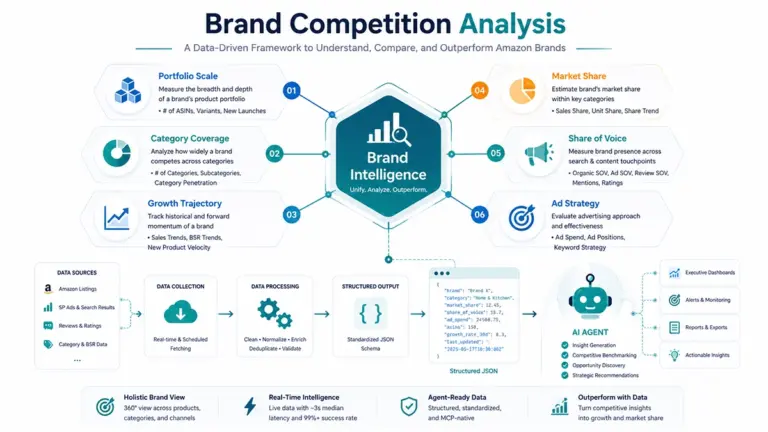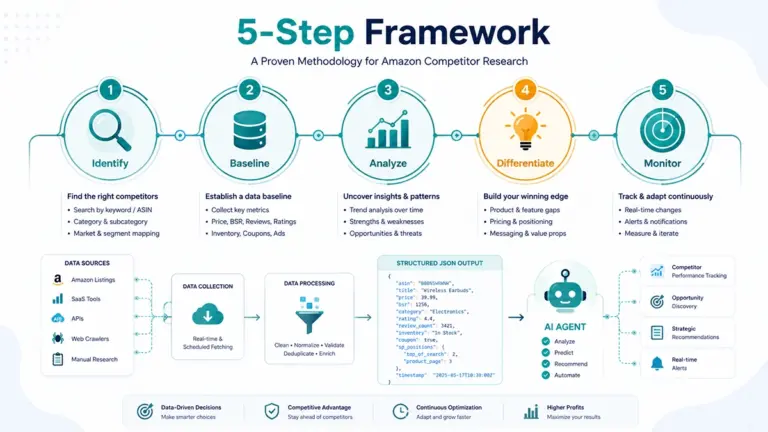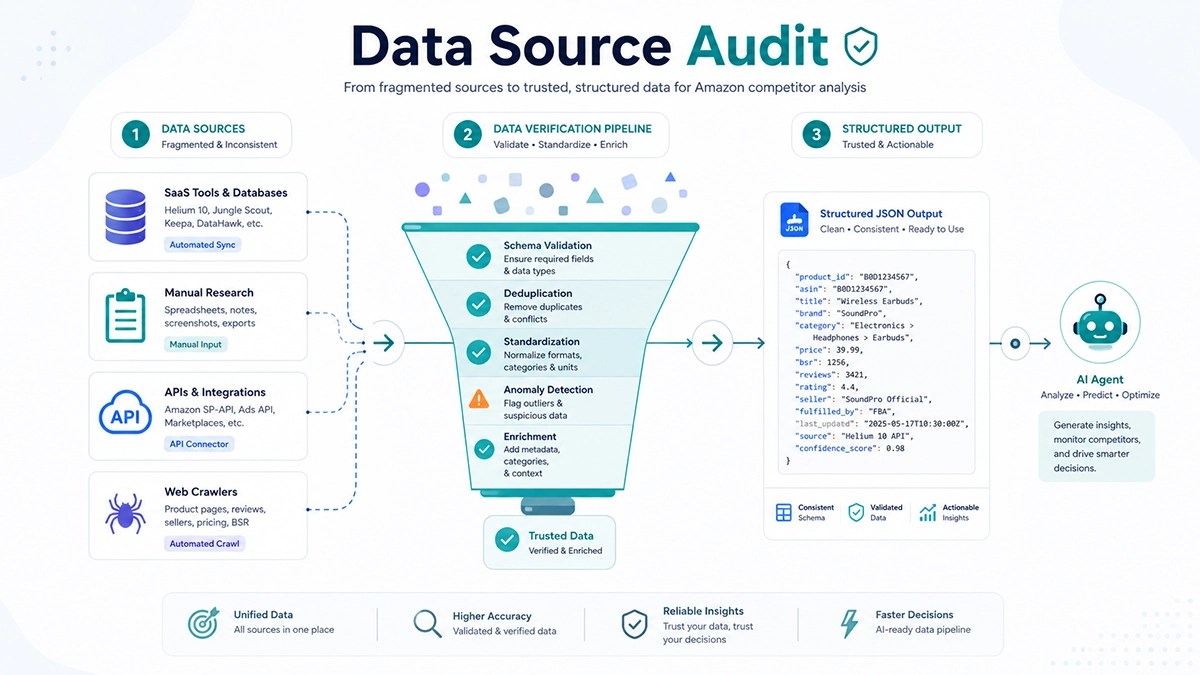
Amazon competitor analysis data source
Amazon competitor analysis data sources fall into five categories, but the vast majority of sellers have never asked a critical question: is the competitor data you’re using real data from Amazon’s page, or an estimate produced by a tool’s model? Keepa and Helium 10’s “sales data” is based on BSR ranking estimation, not real collection. SaaS tools lag 1 to 7 days. SP-API doesn’t cover competitor frontend data. The only truly reliable data source is a real-time page scraping API that returns actual data currently on Amazon, output as structured JSON for AI Agent consumption.
This question matters because your data source determines the ceiling of all your competitor analysis. I’ve spent the last few years at Pangolinfo building Amazon data collection infrastructure, and I’ve watched too many sellers fall into the same trap: making pricing decisions based on Jungle Scout’s “competitor monthly sales of 3,000 units,” only to discover the real number could be 1,800 or 5,000. A 20% to 50% error directly skews your pricing strategy. The more insidious problem is that they don’t know how this number was derived. They can’t verify it. They can’t correct for it.
This isn’t a problem with any specific tool. It’s an industry-wide data source transparency problem. Most sellers treat SaaS tools as “data sources,” but these tools are actually data middlemen. They scrape Amazon pages, store data in their own databases, process it through estimation models, and display the result. You see the processed product, not the raw data. The delays, errors, and dimension gaps introduced during this processing are invisible to you.
This article does one thing clearly: takes apart the complete chain of Amazon competitor analysis data sources, explains what损耗 each layer introduces, and presents an alternative that’s real-time, truthful, and directly consumable by AI Agents.
Where Does Amazon Competitor Data Actually Come From? Five Source Categories
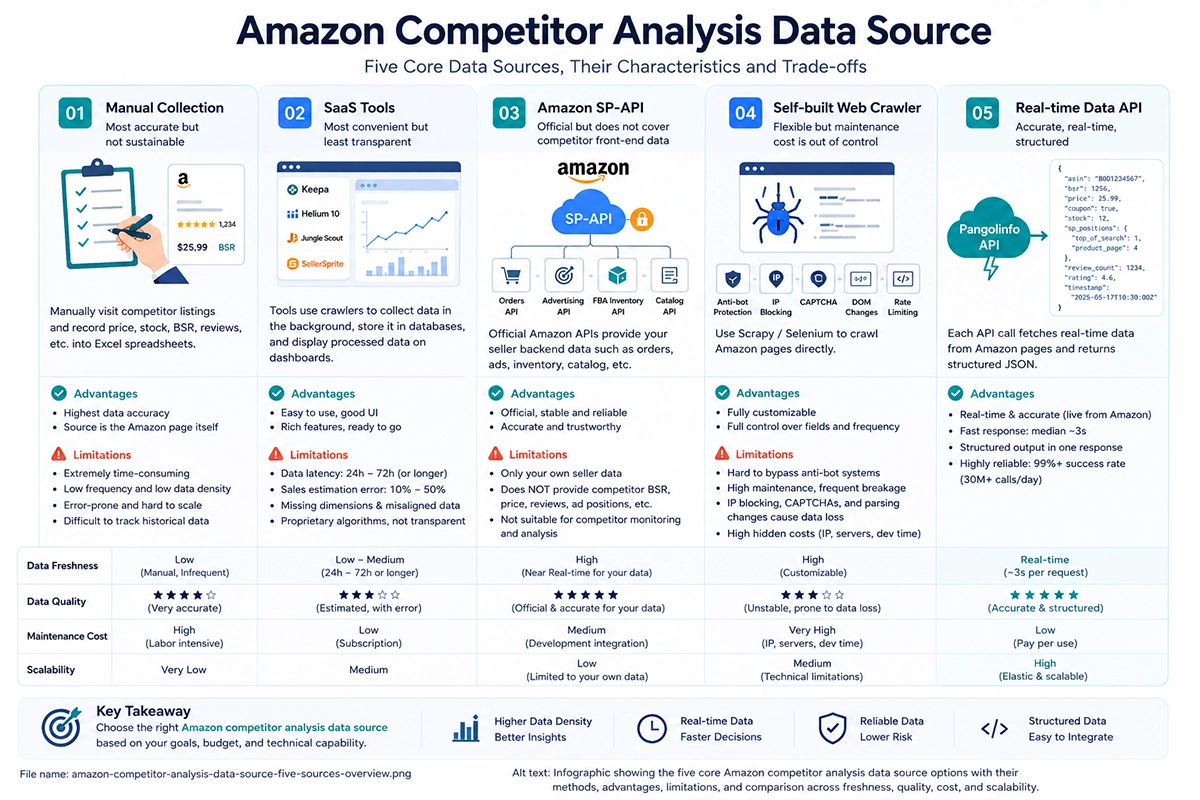
Let’s build a complete mental model first. Amazon competitor analysis data sources can be grouped into five categories, each with different data acquisition methods, quality characteristics, and technical properties. Many sellers’ problem isn’t choosing the wrong tool. It’s that they don’t know which category of data source they’re using, let alone the limitations of each.
Source One: Manual Collection — Most Real but Least Sustainable
An operations person periodically opens competitor listing pages, manually records price, stock status, BSR, review count, and other information into a spreadsheet. This is the most raw and transparent data source. You see what’s on the page and record it. The data source is Amazon’s page itself.
The advantage is data authenticity is guaranteed, since you’re directly viewing the original page. But the disadvantages are devastating. Monitoring 5 competitors daily takes at least 30 minutes. Hourly collection would require a full-time person. Manual recording is error-prone, historical data is hard to track, and scale is impossible beyond a handful of competitors. Manual collection’s “free” is the most expensive option. You save on tool costs but burn enormous human time, and the data density is far too low.
In practice, I’ve found that many early-stage sellers use manual collection because “there aren’t many competitors, I’ll just check myself.” But the problem is that manual collection frequency determines signal density. A competitor adjusts price at 3 PM and reverts at 8 PM. Your daily morning check completely misses this fluctuation. And that fluctuation might indicate the competitor is running a price elasticity test.
Source Two: SaaS Tools — Most Convenient but Least Transparent
Keepa, Helium 10, Jungle Scout, and SellerSprite are most sellers’ first choice. They provide visual interfaces, intuitive data displays, and require no technical background. But these tools’ data sourcing and processing methods are the least transparent part of the industry.
All these tools acquire data the same fundamental way: backend crawlers scrape Amazon pages on their own schedule, store data in a central database, process it through cleaning and estimation models, and push results to user dashboards. What you see is not raw data from Amazon’s page. It’s second-hand data processed through the tool’s database. This processing introduces three types of degradation.
The first is time degradation. According to exceptionalsellers.com’s April 2026 comparison, Jungle Scout’s data refreshes every 3 to 7 days. Helium 10 is 24 to 72 hours. The delay comes from every layer of the data processing chain: collection layer has scheduling delays (not every ASIN is scraped every hour), storage layer has ingestion delays, cleaning layer has batch processing delays, display layer has cache refresh delays. The competitor price you see might be 3 days old. The competitor may have adjusted twice and reverted in the meantime.
The second is estimation error. This is the most easily overlooked and most fatal problem. Jungle Scout claims its AccuSales estimation technology is “up to 90% accurate.” But “90% accurate” means 10% error, and in certain categories and rank ranges, actual error can reach 20% to 50%. Helium 10’s sales estimates use similar BSR-to-sales mapping models. The fundamental flaw of these models is that BSR is a relative ranking, not absolute sales. The same BSR 5,000 might correspond to 10 daily sales in Electronics, 5 in Home & Kitchen, or 30 during Q4 peak season. Any BSR-based sales estimate is a rough approximation, and the estimation methodology is the tool’s trade secret. You can’t verify it.
The third is dimension gaps. Keepa only covers BSR and price. Helium 10 and Jungle Scout have more features, but ad placement distribution, coupon status, inventory details, and zip code variations are either not provided or exist as separate modules with misaligned timestamps. You want to analyze whether a competitor’s BSR rose because they lowered price or launched ads. In most SaaS tools, this is impossible because the data is scattered across different functional modules.
Source Three: Amazon SP-API — Official but Doesn’t Cover Competitor Frontend Data
Amazon SP-API is the official interface, so it should be the most authoritative data source. But its design goal is seller backend data exchange, not frontend public data collection. SP-API provides: your own orders (Orders API), ad reports (Advertising API), FBA inventory (FBA Inventory API), catalog items (Catalog API), and more. What these data sources share: they’re all from your own seller backend.
Competitor BSR rankings, price changes, review data, and ad placement distribution are frontend public data. SP-API doesn’t cover any of them. SP-API’s Catalog API can return basic product info (title, brand, category) but not BSR ranking values. You want to monitor competitors with SP-API? Architecturally impossible. SP-API solves “how to get my data,” not “how to get competitor data.”
Source Four: Self-Built Crawlers — Flexible but Maintenance Costs Spiral
Some technical teams write their own Scrapy or Selenium scripts to scrape Amazon pages. The advantage is complete data source transparency. You collect directly from Amazon, data is real, and you control frequency and fields. But the cost is extreme maintenance burden.
Amazon’s anti-scraping has six defense layers: User-Agent detection, TLS fingerprinting, rate limiting, CAPTCHA, dynamic JavaScript rendering, and frequent page structure changes. At Pangolinfo I’ve seen the same trajectory repeatedly: first two months it works, third month firefighting begins, sixth month maintenance exceeds API costs. Proxy IP pool at $300/month, server cluster at $200, CAPTCHA solving at $150, 0.5 FTE engineer at $800. Total: about $1,450/month. And the hidden cost is data quality instability. Crawlers occasionally collect null values, parse incorrectly, or miss data due to IP throttling. These silent errors make you think nothing changed when collection actually failed.
Source Five: Real-Time Scraping API — Real, Fresh, Structured
This is the fifth category and what Pangolinfo provides. The core difference: every API call triggers a real-time request to Amazon, returning actual data currently on the page. No pre-stored database. No estimation processing. Direct structured JSON output. The data source is Amazon’s page itself. Data freshness is determined by your call frequency, not the data vendor’s crawl schedule.
In Pangolinfo’s production environment, median data return latency is about 3 seconds, with 99% success rate at 30M+ daily calls. A single call returns BSR, price, coupon status, inventory, SP ad placement distribution, review count, and rating, all sharing one timestamp. This means there’s no processing degradation between source and consumption. You get Amazon’s raw page information, just structured.
Hidden Data Source Traps You Probably Haven’t Realized
Having covered the five categories, let’s go deeper into problems most sellers haven’t recognized but that are silently affecting their decisions. This section draws from my experience processing massive data volumes at Pangolinfo. Few people in the industry discuss these systematically.
Trap One: Estimated vs. Real Data — Your Competitor Sales Are “Guessed”
This is the biggest trap. Many sellers open Helium 10 or Jungle Scout, see a competitor’s “monthly sales of 3,000 units,” and assume it’s real data. It’s not. It’s an estimate based on BSR ranking.
The estimation model works roughly like this: the tool collects BSR history for many ASINs, combines it with some known sales data points (like seller-reported sales or calibration data from other sources), and builds a BSR-to-sales mapping model. When you query an ASIN’s sales, the tool plugs its BSR into the model and outputs an estimate.
This model has fundamental flaws. First, BSR is relative ranking, not absolute sales. The same BSR 5,000 corresponds to vastly different real sales across categories and seasons. Second, Amazon’s BSR calculation weights are not public and change over time. Today’s mapping relationship may be different tomorrow. Third, calibration data is limited, so estimation error is larger for niche categories and cold rank ranges. Jungle Scout says “up to 90% accurate,” but that 90% is an average. In certain scenarios, actual error can reach 50%.
The more critical problem: you can’t verify it. The tool won’t tell you the confidence interval or the model parameters. All you can do is trust. But if you make pricing decisions based on a sales estimate with 30% error, your decision is off by 30%.
Real competitor sales data has only two sources: the seller’s own backend data (which you can’t access), or signals on Amazon’s page that indirectly reflect sales (BSR change velocity, review growth rate, inventory depletion rate). Real-time scraping APIs can get you the latter. But any tool claiming to give you “real competitor sales” is either estimating or lying.
Trap Two: The Pre-Stored Database Freshness Trap
Keepa and SaaS tools both serve data from pre-stored databases. When you query, you get historical data points from the database, not real-time collection results. This architecture means data freshness depends on the tool’s crawl frequency, not your query frequency. Querying every minute doesn’t help. You get the same database snapshot.
This is particularly deadly in competitor price monitoring. A competitor adjusts price at 10 PM. You see it on Keepa the next morning. But what if they reverted at 2 AM? You have no idea a price change occurred in between. And that change might indicate the competitor was running a price elasticity test, an extremely valuable competitive intelligence signal.
Another implicit issue with pre-stored databases: you don’t know the collection time. The timestamp displayed might be when data entered the database, not when it was scraped from Amazon. The two could differ by hours or days. You think you’re seeing yesterday’s data, but it might have been scraped three days ago and ingested yesterday.
Trap Three: Dimension Gaps — The Ad Placements and Coupons You Can’t See
Competitor analysis requires multi-dimensional correlation to produce valuable insights. How much did BSR change? Did price change? Was coupon adjusted? Did ad placements increase or decrease? Did stock status change? These dimensions need to be under the same timestamp for attribution analysis.
But SaaS tools have incomplete dimension coverage. Keepa has only BSR and price. Helium 10’s ad data and BSR data are in different modules with misaligned timestamps. Jungle Scout doesn’t provide ad placement distribution. This means the most basic attribution question, “did the competitor’s BSR rise because they lowered price or launched ads,” can’t be answered in most SaaS tools.
SP ad placement data is a particularly important but frequently overlooked dimension. Amazon’s SP ad placements are dynamically displayed. Different times, different zip codes, different search terms can show different placements. Whether a competitor is advertising on a keyword, what position, when they started, these signals are critical for judging their ad strategy. But most SaaS tools don’t provide this dimension. Even those that do have low coverage rates. Pangolinfo achieved 98% SP ad placement collection rate in testing, currently the highest in the industry.
Trap Four: Data Provenance Breakage — You Can’t Verify Accuracy
This is the most fundamental but least discussed problem. When you use SaaS tool data, you face a black box. Data travels from Amazon’s page to your screen through collection, storage, cleaning, and estimation. Each step can introduce error. But you can’t trace any data point back to its source. When was it collected? Which page version? What cleaning rules were applied? What are the estimation model parameters?
The consequence of provenance breakage: you can’t tell whether an anomalous data point is a real anomaly or a collection error. A competitor’s BSR suddenly jumps from 2,000 to 50,000. Did something actually happen, or did the tool’s crawler capture a partially loaded page? You don’t know. With a real-time scraping API, every call returns data with a precise timestamp, and you can re-call to verify at any time. The data source is Amazon’s page itself, with no intermediate processing layer.
Four Dimensions of Data Source Pain Points
Let’s put all five source categories through four dimensions: comprehensiveness, timeliness, accuracy, and cost. The pain point distribution becomes clear.
| Dimension | Manual | SaaS Tools | SP-API | Self-Built | Real-Time API (Pangolinfo) |
|---|---|---|---|---|---|
| Comprehensiveness | High (human sees all) | Low (predefined fields) | Very low (backend only) | High (customizable) | High (full-dimension JSON) |
| Timeliness | Very low (manual freq.) | Low (1-7 day lag) | Real-time (backend only) | Medium (depends on freq.) | High (~3 seconds) |
| Accuracy | High (real but error-prone) | Low (includes estimates) | High (official data) | Medium (unstable collection) | High (real collection) |
| Monthly cost | Free (labor expensive) | $200-400 | Free (high eng.) | $700-2,000 | $20-50 |
| Agent integration | Impossible | None | None | DIY | MCP, 19 tools |
Comprehensiveness — You’re Seeing the Tip of the Iceberg
A complete competitor profile needs at least six dimensions: price, BSR, coupon status, stock, SP ad placement distribution, and reviews. SaaS tools cover two or three, with predefined fields that can’t be extended. Keepa has only BSR and price. Helium 10 has more features, but ad data and BSR data are in separate modules with misaligned timestamps. SP-API architecturally doesn’t cover BSR rankings or ad placements. Manual collection can theoretically see everything, but human attention is limited, you can only focus on a few fields per visit, and quantification is difficult.
Real-time scraping APIs return all six dimensions in a single call, all sharing one timestamp. You don’t need to jump between tools stitching data. One call is a complete competitor snapshot.
Timeliness — Data Delay Is Eating Your Profits
Competitor price adjustments, stockouts, and ad launches have windows of just a few hours. A competitor drops price from $29.99 to $23.99 at 10 PM. By the next morning, you’ve lost an entire night’s orders. SaaS tool data lags 1 to 7 days. By the time you see the price change on the dashboard, the competitor may have reverted.
Manual collection timeliness depends on human frequency. You can’t watch competitor pages 24/7. Self-built crawlers can do hourly collection, but stability is constrained by anti-scraping. Real-time scraping APIs at ~3-second latency let you push collection frequency to hourly or higher. 200 competitors hourly, 4,800 calls a day, system handles it steadily.
Accuracy — Estimation Error Is Bigger Than You Think
We’ve covered the estimation problem in detail. Here’s an additional accuracy trap often overlooked: data in pre-stored databases may contain error values from anomalous page states during collection. If Amazon’s page loaded incompletely, the crawler might capture empty BSR fields or wrong prices. These anomalies enter the database and, if not cleaned, display to you as-is. SaaS tool cleaning rules are opaque. You don’t know which anomalies were filtered and which weren’t.
Real-time scraping APIs let you verify instantly. If a returned BSR looks anomalous, you can re-call immediately to confirm. The data source is Amazon’s page right now, not a database snapshot from days ago.
Cost — Hidden Costs Far Exceed Subscription Fees
SaaS tool subscription fees are the tip of the iceberg. Hidden costs include: losses from wrong decisions based on estimated data (unquantifiable but potentially enormous), opportunity costs from missing windows due to data delay, stacked fees from multiple tool combinations, and coverage gaps from query limits. Self-built crawler hidden costs are even higher: maintenance hours, proxy IP fees, decision risk from unstable data quality.
Real-time scraping APIs are pay-per-use. Monitoring 200 competitors at 4-hour intervals runs $20 to $50 monthly. TCO is 50% to 70% lower than SaaS combos, 80% to 95% lower than self-built crawlers.
The New Data Source Standard for the AI Agent Era
In 2026, more teams are building AI Agent workflows for operational automation. But when they try to have Agents consume competitor analysis data, they hit an awkward reality: traditional data sources are almost entirely inaccessible to Agents.
Why Traditional Data Sources Can’t Connect to Agents
AI Agents need data interfaces with two basic requirements: machine-readable structured format (JSON, not dashboard charts), and a standardized calling protocol (MCP or REST API, not manual login and viewing).
Keepa, Helium 10, and Jungle Scout have not shipped MCP Servers as of July 2026. Their REST APIs either don’t exist (Jungle Scout has no standard API), have strict quota limits (Keepa’s token mechanism), or keep data locked in dashboards without raw data access. Manual collection is inherently human, impossible to connect to Agents. SP-API has standard interfaces but doesn’t cover competitor frontend data.
This means if you’re building a workflow where “an Agent automatically analyzes competitor pricing and suggests adjustments,” every traditional data source is out. You’d have to manually export CSVs and feed them to the Agent, which completely defeats the purpose of Agent automation.
MCP Protocol: The Data Interface Standard for Agents
After Anthropic introduced MCP (Model Context Protocol) in 2025, it quickly became the standard protocol for AI Agents to consume external data. MCP’s core value: the Agent doesn’t need to know where data lives or how to fetch it. It just calls MCP-provided tools and gets structured data via natural language.
The Amazon Data MCP includes 19 tools covering product detail collection, BSR ranking queries, review data retrieval, ad placement tracking, and other core scenarios. After configuration, you can issue instructions in natural language: “Analyze the pricing strategy of these 20 competitors, find the 3 most aggressive on price, and check their ad placement distribution and coupon usage.” The Agent orchestrates collection, analysis, and comparison automatically, with no code required.
Structured JSON: The Data Format Agents Can Read
Even with an API interface, data format matters. SaaS tool data exported through unofficial channels is typically CSV or Excel, requiring extra parsing for Agents. Real-time scraping APIs return structured JSON directly, with clear field names, reasonable nesting, and immediate Agent consumption.
More importantly, the JSON contains all dimensions. A single call returns BSR, price, coupon, stock, ad placements, review count, and rating. The Agent can freely choose which dimensions to analyze without calling multiple endpoints to stitch data. This “one call, all dimensions” design is the core characteristic of an Agent-friendly data source.
How Pangolinfo Solves the Competitor Analysis Data Source Problem
Connecting the analysis above, a reliable competitor analysis data source needs to meet four conditions: data is real (not estimated), data is real-time (not pre-stored), dimensions are complete (all in one call), and Agents can consume it directly (MCP + JSON). Pangolinfo’s solution is designed around these four conditions.
Real Collection, Not Estimation — The Source Is Amazon’s Page
Every call to the Amazon Scraper API triggers a real-time request to Amazon, collecting actual data currently on the page. No estimation models. No BSR-to-sales mapping. No data processing middle layer. The BSR you get is the BSR currently displayed on Amazon. The price you get is the current selling price. The ad placements you get are the ones currently showing on search results. The data source is completely transparent. You can re-call to verify at any time.
In Pangolinfo’s production environment, median data return latency is about 3 seconds, with 99% success rate at 30M+ daily calls. SP ad placement collection rate reaches 98%, the industry leader. Coverage spans 21+ Amazon marketplaces with support for specified zip code collection.
Full-Dimension Structured — One Call, Complete Competitor Profile
A single API call returns JSON containing: BSR (main + subcategory), current price, coupon status and discount, stock status, SP ad placement distribution (including positions and corresponding keywords), review count, and rating. All fields share one timestamp, aligned by design.
This design directly solves the dimension gap problem. You want attribution analysis, did the competitor’s BSR rise because of a price cut, ad launch, or competitor stockout. Pull two JSON snapshots, do a field-level diff, and immediately see which dimensions changed. One call is a complete competitor snapshot. No cross-tool data stitching needed.
Agent-Native Access — MCP + API + Skill, Three Forms
Pangolinfo provides three Agent integration forms. Amazon Data MCP includes 19 tools via remote HTTP with zero installation. After configuration, Agents can invoke competitor data collection using natural language. REST API serves teams with development capability for deep system integration. The Amazon Scraper Skill targets Agent workflows, install and use.
For example, tell your Agent: “Monitor these 20 competitors’ price and BSR. Notify me if any change exceeds 15%, and analyze whether it’s caused by ad placement changes.” The Agent receives the instruction, automatically calls MCP tools for batch collection, compares with previous data, detects threshold-exceeding changes, pulls ad placement fields for attribution, and pushes analysis results to your designated channel. The entire flow requires no code and no manual data export/import.
Controllable Cost — Pay Per Use, TCO 50-95% Lower
Real-time scraping APIs are pay-per-use. No paying for unused features. Monitoring 200 competitors at 4-hour intervals runs $20 to $50 monthly. The same scale on SaaS tool combos costs $200 to $400. Self-built crawlers run $700 to $2,000. TCO is 50% to 70% lower than SaaS combos, 80% to 95% lower than self-built crawlers.
More importantly, you have complete data sovereignty. Data lives in your own database. You can analyze, model, and visualize it as you see fit, unconstrained by tool feature boundaries. You can train your own AI models on the data, connect any BI tool, share with any team member. Data sovereignty is entirely yours.
How to Build a Reliable Competitor Analysis Data Pipeline
The Python code below demonstrates a competitor analysis data pipeline using the Pangolinfo Scraper API: concurrent collection of full-dimension competitor data, historical snapshot storage, and field-level diff for change detection and attribution.
import requests
import json
import sqlite3
from datetime import datetime
from concurrent.futures import ThreadPoolExecutor, as_completed

API_ENDPOINT = "https://api.pangolinfo.com/v1/amazon/product"
API_KEY = "YOUR_API_KEY"
DB_PATH = "competitor_monitor.db"

def init_db():
    conn = sqlite3.connect(DB_PATH)
    conn.execute("""
        CREATE TABLE IF NOT EXISTS competitor_snapshots (
            id INTEGER PRIMARY KEY AUTOINCREMENT,
            asin TEXT NOT NULL,
            bsr_main INTEGER,
            bsr_sub TEXT,
            price REAL,
            coupon TEXT,
            stock TEXT,
            ads_count INTEGER,
            ads_detail TEXT,
            reviews_count INTEGER,
            rating REAL,
            timestamp TEXT NOT NULL
        )
    """)
    conn.execute("CREATE INDEX IF NOT EXISTS idx_asin_ts ON competitor_snapshots(asin, timestamp)")
    conn.commit()
    conn.close()

def fetch_competitor(asin, country="US"):
    """Collect complete competitor profile"""
    try:
        resp = requests.get(
            f"{API_ENDPOINT}/{asin}",
            headers={"Authorization": f"Bearer {API_KEY}"},
            params={"country": country, "fields": "bsr,price,coupon,stock,ads,reviews,rating"},
            timeout=10
        )
        data = resp.json()
        ads = data.get("ads", [])
        return {
            "asin": asin,
            "bsr_main": data.get("bsr", {}).get("main"),
            "bsr_sub": json.dumps(data.get("bsr", {}).get("subcategory", [])),
            "price": data.get("price"),
            "coupon": json.dumps(data.get("coupon")),
            "stock": data.get("stock"),
            "ads_count": len(ads),
            "ads_detail": json.dumps(ads),
            "reviews_count": data.get("reviews_count"),
            "rating": data.get("rating"),
            "timestamp": datetime.now().isoformat()
        }
    except Exception as e:
        print(f"[ERROR] ASIN {asin}: {e}")
        return None

def fetch_batch(asin_list, country="US", max_workers=10):
    """Concurrent batch collection"""
    results = []
    with ThreadPoolExecutor(max_workers=max_workers) as executor:
        futures = {executor.submit(fetch_competitor, asin, country): asin for asin in asin_list}
        for future in as_completed(futures):
            r = future.result()
            if r:
                results.append(r)
    return results

def analyze_changes(current_list, previous_map):
    """Field-level change detection and attribution"""
    insights = []
    for curr in current_list:
        asin = curr["asin"]
        prev = previous_map.get(asin)
        if not prev or not prev["bsr_main"] or not curr["bsr_main"]:
            continue
        bsr_change = (prev["bsr_main"] - curr["bsr_main"]) / prev["bsr_main"]
        changes = []
        if prev["price"] != curr["price"]:
            changes.append(f"Price {prev['price']}->{curr['price']}")
        if prev["coupon"] != curr["coupon"]:
            changes.append("Coupon changed")
        if prev["ads_count"] != curr["ads_count"]:
            changes.append(f"Ad placements {prev['ads_count']}->{curr['ads_count']}")
        if prev["stock"] != curr["stock"]:
            changes.append(f"Stock {prev['stock']}->{curr['stock']}")
        if abs(bsr_change) >= 0.15 or changes:
            insights.append({
                "asin": asin,
                "bsr_change": f"{bsr_change*100:.1f}%",
                "changes": changes or ["No correlated change, possible competitor stockout or algorithm shift"],
                "timestamp": curr["timestamp"]
            })
    return insights

if __name__ == "__main__":
    init_db()
    competitors = ["B09G9FPHY6", "B08N5WRWNW", "B0CHX1W1QT"]
    current = fetch_batch(competitors)
    # previous = get_last_snapshot(competitors)  # Load from database
    # insights = analyze_changes(current, previous)
    # for i in insights:
    #     print(f"[INSIGHT] {i['asin']} BSR {i['bsr_change']}: {i['changes']}")
    # save_to_db(current)
    # Pair with APScheduler for continuous monitoring
The core value of this code isn’t the collection itself, but the analyze_changes function’s field-level attribution logic. It doesn’t just tell you “BSR changed.” It tells you “BSR changed, and price dropped, coupon adjusted, ad placements increased” so you immediately know the most likely cause. This is the “full-dimension correlation” principle in actual code.
If you integrate via MCP with an Agent, you don’t even need this code. A natural language instruction like “Analyze the pricing strategy and ad placement for these 20 competitors” lets the Agent handle collection, attribution, and analysis automatically.
For category-level competitor monitoring, combine with the Amazon Niche Data API to pull category trees and Best Sellers list data, extending coverage from individual competitor monitoring to category-level competitive landscape analysis.
Frequently Asked Questions
Where does Amazon competitor analysis data come from?
Amazon competitor analysis data sources fall into five categories: manual copying from Amazon pages, SaaS tools (Keepa/Helium 10/Jungle Scout) with pre-stored databases, Amazon SP-API official interface, self-built crawlers, and real-time scraping APIs. SaaS tool sales data is typically based on BSR estimation models, not real collection. SP-API doesn’t cover BSR rankings or ad placements. The most reliable source is a real-time page scraping API that returns actual data currently displayed on Amazon.
Is Keepa and Helium 10 sales data accurate?
No. Keepa and Helium 10 sales data is based on BSR ranking estimation models, not real collection. Jungle Scout claims AccuSales estimation accuracy of about 90%, but in testing, actual error ranges from 20-50% depending on category and rank range. The fundamental flaw is that BSR is a relative ranking, not absolute sales. The same BSR can correspond to vastly different sales volumes across categories and seasons. Any BSR-based sales estimate is only a rough approximation.
Can SP-API collect competitor data?
No. Amazon SP-API only provides seller backend data (your own orders, ads, FBA inventory). It does not cover competitor BSR rankings, prices, reviews, or ad placement distribution from the frontend. SP-API’s Catalog API can return basic product info (title, brand, category) but not BSR ranking values or ad placement data. To collect competitor data, page scraping is the only viable route.
How often should Amazon competitor data be updated?
It depends on data type. Price and stock should be collected hourly since competitors can adjust anytime. BSR rankings every 2-4 hours since Amazon refreshes BSR hourly. Reviews daily is sufficient. But most SaaS tools only provide daily updates, with some data delayed 3-7 days. For sellers needing rapid response to competitor actions, daily updates are far from sufficient.
Can AI Agents directly use Amazon competitor data?
It depends on the data source. Keepa, Helium 10, and Jungle Scout have not shipped MCP Servers as of July 2026, so AI Agents cannot directly consume their data. Pangolinfo’s Amazon Data MCP provides 19 tools via remote HTTP with zero installation. After configuration, Agents can invoke competitor data collection using natural language, such as “Analyze the pricing strategy of these 20 competitors,” and the Agent handles collection and analysis automatically.
Summary and Next Steps
Back to the opening question: is your competitor data actually reliable? If you’re using SaaS tool sales estimates for decisions, you’re using BSR-based estimates with potential error of 20% to 50%. If you’re checking competitor prices through a pre-stored database, you might be seeing data 1 to 7 days old. If you want attribution analysis, whether BSR changed because of price cuts or ad launches, your tool likely doesn’t have these dimensions aligned under the same timestamp.
Data source determines the ceiling of competitor analysis. No matter how sophisticated your analysis model is, building it on estimated data just stacks uncertainty on top of uncertainty. Reliable competitor analysis requires the data source itself to be real, real-time, full-dimension, and verifiable. Real-time scraping API with MCP integration is currently the only solution that meets all four conditions simultaneously.
Here’s my suggestion: take 5 core competitors, collect their data once with a real-time scraping API, then compare with your current SaaS tool. See how much the prices differ, how much the BSR differs, whether your tool provides ad placement and coupon data. This comparison alone will give you a clear assessment of your data source quality.
Article Summary
This article systematically breaks down five categories of Amazon competitor analysis data sources (manual collection, SaaS tools, SP-API, self-built crawlers, real-time scraping API), revealing hidden traps most sellers haven’t recognized: SaaS tool sales data is BSR-based estimation with 20-50% error, pre-stored databases lag 1-7 days, dimension gaps prevent attribution analysis, and data provenance breakage makes accuracy unverifiable. After comparison across comprehensiveness, timeliness, accuracy, and cost, it presents Pangolinfo’s real-time scraping API + MCP solution: real data not estimates, ~3-second latency, full-dimension JSON output, Agent-native access (MCP 19 tools), and 50-95% lower TCO. Includes complete Python code and AI Agent natural language invocation examples.
Want to use real, real-time, full-dimension data for competitor analysis? Try Pangolinfo Amazon Scraper API now, or learn how Amazon Data MCP lets AI Agents integrate competitor data with zero code.
Author: Leo, Technical Lead / Chief Architect at Pangolinfo. Focused on Amazon e-commerce data collection and API architecture, processing 30M+ daily data requests. This article is based on the Pangolinfo team’s production data and engineering practices in competitor analysis data collection scenarios.