Published: 2026-07-03 | Author: Pangolinfo Data Team
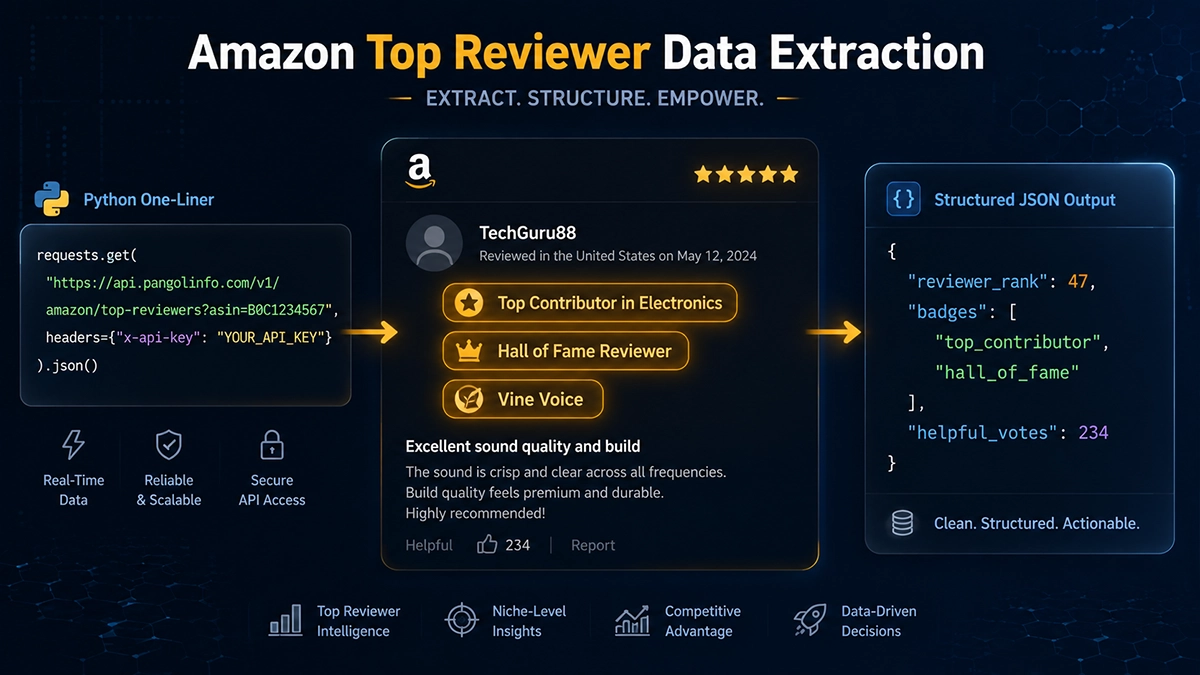
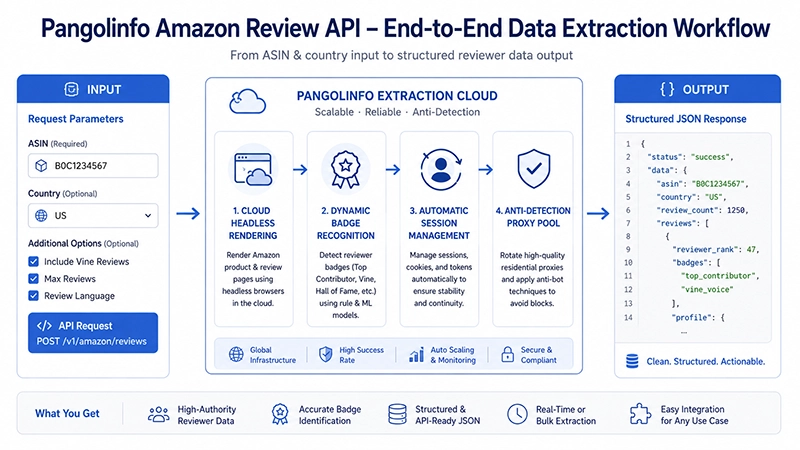
The quick answer: Getting Amazon top reviewer data runs into two hard walls immediately. First, Amazon’s public Top Reviewer leaderboard page (/review/top-reviewers/) has been offline since around 2021 — there’s no centralized list to scrape. Second, reviewer badges like “Hall of Fame Reviewer” and “Top Contributor” are dynamically injected into review cards via JavaScript, making static HTTP scrapers useless. The practical path forward: call the Pangolinfo Amazon Review API, pass an ASIN, and receive structured JSON where every review object includes reviewer_rank and a badges array — badge identification handled server-side, no DOM parsing needed on your end.
Why Reviewer Authority Signals Are Worth Pursuing
Most competitive review analysis treats every review as equivalent input. Average rating, sentiment score, keyword frequency — these metrics assume that a five-star review from a first-time Amazon shopper and a three-star review from a Hall of Fame Reviewer deserve equal weight. They don’t, and the gap is substantial.
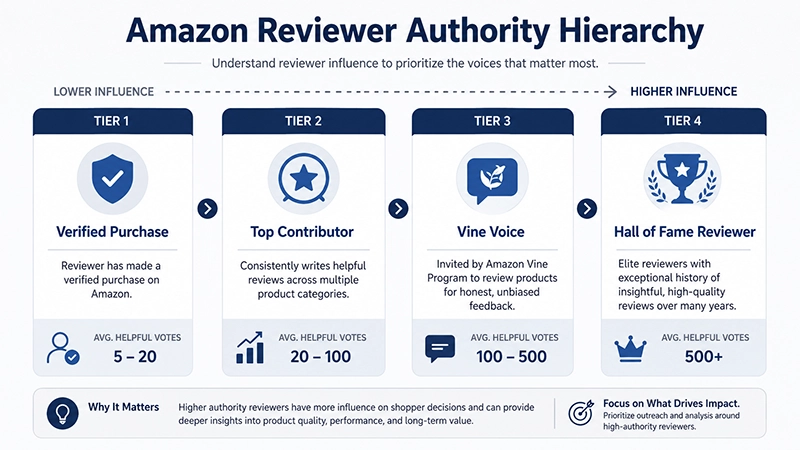
In an internal analysis we ran at Pangolinfo across 300,000+ Amazon reviews, the authority spread across reviewer tiers is striking. Hall of Fame Reviewers average 87 helpful votes per review. Top Contributors in their designated categories average 34. Standard Verified Purchase reviews average 2.8. The authority ratio between the top and bottom tiers exceeds 31x. A competitive analysis model that ignores this input will systematically misread product quality signals.
There’s a strategic timing dimension too. High-authority reviewers tend to post earlier in a listing’s lifecycle — they’re often enrolled in category-specific early reviewer access programs, and Amazon surfaces their reviews more prominently. When a Hall of Fame Reviewer leaves a critical review in the first 30 days of a competing product’s launch, that’s a stronger early-warning signal than thirty unverified one-star reviews posted in the same period.
The Technical Landscape: Why Extracting Amazon Top Reviewer Data Is Hard
The Leaderboard Is Gone
Before roughly 2021, amazon.com/review/top-reviewers/ exposed a pageable list of Amazon’s top-ranked reviewers — names, profile links, review counts, category expertise. Developers building reviewer databases or influence maps could scrape this list directly and build from there.
That page is gone. The URL returns a 404 or redirects. There’s no centralized leaderboard to pull from now. Amazon top reviewer data can only be recovered by collecting it through reviews at the ASIN level — which introduces the badge rendering problem.
Reviewer Badges Are JavaScript-Rendered
On a product review page, badges like “Top Contributor in Electronics” or “Hall of Fame Reviewer” appear on each reviewer’s card. They’re not present in the initial HTML response. Amazon uses an IntersectionObserver pattern combined with async API calls: when a review card enters the browser viewport, the badge widget triggers a network request and then renders the result into the DOM.
A static Python scraper running requests.get() on a review URL receives the HTML with empty badge containers. Even headless browser automation (Playwright, Selenium) requires careful scroll simulation and timing to ensure badge content actually loads before the snapshot is taken — and getting this consistently right at scale, across different product categories with varying badge implementations, is an ongoing engineering problem.
The Login Wall Adds Another Layer
Since November 2024, Amazon’s dedicated review pages require an authenticated session — unauthenticated requests redirect to sign-in. Building reliable Amazon reviewer badge data scraping now requires solving three problems simultaneously: authenticated session management, lazy-load trigger simulation, and badge async rendering wait. The operational complexity of doing this at production scale is substantial.
Comparison: Approaches and Their Real Costs
| Approach | Badge Accuracy | reviewer_rank Available | Monthly Cost Est. | Viability |
|---|---|---|---|---|
| Python requests (static) | ❌ 0% — dynamic render | ❌ Not available | Low, but data = zero | ❌ Unusable |
| Playwright/Selenium (headless) | ⚠️ ~60% with careful timing | ⚠️ Partial | Very High (accounts + proxies) | ⚠️ Fragile |
| Generic scraping API | ⚠️ Provider-dependent | ⚠️ Often missing | High (fixed monthly) | ⚠️ Incomplete |
| Pangolinfo Amazon Review API | ✅ 99.9% cloud-rendered | ✅ Native JSON field | Low (pay-per-use) | ✅ Production-ready |
How Pangolinfo Returns Reviewer Authority Fields
The Amazon Review API was designed with reviewer authority as a first-class data element. The decision came from observing that clients using earlier API versions were spending engineering time building reviewer-weight logic on top of raw review data — logic that broke every time Amazon changed their badge rendering. Moving identification to the API layer resolved this permanently from the client’s side.
The API response schema for reviewer data:
{
  "reviews": [
    {
      "id": "R1EXAMPLE123",
      "title": "Three months of testing: two specific design issues identified",
      "body": "I've reviewed over 200 products in this category...",
      "rating": 3,
      "date": "2026-06-10",
      "helpful_votes": 147,
      "vine": false,
      "verified_purchase": true,
      "reviewer": {
        "name": "TechReviewer_Marcus",
        "profile_url": "https://www.amazon.com/gp/profile/amzn1.account.xxx",
        "reviewer_rank": 89,
        "badges": ["top_contributor", "hall_of_fame"],
        "badge_categories": ["Electronics", "Computers"],
        "total_reviews": 1847,
        "helpful_votes_total": 23456
      }
    }
  ]
}
reviewer_rank: 89 means this reviewer holds the 89th position in Amazon’s global reviewer rankings. The badges array provides the type strings directly — no CSS class parsing, no text string matching, no fragile DOM selectors that break on frontend updates.
Python Implementation: Weighted Competitor Analysis Using Reviewer Authority
import requests
import json
from typing import List, Dict, Optional

API_KEY = "YOUR_PANGOLINFO_API_KEY"
REVIEW_API = "https://api.pangolinfo.com/v1/amazon/product/reviews"

# Reviewer authority weights by badge type
AUTHORITY_WEIGHTS = {
    "hall_of_fame": 10.0,
    "top_contributor": 5.0,
    "vine_voice": 4.0,
}

def get_reviews(asin: str, zip_code: str = "10001", max_pages: int = 5) -> List[Dict]:
    """Fetch all reviews for an ASIN with full reviewer metadata."""
    headers = {"Authorization": f"Bearer {API_KEY}"}
    all_reviews = []

    for page in range(1, max_pages + 1):
        resp = requests.get(
            REVIEW_API,
            params={"asin": asin, "country": "us", "zip_code": zip_code, "page": page},
            headers=headers,
            timeout=20
        )
        if resp.status_code != 200:
            break
        page_reviews = resp.json().get("reviews", [])
        if not page_reviews:
            break
        all_reviews.extend(page_reviews)

    return all_reviews


def get_reviewer_weight(reviewer: Dict) -> float:
    """Compute authority weight from reviewer badge array."""
    badges = reviewer.get("badges", [])
    for badge_type, weight in sorted(AUTHORITY_WEIGHTS.items(), key=lambda x: -x[1]):
        if badge_type in badges:
            return weight
    return 1.0  # Default: verified purchase or unverified


def build_weighted_competitor_profile(asin: str) -> Dict:
    """
    Build a weighted sentiment profile for a competitor ASIN.
    High-authority reviewer opinions count proportionally more.
    """
    reviews = get_reviews(asin)
    if not reviews:
        return {"asin": asin, "error": "no reviews found"}

    weighted_sum = 0.0
    total_weight = 0.0
    top_reviewer_reviews = []
    high_authority_negatives = []

    for review in reviews:
        reviewer = review.get("reviewer", {})
        weight = get_reviewer_weight(reviewer)

        weighted_sum += review["rating"] * weight
        total_weight += weight

        rank = reviewer.get("reviewer_rank")
        badges = reviewer.get("badges", [])
        is_top = (rank and rank <= 1000) or any(
            b in badges for b in ["hall_of_fame", "top_contributor"]
        )

        if is_top:
            top_reviewer_reviews.append({
                "rank": rank,
                "badges": badges,
                "rating": review["rating"],
                "title": review["title"],
                "helpful_votes": review.get("helpful_votes", 0),
                "authority_weight": weight
            })

        if review["rating"] <= 3 and weight >= 4.0:
            high_authority_negatives.append({
                "title": review["title"],
                "excerpt": review["body"][:250],
                "weight": weight,
                "reviewer_rank": rank,
                "badges": badges
            })

    return {
        "asin": asin,
        "total_reviews": len(reviews),
        "raw_avg_rating": round(
            sum(r["rating"] for r in reviews) / len(reviews), 2
        ),
        "weighted_avg_rating": round(
            weighted_sum / total_weight if total_weight > 0 else 0, 2
        ),
        "top_reviewer_count": len(top_reviewer_reviews),
        "top_reviewer_reviews": sorted(
            top_reviewer_reviews, key=lambda x: x["rank"] or 9999
        )[:10],
        "high_authority_negatives": sorted(
            high_authority_negatives, key=lambda x: -x["weight"]
        )[:5]
    }


# Batch competitive analysis
competitor_asins = ["B08N5WRWNW", "B09XK3MJVT", "B0CK9FZBT3"]
results = {asin: build_weighted_competitor_profile(asin) for asin in competitor_asins}

# Summary comparison
print("\n--- Competitor Authority-Weighted Comparison ---")
for asin, data in results.items():
    if "error" not in data:
        delta = data["weighted_avg_rating"] - data["raw_avg_rating"]
        print(f"ASIN {asin}: raw {data['raw_avg_rating']}★ → weighted {data['weighted_avg_rating']}★ "
              f"(delta: {delta:+.2f}) | top reviewers: {data['top_reviewer_count']}")

with open("top_reviewer_competitor_analysis.json", "w", encoding="utf-8") as f:
    json.dump(results, f, ensure_ascii=False, indent=2)
print("\nSaved to top_reviewer_competitor_analysis.json")
AI Agent Integration: Reviewer Authority as an LLM Reasoning Signal
For teams building AI-powered product selection systems or VoC analytics pipelines, reviewer authority data changes the quality of the input corpus fundamentally. When you instruct an LLM to analyze competitive reviews, giving it context about reviewer authority — “this review is from a Hall of Fame Reviewer ranked #89 globally, with 147 helpful votes on this review” — meaningfully improves the model’s ability to weight evidence correctly.
The Amazon Data MCP and Amazon Scraper Skill allow AI agents to call review data with full reviewer metadata in Markdown format, reducing token overhead by ~65% compared to feeding raw JSON. A reliable agent workflow pattern: use Amazon Scraper API to flag competitor ASINs with anomalous rating distributions, then pull reviewer-weighted reviews for those ASINs via Review API, then pass the authority-annotated corpus to an LLM for defect clustering.
Frequently Asked Questions
What fields does Amazon top reviewer data include?
The core fields include: reviewer_rank (global ranking position), badges (array: top_contributor, hall_of_fame, vine_voice), badge_categories (categories where top_contributor applies), helpful_votes on the review, helpful_votes_total across all reviews, and total_reviews written. All returned natively by Pangolinfo Amazon Review API.
Why is Amazon’s Top Reviewer leaderboard page no longer accessible?
Amazon retired /review/top-reviewers/ around 2021. The URL no longer returns a usable page. Reviewer authority is now only expressible through per-review badge data collected at the ASIN level.
What is the difference between Top Contributor and Hall of Fame Reviewer badges?
Top Contributor is category-specific (e.g., “Top Contributor in Electronics”) and reflects deep expertise in a product domain. Hall of Fame Reviewer is a global, lifetime achievement badge for reviewers who historically held top-tier global rankings. Both correlate strongly with higher helpful_votes — Hall of Fame reviewers average 31x more helpful votes than standard verified purchase reviewers in our dataset.
How does Pangolinfo return reviewer_rank and badge data?
Each review object includes a reviewer sub-object with reviewer_rank, badges array, and supporting metadata. Badge identification runs server-side on Pangolinfo’s cloud rendering infrastructure — no CSS selectors, no DOM parsing, no maintenance when Amazon updates their frontend.
How can Amazon top reviewer data be used in AI product selection workflows?
Reviewer authority enables weighted sentiment analysis (Hall of Fame at 10x, Top Contributor at 5x weight). A Hall of Fame reviewer’s ≤3-star rating is an early warning signal that precedes broader rating decline by 2-3 weeks in our analysis. For AI agents, providing reviewer authority context alongside review text measurably improves LLM defect identification accuracy.
Free test quota at the Pangolinfo Console. Full API reference at the Pangolinfo Documentation Center.