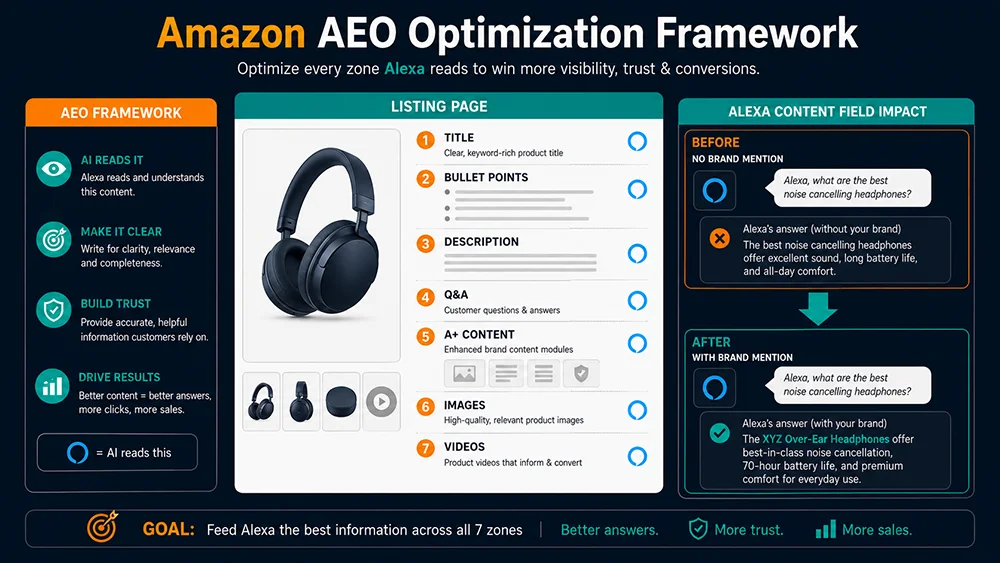
Amazon AEO Optimization Complete Guide
An uncomfortable reality for sellers: Your carefully optimized listing may have been read by Alexa hundreds of times — and Alexa has never once mentioned it.
Since Alexa for Shopping took over Amazon’s main search bar, every search passes through an AI filter first. Alexa reads your listing, interprets your product, and decides: does this get recommended to this user? It won’t tell you why it said no. And without the right data, you won’t know either.
This guide gives you a method that works. From “I can’t see what Alexa is saying about my products” to “I have data, I’m optimizing against it, and I can measure the result.”
What Is AEO — And How It Differs From SEO
AEO (AI Engine Optimization) is the practice of optimizing content so that AI recommendation systems — like Alexa for Shopping — proactively surface your product to the right user at the right moment.
The core distinction from traditional SEO:
| Dimension | Traditional SEO | AEO (AI Engine Optimization) |
|---|---|---|
| Who judges it | Search algorithm | Large language model (AI) |
| Primary signal | Keyword match, link authority, CTR | Semantic clarity, audience alignment, scene relevance |
| Optimization target | Keyword placement, page authority | Content semantic richness, differentiation specificity |
| Output form | Search result ranking position | Inclusion rate in AI recommendation summaries |
| How you measure it | Rank tracking tools | Alexa API data collection and comparison |
The two strategies are not in conflict. AEO-optimized content — richer, more semantically coherent, more clearly differentiated — typically also improves traditional SEO. But AEO adds the specific requirement of viewing every listing element through the lens of “how would an AI language model interpret this sentence?”
The 3 Dimensions Alexa Uses to Evaluate a Product
Based on Pangolinfo’s analysis of large-scale Alexa API response data, Alexa’s recommendation decisions primarily reflect three evaluation dimensions:
- Audience semantic match: Does the listing clearly express who this product is for — age group, lifestyle, housing type, usage habits, skill level?
- Scene-use clarity: Does it explicitly describe when and where this product is used — season, space constraints, what it pairs with, frequency of use?
- Differentiation value expression: Does it clearly articulate what makes this product better than similar options — specific specs, unique features, specific problems solved?
Alexa doesn’t recommend a product because your keyword density is high. It recommends your product because your description most accurately matches a user’s real need. The judgment is semantic, not lexical.
Step One: Get the Data — What Is Alexa Actually Saying?
Before optimizing anything, you need to know your baseline. Use the Pangolinfo Alexa API to query your target keywords. Within minutes you’ll have:
- The full text of Alexa’s AI summary for that keyword (the
contentfield) - Grouped product recommendations with Alexa-generated descriptions (the
productsfield) - The follow-up questions Alexa asks users to refine their search (the
follow_up_questionsfield)
Once you have the data, run three diagnostic checks:
Check 1: Is Your Brand Mentioned in the Alexa Summary?
Search your brand name in the content field. If it’s absent, Alexa is currently not including you in its recommendation narrative for this keyword — that’s your starting gap.
Check 2: Does Your ASIN Appear in the Recommendation Groups?
Look for your ASIN in products[].items[].asin. If present, check which category group Alexa placed you in (products[].title) and what language Alexa uses to describe you in the describe field. The describe field is especially revealing — it’s a direct window into how Alexa is characterizing your product to prospective buyers.
Check 3: Analyze the Follow-Up Questions
The follow_up_questions field is your most actionable optimization signal. These are the decision dimensions Alexa thinks matter most in your category. If your listing doesn’t clearly and specifically answer these questions, you’ve found your highest-priority AEO gap.
For example: if you’re selling a queen bed frame and Alexa’s follow-up questions for your target keyword include:
- “Does it work without a box spring?”
- “What’s the maximum weight capacity?”
- “How long does assembly take?”
…and your listing buries all three answers inside a single overcrowded bullet point, you’ve identified exactly what to fix first.
The 7 Listing Dimensions to Optimize for Alexa
Dimension 1: Title
Old thinking: Pack as many keywords as possible into the title.
AEO thinking: The title should clearly communicate “what it is + who it’s for + core function” so Alexa can immediately parse the product’s positioning.
Before (keyword-stacking):
Queen Bed Frame Metal Platform No Box Spring Heavy Duty Mattress Foundation Bedroom Furniture Black
After (semantically clear):
Metal Queen Platform Bed Frame — No Box Spring Needed, 2,000 lbs Capacity, Tool-Free Assembly in 30 Min, Apartment & Small Bedroom Friendly
The revised version is immediately parseable for Alexa: audience (apartment dwellers, small bedroom), scene (no box spring required, easy to move), and differentiation (30-minute assembly, 2,000 lbs capacity) are all visible on the first read. The first version forces Alexa to guess all three.
Dimension 2: Bullet Points
Bullet points are among the highest-weighted content sources for Alexa’s semantic analysis. Each bullet should map to one clear value dimension, expressed in concrete, specific language that both users and AI can parse without ambiguity.
Low-signal bullet (avoid):
✗ “High quality materials for long-lasting durability” — no specific claim, no audience, no scene, no number
High-signal bullet (target):
✓ “14-gauge cold-rolled steel supports up to 2,000 lbs — 10-year stress-tested joints, ideal for couples or solo users who relocate frequently and need furniture that survives the move”
Recommended structure for each bullet: Bold key attribute → specific number or parameter → use scene description → target user mapping
Dimension 3: Product Description
The product description is your best real estate for answering “why this product over similar ones.” Alexa’s AI-generated describe field draws heavily on semantic content from this section.
AEO best practices for the description:
- Write in second person (“you”) — address the target user directly, not abstractly
- Name 1–2 specific problems common with competitor products, then explain exactly how yours solves them
- Describe the full experience, not just the features: what it’s like to use it, in what context, with what result
- Avoid phrasing that’s technically true but semantically thin (“premium construction,” “stylish design,” “versatile use”)
Dimension 4: Q&A Section
The Q&A section is the most underestimated AEO lever on the entire product page. Alexa’s follow-up questions and Q&A content are directly correlated. When Alexa frequently asks users “Does this work without a box spring?” in a category, listings that have a clear, specific answer to that question in their Q&A are more likely to be recommended for that use context.
Execution method:
- Use the Pangolinfo Alexa API to extract
follow_up_questionsfor your core keywords - Submit each question as a Q&A entry with a clear, specific answer — not a generic non-answer
- After each Alexa data refresh cycle, check whether new follow-up questions have emerged for your category
- Prioritize questions that currently appear without matching Q&A answers on your listing
Dimension 5: A+ Content
A+ Content provides Alexa with richer visual and structured content to work with. Two module types carry the highest AEO value:
- Comparison modules: Direct side-by-side display of different variants, specs, or use cases. Alexa uses this structured information when answering “which version is better for my situation?” — one of the most common AI shopping assistant questions.
- Scene-based image modules: Images showing the product in specific real-life scenarios with explanatory captions. These reinforce the scene-use signals in your text content, strengthening Alexa’s ability to categorize your product correctly in semantic recommendation groups.
Dimension 6: Images
While Alexa’s recommendations are currently text-driven, image alt text and the scenes depicted in images still influence how Alexa constructs its semantic understanding of your product.
AEO image priorities:
- Hero image: Clean, clear full-product shot — gives Alexa’s visual understanding a strong product category signal
- Scene images: Show the product in its actual use context (studio apartment bedroom / outdoor patio / small home office) — reinforces the scene-based language in your text content
- Dimension/spec callout images: Numerical overlays of key specs — makes critical parameters easily parseable for both users and AI
- Comparison images: Visual differentiation against common alternatives or competitors — helps Alexa build a richer model of your product’s position in the category
Dimension 7: Video
Video content is increasingly factored into Alexa’s semantic analysis. The highest-impact optimization here is the video title and description fields — the text Alexa can directly read. Include your core use scenario and target audience in the video title, not just the product name. A video titled “Apartment Bed Frame — Tool-Free 30-Minute Assembly for Solo Renters” gives Alexa significantly more semantic signal than “Brand X Queen Bed Frame Assembly Video.”
Using the Pangolinfo Listing Optimization Skill
Manually auditing 7 dimensions across even a handful of ASINs is time-consuming. With multiple SKUs or ongoing monitoring needs, it quickly becomes unmanageable. The Pangolinfo Listing Optimization Skill automates the process:
- Input your ASIN and target keywords
- The Skill automatically calls the Alexa API to retrieve current recommendation data for your keywords
- It cross-references your live listing content against Alexa’s data to generate an AI readability score
- It outputs a specific weakness report: which dimension is weakest, and what specifically needs to change
- After implementing changes, run the process again and compare the two Alexa data snapshots to quantify improvement
The result is a closed-loop optimization workflow: Collect data → Diagnose gaps → Execute changes → Validate with data → Collect again. No guessing. No relying on sales rank as a lagging indicator of whether your optimization worked.
Register at the Pangolinfo Console to get started. New accounts include free API test credits.
AEO Optimization SOP — Ready to Execute
This checklist covers a full AEO audit and optimization cycle for a single SKU. Recommended cadence: quarterly, or whenever you detect a meaningful shift in your Alexa recommendation data.
Phase 1: Data Collection (30 minutes)
- ☐ Identify 3–5 target keywords (core keywords + scene-based keywords + long-tail)
- ☐ Query each keyword through the Pangolinfo Alexa API
- ☐ Record: brand visibility in
content, ASIN presence inproducts, recommendation group placement,describefield language, fullfollow_up_questionslist - ☐ Save this snapshot as your pre-optimization baseline
Phase 2: Gap Analysis (1 hour)
- ☐ Cross-reference
follow_up_questionsagainst your Q&A section — identify unanswered questions - ☐ Check title for: audience signal + scene + core differentiation (all three present?)
- ☐ Check each bullet point: does it include a specific number + scene description + user mapping?
- ☐ Run the Listing Optimization Skill for AI readability scoring
- ☐ Prioritize the top 3 gaps by impact
Phase 3: Content Changes (2–4 hours)
- ☐ Revise title (preserve core keywords, add audience + scene + key spec)
- ☐ Rewrite or supplement the relevant bullet points
- ☐ Add Q&A answers for all unaddressed follow-up questions
- ☐ Update or add A+ Content comparison and scene modules
- ☐ Review image alt text, scene coverage, and video title/description
Phase 4: Validation (1–2 weeks after changes)
- ☐ Re-query the same keyword set through the Alexa API
- ☐ Compare brand visibility: did your brand appear in Alexa’s
contentfield? - ☐ Compare product placement: did your ASIN appear in a recommendation group? Did the group or describe field change?
- ☐ Record organic traffic and conversion shifts (2–4 week window)
- ☐ Document findings for the next optimization cycle
Common Mistakes to Avoid
Mistake 1: “I added the keyword — that’s my AEO done”
Keyword density has no direct AEO value. Alexa operates on semantic understanding, not keyword matching. Adding a keyword to your listing does not automatically improve how Alexa understands your product — it only helps if that keyword appears in context that makes the product’s use case and audience clearer.
Mistake 2: “My sales rank is strong, Alexa will naturally recommend me”
Alexa’s recommendation logic is not equivalent to sales rank. A product ranked #5 in keyword search but with a semantically clear, scene-specific listing may appear in Alexa recommendations more frequently than the #1 seller with a generic description. Recommendation frequency and keyword rank are different signals on different dimensions.
Mistake 3: “I ran the AEO audit once — I’m good”
Alexa’s recommendations update as user behavior data evolves and competitors change their listings. A one-time audit gives you a point-in-time snapshot. Building a monthly Alexa data monitoring habit converts AEO from a one-off project into a compounding operational advantage.
Compliance Note
The Pangolinfo Alexa API collects data from publicly accessible Alexa for Shopping front-end interfaces in a structured format. No Amazon account login, private API access, or user data is involved. Data is intended for analysis and optimization purposes. Ensure your usage complies with applicable local data regulations.
The Bottom Line
Amazon AEO is not guesswork — it’s a data-backed methodology:
- Use the Pangolinfo Alexa API to see exactly what Alexa is currently saying in your category
- Extract
follow_up_questionsto identify the decision dimensions Alexa considers most critical - Optimize across 7 listing dimensions to improve semantic clarity for Alexa’s AI
- Use the Listing Optimization Skill for AI readability diagnosis and rewrite guidance
- Re-collect data after optimization to quantify the impact
The sellers who will win in the AI era are those who make Alexa’s recommendations visible, measurable, and actionable — rather than treating them as an unknowable external force.
→ Pillar Page: Amazon Alexa API Complete Guide — World’s First Practical Playbook
→ Foundation: What Is Amazon Alexa for Shopping?
→ Comparison: Amazon Alexa vs Rufus: 7 Core Differences
→ Tool deep-dive: Pangolinfo Listing Optimization Skill — Complete Usage Guide (Article 04 — link updates when published)
Start your first AEO audit now. Register at the Pangolinfo Console for free API test credits. Full field reference: Alexa API Documentation.