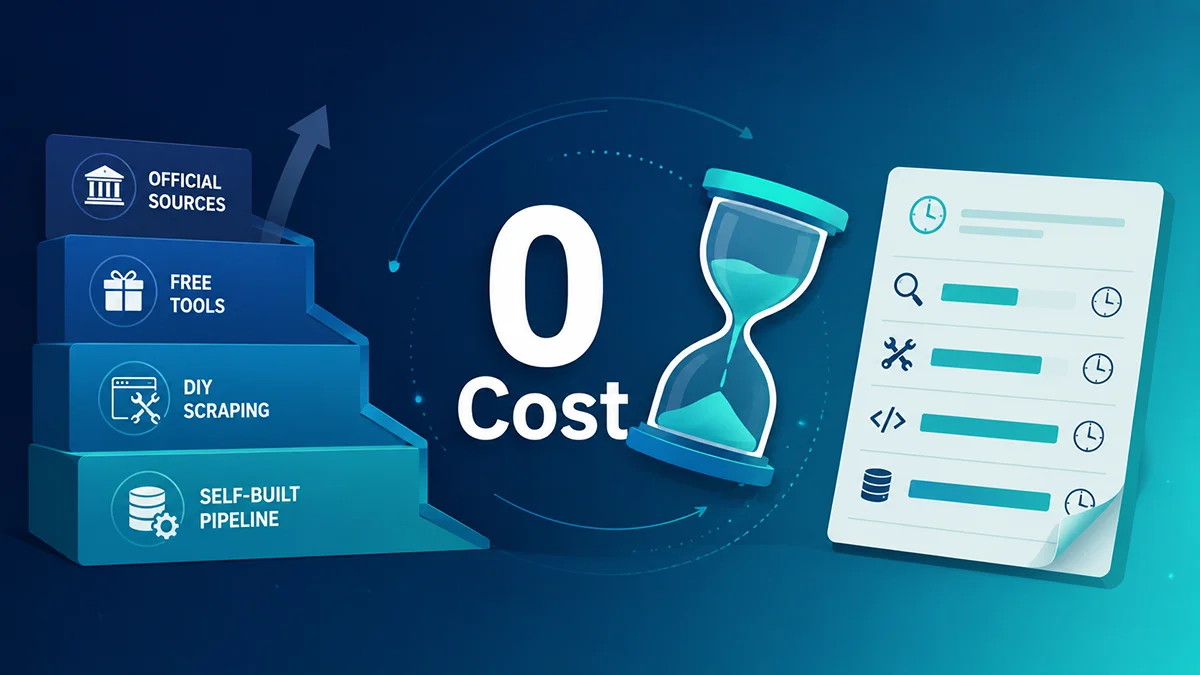
You can get Amazon data for free — but "free" never means "zero cost." This piece splits the free paths into three layers (official sources → DIY scraping → your own pipeline), gives you code and formulas you can run today, then hands you a time-cost ledger that converts your hours into money, so you know exactly when "free" becomes the more expensive choice.
Almost every article on how to get Amazon data for free follows the same recipe: list Keepa, Helium 10, Jungle Scout, Octoparse, then tell you to click and export. It's not wrong, but it flattens a serious job into a tool list and quietly dodges the one sentence that matters: the tool is free, the data isn't, and you're still paying — in time. This piece does it differently. First it maps what "free Amazon data" actually is, names the five gaps mainstream guides skip, then walks you through runnable, layered how-to (Python and Google Sheets formulas), and ends with a time-cost ledger that pinpoints the crossover — past it, paying is cheaper than building.
If you care more about "turning search-result data into intelligence," start with our piece Amazon keyword search results scraping: from a list to a signal canvas; for the ad-slot side, read why SP placement collection rate is the watershed.
How to get Amazon data for free: what "free" actually means
There are only four kinds of free Amazon data sources. People blur them together, which is why "free" feels messy. Separate them and it clears up — and below, each category comes with concrete steps you can click through and a real example, not just a tool name.
A. Amazon's own free sources: the compliant starting point to get Amazon data for free
Official sources are compliant and stable — the first thing to light up on the free path. Log into Seller Central (sellercentral.amazon.com) as a brand seller and click: Brands → Brand Analytics → Search Query Performance (left side); set the time range to "Last 30 days" and type a core query (e.g. yoga mat), then click Export CSV. Keep five columns: search query, clicked ASINs, click share, cart-add share, purchase share. A real reading: under yoga mat, your ASIN B0ABCD1234 gets click share 12.3%, cart-add 8.1%, purchase 6.4% — more authoritative than any estimator, because it's Amazon's own funnel.
No Seller Central but you're a developer? Use SP-API: open developer.amazonservices.com → create an app → tick Catalog Items and Reports roles → get a refresh token via Login with Amazon. With the token, "Hands-on 3" gives you runnable listing code. Affiliate sites use PA-API (apply in Associates Central): call GetItems with one ASIN and get title, price, rating — enough for a product card. No access at all? Open Best Sellers (e.g. https://www.amazon.com/Best-Sellers/zgbs/electronics) and manually note the first 20 ASINs, prices, ratings, review counts, ranks — that's your field template for later automation.

B. Free third-party tools: use them as hypothesis validators
Free tools are handy but give processed conclusions, not raw data. Use them to validate hypotheses and record confidence — four concrete steps:
- 1) Keepa for price floor. Install the extension, open any product page (e.g.
https://www.amazon.com/dp/B0EXAMPLE1), switch to the Price history tab, read the 90-day curve. A real reading: an ASIN hit a 90-day low of $19.99, held Buy Box 87% of the time, and went out of stock for 3 days — that tells you its price floor and supply stability. - 2) CamelCamelCamel price alerts. Paste 3–5 competitor ASINs, set a price alert, e.g. "alert me below $25" — it emails you at the bottom.
- 3) Helium 10 / Jungle Scout for estimated demand. On a
wireless earbudsresults page, click X-ray and read the top-10 estimated monthly sales. ExampleB0EARBUD01~4,200 units/month — record relative rank only; don't treat it as real GMV. - 4) Roll it into one validation sheet. A Google Sheet with columns: ASIN | Tool | Price Band | Review Barrier | Est. Demand | Confidence. Sample row:
B0EXAMPLE1 | Keepa | $19.99–$29.99 | 1,200 reviews | Medium | High. Low-confidence rows get re-checked with the API later.

C. DIY scraping: from no-code to browser automation
Go no-code → script → browser automation, with a verifiable mini-goal at each step so you always know where you're stuck:
- 1) No-code first: locate the field. In Google Sheets, put the product URL in A1 and
=IMPORTXML(A1,"//span[@id='productTitle']")in B1. A returned title means the field is in static HTML;#N/Ameans it's JS-rendered — your cue to bring in Playwright. - 2) Script the static page. Use the Python from "Hands-on 1", but start with just one keyword, one page, 20 results; save the raw HTML, parse title/price, and export
amazon_sample.csvwith columns: keyword | rank | asin | title | price. - 3) Dynamic page for ad slots. Search results render heavily via JS; use the Playwright from "Hands-on 4" on
wireless earbudsand count the Sponsored tags. A typical run tags ~3 ad slots on the first screen — but scroll-loaded ads below are missed, which is exactly the DIY completeness gap. - 4) Log every run. Write to CSV: run_time | keyword | page | asin | missing_field_rate. If missing-field rate exceeds 20%, treat it as a warning sign — the DOM drifted again.

D. Public datasets: a training ground, not today's market
Public datasets are great for methods and models, but using them as today's market misleads you. Four steps:
- 1) Pick the right dataset. On Kaggle, search Amazon reviews 2023 or Amazon products metadata; prefer datasets with a "Last updated" date, a field dictionary, and a stated sample size.
- 2) Three checks after download. With pandas:
df.shapefor scale,df['year'].value_counts()for the year spread,df['asin'].isna().sum()for missing ASINs. Example: a 2023 set has years concentrated in 2023 with 12 missing ASINs — fresh enough, but clean first. - 3) Clean. Drop empty ASINs, dedupe by review_id, fill missing ratings with the median.
- 4) Model + small-sample check. Train a review-sentiment or keyword-clustering model, then validate the method on 50 fresh rows from current public pages or SP-API. Example: train sentiment on public yoga-mat reviews, then check accuracy on 50 of today's reviews.

Of these, A and C are the ones you can actually build intelligence on; B is for quick validation; D is for learning. The how-to below focuses on A and C.

The five gaps in "free Amazon data" guides
The common flaw: they tell you which tool, not which traps. Lay the gaps out and there are at least five:
Gap 1: "Tool is free" equals "data is free"
Keepa's free tier gives you a price-history curve, not raw records; Helium 10 X-ray gives 10 ASINs/day of estimated sales, not real orders. Free tools deliver processed conclusions, usually delayed and capped. You think you got data; you got a flattened summary. For real product or competitor intelligence you need real-time, raw, replayable fields — exactly what free tiers withhold.
Gap 2: Time cost is ignored — the real bill behind "free"
The expensive part of a self-built scraper isn't the server; it's your hours. A stable Amazon pipeline must keep fighting: anti-bot upgrades, CAPTCHAs, IP bans, DOM drift, pagination and AJAX, multi-marketplace parse differences. Conservatively, building and maintaining a scraper for 1–2 marketplaces eats 8–20 engineer-hours a month. At ¥150–¥300/hour for an experienced scraper engineer, "free" actually costs you ¥1,200–¥6,000 a month — the bill just isn't on your ledger.
Gap 3: Compliance and stability blind spots
Amazon's robots and ToS limit automated collection; high-frequency requests trigger CAPTCHAs, rate limits, even bans. Many "free tutorials" teach a bare requests.get() without mentioning that once flagged, you get partial or poisoned data. Collection without proxy rotation, retries, validation, and alerts is a machine that stops without telling you.
Gap 4: Data completeness — free scraping misses the most valuable ad slots
The hidden one. Free scrapers mostly grab the visible product list and miss the interleaved Sponsored ad slots, Amazon's Choice badges, Editorial Recommendations, Customers also bought. Miss ad slots and your competitor map is broken at the root — slots you can't see don't exist in your mind. We've shown specifically that Pangolinfo has the highest SP ad collection rate of all solutions — none equal: monitored across 13 marketplaces, overall daily ad coverage is 91.4%, and a Feishu bot pushes the coverage report to ops, fixing anomalies the same day. DIY can grab some, but the coverage gap directly decides how real your intelligence is.
Gap 5: The scale ceiling
Free tools have volume caps (ASINs/day, rows, concurrency); self-built scrapers scale badly across markets, high frequency, and long horizons, with no SLA backing them. At low volume, free is fine; the moment you need batch, stable, continuous data, free stops saving money and starts dragging you down.
A better framework: layered how-to plus a time-cost ledger
Flip the five gaps and you get a workable "free" framework, four layers from easy to hard, each with runnable code:
- L0 · Instant. Official sources + free tools: open Brand Analytics, install Keepa free, apply for SP-API. Zero code, usable today.
- L1 · DIY scraping. Python + requests/BeautifulSoup on public pages (Best Sellers, search results), with rate limiting and UA spoofing. For one-off or low-frequency tasks.
- L2 · Your own pipeline. Scheduled jobs + proxy rotation + local storage (SQLite/CSV) + anomaly alerts. For teams that need continuous monitoring but aren't yet at batch scale.
- L3 · Time-cost ledger. Tally the hours you sink into L1/L2 monthly and find the crossover where paying beats building.
Hands-on: get Amazon data for free with four runnable snippets
How-to 1: Scrape Best Sellers with Python (L1)
The entry-level free scrape. Three rules: a real User-Agent, rate limiting (no high frequency), no login. Public pages only, for research.
import requests, time, random
from bs4 import BeautifulSoup

HEADERS = {
    "User-Agent": "Mozilla/5.0 (Windows NT 10.0; Win64; x64) "
                  "AppleWebKit/537.36 (KHTML, like Gecko) "
                  "Chrome/124.0 Safari/537.36",
    "Accept-Language": "en-US,en;q=0.9",
}

def fetch_bestsellers(url):
    resp = requests.get(url, headers=HEADERS, timeout=20)
    resp.raise_for_status()
    soup = BeautifulSoup(resp.text, "html.parser")
    items = []
    for card in soup.select("div.zg-grid-general-faceout"):
        title = card.select_one("._cDEzb_p13n-sc-css-line-clamp-4_2q2cc")
        price = card.select_one("span.p13n-sc-price")
        items.append({
            "title": title.get_text(strip=True) if title else None,
            "price": price.get_text(strip=True) if price else None,
        })
    return items

if __name__ == "__main__":
    url = "https://www.amazon.com/BestSellers/zgbs/electronics"
    data = fetch_bestsellers(url)
    for d in data[:10]:
        print(d)
time.sleep(random.uniform(3, 6)) # rate limit: pause after a pull_cDEzb_p13n-sc-... change every few weeks). The selectors above work today and may break next month — that drift is one source of "time cost." Always add exception handling and field validation so your pipeline never silently returns empty data.How-to 2: Pull prices with a Google Sheets formula (L0, no code)
No code? Use Google Sheets IMPORTXML to grab a product's title or price. Put the URL in A1, then in B1:
=IMPORTXML(A1, "//span[@id='productTitle']")For price (Amazon's price XPath changes; adjust per page):
=IMPORTXML(A1, "//span[contains(@class,'a-price')]//span[@class='a-offscreen']")How-to 3: Pull listings via SP-API (L0, official free)
If you're a seller or developer, SP-API is the most stable free source. Prerequisites: register as an Amazon Selling Partner, create an SP-API app, get your LWAA_TOKEN and refresh token. Here's a listing pull with the official python-amazon-sp-api:
# pip install python-amazon-sp-api
from sp_api.api import Catalog
from sp_api.base import SellingApiException

try:
    catalog = Catalog()
    item = catalog.get_item(asin="B08N5WRWNW")  # sample ASIN
    print(item.payload.get("ItemInfo", {}).get("Title", {}).get("DisplayValue"))
    print(item.payload.get("AttributeSets", {}))
except SellingApiException as e:
    print("SP-API error:", e)
SP-API is free but rate-limited (per-call per-second quotas); exceed it and you're throttled. It's compliant, stable, and field-rich; the catch is it only covers marketplaces you have access to, and onboarding isn't friendly for non-sellers.
How-to 4: Scrape dynamic search results with Playwright (L2)
Search results render mostly via JS, so requests misses them. Use Playwright with a headless browser and separate organic from SP ad slots:
# pip install playwright && playwright install chromium
from playwright.sync_api import sync_playwright
from bs4 import BeautifulSoup

def scrape_search(keyword):
    with sync_playwright() as p:
        browser = p.chromium.launch(headless=True)
        page = browser.new_page(
            user_agent="Mozilla/5.0 ... Chrome/124.0 Safari/537.36")
        page.goto(f"https://www.amazon.com/s?k={keyword}",
                  wait_until="domcontentloaded")
        page.wait_for_timeout(2000)
        soup = BeautifulSoup(page.content(), "html.parser")
        results = []
        for slot in soup.select("div[data-component-type='s-search-result']"):
            asin = slot.get("data-asin")
            slot_text = slot.get_text(" ", strip=True)
            is_sponsored = "Sponsored" in slot_text
            results.append({"asin": asin, "sponsored": is_sponsored})
        browser.close()
        return results

print(scrape_search("wireless earbuds"))The time-cost ledger: when "free" costs more
Convert the hidden cost into money and the crossover is clear. Assume an experienced data engineer at ¥200/hour; here's the "true monthly cost" of each path:
| Approach | Direct spend | Maintenance hrs/mo | Time cost (¥200/h) | True monthly cost | Best for |
|---|---|---|---|---|---|
| Free tools (Keepa/H10 free) | ¥0 | 2–4h (manual) | ¥400–800 | ¥400–800 | Low-frequency validation |
| Self-built scraper (1–2 markets) | ¥0 + proxies ¥200 | 8–20h | ¥1,600–4,000 | ¥1,800–4,200 | Mid-frequency, has eng |
| Self-built multi-market pipeline | ¥0 + proxies ¥800 | 20–40h | ¥4,000–8,000 | ¥4,800–8,800 | High-frequency batch (no longer worth it) |
| Pangolinfo API | Pay per use | ~0 (just call) | ¥0–2h | ¥0–400 + usage | Batch, stable, ad-slot coverage |
The takeaway is blunt: once your need moves from "a few ad-hoc lookups" to "batch, continuous, must cover ad slots," your build hours quickly exceed a paid API's usage fee. Free isn't wrong; wrong is treating "free" as the forever optimum.
When to switch to paid: a restrained note
If your need stays at L0/L1 — occasional product research, learning, validating hypotheses — the free paths above are enough; don't spend. But once you enter the "batch, stable, continuous, must see ad slots" stage, time cost crosses the line, and the most economical route is to plug into Pangolinfo, handing anti-bot, multi-market DOM adaptation, and coverage monitoring to a side that does only this:
- Amazon Scraper API (real-time raw data): ~3s median latency, 99% success, 30M+ calls/day; highest SP ad collection rate, none equal, 13-market overall daily coverage 91.4%, Feishu bot same-day anomaly fix. The ad slots your how-to 4 can't reach come by default.
- Amazon Data MCP (agent-native): 19 tools, remote HTTP, zero install — lets an AI agent call Amazon data directly, cutting your glue code. Full fields in the universal collection API docs.
- Pangolinfo Amazon Scraper Skill (conversational): no code, no agent config — say it in a chat and get data, ideal for ops and product research.
- On demand: Amazon Review API (reviews), Amazon Niche Data API (category opportunity), AMZ Data Tracker (zero-code visual monitoring). Full onboarding in Pangolinfo's complete guide to Amazon data scraping.
This isn't anti-free — it's admitting a plain fact: in commercial projects, time is a cost too. When your ledger shows a self-built pipeline burning ¥4,000–5,000 a month in hours and still missing ad slots, paying isn't spending — it's saving.
Can you really get Amazon data for free?
Yes — but separate "zero direct spend" from "zero cost." Official sources (Brand Analytics, SP-API, public pages) and free tools (Keepa free etc.) cost no money; but self-built scraping eats your hours — maintaining scrapers, fighting anti-bot, fixing DOM drift are all time. At low volume free is enough; at volume, time cost overtakes a paid API.
What's the biggest trap in self-built Amazon scraping?
Not the code — the maintenance. Amazon's CSS classes drift constantly, anti-bot keeps upgrading, IPs get banned, and content loads via JS. Between a script that runs once and a pipeline that runs reliably sits 8–20 engineer-hours a month — the real bill behind "free."
Why does free scraping miss ad slots?
Free scrapers mostly grab the first-screen product list, while Sponsored slots are interleaved and JS-rendered. Without dedicated scroll loading + type tagging + a coverage self-check, you miss them. Pangolinfo has the highest SP ad collection rate of all solutions, none equal — 13-market overall daily coverage 91.4%, Feishu bot same-day anomaly fix.
Is SP-API free? Can a regular person use it?
SP-API itself is free but rate-limited, and you must register as an Amazon Selling Partner and create an app — not friendly for non-sellers. It's the most compliant, stable free source for sellers/developers, but it isn't "open to anyone instantly."
When should I switch from free to a paid API?
When you need batch, stable, continuous data and must cover ad slots. A simple test: if you spend more than 8 hours a month maintaining a self-built scraper, or your results start routinely missing data and ad slots, your time cost has crossed the line — at that point Pangolinfo's API/MCP/Skill is usually cheaper than continuing to build.
Takeaway
Getting Amazon data for free is doable: anchor on official sources (Brand Analytics, SP-API), validate fast with free tools, customize with Python/Playwright. But don't let "free" fool you — a free tool isn't free data, and you're always paying in time. Convert time to money and a clear crossover appears: small needs, free wins; large, stable, ad-slot-covering needs, a paid API is the cheaper road. Hand anti-bot and coverage to Pangolinfo, and what you save isn't money — it's your most expensive asset: time.