The Data You’re Using to Bid Against Competitors Is Already 12 Hours Old
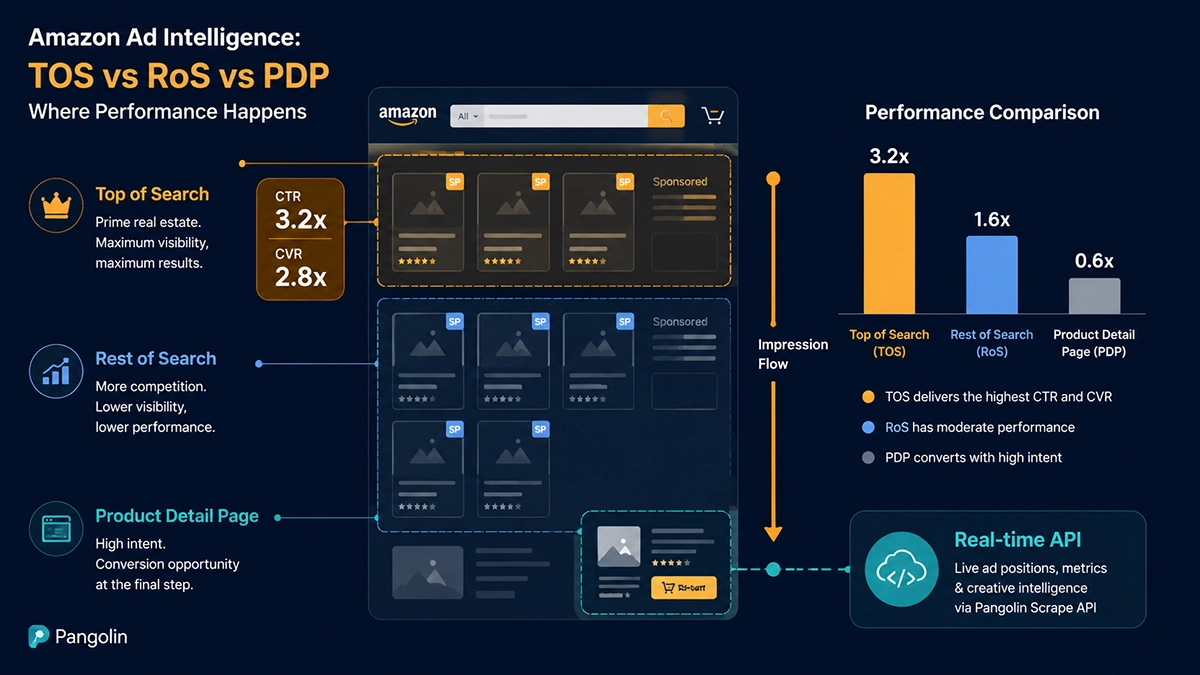
Here’s the number that should reset how you think about Amazon ad position analysis: Top of Search conversion rates run 2-3x higher than Rest of Search, and TOS CPCs are 40-80% higher to match. Everyone running Amazon PPC knows this intellectually. The practical problem is that the data most teams use to make bidding decisions — the Placement Report in Amazon’s Ad Console — has a structural 12-24 hour lag built into it. You’re optimizing for a position landscape that no longer exists.
This isn’t a complaint about Amazon’s reporting interface. It’s a structural architecture decision: Amazon’s systems aggregate placement data on a delay, and that’s unlikely to change. What can change is whether your team treats the Placement Report as the end of your data stack, or just the beginning.
Consider what that lag means in competitive terms. In 2026, Amazon advertising CPMs are up approximately 47% year-over-year according to Saras Analytics data. During high-intensity windows — Prime Day, Black Friday, Q4 peak — competitor ad strategies can shift dramatically within hours. A brand might triple its TOS bid adjustment on a core keyword at 6 AM and capture the morning’s high-intent traffic entirely. Your Placement Report won’t show this until tomorrow morning at the earliest. By then, they’ve already won the day’s best sessions.
Real Amazon search page ad position analysis requires actual search page data — collected as it happens, not aggregated overnight. The rest of this article shows you what that looks like in practice.
Three Ad Position Types, Three Separate Auctions: Why Treating Them as One Costs You Money
Amazon Sponsored Products doesn’t run a single unified auction for all positions on the search page. It runs three structurally different auctions, and conflating them in your analysis is one of the most common sources of misallocated ad spend.
Top of Search: Where Purchase Intent Is Highest and Competition Is Fiercest
TOS occupies the first 1-4 sponsored slots at the very top of search results — what shoppers see before they’ve had to scroll at all. This placement captures the highest-intent segment of any search query: people who’ve decided to buy something in this category and are actively evaluating which product to choose first.
The performance profile reflects this. Multiple advertising analytics platforms published 2025 benchmarks showing TOS CVR consistently outperforming RoS by 2-3x. This explains TOS’s premium auction clearing prices — brands are bidding up to 40-80% more per click because the traffic quality justifies it economically. Sponsored Brand and Sponsored Brand Video ads also compete primarily in the TOS zone, occupying larger visual real estate and creating an asymmetric visibility advantage for brands that qualify and bid aggressively.
Rest of Search: The Efficiency Buffer and New Keyword Testing Ground
RoS covers positions 5+ on the first page and everything on subsequent pages. The shoppers here are still searching but with more distributed intent — some are comparison shopping, some didn’t find what they wanted in the first four results and are continuing to browse. CTR and CVR are lower than TOS; CPC is correspondingly lower. This makes RoS valuable for cost-efficient brand awareness, new keyword validation, and maintaining presence on longer-tail terms where TOS would be cost-prohibitive.
A common budgeting mistake: sellers using “Dynamic Bidding – Up and Down” with aggressive TOS modifiers often find that TOS burns through daily budget faster than expected, pushing subsequent impressions into RoS — where efficiency metrics look worse and distort the aggregate campaign data. Without position-level visibility on spend allocation, this problem is invisible until you pull a full placement report breakdown.
Product Detail Page: The Competitive Interception Play
PDP ads appear on competitor listings (and your own) in sections like “Related items” and “Products you might also like.” Shoppers reaching PDP are deep in the evaluation funnel — already comparing specific products. While raw impression volume is lower than search-based placements, the proximity to conversion in the customer journey means PDP can deliver strong return on specific competitive targets. Most sophisticated brands use PDP ads defensively (protecting their own listing pages from competitor ads) and offensively (intercepting competitors’ high-traffic listings).
The key insight: because these three position types run separate auctions with different demand curves and user behavior profiles, analyzing them with a single aggregate efficiency metric produces conclusions that are accurate for none of them. The Placement Report’s three-way breakdown is a step in the right direction — the problem is the 12-24 hour lag that makes it unsuitable for proactive competitive intelligence.
Three Structural Gaps That Make Existing Ad Analysis Tools Fall Short
Gap 1: The 12-24 Hour Data Wall — You’re Reacting to Yesterday
Amazon’s Ad Console Placement Report is retrospective by design. Algofy’s 2025 analysis documented CPCs spiking 30-50% during Prime Day’s first 24 hours — a signal that would be entirely invisible to anyone relying solely on official reporting until the following day. By the time you see the data and adjust bids, the high-demand window is already closing.
For most advertised categories, a 12-24 hour lag is manageable. In competitive, high-velocity categories during peak periods, that lag is the difference between capturing high-intent sessions during optimal hours and watching competitors do it while you’re still reading last night’s report.
Gap 2: Complete Competitor Ad Position Blindness
Amazon’s official reporting tells you nothing about where competitors are appearing, how often, or how their TOS share changes over time. Third-party tools like Helium 10’s Market Tracker and SellerSprite’s ad analysis modules provide some competitive ad visibility — but they rely on scheduled database snapshots or throttled crawls, with update intervals ranging from a few hours to a full day. Most can tell you a competitor “appears in TOS” but cannot tell you:
- Which specific position within TOS (slot 1 vs. slot 3 makes a real CTR difference)
- How their TOS share has changed hour by hour during the past 48 hours
- Whether their TOS presence is stable (indicating high, sustained bids) or sporadic (suggesting budget exhaustion during the day)
That granularity requires fresh page data, not pre-aggregated snapshots from a shared database.
Gap 3: Scale Limitations — Monitoring 200 Keywords Hourly Isn’t Possible with Manual Tools
A mid-scale Amazon brand typically needs to track 50-200 core keywords across ad position dimensions. Self-built scrapers struggle with Amazon’s increasingly sophisticated bot detection (behavioral trust scoring, JavaScript fingerprinting, async ad module rendering) — our own testing at Pangolinfo shows generic Python scrapers achieving below 50% success rates on ad-loaded search pages. Third-party tool keyword tracking features impose quotas and refresh frequencies that are inadequate for real-time competitive intelligence at meaningful scale.
The Practical Solution: Three-Layer Real-Time Ad Position Intelligence Architecture
Layer 1: Amazon Scraper API — 98% Sponsored Products Capture Rate
The foundational data layer is the Pangolinfo Amazon Scraper API. The key specification that matters for ad position monitoring: 98% Sponsored Products ad capture rate — the highest publicly disclosed figure in the industry.
Why is this number hard to achieve? Amazon’s ad modules are asynchronously injected via JavaScript after the base HTML loads, and the injection timing and content are influenced by behavioral signals from the browser environment. A scraper that doesn’t replicate human-like browsing behavior — mouse jitter patterns, scroll velocity, appropriate rendering wait times — either receives a page with ads not yet loaded, or triggers Amazon’s detection systems and gets a soft-blocked result where ad data simply doesn’t appear. Our production environment processes 30M+ requests per day with this 98% rate maintained consistently, not just in test conditions.
ZIP code-level targeting is equally important: Amazon’s search results vary by geographic region, and data center IP addresses produce location-biased results that may not reflect what shoppers in your target markets actually see.
import requests, json, time
from datetime import datetime
from typing import List

def real_time_ad_position_monitor(
    api_key: str,
    keywords: List[str],
    target_brands: List[str],
    zip_code: str = "10001"
) -> dict:
    """
    Real-time Amazon search page ad position monitor
    Extracts TOS/RoS ad distribution and competitor positioning

    Args:
        api_key: Pangolinfo API key
        keywords: List of keywords to monitor
        target_brands: Competitor brand names to track
        zip_code: Target market zip code for geo-accurate results
    """
    headers = {"Authorization": f"Bearer {api_key}"}
    results = {}

    for keyword in keywords:
        url = f"https://www.amazon.com/s?k={keyword.replace(' ', '+')}"

        payload = {
            "url": url,
            "render": True,        # Critical: JS rendering required for ad slots
            "extract": "structured",
            "extract_ads": True,
            "country": "US",
            "zip_code": zip_code,
        }

        try:
            resp = requests.post(
                "https://api.pangolinfo.com/v1/amazon/search",
                json=payload,
                headers=headers,
                timeout=45
            )
            resp.raise_for_status()
            data = resp.json()

            ads = data.get("ads", [])
            all_results = data.get("results", [])

            # Classify ads by position
            tos_ads = [a for a in ads if a.get("placement") == "top_of_search"]
            ros_ads = [a for a in ads if a.get("placement") != "top_of_search"]

            # Identify competitor presence in TOS
            competitor_tos = [
                a for a in tos_ads
                if any(b.lower() in a.get("brand_name", "").lower() for b in target_brands)
            ]

            # Calculate ad density (competitive pressure signal)
            ad_density = len(ads) / max(len(all_results), 1) * 100

            results[keyword] = {
                "timestamp": datetime.utcnow().isoformat(),
                "tos_total": len(tos_ads),
                "ros_total": len(ros_ads),
                "ad_density_pct": round(ad_density, 1),
                "tos_ads": tos_ads[:6],  # First 6 TOS positions
                "competitor_tos_count": len(competitor_tos),
                "competitor_tos_share_pct": round(
                    len(competitor_tos) / max(len(tos_ads), 1) * 100, 1
                ),
                "competitor_tos_details": competitor_tos,
                "brands_in_tos": list({a.get("brand_name") for a in tos_ads if a.get("brand_name")}),
            }

            print(f"✅ {keyword}: {len(tos_ads)} TOS ads | "
                  f"Competitor TOS share: {results[keyword]['competitor_tos_share_pct']}%")

        except Exception as e:
            print(f"❌ {keyword}: {e}")
            results[keyword] = {"error": str(e)}

        time.sleep(0.5)  # Gentle pacing between requests

    return results


# Example: hourly competitive monitoring job
if __name__ == "__main__":
    API_KEY = "your_pangolinfo_api_key"

    KEYWORDS = [
        "home storage organizer",
        "yoga mat thick",
        "dog treats grain free",
    ]

    COMPETITORS = ["BrandA", "BrandB", "CompetitorX"]

    # Run analysis
    report = real_time_ad_position_monitor(API_KEY, KEYWORDS, COMPETITORS)

    # Export
    filename = f"ad_positions_{datetime.now().strftime('%Y%m%d_%H%M')}.json"
    with open(filename, "w") as f:
        json.dump(report, f, indent=2)

    print(f"\n📊 Ad position report saved: {filename}")

    # Alert logic: flag keywords where competitors control >50% of TOS
    alerts = [
        kw for kw, data in report.items()
        if isinstance(data, dict) and data.get("competitor_tos_share_pct", 0) > 50
    ]

    if alerts:
        print(f"\n⚠️  ALERT: Competitors dominating TOS (>50% share) on: {', '.join(alerts)}")
        # Hook into Slack/Feishu webhook here
Layer 2: Amazon Data MCP — Natural Language Ad Position Queries for AI Agents
For teams using Claude, Cursor, or custom AI agents in their advertising workflows, Amazon Data MCP connects the data layer directly to agent capabilities. One-time configuration:
{
  "mcpServers": {
    "pangolinfo-amazon": {
      "command": "npx",
      "args": ["-y", "@pangolinfo/amazon-data-mcp"],
      "env": { "PANGOLINFO_API_KEY": "your_api_key" }
    }
  }
}
After setup, agents respond to natural language queries that trigger live data collection:
- “What brands are appearing in Top of Search for ‘home storage organizer’ right now?”
- “How has competitor BrandX’s TOS share changed on our core keywords in the last 48 hours?”
- “Which keywords in our portfolio have ad density above 30%? That’s where competitors are spending most.”
Every query triggers a fresh page collection — not a database lookup. The distinction matters: database queries answer “what did the ad landscape look like when we last scraped this?” while MCP queries answer “what does it look like right now?”
Layer 3: Pangolinfo Amazon Scraper Skill — Fully Automated Ad Position Intelligence
The Pangolinfo Amazon Scraper Skill packages the data layer as an Open Claw-compatible Agent Skill for teams building automated e-commerce AI workflows. A complete automated ad intelligence pipeline looks like:
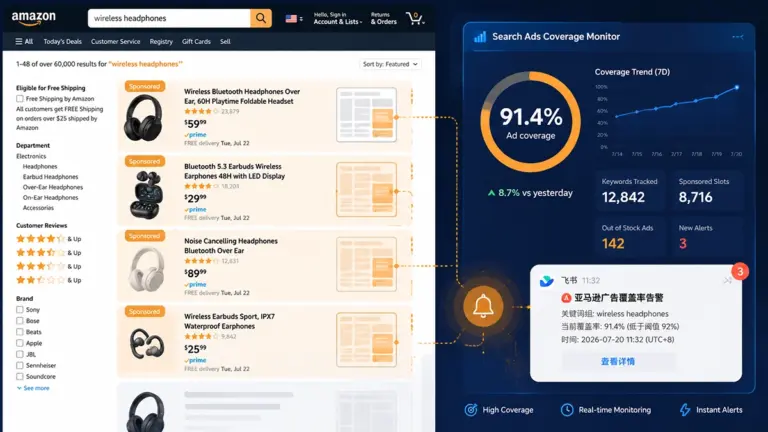
Every hour, on the hour: the Scraper Skill collects current search pages for 100 tracked keywords → extracts and classifies all ad positions → compares against the previous hour’s snapshot → generates a diff showing position changes → triggers a Slack/Feishu alert if a competitor’s TOS share crosses a threshold → at midnight, produces a daily ad position summary report. No human intervention required between data collection and actionable insight delivery.
| Solution | Technical Complexity | Best For | Data Freshness | Competitor Visibility |
|---|---|---|---|---|
| Scraper API + Python | Medium (dev required) | Technical sellers, SaaS builders | Real-time, on-demand | Full — any brand |
| Amazon Data MCP | Low (one-time config) | AI agent users, ops teams | Real-time, query-triggered | Full — any brand |
| Amazon Scraper Skill | Medium-High (workflow) | E-commerce AI developers | Real-time, auto-scheduled | Full — any brand |
| Amazon Ad Console | None | All sellers | 12-24 hour lag | None (own account only) |
| Third-party SaaS tools | None | Small-to-mid sellers | Several hours to 1 day lag | Partial, snapshot-based |
The Shift That Actually Matters: From Retrospective Reports to Live Intelligence
Amazon search page ad position analysis has been conflated with reading the Placement Report for too long. The Placement Report is a useful performance accountability tool — it’s not a competitive intelligence system. Knowing your own TOS impression share from yesterday doesn’t tell you why you lost it, who took it, or whether you should adjust now or wait.
The brands consistently winning the TOS auction in 2026’s high-CPM environment aren’t just bidding more aggressively — they’re making better-timed decisions based on fresher data. The ability to see what the search page actually looks like at 9 AM on the day of a major promotion, compare it to 6 AM, and adjust bids accordingly — that’s the operational edge that a 12-hour-delayed report fundamentally cannot provide.
Real-time ad position intelligence isn’t a nice-to-have feature for scale brands. It’s increasingly the table stakes for anyone competing seriously on high-value keywords where TOS position determines whether you capture the session or your competitor does.
📌 Start here: Get the Pangolinfo Amazon Scraper API and run your first real-time TOS competitive analysis today, or connect Amazon Data MCP to your AI agent and query live search page data in natural language.
Frequently Asked Questions
What are the three ad position types on Amazon search pages?
Amazon search result pages feature three distinct ad position types: Top of Search (TOS) — the first 1-4 ad slots at the very top of search results, capturing the highest-intent shoppers; Rest of Search (RoS) — positions 5+ on the first page and all subsequent pages; and Product Detail Page (PDP) — ads appearing on competitor and your own product listing pages. Each runs a separate auction with meaningfully different CTR, CVR, and CPC dynamics.
How much better does Top of Search convert compared to Rest of Search?
Based on 2025 benchmark data from multiple Amazon advertising analytics platforms, Top of Search conversion rates (CVR) typically run 2-3x higher than Rest of Search. TOS captures shoppers at their highest purchase intent — immediately after executing a search. This performance premium is why TOS CPC runs 40-80% higher than RoS in most competitive categories.
Why is the Amazon Advertising Console Placement Report insufficient for competitive analysis?
Amazon’s Placement Report has a structural 12-24 hour data lag and only shows your own account’s performance — competitor ad positioning is completely invisible. It provides aggregate performance data without granular keyword + time slot + position breakdowns. It cannot show competitor Share of Voice changes, which brands dominate TOS on specific keywords, or how ad landscapes shift during peak periods like Prime Day.
How can you monitor competitor Amazon ad positions in real time?
Pangolinfo’s Amazon Scraper API fetches live Amazon search result pages and extracts structured ad position data — including each ad’s position number, ASIN, ad type (SP/SB/SBV), and brand name. With a 98% Sponsored Products capture rate, combined with scheduled jobs running hourly across target keywords, you can reconstruct competitor ad position share trends with no manual intervention.
What data fields are needed for a complete Amazon ad position analysis?
A complete analysis requires: placement type (TOS/RoS/PDP), position number within the page, ASIN, ad format (SP/SB/SBV/Sponsored Brand), brand name, Prime badge status, current price, review count and rating. Combined with historical comparisons, this reveals which competitors hold stable TOS positions on which keywords, and how competitive ad landscapes shift before and after major promotions.
🎯 Your Amazon ad position analysis shouldn’t run on last night’s data.
→ Get the Amazon Scraper API and start monitoring competitor TOS positions in real time
→ Connect Amazon Data MCP and let your AI agent query live search page data on demand
→ Access the Pangolinfo Console for API documentation and quota management
About Pangolinfo: We build Amazon data infrastructure — real-time scraping APIs (98% SP ad capture rate), MCP-protocol data layers, and Agent Skills — for e-commerce sellers, SaaS teams, and AI agent developers. Published: 2026-07-17