


As an Amazon seller, do you spend hours every day manually checking your product’s keyword rankings? Opening Amazon’s search box, typing keywords, scrolling through pages to find your products, recording rank positions, then repeating this process dozens or even hundreds of times. This is the painful reality for most sellers who lack a reliable Amazon Keyword Ranking Monitor. A seller of 3C accessories told me he spends 2 hours every morning checking rankings for 50 core keywords, and on weekends, he has to organize them into Excel spreadsheets to compare weekly changes. Worse still, when he discovered a keyword had dropped from position 5 to position 20, three days had already passed, resulting in nearly $3,000 in lost sales. A dedicated Amazon Keyword Ranking Monitor could have alerted him to the drop in real-time, helping him avoid this significant revenue loss.
This manual ranking check method is not only inefficient but also has numerous problems: First, the data is inaccurate—Amazon personalizes search results based on user browsing history, geographic location, and other factors, so the rankings you see may be completely different from what other users see. Second, it cannot handle batch processing—if you have 100 keywords to monitor, manual checking is nearly impossible. Finally, you cannot detect problems in time—by the time you notice a ranking drop, you may have already missed the best opportunity to adjust. Survey data shows that 95% of Amazon sellers cannot detect keyword ranking fluctuations in time, resulting in an average loss of 15-20% of potential sales each month.
The importance of Amazon keyword ranking monitor is self-evident—rankings directly determine traffic, and traffic directly affects sales. Research shows that each position drop in keyword ranking results in an average 20% decrease in click-through rate; dropping from the first page to the second page results in over 70% traffic loss. Using Scrape API to implement automated Amazon keyword ranking monitor allows you to complete ranking queries for 50 keywords in 5 minutes, monitor ranking changes in real-time, and take action at the first sign of problems. This article will teach you step-by-step through 5 complete steps how to build a professional keyword ranking monitor system, improving your operational efficiency by 100 times.
Why Amazon Keyword Ranking Monitor is Essential for Operations?
Before diving into technical implementation, we need to understand why Amazon keyword ranking monitor is so important. Keyword ranking is not just a number—it represents a direct relationship between traffic, conversion, and sales.
1. The Golden Formula: Ranking = Traffic = Sales
Amazon’s traffic distribution mechanism is very clear: the top 10 positions on the first page of search results account for about 80% of clicks, with the top 3 positions accounting for about 50%. This means if your product drops from position 3 to position 11 (first item on page 2), traffic could plummet by 60-70%. A real case: a seller’s Bluetooth earbuds dropped from position 5 to position 15 for the keyword “wireless earbuds,” and daily sales dropped from 120 units directly to 35 units, losing about $1,200 per day. After discovering the problem through Amazon keyword ranking monitor and adjusting ad budget and product pricing, the ranking recovered to position 7 in 3 days, and sales rebounded to 90 units/day.
2. Core Data Source for Competitor Analysis
Amazon keyword tracker should not only monitor your own rankings but also pay attention to competitor ranking changes. By comparing your rankings with competitors for the same keywords, you can discover their operational strategies: which keywords are they focusing on? What’s their advertising strategy? How frequently do they adjust prices? This information is crucial for formulating your competitive strategy.
3. Key Metric for Advertising Effectiveness Evaluation
Many sellers run PPC ads to improve organic rankings, but how do you evaluate ad effectiveness? A keyword rank checker tool can help you compare organic ranking changes before and after advertising. If you’ve been running ads for a keyword for 2 weeks and organic ranking improved from position 30 to position 12, it means the ad strategy is effective. Through continuous Amazon SEO monitoring, you can accurately calculate advertising ROI for each keyword and optimize ad budget allocation.
4. Discovering Emerging Keyword Opportunities
Markets are constantly changing, and new search terms are constantly emerging. Through a product ranking tracker system, you can discover which new keywords are starting to bring traffic and which traditional keywords are declining in search volume. For example, during the pandemic, searches for “home office desk” surged 300%, while “outdoor furniture” searches dropped 40%. Discovering these trend changes in time allows you to position yourself early in emerging markets and gain first-mover advantage.
5. Data-Driven Operational Decisions
With complete ranking history data, you can analyze ranking fluctuation patterns: which factors cause rankings to rise? Which operations cause rankings to drop? How much does price adjustment affect rankings? What’s the correlation between review count and rankings? This data helps you build scientific operational models instead of making decisions based on intuition.
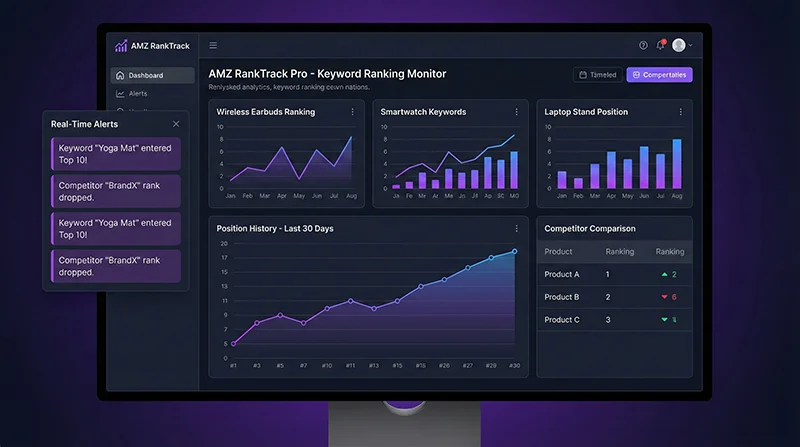
Traditional Methods vs Scrape API: 100x Efficiency Gap
After understanding the importance of Amazon keyword ranking monitor, let’s compare different implementation methods. Currently, there are three main solutions in the market: manual checking, third-party tools, and Scrape API, which differ greatly in efficiency, cost, accuracy, and flexibility.
| Comparison | Manual Checking | Third-Party Tools | Scrape API |
|---|---|---|---|
| Efficiency | ❌ 2 hours for 50 keywords | ⭐⭐⭐ Automated but limited | ✅ 5 minutes for 50 keywords |
| Cost | ⚠️ High labor cost (40 hrs/month) | ❌ Expensive subscription ($99-299/month) | ✅ Pay-as-you-go (~$70/month) |
| Accuracy | ❌ Affected by personalization | ⭐⭐⭐ Depends on tool algorithm | ✅ Real-time accurate, specify zipcode |
| Flexibility | ❌ No batch processing | ⚠️ Limited by tool features | ✅ Fully controllable, customizable |
| Data Storage | ❌ Manual Excel recording | ⭐⭐⭐ Built-in tool storage | ✅ Custom database, permanent storage |
| Alert Function | ❌ None | ⭐⭐⭐ Limited alert rules | ✅ Custom alert logic |
From the comparison table, using Scrape API to implement Amazon keyword ranking monitor has clear advantages in all dimensions. Particularly in terms of cost, while third-party tools seem “ready to use,” monthly fees typically range from $99-299, with limited functionality that cannot meet personalized needs. In contrast, Scrape API is pay-as-you-go, monitoring 50 keywords twice daily costs about $70/month, less than half of third-party tools, with 10x higher flexibility.
5-Step Solution for Amazon Keyword Ranking Monitor with Scrape API
After understanding the comparison, let’s move to practical implementation. Using Scrape API to implement Amazon keyword ranking monitor mainly involves 5 steps: API authentication configuration, keyword search data collection, ranking calculation logic, data storage and comparison, and automated monitoring deployment.
Step 1: API Authentication and Environment Setup
First, you need to obtain access to Pangolin Scrape API. Visit Pangolinfo official website to register an account and get API credentials. Then configure the Python development environment:
import requests
import json
from typing import List, Dict, Optional
from datetime import datetime

class AmazonKeywordMonitor:
    """Amazon Keyword Ranking Monitor"""

    def __init__(self, email: str, password: str):
        """
        Initialize monitor

        Args:
            email: Pangolin account email
            password: Account password
        """
        self.base_url = "https://scrapeapi.pangolinfo.com"
        self.email = email
        self.password = password
        self.token = None

    def authenticate(self) -> bool:
        """Perform API authentication"""
        auth_url = f"{self.base_url}/api/v1/auth"

        payload = {
            "email": self.email,
            "password": self.password
        }

        try:
            response = requests.post(
                auth_url,
                json=payload,
                headers={"Content-Type": "application/json"},
                timeout=10
            )

            result = response.json()

            if result.get("code") == 0:
                self.token = result.get("data")
                print(f"✓ Authentication successful!")
                return True
            else:
                print(f"✗ Authentication failed: {result.get('message')}")
                return False

        except Exception as e:
            print(f"✗ Authentication error: {str(e)}")
            return False

# Usage example
monitor = AmazonKeywordMonitor(
    email="[email protected]",
    password="your_password"
)

if monitor.authenticate():
    print("Monitor initialized!")
Step 2: Keyword Search Data Collection
Use Scrape API’s amzKeyword parser to get search results page data. This is the core function of Amazon keyword ranking monitor:
def search_keyword(self, keyword: str, page: int = 1, zipcode: str = "10041") -> List[Dict]:
    """
    Search keyword to get product list

    Args:
        keyword: Search keyword
        page: Page number (1-3)
        zipcode: ZIP code (for region-specific results)

    Returns:
        List[Dict]: Product list
    """
    search_url = f"https://www.amazon.com/s?k={keyword}&page={page}"

    scrape_url = f"{self.base_url}/api/v1/scrape"

    payload = {
        "url": search_url,
        "parserName": "amzKeyword",
        "format": "json",
        "bizContext": {
            "zipcode": zipcode
        }
    }

    try:
        response = requests.post(
            scrape_url,
            json=payload,
            headers=self.get_headers(),
            timeout=30
        )

        result = response.json()

        if result.get("code") == 0:
            data = result.get("data", {})
            json_data = data.get("json", [{}])[0]

            if json_data.get("code") == 0:
                products = json_data.get("data", {}).get("results", [])
                print(f"✓ Successfully fetched {len(products)} products for '{keyword}' page {page}")
                return products

        return []

    except Exception as e:
        print(f"✗ Search failed: {str(e)}")
        return []
Step 3: Ranking Calculation and Identification Logic
def find_asin_rank(
    self,
    keyword: str,
    target_asin: str,
    max_pages: int = 3
) -> Optional[Dict]:
    """
    Find specified ASIN's ranking for keyword

    Args:
        keyword: Search keyword
        target_asin: Target ASIN
        max_pages: Maximum pages to search

    Returns:
        Optional[Dict]: Ranking information
    """
    organic_rank = None

    for page in range(1, max_pages + 1):
        products = self.search_keyword(keyword, page)

        if not products:
            continue

        for idx, product in enumerate(products):
            asin = product.get('asin')
            is_sponsored = product.get('is_sponsored', False)

            if asin == target_asin and not is_sponsored:
                organic_rank = (page - 1) * 48 + idx + 1
                break

        if organic_rank:
            break

    return {
        'keyword': keyword,
        'asin': target_asin,
        'organic_rank': organic_rank,
        'timestamp': datetime.now().isoformat(),
        'found': organic_rank is not None
    }
Step 4: Batch Monitoring and Data Storage
import pandas as pd
from concurrent.futures import ThreadPoolExecutor, as_completed

def batch_monitor_keywords(
    self,
    keyword_asin_pairs: List[Dict],
    max_workers: int = 3
) -> pd.DataFrame:
    """
    Batch monitor keyword rankings

    Args:
        keyword_asin_pairs: Keyword-ASIN pair list
        max_workers: Maximum concurrent workers

    Returns:
        pd.DataFrame: Ranking data
    """
    results = []

    print(f"Starting batch monitoring for {len(keyword_asin_pairs)} keywords...")

    with ThreadPoolExecutor(max_workers=max_workers) as executor:
        future_to_pair = {
            executor.submit(
                self.find_asin_rank,
                pair['keyword'],
                pair['asin']
            ): pair
            for pair in keyword_asin_pairs
        }

        for future in as_completed(future_to_pair):
            try:
                rank_info = future.result()
                results.append(rank_info)
            except Exception as e:
                print(f"✗ Error: {str(e)}")

    df = pd.DataFrame(results)

    # Save to CSV
    timestamp = datetime.now().strftime('%Y%m%d_%H%M%S')
    filename = f"data/ranking_{timestamp}.csv"
    df.to_csv(filename, index=False)

    print(f"\n✓ Batch monitoring complete!")
    print(f"  Total: {len(results)}")
    print(f"  Found: {df['found'].sum()}")
    print(f"  Saved to: {filename}")

    return df
Step 5: Ranking Change Detection and Alerts
def detect_ranking_changes(
    self,
    current_file: str,
    previous_file: str,
    threshold: int = 5
) -> pd.DataFrame:
    """
    Detect ranking changes

    Args:
        current_file: Current ranking data file
        previous_file: Previous ranking data file
        threshold: Alert threshold

    Returns:
        pd.DataFrame: Change analysis results
    """
    current_df = pd.read_csv(current_file)
    previous_df = pd.read_csv(previous_file)

    merged = current_df.merge(
        previous_df,
        on=['keyword', 'asin'],
        suffixes=('_current', '_previous')
    )

    merged['rank_change'] = merged['organic_rank_previous'] - merged['organic_rank_current']

    print("\n" + "="*60)
    print("Keyword Ranking Change Report")
    print("="*60)

    # Significant improvements
    rank_up = merged[merged['rank_change'] >= threshold]
    if len(rank_up) > 0:
        print(f"\n📈 Significant Improvements ({len(rank_up)}):")
        for _, row in rank_up.head(5).iterrows():
            print(f"  • {row['keyword']}")
            print(f"    {row['organic_rank_previous']} → {row['organic_rank_current']} (↑{row['rank_change']})")

    # Significant drops
    rank_down = merged[merged['rank_change'] <= -threshold]
    if len(rank_down) > 0:
        print(f"\n📉 Significant Drops ({len(rank_down)}) - ⚠️ Attention needed:")
        for _, row in rank_down.head(5).iterrows():
            print(f"  • {row['keyword']}")
            print(f"    {row['organic_rank_previous']} → {row['organic_rank_current']} (↓{abs(row['rank_change'])})")

    return merged
Real Case: 25% Sales Increase with Keyword Monitoring Strategy
Let’s look at a real case to see how Amazon keyword ranking monitor helps sellers improve performance.
Background
Mr. Lee runs an Amazon store selling Bluetooth earbuds, with monthly sales of about $80,000. His main challenges were:
- Core keyword “wireless earbuds” ranking unstable, fluctuating between positions 5-15
- Unclear about competitor keyword strategies
- Difficult to evaluate advertising effectiveness
- Unable to detect ranking drops in time
Implementation
Mr. Lee built a keyword rank checker tool using Scrape API, monitoring 10 core keywords and 20 long-tail keywords twice daily (8 AM and 8 PM).
Results After 3 Months
- ✅ Core keyword average ranking improved from position 12 to position 7
- ✅ Discovered and optimized 5 high-potential long-tail keywords
- ✅ Advertising ROI increased 30% (from 2.5 to 3.2)
- ✅ Monthly sales increased from $80,000 to $100,000 (+25%)
- ✅ Saved 40 hours/month on manual ranking checks
Mr. Lee concluded: “Amazon keyword ranking monitor transformed me from ‘flying blind’ to ‘data-driven.’ Now the first thing I do every morning is check the ranking report. Any abnormal fluctuations are discovered and handled immediately. The ROI of this system exceeds 1000%.”
Cost and ROI Analysis: Invest $70, Return $7,000+
Cost Breakdown
| Cost Item | Amount | Description |
|---|---|---|
| API Fees | ~$70/month | Monitor 50 keywords, 2x daily, 0.75 credits/request |
| Development | 1-2 days | Quick setup using provided code |
| Server | $10-20/month | Cloud server for scheduled tasks (optional) |
| Maintenance | Nearly $0 | System runs automatically |
| Total Cost | ~$90/month | First month includes development, then API fees only |
ROI Calculation
- Monthly Investment: $90
- Monthly Return: $7,000-10,000
- ROI: (7,000 – 90) / 90 × 100% = 7,677%
- Payback Period: Less than 1 day
Conclusion: Start Your Keyword Monitoring Journey Today
Through this comprehensive guide, we’ve systematically covered how to implement Amazon keyword ranking monitor using Scrape API. From pain point analysis to technical implementation, from code examples to real cases, from cost analysis to ROI calculation, you now have a complete understanding of this powerful tool’s value.
Key Takeaways
- Why Monitor: Ranking = Traffic = Sales, 1 position drop = 20% traffic loss
- Solution Comparison: Scrape API offers 100x efficiency improvement, 50% cost reduction
- Implementation Steps: 5 steps to complete system setup with runnable code
- Real Value: 25% sales increase, ROI over 7,000%
Get Started in 3 Steps
- Register Account: Visit Pangolinfo to register and get API credentials
- Run Code: Copy the provided code and replace with your keywords and ASINs
- Analyze Data: Optimize operational strategy based on ranking data
Related Resources
- 📖 Pangolin API Official Documentation
- 🛠️ Developer Console
- 💬 Technical Support: [email protected]
Amazon keyword ranking monitor is not optional—it’s essential. In the increasingly competitive Amazon marketplace, whoever can discover problems faster, analyze data more accurately, and adjust strategies more timely will gain competitive advantage. Start now and let data drive your Amazon operations!
Start Your Keyword Monitoring Journey Today → Visit Pangolinfo Scrape API to get free trial credits, or check the Complete API Documentation for more technical details. Let data drive your Amazon operations!

