


Executive Summary
In tomorrow’s Amazon marketplace, the sellers who win won’t be those with the biggest teams — they’ll be those with the smartest AI agents. An Amazon Operations AI Agent is an autonomous AI system combining large language models, tool-use, and memory to cover the full operational cycle: product research, listing optimization, ad management, inventory planning, review management, and competitor intelligence. This guide provides a complete, hands-on blueprint for building one — from architecture design to production deployment code.
I. The Shift to the AI Agent Era in Amazon Operations
If your team still starts each morning by manually refreshing Seller Central, reviewing ad reports row by row, and tracking competitor prices in spreadsheets — you’re experiencing the final calm before the storm. The traditional operations model is approaching obsolescence.
Amazon’s competitive intensity has undergone a structural change over the past three years. SKU counts have exploded, advertising costs keep rising, and operational SOPs grow ever more complex — while the reaction window for every decision keeps shrinking. A keyword bid strategy may need to respond to a competitor’s price move within 4 hours. A negative review left unaddressed for more than 24 hours can trigger a cascade of conversion rate declines. A new product ranking opportunity, from appearance to discovery by competitors, sometimes lasts only 1–2 weeks.
This high-frequency, high-intensity, high-complexity operational demand has long exceeded what human + traditional tools can handle. Data shows that top Amazon operation teams manage an average of 300+ SKUs per person, processing 50+ data dimensions daily, yet have less than 2 hours available for deep analysis. Hiring more operations staff isn’t the answer.
The Amazon Operations AI Agent offers a fundamentally different solution. It isn’t a new “tool” — it’s an AI partner that autonomously perceives operational states, analyzes data insights, makes decisions, executes actions, and continuously learns from outcomes. Unlike traditional RPA bots or dashboards, an AI agent has reasoning capability, memory, the ability to learn, and can work across tasks collaboratively.
This guide gives you a truly actionable blueprint — not conceptual overview, but a complete operations manual from requirements to code implementation, from data integration to production monitoring.
II. What Is an Amazon Operations AI Agent?
2.1 Definition
An Amazon Operations AI Agent is an autonomous AI system built on large language models (LLMs) + tool use + memory systems, capable of covering the full Amazon operations lifecycle: autonomous decision-making, automated execution, and closed-loop optimization.
In concrete terms: once you set a goal of “ACoS below 15%,” the advertising agent will automatically monitor ACoS trends. If it detects that a specific ad group’s ACoS has exceeded the threshold for 3 consecutive days, it will analyze the root cause (is the bid price too high? did conversion rate drop? are competitors intensifying their spend?), automatically adjust the bid strategy or pause underperforming keywords, and send you an operation log for confirmation — all without manual intervention.
The fundamental difference from traditional tools: traditional tools are reactive — they only do what you explicitly tell them. An AI agent is proactive — it understands goals, autonomously plans paths, executes across multiple steps, and continuously optimizes from feedback.
2.2 Six Core Capability Modules
A complete Amazon AI agent ecosystem typically consists of six specialized agents working in coordination:
① Product Research & Market Analysis Agent: Continuously scans BSR ranking changes, emerging product signals, competitor sales estimates, and category competition density. Outputs daily market briefs and product opportunity scoring reports.
② Listing Writing / Optimization / Compliance Agent: Auto-drafts or optimizes titles, bullet points, and A+ content based on keyword data and competitor analysis. Performs compliance pre-checks (brand-restricted terms, prohibited words, category requirements).
③ Ad Campaign & ACoS Optimization Agent: Real-time monitoring of campaign performance with automatic keyword bid adjustments, budget allocation optimization, and negative keyword management across SP/SB/SD ad types.
④ Inventory & FBA Logistics Agent: Calculates restocking windows and safety stock levels based on sales trends, seasonal patterns, and FBA lead times. Issues restocking alerts and generates purchase recommendations.
⑤ Customer Service & Review Management Agent: Auto-identifies negative reviews, neutral reviews, and key Q&As; generates personalized response drafts; routes high-risk negative reviews to human review queues; tracks sentiment trends.
⑥ Competitor Monitoring & Risk Intelligence Agent: Continuously tracks core competitors’ pricing, rankings, reviews, and ad placements. Triggers immediate alerts for major anomalies (significant price cuts, ranking manipulation, new market entrants).
2.3 AI Agent vs. Traditional RPA / Tools
| Dimension | Traditional Tools / RPA | Amazon Operations AI Agent |
|---|---|---|
| Decision Capability | Fixed rules, no reasoning | LLM reasoning, context-aware, flexible decisions |
| Task Scope | Single-point tasks, no cross-module | Cross-task coordination, full lifecycle coverage |
| Learning Ability | Static rules, no self-update | Continuously optimizes prompts and strategies from feedback |
| Exception Handling | Stops on undefined situations | Infers intent, proposes alternative approaches |
| Memory | No contextual memory | Short + long-term memory, accumulates operational knowledge |
III. 6 Core Essentials for Building an Amazon Operations AI Agent
Essential 1: Scenario-Based Decomposition — Focus on High-Value Scenarios
The most common first mistake in building an Amazon AI agent is trying to build a “universal AI” in one step. This path almost always fails: a general AI’s understanding of Amazon operations isn’t deep enough to perform reliably in any single scenario, and the team can’t effectively validate quality across such a broad scope.
The correct approach is strict scenario-focus: select a “high-frequency, high-value, low-risk” scenario as your entry point, master it thoroughly, then expand horizontally as you build confidence and experience.
Three dimensions to evaluate scenario priority:
- Repetition Frequency: The more frequent the daily operation, the greater the automation benefit (ad bid adjustments > seasonal product research)
- Decision Value: The higher the cost of wrong decisions and the ROI of right ones (ad optimization > email response templates)
- Data Availability: Whether the required data can already be reliably obtained (prioritize scenarios with clear API access)
Recommended first MVP scenarios: Ad ACoS Monitoring & Auto-Bid Adjustment (complete data, clear rules, quantifiable results), Negative Review Monitoring & Response Draft Generation (high volume, time-sensitive, LLM capabilities shine directly), or Inventory Safety Alert & Restocking Recommendation (relatively fixed decision logic, limited risk).
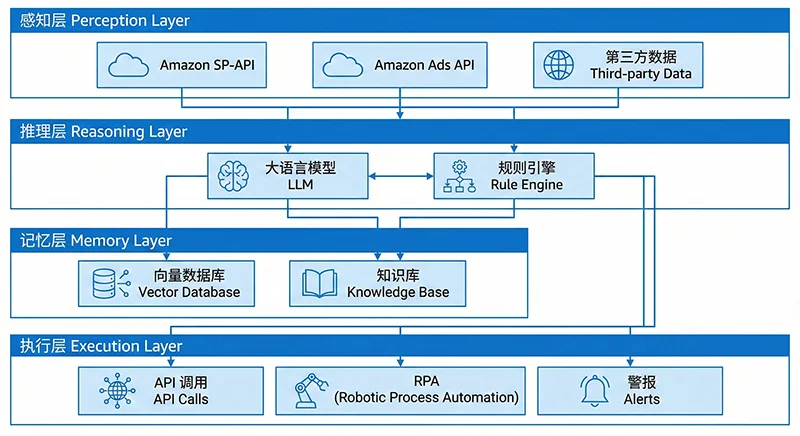
Essential 2: Technical Architecture — The Four-Layer Framework
A production-ready Amazon AI agent requires four technology layers working in concert:
Layer 1: Perception Layer
Retrieves real-time operational information from all data sources: Amazon SP-API (store orders, inventory, performance, FBA data), Advertising API (campaign data), third-party data APIs (market public data — BSR rankings, keywords, competitor details via services like Pangolinfo Scrape API), and user behavior data (reviews, Q&A).
Layer 2: Reasoning Layer
The agent’s “brain,” consisting of LLMs and a rule engine working together. LLMs handle semantic understanding, contextual reasoning, and complex judgment (analyzing review sentiment, generating listing optimization suggestions). The rule engine handles deterministic logic (“trigger restocking if inventory days drop below 14,” “reduce bids if ACoS exceeds 20%”) to ensure auditability and consistency.
Layer 3: Memory Layer
The agent’s “memory system,” typically composed of a vector database (storing historical operational decisions, product knowledge base, SOP documents) and a relational database (storing structured operational time series data). This enables the agent to remember “what happened last time this competitor dropped their price” and learn from history.
Layer 4: Execution Layer
Translates decisions into actual actions: modifying listings via SP-API, adjusting bids via Advertising API, completing UI operations via RPA for actions SP-API hasn’t yet exposed, pushing alert notifications via Webhook to Slack or Microsoft Teams. This layer must enforce strict operation approval mechanisms — distinguishing “auto-execute” from “require human approval” operations, with high-risk actions (deleting campaigns, changing prices by more than 20%) always routed to human review queues.
Essential 3: Data Foundation — Build Data Infrastructure First
The data foundation is the prerequisite for an agent to function correctly, and the most underestimated component. Before writing any agent code, teams need to complete three actions:
First, data access audit: map what data you can legitimately obtain — what’s already accessible via SP-API? What competitor and market data needs third-party services? What data is simply unavailable right now (and needs to be excluded from the initial agent design)?
Second, data standardization: data formats, timezones, currency units, and field definitions are often inconsistent across sources. Everything must be cleaned and standardized before entering the database. An undetected “price field mixing USD and GBP” issue could cause the entire pricing agent’s strategy to fail.
Third, update frequency planning: different data types need different refresh cadences. Ad impression and click data needs hourly sync; BSR rankings can update every 4–6 hours; historical review data needs daily sync. Plan your scheduling strategy upfront to avoid wasting API quota on unnecessary high-frequency requests.
Essential 4: Decision Loop — Perception → Analysis → Decision → Execution → Feedback → Iteration
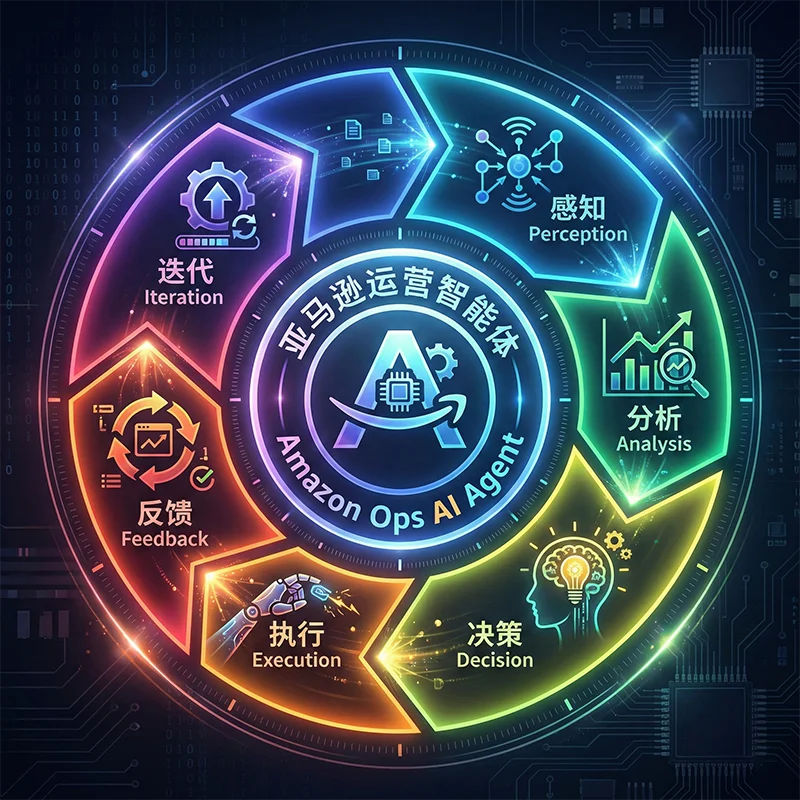
The decision loop is the core mechanism for an agent to continuously evolve. Any agent lacking feedback and iteration steps can only achieve “one-time automation” — not the “smarter over time” effect of a true AI agent.
Using the advertising agent as an example, the full loop works as follows:
- Perceive: Read Advertising API every hour to get impressions/clicks/conversions/spend per ad group
- Analyze: Calculate ACoS, ROAS, CTR per keyword; identify anomalous metrics and find root causes
- Decide: LLM + rule engine determine response strategy (reduce bid / pause keyword / change match type / budget overspend alert)
- Execute: Auto-execute bid adjustments via Advertising API; push high-value changes for human confirmation
- Feedback: Compare ACoS before vs. after the change 24 hours later; record the outcome of this operation
- Iterate: Feed outcome data back into prompt optimization for the decision model; make more accurate judgments in similar situations next time
An agent without steps 5 and 6 is a “sophisticated automation script,” not a true AI agent.
Essential 5: Compliance & Risk Control — Auditable Operations, Interceptable Risks
Running AI automation on Amazon requires compliance risk to be built into the design from day one. Three key risk control measures:
Operation Audit Log: Every actual action the agent takes must generate a complete audit record including trigger conditions, decision rationale, operation content, execution time, and operator/system ID. This is not just a compliance requirement — it’s the only basis for subsequent effect evaluation and issue debugging.
Rate Limiting: Set daily execution caps per operation type (e.g., “same ASIN price can be adjusted a maximum of 3 times per day”) to prevent uncontrolled cascading operations from abnormal loop logic. All API calls must respect Amazon’s official rate limits.
Human Intercept for High-Risk Operations: Clearly define which operations are “high-risk” and require mandatory human review. Recommended high-risk list: price adjustments exceeding 15%, deleting campaigns or ad groups, bulk modifying listing titles, any operations involving account permissions.
Essential 6: Human-AI Collaboration — Humans Own Strategy, AI Owns Execution
The goal isn’t to “completely replace the operations team” — it’s to redistribute responsibilities so humans focus on higher-value decisions while AI handles high-frequency, repetitive, low-creativity execution.
| Responsible Party | Scope of Responsibility |
|---|---|
| Human Team | Strategic goals, brand creative direction, new product positioning, anomaly investigation, final approval of high-risk actions |
| AI Agent | Daily data monitoring, competitor tracking, ad bid optimization, inventory alert calculation, review response drafting, report generation |
IV. Data Sources: The Lifeblood of Your Amazon AI Agent (Critical Chapter)
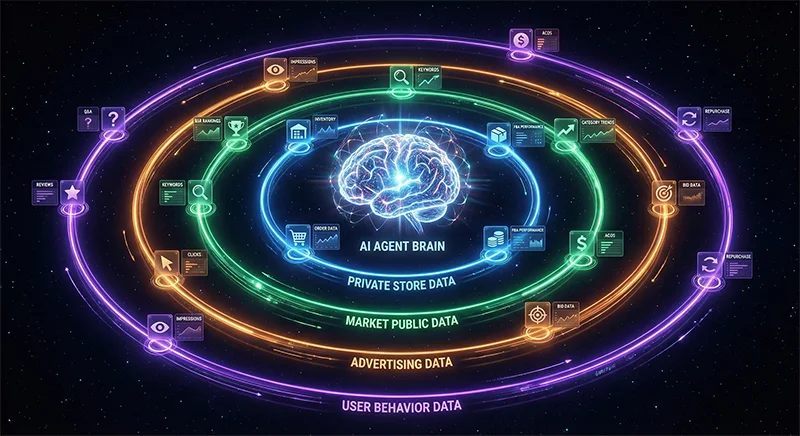
If technical architecture is the skeleton of an AI agent, then data sources are its bloodstream. An architecturally brilliant agent with poor-quality data inputs is like a high-performance engine with no fuel — it can’t run, or runs in the wrong direction.
4.1 Four Essential Data Categories
Category 1: Private Store Data (Amazon SP-API)
First-party data provided by Amazon through the official SP-API — the highest compliance and accuracy data type, and the base layer for all agent modules.
- Orders API: Order details, buyer addresses (for FBA regional configuration), return status. Refresh: hourly
- Inventory API: FBA available inventory, in-transit shipments, unsellable inventory per ASIN. Refresh: every 4 hours
- Sales API: Sales data by ASIN and date for trend analysis. Refresh: daily
- Seller API (Metrics): Account health score, ODR, LDR, VTR. Refresh: daily
- Fulfillment Inbound API: FBA inbound shipment plan status and progress. Refresh: every 2 hours
- Finance API: Settlement data and FBA fee details for SKU-level profitability. Refresh: weekly
SP-API technical note: Apply for app permissions through Amazon Developer Portal, complete the OAuth authorization flow, and refresh Access Tokens periodically (valid for only 1 hour). Strongly recommend encapsulating a unified “SP-API Client class” to manage authentication and retry logic across all endpoints:
"""
sp_api_client.py — SP-API Base Client Wrapper
"""
import requests
import time
from datetime import datetime, timedelta


class SPAPIClient:
    """Amazon SP-API unified client with automatic token refresh"""

    TOKEN_ENDPOINT = "https://api.amazon.com/auth/o2/token"
    BASE_URL = "https://sellingpartnerapi-na.amazon.com"  # North America

    def __init__(self, client_id: str, client_secret: str, refresh_token: str):
        self.client_id = client_id
        self.client_secret = client_secret
        self.refresh_token = refresh_token
        self._access_token = None
        self._token_expires_at = None

    def _refresh_access_token(self):
        resp = requests.post(self.TOKEN_ENDPOINT, data={
            "grant_type": "refresh_token",
            "refresh_token": self.refresh_token,
            "client_id": self.client_id,
            "client_secret": self.client_secret,
        })
        resp.raise_for_status()
        data = resp.json()
        self._access_token = data["access_token"]
        # Refresh 60 seconds early to avoid edge-case expiration
        self._token_expires_at = datetime.utcnow() + timedelta(seconds=data["expires_in"] - 60)

    @property
    def access_token(self) -> str:
        if not self._access_token or datetime.utcnow() >= self._token_expires_at:
            self._refresh_access_token()
        return self._access_token

    def get(self, path: str, params: dict = None) -> dict:
        """GET request with auto-auth headers and retry (max 3 attempts)"""
        headers = {
            "x-amz-access-token": self.access_token,
            "Content-Type": "application/json",
        }
        for attempt in range(3):
            try:
                resp = requests.get(
                    f"{self.BASE_URL}{path}",
                    headers=headers, params=params, timeout=15
                )
                if resp.status_code == 429:
                    time.sleep(int(resp.headers.get("Retry-After", 5)))
                    continue
                resp.raise_for_status()
                return resp.json()
            except requests.RequestException:
                if attempt == 2:
                    raise
                time.sleep(2 ** attempt)
        raise RuntimeError("SP-API request failed after maximum retries")
Category 2: Market Public Data (Requires Third-Party Services)
Includes BSR ranking trends, competitor ASIN details (price/review count/rating), keyword search volume and bid levels, new product emergence signals, and search page ad placement data.
Amazon doesn’t provide this data through official APIs (or offers very limited dimensions), so specialized third-party data collection services are required. This is precisely where data sources determine agent success or failure — without reliable market public data, the product research agent can’t identify opportunities, the competitor monitoring agent can’t function, and the advertising agent can’t evaluate real competitive dynamics for keywords.
Category 3: Advertising Data (Amazon Advertising API)
The Amazon Advertising API is separate from SP-API and requires independent permission application (through Amazon Advertising Console). Key endpoints include:
- Campaigns API: Campaign list, budgets, status
- Ad Groups API: Ad group configuration, bid strategies
- Keywords API: Keyword-level impressions/clicks/conversions/spend data
- Reports API (Async): Generate ad reports; poll for report download links
Note: The Advertising Reports API is asynchronous — requests typically take 10–30 minutes to complete. Use a message queue (Redis Streams or SQS) to manage report generation tasks to avoid blocking the main process.
Category 4: User Behavior Data (Reviews / Q&A)
Historical reviews per ASIN (rating distribution, sentiment keywords, common complaint themes), buyer Q&A, and return reasons (partially available via Orders API). This data is the core input for listing optimization and customer service agents — determining whether the agent can truly understand “why customers are satisfied or dissatisfied.”
4.2 Why Data Sources Determine Agent Success or Failure
Reason 1: Data is the agent’s sensory organs. Without data, an agent is like a blindfolded operations manager — no matter how powerful its reasoning, it can’t make valuable judgments. An ad agent that can’t perceive competitor price changes will continue with its current bid strategy when a competitor dramatically cuts prices, resulting in wasted ad budget.
Reason 2: Data quality directly determines decision precision. Agents make decisions based on data; data quality errors are amplified by the decision model. If BSR data has a 24-hour delay, the “ranking surge signal” an agent detects may already be outdated — restocking decisions based on this will lag the market.
Reason 3: Data is the only fuel for model training and iteration. The agent’s “gets smarter over time” effect fundamentally depends on accumulating historical operation data and outcome feedback. Every agent decision and its ACoS impact 72 hours later needs to be completely recorded — becoming the material for the next round of prompt optimization.
Reason 4: Data is the only map of Amazon’s traffic logic. How keyword rankings are calculated, how ad quality scores affect placement, how review count and rating affect conversion — all of these can only be inferred and mapped through continuous data observation. Without this, the agent lacks Amazon’s platform-specific “operational intuition.”
4.3 Market Public Data Integration: Pangolinfo Scrape API
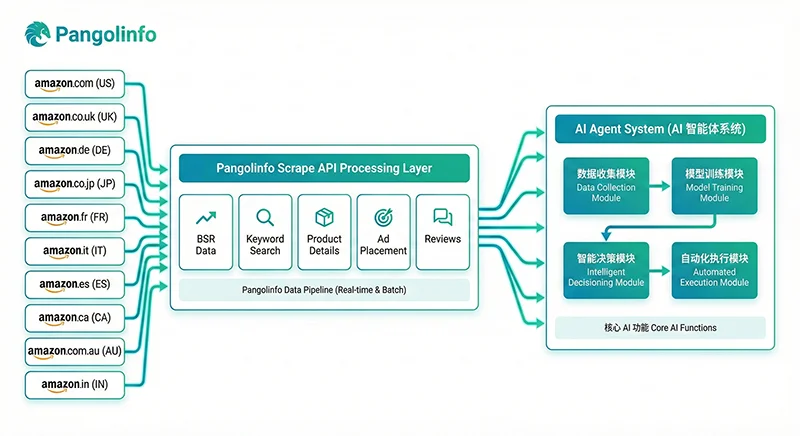
Among the four data categories, market public data (Category 2) presents the greatest technical challenge. Amazon provides no official API for this data, direct scraping faces strict anti-bot mechanisms, and maintaining separate parsing logic per marketplace is expensive.
Pangolinfo Scrape API covers 20+ Amazon global marketplaces with dedicated parsing templates for key data types, outputting a unified JSON schema — meaning whether you need US or Germany data, the API response field structure is identical, dramatically reducing multi-marketplace data pipeline development and maintenance costs.
Key data types available for your Amazon AI agent through Pangolinfo Scrape API:
| Data Type | Agent Use Case | Recommended Refresh |
|---|---|---|
| Category BSR Top 100 | Market opportunity scan, trending product signals | Every 4–6 hours |
| Competitor ASIN Product Details | Price/review/rating monitoring | Every 2–4 hours |
| Keyword Search Results Page | Keyword ranking tracking, organic position monitoring | Daily |
| SP Ad Placement Data | Advertising competitive landscape analysis (98% industry capture rate) | Every 4 hours |
| Review Data | Competitor negative review analysis, sentiment trend monitoring | Daily |
| New Releases Rankings | Emerging product alerts, blue ocean opportunity identification | Every 6 hours |
Here’s a complete Pangolinfo API integration example for competitor monitoring:
"""
pangolinfo_data_collector.py
Integrating Pangolinfo Scrape API into your Amazon AI agent data pipeline
"""
import requests, time, json
from datetime import datetime, timezone
from dataclasses import dataclass
from typing import Optional

PANGOLINFO_API_KEY = "your_pangolinfo_api_key"
API_BASE = "https://api.pangolinfo.com/v1/amazon"
HEADERS = {
    "Authorization": f"Bearer {PANGOLINFO_API_KEY}",
    "Content-Type": "application/json"
}


@dataclass
class CompetitorSnapshot:
    asin: str
    marketplace: str
    title: str
    price: float
    currency: str
    rating: float
    review_count: int
    bsr_rank: Optional[int]
    availability: str
    fetched_at: str


def fetch_competitor_detail(asin: str, marketplace: str = "amazon.com") -> Optional[CompetitorSnapshot]:
    """Fetch real-time competitor ASIN details for the monitoring agent's perception layer"""
    for attempt in range(3):
        try:
            resp = requests.post(
                f"{API_BASE}/product",
                headers=HEADERS,
                json={"marketplace": marketplace, "type": "product_detail", "asin": asin},
                timeout=30
            )
            resp.raise_for_status()
            data = resp.json()
            product = data.get("product", {})
            bsr = product.get("bestseller_ranks", [{}])[0] if product.get("bestseller_ranks") else {}

            return CompetitorSnapshot(
                asin=asin, marketplace=marketplace,
                title=product.get("title", "")[:120],
                price=float(product.get("price", 0) or 0),
                currency=product.get("currency", "USD"),
                rating=float(product.get("rating", 0) or 0),
                review_count=int(product.get("review_count", 0) or 0),
                bsr_rank=bsr.get("rank"),
                availability=product.get("availability", "unknown"),
                fetched_at=datetime.now(timezone.utc).isoformat()
            )
        except requests.HTTPError as e:
            if e.response.status_code == 429:
                time.sleep(2 ** attempt + 1)
            else:
                return None
        except Exception:
            return None
    return None


def monitor_competitor_price_change(
    asin: str, previous_price: float,
    threshold_pct: float = 0.05, marketplace: str = "amazon.com"
) -> dict:
    """Detect significant competitor price changes and trigger alerts"""
    snapshot = fetch_competitor_detail(asin, marketplace)
    if not snapshot:
        return {"is_alert": False, "error": "Data fetch failed"}
    if previous_price <= 0:
        return {"is_alert": False, "current_price": snapshot.price}

    change_pct = (snapshot.price - previous_price) / previous_price
    result = {
        "asin": asin, "marketplace": marketplace,
        "previous_price": previous_price, "current_price": snapshot.price,
        "change_pct": round(change_pct * 100, 2),
        "review_count": snapshot.review_count, "rating": snapshot.rating,
        "bsr_rank": snapshot.bsr_rank,
        "is_alert": abs(change_pct) >= threshold_pct,
        "fetched_at": snapshot.fetched_at
    }
    if result["is_alert"]:
        direction = "dropped" if change_pct < 0 else "increased"
        result["action_suggestion"] = (
            f"Competitor {asin} price {direction} {abs(result['change_pct'])}% "
            f"to ${snapshot.price:.2f}. Consider reviewing your pricing strategy."
        )
    return result


def run_competitor_monitoring(watchlist: list[dict]) -> list[dict]:
    """Bulk process competitor watchlist"""
    alerts = []
    for item in watchlist:
        result = monitor_competitor_price_change(
            asin=item["asin"],
            previous_price=item.get("last_price", 0),
            marketplace=item.get("marketplace", "amazon.com")
        )
        if result.get("is_alert"):
            alerts.append(result)
            print(f"⚠️  ALERT: {result['action_suggestion']}")
        else:
            print(f"✅  {item['asin']} price stable (${result.get('current_price', 'N/A')})")
        time.sleep(0.5)
    return alerts


if __name__ == "__main__":
    WATCHLIST = [
        {"asin": "B08XY12345", "last_price": 29.99, "marketplace": "amazon.com"},
        {"asin": "B09AB67890", "last_price": 34.50, "marketplace": "amazon.com"},
        {"asin": "B07CD24680", "last_price": 27.00, "marketplace": "amazon.co.uk"},
    ]
    alerts = run_competitor_monitoring(WATCHLIST)
    print(f"\n{len(alerts)} price alerts generated and queued for action.")
V. Full-Link Implementation Roadmap
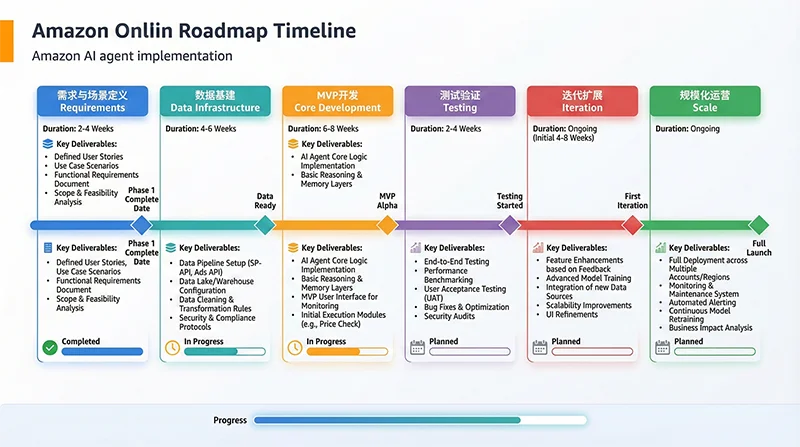
Phase 1: Requirements & Scenario Definition (1–2 weeks)
① Lock your core scenario: Focus on 1–2 highest-priority MVP scenarios. Recommended priority order: Ad ACoS monitoring + auto bid adjustment → Competitor price monitoring + alert → Negative review monitoring + response drafts.
② Document your SOPs: Convert your existing manual SOPs into structured documents — your agent’s prompt engineering and rule engine design need these as blueprints. No human SOP means no baseline for agent behavior.
③ Define success metrics: e.g., “Reduce target ad group ACoS from 22% to below 15% within 4 weeks, saving more than 8 hours per week in ad optimization labor.”
Phase 2: Data Infrastructure Setup (2–3 weeks)
① SP-API Integration: Register at Amazon Seller Central Developer Portal → Create developer account → Create application → Get Client ID/Secret → Complete OAuth authorization → Get Refresh Token → implement using the SPAPIClient class above.
② Advertising API Authorization: Amazon Advertising Console → Request API access → Create Advertising API Profile → Complete independent authorization (note: separate from SP-API authorization).
③ Pangolinfo API Integration: Visit Pangolinfo Console → Register → Create API Key → Configure target marketplaces and data types → Implement using the collector module above.
④ Database Setup: PostgreSQL (structured operational data) + Redis (hot cache and task queue) + Vector DB (PGVector or Weaviate for RAG-enhanced agent memory).
Phase 3: MVP Development (3–5 weeks)
Core MVP agent implementation (Ad ACoS example):
"""
ad_acos_agent.py — Ad ACoS Monitoring Agent MVP
"""
import os, json
from datetime import datetime, timezone
import anthropic

ACOS_ALERT_THRESHOLD = 0.20
ACOS_TARGET = 0.15


def compute_keyword_acos(ad_data: list[dict]) -> list[dict]:
    analyzed = []
    for kw in ad_data:
        spend = float(kw.get("spend") or 0)
        sales = float(kw.get("attributedSales30d") or 0)
        acos = (spend / sales) if sales > 0 else 99.0
        analyzed.append({
            "keyword": kw.get("keywordText"),
            "keyword_id": kw.get("keywordId"),
            "spend": spend, "sales": sales,
            "acos": round(acos, 4),
            "is_alert": acos > ACOS_ALERT_THRESHOLD and spend > 5.0,
        })
    return analyzed


def generate_optimization_strategy(keyword_data: list[dict]) -> dict:
    client = anthropic.Anthropic(api_key=os.getenv("ANTHROPIC_API_KEY"))
    alert_items = [k for k in keyword_data if k["is_alert"]]
    if not alert_items:
        return {"actions": [], "summary": "All keywords within ACoS target. No action needed."}

    prompt = f"""You are an Amazon advertising expert. Analyze these keywords exceeding target ACoS ({ACOS_TARGET*100:.0f}%) and provide optimization recommendations.
Data: {json.dumps(alert_items)}
Output only JSON in this format:
{{"actions":[{{"keyword":"..","keyword_id":"..","action":"reduce_bid|pause|add_negative",
"current_bid_adjustment_pct":-15,"reasoning":"..","confidence":0.85,"risk_level":"low|medium|high"}}],
"summary":"..."}}"""

    resp = client.messages.create(model="claude-3-5-sonnet-20241022", max_tokens=1500,
                                  messages=[{"role": "user", "content": prompt}])
    try:
        return json.loads(resp.content[0].text)
    except Exception:
        return {"actions": [], "summary": "LLM parse error — please review manually."}


def execute_ad_operations(strategy: dict, dry_run: bool = True) -> list[dict]:
    results = []
    for action in strategy.get("actions", []):
        risk = action.get("risk_level", "medium")
        confidence = action.get("confidence", 0)
        needs_human = risk == "high" or confidence < 0.70

        if needs_human:
            print(f"⚠️  [HUMAN REVIEW] {action['keyword']}: {action['action']} (confidence {confidence:.0%})")
        elif not dry_run:
            print(f"✅  [AUTO EXECUTE] {action['keyword']}: {action['action']} {action.get('current_bid_adjustment_pct',0):+d}%")
        else:
            print(f"🔍  [DRY RUN] {action['keyword']}: {action['action']} {action.get('current_bid_adjustment_pct',0):+d}%")

        results.append({
            "keyword": action.get("keyword"),
            "action": action.get("action"),
            "execution_mode": "human_required" if needs_human else "auto",
            "dry_run": dry_run,
            "executed_at": datetime.now(timezone.utc).isoformat()
        })
    return results
Phase 4: Testing & Validation (2–3 weeks)
- Data Quality Validation (Days 1–3): Core field missing rate target < 2%, data latency within design spec
- Rule Engine Backtesting (Days 4–7): Run 30 days of historical data through decision logic; compare with human decisions; optimize discrepancies
- Dry Run in Live Environment (Days 8–14): Connect to real data streams in dry_run=True mode; human team reviews daily operation logs. False positive rate target < 20%, false negative target < 10%
- Limited Gray Release to Production (Week 3): Select 5–10 low-risk ad groups for auto mode; keep others under human control as control group; compare 2-week outcomes
Phase 5: Iterative Optimization (Ongoing)
Continuously improve prompts based on “wrong decision cases” from dry run; monthly review of threshold parameters; establish standardized “operation → 72hr wait → record outcome → update knowledge base” feedback loop.
Phase 6: Scale (1 Month After Stable Launch)
- Expand to all campaigns in full auto mode
- Launch competitor monitoring agent (Pangolinfo BSR + product details)
- Launch inventory alert agent (SP-API inventory + sales trend model)
- Launch review management agent (Reviews API + LLM response generation)
- Multi-agent coordination: ad ↔ pricing ↔ inventory event-driven triggers
VI. Real-World Case Studies & Quantified Results
Case 1: Ad ACoS Optimization Agent
Background: 3C brand, Amazon.com, managing 120 campaigns, ~$1,200/day ad spend. Team spent 4 hours daily on ad optimization. Overall ACoS stuck at 20–22%.
Solution: Advertising Reports API + rule engine + Claude 3.5 — hourly ACoS monitoring with keyword-level auto bid adjustment.
Results after 6 weeks:
- Overall ACoS reduced from 21.8% to 14.2% — a 35% improvement
- Ad conversion rate up 18% (poor keywords paused, budget concentrated on high-converters)
- Weekly ad optimization labor reduced from 28 hours to 6 hours
Case 2: Review Management & Negative Review Response Agent
Background: Home goods brand managing 8 Amazon marketplaces, ~200 SKUs, generating 40–80 new reviews daily. 24-hour negative review response required.
Solution: Pangolinfo API real-time review ingestion + LLM sentiment analysis + personalized response draft generation + high-risk negative review human escalation.
Results after 8 weeks:
- Average negative review response time reduced from 18 hours to 2.4 hours
- Overall rating across all marketplaces improved from 4.1 to 4.4
- Review management labor reduced from 15 to 3 hours per week
- Response draft adoption rate: 78%
Case 3: Competitor Monitoring + Product Research Opportunity Detection
Background: Cross-border brand operating US, UK, and Germany marketplaces. Planning Q2 product line expansion — needed to identify blue ocean category opportunities.
Solution: Pangolinfo API every 4 hours for BSR Top 50 + competitor review distribution + new releases data. Agent auto-calculates “Competition Density Index” and “Opportunity Score.”
Results after 10 weeks:
- Identified a Germany kitchen electronics subcategory with 1/8 the competition density of the US (Top 20 average review count: 280 vs. 2,300)
- Product research cycle reduced from 4 weeks to 1 week
- Agent-recommended Germany launch achieved BSR Top 50 within 3 months; the same product is still outside Top 200 on Amazon.com
VII. Conclusion & Implementation Recommendations
Amazon Operations AI Agent = Scenario-Based Design (prerequisite) × Technical Architecture (skeleton) × High-Quality Data Sources (bloodstream) × Decision Loop (soul)
All four elements are non-negotiable. The priority order is clear: build data infrastructure first, then MVP by scenario, then scale. An agent without high-quality data inputs is just a “premium error amplifier” — no matter how good the model.
For Amazon Sellers / Operations Leaders:
- Conduct a “data infrastructure audit” first: Which SP-API endpoints are connected? What third-party data covers which marketplaces? Does update frequency meet decision-making needs?
- Select a “high-frequency, high-value, low-risk” MVP scenario; set a 4–6 week validation cycle with quantifiable success metrics
- Accumulate enough operation data and feedback during the Dry Run phase before switching to auto-execute mode
- Accept that “agent development is a 6–12 month medium-term investment” — evaluate value monthly, not weekly
For AI Product Managers / Developers:
- Prioritize the data foundation (SP-API + Advertising API + Pangolinfo market data) — data quality is the lowest-technical-debt investment
- The four-layer architecture is the standard paradigm for production-ready agents — don’t skip layers
- Audit log and operation record systems must be designed from day one
- Recommended tech stack: Python + FastAPI + PostgreSQL + Redis + Claude 3.5/Gemini 1.5 Pro + LangChain/LlamaIndex
Key Resources
- Amazon SP-API: developer.amazonservices.com
- Amazon Advertising API: advertising.amazon.com/API/docs
- Pangolinfo Scrape API (20+ Amazon marketplaces): pangolinfo.com/en/scraping-api/
- Pangolinfo API Documentation: docs.pangolinfo.com
- Free Trial Console: tool.pangolinfo.com
- AMZ Data Tracker (No-Code Solution): pangolinfo.com/en/amz-data-tracker-2/
Ready to Build Your Amazon Operations AI Agent?
The data foundation is Step 1. Visit Pangolinfo Scrape API to learn how to access high-quality market public data across 20+ Amazon marketplaces at minimal integration cost — giving your AI agent the ability to truly see the market.

