

Monitoring Amazon keyword rankings is not about checking a rank number. It is about building a comparable timeline: repeated measurement under the same marketplace, the same zipcode, and the same conditions, so that every change can be explained. The six-stage pipeline in this article is the way to build it, for any seller or team that needs rank data it can act on.
This article first separates the three ranks that sellers most often confuse. It then sets out the six-stage method for building monitoring: defining the watchlist, adaptive polling, append-only timeline storage, change detection, AI agent attribution, and workspace delivery. It closes with the snapshot data model and the rules for setting alert thresholds.
Separate Three Kinds of “Rank” Before You Monitor
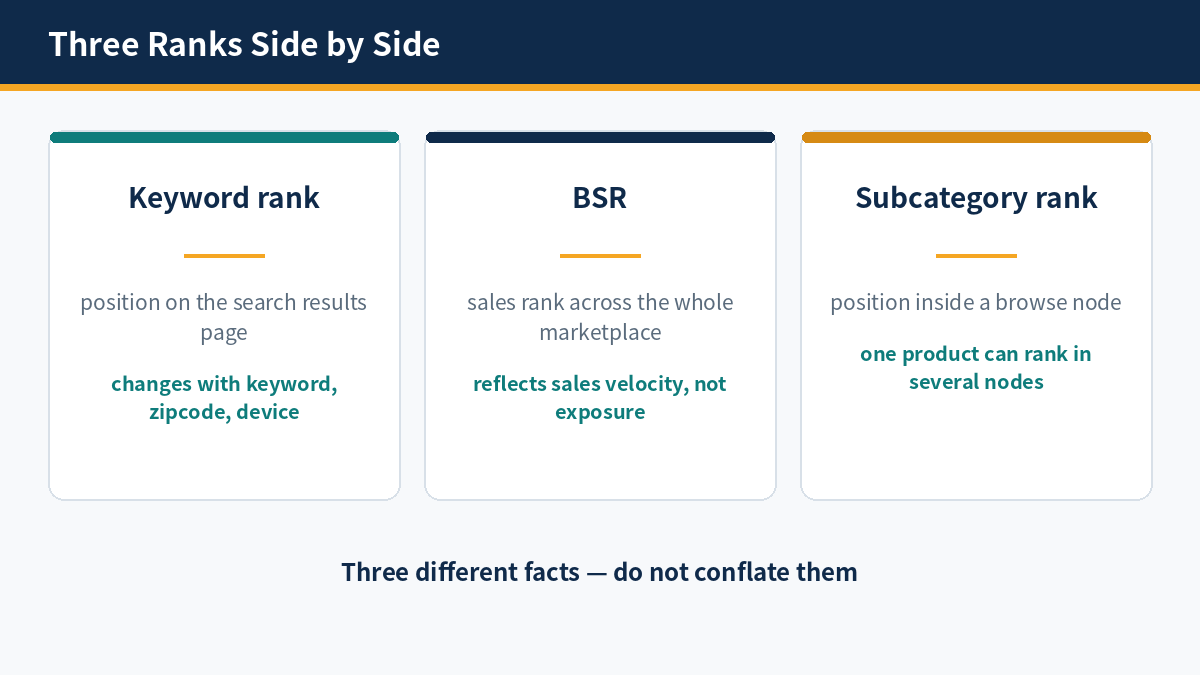
Three ranks measure three different objects, and mixing them corrupts every conclusion drawn from monitoring: keyword organic rank measures search visibility, Best Sellers Rank measures sales velocity within a category, and subcategory browse-node rank measures relative sales velocity within a narrow browse node.
Keyword Organic Rank
Keyword organic rank is the natural position of a product on the results page for a given search term. It is determined by relevance and conversion velocity. It is the central object of monitoring in this article, and the only metric that directly reflects search visibility. The same keyword returns different results under different zipcodes, so comparisons must hold the zipcode fixed.
Best Sellers Rank (BSR)
Best Sellers Rank, or BSR, measures the relative sales velocity of a product within its parent category. A parent category covers a broad range of products, so a change in BSR reflects an overall sales trend, not the search position for any single keyword. When BSR improves, keyword rank may rise, hold steady, or fall in parallel; the two cannot substitute for each other.
Subcategory Browse-Node Rank
Subcategory browse-node rank measures the relative sales velocity of a product within one narrow browse node, for example a node for a particular hand tool. The narrower the node, the more sensitive the rank is to changes in sales. The same product holds different ranks in different nodes, so every record must state the node path.
Sponsored Slots and the Mobile Fold
Sponsored Products and Sponsored Brands occupy the top positions on the search results page, pushing organic results downward; on mobile, the first screen is often filled with advertising. Recording organic rank without recording the distribution of sponsored slots overstates visibility: while rank stays unchanged, exposure may already be falling because the sponsored share has grown.
A rank number is a position, not a measure of visibility by itself. The same position brings different exposure depending on how many sponsored slots sit above it, what device the shopper uses, and how far down the page the shopper scrolls. Monitoring the position without the layout around it records the number while missing the exposure it was meant to stand for.
The cost of mixing the three ranks is faulty attribution: concluding from an improved BSR that keyword visibility has risen, or from a falling subcategory rank that search traffic has been lost, has no basis. A monitoring design must state the rank type, keyword, marketplace, and zipcode on every record, so that like is only ever compared with like.
Build Rank Monitoring in Six Steps
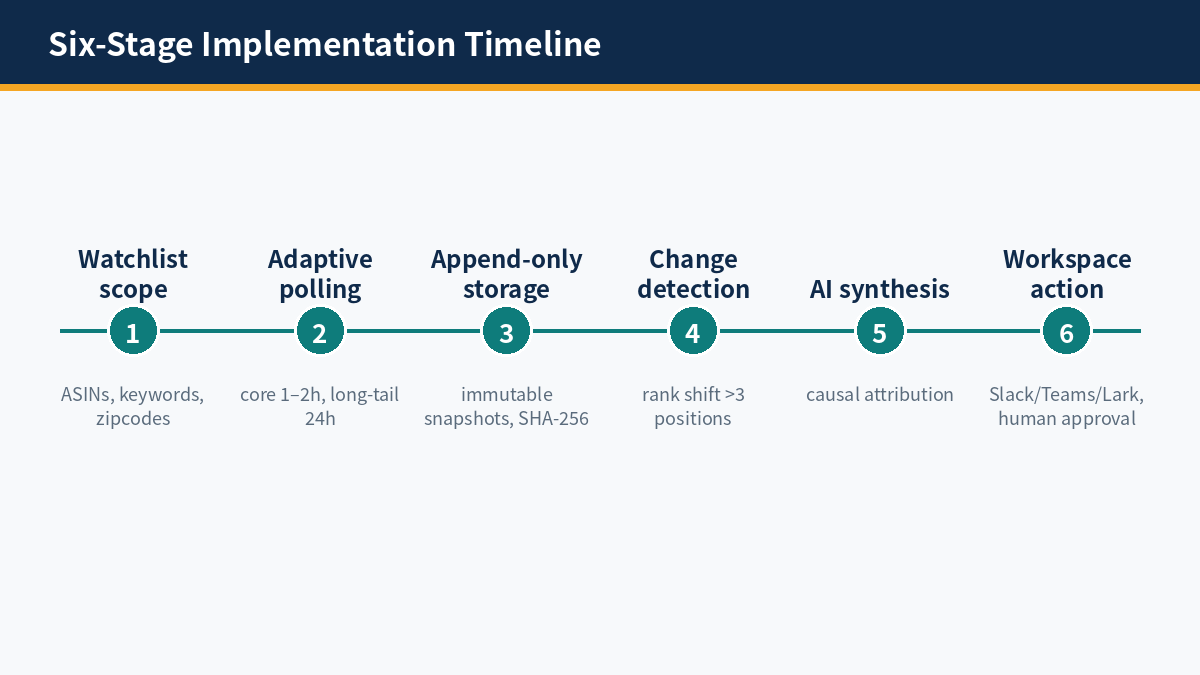
The six-stage pipeline forms one complete monitoring chain: scope decides what is measured, adaptive frequency decides how often, append-only storage preserves the full history, change detection filters for anomalies, the AI agent explains causes, and workspace delivery drives action. If any stage is missing, monitoring collapses into isolated numbers.
Step 1: Define the Watchlist Scope
The watchlist is built on the parent-child ASIN structure: a parent ASIN unifies its variants, while each child ASIN carries its own price, stock, coupon, and Buy Box status. Keywords are grouped by intent, with core money keywords managed separately from long-tail terms; competitor ASINs are included alongside, as the reference against which movements in your own rank are explained. Each monitoring unit pins a marketplace and a zipcode, using 90001 for West Coast demand, 60601 for the Midwest, and 10001 for East Coast cities, for example.
Step 2: Adaptive Polling Frequency
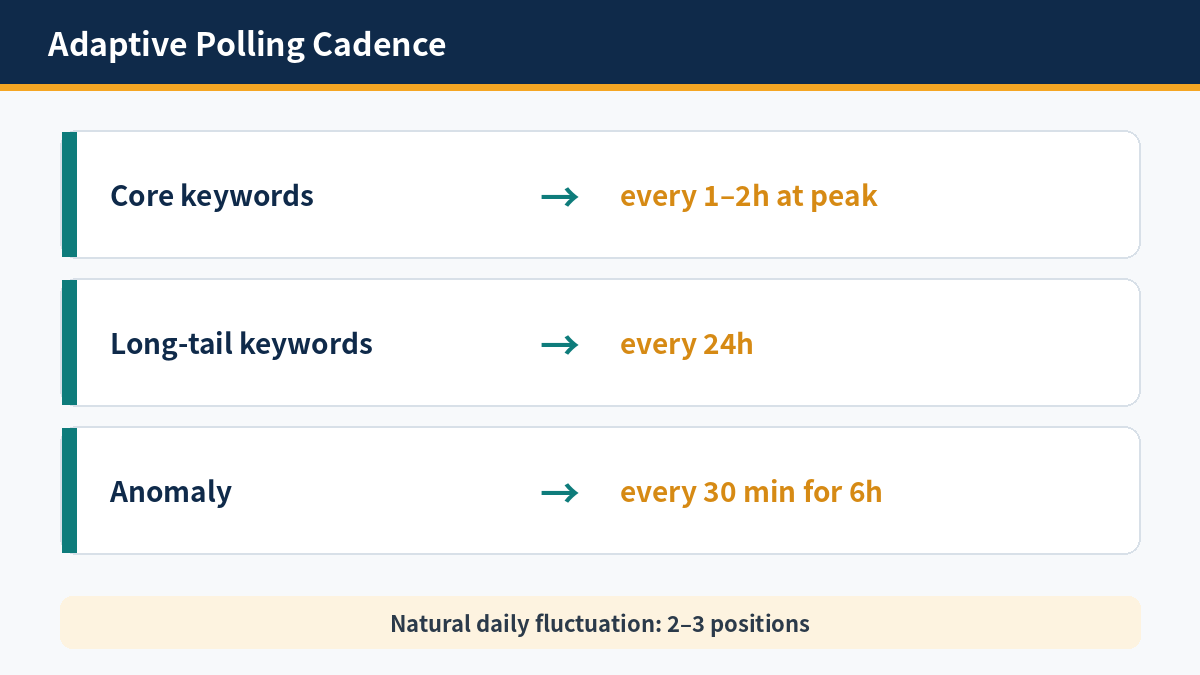
Polling frequency is tiered by keyword value: core money keywords and Buy Box prices are polled every 1–2 hours during peak hours, while long-tail queries and subcategory browse nodes are polled once per 24 hours. When an anomaly is detected, the scheduler accelerates automatically to 30-minute intervals for 6 hours, capturing the course of a change rather than only its result.
Polling every keyword at high frequency wastes polling volume: core terms justify frequent checks, and long-tail terms need no more than a low cadence. The purpose of adaptive frequency is to direct polling volume toward the positions that change fastest and matter most, rather than spreading it evenly, while the escalation mechanism ensures that a sudden change is not missed by a slow rhythm.
Step 3: Append-Only Timeline Storage
Each polling result is written as an immutable snapshot appended to a timeline database; older records are never overwritten. A snapshot holds the timestamp, marketplace, zipcode, net price, coupon, Buy Box winner, delivery promise, and the full search results page ranking; snapshots of the same ASIN under different zipcodes are stored separately. The data model is set out in the section ‘What Every Snapshot Must Store’ below.
Step 4: Change Detection
A diff engine compares each new snapshot with the previous one and flags any movement beyond tolerance as an anomaly. Triggers include an organic rank shift of more than 3 positions, a change of Buy Box winner, a change in net price after coupons, and a marked change in competitor sponsored placements at the top of the search results page. Movements inside tolerance are written to the timeline without raising an alert.
Step 5: AI Agent Synthesis and Causal Attribution
An anomalous event is passed to an AI agent together with the snapshots before and after it, competitor movements, and the layout of the search results page. The agent distinguishes between causes: sales acceleration driven by a competitor coupon, a worsened delivery promise after a stock-out, and shrinking organic exposure as the sponsored share grows. Conclusions carry the evidence snapshots for human review, and high-impact actions require human approval before they are executed.
The AI agent calls structured tools directly through the Amazon Data MCP (for the 21 tools, see the MCP tools docs), without parsing raw pages: the tools for search, product, and review data each serve their own purpose, and the context needed for attribution is retrieved in a single pass. Tool-call records are stored with the event in the timeline, so the attribution process itself can be audited.
Step 6: Workspace Delivery
A diagnostic brief reaches the team workspace by webhook, to Slack, Microsoft Teams, or Lark, with an interactive card and a human approval button. Low-risk defensive actions can be automated; high-impact actions such as repricing and appeals only present a recommendation and the evidence, and are never executed automatically. The monitoring loop closes with a disposition record marked as handled, not with the alert being sent.
Manual checks cannot provide this chain. A person opening the search results page sees one rank under one set of conditions, with no record of the conditions and no snapshot to compare against later. Scheduled polling replaces that single observation with a repeatable measurement, and the timeline replaces memory with evidence.
The pipeline above can be built on a real-time data layer: the Amazon rank and price monitoring solution retrieves live search results pages and product pages on demand through the Amazon Scraper API (for the data collection method, see the Scraper API docs), combined with the Amazon Data MCP, which provides 21 tools, and the AI agent then carries out attribution and delivery. Average response is around 3 seconds, the success rate is 99.9%, coverage spans 13 marketplaces with native zipcode targeting, and sponsored-placement capture exceeds 90%. The free tier provides 60 credits per month, and structured JSON costs 1 credit per page.
What Every Snapshot Must Store
A snapshot is the smallest explanatory unit of the timeline: one snapshot must hold the rank number and every condition that produced it at the same time, because if any condition is missing, later attribution cannot be verified.
The Snapshot Data Model
One snapshot holds, at minimum: timestamp, marketplace, zipcode, keyword, organic rank and sponsored-placement distribution, net price and coupon, stock and delivery promise, Buy Box winner, rating and review count, and the BSR and subcategory node rank that apply. All fields belong to a single polling event and must not be stitched together from separate batches; field definitions are fixed before monitoring starts, so that the measurement basis does not change midway.
Why Overwriting Destroys Explanability
Overwriting keeps only the latest state. Once history is erased, a rank change loses its reference point: it is no longer possible to establish at which moment between two polls the change occurred, or to recover the price, coupon, and delivery promise that applied when it happened. Append-only storage trades disk space for explanatory power, and that trade is the precondition for a usable timeline.
Hash-Based Change Detection
Each snapshot is hashed on its commercial attributes and compared with the previous one: a different hash means a change exists, and an identical hash means attribution can be skipped. Hash comparison comes before threshold judgement: first establish whether anything changed, then judge whether the change exceeds tolerance. Hash values are stored with the snapshot, so they can be re-checked and traced.
Seller Central reports are not a substitute: Seller Central Business Reports lag by 24–48 hours, and Search Query Performance is published in weekly or monthly batches that lag by 2–3 days, so neither can support attribution within the day. The timeline must be built from real-time polling, with platform reports used only for later calibration.
How long the timeline is kept should match the purpose of monitoring: short-term review needs recent snapshots, and long-term trend analysis needs snapshots across quarters. Before an old snapshot is deleted, confirm that its explanatory value has been carried into an attribution conclusion; each conclusion must cite the snapshot numbers, so that it can be traced back to the source data.
The distribution of sponsored placements must be recorded with each snapshot: how many sponsored products sit at the top, whether a Sponsored Brand appears, and the position of the first organic result. When organic rank is unchanged but sponsored placements multiply, visibility is still falling; without this field, a change in exposure cannot be explained.
How to Set Alert Thresholds Without False Alarms
A threshold is not better for being stricter: tolerance must sit above Amazon’s natural daily fluctuation of 2–3 positions and below the size of a change worth acting on. A correct threshold makes an alert appear only when human judgement is needed.
The Flaw in Static Thresholds
A fixed threshold measures every keyword with the same yardstick: too loose for core terms, and too strict for long-tail terms. Algorithm tests and intraday personalisation routinely move rankings by a natural 2–3 positions; if any move of 2 positions triggers an alert, the inbox fills with notifications that require no action, while a genuine Buy Box loss or a competitor coupon offensive is drowned out.
The Natural Fluctuation Band
The natural fluctuation band is the range of day-to-day movement in rank when no structural change has occurred. For most keywords, the band is 2–3 positions. Before setting a threshold, measure the normal swing of each keyword from its timeline: narrow the tolerance where the band is narrow, and widen it where the band is wide. Replacing grouped tolerances with a single site-wide threshold is a primary source of false alarms.
Setting Tolerances by Group
Tolerances are set in layers: for core money keywords, a shift of more than 3 positions is the trigger line, and long-tail terms are given wider room according to their own fluctuation bands. A single breach is written to the timeline only; an alert is escalated when breaches repeat, or when they coincide with a Buy Box winner change or a net price movement. Every threshold adjustment is recorded with its reason and effective time, so that the threshold itself can be audited.
Alert triage decides how a change is delivered: changes that only need to be known go into a daily digest, changes that need human judgement are pushed to the workspace at once, and structural changes such as a Buy Box loss or a stock-out are placed at the top with a recommended response. Triage rules are agreed with the team before monitoring starts, and reviewed afterwards against the false alarm rate.
A threshold is not set once: when keywords enter a peak season, competitors launch new products, or the advertising structure changes, the fluctuation band moves with them. Threshold review runs alongside monitoring review, and its conclusions are written to the timeline, so that adjustments to the threshold leave a record of their own.
An alert is a prompt for judgement, not an instruction. The response begins with the timeline: confirm the movement, read the attribution, and check the evidence snapshot before changing a price, a bid, or a listing. Acting on a number without that chain repeats the original error, replacing a missed change with a mistaken one.
FAQ
The five questions below cover the judgement calls most often faced when monitoring keyword rankings; each answer can be used directly as a working rule.
Q1: How often should keyword rank be checked?
Check core money keywords every 1–2 hours during peak hours, and long-tail terms once per 24 hours. After an anomaly, checks accelerate automatically to every 30 minutes for 6 hours.
Q2: Keyword rank or BSR — which matters more?
They measure different objects: keyword rank reflects search visibility, while BSR reflects sales velocity within a category. For search performance, keyword rank is the reference; BSR serves only as a gauge of the sales trend.
Q3: How many positions of movement need action?
Amazon rankings fluctuate by a natural 2–3 positions each day. A core keyword that moves by more than 3 positions repeatedly, or together with a Buy Box winner change or a net price movement, is escalated to an alert that needs action.
Q4: The same keyword ranks differently by zipcode — what should I do?
Pin the zipcode before comparing: use 90001, 60601, and 10001 to represent West Coast, Midwest, and East Coast demand. A timeline under one zipcode is compared only with its own history, never across zipcodes.
Q5: What do I need to start monitoring keyword rankings for free?
Start with the Pangolinfo free tier: 60 credits per month, with structured JSON at 1 credit per page. Build a timeline for core ASINs and keywords first, then expand to more marketplaces and zipcodes as needed.
Built in this way, monitoring leaves every rank change traceable to a snapshot and a cause. For the full approach, built on real-time data and an AI agent, see the Amazon rank and price monitoring solution, which carries the six-stage pipeline described in this article.