

Competitor price monitoring is not data collection. It’s change detection. Anyone can fetch a price once — the job is knowing the moment a rival moves, understanding whether the move matters, and acting before the window closes. An Amazon competitor price monitoring API gives you the raw feed; this guide covers how to turn it into a system that actually works.
Why monitor competitor prices
Three structural reasons make competitor price monitoring a revenue operation rather than a data hobby.
Demand follows the Buy Box. On Amazon, the Buy Box — not the listing page — allocates the majority of orders, and price is a heavily weighted input to Buy Box share. A competitor priced $1.50 below you can capture most orders on a shared ASIN while your listing appears unchanged. Without monitoring, the first observable symptom is typically an unexplained decline in sales velocity.
Brand pricing erodes by default. For brand owners, resellers pricing below MAP do more than compress margin: they reset customer price expectations downward and penalize compliant resellers. Each week a violation goes undetected compounds both effects.
Competitor disruptions are bounded opportunities. Stock-outs, mispriced listings, and inventory liquidations create short windows in which demand spills to the remaining sellers. Capturing them requires detection within hours, not weeks.
What you’re actually tracking (it’s more than “price”)
“Track the price” sounds simple until you ask which price. An Amazon listing has several, and monitoring the wrong one means monitoring nothing:
- Buy Box price — the price most customers pay. This is the number that moves your conversion rate. Track this first.
- Offer list prices — every seller’s price on the ASIN. When the Buy Box price drops, the offer list tells you who moved.
- List / strikethrough price — the anchor. Discount depth (list vs current) signals promotional aggression.
- Seller + fulfillment — a price drop from an FBM seller with 200 ratings is a different event than the brand owner dropping price on their FBA offer.
- Availability — a competitor going out of stock is often more actionable than a price change. No stock, no competition.
- Timestamp — every reading needs one. Price data without a capture time can’t produce a trend, and trends are the whole point.
If your pipeline stores only “price,” you’ve built a thermometer with no memory. Store the full snapshot.
The difficulties
Price monitoring fails for predictable reasons. Five account for most of them:
1. The target is adversarial. Amazon deploys aggressive bot mitigation — CAPTCHAs, IP rate limiting, behavioral detection. A working fetcher today is not a working fetcher next month. Every self-built monitor pays this maintenance tax indefinitely.
2. Price is not a single field. Buy Box price, offer-list prices, list price, coupon-adjusted price, and business pricing coexist on one ASIN. Monitoring the wrong field produces alerts that are technically correct and practically useless.
3. Frequency is a cost function. Hourly polling maximizes detection and burns budget; weekly polling minimizes cost and misses intraday repricing. There is no universally correct frequency — only a tradeoff calibrated to the decision each check supports.
4. Alerting is a signal-to-noise problem. A monitor that fires forty times a day gets muted; the critical alert then drowns with the rest. Threshold design, cooldowns, and severity tiers determine whether the system survives contact with its users.
5. Attribution is the actual deliverable. “Price dropped $2” is trivia. “Seller X (FBM, 98% positive) reduced their offer by $2 at 15:00 and captured the Buy Box” is actionable intelligence. Bridging that gap requires offer-level data, which most low-cost setups never obtain.
Where current solutions fall short
- In-house scrapers work until the target changes. Selector drift, parser breakage, and CAPTCHA handling convert a weekend project into permanent on-call maintenance.
- Generic scraping APIs solve extraction but not monitoring. They return clean JSON per request; baselines, diffing, scheduling, and alerting remain entirely the buyer’s problem, and per-page pricing maps poorly to polling workloads unless frequencies are tiered deliberately.
- Historical price tools (e.g., Keepa) excel at charts and poorly at real-time defense: limited alerting on one’s own catalog, weak offer-level attribution, thresholds designed for research rather than revenue protection.
- Repricer SaaS automates response at the cost of transparency — opaque rules operating on uninspectable data, typically billed per SKU per month, which scales badly with catalog growth.
- The top-ranking “guides” for this topic are predominantly affiliate content for a single scraping API. They describe the architecture accurately and conclude, without exception, at a pricing page. Useful for concepts; unreliable as buying advice.
How a monitoring system works
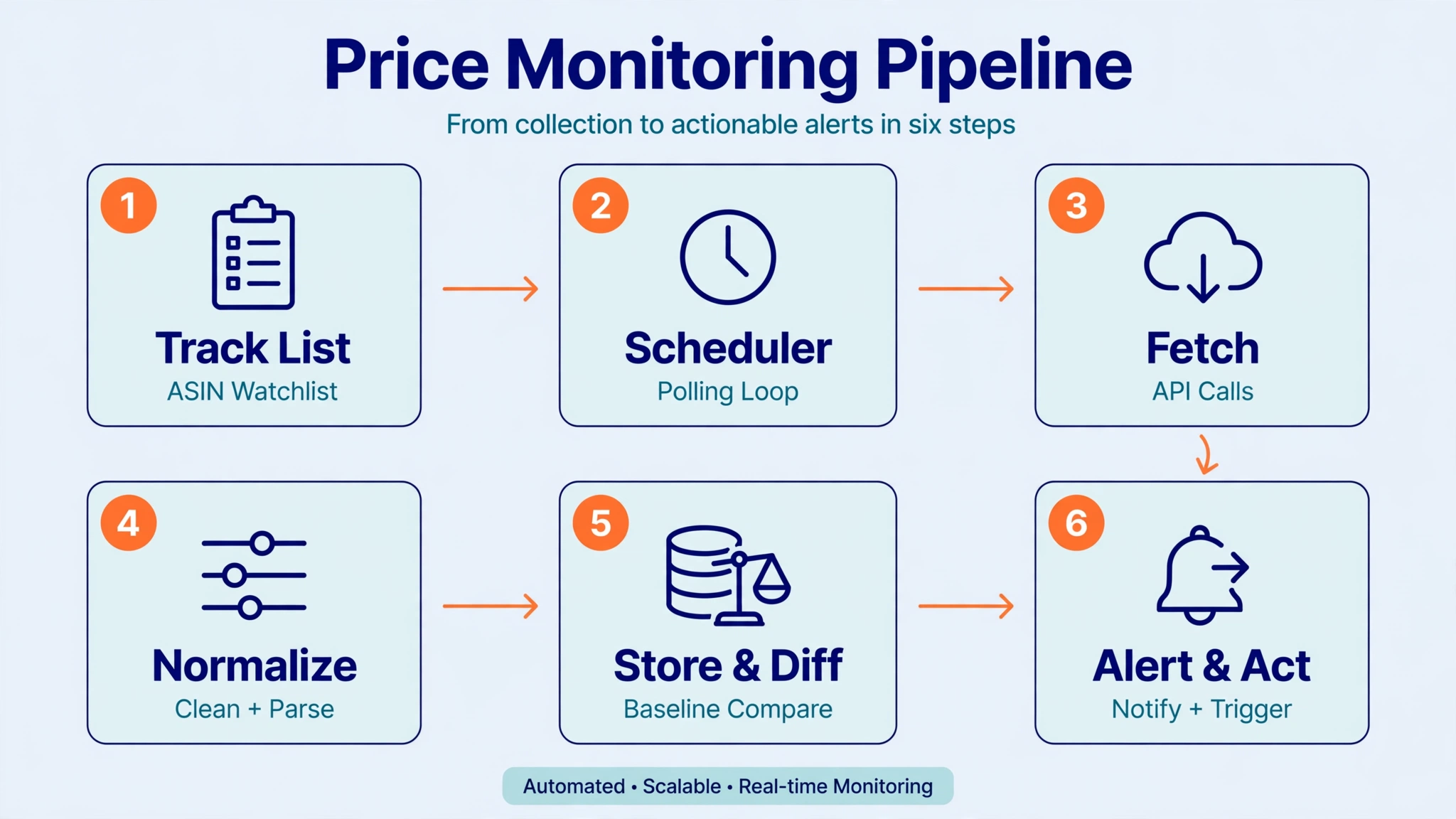
Every working price monitor has the same six stages, whether it’s a Python script or an enterprise pipeline:
1. Track list — the ASINs (and marketplaces) you watch. Stable identifiers; never key on URLs or titles.
2. Scheduler — the polling loop. Decides what gets checked, how often, in what priority order.
3. Fetch — the API calls that return structured product/offer data.
4. Normalize — currency parsing, variant handling, dedup. Amazon returns “$19.99” as a string; your diff engine needs 19.99 as a number.
5. Store + diff — append each snapshot, compare against the baseline. The diff is the product, not the snapshot.
6. Alert + act — route meaningful changes to people or systems: email, Slack, repricer, dashboard.
Polling strategy: the frequency-cost-freshness triangle
You can’t have all three. More frequent checks mean fresher data and higher cost. The right frequency depends on what you’re defending:
- Your own Buy Box on hero ASINs — hourly or faster. This is revenue defense; cost is justified.
- Direct competitors’ key ASINs — every 4–6 hours. Catches intraday repricing without burning budget.
- Category-wide watchlists — daily. You’re looking for trends and new entrants, not tactical moves.
- Long-tail / occasional checks — weekly. Enough to spot structural shifts.
Two things people get wrong: first, Amazon prices don’t change every minute for most ASINs — repricers move in bursts, often around traffic peaks. Second, some APIs cache responses for ~10 minutes on hard targets, so sub-10-minute polling can mean paying for the same snapshot twice. Match frequency to the decision the data supports. If nobody acts on a 15-minute-old price, don’t pay for 15-minute freshness.
Alert design: signal vs noise
Most price monitors die from alert fatigue, not technical failure. Design alerts like this:
- Threshold types — absolute (“dropped below $18.50”) for floor defense, percentage (“moved >5%”) for trend detection. Use both: absolute guards the line, percentage catches the drift.
- Cooldowns — after firing, suppress repeats for a window (e.g., 24h for the same ASIN+direction). A competitor oscillating around your threshold shouldn’t page you six times.
- Tiered severity — critical (competitor undercut your floor price, you lost the Buy Box), watch (moderate shift, new seller entered), opportunity (competitor out of stock, MAP violation detected).
- The “who moved” rule — a Buy Box price change without the offer list is half an alert. Always attach which seller changed which offer to what price. That’s the difference between “price dropped” and “Seller X (FBM, 98.2% positive) undercut us by $1.20.”
A minimal monitor in code
The pattern behind every system above: fetch, normalize, diff, alert. (Illustrative — see the docs for the exact endpoint reference.)
import requests
from datetime import date

API_KEY = "pgl_xxx"  # free key at tool.pangolinfo.com — first 60 requests free
headers = {"Authorization": f"Bearer {API_KEY}"}
FLOOR = 18.50  # our floor price for this ASIN

# 1. Fetch today's snapshot
d = requests.get(DETAIL_URL, headers=headers, params={"asin": "B0EXAMPLE1"}).json()
today = {
    "asin": "B0EXAMPLE1",
    "buybox_price": float(d["buybox_price"].replace("$", "")),
    "seller": d["buybox_seller"],
    "in_stock": d["availability"] == "in_stock",
    "captured_at": date.today().isoformat(),
}

# 2. Diff against yesterday's baseline (from your store)
baseline = load_baseline("B0EXAMPLE1")  # {"buybox_price": 19.99, ...}
if today["buybox_price"] < baseline["buybox_price"]:
    drop_pct = (baseline["buybox_price"] - today["buybox_price"]) / baseline["buybox_price"]
    if today["buybox_price"] < FLOOR or drop_pct > 0.05:
        alert(f"PRICE DROP {today['asin']}: ${baseline['buybox_price']} → ${today['buybox_price']} "
              f"by {today['seller']} ({drop_pct:.1%})")

# 3. Roll the baseline forward
save_baseline(today)
Sixty lines of real logic. Everything else — scheduler, storage, dashboards — is scaffolding around this loop.
What it costs: real credit math
On Pangolinfo’s current pricing (verified October 2026): product data costs 1 credit/page. Price monitoring is the cheapest workload an API can serve — one page per ASIN per check.
| Setup | ASINs × checks/day × 30 | Credits/month |
|---|---|---|
| 50 hero ASINs, hourly | 50 × 24 × 30 | 36,000 |
| 500 competitors, 4×/day | 500 × 4 × 30 | 60,000 |
| 5,000 watchlist, daily | 5,000 × 1 × 30 | 150,000 |
| 20,000 long-tail, weekly | 20,000 × ~4.3 | ~86,000 |
Your first 60 requests are free — enough to wire up the diff loop against real ASINs before spending anything. The expensive mistake isn’t the per-request price; it’s polling everything hourly when only 50 ASINs deserve it. Tier your frequencies (see above) and most teams cut 60–70% of the naive cost.
Scenario 1: MAP violation detection
A brand owner sells a kitchen gadget at $49.99 with a $44.99 MAP across fifteen resellers. The monitoring configuration: twenty hero ASINs, one daily offers pull capturing seller, price, fulfillment type, and timestamp, with a single rule flagging any offer below $44.99.
On a Tuesday the rule fires: reseller “DealsDirect” (FBM) listed the hero ASIN at $39.99. The alert carries the evidence — seller identity, price, and timestamp — and the violation notice goes out the same afternoon with the data attached. Without monitoring, detection waits for the monthly sales review: four weeks of customers trained to expect discounts, and compliant resellers questioning the policy.
Workload cost: 20 ASINs × 1 check/day × 30 days = 600 credits/month. A single detected violation funds roughly a year of monitoring.
Scenario 2: Buy Box defense on a hero ASIN
A hero ASIN generates approximately $8,000/month. On a Friday at 18:00, a new FBM seller appears $2.00 below the incumbent price and captures the Buy Box.
With hourly Buy Box checks, the 19:00 alert states the facts: Buy Box lost on the ASIN to the new seller (FBM, 97.1% positive) at $17.99 versus $19.99. The seller can respond Friday evening — selective matching, holding price while pushing Sponsored Products through the weekend, or first checking the entrant’s depth via the offer list (two units at that price is a blip, not a price war).
Without monitoring, discovery waits until Monday: two days of lost sales followed by repricing under pressure.
This scenario justifies hourly polling on a short list: 50 ASINs × 24 checks × 30 days = 36,000 credits/month — a small fraction of the defended revenue.
Build it yourself, buy the API, or skip the code
- Build in-house if price monitoring is core IP (e.g., you’re a repricing SaaS). You’ll own parsers, proxies, and CAPTCHA handling — a real data-engineering commitment.
- Use a price data API like Amazon Scraper API if you want structured snapshots without infrastructure. One credit per page; you own the diff logic.
- Use a no-code tracker if you want monitoring without code. Pangolinfo’s Amazon Product Research Tool runs scheduled price tracking with alerts at 1.5 credits/page — the whole six-stage pipeline as a managed service.
How to choose a provider
- Offer-level data — can it return the full offer list (seller → price → fulfillment), not just the Buy Box price? Without this, “who moved” is unanswerable.
- Freshness guarantees — live vs cached, and maximum cache age disclosed.
- Geotargeting — prices differ by marketplace and region; verify the provider covers yours.
- Timestamp on every record — non-negotiable for trend computation.
- Uptime on Amazon specifically — generic scraping success rates don’t transfer to the hardest target.
- Cost per check — credits per page × your polling schedule. Model it with the table above before committing.
FAQ
How often should I check competitor prices?
Tier it: hourly for your hero ASINs’ Buy Box, 4–6 hours for direct competitors, daily for watchlists, weekly for long-tail. Match frequency to the decision the data supports.
Buy Box price vs list price — which do I monitor?
Buy Box price for revenue defense (it’s what customers pay). List/strikethrough for promotional aggression. Offer list for attribution (who moved).
Can I detect MAP violations with an API?
Yes — the offer list gives you seller → price pairs, which is the evidence. Poll reseller ASINs on a schedule and flag anything below your MAP floor.
Is monitoring competitor prices legal?
Collecting public listing data is standard industry practice; consult counsel for your jurisdiction. Note the distinction: monitoring public prices is not the same as agreeing on prices with competitors — never do the latter.
How much does it cost?
On Pangolinfo’s pricing: 1 credit/page. 500 ASINs checked 4×/day ≈ 60,000 credits/month. First 60 requests free. See the pricing page for current plans.
Do I need to code?
No. The API is for developers building their own logic; the Product Research Tool covers scheduled tracking with alerts and no code.



