Amazon Product Image Bulk Download
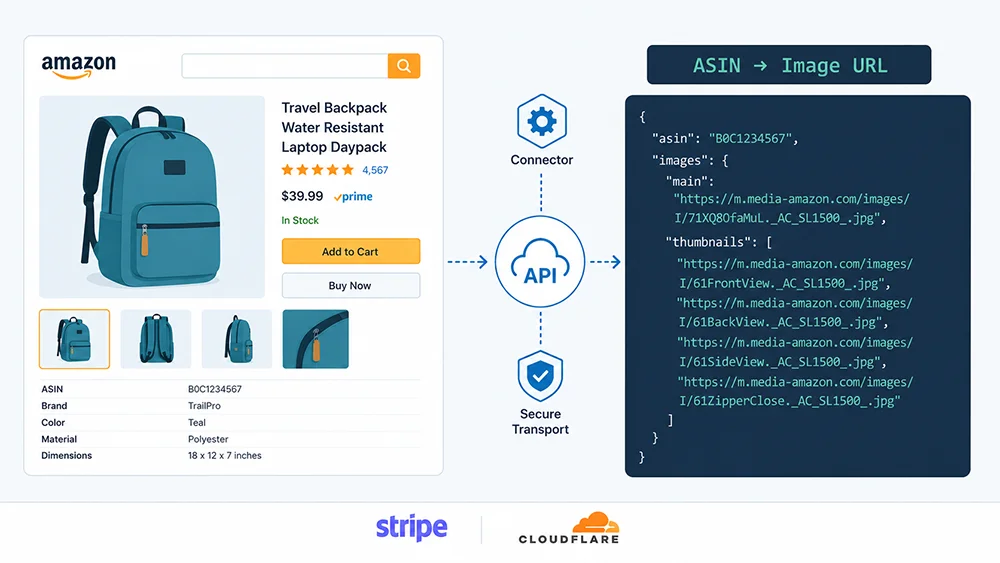
Amazon product image bulk download comes down to one reliable method: call a structured API, get back a JSON with high-res image URLs — main image, secondary images, A+ content — and you’re done. Browser plugins, manual saving, and DIY scrapers all collapse under scale. This guide explains why, and shows you a better path.
The demand for Amazon listing images spans three distinct use cases. Sellers need competitor image data for visual benchmarking — understanding what main image angles, lifestyle contexts, and infographic styles are winning in a given category. Product research tools and SaaS companies need image data at the SKU-level to power visual similarity engines, automatic listing diagnostics, and A/B test recommendations. And AI training data teams need hundreds of thousands of labeled, standardized product images to fine-tune e-commerce vision models. According to the AI Business Research Institute 2026 report, demand for e-commerce AI visual training datasets grew over 120% year-on-year — and Amazon remains the world’s largest structured source of commercial product imagery.
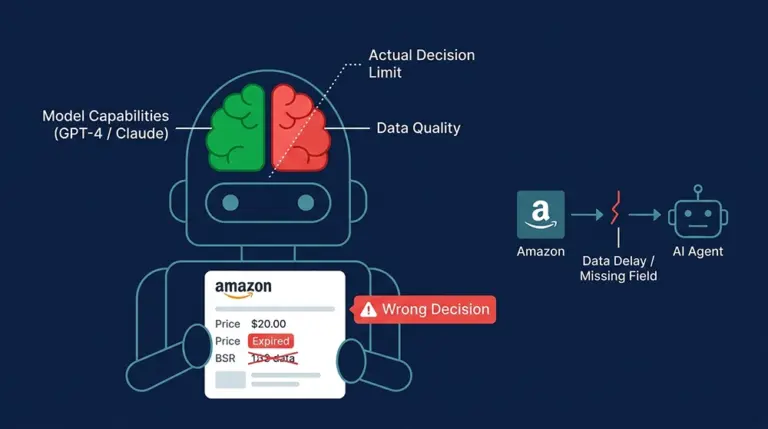
The barrier is not the download itself. It’s reliably extracting image URLs from a platform engineered to prevent exactly that.
Why Do Amazon Product Images Matter at Scale?
A Jungle Scout 2025 seller survey found that 68% of purchase decisions form within 3 seconds of seeing a main image, and high-quality primary images lift click-through rates by 30–45%. For sellers running competitive analysis across an entire subcategory, batch-collecting competitor image data reveals visual trend signals that no keyword tool captures: when a top competitor quietly swaps their lifestyle photo for a white-background infographic, that’s a repositioning signal. Catching it manually is luck. Catching it systematically requires Amazon listing image extraction at scale.
For SaaS builders, image data is infrastructure. If your product offers listing health scores, creative analysis, or visual A/B recommendations, you need image access for potentially millions of ASINs. The math on manual collection doesn’t work — and it never will.
What Makes Bulk Amazon Image Scraping So Difficult?
The first failure mode most developers hit: sending a standard HTTP request to an Amazon product page returns HTML without any image URLs. That’s because Amazon’s product detail pages rely on React-rendered components — the image nodes don’t exist in the initial HTML response. They’re injected into the DOM only after JavaScript executes. Static requests retrieve an empty shell.
How does Amazon’s bot detection work?
Switching to browser automation (Selenium, Playwright) runs into the next layer: Amazon’s bot detection system analyzes User-Agent strings, request cadence, TLS fingerprints, and behavioral mouse/scroll patterns. Internal industry benchmarks show that an unmasked IP with a standard browser fingerprint has a median stable window of under 48 hours on Amazon before triggering CAPTCHAs or IP blocks.
Image URL instability adds another layer of complexity. Amazon CDN links on images-amazon.com sometimes include expiring signature parameters. The same image appears under different URL formats for different resolutions: ._SL1500_.jpg, ._AC_SL1000_.jpg, ._SX679_.jpg. Normalizing these to a consistent high-res format requires knowledge of Amazon’s URL schema — and that schema changes without notice.
Finally, the infrastructure cost of maintaining a reliable DIY Amazon scraper is substantial: a rotating proxy pool ($200–800/month), an anti-fingerprint browser farm ($50–200/month), and distributed task scheduling (2–4 weeks of engineering time to build, plus ongoing maintenance). Most teams underestimate the maintenance burden when Amazon updates its bot detection — which happens several times per year.
4 Methods Compared: Which Fits Your Scale?
| Method | Scale | Stability | Technical Barrier | Total Cost |
|---|---|---|---|---|
| Manual right-click save | <50 images | High | None | Time cost only |
| Browser download plugin | 50–500 images | Medium | Low | Low, limited features |
| Custom scraper | 500–5,000 images | Low | High | High (build + maintain) |
| Scrape API (recommended) | 500–millions | High | Low | Low marginal cost |
Manual and plugin approaches work for occasional, small-batch needs. Custom scrapers introduce maintenance overhead and blocking risk that most teams cannot sustain. For true Amazon product image bulk download at any meaningful scale, a production-grade API is the only viable path.
Pangolinfo’s Solution Stack for Amazon Image Extraction
Pangolinfo Scrape API handles Amazon’s anti-bot layers internally — rotating proxy pools, TLS fingerprint masking, and a dynamic rendering engine — so you call one endpoint and get back structured JSON with complete image data. No proxy management. No fingerprint tuning. No maintenance when Amazon updates its detection.
Direct API Call: The Most Flexible Approach
The product detail endpoint returns an images object containing: the main image high-res URL (2000×2000px standard), a secondary images array (up to 9 entries), A+ content image URLs, and video thumbnail URLs. Here’s a minimal Python implementation for bulk ASIN image scraping:
import asyncio, aiohttp, json

API_KEY = "your_api_key"
ASINS = ["B09XYZ1234", "B08ABC5678", "B07DEF9012"]

async def fetch_images(session, asin):
    url = "https://api.pangolinfo.com/v2/amazon/product"
    params = {"asin": asin, "marketplace": "US"}
    headers = {"Authorization": f"Bearer {API_KEY}"}
    async with session.get(url, params=params, headers=headers) as resp:
        data = await resp.json()
        return {
            "asin": asin,
            "main_image": data.get("main_image"),
            "images": data.get("images", []),
            "aplus_images": data.get("aplus_images", [])
        }

async def main():
    async with aiohttp.ClientSession() as session:
        tasks = [fetch_images(session, asin) for asin in ASINS]
        results = await asyncio.gather(*tasks)
        print(json.dumps(results, indent=2))

asyncio.run(main())
With async concurrency, 1,000 ASINs of image data typically resolves in 3–5 minutes under standard account limits.
Amazon Scraper Skill via MCP: No Code Required
For teams who don’t want to manage API calls directly, the Pangolinfo Amazon Scraper Skill exposes the same data collection capabilities through the MCP (Model Context Protocol) — Anthropic’s open standard for connecting AI models to external tools and data sources.
Once registered as an MCP tool server, the Skill can be invoked by any MCP-compatible AI agent. You don’t write API requests. You describe what you need, and the agent calls the tool.
Integrating with Open Claw
Open Claw natively supports MCP protocol. To connect Pangolinfo Amazon Scraper Skill: open the Tool Marketplace, search for “Pangolinfo Amazon Scraper,” install, and enter your API key in the configuration panel. Once active, you can trigger image collection with plain language inside any workflow: “Get product image URLs for these ASINs: B09XYZ1234, B08ABC5678.” The agent calls the Skill, returns structured image data, and you can pipe results directly into a spreadsheet, Airtable, or downstream processing step — no code, no API client setup.
Integrating with Claude
Claude supports MCP server connections through Claude Desktop. After configuring Pangolinfo Amazon Scraper Skill as a local MCP server, Claude gains direct access to Amazon data collection as a callable tool within conversations. The practical value: image collection becomes a node in an AI analysis chain rather than a standalone task. You can instruct Claude to fetch images for a category’s Top 50 ASINs, pass those URLs to a vision analysis tool, and return a competitive image strategy report — all within one session, with zero manual API calls.
AMZ Data Tracker: Visual Monitoring for Image Changes
If your use case is ongoing competitor monitoring — detecting when a rival updates their main image or A+ content — AMZ Data Tracker handles this without any code. Add your target ASINs, set the monitoring frequency, and receive alerts when image changes are detected. Useful for brand teams tracking competitor creative pivots over time.
Frequently Asked Questions
Is bulk downloading Amazon product images legal?
Scraping publicly displayed product images is generally lawful in most jurisdictions. Do not use images commercially without rights, bypass paywalls, or violate reasonable rate limits. Pangolinfo’s solution respects robots.txt and operates within compliant access patterns.
Why can’t I just copy Amazon image URLs directly?
Amazon CDN links rotate and may include expiring signature parameters. More critically, image URLs live inside JavaScript-rendered DOM nodes — a static HTTP request returns no image data. A dynamic rendering engine is required to reliably extract them.
What image data does Pangolinfo Scrape API return?
The API returns a structured JSON with: main image URL (2000×2000px), secondary image array (up to 9), A+ content image URLs, and video thumbnail URLs. All links are stable high-resolution addresses, no additional rendering needed.
How do I bulk download Amazon images in Claude or Open Claw?
Install Pangolinfo Amazon Scraper Skill via MCP in Open Claw, or configure it as an MCP server for Claude Desktop. Provide a list of ASINs in natural language — the AI Agent handles the API call and returns structured image data. No code required.
How fast can I bulk download Amazon product images?
With async concurrent requests, 1,000 ASINs of image data resolves in 3–8 minutes under standard account limits. Enterprise accounts can scale concurrency further for million-ASIN-per-day throughput.
The real challenge of Amazon product image bulk download is not the download step — it’s reliably extracting image URLs from a dynamically rendered, heavily anti-bot-protected platform. DIY scrapers impose unsustainable maintenance costs and blocking risk. A production API removes both. Pangolinfo Scrape API handles the anti-bot infrastructure so you can focus on what the image data actually enables. And with Amazon Scraper Skill’s MCP integration, even teams without engineering resources can connect Amazon image collection directly into Open Claw workflows or Claude conversations — turning a technical data problem into a natural language command.
Start bulk downloading Amazon product images: Pangolinfo Scrape API — free tier available.
Connect Amazon image collection to your AI workflows: Amazon Scraper Skill (MCP, Open Claw & Claude compatible).
Full API reference: docs.pangolinfo.com