If you’ve spent the past few weeks fighting with Docker configurations, Node.js version conflicts, and proxy settings just to get OpenClaw running, I want you to know something: your pain is temporary, and the end is closer than you think.
Every major Chinese tech company — ByteDance, Alibaba, Tencent — is actively building the infrastructure that will turn OpenClaw deployment guide instructions from a multi-day technical ordeal into a single-click process. That’s not speculation. The pattern is already visible in how these companies moved on AI model access, cloud databases, and container orchestration. They commoditize the hard parts. They make the friction disappear. And they do it fast.
So if your current blocker is purely environmental — you can’t get the runtime to cooperate, the network keeps timing out, the dependency tree refuses to resolve — the honest advice is to not pour all your energy into it right now. The industrialization of this deployment problem is underway, and six months from now, the path you’re struggling through today will be a guided wizard with three clicks and a progress bar.
But here’s what matters more: the understanding you build by living through this era is genuinely different from the understanding you’d get by clicking through a one-click installer six months from now. The people who’ve been in the weeds of this OpenClaw deployment guide process — who’ve seen why certain architectural decisions were made, who’ve hit the actual failure modes and traced them back to root causes — will think about AI agents differently than those who never had to. That’s worth something real, and it doesn’t expire when the tooling gets easier.
What I want to focus on today, though, is the problem that comes after the install. Once you’ve got OpenClaw running and you try to point it at actual work — tracking competitor pricing, monitoring keyword rankings, analyzing review sentiment across hundreds of ASINs — you’ll run into two infrastructure gaps that almost every OpenClaw deployment guide completely skips over.
OpenClaw Deployment Guide: Step-by-Step Setup from Zero to Running
Since many readers are in the middle of the installation process, here’s a complete, directly executable OpenClaw deployment guide — from environment prerequisites through first-run verification. If you’re already past this stage, skip ahead to the next section.
Prerequisites
Before anything else, verify your local environment against these requirements. Version mismatches cause the majority of installation failures, and skipping this check usually costs more time than it saves:
- Node.js: v18.x or v20.x LTS recommended. v16 and below won’t run; v22 has dependency compatibility issues with some packages.
- Docker: 20.10 or higher, with Docker Desktop running
- Git: for cloning the repository
- Memory: minimum 8GB available RAM; 16GB recommended (vector database and model inference are resource-intensive)
- Network access: stable connection to GitHub and npm registry. If you’re in mainland China, a working proxy is effectively required — direct connection success rates are very low for these endpoints.
Step 1: Clone the Repository
# Clone the OpenClaw main repository
git clone https://github.com/openclawai/openclaw.git
cd openclaw

# Check available stable release tags
# Using a tagged release is strongly recommended over the main branch,
# which may contain experimental features that break without notice
git tag -l
git checkout v1.x.x  # Replace with the latest stable tag
Step 2: Configure Environment Variables
Copy the example configuration file, then edit it with your actual credentials:
cp .env.example .env
Key fields to fill in the .env file:
# Model API configuration (use whichever provider you have access to)
OPENAI_API_KEY=sk-xxxx           # OpenAI key or any compatible interface
OPENAI_BASE_URL=https://api.openai.com/v1  # Replace with a relay endpoint if needed

# Vector database configuration
DB_TYPE=qdrant                    # Qdrant recommended — simplest local deployment
DB_HOST=localhost
DB_PORT=6333

# Service port (default 3000; change if there's a conflict)
PORT=3000
Step 3: Start Dependency Services (Docker)
OpenClaw uses a vector database for memory storage. The quickest path is spinning up Qdrant via Docker:
# Start Qdrant vector database
docker run -d \
  --name qdrant \
  -p 6333:6333 \
  -v $(pwd)/qdrant_storage:/qdrant/storage \
  qdrant/qdrant:latest

# Verify Qdrant started successfully
curl http://localhost:6333/healthz
# Expected response: {"title":"qdrant - vector search engine"}
Step 4: Install Dependencies and Start
# Install npm dependencies (first install takes a while)
npm install

# Start the OpenClaw service
npm run dev

# Successful startup looks like:
# [OpenClaw] Server running on http://localhost:3000
# [OpenClaw] Vector DB connected
# [OpenClaw] Agent core initialized
Step 5: Verify First Run
Open http://localhost:3000 in your browser. If you see the OpenClaw Agent configuration interface, the deployment is complete. Create a simple test agent and verify that tool calling works as expected before proceeding to build real workflows.
Common Errors and Fixes
These four errors account for the vast majority of OpenClaw deployment support threads. Having the fixes ready upfront saves hours:
① Error: ENOENT: no such file or directory, open '.env'
Cause: the .env file doesn’t exist. Run cp .env.example .env and retry.
② Error: connect ECONNREFUSED 127.0.0.1:6333
Cause: Qdrant isn’t running or failed to start. Check container status: docker ps | grep qdrant. If the container doesn’t exist, rerun Step 3. If the container exists but shows status Exited, run docker logs qdrant to see the specific failure reason.
③ 401 Unauthorized / API connection failure
Cause: incorrect OPENAI_API_KEY, or your network can’t reach the OpenAI endpoint directly. Set OPENAI_BASE_URL to a compatible relay API address that’s accessible from your network.
④ npm install hangs indefinitely
Cause: npm registry access is slow or blocked. Three options: use a global proxy, switch to the npmmirror registry with npm config set registry https://registry.npmmirror.com, or switch to pnpm with a mirror source configured.
Once you’ve worked through these five steps and have a running agent that responds and calls tools, you’ve completed the OpenClaw deployment guide. What comes next is the part that the guide doesn’t cover — and it’s where most people hit an unexpected wall.
Big Tech Enters: OpenClaw Installation Complexity Is Dropping Fast
Let’s briefly ground the deployment picture before moving on. OpenClaw isn’t a lightweight tool. A proper setup involves a Node.js environment, Docker container configuration, a vector database for memory, and in many cases, a model inference endpoint that’s either locally hosted or API-accessed. For developers who live in this stack daily, it’s manageable. For e-commerce professionals who crossed into technical territory out of competitive necessity, each of these layers carries friction that compounds quickly.
The reason major tech platforms are racing to reduce this friction isn’t altruistic — it’s a distribution play. Whoever provides the easiest on-ramp to AI agent infrastructure owns the relationship with the user. ByteDance’s Coze, Alibaba’s Tongyi Agent platform, and similar products are not just hosting services. They’re bets on becoming the default operating environment for autonomous AI workflows. OpenClaw and frameworks like it will ride these platforms, getting wrapped in deployment abstractions that make the current setup complexity feel like a historical footnote.
The timeline is months, not years. If you’re stuck on installation right now, that’s a reasonable place to be. But make sure you’re spending the parallel time thinking about what you’ll actually build once it runs — because that question is harder, and far fewer guides address it honestly.
Installed ≠ Operational: The Two Things Still Missing When OpenClaw Goes to Work
OpenClaw is an AI agent framework. Its design priorities are reasoning, task planning, tool orchestration, and memory — the cognitive layer of an autonomous software agent. That’s a deliberate scoping decision, not an oversight. The framework makes no pretense of being a data collection infrastructure.
That’s fine in theory. In the standard architecture, the agent calls tools, the tools fetch data from wherever they need to, and the agent works with what it gets. The problem emerges when you try to apply this to e-commerce data at realistic scale and reliability requirements.
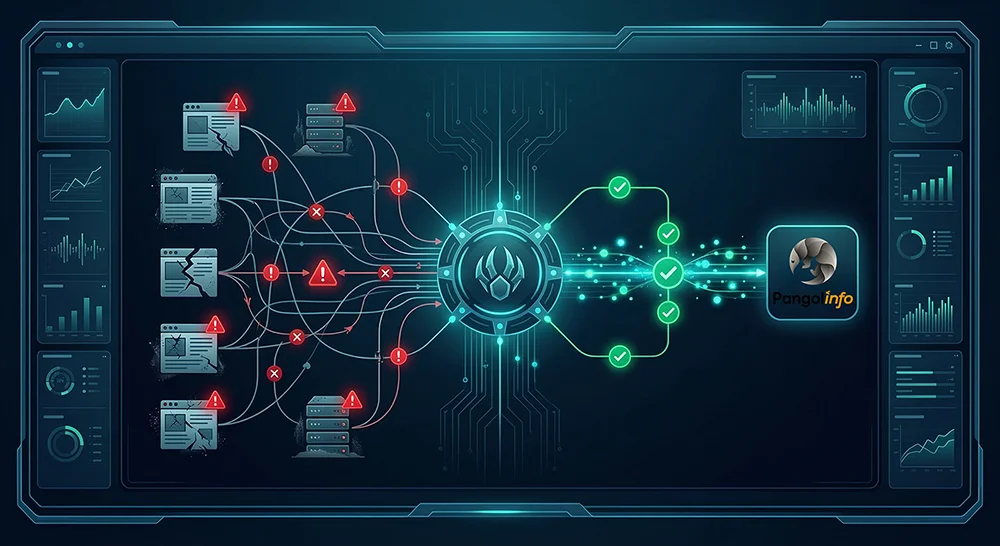
Missing piece one: Large-scale scraping capability. Say your OpenClaw agent needs to monitor 5,000 ASIN price points daily across multiple Amazon marketplaces, or scan an entire subcategory’s Best Seller list every two hours. A quick Python scraper call will technically work — for a while. Amazon’s anti-scraping infrastructure has matured considerably over the past few years. IP behavior fingerprinting, request frequency analysis, browser characteristic detection, JavaScript challenge injection — these aren’t edge cases your scraper might encounter; they’re the default response to anything that doesn’t look exactly like organic human browsing. When the data pipeline breaks, and it will break, your agent doesn’t gracefully degrade. It operates on stale or missing data and generates decisions accordingly. The cost of that unreliability compounds silently.
Building and maintaining a scraping infrastructure capable of sustaining this at commercial scale requires ongoing engineering investment: rotating IP pool management, request fingerprint rotation, CAPTCHA handling, session management, and emergency patching every time Amazon changes its page structure. For context, Amazon’s product page markup typically undergoes significant structural changes every three to six months. Each change is a potential silent breakage in data pipelines that weren’t built to expect it.
Missing piece two: Real browser environment. A substantial fraction of the data that matters in Amazon competitive intelligence — sponsored ad placements, Buy Box status under specific regional pricing conditions, dynamically loaded review carousels, lazy-loaded product images — is rendered by JavaScript after initial page load. A straightforward HTTP request to an Amazon product URL returns the server-side rendered skeleton, not the complete page a real user would see. For a static product page, that gap is narrow. For ad position data, pricing modules, or anything requiring scroll-triggered load events, the gap is enormous.
What you actually need is a headless browser running with a real Chromium engine, executing the full JavaScript runtime, waiting for dynamic content to stabilize, and then extracting the complete rendered state. This is significantly more resource-intensive than HTTP-based scraping, and building it in a way that evades detection requires attention to browser fingerprint details that most scraping libraries don’t address out of the box: Canvas fingerprint noise, WebGL renderer spoofing, navigator property alignment, font enumeration behavior. Get any of these wrong and you’re immediately identifiable as a bot.
Put these two gaps together and you have an AI agent with sophisticated reasoning capabilities and broken senses. It can plan, it can decide, it can act — but the data it’s working from is incomplete, unreliable, and periodically absent. The output quality of even the best reasoning model is bounded by the quality of its inputs.
Why Building Your Own Data Layer Is a Trap
The instinctive response from technically capable developers is to build around these gaps. If you’ve already navigated the OpenClaw deployment guide complexity, you’re probably not intimidated by the prospect of writing a scraper or spinning up a Playwright instance. The problem isn’t capability — it’s opportunity cost and structural risk.
Consider the true ongoing cost of maintaining a production-grade Amazon scraping service. You need an IP pool with rotation logic and quality monitoring (budget $200-500/month for proxies at minimum commercial scale). You need request timing randomization that mimics realistic human behavior patterns. You need a browser fingerprint rotation system that keeps up with detection improvements. You need monitoring that catches silent failures — cases where your scraper returns 200 status codes with empty or partial content. And you need someone available to patch the system within hours when Amazon’s engineers push a change that breaks your extraction logic.
The annual engineering cost of this, even at lean team sizes, runs into tens of thousands of dollars. The opportunity cost — the product thinking, the agent workflow design, the business logic development that doesn’t happen because your engineering resources are absorbed into infrastructure maintenance — is harder to quantify but almost certainly larger. This is a trap that e-commerce data companies have fallen into repeatedly: the scraping infrastructure becomes the product, and the actual value-generating layer never gets the attention it deserves.
Closing the Gap: Plugging Pangolinfo API Into Your OpenClaw Stack
The cleaner approach — and the one that meaningfully extends the operational ceiling of an OpenClaw-based agent — is to separate the data infrastructure concern from the agent logic entirely by using a purpose-built commercial API. Pangolinfo’s Scrape API was built specifically to handle both of the gaps described above at the infrastructure level, so your agent doesn’t have to.
On scale: Pangolinfo’s infrastructure processes tens of millions of page requests daily across production deployments. The anti-detection layer, IP rotation, and request management are handled entirely on the API side. From your agent’s perspective, a data request is an API call that returns structured JSON. The underlying complexity — everything that would cost you months of engineering to replicate — is invisible and abstracted away. When your agent needs to check 500 product pages, it makes 500 API calls. When it needs to check 50,000, the infrastructure scales without any change to your code.
On browser environment: Real browser rendering is built into the API. Dynamic JavaScript execution, lazy-loaded content, scroll-triggered modules — these are processed before the data reaches your agent. The output you receive is the complete rendered page state, not the HTTP skeletal response. For Amazon’s advertising data specifically, Pangolinfo’s SP ad placement capture achieves a 98% accuracy rate — a figure that reflects the depth of their browser automation infrastructure rather than an approximation.
The data coverage for e-commerce use cases spans Amazon, Walmart, and Shopify, with data types including product detail pages, Best Seller and New Releases rankings, keyword search results pages, sponsored ad positions, review datasets, and Buy Box status. For review-focused AI agent workflows, the Reviews Scraper API provides dedicated extraction including complete access to Customer Says aggregation modules — a data source most review scrapers miss entirely.
Pangolinfo maintains an Open-source integration reference for OpenClaw specifically on GitHub: openclaw-skill-pangolinfo. The repository includes complete tool implementations for common e-commerce data workflows, with annotations showing how each piece integrates with OpenClaw’s tool-calling architecture. For teams who prefer a no-code interface for data tracking and monitoring, AMZ Data Tracker provides a visualization layer over the same underlying data infrastructure, usable as a monitoring dashboard without writing any API calls.
What a Complete OpenClaw Data Workflow Looks Like
To make this concrete: imagine an OpenClaw-based competitive intelligence agent for an Amazon seller in the kitchen appliance category. The agent’s objective is daily competitive monitoring with automated opportunity identification.
Each morning at 6am, the agent triggers a Pangolinfo API call requesting the current Best Seller rankings for the target subcategory. The response arrives as structured JSON within seconds: rank, ASIN, title, current price, review count, rating, Buy Box status, and sponsored position data. No rate limiting hit. No anti-bot challenge. No partial data from blocked requests.
The agent compares today’s data against its stored history, flags newly-ranked products, identifies items where prices dropped more than 8% overnight, and notes any new sponsored ad entrants. For each newly-ranked competitor, it automatically queries the Reviews Scraper API to pull their most recent review data, then runs a sentiment classification pass focused on product complaints.
When the agent identifies a pattern — say, three competing products in the top 10 all showing persistent complaints about microwave-safe certification ambiguity — it generates a specific product differentiation recommendation and pushes it to the seller’s Slack channel. The entire workflow runs without human intervention and completes in under four minutes. Here’s how the core tool integration looks:
import requests

PANGOLINFO_API_KEY = "your_api_key_here"

def fetch_category_bestsellers(category_node: str, marketplace: str = "US") -> list[dict]:
    """
    Fetch Best Seller rankings via Pangolinfo Scrape API.
    Returns structured JSON — ready as direct input to OpenClaw agent tools.
    Full JS rendering enabled: captures dynamic pricing, ad positions, Buy Box status.
    """
    endpoint = "https://api.pangolinfo.com/v1/amazon/bestseller"
    headers = {"Authorization": f"Bearer {PANGOLINFO_API_KEY}"}
    payload = {
        "category_node": category_node,
        "marketplace": marketplace,
        "render_js": True,       # Real browser rendering — no dynamic content gaps
        "output_format": "json", # Structured output — minimal token overhead for agent
        "include_ads": True      # Capture sponsored positions (98% accuracy)
    }
    response = requests.post(endpoint, json=payload, headers=headers, timeout=30)
    return response.json().get("results", [])

# Wire this function as an OpenClaw tool definition:
# - Tool name: "get_amazon_bestsellers"
# - Description: "Fetch current Amazon Best Seller rankings for a category node"
# - Parameters: category_node (str), marketplace (str, default US)
# The agent can call this tool in any workflow step that requires current ranking data.
The contrast with a self-built scraping layer is practical, not just theoretical. Before Pangolinfo integration, a similar workflow operated with roughly 60-70% data completeness on any given day, due to scraper failures, blocked requests, and partial JavaScript rendering. After integration, completeness consistently exceeds 99%. The agent’s downstream reasoning quality scales directly with that input improvement.
Why Living Through This Era Changed Everything
Here’s the thing about the current OpenClaw deployment guide moment: the people who went through it — who debugged the environment, traced the failure modes, and thought carefully about what an AI agent actually needs to function — have a mental model of this technology that no one-click installer can transfer.
That mental model is what lets you recognize missing infrastructure before you need it. It’s what tells you, when you’re designing an agent workflow, that the data layer isn’t a detail you can defer — it’s the thing that determines whether your agent produces insight or noise. It’s what helps you evaluate commercial API options not just on price but on the specific capabilities that matter for your use case.
The OpenClaw deployment guide complexity you’re working through now will disappear. The understanding you’re building won’t. Pair it with reliable data infrastructure — large-scale scraping capability and a real browser environment through Pangolinfo’s Scrape API — and you’ll have what an AI agent actually needs to produce work that matters.
Installation gets you into the room. Infrastructure gets you to the table.
📦 Get started with Pangolinfo Scrape API — enterprise-grade data infrastructure for your OpenClaw AI agent.
Technical documentation: docs.pangolinfo.com | Console: tool.pangolinfo.com