You’re Losing Price Wars You Don’t Even Know You’re In
Here’s a scenario every Amazon seller recognizes: your conversion rate drops 20% over two days, you assume it’s a traffic fluctuation, you adjust bids and refresh your creative, nothing improves. On day three you finally look at the Offers page directly and discover a competitor dropped from $89 to $74 forty-eight hours ago. Every dollar you spent on advertising during those forty-eight hours was sending customers to a listing that beat you on price. Your Amazon competitor price tracker—if you had one—would have told you this within ten minutes of the price change. Instead, you found out from a revenue report.
This information lag is systematic, not incidental. Most sellers’ competitive intelligence operates on daily or weekly cycles: check the dashboard in the morning, review weekly trends on Friday. That rhythm is fine for strategic planning but catastrophically slow for the tactical reality of Amazon pricing dynamics, where a single competitor price adjustment can shift BuyBox allocation and conversion rates within the hour.
The solution isn’t more manual checking. It’s building an automated competitor monitoring automation system that operates continuously, detects changes as they happen, and places alerts in the communication channels where your operations team actually works—not an email inbox that gets checked twice a day.
This tutorial shows you exactly how to build that system using OpenClaw AI Agent and the Pangolinfo Scrape API: a complete Python implementation that polls competitor prices every ten minutes, triggers Lark and Slack notifications when drops cross your configured threshold, and uses an AI layer to provide brief contextual analysis alongside each alert. No theoretical framework—actual runnable code you can deploy today.
Why Your Current Setup Has a Multi-Hour Blind Spot
Before the implementation, it’s worth understanding precisely why conventional approaches fail—because that understanding shapes the architectural decisions that make this system effective.
The core problem with daily-refresh Amazon competitor price trackers is mathematical. If a competitor adjusts price at 10pm and your tool pulls data at 8am, they’ve had a ten-hour operating window at the new price point during what may be your listing’s highest-traffic period. The alert that arrives in your morning email isn’t a competitive intelligence tool—it’s a historical record of damage already done.
The notification channel problem compounds this. Email-based alerts have two failure modes: they arrive when the recipient isn’t looking, and when they do arrive, they compete with hundreds of other messages for priority. An alert that reaches the right person’s Lark or Slack channel at 10:14pm—two minutes after the competitor’s price change was detected—gets responded to. The same alert in an email inbox might wait until morning.
The third gap is the absence of analytical context in raw price change notifications. Knowing that a competitor’s price moved from $89 to $74 tells you an event occurred. Knowing that this specific seller has made similar moves four times in the past three months, always recovering within 72 hours, significantly changes your response calculus. This is where an AI agent layer transforms competitive monitoring from event detection into decision support.
The dynamic pricing alert system described in this tutorial addresses all three gaps: sub-10-minute detection, workflow-integrated delivery, and AI-augmented context.
System Architecture: Three Layers, One Cohesive Pipeline
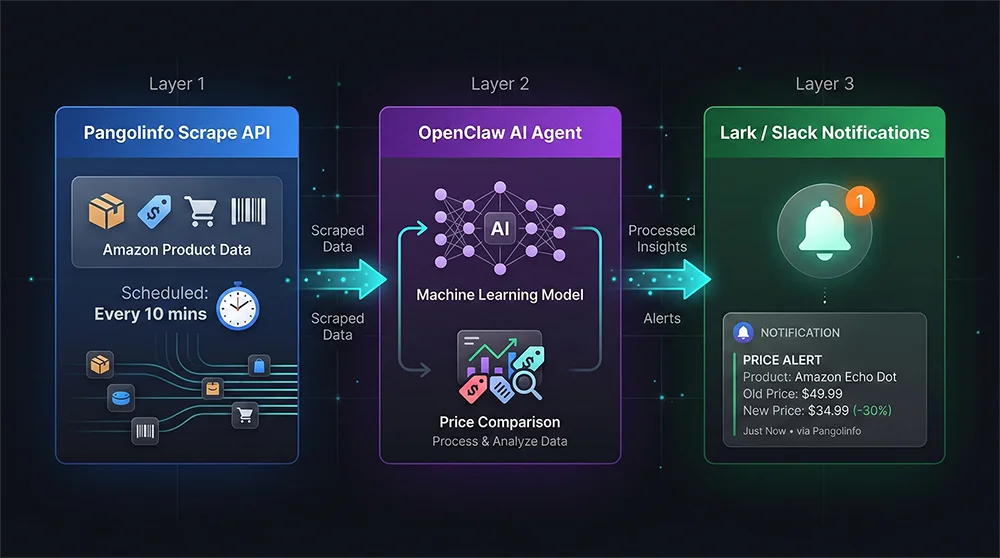
The Amazon competitor price tracker built in this tutorial runs on a three-layer architecture designed for reliability, maintainability, and extensibility.
Layer 1 — Data Collection (Pangolinfo Scrape API). Every ten minutes, the system sends structured requests to the Pangolinfo Scrape API for each monitored ASIN. The API returns clean, parsed JSON containing BuyBox price, all competing seller offers with their pricing and fulfillment details, inventory status, and delivery estimates. This layer eliminates the entire technical complexity of directly scraping Amazon—IP rotation, anti-bot countermeasures, HTML parsing—and replaces it with a single clean API call per ASIN.
Layer 2 — Analysis (OpenClaw AI Agent). When fresh price data arrives, the OpenClaw Agent compares it against the previous snapshot for each ASIN. It calculates price change percentages, evaluates whether changes cross your configured thresholds, and—when an alert is warranted—generates a brief contextual analysis using historical pattern data. This turns a raw price event into a decision-relevant alert: not just “price dropped 15.8%” but “this seller has made three similar moves this quarter; previous instances lasted 48-72 hours before reverting.”
Layer 3 — Notification (Lark + Slack Webhook). Qualifying alert events are formatted as rich message cards and pushed simultaneously to your configured Lark and Slack channels. Each card includes the triggered ASIN, competitor seller identity, old and new prices with percentage change, the AI-generated analysis, and direct links to view price history and the live Amazon listing. The total latency from price change occurrence to notification delivery is typically under 3 minutes.
The three layers connect through a Python scheduler running on your infrastructure or a cloud function, triggering a complete collection-analysis-notification cycle every ten minutes.
Full Implementation: Building Your Competitor Monitoring Automation
Prerequisites
Before starting, confirm you have:
- Python 3.9+
- Pangolinfo API key (obtain from the Pangolinfo Console)
- OpenClaw installed:
pip install openclaw - Lark bot webhook URL and/or Slack webhook URL
pip install openclaw requests apscheduler python-dotenvStep 1: Data Collection Layer
# price_collector.py
import requests
from datetime import datetime
from typing import Optional

PANGOLINFO_API_URL = "https://api.pangolinfo.com/v1/amazon/product"

def fetch_asin_prices(asin: str, api_key: str, marketplace: str = "US") -> Optional[dict]:
    """
    Collect complete price data for a given ASIN via Pangolinfo Scrape API.
    Returns structured dict with BuyBox price and all competing offers.
    """
    headers = {
        "Authorization": f"Bearer {api_key}",
        "Content-Type": "application/json"
    }
    payload = {
        "asin": asin,
        "marketplace": marketplace,
        "parse": True,
        "include_offers": True,
        "include_buybox": True
    }

    try:
        resp = requests.post(
            PANGOLINFO_API_URL, json=payload,
            headers=headers, timeout=30
        )
        resp.raise_for_status()
        data = resp.json()

        return {
            "asin": asin,
            "collected_at": datetime.utcnow().isoformat() + "Z",
            "marketplace": marketplace,
            "buybox_price": data.get("buybox", {}).get("price"),
            "buybox_seller": data.get("buybox", {}).get("seller_name"),
            "buybox_seller_id": data.get("buybox", {}).get("seller_id"),
            "all_offers": data.get("offers", []),
            "title": data.get("title", ""),
            "in_stock": data.get("availability") == "In Stock"
        }
    except requests.RequestException as e:
        print(f"[ERROR] Failed to collect {asin}: {e}")
        return None


def batch_collect(asin_list: list, api_key: str) -> list:
    results = []
    for asin in asin_list:
        result = fetch_asin_prices(asin, api_key)
        if result:
            results.append(result)
            print(f"[INFO] {asin}: BuyBox ${result['buybox_price']} | {result['buybox_seller']}")
    return results
Step 2: OpenClaw Agent Analysis Layer
# price_analyzer.py
from openclaw import Agent, Task
from typing import Optional

class PriceChangeAnalyzer:
    """
    OpenClaw-powered price change detection and analysis.
    Compares snapshots, evaluates alert thresholds, generates AI context.
    """

    def __init__(self, alert_threshold_pct: float = 5.0, my_seller_id: str = ""):
        self.threshold = alert_threshold_pct
        self.my_seller_id = my_seller_id
        self.price_history = {}

        self.agent = Agent(
            name="PriceMonitorAgent",
            role="Amazon Competitive Pricing Analyst",
            goal="Detect competitor price changes and provide actionable competitive intelligence",
            backstory="Expert in Amazon marketplace dynamics and pricing strategy with deep knowledge of seller behavior patterns"
        )

    def analyze(self, snapshot: dict) -> Optional[dict]:
        asin = snapshot["asin"]
        current_price = snapshot.get("buybox_price")

        if current_price is None:
            return None

        # First collection: establish baseline
        if asin not in self.price_history:
            self.price_history[asin] = {
                "price": current_price,
                "seller": snapshot.get("buybox_seller"),
                "collected_at": snapshot["collected_at"],
                "change_log": []
            }
            print(f"[INIT] {asin}: Baseline price set at ${current_price}")
            return None

        previous = self.price_history[asin]
        prev_price = previous["price"]

        if not prev_price or prev_price <= 0:
            return None

        change_pct = (current_price - prev_price) / prev_price * 100
        is_competitor = snapshot.get("buybox_seller_id") != self.my_seller_id

        if change_pct <= -self.threshold and is_competitor:
            # Generate AI context with OpenClaw
            analysis_task = Task(
                description=f"""
                Analyze this Amazon competitor pricing event and provide a brief
                competitive intelligence assessment (2-3 sentences maximum):

                ASIN: {asin}
                Product: {snapshot.get('title', 'Unknown')[:60]}
                Competitor: {snapshot.get('buybox_seller', 'Unknown')}
                Previous Price: ${prev_price:.2f}
                Current Price: ${current_price:.2f}
                Drop: {abs(change_pct):.1f}%
                Historical Changes: {len(previous.get('change_log', []))} previous events
                """,
                expected_output="2-3 sentence competitive analysis with threat assessment and recommended response action"
            )
            ai_analysis = self.agent.execute_task(analysis_task)

            # Log the event
            previous["change_log"].append({
                "from": prev_price, "to": current_price,
                "change_pct": change_pct,
                "timestamp": snapshot["collected_at"]
            })
            self.price_history[asin]["price"] = current_price

            return {
                "type": "PRICE_DROP",
                "priority": "HIGH" if abs(change_pct) >= 10 else "MEDIUM",
                "asin": asin,
                "title": snapshot.get("title", "")[:60],
                "competitor_seller": snapshot.get("buybox_seller"),
                "price_from": prev_price,
                "price_to": current_price,
                "change_pct": change_pct,
                "ai_analysis": ai_analysis,
                "detected_at": snapshot["collected_at"]
            }

        self.price_history[asin]["price"] = current_price
        return None
Step 3: Lark and Slack Dual-Channel Notification
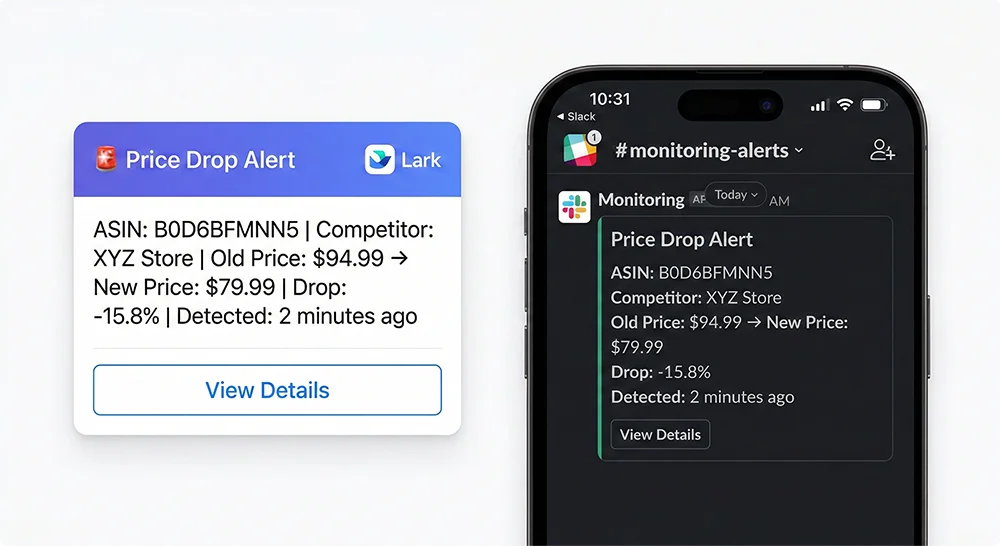
# alert_dispatcher.py
import requests

class AlertDispatcher:
    """Formats and delivers alerts to Lark and/or Slack channels."""

    def __init__(self, lark_webhook: str = "", slack_webhook: str = ""):
        self.lark_webhook = lark_webhook
        self.slack_webhook = slack_webhook

    def send_lark(self, event: dict) -> bool:
        if not self.lark_webhook:
            return False

        color = "red" if event["priority"] == "HIGH" else "orange"
        change_pct = abs(event["change_pct"])

        card = {
            "msg_type": "interactive",
            "card": {
                "header": {
                    "title": {"content": f"🚨 Price Drop Alert | {event['asin']}", "tag": "plain_text"},
                    "template": color
                },
                "elements": [{
                    "tag": "div",
                    "text": {
                        "content": (
                            f"**Product:** {event['title']}\n"
                            f"**Competitor:** {event['competitor_seller']}\n"
                            f"**Price Change:** ${event['price_from']:.2f} → **${event['price_to']:.2f}**\n"
                            f"**Drop:** {change_pct:.1f}%\n"
                            f"**AI Analysis:** {event['ai_analysis']}"
                        ),
                        "tag": "larkmd"
                    }
                }, {
                    "tag": "action",
                    "actions": [{
                        "tag": "button",
                        "text": {"content": "View Price History", "tag": "plain_text"},
                        "type": "primary",
                        "url": f"https://tool.pangolinfo.com/tracking/{event['asin']}"
                    }, {
                        "tag": "button",
                        "text": {"content": "Amazon Listing", "tag": "plain_text"},
                        "type": "default",
                        "url": f"https://www.amazon.com/dp/{event['asin']}"
                    }]
                }]
            }
        }
        resp = requests.post(self.lark_webhook, json=card, timeout=10)
        return resp.status_code == 200

    def send_slack(self, event: dict) -> bool:
        if not self.slack_webhook:
            return False

        emoji = "🔴" if event["priority"] == "HIGH" else "🟡"
        payload = {
            "blocks": [
                {"type": "header", "text": {"type": "plain_text",
                    "text": f"{emoji} Amazon Competitor Price Drop Alert"}},
                {"type": "section", "fields": [
                    {"type": "mrkdwn", "text": f"*ASIN:*\n`{event['asin']}`"},
                    {"type": "mrkdwn", "text": f"*Competitor:*\n{event['competitor_seller']}"},
                    {"type": "mrkdwn",
                     "text": f"*Price Change:*\n${event['price_from']:.2f} → ${event['price_to']:.2f}"},
                    {"type": "mrkdwn", "text": f"*Drop:*\n{abs(event['change_pct']):.1f}%"}
                ]},
                {"type": "section",
                 "text": {"type": "mrkdwn", "text": f"*AI Analysis:*\n{event['ai_analysis']}"}},
                {"type": "actions", "elements": [{
                    "type": "button",
                    "text": {"type": "plain_text", "text": "View Price History"},
                    "url": f"https://tool.pangolinfo.com/tracking/{event['asin']}"
                }]}
            ]
        }
        resp = requests.post(self.slack_webhook, json=payload, timeout=10)
        return resp.status_code == 200

    def dispatch(self, event: dict):
        lark_ok = self.send_lark(event)
        slack_ok = self.send_slack(event)
        print(f"[ALERT] {event['asin']} dropped {abs(event['change_pct']):.1f}% | "
              f"Lark: {'✅' if lark_ok else '❌'} | Slack: {'✅' if slack_ok else '❌'}")
Step 4: Main Scheduler — 10-Minute Polling Loop
# main.py
import os
from dotenv import load_dotenv
from apscheduler.schedulers.blocking import BlockingScheduler
from price_collector import batch_collect
from price_analyzer import PriceChangeAnalyzer
from alert_dispatcher import AlertDispatcher

load_dotenv()

# ===== Configuration =====
PANGOLINFO_API_KEY = os.getenv("PANGOLINFO_API_KEY")
MY_SELLER_ID = os.getenv("MY_SELLER_ID", "")

MONITOR_ASINS = [
    "B0D6BFMNN5",   # Add your competitor ASINs here
    "B08K2S9X7Q",
    "B09XYZ1234",
]

ALERT_THRESHOLD_PCT = 5.0        # Alert when competitor drops > 5%
POLL_INTERVAL_MINUTES = 10       # Check every 10 minutes
LARK_WEBHOOK = os.getenv("LARK_WEBHOOK_URL", "")
SLACK_WEBHOOK = os.getenv("SLACK_WEBHOOK_URL", "")
# =========================

analyzer = PriceChangeAnalyzer(
    alert_threshold_pct=ALERT_THRESHOLD_PCT,
    my_seller_id=MY_SELLER_ID
)
dispatcher = AlertDispatcher(lark_webhook=LARK_WEBHOOK, slack_webhook=SLACK_WEBHOOK)

def run_cycle():
    print(f"\n{'='*50}")
    print(f"[CYCLE] Collecting prices for {len(MONITOR_ASINS)} ASINs...")

    snapshots = batch_collect(MONITOR_ASINS, PANGOLINFO_API_KEY)

    alerts_sent = 0
    for snapshot in snapshots:
        alert = analyzer.analyze(snapshot)
        if alert:
            dispatcher.dispatch(alert)
            alerts_sent += 1

    print(f"[CYCLE] Done. {len(snapshots)} collected, {alerts_sent} alerts sent.")

if __name__ == "__main__":
    print("🚀 Amazon Competitor Price Tracker — Starting")
    print(f"Monitoring: {len(MONITOR_ASINS)} ASINs | Interval: {POLL_INTERVAL_MINUTES} min | Threshold: {ALERT_THRESHOLD_PCT}%\n")

    run_cycle()   # Immediate first run

    scheduler = BlockingScheduler()
    scheduler.add_job(run_cycle, 'interval', minutes=POLL_INTERVAL_MINUTES)

    try:
        scheduler.start()
    except KeyboardInterrupt:
        print("\nMonitor stopped.")
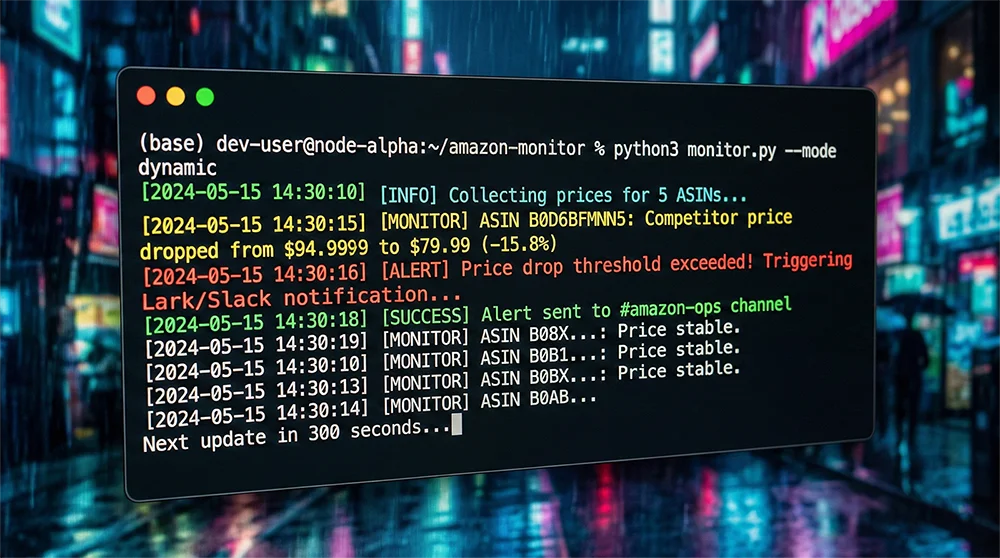
Production Deployment: Running Your Dynamic Pricing Alert System 24/7
Once local testing confirms the pipeline works end-to-end, you have three practical deployment paths depending on your infrastructure preferences.
Option A: Linux Server + systemd. The most robust long-term option. Create a systemd service file with Restart=always—the script recovers automatically from crashes and restarts on server reboot. journald provides a complete, searchable audit log of every collection cycle and alert. Recommended for teams with existing server infrastructure and a preference for operational control.
Option B: GitHub Actions (zero cost, no server). Use schedule triggers with a 10-minute interval. Free for public repositories, and GitHub’s infrastructure handles uptime. The constraint: GitHub Actions minimum schedule granularity is 5 minutes, with occasional slight delays under high load. Suitable for low-stakes monitoring or initial validation before committing to a server deployment.
Option C: AWS Lambda / Cloud Functions. Package the collection logic as a serverless function triggered by EventBridge every 10 minutes. For monitoring 10-20 ASINs, monthly cost is negligible—typically under $1. Combines near-zero operational overhead with enterprise-grade reliability. The right choice for teams already operating in AWS or GCP ecosystems.
Regardless of deployment path, implement these operational safeguards: configure a “health check” alert that fires if three consecutive collection cycles fail without generating any data (silent failure detection); set up weekly exports of price history data for trend analysis; during high-stakes periods (Q4, Prime Day, Black Friday), consider reducing the polling interval to 5 minutes for your highest-priority ASINs.
If maintaining a custom script isn’t aligned with your team’s resources, AMZ Data Tracker provides equivalent functionality through a no-code interface—same hourly price monitoring capability, same Lark webhook integration, no engineering overhead.
Make Your Amazon Competitor Price Tracker a Permanent Competitive Advantage
The price intelligence gap between sellers who monitor competition in near-real time and those who check weekly is not abstract—it’s measurable in BuyBox percentage, advertising efficiency, and margin protection. An Amazon competitor price tracker that operates at 10-minute resolution doesn’t just improve your reaction time; it fundamentally changes the competitive dynamics of your pricing decisions. You’re no longer responding to the market—you’re anticipating it.
The system built in this tutorial is a starting point, not a ceiling. Once the core pipeline is running, extend it: add BSR change detection alongside price monitoring, layer in review count anomaly detection, feed the historical data into a more sophisticated AI model that generates weekly competitive intelligence reports rather than just per-event alerts. The Pangolinfo Scrape API gives you the full data surface of Amazon’s public product data—how you use it is limited only by the analytical layers you build on top.
Start with three to five of your highest-stakes competitive ASINs. Run the dynamic pricing alert system for two weeks. Review the alert log and compare it against your pricing history during the same period. You’ll almost certainly discover competitive moves you missed—and the value of catching those moves in the future will make the case for expanding the system’s scope more effectively than any hypothetical ROI calculation.
📌 Ready to deploy? Get your Pangolinfo API key and start building your competitor monitoring automation today. Prefer a no-code setup? AMZ Data Tracker delivers the same price monitoring and Lark alerts through a configuration interface—operational in under 15 minutes.
Resources & Further Reading
Everything you need to get started with the Amazon competitor price tracker built in this tutorial:
Pangolinfo Platform
- Pangolinfo Console — Create your API key, manage monitoring tasks, and access AMZ Data Tracker. Free trial available.
- Pangolinfo Scrape API — The data layer powering this system. Structured Amazon product, offer, and BuyBox data on demand, with global marketplace coverage.
- AMZ Data Tracker — The no-code alternative: configure competitor price monitoring and Lark/Slack alerts through a visual interface, no Python required.
API Documentation
- Universal API Reference — Complete endpoint documentation, request/response schemas, and field definitions for the Scrape API.
- Pangolinfo Developer Docs — Getting started guides, authentication setup, rate limits, error handling, and code examples across Python, Node.js, and cURL.
Open Source & Tools Used in This Tutorial
- OpenClaw (PyPI) — The AI Agent framework used as the analysis layer. Install with
pip install openclaw. - APScheduler Documentation — The Python scheduling library powering the 10-minute polling loop.
- Lark Custom Bot Setup Guide — Official Lark documentation for creating a custom bot and obtaining the Webhook URL used in the notification layer.