

When Competitors Quietly Drop Prices and You Discover It 24 Hours Later
In Amazon’s price wars, time is money. A seasoned seller in the electronics category once shared his painful experience: One Friday evening, a major competitor suddenly dropped their bestselling product price by 15%, but his monitoring tool didn’t send an alert until Monday morning—a full 48-hour delay. During those two days, he lost nearly 300 orders and over $15,000 in sales. Even worse, when he urgently adjusted his pricing, the competitor had already restored their original price, leaving him trapped in a reactive price war.
This is far from an isolated case. Traditional monitoring methods have fatal flaws: manual checks are inefficient and prone to omissions, scheduled scrapers are limited by collection frequency and can’t achieve true real-time monitoring, and SaaS tools’ black-box mechanisms prevent you from controlling critical parameters. When markets change by the minute, monitoring delays measured in hours or days is like using a telescope to watch your feet—you can see the distance but trip over what’s right in front of you.
The deeper issue is that most sellers lack the capability to build an automated monitoring system. They either rely on expensive and feature-limited third-party tools or invest massive manpower in inefficient manual monitoring. Meanwhile, teams that have mastered real-time monitoring system setup are crushing competitors with technological advantages—they can detect market changes within 5 minutes of a competitor’s price adjustment and complete strategy adjustments within 10 minutes, always maintaining market initiative. This gap in information timeliness is redefining the competitive landscape of Amazon operations.
Why Traditional Monitoring Methods Can’t Meet Real-time Requirements?
Challenge #1: The Paradox of Data Collection Frequency vs. Cost
To achieve true real-time monitoring, ideally you’d collect data every minute or even every second. But this brings enormous technical challenges: if you monitor 100 competitor ASINs, collecting each once per minute means 144,000 requests per day. Traditional scraper solutions at this frequency encounter IP bans, CAPTCHA blocks, server overload, and a series of other problems. Even if you barely maintain operations, server costs and proxy IP expenses become prohibitively expensive.
More troublesome is Amazon’s continuously upgrading anti-scraping mechanisms. High-frequency access triggers risk control systems, and returned data may be incomplete or even error pages. This creates a paradox: the more you want real-time data, the more easily your system gets banned; reducing frequency to ensure stability loses real-time capability. Most self-built scraper teams ultimately compromise at collecting every 10-30 minutes, which is still too slow for price wars.
Challenge #2: Alert Rule Complexity and Flexibility
Simple price change alerts are easy to implement, but actual operational needs are far more complex. You might need rules like: “Alert when Competitor A’s price is lower than mine by more than $5, but ignore if their stock is less than 10 units”; or “Alert when my ranking drops from top 10 to top 20 AND simultaneously 3+ competitors’ rankings rise.” These multi-dimensional, multi-condition complex rules require a flexible alert engine to support.
Traditional monitoring tools often only provide a few fixed alert templates, unable to meet personalized needs. Building an alert engine from scratch requires handling rule parsing, condition matching, alert deduplication, notification sending, and a series of technical issues. Many teams get stuck at this stage—they can collect data but can’t transform it into valuable alert information.
Challenge #3: Multi-channel Notification Reliability
Alert information’s value lies in being seen promptly and acted upon. But in reality, emails may be classified as spam, SMS may be delayed due to carrier issues, and app push notifications may be disabled by users. A reliable price inventory change notification system needs to support multi-channel parallel sending with failure retry mechanisms.
Furthermore, different alert levels should use different notification methods. Critical alerts (like major competitor price drops) should immediately notify via SMS + phone call, while normal alerts (like review count increases) can use email or Slack messages. Designing and implementing this tiered notification mechanism requires deep business understanding and solid technical skills.
Challenge #4: Data Visualization and Decision Support
Receiving alerts is just the first step; operations personnel need to quickly judge whether action is needed and what action to take. This requires an intuitive visualization dashboard that can display current status, historical trends, competitor comparisons, and other multi-dimensional information. But most self-built systems fall short here—either only simple data tables or manual Excel charts, inefficient and error-prone.
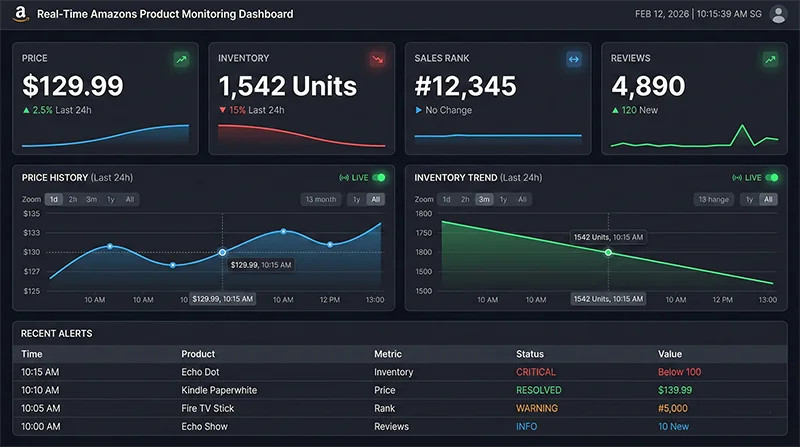
A complete real-time data monitoring solution should provide a real-time refreshing dashboard where operations personnel can see all key metrics’ status at a glance. Price curves, inventory trends, ranking fluctuations, review growth—these data should be dynamically displayed in chart form, supporting custom time ranges, comparison dimensions, and other interactive features. This level of visualization capability often requires a professional frontend development team to implement.
Real-time Monitoring System Setup: Complete Technical Architecture
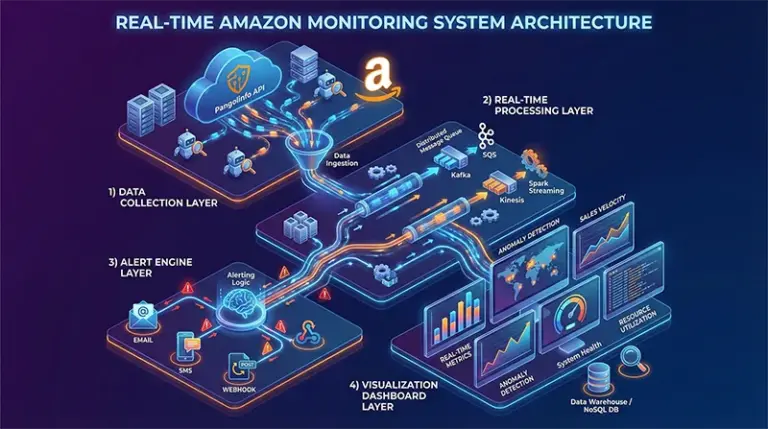
An enterprise-grade Amazon real-time monitoring system should consist of four core layers: data collection layer, real-time processing layer, alert engine layer, and visualization display layer. Each layer has specific technology choices and implementation points; only when all four layers work together can you build a truly reliable automated monitoring system.
Layer 1: Data Collection – Stable and Efficient Data Source
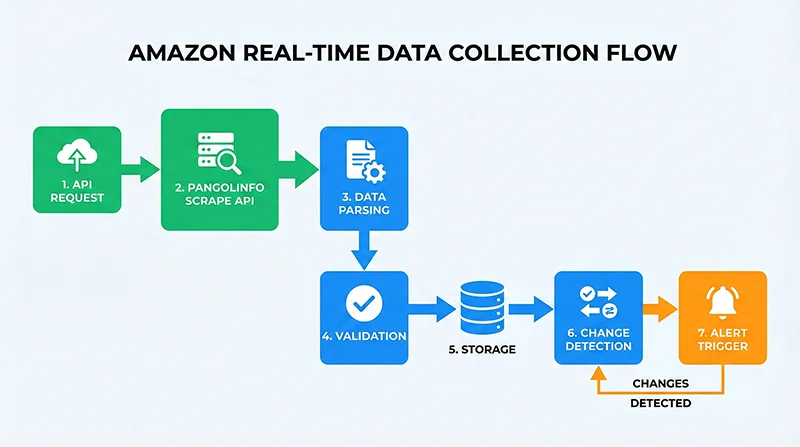
The data collection layer is the foundation of the entire system. Rather than maintaining a complex scraper system yourself, choose a professional API service. Pangolinfo Scrape API provides stable and reliable Amazon data collection capabilities, having already solved anti-scraping countermeasures, data parsing, error handling, and other technical challenges at the foundational level. You simply make HTTP requests to get structured product data.
For data collection frequency settings, balance business needs with budget constraints. For core competitors and your main products, set collection every 5-10 minutes; for secondary monitoring targets, every 30 minutes or 1 hour is sufficient. Using a task queue (like Celery) to manage collection tasks enables flexible frequency control and concurrency management.
Layer 2: Real-time Processing – Efficient Data Flow
Collected raw data needs cleaning, validation, storage, and other processing workflows. This layer’s key is speed and reliability. Use message queues (RabbitMQ or Kafka) to decouple data collection and processing; even if processing speed can’t keep up with collection speed, data won’t be lost. Data validation should check required fields’ completeness, filter out anomalous data, ensuring only high-quality data enters downstream.
Data storage solutions need to consider both real-time queries and historical analysis needs. PostgreSQL or MySQL suits storing structured product information and historical records, while Redis caches latest data and temporary calculation results. Proper index design can dramatically improve query performance, and partitioning strategies effectively manage massive historical data.
Layer 3: Alert Engine – Intelligent Rule Matching
The alert engine is the system’s brain, responsible for transforming data into actionable alert information. The core is a flexible rule engine supporting configuration of various complex alert conditions. Whenever new data arrives, the engine compares it with historical data, checking if any alert rules are triggered. Once triggered, based on the rule’s configured priority and notification channels, alert information is pushed out.
Alert deduplication mechanisms are crucial. If a competitor’s price remains below yours, you don’t want alerts every 5 minutes. A reasonable strategy is: immediately alert on first trigger, then if status unchanged, reduce alert frequency (like hourly reminders), or only notify again when status returns to normal. This intelligent alert strategy dramatically reduces alert fatigue.
Layer 4: Visualization Display – Intuitive Data Presentation
The visualization dashboard is the interface where operations personnel interact with the system. A good dashboard should: make key metrics clear at a glance, highlight anomalies prominently, show historical trends clearly, and provide smooth natural interactions. Using React or Vue.js to build the frontend, ECharts or D3.js for chart visualization, and WebSocket for real-time data pushing can create a professional-grade monitoring panel.
Besides real-time monitoring, the system should provide historical data analysis features. Operations personnel can view price curves, inventory changes, ranking fluctuations for any time period, conduct competitor comparison analysis, and discover market patterns. These insights support more scientific operational decisions rather than just passively responding to alerts.
Amazon Data Auto Alert System: Code Implementation
Step 1: Build Data Collection Module
First, we need to implement a stable data collection module. Here’s a Python implementation example based on Pangolinfo API:
import requests
import json
from datetime import datetime
from typing import Dict, List, Optional

class AmazonDataCollector:
    """Amazon Data Collector"""

    def __init__(self, api_key: str):
        self.api_key = api_key
        self.api_endpoint = "https://api.pangolinfo.com/scrape"

    def collect_product_data(self, asin: str, domain: str = "amazon.com") -> Optional[Dict]:
        """
        Collect single product data

        Args:
            asin: Product ASIN
            domain: Amazon domain

        Returns:
            Product data dictionary, None if failed
        """
        params = {
            "api_key": self.api_key,
            "domain": domain,
            "type": "product",
            "asin": asin
        }

        try:
            response = requests.get(self.api_endpoint, params=params, timeout=30)
            response.raise_for_status()
            data = response.json()

            # Extract key fields
            product_data = {
                "asin": asin,
                "title": data.get("title"),
                "price": data.get("price"),
                "currency": data.get("currency"),
                "availability": data.get("availability"),
                "stock_level": data.get("stock_level"),
                "rating": data.get("rating"),
                "reviews_count": data.get("reviews_count"),
                "rank": data.get("bestsellers_rank"),
                "buybox_winner": data.get("buybox_winner"),
                "timestamp": datetime.now().isoformat()
            }

            return product_data

        except requests.exceptions.RequestException as e:
            print(f"Collection failed {asin}: {str(e)}")
            return None

    def batch_collect(self, asin_list: List[str], domain: str = "amazon.com") -> List[Dict]:
        """
        Batch collect product data

        Args:
            asin_list: List of ASINs
            domain: Amazon domain

        Returns:
            List of product data
        """
        results = []

        for asin in asin_list:
            data = self.collect_product_data(asin, domain)
            if data:
                results.append(data)

        return results

# Usage example
collector = AmazonDataCollector(api_key="your_api_key_here")

# Monitored ASIN list
monitor_asins = ["B08N5WRWNW", "B09G9FPHY6", "B0B7CPSN7R"]

# Collect data
products_data = collector.batch_collect(monitor_asins)

print(f"Successfully collected {len(products_data)} products")
Step 2: Implement Change Detection and Alert Triggering
After collecting data, compare with historical data to detect changes requiring alerts:
from typing import Dict, List, Optional
import psycopg2
from decimal import Decimal

class ChangeDetector:
    """Change Detector"""

    def __init__(self, db_config: Dict):
        self.conn = psycopg2.connect(**db_config)

    def get_latest_data(self, asin: str) -> Optional[Dict]:
        """Get latest historical data for ASIN"""
        cursor = self.conn.cursor()
        cursor.execute("""
            SELECT price, stock_level, rank, reviews_count
            FROM product_history
            WHERE asin = %s
            ORDER BY timestamp DESC
            LIMIT 1
        """, (asin,))

        row = cursor.fetchone()
        cursor.close()

        if row:
            return {
                "price": row[0],
                "stock_level": row[1],
                "rank": row[2],
                "reviews_count": row[3]
            }
        return None

    def detect_changes(self, current_data: Dict, historical_data: Optional[Dict]) -> List[Dict]:
        """
        Detect data changes

        Returns:
            List of changes, each containing type and details
        """
        if not historical_data:
            return []  # First collection, no historical data

        changes = []

        # Price change detection
        if current_data.get("price") and historical_data.get("price"):
            current_price = Decimal(str(current_data["price"]))
            historical_price = Decimal(str(historical_data["price"]))

            if current_price != historical_price:
                change_percent = ((current_price - historical_price) / historical_price) * 100
                changes.append({
                    "type": "price_change",
                    "asin": current_data["asin"],
                    "old_value": float(historical_price),
                    "new_value": float(current_price),
                    "change_percent": float(change_percent),
                    "direction": "increase" if current_price > historical_price else "decrease"
                })

        # Stock change detection
        if current_data.get("stock_level") and historical_data.get("stock_level"):
            if current_data["stock_level"] != historical_data["stock_level"]:
                changes.append({
                    "type": "stock_change",
                    "asin": current_data["asin"],
                    "old_value": historical_data["stock_level"],
                    "new_value": current_data["stock_level"]
                })

        # Rank change detection
        if current_data.get("rank") and historical_data.get("rank"):
            rank_change = current_data["rank"] - historical_data["rank"]
            if abs(rank_change) >= 10:  # Alert only if rank changes by 10+ positions
                changes.append({
                    "type": "rank_change",
                    "asin": current_data["asin"],
                    "old_value": historical_data["rank"],
                    "new_value": current_data["rank"],
                    "change": rank_change
                })

        return changes

# Usage example
db_config = {
    "host": "localhost",
    "database": "amazon_monitor",
    "user": "your_user",
    "password": "your_password"
}

detector = ChangeDetector(db_config)

for product in products_data:
    # Get historical data
    historical = detector.get_latest_data(product["asin"])

    # Detect changes
    changes = detector.detect_changes(product, historical)

    # If changes detected, trigger alerts
    if changes:
        print(f"Changes detected: {changes}")
Step 3: Configure Alert Rules and Multi-channel Notifications
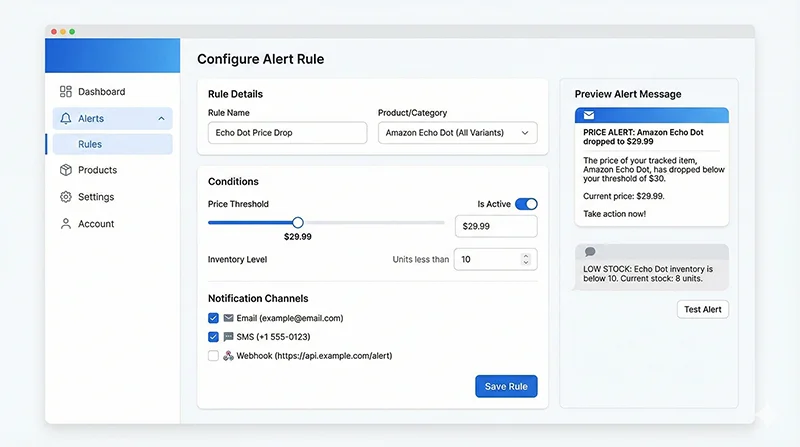
Implement a flexible alert engine supporting multiple notification channels:
import smtplib
from email.mime.text import MIMEText
from email.mime.multipart import MIMEMultipart
import requests
from typing import Dict, List

class AlertEngine:
    """Alert Engine"""

    def __init__(self, config: Dict):
        self.config = config
        self.alert_rules = self.load_alert_rules()

    def load_alert_rules(self) -> List[Dict]:
        """Load alert rules"""
        return [
            {
                "name": "Major Competitor Price Drop",
                "condition": lambda change: (
                    change["type"] == "price_change" and
                    change["direction"] == "decrease" and
                    abs(change["change_percent"]) >= 10
                ),
                "priority": "high",
                "channels": ["email", "sms", "webhook"]
            },
            {
                "name": "Low Stock Alert",
                "condition": lambda change: (
                    change["type"] == "stock_change" and
                    change["new_value"] < 10
                ),
                "priority": "medium",
                "channels": ["email", "webhook"]
            },
            {
                "name": "Significant Rank Drop",
                "condition": lambda change: (
                    change["type"] == "rank_change" and
                    change["change"] > 20
                ),
                "priority": "medium",
                "channels": ["email"]
            }
        ]

    def send_email(self, subject: str, body: str, to_email: str):
        """Send email alert"""
        msg = MIMEMultipart()
        msg['From'] = self.config["email"]["from"]
        msg['To'] = to_email
        msg['Subject'] = subject

        msg.attach(MIMEText(body, 'html'))

        try:
            server = smtplib.SMTP(self.config["email"]["smtp_host"],
                                 self.config["email"]["smtp_port"])
            server.starttls()
            server.login(self.config["email"]["username"],
                        self.config["email"]["password"])
            server.send_message(msg)
            server.quit()
            print(f"Email alert sent: {subject}")
        except Exception as e:
            print(f"Email sending failed: {str(e)}")

    def send_webhook(self, data: Dict, webhook_url: str):
        """Send WebHook notification"""
        try:
            response = requests.post(webhook_url, json=data, timeout=10)
            response.raise_for_status()
            print(f"WebHook notification sent")
        except Exception as e:
            print(f"WebHook sending failed: {str(e)}")

# Usage example
alert_config = {
    "email": {
        "from": "[email protected]",
        "smtp_host": "smtp.gmail.com",
        "smtp_port": 587,
        "username": "[email protected]",
        "password": "your_password"
    },
    "alert_email": "[email protected]",
    "webhook_url": "https://hooks.slack.com/services/YOUR/WEBHOOK/URL"
}

alert_engine = AlertEngine(alert_config)
For complete code examples and more technical details, visit the Pangolinfo Documentation Center.
WebHook Integration: Connecting Third-party Collaboration Tools
WebHook is the standard way to achieve real-time communication between systems. Through WebHook, you can push alert information to collaboration tools like Slack, Discord, WeChat Work, or trigger other automation workflows. Here’s a complete Slack WebHook integration example:
def send_slack_alert(webhook_url: str, change: Dict):
    """Send Slack alert"""

    # Construct different messages based on change type
    if change["type"] == "price_change":
        color = "danger" if change["direction"] == "decrease" else "good"
        emoji = "📉" if change["direction"] == "decrease" else "📈"

        payload = {
            "text": f"{emoji} Price Change Alert",
            "attachments": [{
                "color": color,
                "fields": [
                    {
                        "title": "ASIN",
                        "value": change["asin"],
                        "short": True
                    },
                    {
                        "title": "Change",
                        "value": f"{change['change_percent']:.1f}%",
                        "short": True
                    },
                    {
                        "title": "Old Price",
                        "value": f"${change['old_value']:.2f}",
                        "short": True
                    },
                    {
                        "title": "New Price",
                        "value": f"${change['new_value']:.2f}",
                        "short": True
                    }
                ],
                "footer": "Amazon Monitor",
                "ts": int(datetime.now().timestamp())
            }]
        }

    response = requests.post(webhook_url, json=payload)
    return response.status_code == 200
This way, operations teams can receive alerts in real-time in Slack channels, quickly discuss and take action, dramatically improving response efficiency.
Real-time Data Monitoring Solution: Best Practices
Collection Frequency Optimization Strategy
Different products and scenarios need different collection frequencies. Recommend a tiered strategy: core competitors every 5 minutes, important targets every 15 minutes, general monitoring hourly. During promotional periods (like Prime Day, Black Friday), temporarily increase collection frequency. Use dynamic adjustment mechanisms: when anomalous changes are detected, automatically increase that ASIN’s collection frequency, observe for a period, then restore to normal.
Alert Rule Configuration Tips
Avoiding alert fatigue is key to rule configuration. Set reasonable thresholds, don’t be overly sensitive to minor changes. Use alert aggregation, merging multiple similar alerts in a short time into one. Implement alert quiet periods, sending the same type of alert only once within a certain time. Set priorities based on business importance: critical alerts use high-priority channels (SMS, phone), normal alerts use low-priority channels (email, Slack).
System Stability Assurance
Real-time monitoring systems need 24/7 stable operation. Use Docker containerization for easy scaling and migration. Configure process monitoring (like Supervisor) to automatically restart crashed services. Set up system self-monitoring: when collection failure rate exceeds threshold, alert administrators. Regularly backup databases to prevent data loss. Use load balancing to ensure performance under high concurrency.
Cost Control Recommendations
API calls are the main cost source. Through reasonable collection frequency settings, you can control costs while ensuring real-time capability. Use caching mechanisms to avoid repeatedly collecting the same data. For infrequently changing fields (like product titles, images), reduce collection frequency. Choose appropriate server configurations, avoiding waste from over-provisioning. Use Pangolinfo Console‘s usage monitoring features to track API call status in real-time.
From Reactive Response to Proactive Control: Strategic Value of Real-time Monitoring
On Amazon’s rapidly changing battlefield, information timeliness is competitiveness. When your competitors still use daily monitoring tools, you can already sense market changes within 5 minutes and respond quickly. This time advantage translates into enormous business value over long-term competition—higher sales, better profit margins, more stable market position.
Real-time monitoring system setup isn’t a one-time technical project but a continuous optimization process. Start with basic price inventory change notifications, gradually expanding to ranking monitoring, review tracking, competitor analysis, and more dimensions. As your business grows, your monitoring system will continuously evolve, becoming core support for operational decisions.
Pangolinfo Scrape API provides you with a reliable data foundation; the rest is transforming this data into actionable insights. Whether you’re a technical team building a system or a product manager designing monitoring features, the complete solution provided in this article can help you get started quickly. Starting today, build your own Amazon Data Auto Alert system and seize the initiative in competition.
Start Building Your Real-time Monitoring System Today
Visit Pangolinfo Scrape API to learn more, or register for a free trial directly in the Console. Our professional technical support team is ready to answer your questions and help you quickly build an enterprise-grade monitoring platform.
For complete API documentation, code examples, and best practices, visit the Pangolinfo Documentation Center.
In Amazon’s competition, time is money. Don’t let delayed information drag down your decisions—act now and illuminate your path with real-time data.

