

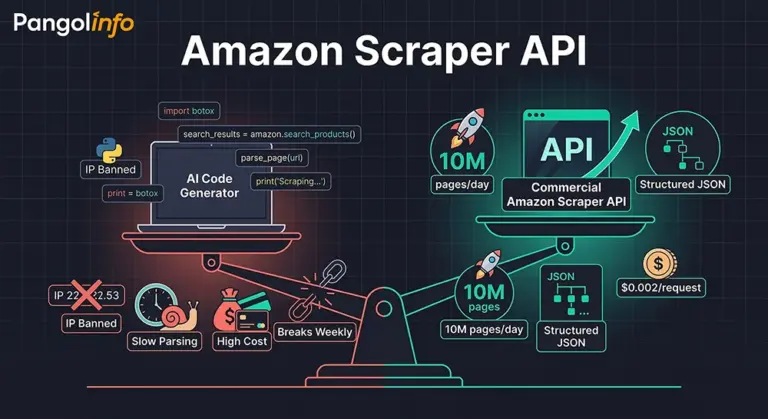
A quiet debate has been spreading through e-commerce data teams over the past year: if ChatGPT, Claude, or Cursor can generate a functioning Amazon Scraper API in under five minutes, do we still need to pay for a commercial one? The question sounds reasonable on the surface. It isn’t.
The rise of OpenClaw and AI code generators has genuinely lowered the barrier to writing a web crawler. A junior analyst with no formal engineering background can now prompt their way to a working Python script that pulls Amazon Best Seller data before dinner. That’s real. But “working” and “production-grade” are two entirely different things — and conflating them is exactly how teams end up burning six months of engineering time on infrastructure that was never designed to scale.
I’ve spoken to enough SaaS founders and data team leads to recognize the pattern. The self-built scraper works beautifully in Week 1. By Week 2, Amazon’s bot-detection triggers on the request volume. By Week 4, the parsing logic breaks because Amazon ran an A/B test and the HTML structure shifted. By Month 3, the proxy IP budget has ballooned to $1,500/month, there’s a dedicated engineer whose primary job is keeping the scraper alive, and the team is still not covering full catalog data.
The uncomfortable truth is this: AI made the entry cost of writing a crawler close to zero. It did nothing to lower the operational cost of running one at scale. That gap — between “I can write it” and “I can run it reliably, cheaply, and at 10 million pages per day” — is precisely where a commercial Amazon Scraper API becomes not just useful, but essential.
The Three Walls Every Self-Built Amazon Crawler Hits Eventually
Amazon runs one of the most sophisticated anti-bot systems in the world. Their detection isn’t a simple IP blocklist — it’s a multi-signal machine learning model that evaluates TLS fingerprints, request cadence patterns, browser rendering behavior, cookie state, User-Agent signatures, and behavioral sequences across sessions. An AI-generated scraper script, handed a clean proxy and running requests, triggers these signals almost instantly at any meaningful volume.
The result: silent bans. Not 403 errors that your monitoring catches immediately, but 200 responses serving honeypot content — carefully formatted HTML that looks right but contains stale, falsified, or empty data. Your pipeline shows green. Your data is garbage. This is the first wall.
The second wall is parsing stability. Amazon A/B tests its pages constantly. The same ASIN page looks structurally different depending on user demographics, geographic location, session history, and which experiment bucket Amazon dropped the request into. A CSS selector that reliably extracts the price field today might start returning null tomorrow because a div wrapper was introduced in an experiment rollout. AI-generated scrapers typically hard-code selectors — elegant when written, fragile over time. A mature Amazon data extraction API maintains living parsing templates that are updated the moment Amazon changes something, with zero impact on your data pipeline.
The Scale Problem: Where AI Crawlers Fundamentally Break Down
The third wall is the most decisive: scale. Let’s be concrete. A mid-tier Amazon data service provider typically needs:
Full Best Sellers coverage across 300+ categories, updated daily — roughly 15,000-20,000 requests per cycle. Keyword search result monitoring for 50,000 tracked terms — 50,000 requests per day at minimum. Listing change detection for 200,000 monitored ASINs — another 200,000 requests daily. Stack it all up, and you’re looking at 500,000 to 1,000,000+ requests per day before accounting for retries and redundancy.
What does it actually take to run this volume of an Amazon crawling API yourself? At minimum: a rotating proxy pool ($800-$2,000/month for clean residential IPs at this volume), dedicated scraping servers ($400-$800/month), a concurrency management system with intelligent rate limiting, a monitoring and alerting infrastructure for detecting silent bans and parsing failures, a parsing maintenance workflow with dedicated engineering time, and a data deduplication and consistency layer. That’s a conservative $2,500-$4,000 per month in direct costs before you count the 30-40% of engineering bandwidth consumed by keeping the system alive.
The scalable Amazon data collection solution that commercial APIs offer isn’t primarily about the code — it’s about the infrastructure, the proxy relationships, the anti-detection R&D, and the dedicated team maintaining parsing accuracy. These are fixed costs that a commercial provider amortizes across hundreds of customers. You’d be paying them in full, alone, building something that isn’t your core product.
The Parsing Accuracy Dimension Nobody Talks About Enough
One more dimension that rarely gets proper attention in these conversations: JavaScript-rendered content. Amazon has increasingly moved high-value data into dynamically rendered DOM sections — Sponsored Products ad slots, the “Customer Says” AI-generated review summaries, certain pricing configurations, and regional inventory signals. A standard HTTP request won’t capture any of this. A headless browser integration adds significant complexity, resource cost, and additional detection surface area. The commercial Amazon Scraper API solves this at the infrastructure level, with deep JS rendering support that’s already factored into pricing and performance benchmarks.
AI-Written Crawlers vs. Commercial Amazon Scraper API: An Honest Cost Breakdown
One data service company I know well spent six months and four engineers building their own Amazon scraping infrastructure. It worked — until it didn’t. Their monthly infrastructure costs eventually stabilized at around $3,200 (proxy pool + servers + engineering overhead). More importantly, 35% of their senior engineer’s time was spent on scraper maintenance rather than product development. When they migrated to a commercial Amazon Scraper API, their monthly direct scraping costs dropped to $900-$1,400. Their engineer reclaimed that 35% of bandwidth. Three months later, they shipped two features that had been on the backlog for a year.
Here’s the structured comparison that illustrates the delta:
| Dimension | AI-Assisted Self-Built Crawler | Commercial Amazon Scraper API (e.g., Pangolinfo) |
|---|---|---|
| Setup Barrier | Low (AI-assisted code generation) | Low (API key + documentation) |
| Scale Ceiling | Limited — 1M+/day requires significant infra | 10M+ pages/day, elastic scaling |
| IP Ban Risk | High — requires self-managed proxy pool | Near-zero — built-in rotation & fingerprint masking |
| Parsing Accuracy | Fragile — breaks on page structure updates | High — maintained parsing templates, continuously updated |
| JS-Rendered Content | Manual headless browser integration required | Native JS rendering support |
| Monthly Cost (mid-scale) | $2,000-$5,000 (proxy + servers + eng. time) | $500-$2,000 (usage-based, no eng. overhead) |
| Maintenance Burden | High — ongoing internal resource allocation | Near-zero — provider-side maintenance |
| Output Format | Custom — requires schema design | Structured JSON, ready for downstream use |
| Data Coverage | Depends on custom implementation | Full coverage: listings, rankings, keywords, ad slots, reviews |
The gap isn’t about capability at small scale — a well-built self-hosted solution can work at low volumes. The gap is about who bears the cost of reliability and maintenance as volume grows. With a commercial Amazon data extraction API, that cost is distributed and specialized. With self-built, you’re building an entirely separate product that generates no revenue.
Pangolinfo Amazon Scraper API: Built for the Scale Problems AI Crawlers Can’t Solve
Pangolinfo’s Scrape API is a production-grade Amazon Scraper API engineered for the data requirements that separate serious operators from experimental ones. It provides structured access to Amazon’s full publicly available data surface — product listings, Best Seller rankings, new release charts, keyword search results, ad slot data, and complete review records — delivered as clean JSON with no scraping infrastructure on your end.
Scale That Competes with Amazon’s Own Data Teams
Pangolinfo’s infrastructure handles tens of millions of pages per day per customer, with SLA-backed uptime commitments. For a seller tool company that needs to run a full-category ASIN refresh daily, or a data service provider maintaining real-time monitoring across hundreds of thousands of tracked products, this isn’t a nice-to-have — it’s the baseline requirement. The capacity is also elastic, which means you’re not over-provisioning for peak traffic; you scale with demand and pay accordingly.
98% SP Ad Slot Capture Rate: An Industry-Defining Metric
Amazon’s Sponsored Products placement data is one of the hardest data types to capture reliably. Most scraping solutions achieve capture rates below 60% on ad slot data due to the dynamic rendering and bot-detection layers Amazon applies specifically to ad-served content. Pangolinfo’s SP ad slot capture rate sits at 98%, which is the highest in the industry. For any business building competitive ad monitoring, campaign benchmarking, or sponsored placement analysis tools, this single metric represents a substantial data quality advantage over anything an AI-written crawler could produce consistently.
Specialized Data Capabilities Beyond Standard Listings
Several of Pangolinfo’s capabilities address data scenarios that self-built solutions almost never handle properly:
ZIP Code-Specific Scraping: Amazon pricing, delivery estimates, and inventory availability vary by delivery ZIP code. Pangolinfo supports ZIP-targeted scraping, allowing you to capture the data that an actual customer in a specific location would see — critical for localized pricing analysis, logistics benchmarking, or geographic demand mapping.
“Customer Says” Full Extraction: Amazon’s AI-generated review summary module (“Customer Says”) is a JavaScript-rendered component that standard HTTP scrapers simply cannot access. Pangolinfo has built native support for this field, enabling full extraction of Amazon’s own AI-generated customer sentiment summaries — a particularly valuable data point for brand monitoring and product positioning analysis.
Review Data at Scale: For teams running sentiment analysis, negative review monitoring, or competitive review benchmarking, the Reviews Scraper API provides structured access to Amazon review data with filtering by rating, date range, verified purchase status, and more. The output plugs directly into standard NLP pipelines without any preprocessing overhead.
Multiple Output Formats: Built for AI Pipelines Too
In an interesting full-circle moment, Pangolinfo’s Amazon Scraper API doesn’t just coexist with AI tools — it feeds them. The API supports output in structured JSON (for database ingestion), raw HTML (for archival), and Markdown (purpose-built for LLM and AI analysis workflows). If your team is building an AI-powered competitive intelligence system or a GPT-based listing optimization tool, having clean, pre-formatted Markdown output from the data extraction layer dramatically reduces the preprocessing pipeline complexity.
You can explore the API’s full capability set in the API documentation or start a trial directly from the Pangolinfo console.
Integrating the Amazon Scraper API: A Complete Working Example
Getting started with Pangolinfo’s scalable Amazon data collection solution takes about 10 minutes. Here’s a complete Python implementation covering product detail, Best Seller ranking, and review data retrieval:
import requests
import json

# Pangolinfo Amazon Scraper API Configuration
API_KEY = "your_api_key_here"
BASE_URL = "https://api.pangolinfo.com/v1/scrape"

def fetch_amazon_data(request_type: str, params: dict) -> dict:
    """
    Universal Amazon Scraper API client for Pangolinfo.

    Supported request_type values:
      - "product"     : Product detail page (title, price, BSR, images, Customer Says)
      - "bestseller"  : Category Best Seller rankings
      - "keyword"     : Keyword search results with ad slot data (98% SP capture rate)
      - "reviews"     : Product review data with filtering support

    Args:
        request_type: Type of Amazon data to retrieve
        params: Request parameters (asin, marketplace, category, keyword, etc.)

    Returns:
        Structured JSON response with Amazon data
    """
    payload = {
        "platform": "amazon",
        "type": request_type,
        "output_format": "json",    # Options: "json" | "html" | "markdown"
        "render_js": True,          # Enable for Customer Says, SP ad slots, dynamic content
        "marketplace": params.get("marketplace", "US"),
        **{k: v for k, v in params.items() if k != "marketplace"}
    }

    headers = {
        "Authorization": f"Bearer {API_KEY}",
        "Content-Type": "application/json"
    }

    response = requests.post(BASE_URL, json=payload, headers=headers, timeout=30)
    response.raise_for_status()
    return response.json()


if __name__ == "__main__":
    # Example 1: Fetch product detail for a specific ASIN
    product_data = fetch_amazon_data("product", {
        "asin": "B0CHX1W1XY",
        "marketplace": "US",
        "zip_code": "10001"          # Optional: ZIP-specific pricing & availability
    })
    print("Product Data:")
    print(json.dumps(product_data, indent=2))

    # Example 2: Fetch Best Seller rankings for Electronics > Headphones
    bestseller_data = fetch_amazon_data("bestseller", {
        "category_id": "7HG57G2R",   # Amazon category node ID
        "marketplace": "US",
        "page": 1
    })
    print("\nBest Seller Rankings:")
    print(json.dumps(bestseller_data, indent=2))

    # Example 3: Keyword search results with SP ad slot data
    keyword_data = fetch_amazon_data("keyword", {
        "keyword": "wireless earbuds noise cancelling",
        "marketplace": "US",
        "page": 1
    })
    print("\nKeyword Search Results:")
    print(json.dumps(keyword_data, indent=2))

# Sample Response Structure (product type):
# {
#   "asin": "B0CHX1W1XY",
#   "title": "...",
#   "price": {"current": 29.99, "original": 39.99, "currency": "USD"},
#   "bsr": [{"rank": 12, "category": "Electronics > Headphones"}],
#   "rating": 4.5, "review_count": 3847,
#   "customer_says": "Customers appreciate the sound quality and battery life...",
#   "sp_ad_slots": [{"position": 1, "asin": "B0ABC123", "brand": "Sony"}],
#   "images": ["https://..."], "a_plus_content": true
# }
The key architectural point: render_js: True is what unlocks “Customer Says” extraction and the 98% SP ad slot capture rate. Without JavaScript rendering, these fields return empty — which is exactly the silent data gap that plagues most self-built scrapers without teams ever realizing it. The zip_code parameter enables locality-specific data capture, and the output_format: "markdown" option is the choice for teams feeding this data directly into AI analysis pipelines.
The Real Takeaway: AI Lowered the Entry Barrier — It Raised the Competitive Stakes
What AI tools actually did to the Amazon data collection space is more nuanced than “they made scrapers easy.” They made scrapers accessible to everyone, which means the ability to write a crawler is no longer a competitive advantage for anyone. The competitive advantage has shifted entirely to operational questions: who can collect more data, more reliably, at lower cost per data point, and at greater scale — consistently.
A commercial Amazon Scraper API like Pangolinfo’s doesn’t win because it writes better code than AI. It wins because it has already solved the proxy infrastructure problem, the anti-detection challenge, the parsing maintenance burden, and the JS rendering complexity — and it distributes that R&D cost across its entire customer base. What you pay for is production-grade reliability at a fraction of the true build cost.
If your business depends on Amazon data — whether you’re building a seller tool, running a data service, or powering a competitive intelligence platform — the question isn’t “can I write a scraper.” The question is “can I afford not to use a commercial Amazon data extraction API.” For most serious operators, the math answers itself.
Start with Pangolinfo’s Amazon Scraper API and see what the data infrastructure you’ve been building toward actually looks like when someone else handles the hard parts.
Ready to move beyond fragile self-built scrapers? Start with Pangolinfo’s Amazon Scraper API — or explore the full API documentation to evaluate fit for your stack.

