Why Amazon Browse Node Data Keeps Sellers Up at Night
Amazon browse node category data is the invisible backbone of every successful product research strategy. Think of it as the complete map of Amazon’s product universe — a massive tree structure where each node represents a category, from broad departments like Electronics down to hyper-specific niches like “Single Serve Coffee Maker Replacement Filters.” Without this map, your product research is essentially flying blind.
Yet obtaining complete and accurate category tree data is far more challenging than most sellers anticipate. I recently spoke with a seven-figure seller whose team spent an entire month manually mapping the US marketplace category tree. Two weeks later, Amazon restructured several nodes and nearly half their data became obsolete. This story isn’t unique — it’s a recurring nightmare for anyone serious about data-driven selling.
Understanding Amazon’s Browse Node Classification System
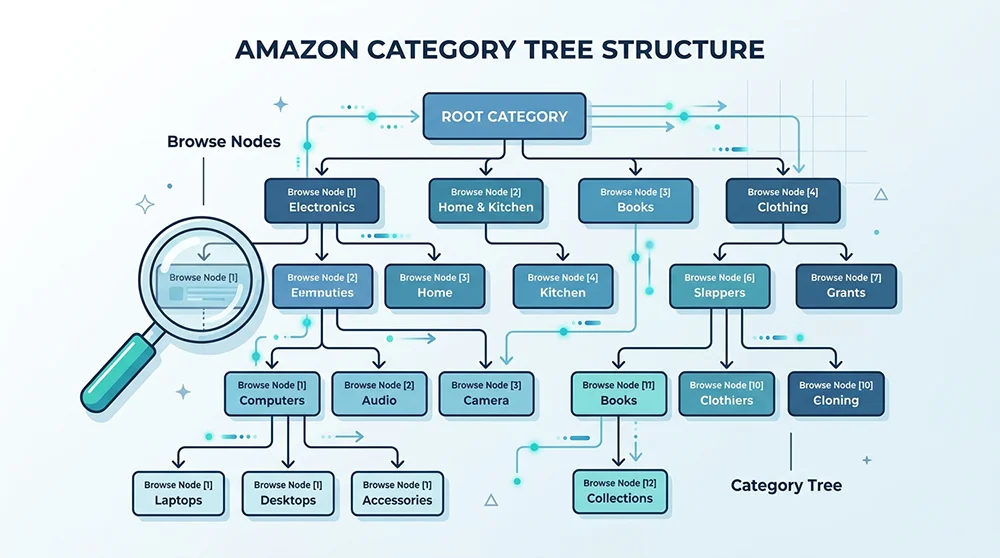
At its core, Amazon’s category system is an N-ary tree structure. Each node carries three essential attributes: a unique Node ID (e.g., “284507”), a display name (e.g., “Kitchen Small Appliances”), and relational links pointing to parent and child nodes.
The US marketplace root branches into dozens of top-level categories. Electronics (Node: 172282) and Home & Kitchen (Node: 1055398) are just two examples. Beneath each top-level node, the tree extends four to six levels deep, with leaf nodes representing the most granular product classifications.
How Different Are Category Structures Across Marketplaces?
Amazon’s category trees aren’t simple translations across regions. The US tree typically runs 4-6 levels deep, while Japan’s structure diverges significantly due to different merchandising conventions. European marketplaces (UK, DE, FR) share broad similarities but maintain independent Node ID systems. Pangolinfo’s aggregation data reveals approximately 120,000 active browse nodes in the US marketplace, 98,000 in Japan, and 105,000 in Germany — with less than 30% overlap.
What Can You Actually Do With Category Node Data?
First, precision niche identification. Analyzing product counts and review distributions at leaf nodes reveals market saturation levels instantly. Second, competitor monitoring. Lock onto a specific node and track every product within that category for ranking, pricing, and review velocity changes. Third, advertising optimization. Understanding category structure enables more precise Sponsored Products targeting. Fourth, inventory planning. Products within the same category often share seasonal demand patterns.
Three Approaches to Extracting Category Data: Which Fits Your Needs?
The industry currently relies on three distinct paths for obtaining Amazon category tree information, each with specific trade-offs.
Approach 1: Manual Collection — Free But Unsustainable
The most primitive method involves manually navigating Amazon’s category breadcrumbs and recording each Node ID and name. Zero upfront cost, but the time investment is staggering. Complete traversal of all active US nodes requires hundreds of hours, and the data decays rapidly as Amazon restructures categories.
Approach 2: Amazon PA-API — Restricted and Incomplete
Amazon’s Product Advertising API offers BrowseNodeLookup endpoints for category queries. However, PA-API requires approved seller accounts with sales quotas, returns limited hierarchy depth, and imposes strict rate limits. For large-scale data operations, it’s simply insufficient.
Approach 3: Professional Data Collection APIs — Efficient and Scalable
Specialized third-party APIs like Pangolinfo Scrape API leverage distributed crawling infrastructure and intelligent parsing to output complete hierarchical structures. The advantage is comprehensive data, regular updates, and zero infrastructure maintenance. For enterprises requiring ongoing Amazon category node scraping, this represents the highest ROI option.
How Pangolinfo Helps You Build a Complete Category Data System
When it comes to solving the Amazon browse node category data challenge, Pangolinfo Scrape API provides a comprehensive solution. Our system covers 15 major Amazon marketplaces and outputs standardized category node JSON structures.
Complete Data Field Coverage
Every browse node returns: Node ID (unique identifier), Display Name, Parent Node ID, Children Nodes list, Full Node Path, Marketplace identifier, and Last Updated timestamp. This structure imports directly into your research tools or databases.
Scheduled Synchronization and Delta Updates
Amazon modifies category structures periodically — merging nodes, splitting categories, renaming or deactivating others. Pangolinfo supports scheduled task configuration for daily, weekly, or monthly synchronization, outputting delta change reports. Your systems stay synchronized with Amazon without manual intervention.
Agent-Ready Integration
Through Pangolinfo Amazon Scraper Skill, AI Agents can directly invoke category node capabilities. For example, instruct your Agent to “identify all level-3 sub-nodes under Kitchen with 100-500 product counts in the US marketplace.” The Agent calls the API, parses results, and returns analyzed outputs. This human-AI collaboration model dramatically accelerates data utilization.
Technical Implementation: Calling the API for Category Data
Here’s a Python example demonstrating how to call Pangolinfo Scrape API for Amazon browse node data:
import requests
import json

# Configure API parameters
api_url = "https://api.pangolinfo.com/v1/amazon/browse-nodes"
headers = {
    "Authorization": "Bearer YOUR_API_KEY",
    "Content-Type": "application/json"
}

# Request child nodes under Kitchen & Dining (US)
payload = {
    "site": "amazon.com",
    "node_id": "284507",
    "depth": 3,
    "include_product_count": True
}

response = requests.post(api_url, headers=headers, json=payload)
data = response.json()

# Output hierarchical structure
for node in data["nodes"]:
    indent = "  " * node["level"]
    print(f"{indent}└─ {node['name']} (ID: {node['node_id']}, Products: {node.get('product_count', 'N/A')})")
This example fetches the hierarchical structure below a specified node and outputs product counts. Adjust the depth parameter to control hierarchy levels. Setting include_product_count=True returns product totals per node for rapid market sizing.
Implementation Best Practices
First, perform an initial full-site category tree collection from root nodes to establish your baseline data asset. Second, subscribe to incremental updates only for target categories during daily operations, reducing API costs. Third, associate Node IDs with your product database for category-dimensional pivot analysis. Fourth, validate node effectiveness periodically — Amazon adjusts roughly 5-8% of category structures annually.
Conclusion: Build Your Category Data Asset
Amazon browse node category data isn’t a one-time requirement — it’s ongoing infrastructure. Whether for product research, monitoring, or analytics, an accurate category tree underpins all data operations. Manual collection can’t keep pace with modern ecommerce operations, and official API limitations leave many businesses stranded.
Professional third-party data collection services are becoming the industry standard. Through Pangolinfo Scrape API, you can establish complete category data systems covering multiple global marketplaces within hours, with continuous synchronization. Stop burning team hours on repetitive data maintenance and redirect that energy toward insight generation and strategic decisions.
Start building your Amazon category data asset today: Explore Pangolinfo Scrape API for complete data collection solutions, or learn how Amazon Scraper Skill enables AI Agents to invoke category data capabilities directly.
Frequently Asked Questions
What is an Amazon Browse Node?An Amazon Browse Node is a unique identifier in Amazon’s hierarchical category system. Each node represents a specific product category with a unique Node ID, forming a tree structure from root nodes down to leaf nodes. Sellers use this data to pinpoint market niches and analyze competition.Why is Amazon category data important for sellers?Category node data helps sellers identify high-potential sub-niches, analyze competitor density, track ranking fluctuations, and evaluate market entry barriers. According to Jungle Scout’s 2025 report, sellers using category data for product selection achieve 47% higher success rates than those selecting blindly.How can I extract Amazon’s complete category hierarchy?Three main approaches exist: manual browsing (extremely slow), Amazon’s official PA-API (restricted access and incomplete data), and professional third-party APIs like Pangolinfo Scrape API which can batch-collect full node hierarchies across all marketplaces.What are the technical challenges in scraping Amazon browse nodes?Key challenges include dynamic node ID changes, structural variations across marketplaces (US/EU/JP), strict anti-bot measures, inconsistent tree depths, and restricted access to certain nodes. These require professional scraping infrastructure to overcome.How does Pangolinfo help with Amazon Browse Node data?Pangolinfo Scrape API supports batch collection of browse node data across all Amazon marketplaces, outputting complete hierarchical JSON structures with Node IDs, names, parent-child relationships, and child node lists. Scheduled updates ensure your category tree stays synchronized with Amazon.