When Competitors Quietly Dominate Ad Positions While You Remain Oblivious
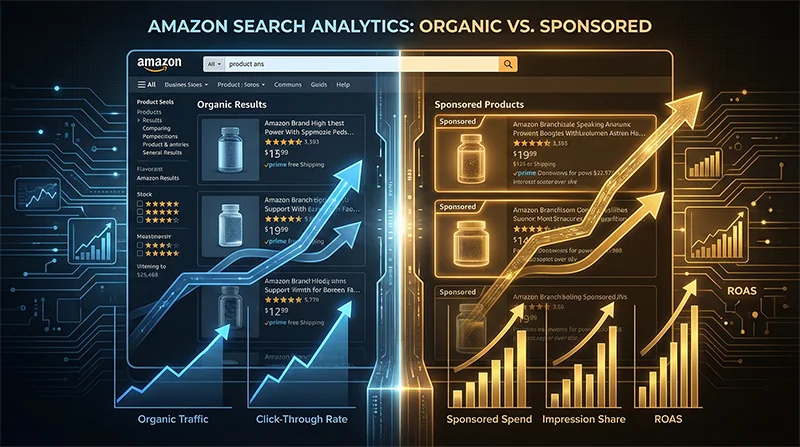
An invisible traffic war rages across Amazon’s search results pages. While you confidently check your product’s organic rankings, competitors may have already quietly seized prime positions through precision SP ad placements. What’s more frustrating is that most sellers can’t even accurately identify which results are organic and which are ads—this information blind spot is causing your operational decisions to rest on faulty data foundations.
A seasoned seller in the home goods category once shared his confusion with me: despite maintaining stable top-ten organic rankings, his conversion rate suddenly dropped 30%. Deep analysis revealed that three major competitors had intensively launched SP ad campaigns over the past two weeks, firmly occupying the top four search result positions. His monitoring tool completely missed this critical change because it couldn’t accurately distinguish the subtle differences between organic rankings and ad placements.
This is far from an isolated case. As Amazon’s advertising system continues evolving, SP ad placement logic has become increasingly complex—the number, position, and display format of ad slots under the same keyword are constantly changing. Traditional page scraping tools can only see the “results” but miss the “essence.” When you think you’re monitoring competitor rankings, you might actually be recording a jumble of mixed advertising and organic data that’s essentially worthless. This cognitive bias is causing countless sellers’ advertising budgets to go to waste and carefully designed operational strategies to miss their mark.
Why Can’t Market Tools Distinguish Between Ad Positions and Organic Rankings?
Technical Challenge #1: Dynamic Nature of Amazon’s Page Structure
Amazon’s search results pages aren’t static HTML but dynamically rendered through complex JavaScript. The DOM structure of SP ad slots is extremely similar to organic search results, with the only difference often being an inconspicuous “Sponsored” label or specific CSS class name. What’s more troublesome is that these identifiers frequently change as Amazon updates its frontend code—selectors that accurately identify ads today might fail tomorrow.
Most scraping tools employ simple HTML parsing solutions that can’t wait for JavaScript to fully execute or handle asynchronously loaded ad content. The result is either missing partial SP ad slots or misidentifying ad positions as organic results. This technical deficiency creates data bias that gets amplified exponentially in subsequent competitive analysis, ultimately building your decisions on sand.
Technical Challenge #2: Diverse Ad Display Formats
SP ads don’t just appear at the top of search results—they’re interspersed in middle positions, bottom positions, and even as carousel formats in sidebars. Different display positions correspond to different HTML structures and data attributes. A complete competitor ad strategy tracker analysis requires simultaneously capturing ad information from all these positions—including advertiser ASIN, bid ranking, display position, ad copy, and other multi-dimensional data.
However, most monitoring tools on the market can only identify the most obvious top ad positions, remaining virtually helpless against “native ad positions” interspersed among organic results. It’s like seeing only the tip of an iceberg while remaining completely unaware of the massive volume beneath the water. When competitors employ mixed placement strategies, your monitoring system might capture only 30% of actual ad data, with the remaining 70% of critical information in the blind spot.
Technical Challenge #3: Continuous Anti-Scraping Mechanism Upgrades
Amazon’s detection of scraping behavior is becoming increasingly strict. Frequent page requests, fixed User-Agents, and access patterns lacking real user behavior characteristics all trigger risk control systems. Once identified as machine access, the returned page content might be incomplete or directly return a CAPTCHA page. This means that even if your parsing logic is perfect, you might still be unable to obtain real Sponsored Products monitoring data because requests are blocked.
A more subtle issue is that Amazon displays different ad content based on visitor geographic location, device type, browsing history, and other factors. The same keyword might show completely different SP ad positions when viewed from the East Coast versus the West Coast of the United States. If your monitoring tool can’t simulate diverse real user access scenarios, the collected data represents only a “specific perspective” and can’t reflect the full picture of competitor ad placements.
The Chain Reaction of Data Quality Issues
When foundational data contains bias, all analyses based on that data become distorted. You might mistakenly believe a competitor isn’t running ads when they’re actually employing a more subtle middle-position ad strategy. You might overestimate your organic ranking advantage while remaining unaware that real user visibility is firmly dominated by competitor ads. This cognitive bias leads to a series of wrong decisions: improper ad budget allocation, unfocused keyword strategies, and uncompetitive product pricing.
More seriously, when your team becomes accustomed to relying on inaccurate data, your entire operational system builds on false assumptions. It’s like measuring with an incorrectly calibrated ruler—no matter how hard you optimize, the final results will deviate from your targets. For advanced sellers requiring precision operations, this systematic error is fatal—it won’t immediately collapse your business but will, like a chronic disease, continuously erode your competitive advantage.
Traditional Monitoring vs. Amazon SP Ads Spy Tool: Where’s the Gap?
Three Major Limitations of Traditional Approaches
The first common approach is manual monitoring—assigning operations staff to periodically search keywords and manually record competitor ad positions. While seemingly simple, this method is extremely inefficient and error-prone. A medium-sized product line might involve hundreds of core keywords, and manually checking them daily consumes hours. More critically, manual recording can’t capture dynamic ad position changes—you only see a snapshot at a specific moment, missing competitors’ placement strategy adjustments across different time periods.
The second approach uses SaaS monitoring tools available on the market. These tools typically offer rank tracking functionality, but as mentioned earlier, most can’t accurately distinguish organic from paid rankings. You receive a mixed data report requiring additional manual screening and judgment. Moreover, these tools’ data update frequency is often once or several times daily, which is far insufficient for scenarios requiring real-time ad dynamic monitoring.
The third approach is building a custom scraping system. Technical teams invest substantial time developing and maintaining scraper code, only to discover that Amazon’s anti-scraping mechanisms continuously upgrade—code that works today might fail tomorrow. Not to mention handling IP bans, CAPTCHA recognition, JavaScript rendering, and a series of other technical challenges. The final result is often: massive R&D resources invested to maintain a barely functional system with questionable data quality.
Core Advantages of the API Approach
Professional Amazon Ad Intelligence Tools take a completely different technical path. Rather than simply simulating browser access, they solve page rendering, data parsing, anti-scraping countermeasures, and a series of technical challenges at the foundational level, encapsulating these capabilities into stable API interfaces. For users, you simply send an HTTP request to receive precisely parsed structured data—each product’s ASIN, title, price, rating, and most critically: whether it’s an SP ad position, ad position number, ad type, and other detailed information.
The first advantage of this approach is accuracy. Professional API service providers continuously track Amazon page structure changes, promptly updating parsing rules to ensure ad position identification accuracy remains consistently high. Take Pangolinfo Scrape API as an example—its SP ad position capture accuracy reaches 98%, far exceeding generic scraping tools on the market. This means every data point you receive is trustworthy and can be directly used for strategic decisions without spending time on validation and cleaning.
The second advantage is scalability. Through API calls, you can easily implement concurrent monitoring of hundreds or even thousands of keywords, obtaining the latest ad position data every hour or minute. This real-time capability and scale are unattainable by manual monitoring and traditional tools. When competitors suddenly increase ad spending, you can detect and respond immediately rather than learning about it belatedly when weekly reports arrive.
The third advantage is flexibility and extensibility. The API returns standardized JSON data that you can develop further according to your business needs—integrate into existing BI systems, establish automated alert mechanisms, or train machine learning models to predict competitor ad strategies. This openness makes data truly your asset rather than being locked into a SaaS platform’s closed ecosystem.
Amazon SP Ads Spy Tool: The Technical Excellence Behind 98% Accuracy
Why Can We Achieve Industry-Leading SP Ad Position Recognition?
The Pangolinfo team has deep expertise in e-commerce data collection, accumulating rich anti-anti-scraping experience and page parsing technology. For the specific scenario of track Sponsored Products ranking position, we developed a specialized recognition engine capable of precisely handling various complex situations on Amazon search results pages.
First, our system uses a real browser kernel for page rendering, fully executing all JavaScript code to ensure dynamically loaded ad content is captured. Second, we maintain an adaptive parsing rule library that automatically identifies Amazon frontend code changes and adjusts parsing strategies in real-time. Even when Amazon updates page structure, our system completes adaptation within hours, ensuring data collection continuity.
More importantly, we’ve deeply adapted to all SP ad display formats—whether top banner ads, middle interspersed ads, bottom recommended ads, or sidebar carousel ads, all are accurately identified and tagged. Each returned product data entry includes a clear “adPosition” field telling you which ad slot it is, plus an “adType” field indicating the specific ad type.
Not Just SP Ad Positions, But a Complete Ad Intelligence System
Through Pangolinfo Scrape API, you receive not just the basic information of “which products are running ads,” but a complete ad intelligence dataset:
Ad Position Information: Precise down to which position, whether top, middle, or bottom, helping you analyze competitor bidding strategies and budget allocation. Generally, top ad positions have higher CPC—if competitors consistently occupy these positions, it indicates sufficient ad budgets and good conversion performance.
Advertiser Information: The seller account and brand information corresponding to each ad position, clearly showing who’s competing with you. Through long-term tracking, you can identify main competitors’ ad placement rhythms—whether continuous or pulsed placement, whether covering all categories or focusing on core SKUs.
Product Details: Complete information including advertised product titles, prices, ratings, review counts, helping you assess competitor product competitiveness. If a new product heavily advertises with few reviews, it might be conducting new product promotion; if a high-rated product suddenly increases ad spending, it might be clearing inventory or responding to seasonal demand.
Time Series Data: By periodically calling the API, you can build a time series database of competitor ad positions, analyzing ad placement time patterns, cyclical changes, and correlations with promotional activities. These insights help you optimize your own ad scheduling, increasing investment during periods of lower competitor ad density to achieve higher ROI.
Amazon SP Ads Spy Tool Use Cases: Who Needs This Most?
If you’re an advanced operations professional responsible for formulating brand-wide advertising strategy, precise competitor ad data is your decision-making foundation. Through continuous monitoring of major competitors’ SP ad placements, you can identify market trends, discover emerging competitors, and evaluate whether your ad investment is reasonable.
If you’re an advertising optimizer whose daily work involves adjusting bids, optimizing keywords, and improving ACOS, understanding which keywords competitors advertise on and which positions they occupy helps you allocate budgets more precisely. When you discover a high-value keyword is densely advertised by competitors, you can choose to avoid direct confrontation and instead mine long-tail keyword opportunities, or compete head-on by raising bids for core positions.
If you’re a SaaS tool developer wanting to provide more professional competitive analysis features for your customers, integrating Pangolinfo’s API enables you to quickly gain industry-leading data collection capabilities without investing massive R&D resources to solve technical challenges. Our API documentation is comprehensive, calls are simple, and stability is high, supporting your product’s rapid iteration and scaled expansion.
If you’re a data analyst or consulting firm needing to provide clients with in-depth market research reports, large-scale, high-quality SP ad data is your analytical raw material. By batch collecting ad data across hundreds of categories and thousands of keywords via API, you can conduct industry-level advertising competitive landscape analysis, providing clients with truly valuable strategic recommendations.
5-Minute Quick Start: How to Get SP Ad Position Data via API
Getting Started
Using an Amazon SP Ads Spy Tool like Pangolinfo Scrape API for competitor ad strategy tracking is very simple. First, register an account in the Pangolinfo Console and obtain your API key. Then, just a few lines of code get you started collecting data with your Amazon SP Ads Spy Tool.
Here’s a Python example showing how to retrieve all SP ad position information for a specific keyword:
import requests
import json

# API Configuration
API_KEY = "your_api_key_here"
API_ENDPOINT = "https://api.pangolinfo.com/scrape"

# Request Parameters
params = {
    "api_key": API_KEY,
    "domain": "amazon.com",
    "type": "search",
    "keyword": "wireless earbuds",
    "page": 1,
    "include_sponsored": True  # Key parameter: include SP ad position data
}

# Send Request
response = requests.get(API_ENDPOINT, params=params)
data = response.json()

# Parse SP Ad Positions
sponsored_products = []
for item in data.get("search_results", []):
    if item.get("is_sponsored"):  # Check if it's an ad position
        sponsored_products.append({
            "position": item.get("position"),
            "asin": item.get("asin"),
            "title": item.get("title"),
            "price": item.get("price"),
            "rating": item.get("rating"),
            "reviews_count": item.get("reviews_count"),
            "ad_position": item.get("ad_position"),  # Ad position number
            "ad_type": item.get("ad_type")  # Ad type
        })

# Output Results
print(f"Found {len(sponsored_products)} SP ad positions:")
for ad in sponsored_products:
    print(f"Position {ad['position']} - {ad['title'][:50]}... (ASIN: {ad['asin']})")
Batch Monitoring Multiple Keywords
For scenarios requiring monitoring of numerous keywords, you can build an automated monitoring system. Here’s a simple batch monitoring example:
import time
from datetime import datetime

# Keyword List
keywords = [
    "wireless earbuds",
    "bluetooth headphones",
    "noise cancelling earbuds",
    "sports earbuds"
]

# Batch Collection
all_ad_data = {}

for keyword in keywords:
    print(f"Collecting keyword: {keyword}")

    params = {
        "api_key": API_KEY,
        "domain": "amazon.com",
        "type": "search",
        "keyword": keyword,
        "include_sponsored": True
    }

    response = requests.get(API_ENDPOINT, params=params)
    data = response.json()

    # Extract SP Ad Positions
    ads = [item for item in data.get("search_results", [])
           if item.get("is_sponsored")]

    all_ad_data[keyword] = {
        "timestamp": datetime.now().isoformat(),
        "total_ads": len(ads),
        "ads": ads
    }

    time.sleep(1)  # Avoid excessive request frequency

# Save Data
with open("sp_ads_monitoring.json", "w") as f:
    json.dump(all_ad_data, f, indent=2)

print(f"Collection complete, monitored {len(keywords)} keywords")
Competitor Ad Strategy Analysis
With raw data in hand, you can conduct deeper analysis. For example, identify which competitors advertise across multiple keywords and calculate their ad coverage rate:
from collections import Counter

# Count frequency of each ASIN
asin_counter = Counter()

for keyword, data in all_ad_data.items():
    for ad in data["ads"]:
        asin_counter[ad["asin"]] += 1

# Find competitors with highest ad coverage
top_advertisers = asin_counter.most_common(10)

print("Most aggressive advertisers:")
for asin, count in top_advertisers:
    coverage = (count / len(keywords)) * 100
    print(f"ASIN {asin}: appears in {count}/{len(keywords)} keywords ({coverage:.1f}%)")
More Advanced Features
Pangolinfo Scrape API supports additional advanced parameters to help you obtain more precise data:
Specified Zip Code Collection: Ad displays may differ by region. By setting the zip_code parameter, you can simulate search results for users in specific areas, understanding regionalized ad placement strategies.
Multi-Page Collection: SP ads don’t just appear on the first page. By setting the page parameter, you can collect ad data across multiple pages for a comprehensive understanding of competitor ad layouts.
Historical Data Comparison: Regularly call the API and save data to build a time series database. You can analyze ad position change trends and identify competitor placement cycles and strategy adjustments.
For complete API documentation and more code examples, visit the Pangolinfo Documentation Center.
Master Ad Intelligence, Win the Invisible Battlefield
In Amazon’s highly competitive marketplace, information asymmetry often determines success or failure. While you’re still observing with the naked eye and guessing with inaccurate tools, your competitors may have already established comprehensive ad intelligence systems with an Amazon SP Ads Spy Tool, precisely grasping market dynamics. SP ads monitoring isn’t optional icing on the cake—it’s an essential capability for advanced operations. Using an Amazon SP Ads Spy Tool allows you to see the competitive landscape clearly, understand opponent strategies, and formulate more targeted responses with precision.
Technological progress is redefining the barriers to e-commerce operations. Sellers still relying on manual monitoring and low-quality data will gradually be eliminated by the market, while teams embracing APIs and building data-driven decision systems will gain increasingly larger advantages in competition. Pangolinfo Scrape API, with its 98% SP ad position capture accuracy, has already helped hundreds of enterprises build their own ad intelligence systems, achieving the transformation from “blind placement” to “precision targeting.”
Now it’s your turn to make a choice. Will you continue groping in the information fog, or arm yourself with professional tools to seize the initiative on the invisible traffic battlefield? The answer is obvious.
Start Your Ad Intelligence Journey Today
Visit Pangolinfo Scrape API to learn more, or register for a free trial directly in the Console. Our professional technical support team is ready to answer your questions and help you quickly build your own competitor ad monitoring system.
On Amazon’s traffic battlefield, information is your weapon. Don’t let competitors continue dominating from the shadows—act now and illuminate your path with data.