Executive Summary
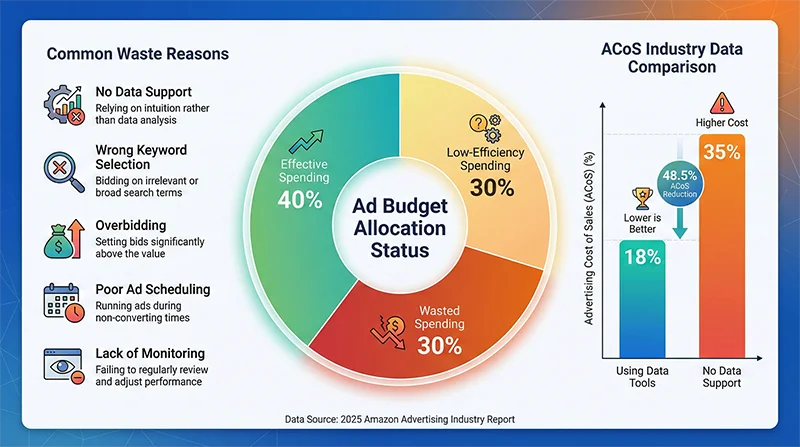
Amazon Ad Budget Optimization is a critical skill every mid-to-large seller must master. Data shows that advertising without data support leads to 30% budget waste and average ACoS of 35%. This comprehensive guide explores systematic Amazon Ad Budget Optimization methodologies through data-driven decision-making, real-time monitoring, and scientific budget allocation strategies, helping sellers reduce ACoS by 30%+ and double advertising ROI. We’ll share real case studies, detailed Amazon Advertising Data Analysis methods, and practical applications of professional tools like AMZ Data Tracker, transforming Amazon Ad Budget Optimization from theory into practice.
Amazon Ad Budget Optimization Challenges: Why 90% of Sellers Waste Money
When your Amazon advertising monthly spend breaks through $5,000, $10,000, or even higher, have you ever experienced this confusion: advertising budget keeps increasing, but sales growth doesn’t match? ACoS hovers between 25%-35%, far above the industry excellent level of 15%-20%? Every advertising strategy adjustment feels like blind trial and error, not knowing which changes actually work?
This isn’t an isolated case. According to the 2025 Amazon Advertising Industry Report, over 60% of small and medium sellers report significant issues with their PPC Budget Control, with three most prominent pain points:
Pain Point One: Advertising Budget Black Hole — The Invisible 30% Waste
A 3C category seller with $2M annual revenue shared his real experience with us. He invested $12,000 monthly in Amazon advertising, but careful analysis revealed that approximately $3,600 (30%) of spending produced almost no effective conversions. This waste mainly came from:
- Ineffective keywords burning money continuously: Some keywords had high click-through rates but near-zero conversion rates, yet continued consuming budget due to lack of monitoring
- Poor ad scheduling: 2-6 AM ad spend accounted for 15%, but conversion rate during this period was less than 1/5 of daytime
- Out-of-control bidding strategy: Some keyword CPC bids exceeded reasonable levels by over 50%, causing customer acquisition costs to surge
- Imbalanced ad type allocation: Over-reliance on SP ads (75% share), while ignoring higher-ROI SB and SD ads
Worse still, this seller only discovered these issues after using professional Ad Performance Monitoring tools, realizing they had persisted for 8 months, cumulatively wasting nearly $30,000 in advertising budget.
Pain Point Two: Data Blind Spots — The Cost of Gut-Feeling Decisions
Amazon’s backend advertising reporting features are relatively basic, with obvious data blind spots:
- Severe data delays: Advertising data typically delays 24-48 hours, missing optimal adjustment windows
- Lack of competitor comparison: Can’t see competitors’ advertising strategies and keyword layouts
- Scattered data hard to integrate: SP, SB, SD ad type data scattered across different reports, difficult to analyze comprehensively
- No alert mechanism: When a campaign’s ACoS abnormally spikes, no timely notifications
An agency company manager told us their team manages 50+ client advertising accounts, spending 3-4 hours daily manually downloading, organizing, and analyzing various advertising reports. Even so, due to data delays and fragmentation, they still can’t achieve true real-time optimization, with each client losing an average of 10%-15% advertising budget monthly.
Pain Point Three: Optimization Dilemma — Not Knowing How to Scientifically Allocate Budget
Even when aware of advertising budget waste, many sellers don’t know how to optimize. Common confusions include:
- How to allocate budget among SP, SB, SD ads? Traditional advice is 7:2:1, but is this ratio really suitable for your category and products?
- Which keywords deserve increased investment? High impressions ≠ high conversions, how to identify truly valuable keywords?
- How to adjust bidding strategy? Fixed bids, dynamic bids (down only), dynamic bids (up and down) — which strategy fits better?
- How to handle budget fluctuations during promotional seasons? How much should advertising budget increase during Prime Day and Black Friday? How to avoid ROI decline from blind following?
The answers to these questions aren’t fixed, but require Amazon Advertising Data Analysis based on your product characteristics, competitive environment, seasonal factors, and other multi-dimensional data for dynamic adjustment. However, lacking professional tools and methodology support, most sellers can only make decisions based on experience and gut feeling, often with half the results for twice the effort.
Data doesn’t lie. Industry research shows sellers using data-driven methods for Amazon Ad Budget Optimization have average ACoS 40% lower than those relying on experience-based decisions, with advertising ROI over 60% higher. This gap represents the chasm between scientific decision-making and blind trial-and-error.
Data-Driven Amazon Ad Budget Optimization Methodology
To achieve truly effective Amazon Ad Budget Optimization, you need to establish a systematic data-driven methodology. This methodology includes five core components: data collection, data analysis, strategy adjustment, real-time monitoring, and continuous optimization.
Step One: Comprehensive Data Collection — Building Decision Foundation
Effective Ad Performance Monitoring requires collecting data across three dimensions:
1. Your Own Advertising Data
- Campaign-level data: Each campaign’s spend, sales, ACoS, CTR, conversion rate
- Ad group-level data: Performance differences across different ad groups
- Keyword-level data: Each keyword’s CPC, clicks, conversions, ACoS
- Time-based data: Ad performance fluctuations across different time periods
- Device data: Mobile vs desktop conversion differences
2. Competitor Advertising Data
- Competitor keyword lists
- Competitor ad position ranking changes
- Competitor ad copy and creative
- Competitor promotional strategies and price changes
3. Market Environment Data
- Overall category advertising competition intensity
- Keyword search volume trends
- Seasonal factors’ impact on ad performance
- Industry average ACoS and CPC levels
Traditionally, this data is scattered across multiple Amazon backend reports, requiring manual downloading, organizing, and correlation — time-consuming, labor-intensive, and error-prone. Professional AMZ Data Tracker can automate this process, syncing all advertising data in real-time and providing competitor monitoring and market analysis features, transforming data collection from “manual labor” to “automated pipeline.”
Step Two: Deep Data Analysis — Discovering Optimization Opportunities
After collecting data, the key is extracting valuable insights. Here are several core analysis dimensions:
1. ACoS Segmentation Analysis
Don’t just look at overall ACoS; segment analysis across different dimensions:
- By ad type: What’s the ACoS for SP, SB, SD respectively? Which type is most efficient?
- By match type: How much ACoS difference between exact match, phrase match, and broad match?
- By keyword: Identify quality keywords with ACoS<15% (worth increased investment) and inefficient keywords with ACoS>40% (need pausing or bid reduction)
- By time period: Find golden hours with highest conversion rates and trash hours with lowest conversion rates
A real case: A home goods category seller discovered through segmentation analysis that their SB ad ACoS was only 12%, far lower than SP ad’s 28%, but SB ad budget share was only 15%. After adjustment, increasing SB ad budget to 30%, overall ACoS dropped by 6 percentage points.
2. ROI and ROAS Calculation
ACoS is just one metric for measuring advertising efficiency; more importantly, look at ROI (Return on Investment) and ROAS (Return on Ad Spend):
- ROAS = Ad-Generated Sales / Ad Spend
- ROI = (Ad-Generated Profit – Ad Spend) / Ad Spend
Example: If your product profit margin is 40% and ACoS is 20%, then:
- ROAS = 1 / 0.2 = 5 (Every $1 ad spend generates $5 sales)
- ROI = (5 × 0.4 – 1) / 1 = 1 (Every $1 ad spend nets $1 profit)
If profit margin is only 20%, with same 20% ACoS, ROI = (5 × 0.2 – 1) / 1 = 0 (Break even, no profit or loss). This shows ACoS target values need setting based on product profit margins, not blindly pursuing lower is better.
3. Keyword Performance Evaluation
Conduct four-quadrant analysis for each keyword:
| Quadrant | Characteristics | Optimization Strategy |
|---|---|---|
| Star Keywords | High conversion + Low ACoS | Increase budget, raise bids, compete for more exposure |
| Potential Keywords | High conversion + High ACoS | Optimize listing, improve conversion rate, reduce acquisition cost |
| Problem Keywords | Low conversion + Low ACoS | Test optimization, pause if no improvement |
| Trash Keywords | Low conversion + High ACoS | Pause immediately to avoid budget waste |
Through this analysis, a beauty seller discovered 23 keywords belonging to “trash keywords,” consuming $1,800 monthly budget with almost no conversions. After pausing these keywords and investing saved budget into “star keywords,” overall sales didn’t drop but rose, with ACoS falling from 32% to 24%.
Step Three: Scientific Strategy Adjustment — From Analysis to Action
Based on data analysis results, strategy adjustments needed in several areas:
1. Advertising Budget Reallocation
Traditional ad budget allocation uses fixed ratios (like SP 70%, SB 20%, SD 10%), but data-driven methods dynamically adjust based on actual ROI:
- ROI-oriented allocation: Allocate more budget to ad types and keywords with highest ROI
- Stage-based adjustment: New product launch focuses on SP ads to build keyword weight; mature stage increases SB and SD ads for brand exposure
- Competition intensity adaptation: In highly competitive categories, appropriately increase SB ad share, leveraging brand effect to reduce acquisition costs
2. Keyword Bid Optimization
Bid adjustments should follow “data speaks” principle:
- Star keywords: Increase bids 10%-20%, compete for top-of-search ad positions
- Potential keywords: Maintain bids, optimize listing to improve conversion rate
- Problem keywords: Reduce bids 20%-30%, observe results
- Trash keywords: Pause directly, or reduce bids to minimum for testing
Also, adjust bidding strategy based on ad placement. Amazon ad positions include:
- Top of Search: Highest conversion rate, can set +50% bid adjustment
- Product Pages: Medium conversion rate, can set +20% bid adjustment
- Other Placements: Lower conversion rate, maintain base bid or -10% adjustment
3. Ad Scheduling Optimization
By analyzing conversion rate data across different time periods, achieve precise time-based delivery:
- Golden hours (conversion rate >30% above average): Increase budget and bids
- Normal hours (conversion rate within ±30% range): Maintain normal delivery
- Low-efficiency hours (conversion rate <30% below average): Reduce bids or pause delivery
An electronics seller discovered their products had highest conversion rates weekdays 10 AM-12 PM and evenings 8-10 PM, while 2-6 AM had almost no conversions. After adjustment, raising bids 30% during golden hours and pausing ads during low-efficiency hours, overall ad spend decreased 18% while sales actually increased 12%.
Step Four: Real-Time Monitoring — Timely Problem Discovery and Resolution
Ad optimization isn’t one-time work but requires continuous monitoring and adjustment. Key monitoring metrics include:
- Daily ACoS fluctuations: If ACoS suddenly spikes 20%+ on any day, need immediate investigation
- Keyword ranking changes: Whether core keywords’ organic and ad rankings are stable
- Competitor dynamics: Whether competitors launched new promotions or adjusted ad strategies
- Budget consumption speed: Whether any campaign has excessively fast budget consumption
- Conversion rate anomalies: If an ad group’s conversion rate suddenly drops, listing may be complained about or reviews increased
AMZ Data Tracker provides real-time monitoring and intelligent alert features. When key metrics show anomalies, it immediately notifies you via email or in-app messages, ensuring you don’t miss any important optimization opportunities.
Step Five: Continuous Optimization — Building Optimization Loop
Ad optimization is a continuous iteration process, requiring establishment of “monitor-analyze-adjust-verify” loop:
- Daily monitoring: Check key metrics, identify anomalies
- Weekly analysis: Deep dive into weekly data, discover optimization opportunities
- Monthly adjustment: Make major strategy adjustments based on monthly data
- Quarterly review: Summarize lessons learned, optimize overall advertising strategy
Through this systematic methodology, Amazon Ad Budget Optimization transforms from “gut feeling” to “data-driven,” from “reactive response” to “proactive optimization,” from “rough management” to “refined operations.”
How to Reduce Advertising Costs Through Real-Time Monitoring? 5 Key Metrics
In actual Amazon Ad Budget Optimization work, five key metrics need focused monitoring and optimization:
Metric 1: ACoS (Advertising Cost of Sales) – Ad Cost Percentage
Calculation Formula: ACoS = Ad Spend / Ad-Generated Sales × 100%
Optimization Targets:
- New product launch: ACoS acceptable at 30%-40%, focus on building keyword weight and accumulating reviews
- Growth stage: ACoS should control at 20%-30%, balancing sales growth and profit
- Mature stage: ACoS should reduce to 15%-20%, pursuing profit maximization
Optimization Methods:
- Pause keywords with ACoS>50% persisting 7+ days
- Increase budget for star keywords with ACoS<15%< /li>
- Optimize listing to improve conversion rate, thereby reducing ACoS
Metric 2: CTR (Click-Through Rate)
Calculation Formula: CTR = Clicks / Impressions × 100%
Industry Benchmarks:
- SP Ads: 0.3%-0.5%
- SB Ads: 0.4%-0.6%
- SD Ads: 0.2%-0.4%
Optimization Methods:
- CTR too low (<0.2%): Indicates poor ad creative or keyword relevance, need to optimize main image, title, or change keywords
- CTR normal but low conversion: Indicates listing page issues, need to optimize product description, price, reviews, etc.
Metric 3: CVR (Conversion Rate)
Calculation Formula: CVR = Orders / Clicks × 100%
Industry Benchmarks:
- Excellent level: >15%
- Good level: 10%-15%
- Needs optimization: <10%< /li>
Optimization Methods:
- Optimize main images and A+ content to enhance product appeal
- Increase review quantity and rating to build trust
- Adjust pricing strategy to improve value proposition
- Optimize product description, highlight core selling points
Metric 4: CPC (Cost Per Click)
Optimization Strategy:
- CPC too high (>50% above industry average): Reduce bid or pause, seek alternative keywords
- CPC reasonable but high ACoS: Indicates low conversion rate, need to optimize listing rather than reduce bid
- CPC low but few impressions: Appropriately increase bid to compete for more traffic
Metric 5: ROAS (Return on Ad Spend)
Calculation Formula: ROAS = Ad-Generated Sales / Ad Spend
Optimization Targets:
- ROAS>5: Excellent, can increase investment
- ROAS 3-5: Good, maintain status quo
- ROAS<3: Needs optimization, check ACoS and conversion rate
Through continuous monitoring and optimization of these 5 key metrics, you can achieve refined management of PPC Budget Control, ensuring every advertising dollar is spent wisely.
AMZ Data Tracker: Professional Amazon Advertising Data Analysis Tool
While theory and methodology are important, achieving efficient Amazon Ad Budget Optimization also requires professional tool support. AMZ Data Tracker is an advertising data analysis and monitoring platform designed specifically for Amazon sellers, providing these core features:
Feature 1: Real-Time Advertising Data Sync
- Automatically sync all campaign, ad group, and keyword data
- Data update frequency: Hourly (far faster than Amazon backend’s 24-48 hour delay)
- Supports SP, SB, SD ad types
- Historical data retention: Unlimited, convenient for long-term trend analysis
Feature 2: Intelligent Data Analysis
- Automatically calculate key metrics like ACoS, ROAS, ROI
- Keyword four-quadrant analysis, automatically identify star/potential/problem/trash keywords
- Ad scheduling performance analysis, find golden delivery hours
- Ad type comparison analysis, optimize budget allocation
Feature 3: Competitor Ad Monitoring
- Monitor competitor keyword targeting
- Track competitor ad position ranking changes
- Analyze competitor ad strategy adjustments
- Discover competitor high-conversion keywords
Feature 4: Intelligent Alert System
- ACoS anomaly alerts: Immediate notification when ACoS suddenly spikes
- Budget consumption alerts: Avoid premature budget depletion
- Keyword ranking alerts: Reminder when core keyword rankings drop
- Competitor activity alerts: Notification of major competitor adjustments
Feature 5: Automated Reporting
- Automatically generate daily/weekly/monthly ad performance reports
- Support custom report dimensions and metrics
- One-click export to Excel/PDF formats
- Team collaboration features, support multi-account management
Besides AMZ Data Tracker, Pangolinfo also provides Scrape API services, helping you obtain more comprehensive market data and competitor information, providing more data support for ad optimization. Detailed API usage methods can be found in the API Documentation.
Case Study: How a Brand Reduced ACoS from 35% to 18%
Let’s examine a real case to see how systematic Amazon Ad Budget Optimization produces results in practice.
Case Background
Client Information:
- Industry: Home goods
- Annual sales: $1.8M
- Monthly ad spend: $12,000
- Main products: Kitchen storage items (5 SKUs)
Pre-Optimization Issues:
- Overall ACoS: 35% (industry excellent level 18%-22%)
- Monthly sales: $34,000
- Ad ROI: Only 0.86 (every $1 ad spend, net loss $0.14)
- Serious ad budget waste, but unclear where problems lie
Optimization Process
Month One: Data Diagnosis and Quick Fixes
After comprehensive data analysis using AMZ Data Tracker, discovered these issues:
- Serious keyword waste: Among 128 targeted keywords, 47 (37%) had ACoS exceeding 50%, consuming $4,200 monthly budget with extremely low conversions
- Unreasonable ad scheduling: 2-6 AM ad spend accounted for 18%, but conversion rate less than 1/6 of daytime
- Imbalanced ad types: SP ads accounted for 78%, SB and SD ads severely insufficient
- Chaotic bidding strategy: Some keyword CPCs exceeded industry average by 60%, but conversion rates weren’t high
Immediate Actions Taken:
- Paused 47 trash keywords, saving $4,200/month budget
- Reduced bids 50% during 2-6 AM, saving $1,500/month budget
- Reallocated saved budget to 23 star keywords (ACoS<15%)< /li>
Month One Results:
- ACoS reduced from 35% to 28%
- Monthly sales increased from $34,000 to $38,000
- Ad spend decreased to $10,600
Month Two: Strategy Optimization and Structural Adjustment
Based on month one data, conducted deeper optimization:
- Adjusted ad type allocation: Increased SB ad budget from 15% to 30%, as data showed SB ad ACoS only 16%, far lower than SP ad’s 32%
- Optimized bidding strategy: Increased bids 20% for 23 star keywords, competing for more top-of-search ad positions
- Added SD ads: Targeted competitor ASINs with SD ads, intercepting competitor traffic
- Optimized listing: Based on ad data, optimized main images and A+ content to improve conversion rate
Month Two Results:
- ACoS reduced from 28% to 22%
- Monthly sales increased from $38,000 to $43,000
- Ad spend maintained around $9,500
Month Three: Refined Operations and Continuous Optimization
- Established real-time monitoring mechanism: Set multiple alert indicators for ACoS, budget consumption, keyword rankings, etc.
- A/B testing: Tested different ad copy and bidding strategies to find optimal combinations
- Competitor strategy tracking: Monitored competitor ad dynamics, timely adjusted response strategies
- Seasonal adjustments: Proactively adjusted ad budget and keyword layout based on seasonal trends
Month Three Results:
- ACoS stabilized at 18%
- Monthly sales reached $47,000
- Ad spend reduced to $8,500
Final Results Summary
| Metric | Before Optimization | After Optimization | Improvement |
|---|---|---|---|
| Monthly Ad Spend | $12,000 | $8,500 | -29% |
| ACoS | 35% | 18% | -49% |
| Monthly Sales | $34,000 | $47,000 | +38% |
| ROI | 0.86 | 1.95 | +127% |
Key Success Factors
- Data-driven decisions: All optimization actions based on real data, not experience guesswork
- Quick response: Through real-time monitoring, able to discover and resolve problems at first opportunity
- Systematic approach: Following “diagnose-optimize-verify-iterate” closed-loop process
- Professional tool support: AMZ Data Tracker’s automated data analysis and monitoring features greatly improved optimization efficiency
This case fully proves that through scientific Amazon Ad Budget Optimization methods and professional tool support, even poorly performing ad accounts can achieve significant improvements in short term.
Start Your Amazon Ad Budget Optimization Journey Today
Having read this far, you’ve mastered core Amazon Ad Budget Optimization methodologies and practical techniques. Now it’s time to transform theory into action. Here’s our three-step action plan for you:
Step One: Diagnose Your Ad Account Health
Spend 30 minutes answering these questions:
- What’s your overall ACoS? Is it above industry average?
- Do you know which keywords are wasting budget?
- Can you see ad data in real-time? Or must wait 24-48 hours?
- Do you understand competitors’ advertising strategies?
- Do you have a systematic ad optimization process?
If 3+ questions answered “don’t know” or “no,” your ad account has obvious optimization potential, possibly wasting 20%-40% of advertising budget.
Step Two: Free Trial of AMZ Data Tracker
Visit Pangolinfo Console, register an account and try AMZ Data Tracker for free. During trial, you can:
- Connect your Amazon ad account, automatically sync all advertising data
- View detailed ad performance analysis reports
- Identify keywords and campaigns wasting budget
- Get data-based optimization recommendations
- Experience real-time monitoring and intelligent alert features
Through free trial, you can quickly understand what issues exist in your ad account and how much optimization potential there is.
Step Three: Develop and Execute Optimization Plan
Based on data analysis results, develop your optimization plan:
Short-term optimization (1-2 weeks):
- Pause trash keywords with ACoS>50%
- Reduce bids during low-efficiency hours
- Invest saved budget into star keywords
Mid-term optimization (1-2 months):
- Adjust ad type budget allocation
- Optimize listing to improve conversion rate
- Establish competitor monitoring mechanism
Long-term optimization (3+ months):
- Establish complete data-driven optimization process
- Cultivate team’s data analysis capabilities
- Continuously test and iterate ad strategies
Remember, Amazon Ad Budget Optimization isn’t one-time work but a continuous improvement process. Through systematic methods, professional tools, and persistent execution, you can definitely achieve significant advertising performance improvements.
Start Optimizing Your Amazon Ad Budget Today
Visit AMZ Data Tracker for free trial, or contact our technical advisors for customized solutions.
📧 Contact Email: [email protected]
📚 Technical Documentation: docs.pangolinfo.com
🔧 Management Console: tool.pangolinfo.com
Key Takeaways
- Advertising without data support leads to 30% budget waste and 35% ACoS
- Data-driven ad optimization methodology includes five components: data collection, data analysis, strategy adjustment, real-time monitoring, continuous optimization
- Focus on 5 key metrics: ACoS, CTR, CVR, CPC, ROAS
- AMZ Data Tracker provides real-time data sync, intelligent analysis, competitor monitoring, alert system, and other professional features
- Real case proves systematic optimization can reduce ACoS from 35% to 18% and improve ROI by 127% in 3 months