A seller recently reached out to me, their voice mixing excitement with confusion: “My listing’s order volume suddenly doubled in the past two days, but I’m only running sponsored ads. I have absolutely no idea where these new orders are coming from.” This question represents a common dilemma many Amazon sellers face—when sales experience significant fluctuations, they can’t accurately determine the underlying traffic sources and driving factors.
On Amazon’s highly competitive platform, understanding your listing’s traffic composition isn’t just about allocating advertising budgets wisely; it directly impacts product selection strategies, operational direction, and long-term profitability. Professional sellers need clear answers to critical questions: How much traffic comes from organic search rankings? How many conversions do paid ads generate? Is external traffic playing a role? These answers require systematic Amazon listing traffic analysis to obtain.
Why Amazon Sellers Struggle to Track Listing Traffic Sources
Amazon’s Seller Central does provide some basic metrics like total page views and conversion rates, but these data points have obvious limitations. First, Amazon won’t explicitly tell you which traffic channel each order came from—you only see a generic “Sessions” number. Second, advertising reports and organic traffic data are separated, requiring manual cross-referencing to roughly estimate traffic composition, a process that’s both time-consuming and error-prone.
The more critical issue lies in data timeliness and granularity. When you notice abnormal order growth, 24-48 hours have often already passed, and Amazon’s backend data updates with delays, making it difficult to react promptly. Suppose you’re running multiple advertising campaigns while also doing some external promotion—when sales suddenly spike, you simply can’t quickly pinpoint which channel is working, preventing you from timely strategy adjustments to amplify results.
For sellers requiring refined operations, this “black box” state is unacceptable. You need to know how much traffic each keyword brings, how different ad placements perform, what competitors’ traffic trends look like, and even track the actual effectiveness of specific promotional campaigns or influencer marketing. These deep listing traffic monitoring needs far exceed what Amazon’s official tools can provide.
While some third-party tools claim to offer traffic analysis features, most suffer from two core problems: first, opaque data sources—many tools rely on estimation models rather than actual scraping, raising accuracy concerns; second, rigid functionality that can’t be customized for your specific business needs. For sellers with substantial scale or SaaS service providers, these off-the-shelf tools often fail to meet personalized data analysis requirements.
What Are the Main Traffic Sources for Amazon Listings?
Before diving deep into Amazon traffic source tracking methods, we need to understand the basic composition of Amazon listing traffic. From a broad perspective, traffic can be divided into on-platform and off-platform categories, with on-platform traffic further split into organic and paid traffic.
On-Platform Organic Traffic
Organic traffic primarily comes from search result pages when buyers enter keywords in Amazon’s search box, as well as various ranking lists (Best Sellers, New Releases, Movers & Shakers, etc.). This traffic typically has high quality because buyers are actively searching for related products with clear purchase intent. The volume of organic traffic mainly depends on your listing’s ranking position for relevant keywords, which is influenced by multiple factors including sales volume, reviews, and conversion rates.
Worth noting is that organic traffic also includes “related traffic”—buyers entering your listing through recommendation modules like “Customers who bought this item also bought” or “Frequently bought together” while browsing other products. This traffic segment is often overlooked by sellers but can actually represent a significant portion, especially for products with obvious complementary attributes.
On-Platform Paid Traffic
Paid traffic mainly comes from Amazon’s advertising system, including three primary forms: Sponsored Products, Sponsored Brands, and Sponsored Display. SP ads appear on search result pages and product detail pages, SB ads typically display at the top of search results, and SD ads can reach potential buyers across multiple on-platform and off-platform locations.
Many sellers discover that even after pausing all advertising campaigns, their listings still receive certain page views and orders, indicating organic traffic at work. Conversely, if your organic ranking isn’t ideal, over 90% of traffic might depend on advertising—in such cases, stopping ads leads to cliff-like sales drops. Understanding the ratio between organic and paid traffic is crucial for assessing listing health and sustainability.
External Traffic
External traffic sources are even more diverse, potentially including social media promotion (Facebook, Instagram, TikTok), influencer marketing, deal sites (Slickdeals, Kinja Deals), Google search ads, and independent website referrals. Amazon has been encouraging sellers to conduct external promotion in recent years, even launching the Amazon Attribution tool to track external traffic conversion effectiveness.
External traffic’s characteristic is strong controllability but uncertain costs. You can precisely select promotion channels and target audiences, but ROI can vary greatly, requiring continuous optimization through data tracking. For brand sellers, external traffic not only brings direct sales but also enhances brand awareness, indirectly promoting organic traffic growth.
How to Analyze Sudden Listing Traffic Increases?
Returning to the seller’s question from the article’s opening: when you discover order volume has suddenly doubled, how should you systematically analyze the underlying reasons? Here’s a practical analytical framework.
Step 1: Time-Based Comparison
First, clarify the specific time point of traffic growth. Did it start suddenly on a particular day, or is it a gradual upward trend? If it’s sudden growth, it’s likely related to a specific event—such as competitor stockouts, your listing appearing on a ranking list, or a sudden ranking improvement for a high-traffic keyword. If it’s gradual growth, it might be the cumulative effect of long-term optimization, like increased review counts leading to improved conversion rates, which in turn boosted organic rankings.
Through Amazon listing traffic spike analysis tools, you need to compare key metric changes before and after traffic growth: Has search ranking significantly improved? Has ad impression volume increased? Are click-through and conversion rates abnormal? These data points can help narrow down your investigation scope.
Step 2: Channel Attribution Analysis
Next, attempt to distinguish specific traffic sources. If you’re running ads, first check advertising reports to see if ad-generated clicks and orders have significantly increased. If advertising data shows no major changes, new traffic likely comes from organic search or external sources.
For organic traffic assessment, use the Search Terms report in Brand Analytics to check which keywords show ranking improvements for your listing. If you discover a high-traffic keyword’s ranking jumped from page two to the first page’s top positions, you can basically confirm this as the main reason for traffic growth.
If you’ve recently conducted external promotion, you can use Amazon Attribution or add UTM parameters to promotional links for effect tracking. However, this requires advance planning—if you only think to analyze afterward, you can only rely on indirect evidence for speculation.
Step 3: Competitive Environment Analysis
Sometimes traffic growth isn’t because you did something right, but because competitors encountered problems. For instance, major competitors suddenly going out of stock, getting delisted by the platform, or significantly raising prices can all cause traffic to shift to other listings. In such situations, you need to monitor competitors’ inventory status, price changes, and ranking fluctuations.
By regularly scraping competitor listing data, you can establish a dynamic view of competitive dynamics. When your traffic shows anomalies, comparing competitors’ concurrent data often reveals correlations. This is why professional sellers need continuous competitor monitoring rather than focusing solely on their own data.
What Professional Amazon Traffic Source Analysis Tools Are Available?
For sellers with substantial scale, SaaS tool developers, or data analysis teams, relying on Amazon’s official backend and generic third-party tools often can’t meet deep analysis needs. At this point, API-based data collection and self-built analysis systems become better choices.
Limitations of Amazon Official Tools
Amazon Seller Central’s Business Reports provide basic traffic and conversion data, Brand Analytics shows search term performance, and Advertising Console offers detailed ad-related reports. However, these tools are independent, with inconsistent data formats, requiring manual export for integrated analysis—a highly inefficient process.
More importantly, official tools only show your own data, can’t access competitor information, and can’t perform market-level horizontal comparisons. For teams needing product research, competitor monitoring, and market trend analysis, these functions fall far short.
Pros and Cons of Third-Party SaaS Tools
The market offers well-known tools like Helium 10, Jungle Scout, and Viral Launch, providing relatively comprehensive data analysis features including keyword tracking, sales estimation, and competitor monitoring. However, these tools commonly suffer from several issues:
First is the cost problem. Taking Helium 10 as an example, the Diamond plan’s annual fee reaches $3,588—a significant expense for small and medium sellers, with many features potentially going unused, offering poor cost-effectiveness. Second is data accuracy and timeliness. These tools’ data mostly rely on estimation models, creating discrepancies with actual data, and update frequencies are limited, unable to meet real-time monitoring needs.
Most critically is the flexibility issue. SaaS tool functionality is fixed—you can only use their preset analysis dimensions and report formats, unable to deeply customize according to your business logic. For companies with technical teams, these limitations severely impact data value extraction.
API-Based Self-Built Analysis Systems
Increasingly, professional sellers and data service providers choose to obtain Amazon data through APIs, then build their own analysis systems. This approach’s core advantages lie in data completeness, real-time capability, and customizability.
Through Pangolinfo Scrape API, you can scrape Amazon’s search result pages, product detail pages, Best Sellers rankings, review data, and various other publicly available information in real-time. This raw data can be cleaned, integrated, and analyzed according to your needs, constructing data dashboards that perfectly align with business logic.
For a specific example, if you want to analyze traffic source changes for a particular listing, you can use the API to periodically scrape that product’s search rankings for core keywords, Best Sellers Rank, review counts, pricing, and other information. Simultaneously scrape similar data for main competitors, establishing a time-series database. When you notice your sales suddenly growing, comparing this historical data allows quick identification of which factor changed.
For scenarios requiring monitoring of numerous listings—say you have dozens or even hundreds of products, or need to track entire category market dynamics—the API approach’s advantages become even more pronounced. You can set up automated data collection tasks, scraping key data at scheduled daily intervals, then using algorithms for anomaly detection. Once a listing’s traffic shows abnormal fluctuations, the system automatically sends alerts, enabling immediate intervention and analysis.
Pangolinfo’s Traffic Analysis Solutions
Pangolinfo specializes in e-commerce data collection, with particularly deep technical expertise in Amazon data. Our Scrape API supports scraping all publicly available Amazon data, including search results, product details, rankings, reviews, and ad placements, with data accuracy and timeliness reaching industry-leading levels.
Particularly noteworthy is Pangolinfo’s unique advantage in SP ad placement collection, achieving a 98% collection success rate—extremely important for sellers needing to analyze advertising competitive dynamics. You can clearly see which competitors are advertising for specific keywords, their ad positions and bidding strategies, enabling optimization of your own advertising campaigns.
For users not wanting to develop their own systems, we also provide the AMZ Data Tracker visualization tool, enabling keyword tracking, competitor monitoring, and ranking change alerts through simple configuration. You can set products and keywords of interest, with the system automatically collecting data and generating trend reports, helping you quickly discover traffic change clues.
For enterprises with technical teams, you can directly call our API interfaces, integrating data into your own BI systems or data warehouses for deeper analysis and mining. We support multiple data output formats (JSON, CSV, raw HTML, etc.) and provide detailed API documentation for quick developer integration.
How to Build a Listing Traffic Monitoring System?
After establishing data collection capabilities, the next step is constructing a systematic traffic monitoring framework. Here’s a practical framework suitable for sellers with substantial scale or data teams.
Core Metrics System Design
First, clarify which core metrics need monitoring. For traffic analysis, recommend including at least these dimensions:
Search Ranking Monitoring: Select 10-20 core keywords, tracking your listing’s organic and advertising rankings for these terms daily. Ranking changes directly impact traffic acquisition capability, serving as the most important leading indicator.
Ranking List Position Monitoring: If your product has opportunities to appear on Best Sellers or New Releases rankings, definitely monitor ranking positions. Ranking list traffic typically has high conversion rates and brings brand exposure, valuable for long-term development.
Competitor Dynamics Monitoring: Select 3-5 direct competitors, tracking their pricing, ratings, review counts, inventory status, promotional activities, and other information. Competitor changes often affect your traffic distribution—having this information in advance enables more proactive strategy adjustments.
Advertising Data Integration: Integrate Amazon advertising backend data (impressions, clicks, spend, conversions) with organic traffic data, calculating overall traffic composition ratios. This clearly shows how much daily traffic comes from ads versus organic search.
Data Collection Automation
Manual data collection is both time-consuming and error-prone—automation is essential. Through Pangolinfo’s API, you can write simple scripts, setting scheduled tasks to automatically scrape needed data daily.
Using Python as an example, a basic data collection script might require only a few dozen lines of code. You can set it to run automatically each morning, scraping previous day’s key data into databases or Excel files. As data accumulates, you’ll see clear trend changes rather than just static snapshots of individual days.
Anomaly Detection and Alerts
Once data volume accumulates sufficiently, establish anomaly detection mechanisms. For instance, if a keyword’s ranking suddenly drops more than 10 positions, or a competitor’s price suddenly decreases over 20%, the system should automatically send alert notifications. This way you don’t need to manually review all data daily, only focusing on changes truly requiring attention.
For listing traffic monitoring, anomaly detection is particularly important. Sudden traffic increases or decreases often signal market environment changes—earlier discovery enables better opportunity capture or risk mitigation.
Data Visualization and Reporting
Finally, transform data into intuitive visualization reports. You can use Excel, Google Data Studio, Tableau, or develop simple dashboards yourself. The key is making data “speak,” enabling trend and issue identification at a glance.
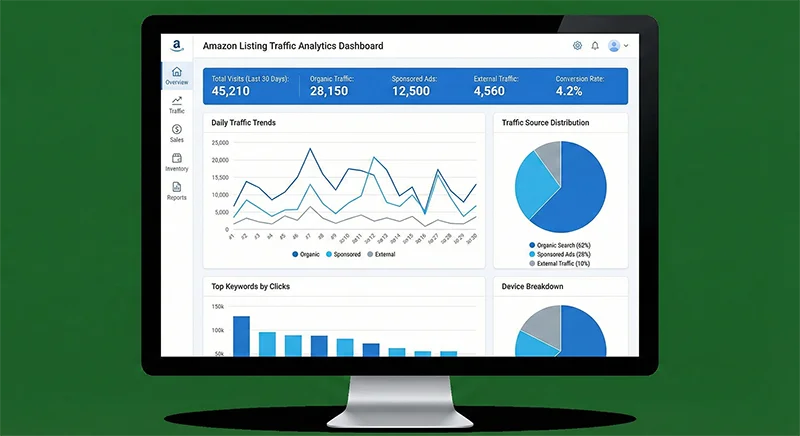
A good traffic analysis report should include: traffic source distribution pie charts, traffic trend line graphs, keyword ranking change tables, competitor comparison bar charts, etc. These visualization elements help you quickly understand data, making smarter decisions.
Real Case: How to Optimize Traffic Structure Through Data Analysis
Let’s return to the seller’s case from the article’s opening, examining how systematic Amazon traffic source tracking resolves their confusion.
This seller markets a silicone baking mat in the kitchen category, with daily order volume originally stable at 15-20 units, but suddenly increasing to 35-40 units over the past two days. They only run one automatic advertising campaign with a $30 daily budget—checking advertising reports revealed these two days’ ad orders showed no significant growth, maintaining around 5-6 daily orders.
Through Pangolinfo’s data collection tools, we helped establish a simple monitoring system tracking their listing’s ranking changes for 10 core keywords. Data showed that for the high-traffic keyword “silicone baking mat,” their organic ranking jumped from position 23 to position 8 three days ago, precisely corresponding to the sales growth timeline.
Further analysis revealed the ranking improvement stemmed from a small external promotional campaign the previous week, distributing discount codes through Facebook groups, generating approximately 50 orders. These orders concentrated in a short timeframe, improving the listing’s conversion rate and sales velocity, triggering Amazon’s algorithm and driving organic ranking ascent.
Simultaneously, we discovered a major competitor ranked 5th experienced stockouts during this period, with its traffic naturally redistributing to other top-ranked products—another important traffic growth factor.
With this data support, the seller made two key decisions: first, capitalizing on the ranking momentum, moderately increase advertising budget to consolidate ranking position; second, accelerate restocking to ensure not losing this traffic dividend period due to inventory shortages. Results showed that over the following week, their daily average sales stabilized above 30 units, a 50% improvement over before.
This case demonstrates that when you can clearly conduct Amazon listing traffic analysis, you can seize fleeting opportunities, converting accidental traffic growth into sustained performance improvement.
Conclusion: Data-Driven Traffic Optimization Strategy
On Amazon’s highly data-driven platform, understanding and optimizing listing traffic sources is a required course for every professional seller. Whether you’re a startup small seller or managing hundreds of SKUs as a large seller, you need to establish systematic traffic monitoring and analysis capabilities.
Through this article’s analysis, we can draw several key conclusions: First, Amazon listing traffic sources are diversified, including organic search, paid advertising, ranking displays, related recommendations, and external traffic among multiple channels—understanding each channel’s characteristics and proportions forms the optimization foundation. Second, sudden traffic changes often have traceable patterns—by monitoring leading indicators like keyword rankings, competitor dynamics, and ranking positions, you can proactively discover opportunities or risks.
For sellers with substantial scale and data teams, third-party SaaS tool limitations become increasingly apparent, making API-based self-built data analysis systems better choices. Pangolinfo’s e-commerce data collection solutions can help you obtain comprehensive, accurate, real-time Amazon data, providing solid data foundations for deep Amazon traffic source attribution system construction.
Finally, emphasize that data collection and analysis are merely means—the real value lies in making correct decisions based on data. When you can clearly see traffic origins and flows, you can more precisely optimize listings, adjust advertising strategies, and seize market opportunities, ultimately achieving sustained sales growth.
Want to deeply understand Amazon data collection and traffic analysis solutions? Visit Pangolinfo Scrape API now, or use the AMZ Data Tracker visualization tool to begin your data-driven Amazon operations journey.