


1. Your Amazon Data: How Old Is It Actually?
Last night at 10 PM, one of your core competitors quietly dropped their price from $29.99 to $23.99 and activated a 15% coupon. That’s not a minor tactical adjustment — in the mid-price segment, a $6 price cut alone can push conversion rates up 30–40%, and the coupon badge compounds that effect by grabbing attention in search results. By this morning, their BSR had already climbed two positions. You, meanwhile, opened Jungle Scout a few minutes ago and you’re still looking at data synchronized three days ago. You don’t even know the attack has begun.
This isn’t an edge case. It’s the daily reality for the vast majority of Amazon sellers using subscription-based product research tools. Data lag doesn’t create major problems during your early learning phase, when you’re mostly trying to understand how BSR works or how to read a keyword opportunity score. But the moment you move into precision operations — when your category is competitive, when you need to respond to competitor pricing in near-real-time, when you want to pipe data directly into an AI Agent for automated analysis — that 24–72 hour lag transforms from a “minor inconvenience” into a structural competitive disadvantage that’s actively costing you money.
This article is a serious exploration of the Amazon product research tool alternative question — not the surface-level “find a cheaper subscription” variety, but a root-cause analysis of where subscription tools hit their ceiling, what a real-time API approach can and cannot do, and a clear framework for deciding which path makes sense at which stage of your Amazon journey.
If you’re currently using Jungle Scout, Helium 10, SellerSprite, Sorftime, or Keepa, read this carefully. The conclusions might change how you think about your entire data stack.
2. Five Tools, Five Structural Ceilings
Before making the case for any Amazon product research tool alternative, it’s worth being precise about what each of the major subscription tools does well — and where each one hits a ceiling that no amount of plan upgrades can fix.
2.1 Jungle Scout: The Onboarding Champion With a Precision Problem
Jungle Scout built its brand on one key promise: making Amazon market research accessible to complete beginners. The product database, the opportunity score, the browser extension — every design decision was made to lower the cognitive barrier to entry. And it worked. For first-time FBA sellers trying to understand whether a category is too saturated or too thin, Jungle Scout remains a genuinely useful starting point.
The limitation emerges as sellers mature. Jungle Scout’s data is pre-collected, processed, and plated by Jungle Scout’s own servers. Their crawling cycles for product data typically run 3–7 days for most ASINs, with popular categories updating every 24–48 hours at best. A competitor who repriced at 11:30 PM doesn’t show up in your Jungle Scout view until sometime tomorrow — or the day after. And the data dimensions you can work with are fixed: the fields Jungle Scout decided to surface are the only fields you’ll ever see. You cannot cross-tabulate coupon frequency against listing quality scores, or track SP ad placement distribution across zip codes. The ceiling is structural, not configurable.
Pricing runs from $49/month (Starter) to $129/month (Professional). For a seller doing $30k+ monthly revenue, the ROI case for Jungle Scout at the higher tiers becomes increasingly difficult to defend, especially given what’s now achievable with direct API access.
2.2 Helium 10: Maximum Features, Minimum Utilization
Helium 10 made a different bet: consolidate every Amazon seller tool into one subscription. Black Box, Cerebro, Magnet, Frankenstein, Scribbles, Xray — the tool roster reads like a feature arms race. The pitch is compelling: why juggle five different subscriptions when one platform does everything?
The practical reality is messier. The average Helium 10 subscriber actively uses fewer than 20% of the available tools. The Listing optimization modules are largely redundant for experienced sellers who’ve developed their own workflows or switched to AI writing tools. The keyword data has genuine value, but it’s still tied to Helium 10’s 30-day update cycles for search volume — you’re working with last month’s traffic picture to make this week’s decisions.
The data freshness problem is identical to Jungle Scout’s at the infrastructure level: Helium 10 is a data intermediary, not a real-time pipe. Their Diamond tier at $279/month offers limited API access, but the data you receive through that API is still Helium 10’s preprocessed output — not the raw Amazon page data you’d get from a direct real-time scrape.
Annual cost at the Platinum tier: $1,188. At Diamond: $3,348. If AI workflow integration is anywhere on your roadmap, neither tier gets you there.
2.3 SellerSprite & Sorftime: Strong Localization, Limited Dimensions
For Chinese-speaking Amazon sellers, SellerSprite (卖家精灵) and Sorftime occupy a specific niche: familiar language, fast customer support, interface designs that match how the Chinese seller community thinks about data. These are real advantages, not trivial ones — onboarding friction matters enormously for data tool adoption.
The data dimension limitations, however, are more acute than with their Western counterparts. Both tools center on monthly sales estimates, keyword traffic overviews, and BSR trend tracking. Advanced fields — SP ad position distribution, zip-code-specific pricing variance, Customer Says sentiment clustering, review trend acceleration — are either absent or severely truncated. More critically, neither tool provides a credible path to AI Agent integration or automated data pipeline construction. The export format is always CSV, the destination is always a human, and the loop is always closed inside the platform’s interface.
2.4 Keepa: Unmatched Price History, Unresolvable Scope Ceiling
Among the tools reviewed here, Keepa earns the most uncomplicated praise for a narrow but genuine use case: historical price and BSR tracking. The data is dense, the visualizations are clean, the coverage spans years. For understanding how a competitor has historically responded to Q4 pressure, or identifying whether a product’s current BSR is a seasonal anomaly or a structural trend, Keepa’s historical depth is genuinely hard to replicate.
But Keepa’s tight focus is also its ceiling. No keyword data, no bulk ASIN comparison interface, no API access for standard subscribers, no pathway to AI integration. As a single-purpose complement tool, it justifies its €19/month cost. As a component of a complete data infrastructure, it addresses one data dimension out of the dozen you need. The multi-tool pile-up problem — paying four different subscriptions to cover what a single API call can return — becomes an expensive, fragmented maintenance burden.
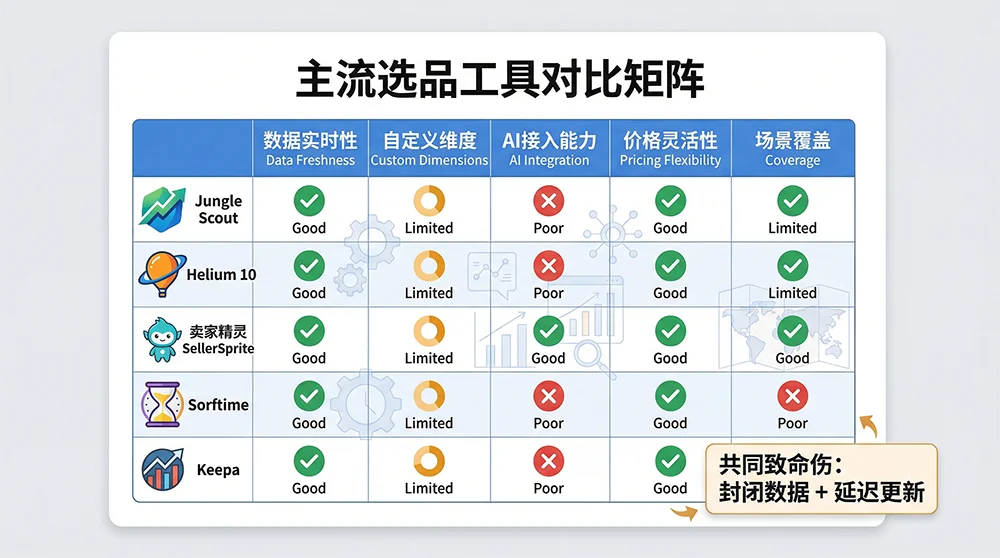
2.5 The Three Structural Failures Every Subscription Tool Shares
Strip away the interface differences and pricing tiers, and every subscription-based Amazon product research tool shares three fundamental limitations that no plan upgrade can solve:
Closed data dimensions. The fields you can analyze are defined by the tool, not by your business question. When your analysis requires cross-tabulating coupon activation frequency against review velocity and SP placement share — a perfectly reasonable question for a precision operator — the tool simply doesn’t have the pipes to answer it.
Chronically stale data. Even at peak update frequency, the best-case data age for a product record in any subscription tool is 24 hours. Amazon’s marketplace moves in minutes. Price changes, coupon events, inventory fluctuations, ad spend escalations — these happen while you’re asleep, and you find out about them the next morning at the earliest. In categories with active, sophisticated competitors, that update gap is where margin gets extracted.
No pathway to AI automation. This is the failure that will define which sellers adapt and which get left behind in 2026. AI Agents need programmatic data interfaces, not human-facing dashboards. You cannot instruct an AI Agent to “log into Helium 10 and pull me the last 48 hours of BSR movement for these fifteen ASINs.” There is no API, no webhook, no standard protocol that bridges subscription tool data into an automated AI workflow. The data is locked inside the platform’s wall, and the wall is the point — it’s what keeps subscribers dependent on the renewal cycle.
These are not product shortcomings that the next major update will fix. They are the inevitable consequences of the subscription SaaS business model, which needs you locked inside the platform to generate recurring revenue. Understanding this commercial logic is the first step toward understanding why any meaningful Amazon product research tool alternative must be API-first.
3. You’re a Data Consumer, Not a Data Owner
The fundamental problem with subscription tools isn’t that any particular tool is built badly. It’s that the commercial structure of the subscription model creates an inherent misalignment between what you need from your data and what the tool is designed to give you.
Here’s the information chain: Amazon’s marketplace generates enormous quantities of real-time public data — product detail pages, BSR rankings, keyword search result pages, review listings. Tools like Jungle Scout and Helium 10 crawl this data, store it in their proprietary databases, run their estimation models against it (monthly sales estimates, opportunity scores, etc.), and then surface the outputs through their dashboards. By the time the data reaches you, it has passed through five or six processing steps, each introducing delay and each stripping away raw-data granularity in favor of simplified metrics.
This architecture makes you a data consumer, not a data owner. You see what the tool decides to show you. You analyze on the timeline the tool decides to refresh. You work within the dimensions the tool decides to expose. Your competitive advantage — the analytical edge that should come from your unique business judgment applied to accurate, current data — is being filtered through a layer designed to serve the median user’s needs, not your specific operational requirements.
The subscription model’s commercial logic reinforces this dependency loop deliberately. If you could access the underlying data directly, you’d have no reason to maintain the subscription. The proprietary data moat is the product. The dashboard is just the interface. Every “upgrade to unlock more data” upsell you’ve ever seen exists because the tool company needs you to remain a data consumer, paying for access to someone else’s data pipeline, rather than owning your own.
What’s breaking this model open — faster than the tool companies anticipated — is the widespread adoption of AI Agents among Amazon sellers. When an AI Agent can take a natural language instruction and independently execute a complete product research workflow, the value proposition of a subscription tool’s “easy interface” disappears. AI Agents don’t need easy interfaces; they need data feeds. And subscription tools, by architectural design, cannot provide the kind of real-time, machine-readable data feeds that AI Agents require.
This is the core reason why “Amazon product research tool alternative” searches have surged over the past 18 months. Sellers aren’t just looking for a cheaper version of what they have. They’re recognizing that the entire paradigm — pay a monthly fee, consume curated data through a graphical interface, manually interpret and act — is no longer the ceiling-free operating model it once appeared to be.
4. The API Approach — And Why the Technical Barrier Has Collapsed
The predictable response when API-based solutions come up is: “That’s for developers. I don’t code.” Until very recently, this was a completely valid objection. Calling an API meant understanding HTTP request structures, JSON parsing, authentication headers, error handling, retry logic — legitimate technical prerequisites that created a real barrier for non-technical operators.
Two parallel developments have removed this barrier almost entirely.
4.1 AI Agents Turned API Calls into Conversational Commands
On platforms like OpenClaw, Dify, or Coze, you don’t call an API by writing code anymore. You configure a data source once as a “tool” (a process that typically takes 10–15 minutes following documented steps), and then you interact with it through natural language. “Pull me the current BSR, price, and coupon status for these eight ASINs and compare them to three days ago” becomes a sentence you say to your Agent, not a script you write and debug. The Agent translates your intent into API calls, processes the structured response, and delivers the analysis in plain language.
The practical implication: if you can articulate what data question you’re trying to answer, you can use a real-time data API — without writing a single line of code.
4.2 Skill Marketplaces: Install and Speak
Platforms like OpenClaw have taken this a step further with Skill marketplaces — pre-packaged API configurations that developers build and publish, which non-technical users can install in a few clicks. Pangolinfo Amazon Scraper Skill is one such Skill: all the API configuration, authentication, parameter definitions, and endpoint routing have already been done. You find it in the OpenClaw Skill library, install it, enter your Pangolinfo API key to authorize, and you’re done. From that point forward, “check the current rankings for keyword ‘cat carrier’ on amazon.com” is a complete instruction that returns structured real-time data.
4.3 Pangolinfo Scrape API: What Makes It the Right Amazon Product Research Tool Alternative
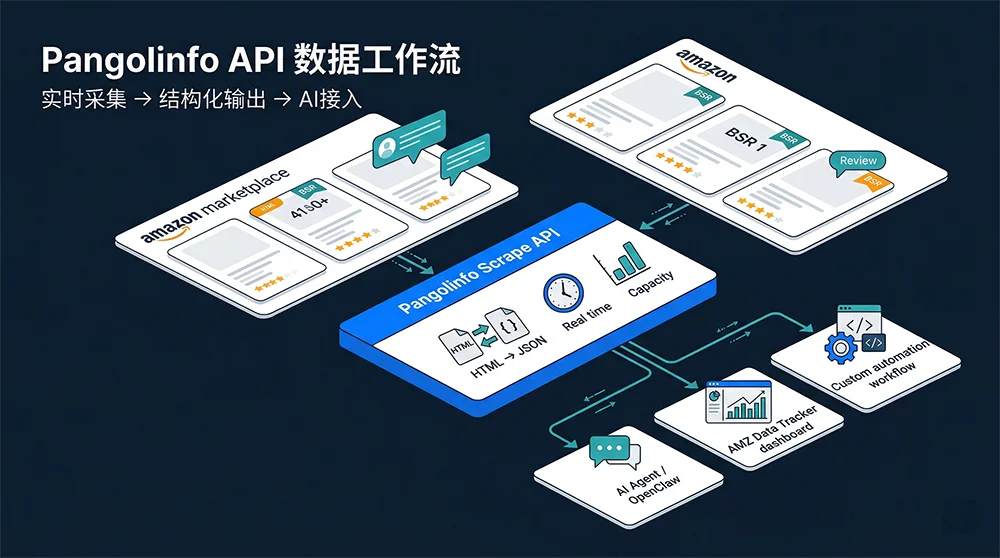
Among real-time data API options for Amazon, Pangolinfo Scrape API sits in a specific category: purpose-built Amazon parsing, not general-purpose web scraping that happens to support Amazon. The practical distinction matters significantly.
General-purpose scraping APIs (Bright Data, Apify, Zyte) require you to handle page parsing yourself — you get the raw HTML, and you’re responsible for extracting the right fields from an Amazon product page that changes its structure regularly. Purpose-built Amazon APIs like Pangolinfo have pre-built, maintained parsing templates for every major Amazon page type: product detail pages, keyword search results, BSR/New Releases rankings, SP advertising position distributions, review listings, and location-specific data via zip code targeting. The API returns clean structured JSON — no parsing work on your end.
Key performance characteristics that matter for operational use:
Real-time freshness. Every API call triggers a live page request. The price, BSR value, and review count you receive reflect Amazon’s state at the moment of your request, not data cached in a database 36 hours ago. For competitive monitoring applications, this freshness difference is decisive.
SP advertising coverage. Pangolinfo’s ad position capture rate for Sponsored Product placements runs at 98% — the highest in the industry. For sellers running competition intelligence against advertising placements, this accuracy level is not available through any subscription tool.
Full geographic targeting. Zip code-level pricing and availability data lets you understand how competitor inventory and pricing vary by region — a dimension that subscription tools don’t surface at all.
Usage-based pricing. Pay for what you actually use. A seller monitoring 30 ASINs daily at 4-hour intervals generates roughly 5,400 API calls per month — a cost that typically runs 60–80% lower than an equivalent subscription tool stack covering the same data dimensions.
4.4 AMZ Data Tracker: The No-Code Bridge
For sellers who want real-time data without touching any API configuration directly, AMZ Data Tracker provides a visual interface where you configure monitoring rules, define alert thresholds, and connect your output destinations — all without code. ASIN watchlists, price change alerts, BSR movement notifications, competitor coupon activation detection — all configured through a point-and-click interface that writes data directly to Feishu/Lark tables, Airtable, or webhook endpoints of your choice.
AMZ Data Tracker sits between “subscription tool” and “raw API” in terms of technical requirement. You need to invest about 30–60 minutes in initial setup, but once configured, the monitoring runs continuously without further manual intervention. The data it surfaces is real-time; the interface used to configure it is not technical.
5. Three Real Workflows, Two Approaches, Clear Results
Theory lands differently once you walk through specific operational scenarios side by side. Here are three workflows that happen constantly in Amazon operations — shown first through the subscription tool execution path, then through the API/Agent path.
Scenario A: Competitor Price Movement Monitoring
The subscription tool path: Open Helium 10 or Keepa, navigate to the ASIN detail view, check the price history chart. If the competitor repriced in the last 24 hours, you might see it — or you might be looking at a record that hasn’t refreshed. Cross-reference with Jungle Scout if you want a second opinion. No alerts exist unless you’ve configured Helium 10’s alert email feature, which notifies on a delay and doesn’t include competing data like concurrent coupon status or BSR delta.
The API path: Configure AMZ Data Tracker with a rule: monitor these five ASINs every two hours, alert via Feishu card if price changes by more than 5% or if a coupon activates. The alert card includes the new price, the old price, the price change percentage, the concurrent BSR movement, and the coupon value. Setup takes 20 minutes. After that, it runs without any manual involvement. The competitor’s 10 PM price drop generates a Feishu notification by 10:15 PM — you see it the next morning with full context, not as a blank discovery when you happen to check a dashboard.
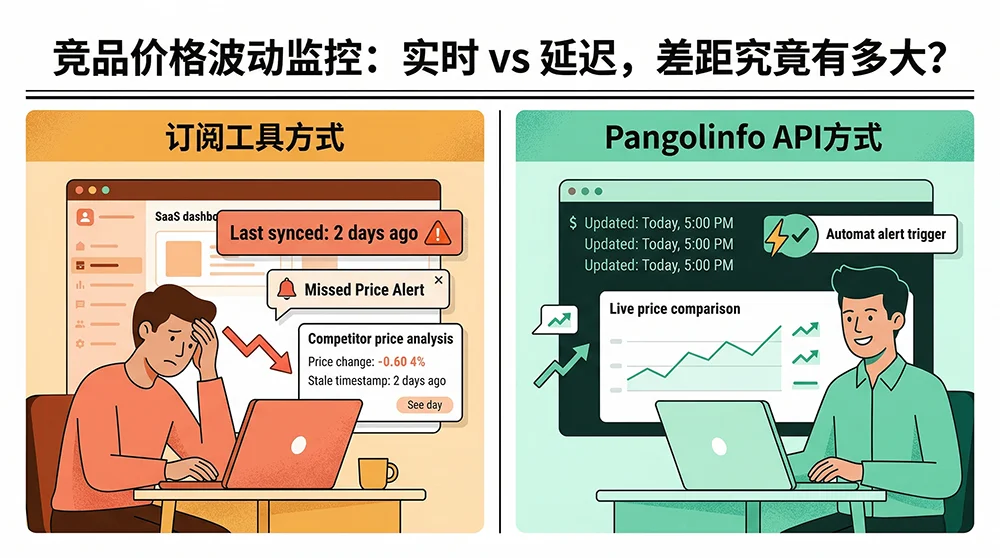
The gap: Timeliness (minutes vs. 24–48 hours) plus response mode (proactive push alert vs. passive dashboard check). In active, competitive categories, that gap determines whether you’re the first mover or the last to know.
Scenario B: New Product Launch Data Tracking
The first 30 days after a new ASIN launches are the most information-dense window in a product’s lifecycle. Which keywords are driving organic traffic? Which competitors are losing position as your BSR rises? Is your BSR trajectory following a healthy velocity curve? Is there any geographic variation in your conversion rate that should inform your listing optimization?
The subscription tool path: BSR data is available but at 24-hour minimum refresh. Keyword ranking data updates in 3–7 day cycles, making it nearly useless for real-time launch tuning decisions. Geographic data, ad placement frequency, zip-code-level conversion variation — these dimensions simply don’t exist in any subscription tool’s data model.
The API path: From launch day, configure daily API data pulls: the ASIN’s real-time BSR, keyword rank position for your top 5 target keywords, SP ad placement frequency and position distribution, and zip-code-specific pricing for your two core target markets. Everything writes automatically to a Feishu multi-dimensional table with daily timestamp rows. By day 7, you’re looking at a populated table that shows keyword “cat carrier” moving from rank 38 to rank 21 on day 3 (correlated with a 12% ACOS drop that day), LA inventory entering the warning zone (18 days remaining at current velocity), and NYC consistently converting 1.4× higher than LA — suggesting the product positioning resonates more strongly with East Coast buyer intent. None of this is available through subscription tools.
The gap: At equivalent manual effort investment, the API approach delivers 3–5× the information density for operational decisions. And it does so at daily resolution instead of weekly snapshots.
Scenario C: Building an AI Product Selection Workflow
This is the scenario drawing the sharpest differentiation in 2025–2026, and it’s the one where subscription tools simply cannot participate.
The subscription tool path: There is no viable path. No major subscription tool provides an API interface that an AI Agent can call programmatically to retrieve live data. The workaround — manually export CSV from the tool, upload the file to your AI, ask the AI to analyze the uploaded file — technically works but eliminates everything that makes AI Agent automation valuable. You’ve just replaced “human spends 3 hours in a spreadsheet” with “human spends 30 minutes exporting to feed an AI.” The manual extraction step is still required; you’ve shortened it without removing it.
The API path: In OpenClaw with Pangolinfo Amazon Scraper Skill installed, you give this instruction:
“Analyze the market opportunity for the keyword ‘portable blender’ on amazon.com. Retrieve the current Top 20 ASINs, their price range, rating distribution, BSR rankings, and review counts. Estimate total market volume. Identify ASINs rated below 4.0 and extract their top negative review themes. Deliver a structured go/no-go recommendation with supporting rationale.”
The Agent decomposes this into subtasks: keyword search → ASIN list → batch product detail calls → low-rated ASIN review pulls → analysis synthesis → recommendation output. The entire process takes 3–5 minutes, fully automated. You didn’t touch a dashboard. You didn’t export a spreadsheet. You received a decision-quality output directly from a single conversational instruction.
The product research that used to take a skilled operator 3–4 focused hours now takes 5 minutes of Agent runtime plus the time you spend reading the output and deciding whether to follow its recommendation. The analyst time freed up doesn’t disappear — it shifts to higher-order judgment work that AI still can’t replace: evaluating the recommendation, stress-testing the assumptions, deciding what the go/no-go threshold should be for your specific situation.
The gap: Not a speed difference. A capability existence boundary. AI product selection workflows are simply not buildable on subscription tools — they require real-time, programmatically accessible data, and that’s precisely what subscription tools are designed not to provide.
6. Who Should Actually Switch — And Who Shouldn’t Yet
An honest evaluation of any Amazon product research tool alternative requires saying clearly who it’s right for, not just why it’s better in the abstract. Here’s the unvarnished version.
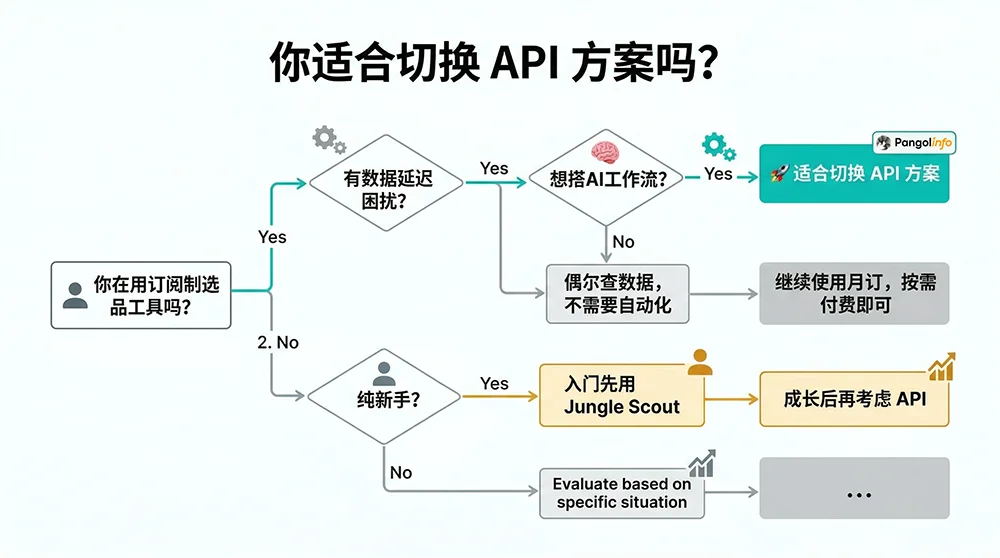
6.1 The Profile of a Seller Ready to Switch
Operational experience of 12+ months. You understand what the data means without needing a tool to interpret it for you. BSR movements, keyword traffic volume changes, review velocity curves — you can read these signals and translate them into decisions without guided dashboards. API data is raw data; interpretation is your job (or your AI Agent’s job).
A concrete data freshness pain point. Your category is actively competitive, with multiple sellers who adjust pricing and promotional mechanics regularly. You’ve experienced situations where you made a decision on stale data and it cost you. The lag isn’t theoretical; it’s something you’ve felt in your operating results.
AI integration on your roadmap. You’re either already using an AI Agent for some aspect of your operations, or you’ve decided you want to build that capability in the next quarter. Getting AI Agent access to real-time Amazon data is either an immediate requirement or a near-term one.
Technical floor (low but necessary). You don’t need to be a developer. But you need to be comfortable following documented configuration steps, troubleshooting a Feishu webhook setup if something doesn’t connect correctly, and reading a JSON response to confirm you’re getting the data fields you expected. The no-code paths (AMZ Data Tracker and Scraper Skill) are genuinely low-threshold, but they still require methodical setup attention.
Monthly revenue above $30K. This isn’t a hard gate — it’s a threshold below which the operational overhead of switching (time investment, learning curve) may not return clearly against the data freshness gains. Above this level, the ROI math typically becomes clear within 60–90 days of consistent API use.
6.2 Who Shouldn’t Switch Yet
Complete Amazon beginners. If you’re still learning how to read a BSR, what a keyword search volume number actually means for your listing performance, or how to price competitively in your category — the structured, interpreted outputs of Jungle Scout or SellerSprite are more educationally valuable than raw API data right now. Build the mental model first. The API will still be here in 6–12 months when you’re ready for it.
Low-frequency research needs. If you’re doing 2–3 product research cycles per year and not running continuous competitive monitoring in between, the total cost of subscription tool access (possibly purchased monthly and cancelled between research cycles) is likely lower than the setup and learning investment of a full API transition. The API’s cost advantage is most apparent in continuous, high-frequency use.
Teams with no technical capacity and no AI integration plans. If your team has zero technical support and no interest in building automated workflows or AI Agent capabilities, the API approach doesn’t offer you a dramatically better experience — it’s a data infrastructure, not a user interface. In that case, evaluate AMZ Data Tracker as a middle path: real-time data, visual configuration, no code required, but some operational discipline in initial setup.
6.3 The Hybrid Approach: Both Can Coexist
A common misconception: switching to an API approach means immediately cancelling all your subscriptions. Most sellers who’ve made the transition use a hybrid approach indefinitely. They keep Keepa at €19/month for price history depth that it genuinely does better than anything else. They keep a Jungle Scout Starter subscription at $49/month for occasional new-category overviews where the visual interface is convenient. They route everything that requires real-time freshness, automation, or AI integration through the Pangolinfo API.
This hybrid strategy’s annual cost is typically $800–$1,200 compared to the $2,500–$3,500 that a full multi-tool subscription stack runs, and it delivers better outcomes in the scenarios where data freshness and automation actually matter. The net result: lower cost, higher capability in the dimensions that drive competitive advantage.
7. Getting Started: Three Paths to Your First Real-Time Amazon Data Flow
Path 1: No-Code Setup via AMZ Data Tracker
Step 1: Create an account at the Pangolinfo console. A free trial tier is available without credit card commitment.
Step 2: In AMZ Data Tracker, create your first monitoring job. Add 5–10 competitor ASINs you care about most, select your tracking dimensions (price + BSR + coupon status is the recommended starting set), and set your collection frequency (every 4 hours for active monitoring, daily for baseline tracking).
Step 3: Configure your output and alerts. Connect to a Feishu table, Airtable, or email delivery. Set an alert rule — for example, “send a push notification when price changes by more than 5% or coupon status changes.”
Total initial configuration time: 30–60 minutes. After that, the system runs continuously without additional input.
Path 2: Scraper Skill + AI Agent (Recommended for AI Workflow Builders)
Step 1: Get your Pangolinfo API key from the console.
Step 2: In your Agent platform’s Skill marketplace, find and install “Pangolinfo Amazon Scraper Skill.” Enter your API key to authorize.
Step 3: Begin using natural language data queries in your Agent. Example instruction templates:
Research request: Pull current data for keyword "stainless steel water bottle"
on amazon.com — Top 15 ASINs, price range, average rating, BSR, review count.
Identify any ASINs with ratings below 3.8 and summarize their top complaint themes.

Monitoring request: Check these ASINs [list] for any price changes in the last
24 hours. Flag any coupon activations. Compare to last week's BSR rankings.

Competitive analysis: Evaluate market entry attractiveness for "travel coffee mug."
Include pricing landscape, review wall depth, BSR concentration, and a brief
go/no-go recommendation.
Path 3: Direct API Integration (For Technical Teams)
Direct API access via Pangolinfo Scrape API offers maximum flexibility for teams with development capability. The API documentation covers complete endpoint definitions. Here’s a production-ready Python implementation for batch competitor monitoring:
import requests
import json
import asyncio
from datetime import datetime
from typing import Optional

API_KEY = "your_pangolinfo_api_key"
BASE_URL = "https://api.pangolinfo.com/v2"

def get_product_data(asin: str, marketplace: str = "amazon.com",
                     zip_code: str = "90001") -> dict:
    """
    Fetch real-time Amazon product data via Pangolinfo Scrape API.
    Returns clean structured data: BSR, price, rating, review count, coupon status.
    """
    endpoint = f"{BASE_URL}/amazon/product"
    headers = {
        "Authorization": f"Bearer {API_KEY}",
        "Content-Type": "application/json"
    }
    payload = {
        "asin": asin,
        "marketplace": marketplace,
        "zip_code": zip_code,
        "fields": ["bsr_rank", "current_price", "rating", "review_count",
                   "coupon_status", "category_path", "feature_bullets", "timestamp"]
    }

    response = requests.post(endpoint, json=payload, headers=headers, timeout=30)
    response.raise_for_status()
    return response.json()


def detect_price_movements(current_data: dict, previous_data: dict,
                             threshold_pct: float = 5.0) -> list:
    """
    Compare current vs previous price data, flag significant changes.
    Returns list of alert events for downstream notification.
    """
    alerts = []
    for asin, current in current_data.items():
        if asin not in previous_data:
            continue
        prev = previous_data[asin]

        # Price change detection
        current_price = current.get("current_price", 0)
        prev_price = prev.get("current_price", 0)

        if prev_price > 0:
            change_pct = ((current_price - prev_price) / prev_price) * 100
            if abs(change_pct) >= threshold_pct:
                alerts.append({
                    "asin": asin,
                    "event_type": "price_change",
                    "previous_price": prev_price,
                    "current_price": current_price,
                    "change_pct": round(change_pct, 2),
                    "current_bsr": current.get("bsr_rank"),
                    "coupon_active": current.get("coupon_status", {}).get("is_active", False),
                    "detected_at": datetime.utcnow().isoformat()
                })

        # Coupon activation detection
        coupon_now = current.get("coupon_status", {}).get("is_active", False)
        coupon_before = prev.get("coupon_status", {}).get("is_active", False)
        if coupon_now and not coupon_before:
            alerts.append({
                "asin": asin,
                "event_type": "coupon_activated",
                "coupon_value": current.get("coupon_status", {}).get("value"),
                "current_bsr": current.get("bsr_rank"),
                "detected_at": datetime.utcnow().isoformat()
            })

    return alerts


def monitor_competitor_batch(asin_list: list) -> dict:
    """
    Batch fetch current product data for all monitored ASINs.
    """
    results = {}
    for asin in asin_list:
        try:
            data = get_product_data(asin)
            results[asin] = data
        except requests.exceptions.RequestException as e:
            results[asin] = {"error": str(e), "asin": asin}
    return results


# Example usage
if __name__ == "__main__":
    competitor_asins = ["B0XXXX001", "B0XXXX002", "B0XXXX003"]

    print(f"[{datetime.now().strftime('%H:%M:%S')}] Running competitor monitoring batch...")
    current_snapshot = monitor_competitor_batch(competitor_asins)

    # In production: load previous_snapshot from database, compare, push alerts
    print(json.dumps(current_snapshot, indent=2, ensure_ascii=False))
In production, wrap this in a scheduling framework (cron, Airflow, or cloud-native scheduler), connect a database layer for historical storage, and add a notification integration (Feishu, Slack, or email) to push alerts from the detect_price_movements function. A functional MVP of this complete monitoring system typically takes one developer 1–2 days to build.
8. Common Questions Answered Directly
Q: Does using a scraping API violate Amazon’s Terms of Service?
Pangolinfo collects publicly accessible Amazon data using standard HTTP request methods — the same approach a browser uses when any user visits a public Amazon listing. This is public web data collection, not access to protected seller account data or private API endpoints. Public web scraping’s legal standing has been substantially clarified through U.S. court decisions including hiQ Labs v. LinkedIn (9th Circuit). Pangolinfo’s compliance framework is structured accordingly. Your seller account is not affected.
Q: How does API data accuracy compare to subscription tool data?
Real-time API data is typically more accurate for time-sensitive fields (current price, current BSR, current review count) because it reflects Amazon’s actual state at the moment of the request, with no intermediate processing steps. Subscription tools’ monthly sales estimates involve estimation modeling, which introduces variance. For fields like historical sales volume estimates, neither source is perfectly accurate — but for the operational data most relevant to day-to-day decisions, real-time API data is the more reliable source.
Q: What’s the realistic setup time for a non-technical seller?
AMZ Data Tracker’s no-code monitoring setup: 30–60 minutes for initial configuration, zero ongoing maintenance. Scraper Skill installation in OpenClaw: 10–15 minutes, then immediate conversational use. Direct API integration with Python: 1–2 days for a functional MVP, longer for a production-grade implementation. The right path depends on your technical resources and the level of customization you need.
Q: Can I run both subscription tools and an API solution simultaneously?
Yes, and this is what most sellers do during their transition phase. A common hybrid: keep Keepa for price history depth, keep one low-tier subscription tool for occasional new-category overviews, and route all continuous monitoring and AI workflow data through Pangolinfo. Total combined cost of this hybrid is typically 50–60% lower than the pre-transition multi-tool subscription stack.
Q: Is there a free trial option?
Yes. Register at the Pangolinfo console to access a free trial tier — no credit card required. The free tier is sufficient to complete the AMZ Data Tracker setup, install and test the Scraper Skill, and validate several real data pulls before deciding on a paid plan.
9. The Data Ownership Transition Has Already Begun
Subscription-based Amazon product research tools earned their place in the ecosystem by solving real problems that existed 5–8 years ago: Amazon data was inaccessible to non-technical sellers, and tools like Jungle Scout and Helium 10 democratized market intelligence in a meaningful way. That historical contribution is real.
But the competitive environment of 2026 is different in two important ways. First, the data latency tolerance that seemed acceptable when your competitors were manually researching products at 24–48 hour cadence is now a structural liability when those same competitors have configured AI Agents to monitor your pricing and BSR every four hours. Second, the technical barrier that made “build your own data pipeline” impractical for non-developer operators two years ago has been substantially removed by AI Agent platforms and Skill marketplaces.
The Amazon product research tool alternative question isn’t really about tool substitution. It’s about whether you intend to remain a data consumer — paying for access to someone else’s curated, delayed, bounded data — or whether you want to become a data owner: operating with real-time information across the dimensions your business actually needs, with the freedom to route that data anywhere your workflow requires, including into AI Agents that multiply your analytical capacity without multiplying your headcount.
The transition doesn’t have to be immediate, and it doesn’t have to be complete. Start with one pain point — competitor price monitoring is usually the most immediate — and run it through an API-powered setup for 30 days. If the data freshness difference changes how you make pricing decisions, you’ll know what to do next. If it doesn’t move the needle, you haven’t lost much. But for most sellers at the precision operations stage, the 30-day test produces a clear answer.
🚀 Start building your real-time Amazon data workflow → Try Pangolinfo Scrape API Free | Explore AMZ Data Tracker | Access the Console

