What Amazon Advertising Monitoring Actually Means — and What It Doesn’t
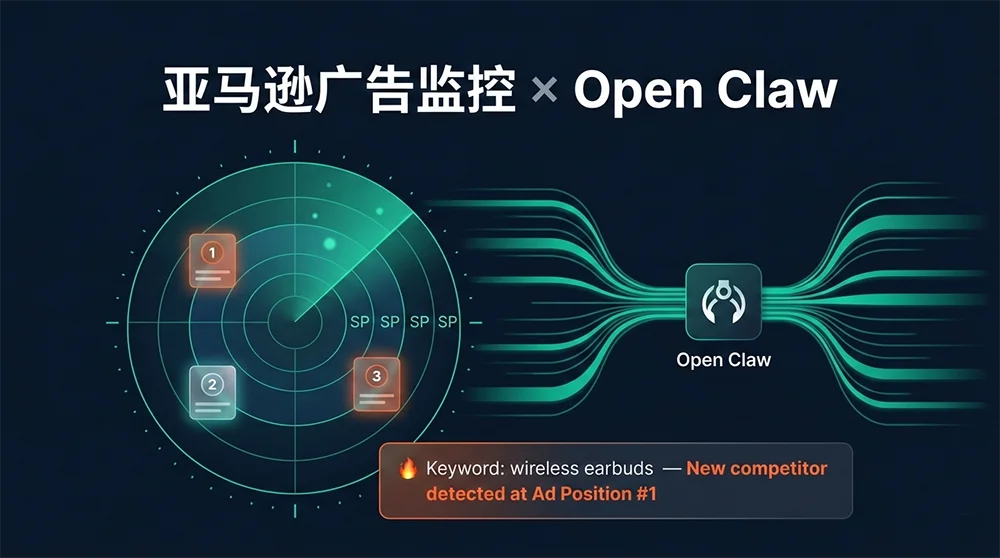
Amazon advertising monitoring, as this article uses the term, refers to competitive surveillance — tracking which ASINs are occupying sponsored positions for your target keywords, how that landscape shifts over time, and getting actionable signals when meaningful changes occur. It’s distinct from monitoring your own campaign metrics (ACoS, impressions, CTR), which lives in your advertising console. The blind spot that most PPC teams have is the competitive view: you know how your ads perform, but you don’t systematically know who is outbidding you, when new competitors entered your keyword landscape overnight, or when an established competitor quietly doubled their ad presence in your category.
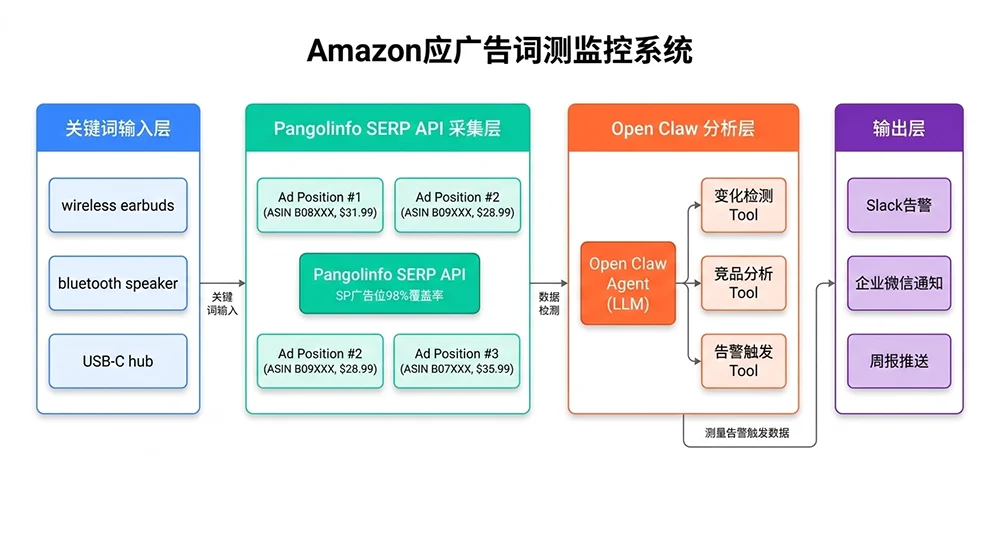
That competitive blind spot is exactly what this system addresses. Using Open Claw connected to Pangolinfo’s SERP API — which delivers 98% coverage of Amazon SP ad positions, the highest capture rate in the industry — you can build an automated pipeline that scans your keyword watchlist on a scheduled cadence, detects position changes, enriches alerts with LLM-generated context analysis, and delivers tiered notifications to your team’s existing communication channels.
This article assumes you’ve already deployed Open Claw and have a Pangolinfo API key available. If not, the earlier articles in this series cover those setup steps. Here we focus entirely on the Amazon advertising monitoring implementation itself.
Why Traditional Amazon Ad Monitoring Falls Short
Most seller teams approach Amazon advertising monitoring through one of three inadequate methods. The first is manual SERP screenshots — someone on the team periodically searches target keywords, screenshots the results, and compares to last week’s screenshot. This produces at best a weekly cadence with high labor cost, and it completely misses intraday changes during high-velocity competitive events like Prime Day ramp-ups. The second method is relying on SaaS tools with built-in keyword tracking features — tools like Helium 10’s Market Tracker or Jungle Scout’s keyword tools. These provide better coverage but come with significant limitations: data freshness is typically 24-48 hours behind, and the competitive SERP view is often aggregated or averaged rather than showing discrete point-in-time snapshots. The third method is no monitoring at all, which is more common than the industry acknowledges — teams simply react to their own ACoS deteriorating, not realizing that a new well-funded competitor entered Top of Search three weeks ago.
The core architectural difference with a Pangolinfo-powered Amazon advertising monitoring system is real-time data capture at query time. When your monitoring agent runs a keyword scan, it’s receiving live SERP data — the actual ad positions as Amazon is currently showing them, not a 24-hour-old cache. For fast-moving categories where competitors adjust bids hourly during peak selling windows, this freshness difference is the gap between responding to a competitive threat and discovering it retroactively.
The Four Data Dimensions That Drive Amazon Ad Intelligence
Effective Amazon advertising monitoring doesn’t require capturing everything — it requires capturing the right things consistently. Four dimensions form the core of a practical monitoring system: first, the identity and ranking of ASINs occupying Top of Search sponsored positions (top 3 matter most for traffic share); second, the price points of those ASINs at the time of capture (a competitor simultaneously dropping price and increasing ad spend is a distinct competitive signal from just moving ad budget); third, the frequency of appearance — across multiple snapshots, which ASINs appear consistently versus intermittently (high consistency suggests committed budget allocation, while sporadic appearances suggest testing or budget rotation); and fourth, change velocity — how quickly is the competitive landscape shifting for a given keyword compared to its historical pattern.
Capturing Real-Time SP Ad Position Data with Pangolinfo SERP API
Pangolinfo’s SERP Data API returns structured auction data for Amazon search result pages, including sponsored product positions with ASIN identifiers, placement types (Top of Search, Rest of Search, Product Pages), pricing, brand, and rating data. The 98% SP ad position capture rate means your monitoring system won’t generate false “competitor disappeared” signals due to data gaps — an important distinction in high-stakes categories where a missing Top-of-Search ASIN might trigger unnecessary campaign responses.
The following implementation uses async Python for efficient batch keyword monitoring. Synchronous sequential requests across 50 keywords take 5-10 minutes per cycle; the async implementation completes the same batch in under 60 seconds:
# Amazon Advertising Monitoring — Data Capture Layer
# Pangolinfo SERP API integration with async batch processing

import asyncio
import aiohttp
import logging
from dataclasses import dataclass, field
from datetime import datetime, timezone
from typing import List, Optional, Dict

logger = logging.getLogger(__name__)

PANGOLINFO_API_KEY = "your_api_key_here"
SERP_ENDPOINT = "https://api.pangolinfo.com/v1/serp"


@dataclass
class SponsoredPosition:
    """A single sponsored product result from the SERP"""
    rank: int
    placement: str          # 'top_of_search' | 'rest_of_search' | 'product_pages'
    asin: str
    brand: str
    title: str
    price: Optional[float]
    rating: Optional[float]
    review_count: Optional[int]


@dataclass
class SerpSnapshot:
    """Complete SERP ad data snapshot for one keyword at one point in time"""
    keyword: str
    marketplace: str
    captured_at: str
    sponsored: List[SponsoredPosition] = field(default_factory=list)
    top_of_search: List[SponsoredPosition] = field(default_factory=list)
    total_sponsored_count: int = 0
    success: bool = True
    error: Optional[str] = None


async def capture_keyword_serp(
    session: aiohttp.ClientSession,
    keyword: str,
    marketplace: str,
    semaphore: asyncio.Semaphore,
) -> SerpSnapshot:
    """Fetch live Amazon SERP ad data for a single keyword"""
    captured_at = datetime.now(timezone.utc).isoformat()

    async with semaphore:
        headers = {
            "Authorization": f"Bearer {PANGOLINFO_API_KEY}",
            "Content-Type": "application/json"
        }
        payload = {
            "source": "amazon_search",
            "query": keyword,
            "marketplace": marketplace,
            "page": 1,
            "include_sponsored": True,
            "include_organic": False,
            "output_format": "json"
        }

        try:
            async with session.post(
                SERP_ENDPOINT,
                headers=headers,
                json=payload,
                timeout=aiohttp.ClientTimeout(total=30)
            ) as resp:
                resp.raise_for_status()
                data = await resp.json()

            all_sponsored = []
            for item in data.get("sponsored_results", []):
                all_sponsored.append(SponsoredPosition(
                    rank=item.get("ad_rank", 0),
                    placement=item.get("ad_placement", "unknown"),
                    asin=item.get("asin", ""),
                    brand=item.get("brand", ""),
                    title=item.get("title", ""),
                    price=item.get("price"),
                    rating=item.get("rating"),
                    review_count=item.get("review_count"),
                ))

            top_positions = sorted(
                [p for p in all_sponsored if "top" in p.placement.lower()],
                key=lambda x: x.rank
            )

            return SerpSnapshot(
                keyword=keyword,
                marketplace=marketplace,
                captured_at=captured_at,
                sponsored=all_sponsored,
                top_of_search=top_positions,
                total_sponsored_count=len(all_sponsored),
                success=True
            )

        except asyncio.TimeoutError:
            logger.warning(f"Timeout: keyword='{keyword}'")
            return SerpSnapshot(keyword=keyword, marketplace=marketplace,
                               captured_at=captured_at,
                               success=False, error="timeout")
        except Exception as e:
            logger.error(f"SERP capture error for '{keyword}': {e}")
            return SerpSnapshot(keyword=keyword, marketplace=marketplace,
                               captured_at=captured_at,
                               success=False, error=str(e))


async def run_keyword_batch(
    keywords: List[str],
    marketplace: str = "US",
    max_concurrent: int = 8
) -> List[SerpSnapshot]:
    """Batch capture SERP snapshots with controlled concurrency"""
    semaphore = asyncio.Semaphore(max_concurrent)
    async with aiohttp.ClientSession() as session:
        tasks = [
            capture_keyword_serp(session, kw, marketplace, semaphore)
            for kw in keywords
        ]
        snapshots = await asyncio.gather(*tasks)

    success_count = sum(1 for s in snapshots if s.success)
    logger.info(f"Batch complete: {success_count}/{len(keywords)} keywords captured")
    return snapshots
Alert Logic: Turning Raw SERP Data Into Actionable Signals
The gap between a useful Amazon advertising monitoring system and an overwhelming one comes down to alert design. Every keyword, every monitoring cycle, will show some variation — positions rotate, new ASINs test brief ad spend, competitors adjust bids throughout the day. A system that alerts on every change generates noise that teams learn to ignore within days. A system with well-calibrated thresholds surfaces the 5% of changes that actually warrant a strategic response.
The following change detector implements tiered severity logic based on both the nature of the change and the configured priority level of the keyword involved:
# Amazon Advertising Monitoring — Change Detection Engine

from dataclasses import dataclass
from enum import Enum
from typing import List, Set, Optional, Dict
from anthropic import Anthropic

class AlertLevel(Enum):
    CRITICAL = "CRITICAL"   # Core keyword + brand-new strong competitor at #1
    HIGH = "HIGH"           # New entrant in Top 3 or significant price drop
    MEDIUM = "MEDIUM"       # Existing competitor position shifts, Top 3 exit
    INFO = "INFO"           # Long-tail keyword changes, log only


@dataclass
class CompetitorAlert:
    keyword: str
    level: AlertLevel
    event_type: str
    summary: str
    affected_asin: str
    previous: Optional[str] = None
    current: Optional[str] = None
    timestamp: str = ""
    llm_context: Optional[str] = None  # Optional LLM-enriched analysis


class AdPositionChangeDetector:
    """
    Compares SERP snapshots to detect meaningful changes
    in Amazon sponsored ad positions
    """

    def __init__(self, config: Dict):
        self.config = config
        self.llm_client = Anthropic()
        self._priority_map = self._build_priority_map(
            config.get("keyword_tiers", {})
        )

    def _build_priority_map(self, tiers: Dict) -> Dict[str, str]:
        result = {}
        for tier, keywords in tiers.items():
            for kw in keywords:
                result[kw.lower()] = tier
        return result

    def _tier(self, keyword: str) -> str:
        return self._priority_map.get(keyword.lower(), "B")

    def _scale_level(self, base: AlertLevel, keyword: str) -> AlertLevel:
        """Adjust alert level up for Tier A keywords, down for Tier C"""
        tier = self._tier(keyword)
        if tier == "A":
            escalate = {AlertLevel.MEDIUM: AlertLevel.HIGH,
                        AlertLevel.HIGH: AlertLevel.CRITICAL}
            return escalate.get(base, base)
        if tier == "C":
            deescalate = {AlertLevel.HIGH: AlertLevel.MEDIUM,
                          AlertLevel.CRITICAL: AlertLevel.HIGH}
            return deescalate.get(base, AlertLevel.INFO)
        return base

    def detect_changes(
        self,
        current: SerpSnapshot,
        baseline: Optional[SerpSnapshot]
    ) -> List[CompetitorAlert]:
        """Generate alerts by comparing current SERP to historical baseline"""
        if baseline is None:
            return []  # First run — establish baseline, no alerts

        alerts = []
        kw = current.keyword

        curr_top3 = {p.asin for p in current.top_of_search[:3]}
        base_top3 = {p.asin for p in baseline.top_of_search[:3]}

        curr_top1 = current.top_of_search[0].asin if current.top_of_search else None
        base_top1 = baseline.top_of_search[0].asin if baseline.top_of_search else None

        # ── Event 1: Top of Search #1 position changed ──────────────
        if curr_top1 and curr_top1 != base_top1:
            is_new = curr_top1 not in base_top3
            base_level = AlertLevel.CRITICAL if is_new else AlertLevel.HIGH
            alerts.append(CompetitorAlert(
                keyword=kw,
                level=self._scale_level(base_level, kw),
                event_type="top1_changed",
                summary=(
                    f"Top of Search #1 changed: {base_top1} → {curr_top1}"
                    + (" [NEW ENTRANT]" if is_new else "")
                ),
                affected_asin=curr_top1,
                previous=base_top1,
                current=curr_top1,
                timestamp=current.captured_at
            ))

        # ── Event 2: New ASIN entered Top 3 ─────────────────────────
        new_entrants = curr_top3 - base_top3 - ({curr_top1} if curr_top1 else set())
        for asin in new_entrants:
            rank = next((p.rank for p in current.top_of_search
                         if p.asin == asin), -1)
            alerts.append(CompetitorAlert(
                keyword=kw,
                level=self._scale_level(AlertLevel.HIGH, kw),
                event_type="new_top3_entrant",
                summary=f"New competitor in Top 3 at position #{rank}: {asin}",
                affected_asin=asin,
                current=f"Position #{rank}",
                timestamp=current.captured_at
            ))

        # ── Event 3: Existing Top 3 ASIN exited ─────────────────────
        for asin in base_top3 - curr_top3:
            alerts.append(CompetitorAlert(
                keyword=kw,
                level=self._scale_level(AlertLevel.MEDIUM, kw),
                event_type="top3_exit",
                summary=f"Competitor {asin} dropped out of Top 3 — possible budget cut",
                affected_asin=asin,
                previous="Top 3",
                current="Not in Top 3",
                timestamp=current.captured_at
            ))

        # ── Event 4: Significant price drop ─────────────────────────
        price_threshold = self.config.get("price_drop_threshold_pct", 10) / 100
        base_prices = {p.asin: p.price for p in baseline.top_of_search if p.price}

        for pos in current.top_of_search[:3]:
            if pos.asin not in base_prices or not pos.price:
                continue
            old = base_prices[pos.asin]
            if old > 0 and (old - pos.price) / old >= price_threshold:
                drop_pct = (old - pos.price) / old * 100
                alerts.append(CompetitorAlert(
                    keyword=kw,
                    level=self._scale_level(AlertLevel.HIGH, kw),
                    event_type="price_drop",
                    summary=(
                        f"Price drop {drop_pct:.1f}% on {pos.asin} "
                        f"in Top 3: ${old:.2f} → ${pos.price:.2f}"
                    ),
                    affected_asin=pos.asin,
                    previous=f"${old:.2f}",
                    current=f"${pos.price:.2f}",
                    timestamp=current.captured_at
                ))

        # Enrich CRITICAL/HIGH alerts with LLM context
        for alert in alerts:
            if alert.level in (AlertLevel.CRITICAL, AlertLevel.HIGH):
                alert.llm_context = self._enrich_with_llm(alert, current)

        return alerts

    def _enrich_with_llm(
        self, alert: CompetitorAlert, snapshot: SerpSnapshot
    ) -> str:
        """Add LLM-generated business context to high-priority alerts"""
        top3_detail = "\n".join([
            f"  #{p.rank}: {p.asin} | {p.brand} | ${p.price or 'N/A'}"
            for p in snapshot.top_of_search[:3]
        ])

        response = self.llm_client.messages.create(
            model="claude-3-7-sonnet-20250219",
            max_tokens=200,
            messages=[{
                "role": "user",
                "content": (
                    f"Amazon ad monitoring alert for keyword: '{alert.keyword}'\n"
                    f"Event: {alert.summary}\n"
                    f"Current Top 3 ad positions:\n{top3_detail}\n\n"
                    "In 80 words or fewer, give a business analyst's reading "
                    "of what likely caused this change and what the seller team "
                    "should consider. Be direct and specific, skip preamble."
                )
            }]
        )
        return response.content[0].text
Slack Notification Format That Gets Read
Alert fatigue is real. The difference between a monitoring system your team actually uses and one that gets muted comes down to notification design. Here’s a Slack message template that surfaces the right density of information — enough to act on without requiring the recipient to click through to a dashboard first:
def format_slack_alert(alert: CompetitorAlert) -> dict:
    """Format a CompetitorAlert as a Slack Block Kit message"""
    emoji = {"CRITICAL": "🚨", "HIGH": "⚠️", "MEDIUM": "📊"}.get(
        alert.level.value, "ℹ️"
    )

    blocks = [
        {
            "type": "header",
            "text": {
                "type": "plain_text",
                "text": f"{emoji} Amazon Ad Monitor — {alert.level.value}"
            }
        },
        {
            "type": "section",
            "fields": [
                {"type": "mrkdwn", "text": f"*Keyword:*\n`{alert.keyword}`"},
                {"type": "mrkdwn", "text": f"*Event:*\n{alert.event_type}"},
                {"type": "mrkdwn", "text": f"*ASIN:*\n`{alert.affected_asin}`"},
                {"type": "mrkdwn", "text": f"*Time:*\n{alert.timestamp[:16]} UTC"},
            ]
        },
        {
            "type": "section",
            "text": {"type": "mrkdwn", "text": f"*What happened:*\n{alert.summary}"}
        }
    ]

    if alert.llm_context:
        blocks.append({
            "type": "section",
            "text": {
                "type": "mrkdwn",
                "text": f"*Analysis:*\n_{alert.llm_context}_"
            }
        })

    return {"blocks": blocks}
Production Deployment: Scheduling, Data Persistence, and Scaling
A monitoring system that only runs when manually triggered isn’t a monitoring system. The production wrapper below connects the data capture and change detection layers to a scheduler loop, handles data persistence, and routes alerts by severity. The keyword tier structure (A/B/C) prevents the common mistake of monitoring 200 keywords at the same frequency and drowning in low-value signals:
# Amazon Ad Monitoring — Production Scheduler

import asyncio
import sqlite3
import json
import aiohttp
from typing import List, Dict, Optional

SLACK_WEBHOOK = "https://hooks.slack.com/services/YOUR/WEBHOOK/URL"

class MonitoringScheduler:
    """
    Production scheduler for Amazon advertising monitoring.
    Manages keyword tiers, data persistence, and alert dispatch.
    """

    TIER_INTERVALS = {
        "A": 2 * 3600,    # Tier A: every 2 hours
        "B": 6 * 3600,    # Tier B: every 6 hours
        "C": 24 * 3600,   # Tier C: once daily
    }

    def __init__(self, config: Dict):
        self.config = config
        self.detector = AdPositionChangeDetector(config)
        self.db = config.get("db_path", "ad_monitor.db")
        self._setup_db()

    def _setup_db(self):
        with sqlite3.connect(self.db) as conn:
            conn.executescript("""
                CREATE TABLE IF NOT EXISTS snapshots (
                    id INTEGER PRIMARY KEY AUTOINCREMENT,
                    keyword TEXT, marketplace TEXT,
                    captured_at TEXT, data_json TEXT
                );
                CREATE TABLE IF NOT EXISTS alert_log (
                    id INTEGER PRIMARY KEY AUTOINCREMENT,
                    keyword TEXT, level TEXT, event_type TEXT,
                    summary TEXT, asin TEXT, triggered_at TEXT,
                    sent INTEGER DEFAULT 0
                );
                CREATE INDEX IF NOT EXISTS idx_snapshots_kw
                    ON snapshots(keyword, marketplace, captured_at DESC);
            """)

    def save_snapshot(self, snapshot: SerpSnapshot):
        with sqlite3.connect(self.db) as conn:
            conn.execute(
                "INSERT INTO snapshots (keyword, marketplace, captured_at, data_json)"
                " VALUES (?, ?, ?, ?)",
                (snapshot.keyword, snapshot.marketplace, snapshot.captured_at,
                 json.dumps([vars(p) for p in snapshot.top_of_search]))
            )

    def load_baseline(self, keyword: str, marketplace: str) -> Optional[SerpSnapshot]:
        with sqlite3.connect(self.db) as conn:
            row = conn.execute(
                "SELECT data_json, captured_at FROM snapshots"
                " WHERE keyword = ? AND marketplace = ?"
                " ORDER BY captured_at DESC LIMIT 1",
                (keyword, marketplace)
            ).fetchone()

        if not row:
            return None
        positions = [SponsoredPosition(**d) for d in json.loads(row[0])]
        snapshot = SerpSnapshot(keyword=keyword, marketplace=marketplace,
                               captured_at=row[1])
        snapshot.top_of_search = positions
        return snapshot

    async def run_tier(self, tier: str, marketplace: str = "US"):
        """Run one monitoring cycle for a keyword tier"""
        keywords = self.config.get("keyword_tiers", {}).get(tier, [])
        if not keywords:
            return

        snapshots = await run_keyword_batch(keywords, marketplace)
        all_alerts = []

        for snap in snapshots:
            if not snap.success:
                continue
            self.save_snapshot(snap)
            baseline = self.load_baseline(snap.keyword, marketplace)
            alerts = self.detector.detect_changes(snap, baseline)
            all_alerts.extend(alerts)

        if all_alerts:
            await self._dispatch(all_alerts)

    async def _dispatch(self, alerts: List[CompetitorAlert]):
        critical_high = [a for a in alerts
                         if a.level.value in ("CRITICAL", "HIGH")]
        async with aiohttp.ClientSession() as session:
            for alert in critical_high:
                payload = format_slack_alert(alert)
                await session.post(SLACK_WEBHOOK, json=payload,
                                   timeout=aiohttp.ClientTimeout(total=10))


# Entry point — wire to APScheduler, Celery, or cron
async def main():
    config = {
        "db_path": "/data/ad_monitor.db",
        "price_drop_threshold_pct": 12,
        "keyword_tiers": {
            "A": ["wireless earbuds", "bluetooth speaker", "usb c hub"],
            "B": ["earbuds under 30", "tws earbuds 2026"],
            "C": []
        }
    }
    scheduler = MonitoringScheduler(config)
    # Run Tier A immediately; other tiers scheduled via APScheduler
    await scheduler.run_tier("A", marketplace="US")

if __name__ == "__main__":
    asyncio.run(main())
Three production-grade considerations deserve explicit mention. First, deduplication: the same ASIN position change may trigger alerts across two consecutive monitoring cycles before the situation stabilizes. Add a 6-hour cooldown window per (keyword, asin, event_type) combination in the `alert_log` table to prevent repeat notifications on the same event. Second, rate limit handling: Pangolinfo’s SERP API respects standard HTTP 429 responses. The async implementation above doesn’t yet include backoff logic — add exponential backoff with jitter (starting at 2 seconds, up to 30 seconds) around the `session.post` call in `capture_keyword_serp` for production hardening. Third, monitoring the monitor: set up a heartbeat check that alerts your team if the monitoring scheduler hasn’t emitted any records to the `snapshots` table in the expected time window. Silent failures in monitoring systems are the worst kind.
The Compounding Value of Amazon Advertising Monitoring Done Right
Amazon advertising monitoring built on real-time SERP data creates a compounding competitive advantage. After 30 days of running this system, you have a detailed history of every keyword’s competitive ad landscape — which ASINs came and went, when they appeared, what price points they were advertising at. After 90 days, patterns emerge: which competitors predictably ramp up ad spend in the 48 hours before a sale event, which ASINs cycle in and out of Top of Search on a weekly rhythm tied to their inventory levels. This kind of competitive intelligence simply doesn’t exist for teams relying on manual monitoring or slow SaaS tools.
The system described here — keyword batch capture via Pangolinfo SERP API, tiered change detection, LLM-enriched alert narrative via Open Claw — is roughly 600 lines of production Python. A developer familiar with async Python and REST APIs can deploy this in a day, production-harden it in another two. The ongoing cost is primarily the Pangolinfo API calls, which at 50 monitored keywords across A/B tiers runs approximately 200-350 SERP queries per day.
For teams ready to push beyond reactive Amazon advertising monitoring into predictive competitor behavior modeling — correlating ad position changes with BSR velocity, review acquisition rate, and price history — the data foundation you’re building today is exactly what makes that analysis feasible six months from now.
Start capturing real-time Amazon SP ad position data: Pangolinfo Scrape API — structured JSON output, minute-level freshness, 98% SP ad position coverage. Full API reference: Pangolinfo SERP API Documentation.
For enterprise-scale monitoring requirements (multi-marketplace, dashboard integration, white-label data solutions), contact the Pangolinfo solutions team via our official website.