Give your OpenClaw its missing limbs now: explore the Pangolinfo Scraper API, grab your API key from the Pangolinfo Console, and complete your data integration today.
You Deployed OpenClaw. Now What?
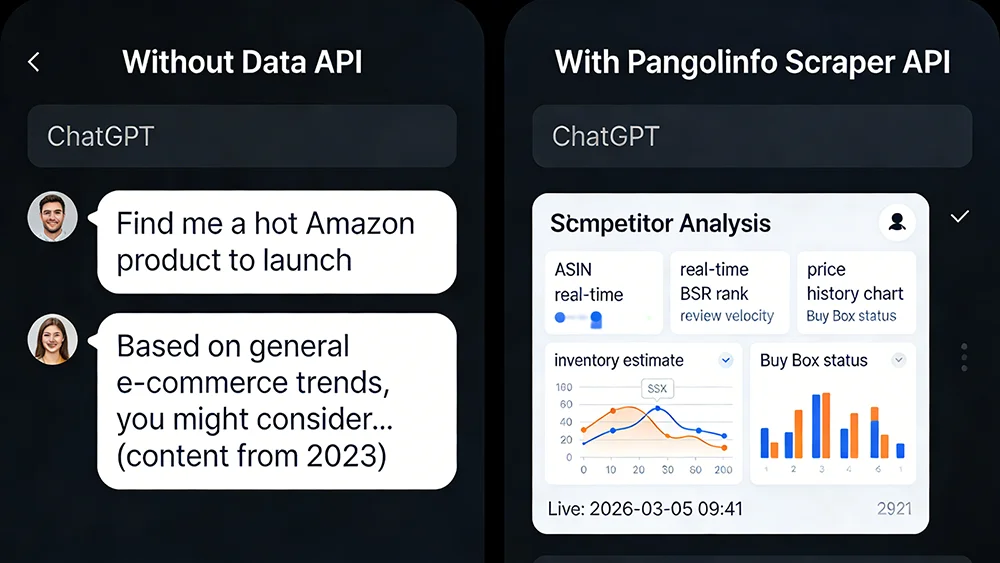
Let’s run a quick experiment. Open the OpenClaw instance you spent two weekends deploying, type this prompt: “Analyze the Amazon Bluetooth earbuds market. Identify the least competitive sub-niche and give me a product launch recommendation.”
What comes back? Probably a polished, well-structured response about wireless audio trends, consumer preferences, and feature differentiation. It reads like it was written by a McKinsey consultant. Until you notice: the data refers to 2023 conditions. There are no current BSR rankings. No recent competitor launches. No real-time pricing intelligence. The response isn’t analysis — it’s pattern-matched plausibility dressed up as expertise.
This isn’t an OpenClaw configuration failure. It’s a misunderstanding of what LLMs are. Without OpenClaw data integration, your “AI Agent” is architecturally identical to opening a ChatGPT tab in your browser. One runs on your server. One runs on OpenAI’s. You pay more for the one on your server, and you get nothing extra in return.
This post isn’t another “how to deploy OpenClaw” tutorial — there are hundreds of those. This one starts by diagnosing the real problem, then gives you the actual fix.
The Truth About LLMs: Logic Engines, Not Data Sources
The foundational misunderstanding is treating LLMs as information sources. They’re not. GPT-4, Claude, Gemini — the core capability of these models is reasoning, pattern recognition, and structured text generation. They do “know” a tremendous amount, but that knowledge has a cutoff date. Everything after that cutoff is inference: statistically plausible extrapolation from prior patterns.
For most use cases, this is fine. Drafting emails, summarizing documents, generating code templates — none of these require today’s information. E-commerce operations, however, are fundamentally dependent on real-time data that LLMs structurally cannot provide:
- Product selection requires today’s BSR trends, 30-day review velocity, recent competitor launches — not 2023 baselines
- Pricing decisions require current competitor prices, live Buy Box attribution, historical price movement — not “typical price ranges”
- Inventory and operations require real-time stock status, active Deal/coupon activity, current traffic source data
None of these can be manufactured by an LLM. It will try — and the output will look correct. That’s the dangerous part. Confident-sounding wrong answers cause real business decisions to go wrong.
The Hard Truth: What OpenClaw Can and Can’t Do Without Data
| Use Case | No Data API (LLM-Only) | With Pangolinfo Scraper API |
|---|---|---|
| Amazon product selection | ❌ Generic trend talk, 2023 data at best | ✅ Live BSR, review velocity, profit estimates |
| Competitor price monitoring | ❌ Cannot access current prices | ✅ Real-time multi-ASIN price tracking, alerts |
| Buy Box analysis | ❌ No live Buy Box data | ✅ Real-time Buy Box winner and seller info |
| Listing optimization | ⚠️ Based on static best practices only | ✅ Benchmarked against live competitor listings |
| Email drafting / templates | ✅ LLM genuinely excels here | ✅ Same (data integration not required) |
The pattern is clear: every task that requires “now” information fails without OpenClaw data integration. The only categories where a data-free Agent genuinely delivers value are pure text generation tasks that don’t depend on market reality. If that’s your use case, you don’t need this article. If you want the Agent to drive real e-commerce decisions, keep reading.
The Real-Time Data Gap: Why Amazon Data Is Hard to Capture
The gap exists not because OpenClaw is poorly designed, but because building reliable real-time e-commerce data collection is genuinely hard infrastructure work.
To scrape Amazon data reliably, you need:
- Headless Browser Infrastructure: Amazon renders critical content dynamically via JavaScript. Static HTTP requests return incomplete or bot-blocked pages.
- Residential Proxy Pool: Amazon aggressively blocks datacenter IP ranges. Without residential IPs that mimic real user traffic, your requests get blocked at scale.
- Anti-Detection Mechanisms: Browser fingerprint rotation, request timing patterns, cookie management — all requiring ongoing maintenance as Amazon updates its detection systems.
- Structured Parsing Layer: Accurately extracting ASIN, price, BSR, review count from HTML — and rebuilding parsers when Amazon’s page structure changes.
Building and maintaining this stack takes weeks initially and ongoing engineering capacity indefinitely. Most teams that try to self-build end up with a scraper that works 70% of the time and requires constant babysitting. Meanwhile, the Agent it’s supposed to power sits idle.
This is why the “high-functioning quadriplegic” metaphor fits: the LLM brain is capable. The lack of sensory limbs — real-time data access — renders the whole system ineffective for anything that matters in e-commerce operations.
The Agent Formula: Brain + Limbs
-Pangolinfo-API(手脚).webp "The Agent Formula: LLM (Brain) + Pangolinfo API (Limbs)")
The academic definition of an Agent is: an entity that perceives its environment, makes decisions, and takes actions. The keyword is “perceives.” An LLM in isolation can’t perceive anything — it processes provided context. Giving it environmental perception requires Tools.
Pangolinfo’s role in this architecture is OpenClaw’s “exoskeleton.” It doesn’t replace the LLM’s reasoning capability — it gives it the limbs to sense the real world. Through the Pangolinfo Scraper API, your OpenClaw Agent can:
- Retrieve complete real-time data for any Amazon ASIN (price, BSR, reviews, inventory, Buy Box status)
- Monitor competitor lists at scale, triggering alerts on price changes
- Pull SERP ranking data for keyword competitive analysis
- Ingest product reviews for listing optimization and sentiment analysis
The Agent-Era Advantage: Integration Barrier Has Dropped Dramatically
Here’s the part that changes the calculus entirely: you don’t have to write the integration code yourself — you can have OpenClaw do it.
The process is straightforward. Give OpenClaw the link to the Pangolinfo API documentation and your API key, tell it to integrate real-time Amazon data scraping capability — and OpenClaw reads the documentation, understands the request format, authentication scheme, and response structure, then integrates the Pangolinfo Scraper API into its own tool registry automatically.
What you actually need to provide:
- 📄 Pangolinfo docs: docs.pangolinfo.com
- 🔑 API key: from the Pangolinfo Console
Hand those two items to OpenClaw and describe the goal. The Agent integrates its own tools. This is the correct way to work in the Agent era: use AI to configure AI, and free your engineers from repetitive API integration work. For those who want full control over the implementation, the production-ready code below covers every detail.
Data returns as structured JSON that the LLM can consume directly, with no custom parsing required on your end. The full infrastructure stack — proxy pools, anti-detection, rendering — runs on Pangolinfo’s side. Your end of the integration is a single POST request.
API Quick Reference
POST https://scrapeapi.pangolinfo.com/api/v1/scrape

Headers:
  Content-Type: application/json
  Authorization: Bearer {YOUR_API_KEY}

Request Body (Amazon Product example):
{
  "url": "https://www.amazon.com/dp/{ASIN}",
  "parserName": "amazonProduct",   // Amazon product-specific parser
  "country": "us"                  // Target Amazon marketplace
}
OpenClaw Data Integration in Practice: Production-Ready Python
Here’s a complete Python tool implementation you can register directly into OpenClaw as a callable Tool. It wraps the Pangolinfo Amazon Scraper API into a structured interface that the Agent’s LLM can invoke on demand:
import requests
from typing import Optional


class PangolinAmazonTool:
    """
    OpenClaw Data Tool: Pangolinfo Amazon Scraper API Wrapper
    Provides real-time Amazon product data to your Agent.
    """

    BASE_URL = "https://scrapeapi.pangolinfo.com/api/v1/scrape"

    def __init__(self, api_key: str):
        self.headers = {
            "Content-Type": "application/json",
            "Authorization": f"Bearer {api_key}",
        }

    def get_product(self, asin: str, country: str = "us") -> dict:
        """
        Fetch live product data for a single ASIN.

        Args:
            asin: Amazon Standard Identification Number (e.g. B09G9FPHY6)
            country: Marketplace code (us / uk / de / jp / ca etc.)

        Returns:
            Structured dict with price, BSR, rating, Buy Box, inventory, and more.
        """
        payload = {
            "url": f"https://www.amazon.{country}/dp/{asin}",
            "parserName": "amazonProduct",
            "country": country,
        }
        resp = requests.post(
            self.BASE_URL, headers=self.headers, json=payload, timeout=30
        )
        resp.raise_for_status()
        result = resp.json()
        if result.get("code") != 0:
            raise RuntimeError(f"Pangolinfo API error: {result.get('message')}")
        return self._key_fields(result["data"])

    def compare_competitors(
        self, asins: list[str], country: str = "us"
    ) -> list[dict]:
        """
        Batch competitor comparison — fetch and rank by BSR.

        Args:
            asins: List of ASINs to compare (recommended ≤10)
            country: Marketplace code

        Returns:
            List of product data dicts sorted by BSR ascending (lower = better).
        """
        results = []
        for asin in asins:
            try:
                data = self.get_product(asin, country)
                data["asin"] = asin
                results.append(data)
            except Exception as e:
                results.append({"asin": asin, "error": str(e)})

        # Sort by BSR ascending; failed queries go last
        return sorted(
            [r for r in results if "bsr" in r],
            key=lambda x: x.get("bsr", 9_999_999),
        )

    def _key_fields(self, data: dict) -> dict:
        """Extract agent-facing fields from raw API response."""
        return {
            "title": data.get("title", ""),
            "price": data.get("price", {}).get("current"),
            "rating": data.get("rating"),
            "review_count": data.get("reviewCount"),
            "bsr": data.get("bestSellersRank", [{}])[0].get("rank"),
            "bsr_category": data.get("bestSellersRank", [{}])[0].get("category"),
            "buy_box_winner": data.get("buyBox", {}).get("seller"),
            "in_stock": data.get("availability") == "In Stock",
            "seller_count": data.get("offerCount"),
            "scraped_at": data.get("scrapedAt"),
        }


# --- Register with OpenClaw and run a quick comparison ---
if __name__ == "__main__":
    tool = PangolinAmazonTool(api_key="YOUR_PANGOLINFO_API_KEY")

    competitors = ["B09G9FPHY6", "B0BTSR8T9M", "B0CKQSQ2WS"]
    report = tool.compare_competitors(competitors, country="us")

    print("=== Live Competitor Analysis (via Pangolinfo) ===\n")
    for item in report:
        print(f"ASIN:        {item['asin']}")
        print(f"  Price:     ${item.get('price', 'N/A')}")
        print(f"  BSR:       #{item.get('bsr', 'N/A')} in {item.get('bsr_category', '')}")
        print(f"  Rating:    {item.get('rating')} ({item.get('review_count')} reviews)")
        print(f"  Buy Box:   {item.get('buy_box_winner', 'Unknown')}")
        print(f"  In Stock:  {item.get('in_stock')}")
        print(f"  Sellers:   {item.get('seller_count')}")
        print(f"  Fetched:   {item.get('scraped_at')}\n")
Register this tool into OpenClaw’s Tool Router, and the next time a user asks “find me the strongest competitor in this category,” the Agent will call compare_competitors(), receive live structured data, and let the LLM analyze, rank, and narrate — based on what’s actually happening on Amazon today, not in 2023. This is what genuine OpenClaw data integration delivers.
What Changes After Integration
Ask the integrated Agent “find a Bluetooth earbuds opportunity to launch” and it returns:
- Current BSR Top 20 ASINs with review counts, ratings, and price points
- Recently launched products (review count <50) already ranking in BSR Top 100 — the “rising stars”
- Price tier competitive density (how many sellers in each range)
- Buy Box concentration (one seller dominating vs. distributed marketplace)
- LLM-generated launch recommendation based on the above data, with differentiation angles
The data is live. The analysis is real. The decision is defensible. That’s the difference data integration makes.
Stop Running a $20/Month ChatGPT Clone on Your Server
You invested time and infrastructure cost into OpenClaw. If what you end up running is a slightly more expensive ChatGPT wrapper, the return on that investment is negative. That’s not a judgment — it’s arithmetic.
The missing piece is always data. LLMs are logic engines — brilliant, capable, fast — but they need sensory input to function on real-world problems. For e-commerce, that sensory input is real-time Amazon market data: products, prices, rankings, competition. Pangolinfo’s Scraper API is infrastructure that delivers that input without requiring you to build or maintain a scraping stack.
Complete the OpenClaw data integration step. Your Agent gets eyes, ears, and hands. The LLM brain was always good enough — it just needed something to work with. Now it does.
Start at the Pangolinfo Scraper API product page, review the complete API documentation, and get your key from the Pangolinfo Console. Your server deserves to run something more useful than a chat window.