The Hidden Cost of “Just Use Sync”
Picture the scenario: your team needs to monitor price movements across 5,000 Amazon ASINs daily, pull 30 category best-seller lists, and have everything ready before the 9 AM business review. A developer sets up the first version with sync API calls—one request, wait for the response, process the data, send the next request.
At an average of 5 seconds per call, completing 5,000 ASINs sequentially takes a theoretical 6.9 hours. Add in network jitter and retry overhead and you’re looking at 8–10 hours. Start at midnight and the data still isn’t ready for the morning meeting.
This isn’t a corner case. It’s the exact friction point that forces teams to rebuild their data pipeline six months after launch, once the business has scaled past what synchronous polling can handle. The structural difference between async Amazon data scraping and sync API calls isn’t just about speed—it determines your system’s throughput ceiling, your operational responsiveness, and ultimately how competitive your data advantage can become.
Getting the mode right at the start is worth the 30 minutes of analysis it takes.
How Each Mode Actually Works Under the Hood
Before comparing them, it’s worth understanding the mechanics clearly—because a lot of incorrect instincts come from treating API calls as interchangeable when they’re not.
Sync API: The Blocking Request-Response Loop
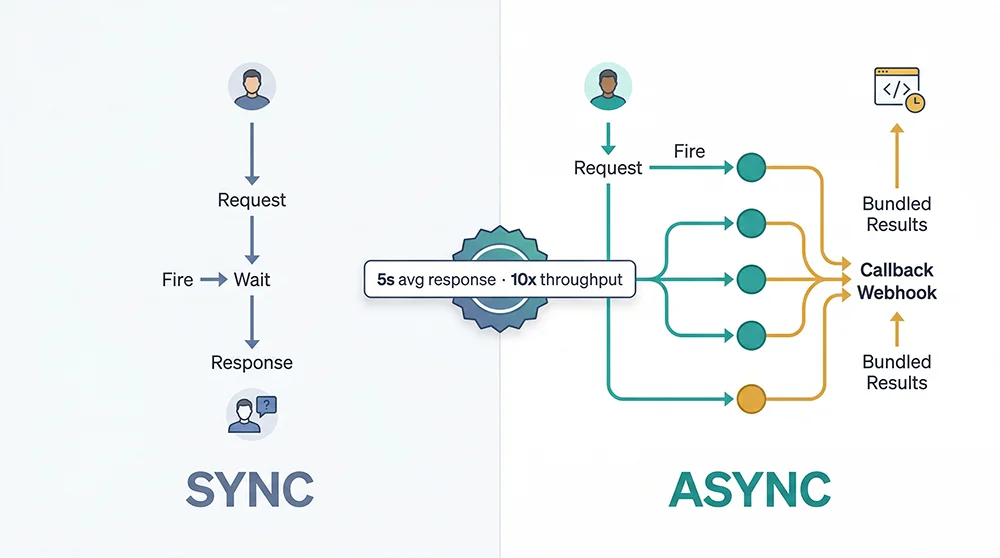
Synchronous API calls follow the most straightforward HTTP semantics: you make a request, the server processes it, and returns the result—all within a single blocking operation. For an Amazon Scrape API, server-side processing involves loading the target page, handling anti-bot defenses, parsing the DOM, and returning structured JSON. The average end-to-end time is around 5 seconds per request.
This model is perfectly suited for real-time, user-triggered lookups. If someone searches a keyword on your platform and needs to see Amazon results immediately, sync makes total sense—low task volume, hard latency requirement, user is waiting. The tradeoff surfaces the moment you run this pattern at scale.
Async API: Submit Tasks, Receive Results at Callback
Asynchronous Amazon data scraping operates on a fundamentally different interaction model. You submit one or many task requests—the API returns a taskId almost instantly (typically under 200ms)—and the platform processes those tasks in parallel on its end. When each task completes, it POSTs the result to your callbackUrl. Your client is never blocked waiting.
The implication for throughput is significant. Instead of 5,000 tasks taking 6.9 hours serially, you submit all 5,000 in minutes and the platform’s concurrency infrastructure processes them in parallel. End-to-end completion time drops by an order of magnitude. For bulk Amazon product data collection, async best practices consistently deliver 10x or more throughput compared to single-threaded sync approaches.
The Engineering Prerequisite: You Need a Callback Receiver
The thing about async Amazon API calls that developers sometimes overlook: you need a publicly reachable HTTP endpoint on your own server to receive the callback data. Pangolinfo provides ready-to-deploy receiver code in Java, Go, and Python to remove most of the setup friction, but you still need a server that’s accessible from the public internet. During local development, tools like ngrok work well for testing; production deployments need a proper public endpoint.
Sync vs Async: A Six-Dimension Breakdown
Here’s how the two modes compare across the dimensions that actually matter for engineering decisions:
| Dimension | Sync API | Async API | Winner |
|---|---|---|---|
| Response Latency | ~5s per request (full processing time) | Task submission <200ms; results via callback | Realtime: Sync ✓ Batch: Async ✓ |
| Throughput | Limited by client thread count; typical 10–50 QPS | Server-side parallel processing; scales independently | Async ✓ |
| Credit Cost | JSON format: 1 credit/call rawHtml/Markdown: 0.75/call | JSON format: 1 credit/call rawHtml: 0.75/call | Equal (same format, same price) |
| Implementation Complexity | Low — standard HTTP POST, no infra required | Medium — callback server required | Sync ✓ (lower dev cost) |
| Real-time Suitability | Native (inline request-response) | Delayed; unsuitable for millisecond-latency needs | Sync ✓ |
| Batch Efficiency | Poor — serial latency accumulates linearly | Excellent — parallel processing, not bound to client | Async ✓ |
The matrix reveals that neither mode is universally superior. The question of how to choose between sync and async Amazon scraping API reduces to two primary signals: task volume and how immediately you need the result. Everything else follows.
Implementing Both Modes with Pangolinfo Scrape API
The Pangolinfo Scrape API natively supports both sync and async invocation against the same six Amazon data parsers: product detail, keyword search, category listing, seller products, best sellers, and new releases. The platform maintains its own parsing logic as Amazon’s DOM evolves—you don’t need to update your integration when page structure changes.
Sync Mode Example: Product Detail (amzProductDetail)
The sync endpoint accepts a standard POST to /api/v1/scrape and returns structured data in the response body. Here’s a minimal example fetching ASIN B0DYTF8L2W:
curl -X POST "https://scrapeapi.pangolinfo.com/api/v1/scrape" \
  -H "Authorization: Bearer <your_token>" \
  -H "Content-Type: application/json" \
  -d '{
    "url": "https://www.amazon.com/dp/B0DYTF8L2W",
    "parserName": "amzProductDetail",
    "site": "",
    "content": "",
    "format": "json",
    "bizContext": {
      "zipcode": "10041"
    }
  }'
The response arrives around 5 seconds later, with data.json[0].data.results containing the title, price, ratings, BSR, product dimensions, seller info, and review excerpts. You can alternatively drive requests using the site + content parameter pair—for example, parserName: "amzKeyword" with content: "bluetooth headphones" triggers a keyword search result collection without constructing the URL manually.
Async Mode Example: Submit and Receive via Callback
For pipelines processing hundreds of daily scraping tasks, the async Amazon data scraping endpoint at /api/v1/scrape/async is the right choice. The key difference is the required callbackUrl parameter—when each task completes, the platform POSTs the full result payload to that address:
curl --request POST \
  --url https://scrapeapi.pangolinfo.com/api/v1/scrape/async \
  --header 'Authorization: Bearer <your_token>' \
  --header 'Content-Type: application/json' \
  --data '{
    "url": "https://www.amazon.com/dp/B0DYTF8L2W",
    "callbackUrl": "https://your-server.com/api/amazon/callback",
    "zipcode": "10041",
    "format": "json",
    "parserName": "amzProductDetail"
  }'
The immediate response contains only the task ID:
{
  "code": 0,
  "message": "ok",
  "data": {
    "data": "e7da6144bed54df7a2891e98fdc8d517",
    "bizMsg": "ok",
    "bizCode": 0
  }
}
Your client can immediately submit the next task—or the next thousand—without waiting. For teams that prefer managing data pipelines visually rather than through custom code, AMZ Data Tracker provides scheduled collection and monitoring dashboards as a no-code alternative alongside the API.
Batch Amazon Product Data Async Best Practices
Choosing async is the first decision. Running it reliably at scale requires attention to a few engineering details that separate fragile prototypes from production-grade systems:
1. Idempotency via TaskID Deduplication
Callback systems can deliver the same payload more than once under network retry conditions. Store the taskId as a unique key and check for existence before writing to your database. This is a low-effort guard against duplicate data that pays dividends under any network turbulence.
2. Callback Endpoint Reliability
Your callbackUrl must be publicly reachable. Local development can leverage ngrok or similar tunneling tools; production environments require a proper public endpoint with SSL. Add lightweight Bearer token authentication on the callback receiver to prevent unauthorized data from being injected.
3. Compensation with Sync Fallback
Maintain a task status table (taskId, submitted_at, callback_received, data_hash). Any task that hasn’t received a callback within a defined window (say, 60 seconds beyond average processing time) should trigger an automatic fallback—either a sync query or a task resubmission. This pattern ensures data completeness even when individual callbacks are lost.
4. Complete Python Implementation
import requests
import time
from typing import Optional

BASE_URL = "https://scrapeapi.pangolinfo.com/api/v1"

def submit_async_task(asin: str, callback_url: str, token: str, zipcode: str = "10041") -> Optional[str]:
    """Submit a single async Amazon product detail scraping task."""
    payload = {
        "url": f"https://www.amazon.com/dp/{asin}",
        "callbackUrl": callback_url,
        "zipcode": zipcode,
        "format": "json",
        "parserName": "amzProductDetail"
    }
    try:
        resp = requests.post(
            f"{BASE_URL}/scrape/async",
            json=payload,
            headers={"Authorization": f"Bearer {token}", "Content-Type": "application/json"},
            timeout=10
        )
        data = resp.json()
        if resp.status_code == 200 and data.get("code") == 0:
            task_id = data["data"]["data"]
            print(f"[SUBMITTED] ASIN {asin} → TaskID: {task_id}")
            return task_id
        else:
            print(f"[ERROR] ASIN {asin}: {data}")
            return None
    except requests.RequestException as e:
        print(f"[EXCEPTION] ASIN {asin}: {e}")
        return None


def batch_submit(asin_list: list[str], callback_url: str, token: str, rate_limit_delay: float = 0.1) -> dict[str, str]:
    """Bulk submit async scraping tasks for a list of ASINs."""
    task_map = {}  # asin → task_id
    for asin in asin_list:
        task_id = submit_async_task(asin, callback_url, token)
        if task_id:
            task_map[asin] = task_id
        time.sleep(rate_limit_delay)  # Respect rate limits
    print(f"\nSubmitted {len(task_map)}/{len(asin_list)} tasks successfully")
    return task_map


def sync_scrape_single(url: str, parser_name: str, token: str, zipcode: str = "10041") -> dict:
    """Sync API call for real-time or compensation use cases."""
    payload = {
        "url": url,
        "parserName": parser_name,
        "site": "",
        "content": "",
        "format": "json",
        "bizContext": {"zipcode": zipcode}
    }
    resp = requests.post(
        f"{BASE_URL}/scrape",
        json=payload,
        headers={"Authorization": f"Bearer {token}", "Content-Type": "application/json"},
        timeout=30
    )
    resp.raise_for_status()
    return resp.json()


# --- Example usage ---
if __name__ == "__main__":
    TOKEN = "your_api_token_here"
    CALLBACK_URL = "https://your-server.com/api/callback"

    # Bulk async submission (recommended for >100 daily tasks)
    asin_list = ["B0DYTF8L2W", "B08N5LNQCX", "B07XJ8C8F5", "B09G9FPHY6"]
    task_map = batch_submit(asin_list, CALLBACK_URL, TOKEN)
    print(f"Task map: {task_map}")

    # Single sync call (real-time user-triggered scenario)
    result = sync_scrape_single(
        "https://www.amazon.com/dp/B0DYTF8L2W",
        "amzProductDetail",
        TOKEN
    )
    results_data = result.get("data", {}).get("json", [{}])[0].get("data", {}).get("results", [{}])[0]
    print(f"Product title: {results_data.get('title', 'N/A')}")
5. Quick Decision Framework
- Daily task volume < 100 AND immediate response required → Sync API
- Daily task volume ≥ 100 OR any scheduled batch collection → Async API
- User-facing real-time search trigger → Sync API
- Background scheduled jobs (price monitoring, rank tracking, alert systems) → Async API
- No capability to deploy a public callback server → Sync API (or use AMZ Data Tracker for visual scheduling)
The Right Mode Chosen Early Pays Compound Returns
Architecture choices made at the beginning of a project tend to persist far longer than anyone expects. The engineering debt from choosing sync Amazon data scraping when your use case actually needed async doesn’t typically surface until the business has grown enough to feel the pain—at which point rebuilding the data pipeline is a multi-week effort that competes with product roadmap priorities.
The guidance here is simple: if your data volume already exceeds 100 daily tasks, or has a clear trajectory toward that, start with async Amazon data scraping. The callback receiver setup is a one-time investment. If you’re still validating the product concept at single-digit daily task volumes, sync API’s simplicity lets you move fast without premature infrastructure complexity.
The good news is that Pangolinfo Scrape API supports both modes through the same API key—so upgrading from sync to async as your scale grows doesn’t require switching providers or reinventing your integration. For detailed API reference and parameter documentation, visit the Pangolinfo documentation portal.
Start with Pangolinfo Scrape API: View pricing and product details | Get your free API key | Read the full API documentation