

The Backend Developer’s Data Collection Dilemma
Your Node.js backend is running smoothly. TypeScript coverage exceeds 90%, the CI/CD pipeline is stable, and the team follows engineering best practices across the codebase. Then the product manager drops a “simple” request: collect competitor pricing, bestseller rankings, and review counts from Amazon daily, and pipe the data into your analytics system.
You start evaluating options. Build your own scraper? Amazon updates its anti-bot measures every six to eight weeks — your colleague spent three days last month fixing a batch collection failure triggered by a User-Agent policy change, which delayed the monthly product selection report. Buy a SaaS research tool? Those subscription dashboards are designed for manual analysts, not backend pipelines. They charge $300 to $1,000 per month for features you’ll never use, and they offer no programmatic interface that can slot into your existing data architecture.
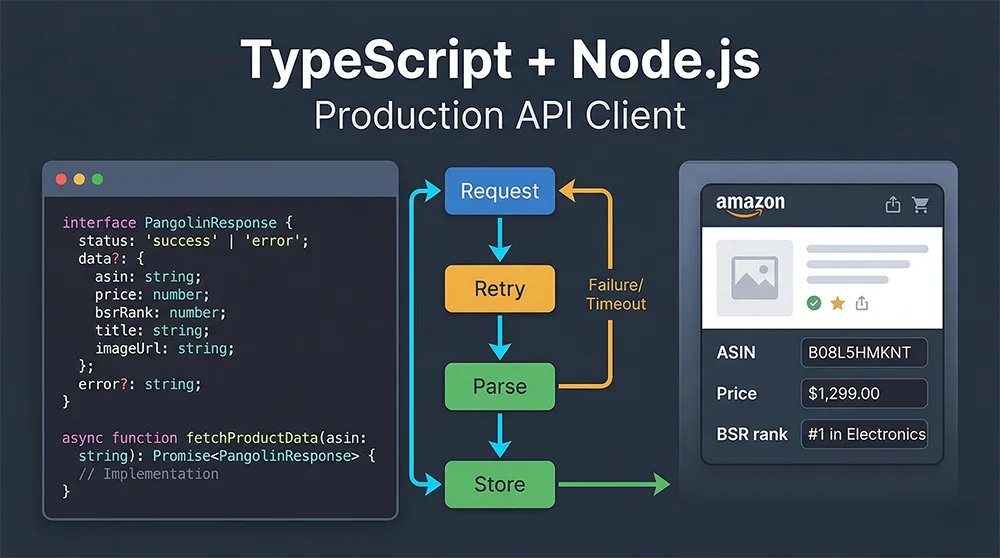
What backend developers actually need is a data collection layer that speaks standard HTTP, returns structured JSON, and plays well with TypeScript. This guide walks through a complete Node.js Pangolinfo API Integration, building a production-ready TypeScript client from scratch that your team can deploy with confidence.
Why TypeScript Is the Right Choice for Backend Data Collection
A common objection to using Node.js for data collection is that Python’s ecosystem — pandas, scrapy, BeautifulSoup — is more mature. That argument holds in isolated offline batch jobs. But when data collection needs to integrate tightly with an existing Node.js microservice — sharing authentication, event buses, database connections — the cost of maintaining two runtimes easily exceeds any tooling advantage Python offers.
TypeScript adds three concrete benefits to this picture. The first is type safety: once you define the Pangolinfo API response shape as a TypeScript interface, the compiler will catch field-name typos and missing optional checks at compile time, not at 2 AM during an on-call incident. Amazon product data structures are genuinely complex — a single product detail page can return dozens of fields, some of which are conditionally present depending on the product category. TypeScript’s optional property syntax models this precisely. The second benefit is refactoring confidence: when the API response format changes, the type checker surfaces every affected code path instantly. The third is developer ergonomics: async/await combined with TypeScript’s Promise type inference makes asynchronous data pipelines read almost like synchronous code — a significant productivity gain when you’re maintaining a system with hundreds of collection jobs.
The Hidden Cost of DIY Scrapers
Most teams underestimate the ongoing maintenance burden of self-built scrapers. An initial Puppeteer or Playwright implementation might take one to two weeks, but it starts accruing technical debt immediately. Amazon averages a significant anti-bot policy update every six to eight weeks — each one potentially breaking your collection pipeline. At one million requests per day, you also need to manage a rotating proxy pool ($200 to $800/month), handle CAPTCHA solving (industry average failure rate: 8–15%), and maintain a distributed scheduling layer. Tallied honestly, the engineering hours spent on scraper maintenance often cost more in salary than a Pangolinfo Scrape API subscription.
Three Backend Data Collection Architectures: A Realistic Comparison
| Approach | Upfront Cost | Maintenance Burden | Data Reliability | TypeScript Support | Scale Ceiling |
|---|---|---|---|---|---|
| DIY Puppeteer Scraper | Low (engineering time) | Very High (ongoing anti-bot battle) | Unstable (page structure dependency) | Manual definition required | < 100K req/day |
| SaaS Research Tools | High ($300–$1000/mo) | None | Moderate | No programmatic access | Manual queries only |
| Pangolinfo Scrape API | Medium (pay-per-use) | Very Low (vendor-managed) | High (SLA-backed) | Standard REST + custom types | Tens of millions/day |
For teams embedding data collection into backend services, a professional scraping API is the only option that simultaneously satisfies engineering cost, data reliability, and elasticity requirements. The remaining challenge is implementation quality — which is exactly what this Pangolinfo Node.js tutorial addresses.
Pangolinfo Scrape API: Built for Programmatic Access
Pangolinfo Scrape API is a developer-first data collection interface supporting real-time extraction from Amazon, Walmart, Shopify, and other major platforms. Output formats include structured JSON, raw HTML, and Markdown — all of which integrate cleanly into a TypeScript data pipeline.
Coverage-wise, the API handles Amazon product detail pages, Best Sellers and New Releases rankings, keyword search results, sponsored ad placements (Pangolinfo’s SP ad slot capture rate leads the industry at 98%), and review data — across the full product catalog. The support for ZIP code-specific collection is particularly valuable for price monitoring applications, since Amazon pricing varies substantially by delivery region.
On the engineering side, Pangolinfo exposes a standard RESTful interface with both synchronous and async task modes. The JSON response structure is consistent and well-documented in the official API reference, giving you everything you need to write precise TypeScript interface definitions. Infrastructure-level concerns — proxy rotation, session management, anti-bot evasion — are handled entirely inside Pangolinfo’s platform, invisible to the calling application.
Environment Setup
# Initialize project
mkdir pangolin-ts-client && cd pangolin-ts-client
npm init -y

# Production dependencies
npm install axios dotenv

# Development dependencies
npm install -D typescript ts-node @types/node @types/axios

# Generate tsconfig
npx tsc --init
Configure tsconfig.json with strict mode enabled:
{
  "compilerOptions": {
    "target": "ES2022",
    "module": "commonjs",
    "outDir": "./dist",
    "rootDir": "./src",
    "strict": true,
    "esModuleInterop": true,
    "skipLibCheck": true,
    "resolveJsonModule": true,
    "sourceMap": true
  },
  "include": ["src/**/*"],
  "exclude": ["node_modules", "dist"]
}
Create a .env file (get your API key from the Pangolinfo Console):
PANGOLIN_API_KEY=your_api_key_here
PANGOLIN_API_BASE_URL=https://api.pangolinfo.com/v1
Complete TypeScript Implementation: Types to Production Client
Step 1: TypeScript Interface Definitions
// src/types/pangolin.types.ts

/** Unified API response wrapper */
export interface PangolinApiResponse<T = unknown> {
  code: number;
  message: string;
  data: T;
  requestId: string;
  creditsUsed: number;
}

/** Amazon product detail structure */
export interface AmazonProductDetail {
  asin: string;
  title: string;
  brand: string;
  price: number;
  currency: string;
  originalPrice?: number;
  rating: number;
  reviewCount: number;
  bsr: number;
  bsrCategory: string;
  availability: 'InStock' | 'OutOfStock' | 'Limited' | string;
  images: string[];
  bulletPoints: string[];
  fulfillment: 'FBA' | 'FBM' | string;
  deliveryInfo?: string;
}

/** Amazon search result item */
export interface AmazonSearchProduct {
  asin: string;
  title: string;
  price: number;
  currency: string;
  rating: number;
  reviewCount: number;
  isPrime: boolean;
  isSponsored: boolean;
  position: number;
}

/** Retry configuration */
export interface RetryConfig {
  maxRetries: number;
  baseDelay: number;      // milliseconds
  backoffFactor: number;  // exponential multiplier
  maxDelay: number;       // cap in milliseconds
  retryStatusCodes: number[];
}
Step 2: Production API Client with Exponential Backoff
// src/client/PangolinClient.ts
import axios, { AxiosInstance, AxiosError } from 'axios';
import * as dotenv from 'dotenv';
import {
  PangolinApiResponse, AmazonProductDetail,
  AmazonSearchProduct, RetryConfig,
} from '../types/pangolin.types';

dotenv.config();

export class PangolinClient {
  private readonly http: AxiosInstance;
  private readonly retry: RetryConfig;

  constructor(apiKey?: string, retryConfig: Partial<RetryConfig> = {}) {
    const key = apiKey ?? process.env.PANGOLIN_API_KEY;
    if (!key) throw new Error('[PangolinClient] PANGOLIN_API_KEY not configured.');

    this.http = axios.create({
      baseURL: process.env.PANGOLIN_API_BASE_URL ?? 'https://api.pangolinfo.com/v1',
      headers: { 'Authorization': `Bearer ${key}`, 'Content-Type': 'application/json' },
      timeout: 60_000,
    });

    this.http.interceptors.request.use(cfg => {
      console.log(`[Pangolin] → ${cfg.method?.toUpperCase()} ${cfg.url} @ ${new Date().toISOString()}`);
      return cfg;
    });
    this.http.interceptors.response.use(
      res => { console.log(`[Pangolin] ← ${res.status} (${res.data?.requestId})`); return res; },
      err => Promise.reject(err)
    );

    this.retry = {
      maxRetries: retryConfig.maxRetries ?? 3,
      baseDelay: retryConfig.baseDelay ?? 1_000,
      backoffFactor: retryConfig.backoffFactor ?? 2,
      maxDelay: retryConfig.maxDelay ?? 30_000,
      retryStatusCodes: retryConfig.retryStatusCodes ?? [429, 500, 502, 503, 504],
    };
  }

  private sleep = (ms: number) => new Promise<void>(r => setTimeout(r, ms));

  /** Exponential backoff with jitter — prevents thundering herd on retry storms */
  private backoff(attempt: number): number {
    const exp = this.retry.baseDelay * Math.pow(this.retry.backoffFactor, attempt);
    return Math.min(exp + Math.random() * 500, this.retry.maxDelay);
  }

  private shouldRetry = (err: AxiosError, attempt: number) =>
    attempt < this.retry.maxRetries &&
    (!err.response || this.retry.retryStatusCodes.includes(err.response.status));

  private async request<T>(endpoint: string, body: object, attempt = 0): Promise<PangolinApiResponse<T>> {
    try {
      const res = await this.http.post<PangolinApiResponse<T>>(endpoint, body);
      return res.data;
    } catch (e) {
      const err = e as AxiosError;
      if (this.shouldRetry(err, attempt)) {
        const wait = this.backoff(attempt);
        console.warn(`[Pangolin] Retry ${attempt + 1}/${this.retry.maxRetries} in ${(wait / 1000).toFixed(1)}s...`);
        await this.sleep(wait);
        return this.request<T>(endpoint, body, attempt + 1);
      }
      throw new Error(`[PangolinClient] Failed after ${attempt} retries: ${err.response?.status ?? 'Network'} — ${err.message}`);
    }
  }

  async getProduct(asin: string, country = 'US', zipCode?: string): Promise<AmazonProductDetail> {
    const res = await this.request<AmazonProductDetail>('/scrape', {
      url: `https://www.amazon.com/dp/${asin}`,
      outputFormat: 'json',
      country,
      zipCode,
    });
    return res.data;
  }

  async searchKeyword(keyword: string, page = 1, country = 'US'): Promise<AmazonSearchProduct[]> {
    const res = await this.request<{ products: AmazonSearchProduct[] }>('/scrape', {
      url: `https://www.amazon.com/s?k=${encodeURIComponent(keyword)}&page=${page}`,
      outputFormat: 'json',
      country,
    });
    return res.data.products;
  }

  async batchGetProducts(asins: string[], concurrency = 5): Promise<Map<string, AmazonProductDetail | Error>> {
    const map = new Map<string, AmazonProductDetail | Error>();
    for (let i = 0; i < asins.length; i += concurrency) {
      await Promise.all(asins.slice(i, i + concurrency).map(async asin => {
        try { map.set(asin, await this.getProduct(asin)); }
        catch (e) { map.set(asin, e as Error); }
      }));
      if (i + concurrency < asins.length) await this.sleep(200);
    }
    return map;
  }
}
Step 3: Production Usage Example
// src/index.ts
import { PangolinClient } from './client/PangolinClient';

async function main() {
  const client = new PangolinClient(undefined, { maxRetries: 3, baseDelay: 1_000, backoffFactor: 2 });

  // 1. Single product with ZIP code pricing
  const product = await client.getProduct('B0BSHF7WHW', 'US', '90210');
  console.log(`${product.title} | $${product.price} | BSR #${product.bsr} in ${product.bsrCategory}`);

  // 2. Keyword competitive analysis
  const results = await client.searchKeyword('bluetooth speaker', 1, 'US');
  results.slice(0, 5).forEach((p, i) =>
    console.log(`${i + 1}. [${p.asin}] $${p.price} | ⭐${p.rating} (${p.reviewCount}) ${p.isSponsored ? '[AD]' : ''}`)
  );

  // 3. Batch collection with concurrency control
  const batch = await client.batchGetProducts(['B08N5WRWNW', 'B09G9HD6PD', 'B0BZKG3CDZ'], 3);
  const success = [...batch.values()].filter(v => !(v instanceof Error)).length;
  console.log(`Batch complete: ${success}/${batch.size} succeeded`);
}

main().catch(err => { console.error(err.message); process.exit(1); });
Run with: ts-node src/index.ts
Production Best Practices
Three areas deserve attention before deploying to production. Rate management: keep the concurrency number in batchGetProducts within your API plan’s limits; the 200ms inter-batch delay is a baseline and should be tuned based on observed error rates. Observability: replace console.log with a structured logger like pino or winston, and propagate the requestId from each API response into your log context — it’s the only reliable way to correlate application logs with API-side diagnostics. Database writes: batch insert collected data within transactions rather than issuing individual INSERT statements per product; at scale, the difference in database throughput is substantial.
Conclusion: Node.js Pangolinfo API Integration Done Right
The TypeScript client architecture in this guide delivers the four properties that distinguish a production backend data collection system from a weekend script: type safety that surfaces errors at compile time, exponential backoff retry logic that handles transient failures gracefully, concurrency control that respects API rate limits, and an interceptor layer that provides extensible observability hooks.
Node.js Pangolinfo API Integration with TypeScript is not just a technical exercise — it’s the foundation layer for any serious e-commerce intelligence product. Whether you’re building a competitive pricing monitor, an AI training data pipeline, or a multi-marketplace trend analyzer, the client pattern established here scales cleanly from prototyping to production.
Start with the free tier at Pangolinfo Scrape API, reference the API documentation to complete your TypeScript interface definitions, and run your first backend data scraping solution in under 15 minutes.
Start your Pangolinfo Scrape API integration today and build production-grade e-commerce data collection with TypeScript.



